Repository navigation
v1.42.0: the answer to life, the universe and everything you asked for

Forty-two has been the answer since 1979; it just took us until now to find the question. Most of this release started as one of yours, and two of the new pieces change how the whole app feels: every past day is now one click away, and there is a timeline that puts your record on a single line.
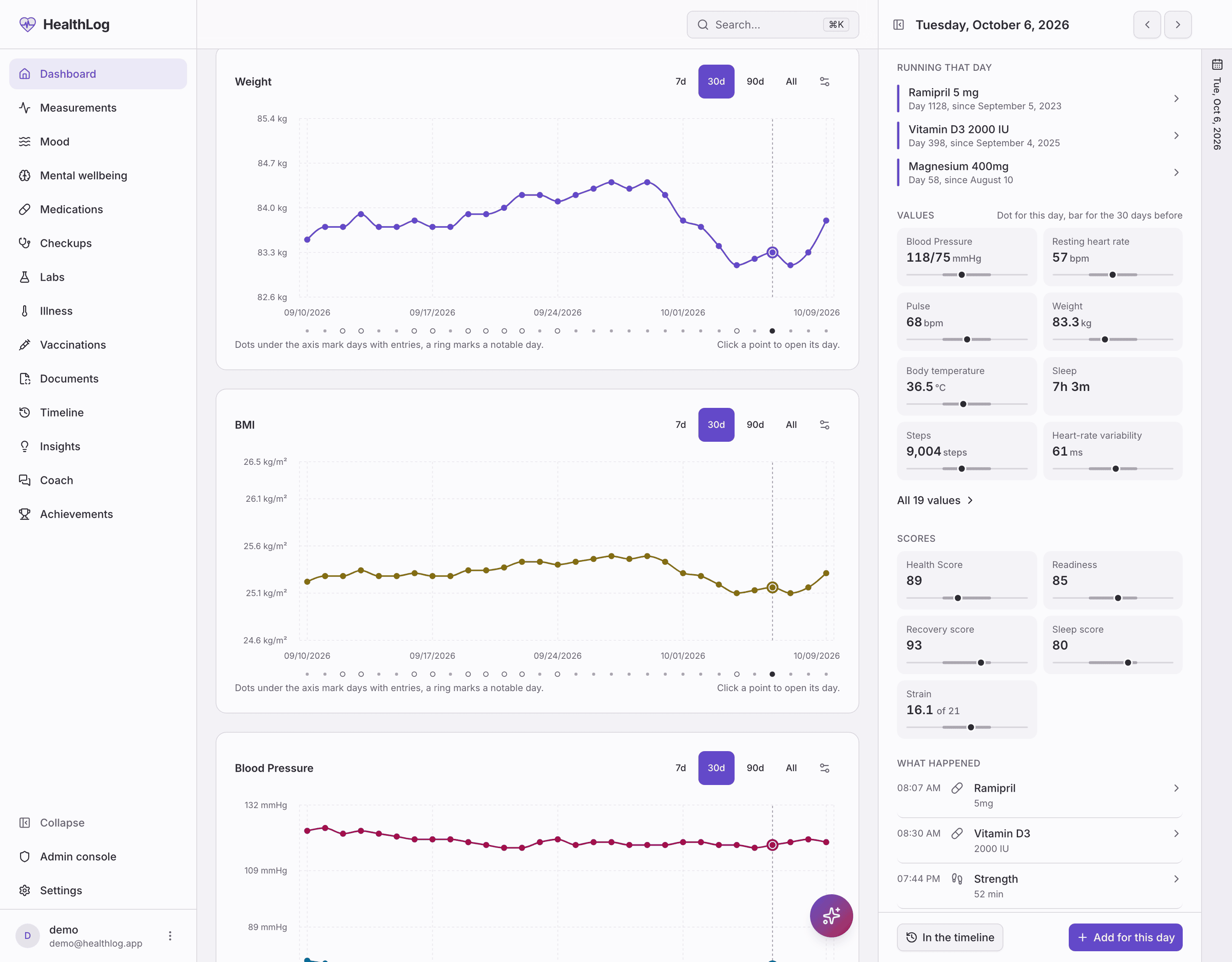
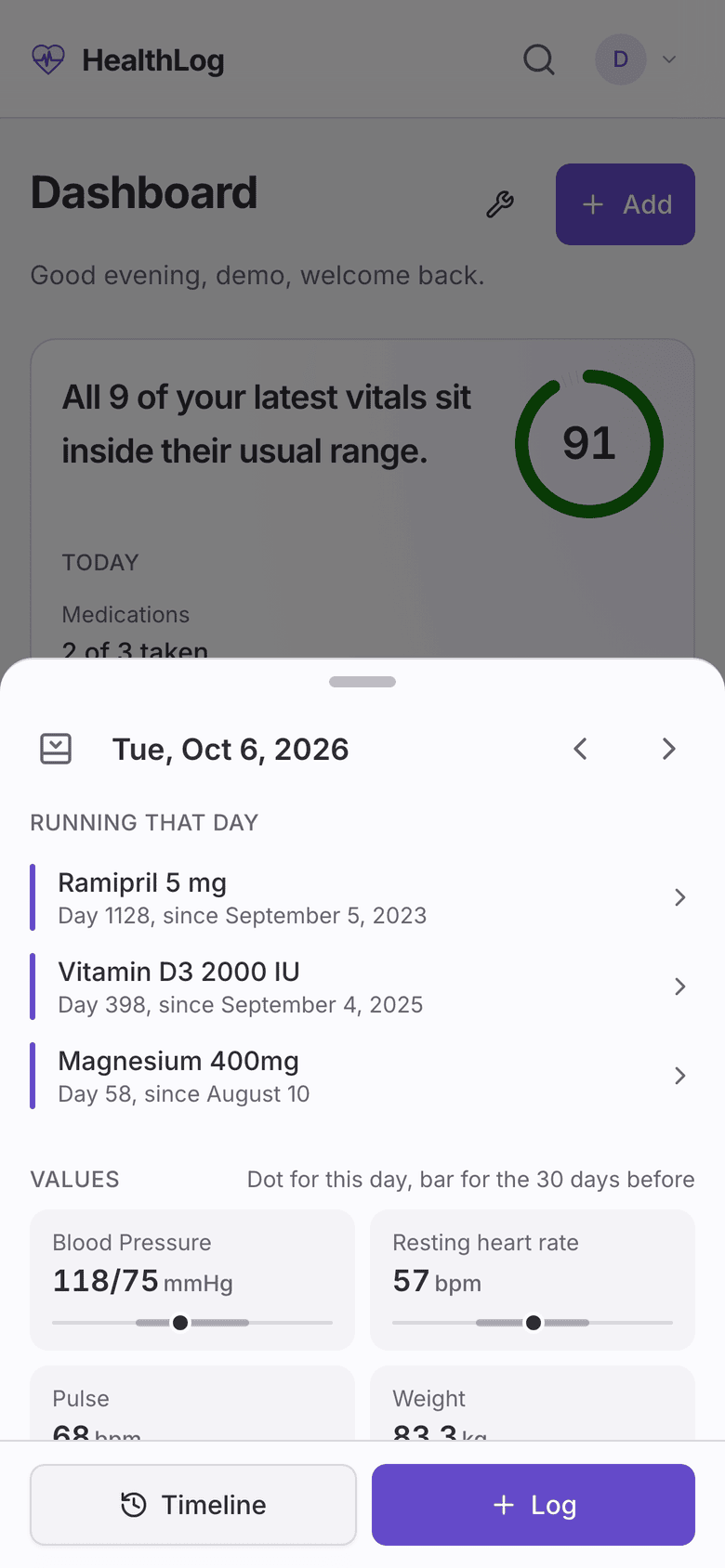
Any day, one click away
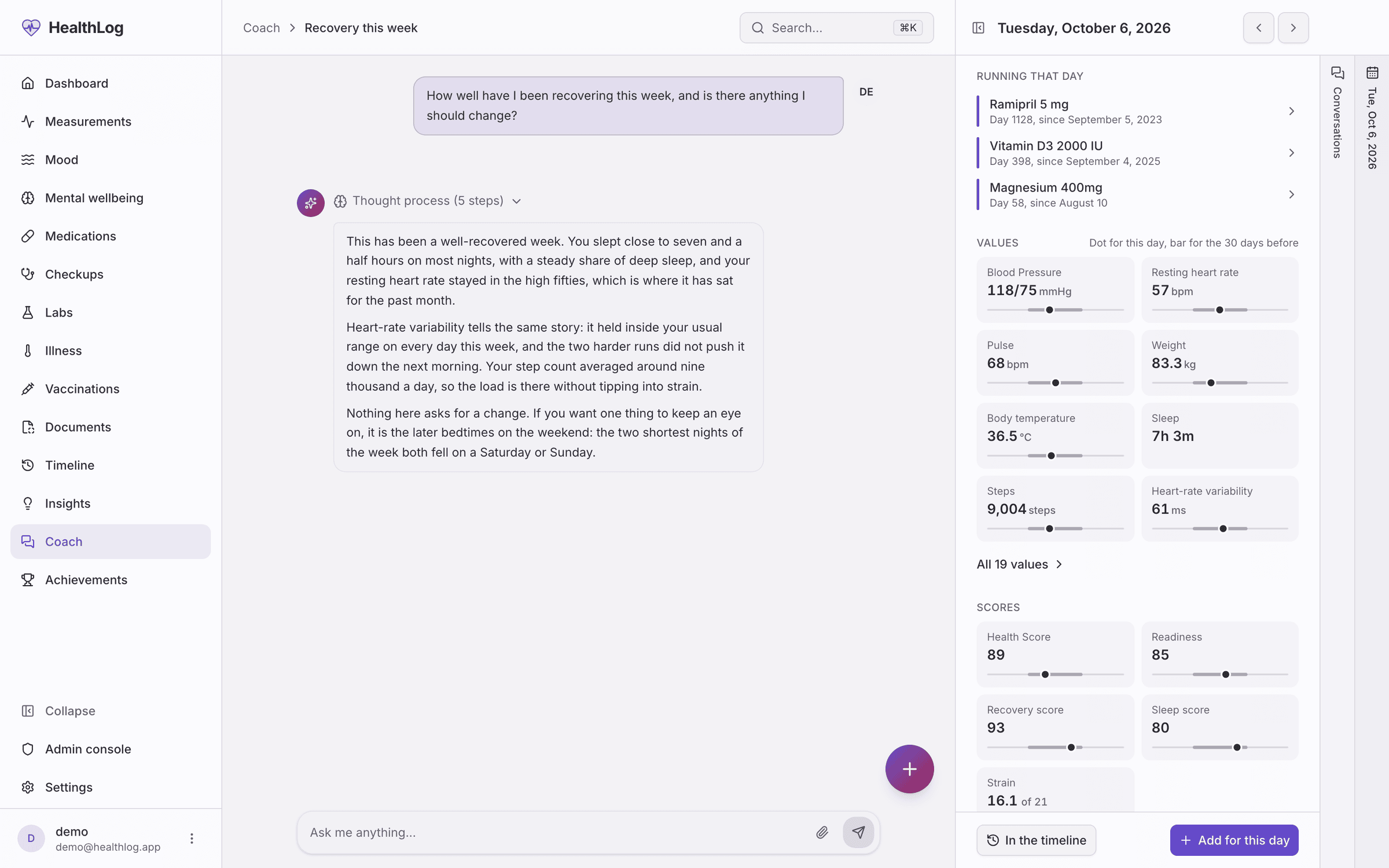
Click a point on a chart, a date in a list or a cell in a calendar, and that day opens beside the page you are on. You see what was running through it (a medication with its dose, an illness, a cycle phase), your readings against your own usual range, the day's scores (health score, readiness, recovery, sleep and strain), and everything you logged in clock order. Every value and score leads to its own page.
The day stays with you. Its strip sits at the right edge of every page, so you can fold it away and bring it back, and it keeps the day you last looked at when you move to another page. Click the date in its header to jump anywhere through a small calendar, or back to today. The arrows step a day at a time, and so do [ and ]. On a phone the day comes up from the bottom, and a tap on a chart point shows the value first, so a stray tap does not open it.
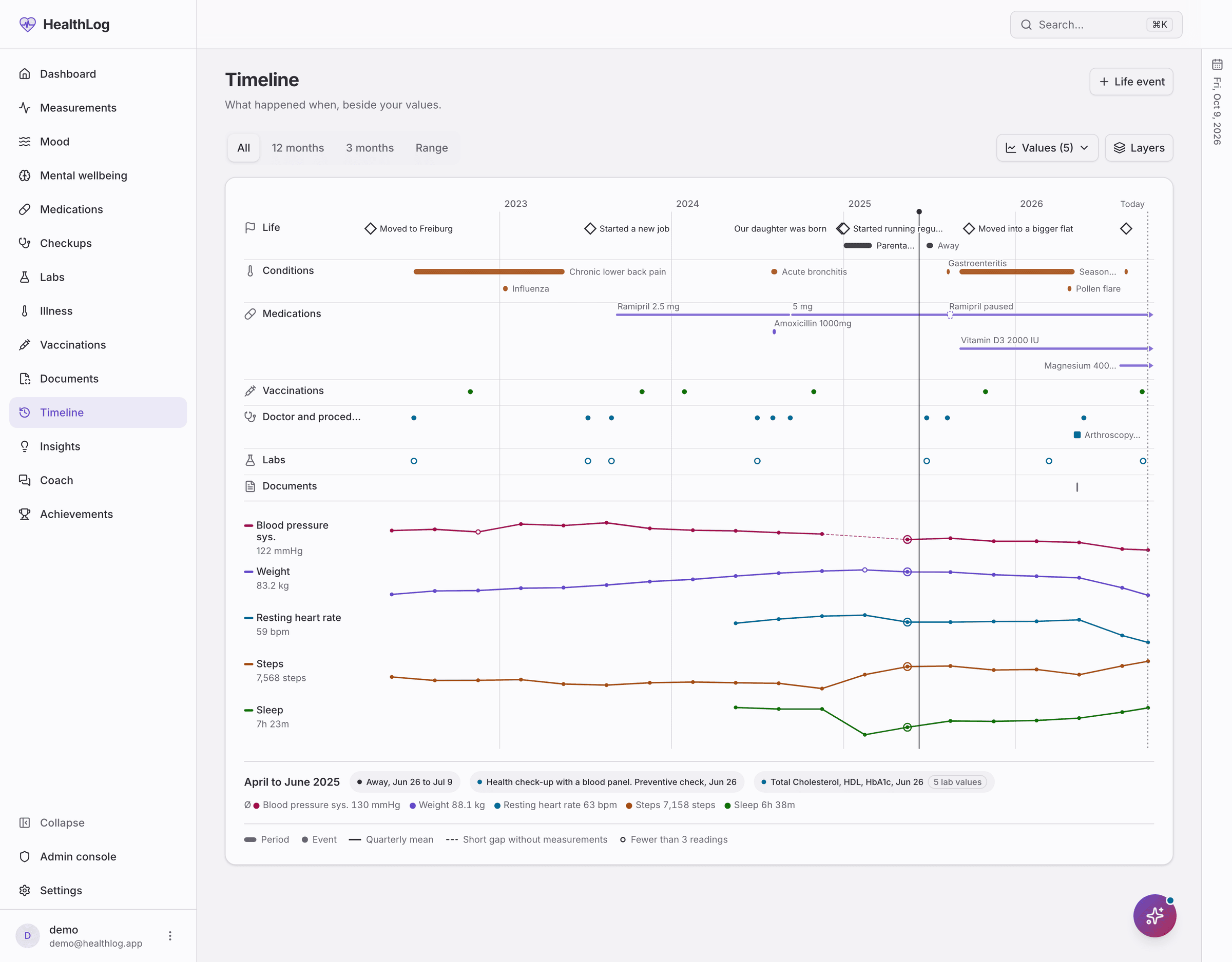
A timeline of your record
The new Timeline module puts conditions, medications, vaccinations, visits, lab results and documents on one time axis, and as many of your measurements as you like underneath. Each medication is one row, with its dose changes and pauses as parts of the same bar. Measurements are averaged by quarter, month or week depending on how far you zoom out, or over any range you pick. A short gap between readings is bridged with a dashed line, a longer one is left open, and a hollow point marks an average built from fewer than three readings, so you can see how much each point stands on. Click a period and the bar below tells you what was going on and how your values stood.
You can add life events as well: a move, a new job, a birth, as exact as you remember them. They are stored encrypted and stay with you alone. The module is off until you switch it on under Settings, Modules, and it first shows how much it already has to work with. Thanks to @lutzkind, whose proposal in #613 shaped it.
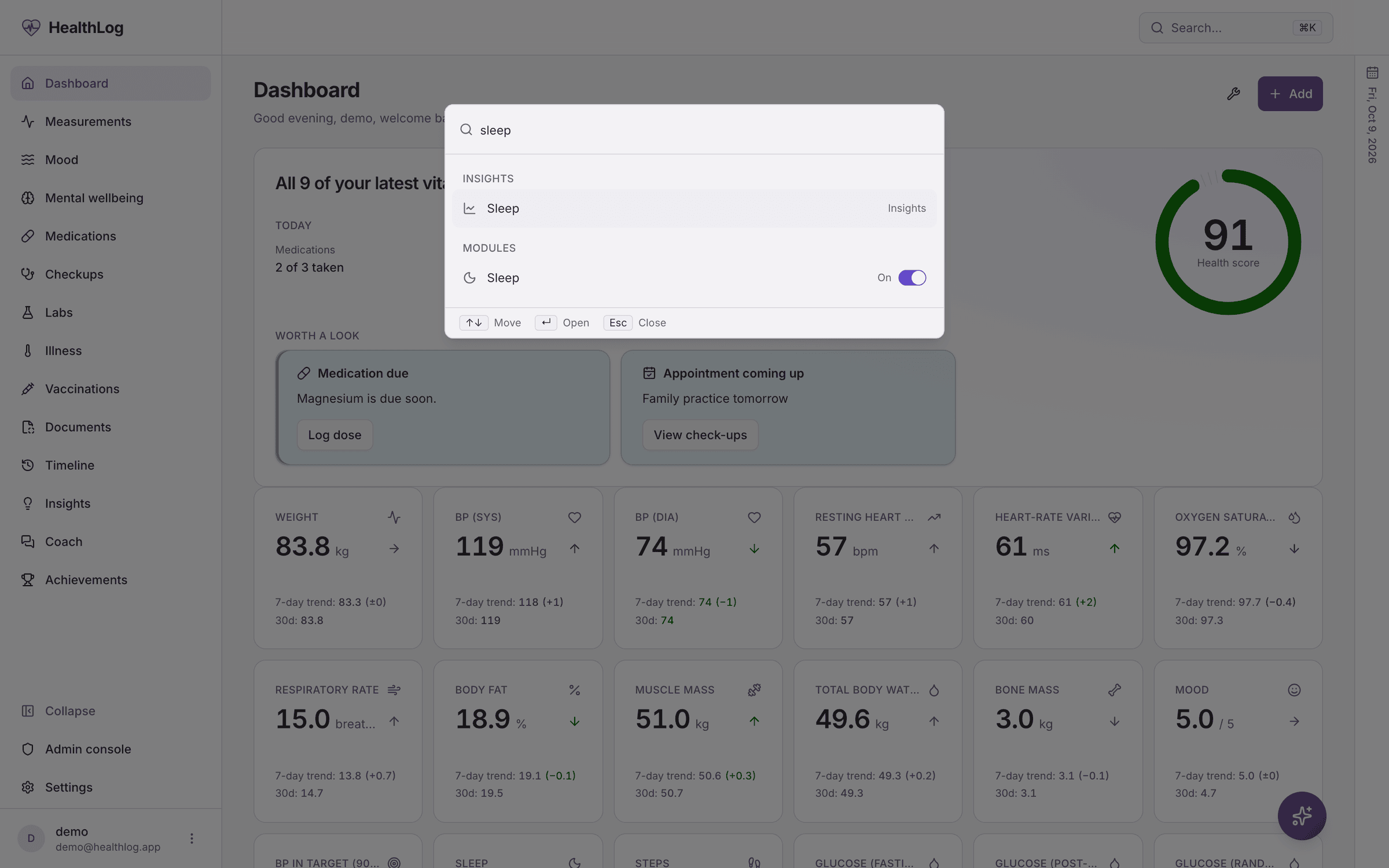
Search and the keyboard
Press ⌘K (or Ctrl K), or use the search field at the top right, to jump to any page, any single setting or any Insights page, switch a module on or off, or start a new entry. If you prefer the keyboard altogether, g followed by a letter takes you around (g d dashboard, g t timeline, g c Coach), n starts a new entry and ? lists everything.
The Coach, beside your day
The Coach page now has the day panel next to its conversation list; a day the Coach mentions opens right there. A new conversation starts from the round button in the conversation window, and an empty conversation no longer suggests questions under the input.
Air quality, pollen and UV
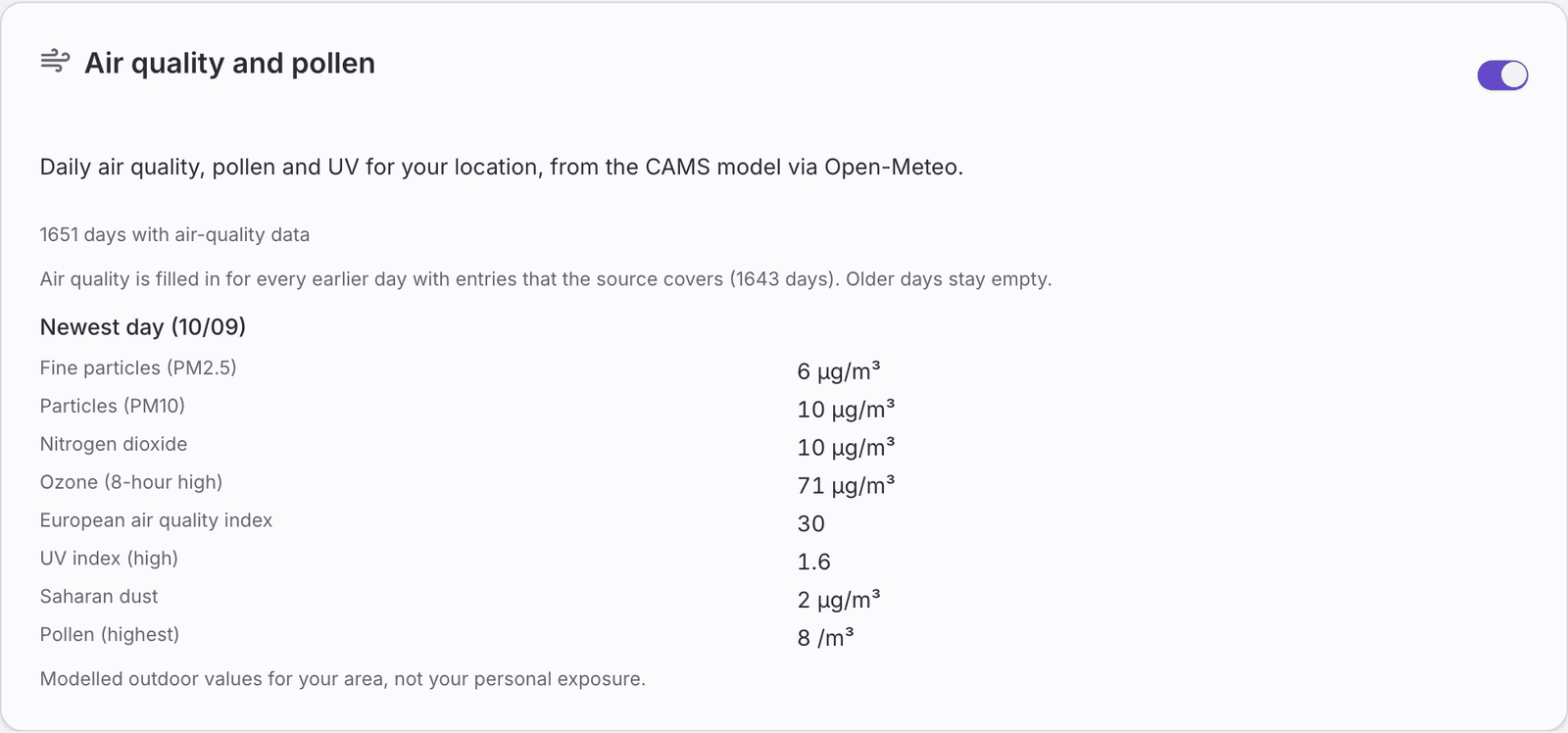
With the Environment module on and a home location set, each day carries fine dust, ozone, nitrogen dioxide, an air quality index, UV, desert dust and pollen next to the weather, from the Copernicus Atmosphere Monitoring Service through Open-Meteo. The history fills in on its own for every day you logged something, as far back as the source reaches (2013 in Europe, mid 2022 elsewhere; pollen in Europe from 2021). Days before you lived at your home location stay empty unless a trip covers them. Fine dust, ozone and pollen join the correlations. Your home location and trips are now stored encrypted. Thanks to @lutzkind for #615.
Also new
Health Connect import. On Android, export your data in Health Connect under Manage data, Export and import, download the ZIP from where Android saved it and upload it under Settings, Export & Import. Steps, energy, distance, heart rate, sleep with stages, workouts, cycle days, water and nutrients come in; data from apps you already connect directly is skipped. Thanks to @CritLoren for #972.
A managed profile can become a full account. When a child grows up or a parent wants to take over their own record, hand it over under Settings, Shared access with a one-time link. The record becomes their account as it is, with its whole history, and they decide what each guardian may still see. Thanks to @ckaotik for #959.
Scores over time. The health score has its own history page, and every score page offers the same 7, 30, 90 days or all.
Correlations no longer mistake the seasons for a pattern. Two things that both follow the time of year, like outdoor temperature and blood pressure, used to look connected. The app now removes the seasonal swing and the long-term trend before it compares them. You will likely see fewer patterns after the update, and the ones that remain hold up better; the mood page says so once.
Smaller and quicker. The server no longer keeps Apple Health's condensed samples around for 75 days, which on a synced account was most of the measurement table. An older mistake in that condensing step could keep only the later half of a day as its average; a one-time repair recalculates the affected averages of the last 75 days, and older days stay exactly as they were.
Smaller things.
- Workouts you logged by hand can be edited (thanks @NebuPookins, #1162).
- Apple Health's RMSSD heart rate variability from iOS 27 is stored beside SDNN; the iPhone app needs an update to send it (thanks @BernhardBuckel, #1110).
- The Apple Health card shows for each type when it last arrived and how (thanks @mills1975, #1173, and @lutzkind, #586).
- You can define your own vaccines, including combination vaccines from old paper records (thanks @CritLoren, #1005).
- Discord and Slack webhooks deliver reminders now; they used to be refused as empty messages.
- Documents sit side by side by month, and deleting one always asks first.
- The top card on the dashboard can be switched off, and the pulse card is called resting heart rate when that is what it shows.
- Deleted Coach conversations stay deleted.
- In the installed app, push reminders survive an update and the keyboard no longer covers fields in a sheet.
If you run a server. Fourteen migrations (0379 to 0392) add tables and nullable columns; nothing is rewritten. The bundled docker-compose.yml loads pg_stat_statements, so the database restarts once on the first docker compose up. After the update the fold repair, the cleanup of condensed samples, the encryption of stored locations and the air quality history run in the background on their own. Once the cleanup is done, Admin, System status has a card to give the space back; start it at a quiet hour. New optional settings: ENVIRONMENT_AIR_QUALITY_DISABLED, OPENMETEO_AIR_QUALITY_URL, DATABASE_WORK_MEM, and DATABASE_SESSION_OPTIONS_DISABLED=1 behind PgBouncer. Setting IP_GEO_LOOKUP_URL now counts as a deliberate choice of geolocation provider. The upgrade notes in the docs list everything.
For the iPhone app and API clients, the changes to existing routes are additive, with two exceptions worth a look: the dashboard summary's pulse now reports the last day's mean rather than the last single reading, and the source enum gains HEALTH_CONNECT. The full list is in CHANGELOG.md and docs/api/openapi.yaml.
Thank you. @lutzkind wrote the two long proposals behind the timeline and the environment data. @CritLoren asked for Health Connect and laid out what was awkward about vaccinations. @ckaotik thought through what should happen when a child grows up. @BernhardBuckel spotted iOS 27's new HRV type before it shipped. @mills1975 documented the missing values with screenshots until the cause was clear, @NebuPookins asked for the edit button that should always have been there, and @undeadcorvid found out that Discord never received a single reminder. Thanks as well to everyone who wrote in the discussions, sent an email, or supports the project with a coffee or by using the iPhone app.


