Repository navigation
Releases
v1.5: Windows offline audio fix, launcher version, N64 USB pad adapter

- Windows offline audio fix: restores the 256-sample audio device buffer for offline and local 2-player play (keeping 1024 samples for online matches), fixing the v1.4 Windows audio crackles, slowdown, and crashes.
- Launcher & window title: displays the release version (
v1.5) in the window titlebar. - Measured generic N64 USB pad adapter (Windows): adds opt-in
docs/controllers/generic-n64-windows.txtand launch instructions inREADME.md(measurements by MatyMeatBoy).
v1.4 Online: 1 vs 1 over internet and LAN
Downloads
- Linux:
Mabecs_ISS2000_Widescreen-x86_64.AppImage - Windows:
Mabecs_ISS2000_Widescreen-Windows-x64.zip(Windows 10/11, unzip and runISS2000Recompiled.exe)
Online 1 vs 1
Play a match against a friend over the internet or your local network, each on their own computer.
How to play
- Both players start the game and click Online in the launcher.
- The host clicks Host, picks a region and gets a pass phrase such as
EU-STRIKER-VOLLEY-HEADER-GOAL. Copy Pass Phrase puts it on the clipboard so you can send it to your friend. - The friend clicks Join, pastes the phrase and clicks Connect & Play. The match starts on both machines.
The host is player 1 and the joining player is player 2. No port forwarding or IP addresses are needed. You can still type the host's IP address in Join if you prefer (port 9099).
Features
- Pass-phrase matchmaking with UDP hole punching. Players on the same network find each other directly on the LAN.
- Lockstep sync: inputs are exchanged with a small delay and sent redundantly, so lost packets are recovered without a hitch.
- Identical matches on both machines: the game's random events (AI decisions, bounces) play out the same on both sides, and the game checks this continuously.
- Online Controller Pak: online matches use their own pak (
controllerpak_online_p1.mpk, separate from your normal saves), so you can save progress together. It stays in sync as long as you keep playing online with the same friend. - Smooth audio online: a deeper audio buffer keeps sound clean through small network hiccups.
- If the connection drops for 5 seconds, both games return to the launcher.
Requirements: both players need v1.4 and the same game version (USA, Europe En,De or Fr,It). Pass-phrase matchmaking needs routers that allow UDP hole punching (most home routers do). For very strict networks, use direct IP with port 9099 forwarded.
No game data is included: you need your own ROM. SHA-1 checksums are in the README.
v1.3: full-detail players
Downloads
- Linux:
Mabecs_ISS2000_Widescreen-x86_64.AppImage - Windows:
Mabecs_ISS2000_Widescreen-Windows-x64.zip(Windows 10/11, unzip and runISS2000Recompiled.exe)
New: full-detail players
On the Nintendo 64, players further from the camera were drawn with simpler, lower-polygon models. This level-of-detail filter saved memory and rendering time, but distant players had blocky bodies, no hands and flat heads. Even the nearest players in a match never got the game's best model, which was kept for close-ups.
v1.3 removes that filter: every player always uses the best, most detailed model, at any distance.
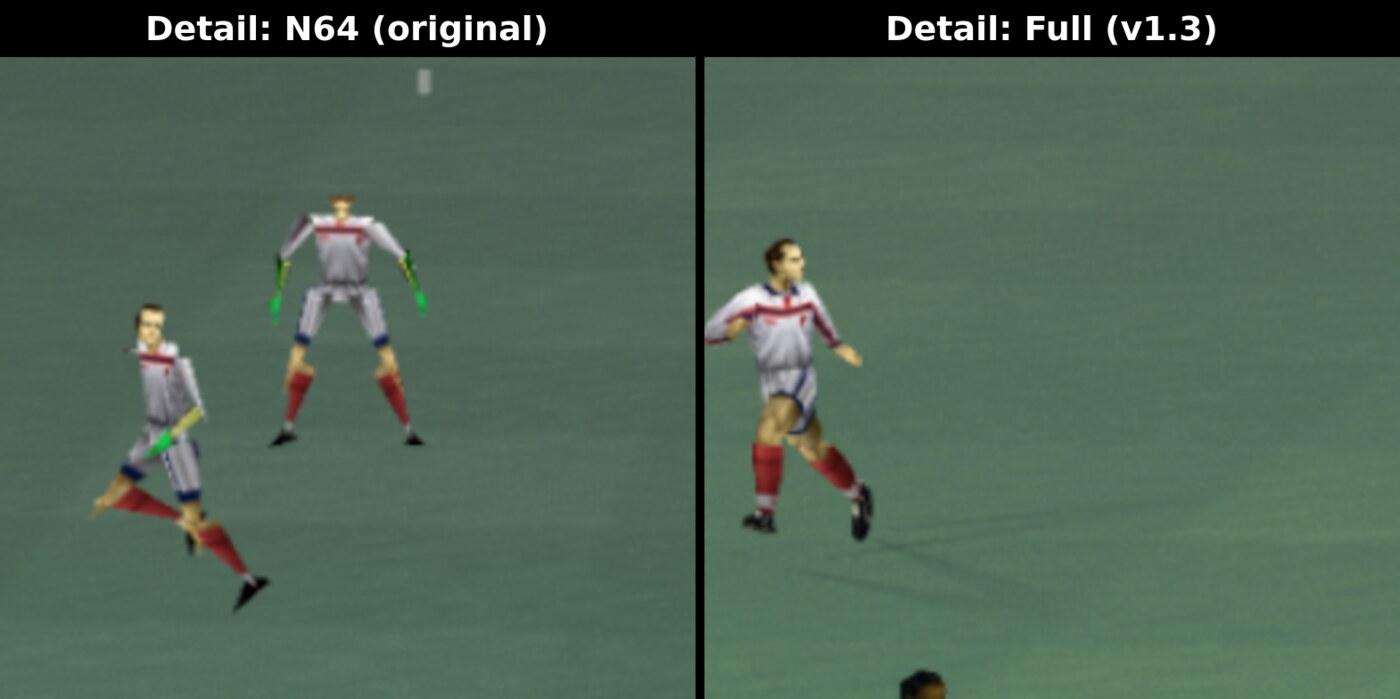
Players far from the camera: the original low-detail models (left) and the full-detail models in v1.3 (right).
- New launcher option Detail: Full / N64. Full (the default) gives you the high-detail models; N64 restores the original behaviour.
- Works in all three versions (USA, Europe En,De and Europe Fr,It).
- Only the player models change. Gameplay, speed and everything else are the same as in v1.2.
Also in this release
- The launcher buttons are now sized to fit their labels, to make room for the new option.
No game data is included: you need your own ROM. SHA-1 checksums are in the README.
v1.2: European versions
Downloads
- Windows (new, first Windows build):
Mabecs_ISS2000_Widescreen-Windows-x64.zip - Linux:
Mabecs_ISS2000_Widescreen-x86_64.AppImage
New: Windows version
This is the first native Windows build. It has the same game, launcher and features as the Linux AppImage, and plays all three versions (USA and both European releases).
- Extract the zip anywhere and run
ISS2000Recompiled.exe. Keep the DLLs in the same folder. - Requires Windows 10 or 11 (64-bit) and a Direct3D 12 or Vulkan capable GPU.
- Your stored ROM, settings and Controller Pak saves go in
%APPDATA%\iss2000recomp. - Built from commit 1158e66, which adds only the Windows support on top of the v1.2 tag. The game code is identical.
New: European versions
v1.2 adds both European (PAL) releases of International Superstar Soccer 2000. One AppImage now plays all three versions:
| ROM | Languages |
|---|---|
| International Superstar Soccer 2000 (USA) (En,Es) (Rev 1) | English, Spanish |
| International Superstar Soccer 2000 (Europe) (En,De) | English, German |
| International Superstar Soccer 2000 (Europe) (Fr,It) | French, Italian |
What the European versions add
- International Cup, a tournament mode only in the European versions
- Harder single-player game
- German, French and Italian menus, messages and commentary (set in the game under Option > Language)
How it works in this build
- Same widescreen, sky and culling fixes as the USA version
- Runs at 50 Hz like a PAL console, which is the speed the European game was made for (matches at 25 fps instead of 30)
- The launcher detects which ROM you give it (.z64, .n64 and .v64 are all accepted). With several ROMs stored, the button next to "Change ROM..." switches between versions
- Controller Pak saves are kept separate per version, so saves never mix (your existing USA saves are untouched)
No game data is included: you need your own ROM. SHA-1 checksums are in the README.
v1.1 - Audio, controller and resolution fixes
Fixes
- No more audio crackling: the audio buffer no longer runs dry.
- Controllers work when started from the launcher (previously only keyboard worked).
- Resolution: High no longer makes matches run too fast, go 4:3 or turn black. The game always uses its normal mode internally; RT64 already renders at your screen's full resolution, so nothing is lost.
- Esc now quits the game (F11 still toggles fullscreen).
Same requirements as v1.0: your own USA (Rev 1) ROM, 64-bit Linux with glibc 2.34+ and a Vulkan GPU.
v1.0 - Widescreen build
Mabecs International Superstar Soccer 2000 - Widescreen build, the first release.
A native Linux, widescreen version of International Superstar Soccer 2000 for the Nintendo 64, made by static recompilation.
You need
- Your own USA (Rev 1) ROM:
International Superstar Soccer 2000 (USA) (En,Es) (Rev 1), SHA-147a993fe1316dfd9e208603370d3dddae05f1d1b. No game data is included. - 64-bit Linux with glibc 2.34+ (Debian 12+, Ubuntu 22.04+, Fedora, Arch, ...) and a Vulkan GPU.
How to run
- Download
Mabecs_ISS2000_Widescreen-x86_64.AppImage, make it executable (chmod +x) and run it. - In the launcher, click Select ROM... (or drag the ROM onto the window), then Play.
Features
- True widescreen at your screen's resolution: no player pop-in at the edges, full-width stadium sky
- Controller Pak saves, stored in
~/.local/share/iss2000recomp - Gamepad and keyboard support, crackle-free audio
Known issues
- The in-game Resolution: High option works as intended in windowed mode only for now. In fullscreen on high-refresh-rate monitors (e.g. 144/240 Hz) it can make the game run at double speed. Windowed mode is not affected. If you play fullscreen, set Resolution to Low in the game's options.
- No rumble or controller remapping yet.
Source code is in this repository (GPL-3.0). Not affiliated with Konami or Nintendo.