Repository navigation
# HiveHub V0.6 — listen to a hive 🐝

HiveHub V0.6 adds a sense the hub did not have. A HiveInside node can now be
asked to record from inside the hive, and the audio comes back to your own
server and plays in the dashboard.
Everything else here is measured against that: the hub already reads the
microphone's levels — RMS, peak, five FFT bands — and those numbers are what
drive the acoustic insights. What they cannot do is tell you what a colony
actually sounds like. When an insight flags piping or a stress band, V0.6 lets
you go and listen.
How it works
Press Record in the dashboard and the request is queued for the hub. On its
next wake the hub connects to the HiveInside node over BLE, authenticates, and
the node streams raw 16 kHz PCM16 out of its microphone while the hub relays it
to the server as it arrives. The server writes it to disk as it lands and serves
it back as a WAV.
It is not instant. The hub deep-sleeps between measurements and only
collects commands when it wakes, so a recording appears within one reporting
interval — minutes, not seconds. The panel says "Waiting for the hub to wake"
for exactly that reason.
Three lengths are offered: 10, 30 or 60 seconds. Shorter is usually better —
it is enough to hear what an insight flagged, and a connected node neither
advertises nor samples, so that hive's readings pause for the length of the
session.
Only hives that actually have a HiveInside are offered. Nothing else on a hub
has a microphone you can listen to, and a request against a HolyIot or RuuviTag
could only fail a wake cycle later.
Raw PCM, streamed — and why
Both decisions came out of one measurement rather than an assumption. BLE
notification throughput from a HiveInside to an ESP32-C6 was measured at
137 kB/s (15 ms connection interval, 2M PHY, 251-byte PDUs). The microphone
produces 32 kB/s.
- No codec. Compressing would be fitting a pipe that is not full, and a lost
ADPCM packet corrupts every sample after it while a lost PCM packet is just a
hole. The wire format keeps aformatbyte with ADPCM reserved, so this can
change later without a protocol break. - Streamed, not buffered. The node holds about a second of audio, not a
whole clip — buffering 60 s would be 1.9 MB of static RAM on a part that also
runs a BLE stack.
The OTA relay's ~1.4 kB/s is not a counter-example: that path writes with
response and flushes flash inside the ATT callback, so it measures RRAM write
scheduling rather than the radio.
The panel
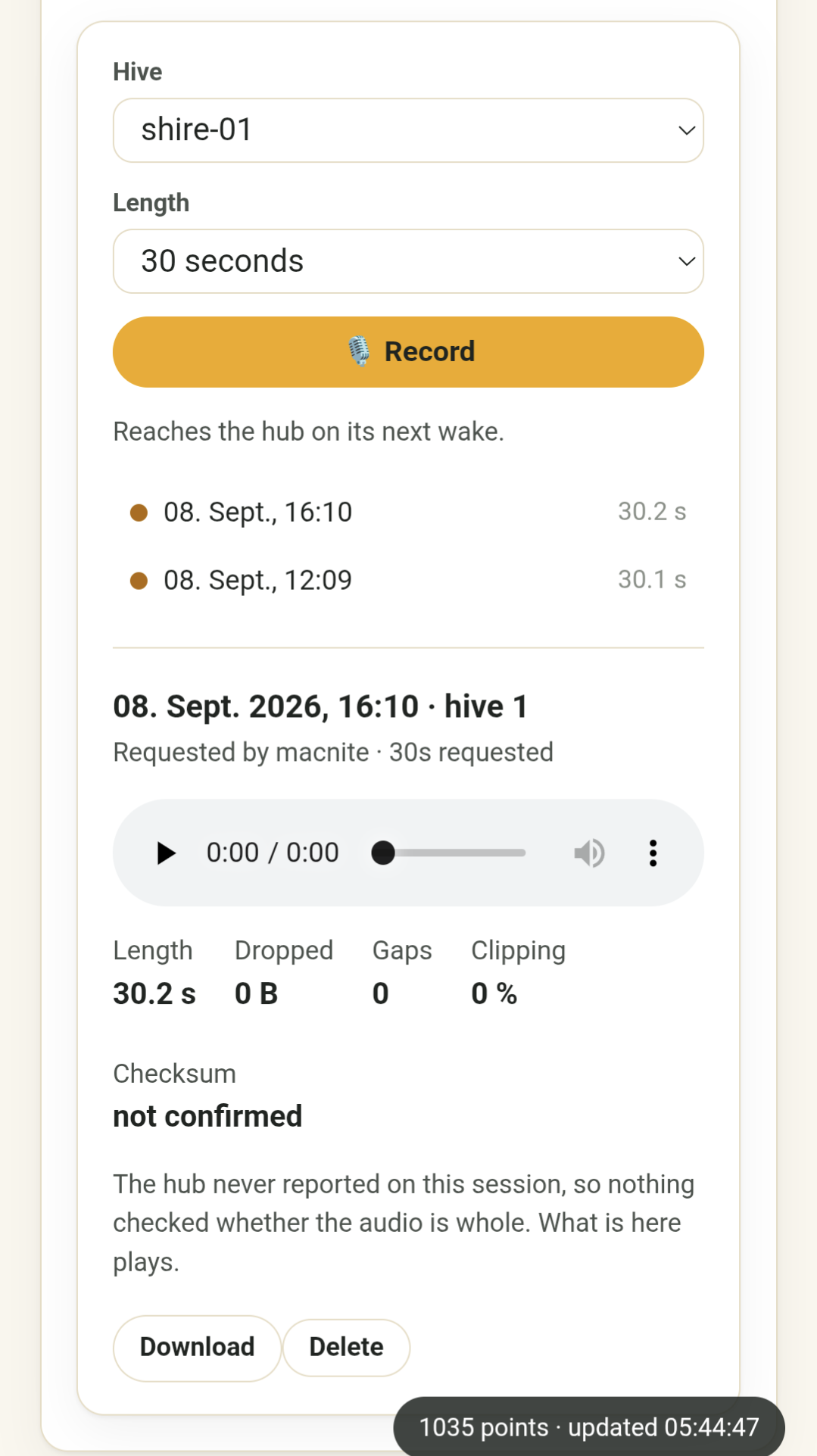
The Audio → Hive audio panel is split. Request controls sit in a left rail
above the list of sessions, newest first; selecting one gives the whole
remaining width to its player, its quality figures and a download button.
The quality figures — length, dropped, gaps, clipping, checksum — are shown
for every recording, not only broken ones. That is deliberate: a recording
with a hole in it plays as perfectly continuous sound, so an acoustic judgement
made on a splice is wrong in a way nothing later reveals.
The Checksum figure answers the only question a listener really has, in four
states rather than two, because the hub reports on a session twice and either
report can go missing:
| Shown as | What happened |
|---|---|
| verified | The hub's detailed report arrived and its checksum matched the bytes on disk |
| unverified | The report arrived, but the checksums disagree or none was sent |
| hub confirmed | No detailed report, but the hub's command result said the session succeeded |
| not confirmed | Neither arrived. The audio plays; nothing corroborates it |
Setting it up
1. A shared key on both devices
The node will not record without an authenticated request, and the hub will not
ask without a key. Both sides want the same 32 bytes in different notations,
so generate once and print both forms:
KEY=$(openssl rand -hex 32)
echo "HiveHub  secrets.h:  #define HIVEINSIDE_AUDIO_PSK_HEX \"$KEY\""
echo "HiveInside audio_secret.h:"
echo "$KEY" | sed 's/../0x&, /g' | fold -sw 48 | sed 's/^/\t/;s/ $//'
The hex line goes in firmware/include/secrets.h (gitignored); the C array goes
in the node's src/audio_secret.h. Nothing stores this key anywhere else, so
keep the output until both devices are flashed.
Both sides fail closed when the key is missing or all-zero. That is the
intended behaviour, not a bug to work around: the alternative is a microphone in
a garden that any BLE device in range can switch on.
FORCE_RESEEDis not involved. That flag only re-seeds the claim code into
NVS. The audio key is compiled in and read afresh at the start of every session,
so an ordinary flash or OTA is enough.
2. Mount the recordings volume
RECORDINGS_DIR (default /app/recordings) needs a volume. The rows describing
recordings live in the database and survive a container recreation — the files do
not, unless you mount them:
hivescale-api:
  environment:
    RECORDINGS_DIR: /app/recordings
  volumes:
    - /opt/hivescale/recordings:/app/recordings
Nothing prunes recordings. There is no retention sweep — a deliberate choice
— so the only thing between your disk and a season of audio is the delete button.
Budget about 1.9 MB per recorded minute.
3. Flash both sides together
The key is checked on every session, so between flashing one device and the other
audio fails with "authentication failed" while measurements keep working
normally. That asymmetry is the giveaway: if readings are fine and only listening
is broken, suspect the key before the radio.
HiveInside must be 0.6.2 or later. 0.6.0 and 0.6.1 speak the protocol
correctly but return a full-length recording whose first ~50 ms carry sound and
whose remainder is silence — and every counter reports it clean, because every
byte the node sent did arrive. See the HiveInside V0.6 notes.
Requesting a recording needs the admin role on the dashboard, or
owner/admin in HivePal. Listening to what already exists follows the usual
per-device roles.
Also in this release
- Remote AP mode, and calibration split into its own dashboard panel —
general settings and the whole per-scale calibration editor no longer share
one Save button. - Claim-code recovery from paired devices, plus a "Re-seed to HivePal"
button for a HiveHub that was removed there (#181). - Inspection masking now applies to MQTT state, so a hive being worked no
longer publishes misleading values to Home Assistant. - Inspection button wake detection fixed, and the reset-crossing RTC markers
moved to.rtc_noinitwhere they actually survive a reboot. - Dashboard metric cards carry a missed sensor reading forward rather than
blanking a hive when one GATT connection fails.
Component versions
| Component | Version |
|---|---|
| HiveHub release | V0.6 |
| Firmware | 0.30.0 |
| Server/backend | 0.5.1 |
| HiveInside node | 0.6.2 or later (required for audio) |
| Recommended hardware | XIAO ESP32-C6 Scale Module V0.4 |
Before upgrading
- The database schema updates itself on startup (migration
029_hive_recordings).
Nothing to run by hand. - Add the recordings volume before you record anything — otherwise the first
container recreation leaves a list of sessions whose audio is gone. - Audio is optional. Without a key configured, everything else in V0.6 works
exactly as before and the panel simply reports that no key is set.
Full details: Listening to a hive ·
API reference · issue
#71