


MAFDET reads your message while you type it, and starts thinking about it before you send it.
Hit Enter, and most of the work is already done.




Chat interfaces make the model wait for you to press Enter before it does anything. While you type, the GPU sits idle. When you send, the model first has to read your whole message (prefill). Then a reasoning model, like Qwen3 in thinking mode, thinks for hundreds of tokens before the first word of its answer. On a mid-range GPU that thinking is the longest wait of all: ten seconds and more on a word problem, minutes on a model larger than the VRAM.
MAFDET uses the time you spend typing for both. It reads your message as you write it, so the prefill is done before Enter. And it thinks ahead: the model starts reasoning about your message while you are still typing it, and keeps that reasoning when you change the text. On Qwen3-4B, with 24 word problems typed in real time, the mean wait after Enter goes from 12.2 s to 3.2 s, with the same 24/24 correct answers; on Qwen3-14B, from 108 s to 47 s. On a MacBook Pro M2 Pro, from 18.1 s to 5.6 s (4B, 24/24 both ways) and from 32.7 s to 12.1 s (14B).
MAFDET is built for the hardware most people actually own. The reference machine is an RTX 2060 with 6 GB of VRAM; it also runs on Apple Silicon Macs (Metal, measured on an M2 Pro with 16 GB), and everything also runs on CPU only. AMD Radeon cards run through Vulkan, measured so far on one card (first numbers, more wanted: help wanted).
Named after Mafdet, the ancient Egyptian feline goddess known as "the runner", who struck snakes and scorpions before they could attack.
An LLM processes text in two phases:
| Phase | What happens | Speed |
|---|---|---|
| Prefill | reads the prompt; all tokens are processed in parallel | fast |
| Decode | generates the answer, one token at a time | slow |
While reading, the model stores intermediate results for every token in the KV cache. Those results never change for a given prefix, so they can be computed ahead of time.
MAFDET keeps the KV cache in sync with the text while you type:
- On every pause, it tokenizes the current text.
- It holds back the last few tokens, because a word you are still typing can still change how the text is split into tokens.
- It finds the longest common prefix between the new tokens and the ones already in cache, trims the cache there, and prefills only what is new.
- When you hit enter, only a handful of tokens are left to process.
Correctness does not depend on how you type. Backspaces, edits in the middle of the text, pasted blocks, missing punctuation or spaces: the common-prefix check always brings the cache back to exactly what a from-scratch computation would produce. Heuristics such as hold-back and debounce only affect how much work is wasted, never the result.
Reading ahead takes the prefill out of the wait; the reasoning is still there. So the model also reasons while you type: in short chunks, on the message as it is at that moment. When you change the text, the reasoning is not thrown away. It stays in the prompt as notes after the new version of the message, which costs only a prefill, and the model goes on from there. On Enter it finishes reasoning from where it got to and answers. On Qwen3-4B about two thirds of the reasoning is done before Enter. How the notes are framed, and what that changed, is in Thinking ahead, in detail below.
Reading ahead is exact. Thinking ahead is not, because the model reasons on versions of the message that are not final yet; that is why it was measured on answers that can be checked.
On Windows, with a double-click. Download MAFDET (on GitHub, Code → Download ZIP, and unzip it; or git clone https://github.com/Mafdet-AI/mafdet.git) and double-click start_mafdet.bat. The first time it creates a Python environment in .venv and installs MAFDET in it, which takes about a minute and needs Python 3.10 or later. After that, a double-click opens MAFDET in under a second, and after an update it installs the new libraries by itself. The terminal shows what is being downloaded as it goes: each library, and later llama.cpp and the models you pick in the app, with size, a progress bar, speed and time left.
On macOS, with a double-click. The same, with start_mafdet.command (Python 3.10 or later: from python.org, or brew install python@3.12). If the Finder says it cannot verify the file, right-click it, Open, then Open again; this is needed only the first time.
From PyPI (Python 3.10 or later). On macOS with Homebrew's Python, and on recent Ubuntu and Debian, pip install outside a virtual environment stops with externally-managed-environment: install with pipx, which gives MAFDET an environment of its own and puts mafdet on the PATH.
brew install pipx             # Ubuntu/Debian: sudo apt install pipx · Windows: py -m pip install --user pipx
pipx ensurepath               # then open a new terminal
pipx install mafdet
mafdet
On Windows with Python from python.org, pip install mafdet works as it is. To update: pipx upgrade mafdet (or pip install -U mafdet).
From the source, in a terminal (also for the measurements in research/):
git clone https://github.com/Mafdet-AI/mafdet.git
cd mafdet
python -m venv .venv          # Windows: py -3.12 -m venv .venv
source .venv/bin/activate     # Windows: .venv\Scripts\Activate.ps1
pip install -e .
mafdet
Either way, no PyTorch and no manual downloads: MAFDET asks whether to open the window or the terminal app, and the first start guides you through the rest. It looks at your machine, installs the right build of llama.cpp by itself (CUDA for an NVIDIA card, Vulkan for an AMD Radeon, Metal on an Apple Silicon Mac, CPU otherwise) and downloads the model that runs best on your hardware.
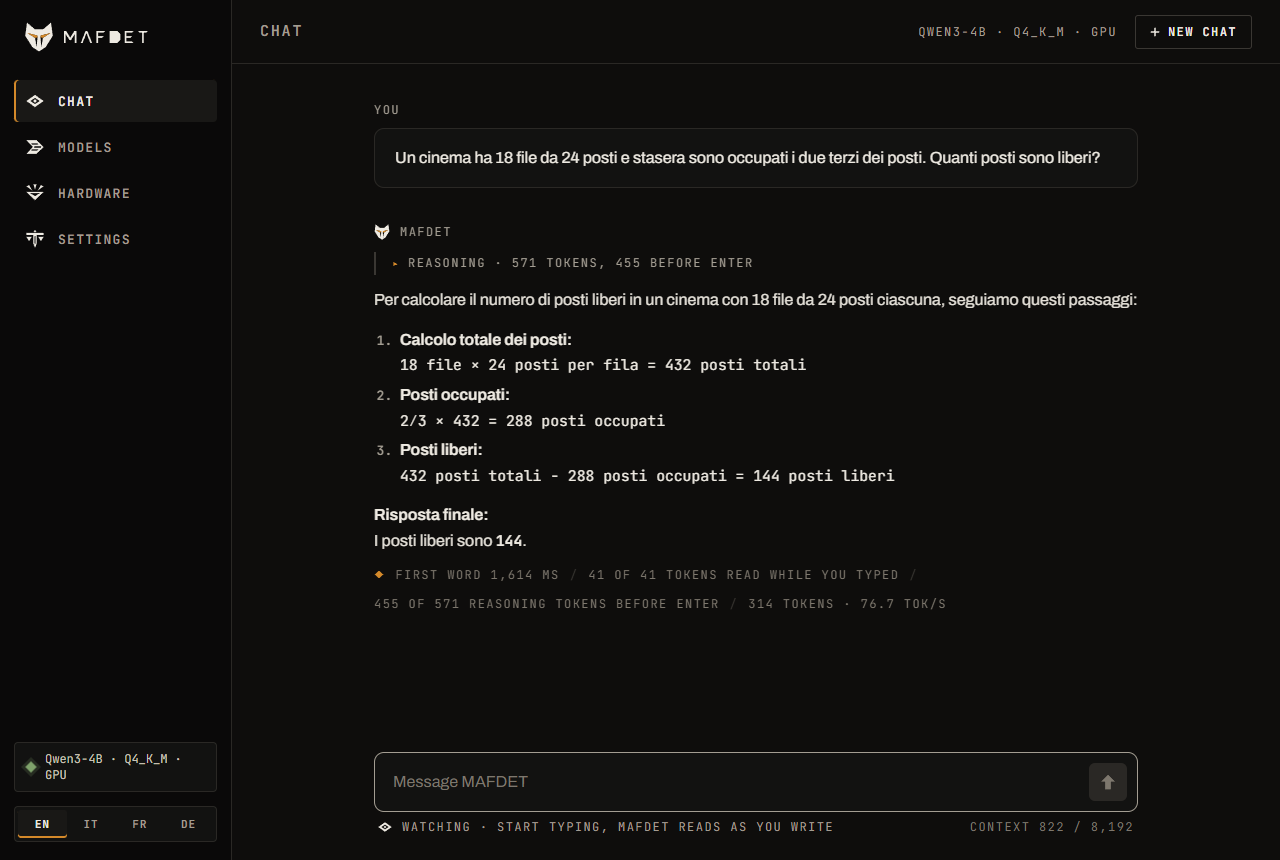
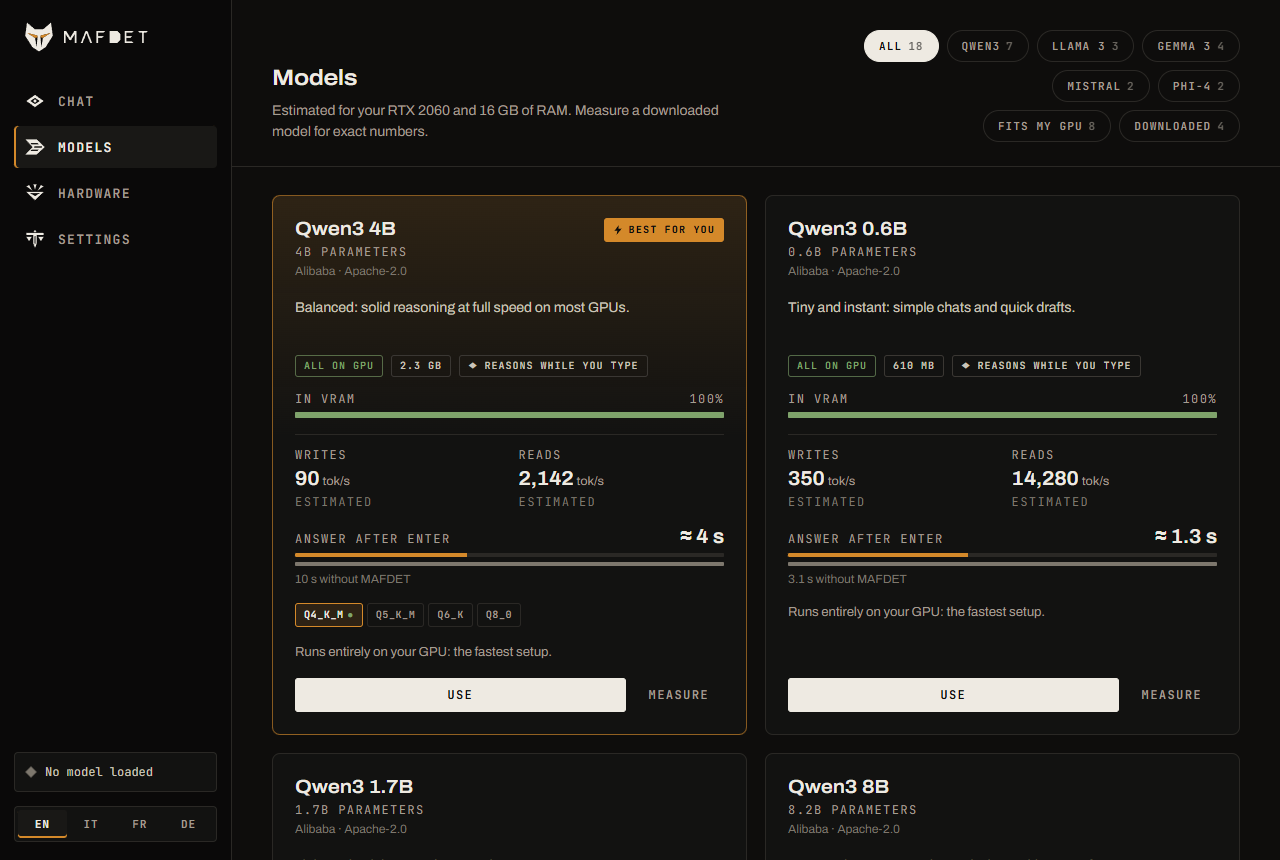
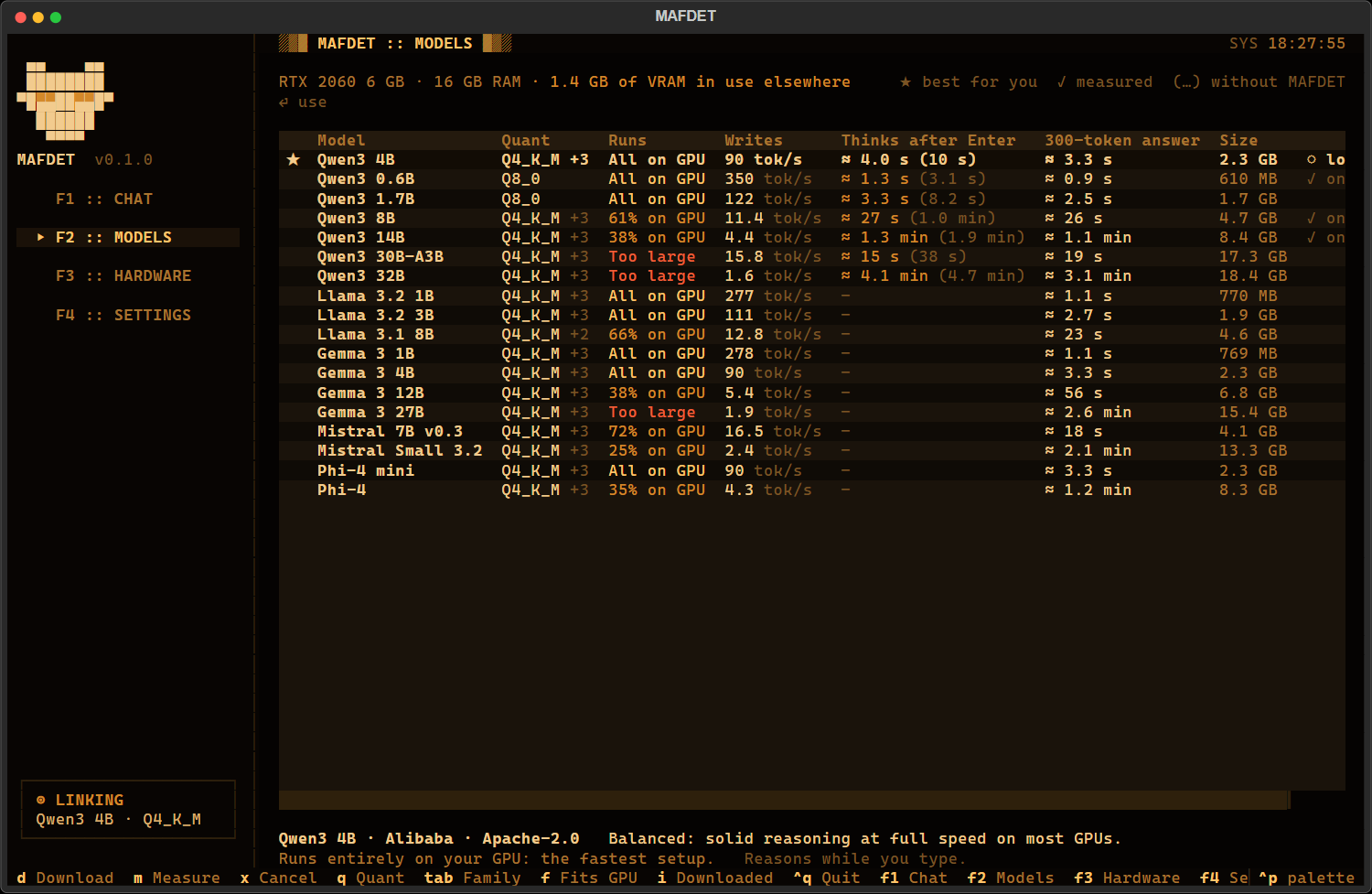
The same app comes in two forms, on the same engine:
| Command | What it is | |
|---|---|---|
 |
mafdet gui |
The window: chat, models, hardware and settings, in English, Italian, French or German |
 |
mafdet tui |
The terminal app: the same views in the terminal, keyboard first (F1 to F4), on an amber phosphor screen with a boot sequence (Settings, Cinematic effects, turns the animations off) |
 |
mafdet models |
the model catalog for this machine (--family, --download, also --download repository:file.gguf from Hugging Face; --delete removes a downloaded model from the disk) |
 |
mafdet doctor |
checks the GPU, memory, llama.cpp and the models; --install installs llama.cpp (--build 12, 13, vulkan or cpu to pick the build) |
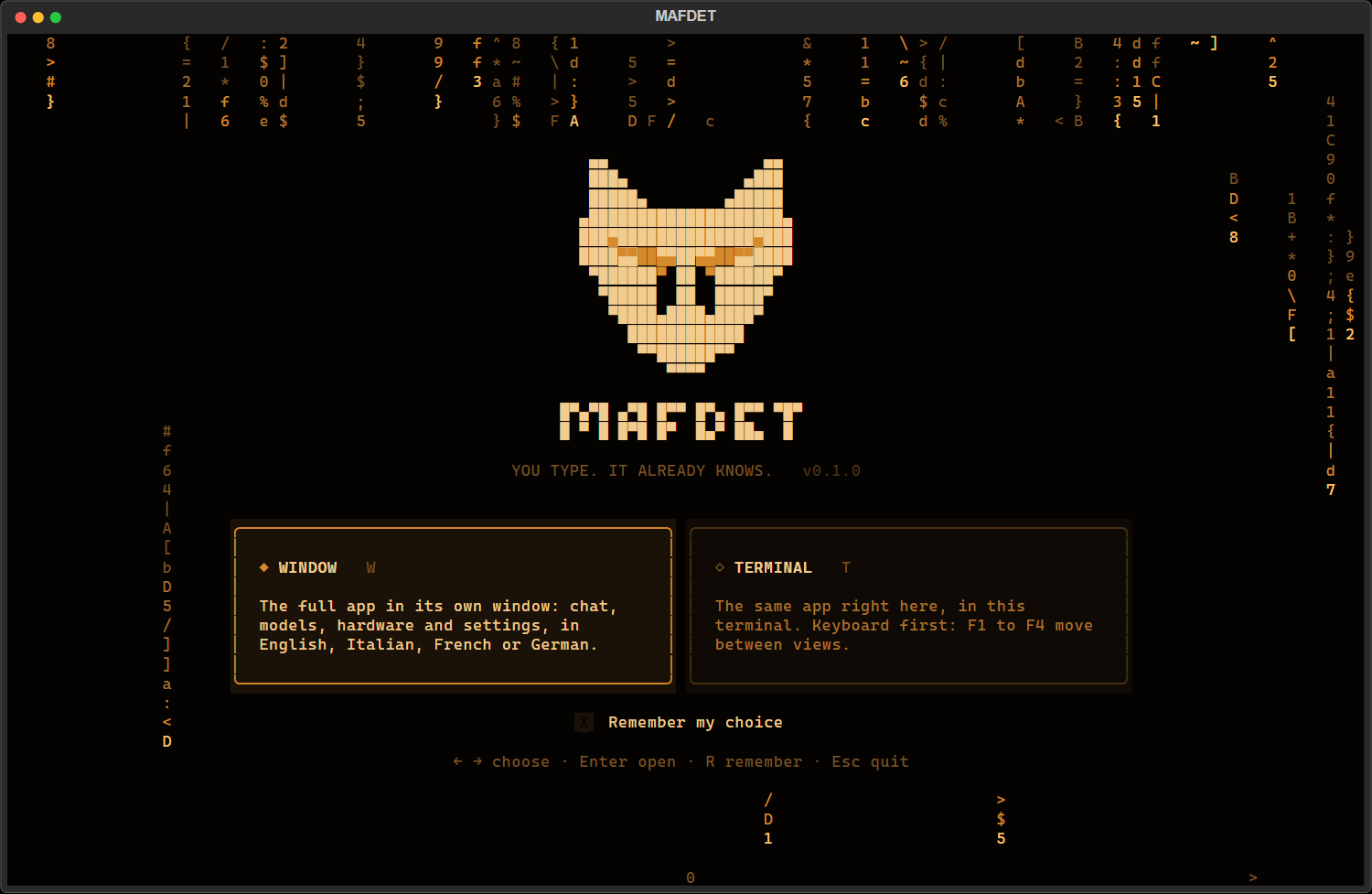
mafdet proxy brings reading ahead to Open WebUI, and mafdet agent gives a local model tools to work with (both below). mafdet alone opens the launcher, which can remember your choice (mafdet --ask shows it again).
Chat. While you type, a status line under the message shows what the model is doing with it: how much it has read, and how many reasoning tokens it has written ahead (the field glows amber while it thinks). On Enter only the tail is left to compute. The reasoning is shown folded above the answer, and every answer ends with its numbers: first word after Enter, tokens read while you typed, reasoning done before Enter, speed. When the model writes the answer ahead during a pause, it appears under the message as it is written, faint, before you send (Settings, Show the answer as it is written ahead): on Enter it moves into the conversation at once, and any change to the message drops it, because an answer only holds for the exact text it was written for. In the reasoning, a mark shows where Enter fell: everything above it was thought while you typed. Thinking budget after Enter (Settings, --think-budget) caps the reasoning after you send: past it the reasoning is closed and the model answers with what it has, instead of thinking on until the token limit cuts it off with no answer.
Models. Five families: Qwen3, Llama 3, Gemma 3, Mistral and Phi-4, from 0.6B to 32B parameters, each in several quantizations. With every model, MAFDET reads your message while you type and, at a pause, writes the answer ahead; Qwen3 also reasons ahead, the one family whose reasoning frame was measured. Every model of the catalog comes with what it does on your machine, before you download it: whether it fits in VRAM or runs partly on the CPU, how fast it writes and reads, and for Qwen3 how long the answer takes after Enter with and without MAFDET (for the other families, how long a typical answer takes to write). The estimate comes from your hardware (GPU and RAM bandwidth, VRAM, llama.cpp's split of layers between GPU and CPU) and is within 12% of the measured speeds on the reference PC (Qwen3-4B 89.6 estimated / 87.1 measured tok/s, 8B 17.0 / 16.2, 14B 5.0 / 4.9), on an RTX 4070 SUPER (4B 134 / 130, 14B 39 / 41, all on the GPU) and on an M2 Pro (Qwen3-4B 53 / 57 tok/s). Where Qwen3-14B does not fit all in VRAM, its IQ4_XS is offered instead of the Q4_K_M: the same answers, with more of the model on the GPU (measured in research/LOG.md). Once a model is downloaded, Measure benchmarks it in half a minute and the real numbers replace the estimate. The model that runs best here is marked Best for you, and each family has its own best pick. Delete removes a downloaded model from the disk, after a question on its card (in the terminal app with Del, from the command line with mafdet models --delete <id>); the view says how much the models take and how much is free on the disk, and a download that would not fit is refused before it starts. The wait after Enter is computed on how long you take to type a message: 34 s to begin with, then the median of your own messages once you have sent a few. To add a model, add a line to tools/build_catalog.py: it reads the file sizes and the shape of the model from Hugging Face.
Your own models. Any GGUF works too, beyond the catalog:
- Search Hugging Face (Models view) finds GGUF repositories, the most downloaded first, and lists their files with the same estimate for your machine; a quantization is suggested (Q4_K_M when there is one). The download resumes where it stopped, all parts of a split model together, into
~/.mafdet/models/hf/<owner>/<repo>/. Gated models (Llama, Gemma) need their license accepted on huggingface.co andhf auth loginon the machine. - A file downloaded by hand: put it in
~/.mafdet/models(any subfolder), or pick it anywhere on disk with Add a GGUF file (it stays where it is).
They appear under Your models, with the numbers read from the file's header (layers, KV heads, parameters, active experts) and Measure as for the catalog. Nothing else is downloaded for them: the tokenizer and the chat template are the GGUF's own, read through llama-server (identical to the Hugging Face tokenizer on Qwen3-4B: ids, special tokens, decoded text, template). A Qwen3 with thinking mode reasons ahead while you type; any other model reads while you type and writes the answer ahead at pauses. The architecture must be one the installed llama.cpp supports.
Hardware and settings. The Hardware view shows the GPU, CPU, memory and the llama.cpp runtime, with a button to install or reinstall it. Settings keep the chat options from one start to the next (in ~/.mafdet, or $MAFDET_HOME).
The same reading ahead, and thinking ahead with --think-ahead, in the chat you already use. mafdet proxy starts llama-server the way reading ahead needs it and an OpenAI-compatible proxy in front of it, at http://127.0.0.1:8077/v1; a small user script makes Open WebUI send what you type to it.
mafdet proxy --model qwen3-4b                  # reading ahead: the prompt the model answers is the same
mafdet proxy --model qwen3-4b --think-ahead    # and the model reasons while you type (Qwen3, not exact)
Open WebUI 0.13 on an RTX 2060, Qwen3-4B, 8 conversations of 2-3 messages each way, typed (research/proxy_openwebui.py):
| Enter → | mean | median | slowest |
|---|---|---|---|
| first word, thinking off: on llama-server with its default options | 5.4 s | 3.3 s | 20.7 s |
first word, thinking off: through mafdet proxy |
0.16 s | 0.14 s | 0.4 s |
first word of the answer, thinking on: mafdet proxy |
7.6 s | 6.3 s | 21.0 s |
first word of the answer, thinking on: mafdet proxy --think-ahead |
4.3 s | 4.1 s | 10.4 s |
With --think-ahead the model writes two reasonings ahead at once, on two slots of the GPU that would otherwise wait for you, and on Enter compares their answers: if they agree, that answer is sent; if not, it is worked out again from the whole message. One reasoning ahead alone lost about one answer in 30 (it commits early to a reading of a question still being typed); two that must agree lost none in the runs: on 40 word problems never seen while tuning, half of them decided by their last words, 40 of 40 right, as without thinking ahead, and the answer's first word after 2.5 s instead of 4.8 s (median, faster in 39 of 40; Qwen3-4B on an RTX 2060, mafdet/proxy/bench.py --think-ahead). --think-branches 1 keeps a single reasoning: faster still (1.7 s), not as safe.
Without it, your message queues behind the title, tags and follow-ups Open WebUI asks the model for, and its 30 built-in tools (~5.8k tokens) get read again; the proxy gives those requests a slot of their own and reads your message while you type. Setup, step by step: Open WebUI + MAFDET in 5 minutes, or all in Docker: docker/. http://127.0.0.1:8077/proxy shows whether it works. Any other front end can send drafts too (mafdet/proxy/README.md); what is next, and how to help: PROXY.md.
A local model that works on your machine through tools, in a loop, until the task is done: it reads and writes files, runs commands, and uses the tools of MCP servers. It is built first for reverse engineering and security study, where the binary should not leave the machine and the model is one you chose yourself: a decompiler or a debugger that speaks MCP gives the model its tools, and any GGUF with a tool-calling chat template can drive them (search Hugging Face in the app, or --model repository:file).
mafdet agent                                         # a conversation, in this folder, with the app's model
mafdet agent --model qwen3-14b --workdir C:\samples\crackme
mafdet agent --mcp rea --profile native-static       # with the tools of an MCP server
mafdet agent -p "what does check.py accept?"         # one task, then exit
mafdet agent --resume last
mafdet agent --provider gemini --list-models          # a model in the cloud: which ones the provider serves
mafdet agent --provider qwen --model qwen3-max        # Qwen on Alibaba Cloud (key in DASHSCOPE_API_KEY)
mafdet agent --provider claude --model claude-opus-5-5   # Claude (key in ANTHROPIC_API_KEY)
mafdet agent --model qwen3-14b --mcp rea --profile native-static --web --save   # and remember these options
mafdet agent --walk C:\samples\crackme.exe --mcp rea --max-functions 50         # name its functions, leaves first
mafdet agent --walk C:\samples\crackme.exe --mcp pyghidra --revise              # then name them all again, with the callers
mafdet agent --mcp rea --book C:\samples\crackme.exe                            # with what the walk found
It is meant for a card with 12-16 GB (the reference is an RTX 5070 Ti, where Qwen3-14B is all on the GPU); on 6 GB only a 4B model is fast enough for a loop. The context is the largest of 32k, 24k and 16k tokens that leaves the model all on the GPU, with the KV cache it will get (8-bit when 16-bit would not fit), and still leaves 1 GB of the video memory free for the desktop and the other apps; the start says what it chose and why, and --ctx chooses for you. On an RTX 4070 SUPER 12 GB, Qwen3-14B IQ4_XS gets 16k: at 24k the model would fit, with 0.4 GB left, but as soon as another app took video memory Windows moved part of the model out of it and it wrote at 5-27 tokens/s instead of 40-46.
mafdet agent opens a conversation that fills the terminal, with the model at work in it. You write at the bottom; above, every tool call with the start of its result, edits as a diff, the answer as Markdown. While the model reasons its thoughts are not shown: a cat blinks next to what a cat would be doing (=^.^= Making biscuits…, with the seconds and the tokens so far), and the reasoning stays folded in a line. A call that needs your approval asks in place, with what it would run or change. When the model sets a to-do list, it is shown above the message box, with the steps done and the one it is on.
| Key | |
|---|---|
| Enter | send; while the model works the message waits and is sent when it is done |
| Shift+Enter (or Ctrl+J) | a new line |
| Esc | stop the model (a running command too), or say no to a question |
y / a / n |
at a question: yes, always for this tool, no |
| Shift+Tab | what runs without asking: ask → edits → all |
| Ctrl+O | the reasoning and the tool outputs in full, or folded |
| Up / Down | your earlier messages |
/ |
the commands, in a menu above the message box that narrows as you type: ↑↓ move, Tab completes, Enter runs, Esc closes; /approve and /reasoning show their values the same way. /model, /reasoning, /approve, /tools, /notes (what the model wrote down), /compact (summarize the conversation to make room), /new, /help, /quit. Their answers come as cards of their own in the conversation |
A MAFDET.md (or AGENTS.md) in the working folder is read at the start as instructions for that folder: what the sample is, what has been found, how to build. --plain gives the same conversation as plain lines, and -p or a pipe one task with no interface. --resume (a session id, or last) goes on with a session of ~/.mafdet/sessions: the full-screen conversation shows its last 60 messages again, the notes are read back, and a session that was compacted starts from its summary.
--save keeps the model, the approval, the MCP servers, the profile, the tools and the web (--web) in ~/.mafdet/agent.json: after it, mafdet agent alone starts with them. What the command line says wins over the file (--no-web for one start without the web).
What it does for a model with a small context and no supervision of its own:
- Few tools, short schemas. Eight of its own (
read_file, which shows a binary as a hex dump,write_file,edit_file,search,shell,job,note,todo): 891 tokens of schemas on Qwen3's vocabulary, and the whole first request, system prompt included, 1,305. MCP servers are named in~/.mafdet/mcp.json, in the shape other clients use. A reverse-engineering server can list hundreds of tools (one tried here: 207, 3.4 MB of schemas): the model starts with a few (--profile native-static: 16 for static analysis of a native binary;--tools, ortoolsin the file) and finds and turns on the others withfind_tools. Descriptions are cut at the end of a sentence (a tool's at 160 characters, a required parameter's at 80, an optional one's at 48), checks the server makes anyway (bounds, patterns) are dropped, and an optional parameter described the same way in an earlier tool is not described again; a tool still over 450 characters (about 100 tokens) is cut a level at a time, its optional parameters down to name and type, the descriptions shorter. Every parameter keeps its name and type, and what is required stays. The profile's 16 tools andfind_toolstake 1,696 tokens (they took 3.8k with their schemas only slimmed); with the server's instructions, the first request grows by 1,812. - A shell that stays open.
shellruns in one PowerShell (sh outside Windows) kept open for the whole session, so acd, a variable or an activated environment are still there for the next command; a result says the exit code when it is not 0, and the folder when it changed. A command past its timeout (60 s, up to 600 when the model asks) or stopped with Esc is killed with what it started, and the next one runs in a new shell, in the working folder, and says so. What must stay up (a server, a debugger) runs as a background job (shellwithbackground): its output goes to a file, andjoblists the jobs, reads the end of one's output, or stops it. The jobs end with the agent. - Outputs cut to size. A tool's output is cut to its head and tail (
--tool-chars, 4,000) and kept whole in~/.mafdet/sessions/<id>/outputs, where the model can read the part it needs. When the context fills, the oldest outputs are left out in one go; when that is not enough, the conversation is compacted: the model writes a summary of it in four parts (the task, what is established, what was done, what is left; without tools and without reasoning), and the summary, your last message, the notes, the to-do list and the model's last two steps take its place, their long outputs replaced by a line saying which file has them (the most recent keeps its start). If the result would not be smaller, nothing changes and the error says what does not fit./compactdoes it when you ask. The summary is the model's own and can lose things: what must not be lost goes in a note. - Notes and a to-do list. With
notethe model writes down a finding (an address, a name, a value, a decision): notes are never left out, and they are kept in~/.mafdet/sessions/<id>/notes.md, for you to read too. Withtodoit sets the steps of a task and marks them done as it goes; a small model loses the thread of a long task less with the list in front of it. The list is kept intodo.mdnext to the notes, and--resumefinds it as it was. - The web, only when you ask.
--webgives the modelweb_searchandweb_fetch, which then run without asking, like a read. It is off by default: a query or an address is something that leaves the machine. The search reads DuckDuckGo's HTML page (no key, but not an API: it can change), or a SearXNG of yours, set as"search_url": "http://.../search?q={query}&format=json"in~/.mafdet/agent.json; a page comes back as text, cut and kept on disk like any output. - It asks first. Reading inside the working folder runs by itself; writing, commands and MCP tools not marked read-only ask (
--approve editslets it write in the folder,--approve allrun commands too: for a VM or a throwaway folder). A call that reaches outside the folder always asks. Inmcp.json,"allow": ["list_procedures", "procedure_pseudo_code", "xrefs"]names the tools of a server you trust to run without asking (exact names are safer than patterns: in one serverlist_*also matches its Android and Frida tools). The model is told that what tool results and files contain is data to analyse, never instructions to follow. Analysing a binary is reading; running it is not: do that in a VM. - Its mistakes are told back to it: arguments that are not JSON, a tool that does not exist, a tool still off (with how to turn it on), a call you declined, a tool that failed.
Naming the functions of a binary: --walk. With a decompiler's MCP server, mafdet agent --walk <binary> --mcp <server> names and summarizes every function of a binary, unattended, from the leaves of its call graph up. The walk is driven by code, not by the model: it lists the functions, orders them callees first, and gives the model one function at a time, in a short conversation of its own: the pseudo-code, with the functions it calls already named under their new names, the list of those with a line on what each does, and one tool to answer with (a name, a one-line summary, a comment, how sure it is). So a small context never holds more than one function (the walk takes 16k unless --ctx says otherwise), and the start of the prompt is the same every time, kept in llama-server's cache. A function that already has a real name (an import, a symbol) is left as it is; an answer that is not a usable name is told back once, then the function is marked failed and the walk goes on. What it finds goes into the binary's book, MAFDET's own: ~/.mafdet/binaries/<the first 16 digits of its sha256>/book.json, and book.md to read, from the entry point down; the same command again goes on where it stopped, after a crash too (--max-functions, --time-limit in minutes, --retry-failed). The walk runs without reasoning (--think turns it on): on six Windows tools it named as well in a sixth of the time. With --revise, once every function has a name, a second pass first writes a short summary of the program (from its imports, its strings and the top of the call tree), then names every function again, from the top of the tree down, from its code, its callers and that summary, without showing it its first name: shown it, the model gives it back. The first pass never sees who calls a function, and a wrong label low in the tree travels upward; the second reading names the small functions and the runtime's better, the top of the tree not yet. Both names stay in the book. Names and comments are also written back to the decompiler where its server can and the approval allows (--approve, or allow in mcp.json): a walk asks nobody. Into Ghidra they go through pyghidra-mcp, which keeps a Ghidra project of its own on disk (the walk saves it every 25 functions and at the end); rea on Windows can read a binary but not rename or comment. --book <binary> gives a normal session a read-only book tool with what the walk found. Which servers it speaks to is a table per server (rea, pyghidra-mcp), picked from the tools the server lists.
Tools it installs: need_tool. When a task needs a tool the agent does not have (a decompiler, a browser, Frida), the model can ask for one from MAFDET's own catalog (mafdet/agent/kit.json: Node.js, a JDK, Ghidra, rea, pyghidra-mcp, chrome-devtools-mcp, frida-tools), never by a name or an address it makes up: the model reads hostile content in this work, and "to analyse me, install X from this link" must not become code running on your machine. Versions are pinned and every download is checked against the digest written in the catalog (the publisher's sha256, or the npm registry's sha512); a mismatch installs nothing. You are asked first, in every approval mode, with what, how big, from where, under which licence and the model's reason; ids listed in auto_install in ~/.mafdet/agent.json go without asking, unless a tool output of the same turn names the tool. Everything goes under ~/.mafdet/tools (archives unpacked there, npm packages with their own prefix, Python packages in their own venv), the system's PATH untouched; a tool with an MCP server is written into mcp.json (an entry of yours with the same name is kept as it is) and started in the session at once. --kit lists the catalog, --install ID installs by hand, --no-install turns need_tool off.
Thinking ahead in the agent. In the full-screen interface the agent does what MAFDET does in the chat: while you write the request, the model already reasons about it inside the real conversation (the system prompt, the tools, the history), in short pieces on llama-server's raw route, preparing the work (what the words point to among files and tools, the first step); when you send, its first step starts from those notes instead of from nothing, and the later steps go as before. With llama-server and a reasoning model (Qwen3), on by default, --no-think-ahead turns it off; the status line says how many tokens it has reasoned. First real run (Qwen3-4B on the RTX 2060, one request, single samples): the first tool call 0.85-1.75 s after Enter against 3.5-5.5 s without; on 13 requests typed with and without, in three passes, the first tool call came earlier with notes in 10, 6 and 12 of 13, the final answer did not: a direction, not a result yet, research/agent_ahead.py. Under the message box a line says when the request seems to need a tool of the catalog that is not on (by its words: "decompile", "eseguibile", .exe, https://...): Ctrl+T installs it (asking first) or starts it while you finish writing.
A model in the cloud: --provider. The agent can also drive a model served by a provider instead of a local one, for a model too large for your machine, at full precision: --provider claude (Anthropic's Claude), --provider qwen (Qwen on Alibaba Cloud's Model Studio; qwen-cn for its China region), --provider gemini (Google Gemini) or --provider openrouter (most models of every lab, behind one key), with --model the provider's own id. --list-models shows the ids the provider serves (without --model they are shown too, and nothing starts). The key is read from the provider's environment variable, ANTHROPIC_API_KEY, DASHSCOPE_API_KEY, GEMINI_API_KEY or OPENROUTER_API_KEY, from --api-key, or from the system's credential store (Windows Credential Manager, the macOS Keychain, the Secret Service on Linux) where /model keeps one you type in; never from or into a file of MAFDET's; --save remembers the provider and the model, --provider local goes back to the local model, and --url for one start wins over a saved provider. The context is taken as 128k unless --ctx says otherwise. They all speak the OpenAI chat API, so the agent, the approvals, the MCP tools and --walk work as with a local model; what differs is handled in the client: the address after the provider's own version path, reasoning turned on and off the provider's way (enable_thinking for Qwen, reasoning_effort for the others), a parameter the provider refuses dropped for the rest of the session instead of failing, tool calls sent without an index (Gemini), and Gemini's thought signatures sent back with the calls they came with. Thinking ahead needs llama-server and stays off. Unlike the rest of MAFDET, this sends the conversation, the files the model reads and the tools' outputs to the provider, and the start says so: for a binary that must not leave the machine, keep a local model. Claude goes through Anthropic's own SDK and Messages API rather than an OpenAI-compatible route: its thinking blocks are sent back unchanged on every later request (kept with the session), and since the agent edits its history (old outputs cut to a line, tools turned on mid-session) the request asks the API to drop the blocks an edit invalidates instead of refusing it; reasoning is adaptive with the level as effort (off asks for low, since the current models cannot turn it off); the prompt is cached between steps; and on the models that take it a request declined by a safety classifier is retried server-side on the model Anthropic recommends for that kind of decline (fallbacks: "default"; reverse-engineering requests can meet the cyber classifier). Built on the providers' documented APIs and checked against their endpoints, not yet tried with a key on a real task.
Changing the model without leaving: /model and /reasoning. In the full-screen interface, /model opens a picker: this machine (the models downloaded here) or a provider, each said with where its key is (an environment variable, the credential store, none yet); for a provider without a key, the key is typed in hidden, checked by asking the provider for its models, and kept in the system's credential store; then the model, from the provider's own list (or the local ones), filtered as you type. Esc goes back a step. The conversation goes on with the new model, from the same history; leaving a local model stops its llama-server, going back to one starts it again (with the context chosen for that model, as at a start), and a switch that fails leaves the model in use, or starts it again. /reasoning (or /reasoning high, --reasoning at the start) sets how much the model reasons before each step: auto (the model's or the provider's default), off, low, medium, high, sent the provider's way (reasoning_effort to Gemini, enable_thinking with a thinking_budget of 2k, 8k or 32k tokens to Qwen, OpenRouter's reasoning object); a local model only reasons or not. The status line shows the level when it is not auto. The choice is remembered for the next start.
Where it stands: the loop and the MCP client work. On an RTX 4070 SUPER with Qwen3-14B the first real sessions made about 60 tool calls, none malformed: reading a file and explaining it took 2 steps (24 s), fixing a bug with --approve edits 5 steps (81 s), and a conversation compacted in a 4k and a 6k context went on and finished right. The first real walk, on Windows' where.exe on the same card: 86 of 86 functions named in about 25 minutes (17 s a function), none failed, through rea and again through pyghidra-mcp, which wrote all 86 names and comments into the Ghidra project. Read by hand on 23 of them, 10 names were right, 8 vague and 5 wrong: the leaves were named well, the top of the call tree badly (main became validate_config_and_initialize). One small binary and one reader's judgement, not a measurement. The full-screen interface, the model running commands, background jobs and the web are tested only with a scripted model (the web on a local test site), not yet with a real one. Next: a second pass over the top of the tree once its callees are named, and symbols first where the binary has them; reading and thinking ahead while a tool runs and on the function under the analyst's cursor; a benchmark on crackmes with a known answer, and on binaries with symbols, stripped, walked and compared with their real names. The plan is in research/LOG.md.
- Windows, with an NVIDIA GPU and up-to-date drivers (tested target: RTX 2060, 6 GB), an AMD Radeon through Vulkan (measured on one card so far, an RX 5700 XT: help wanted), or just a CPU. Linux has its llama.cpp builds and code paths in place, but has not been tested yet
- macOS on Apple Silicon (M1 or later): the models run on the GPU through Metal, in the unified memory (tested: M2 Pro, 16 GB, macOS 26.2; Qwen3-4B reads 593 tokens/s and writes 57). Intel Macs run on the CPU
- Python 3.10 or later (tested with 3.12)
- Disk space: about 0.7 GB for llama.cpp with CUDA (100 MB with Vulkan, 60 MB for the CPU), plus the models, from 0.6 GB (Qwen3-0.6B) to 2.3 GB for the 4B recommended on 6-8 GB cards
- 16 GB of RAM recommended for CPU-only runs and for models larger than the VRAM
The app needs no PyTorch: llama.cpp runs the models, and transformers only provides the tokenizers. PyTorch is needed only for the measurements on the PyTorch backend (below): install it first from the CUDA index, then pip install -e ".[research]".
In the app this is on by default for Qwen3 (Settings, Reason while I type); from the command line it is mafdet strike, with the options below. The model starts thinking about your message while you are still typing it. It runs Qwen3 in thinking mode, so before answering the model reasons in a hidden block (shown folded above the answer). That reasoning is usually the longest wait, and strike moves as much of it as possible to before Enter:
- While you type, the model reasons in short chunks of 32 tokens, on the message as it is at that moment, on whole words (after a space or punctuation, or at a pause).
- When the text changes, the reasoning is not thrown away. It stays in the prompt as notes, after the new version of the message. Moving it there only costs a prefill: the fast, parallel phase, about 60 times faster than writing the same tokens again for the 14B on the RTX 2060. A new line of the notes names the words just typed, so the model goes on gathering material on them instead of starting over.
- On Enter, a last sentence tells the model that the message is now complete. It finishes reasoning from where it got to and answers. Rarely (Qwen3-4B: once in the 24 problems on the Mac, once before on the RTX 2060) the model writes its answer among its thoughts and ends its turn without leaving the reasoning: the app then closes the reasoning as Qwen3's template does, and the model writes the answer, a few seconds later instead of an empty one.
The notes are a list of material for the answer, started by a frame: "The user is still typing. I will not wonder what they will ask, nor remark that the text is unfinished. While I wait, I collect material for the answer: for each key term, name or number already written, one line with what it is and the facts I know about it, or a partial result." followed by one example line from a different message. Each time you type more, a new line names the new words: - New words "finestra di contesto": . So from "Quando finisce la finestra di contesto degli LLM?" the notes already hold what a context window is and what LLM stands for, and from a word problem the partial results (3 × 12 = 36) before the question has been typed.
The frame matters. Without one, the model spent its notes remarking that the message was unfinished, and after every edit it copied its last paragraph again. On six messages typed in real time, the share of sentences in the notes about the user or the message itself (instead of its content) went from 86% with a generic frame ("work out what you can") to 41-54% with this list, and to 17-26% with the example line and a logit bias that, while reasoning ahead and only then, makes words such as user, incomplete, typing less likely (their token ids come from the tokenizer of the model loaded, so it works with any model). Thinking mode also uses the presence penalty suggested by Qwen3's authors, which keeps the 4B out of loops that repeat a sentence until the token limit.
If you pause and send the message unchanged, strike goes further and also writes the answer itself. That part is exact: the answer only holds for the exact text it was written for, and any change drops it. With --no-think (no reasoning) this is all strike does, and with greedy decoding the answer is identical token by token to the one started after Enter (checked).
Reasoning ahead is not exact: the model reasons on intermediate versions of the message, so the answer can differ from the one it would give starting from scratch. That is why it was measured on answers that can be checked (below).
| Option | What it does |
|---|---|
--no-think |
no reasoning: answer right away, and write ahead only the exact answer |
--think-ahead N |
longest reasoning kept across edits (default 1024 tokens) |
--think-budget N |
reasoning allowed after Enter (default 0, no limit): past it the reasoning is closed, as when the model ends its turn inside it, and the model answers with the material it has |
--keep-reasoning |
keep the reasoning of past turns in the conversation. By default only messages and answers stay, as in Qwen3's chat template: the context lasts several times as many turns (6 word problems in a row: 1,342 tokens instead of 8,015, which no longer fit in the default 8,192 by the sixth) |
--ahead N |
answer tokens written ahead when the text does not change (default 512) |
--branches N |
experimental: the model also guesses how you will finish the message and, on a slot of its own, reasons on the guess; if it guessed the exact message, that reasoning (and the answer, if it got that far) is ready on Enter. 1 is the measured setting, see below |
--recycle |
reuse the answers written for earlier versions of the message as n-gram drafts for speculative decoding (+4% decode speed measured with natural typing, +20% on code) |
--draft repo:file |
a small model of the same family drafts tokens for speculative decoding (no gain measured on the RTX 2060, see below) |
mafdet watch and mafdet strike open the window with the model and options given on the command line (--gguf repo:file), instead of the app's settings. demo_live.py (start_demo.bat) is the step-by-step view for debugging: tokens, cache, hold-back and timings, live in the terminal (--auto types an example by itself).
| Command | What it does | ||
|---|---|---|---|
 |
mafdet hunt |
the hunt | simulates people typing and measures the wait after sending |
|
mafdet race |
the race | benchmarks prefill and decode on your machine |
 |
mafdet judge |
the judgement | checks results against a from-scratch computation: must end with 0 errors |
|
mafdet awaken |
the awakening | checks PyTorch and the GPU, for the PyTorch backend |
They run on llama.cpp with --backend llama (no PyTorch needed), or on PyTorch/transformers with the default --backend hf (pip install -e ".[research]" after installing PyTorch from the CUDA index: from PyPI, on Windows, pip would get the CPU-only build). mafdet --help is the full guide, mafdet <command> --help the options of one. Add --device cpu to any command to measure the no-GPU case. Results are saved as CSV files in results/ (change it with --out).
mafdet hunt replays three scenarios (pick them with --scenario):
- clean: a message typed from start to finish
- messy: typos fixed with backspace, a word deleted and retyped, an insertion in the middle, little punctuation
- paste: a long document pasted in, followed by a typed question. This is where the gain is largest.
The typing is not replayed in real time. Each prefill really runs on the model, and its measured duration is placed on the typing timeline. If the model falls behind the typist, the delay piles up and is added to the final wait, just as in a real system.
On an RTX 2060 (6 GB) unless stated (the Mac and the Radeon have their own tables: Mac, Radeon), llama.cpp, Q4_K_M models, real-time typing (5 to 8 characters per second, a few natural pauses, Enter right after the last character, no rereading).
Reasoning ahead, Qwen3-4B (fits in VRAM, 83 tok/s): 24 word problems with a known numeric answer, typed in Italian (script and data: research/thinking_ahead.py).
| Without reasoning ahead | mafdet strike |
|
|---|---|---|
| Correct answers | 24/24 | 24/24 |
| Median wait for the first word of the answer | 10.7 s | 2.9 s |
| Mean wait | 12.2 s | 3.2 s |
| Faster | in 24 of 24 problems | |
| Reasoning in total | 944 tokens | 662 tokens |
| Reasoning left after Enter | 944 tokens | 244 tokens |
Same accuracy, less reasoning in total (the material gathered while typing saves the model from starting over), and almost two thirds of it done before Enter. The two earlier frames, measured the same way: a generic frame gave 22/24 and a median of 4.4 s; no frame gave 22/24, 6.9 s and 70% more reasoning.
Exact answer ahead, Qwen3-4B, no reasoning (pause before Enter, text unchanged):
| Answer | Written before Enter | Full answer on screen after Enter, strike | Without strike |
|---|---|---|---|
| 300 tokens | 200 | 1.2 s | 3.5 s |
| 168 tokens | 168 (all of it) | instant | 1.9 s |
Larger models. What the model can do before Enter is bounded by typing time × its writing speed:
| Model | Fits in 6 GB? | Writes | Reasoning written while typing a 30 s message |
|---|---|---|---|
| Qwen3-4B | yes | 83 tok/s | most of it |
| Qwen3-8B | no, partly on the CPU | 13 to 16 tok/s | 130 to 280 tokens |
| Qwen3-14B | no, partly on the CPU | 5 tok/s | about 160 tokens |
Even so, on the 14B (6 word problems typed in real time, 6/6 correct both ways) reasoning ahead halves the mean wait after Enter: 108 s → 47 s, with 164 reasoning tokens written before Enter on average. Single runs vary a lot (the same problem took 106 s once and 154 s another time), so 6 problems give the order of magnitude, not a precise figure. Reading ahead gains more the larger the model: the 14B reads a 3,000-token pasted document in about 10 s, all of it hidden while you type.
MacBook Pro M2 Pro, 16 GB, macOS 26.2, llama.cpp with Metal: the same scripts and problems as above.
| M2 Pro | Without reasoning ahead | mafdet strike |
|---|---|---|
| Qwen3-4B, 24 problems: correct answers | 24/24 | 24/24 |
| Median wait for the first word of the answer | 16.7 s | 4.1 s |
| Mean wait | 18.1 s | 5.6 s |
| Faster | in 24 of 24 problems | |
| Reasoning in total / left after Enter | 966 / 966 tokens | 773 / 248 tokens |
| Qwen3-14B, 6 problems: correct answers | 6/6 | 6/6 |
| Median wait | 26.5 s | 11.7 s |
| Mean wait | 32.7 s | 12.1 s |
The 4B writes at 54 tok/s on the M2 Pro (83-87 on the RTX 2060), so both waits are longer than on the PC, and reasoning ahead takes about the same share of them away. The 14B is where the Mac differs: Metal may use 12 GB of the 16 GB of unified memory, so the whole model is on the GPU and writes at 18 tok/s (4.5-5 on the RTX 2060, with 62% of it on the CPU). The wait after Enter is 12 s instead of 47 s. The column without reasoning ahead comes from an earlier run of the same day; in that run one answer came out empty (the model ended its turn inside its reasoning, see Thinking ahead, in detail), which the app now handles, and the column with reasoning ahead is the run after the fix. During the runs the Mac reached thermal pressure Heavy for a few minutes (54 → 51 tok/s). Data: research/data/thinking_ahead_4b_m2pro.json, thinking_ahead_4b_m2pro_fixed.json, thinking_ahead_14b_m2pro.json.
A first data point, to be investigated further: one card, one run, sent by SpykeBTW (issue #1). Radeon RX 5700 XT (8 GB), Ryzen 5 3600, 16 GB, Windows 11, AMD driver 31.0.23013.1023, llama.cpp b11747 with Vulkan: the same script and problems as above.
| RX 5700 XT | Without reasoning ahead | mafdet strike |
|---|---|---|
| Qwen3-4B, 24 problems: correct answers | 24/24 | 24/24 |
| Median wait for the first word of the answer | 10.9 s | 6.8 s |
| Mean wait | 14.0 s | 7.7 s |
| Faster | in 22 of 24 problems | |
| Reasoning in total / left after Enter | 920 / 920 tokens | 595 / 252 tokens |
Reasoning ahead works on the Radeon too: same accuracy, the mean wait almost halved. But with about the same reasoning left after Enter as on the RTX 2060 (252 tokens against 244), the wait is twice as long (7.7 s against 3.2-4.2 s), and the reason is the reading speed. Measure has the card writing at 69 tokens/s, close to the RTX 2060, but reading at only 93 tokens/s, against about 2,000 on the RTX 2060 (with CUDA or with Vulkan). The reasoning written ahead comes after the message in the prompt, so the last words you type make the model read it again after Enter: 343 tokens here, 0.17 s on the RTX 2060, about 3.7 s on this card. That accounts for all of the difference. Without reasoning ahead, the wait is all writing; with it, every problem waits 2-5 s more, exactly the time to read the reasoning again at 93 tokens/s. Reading at a normal speed, the wait would be about 4 s.
What we do not know yet is where the 93 tokens/s come from: llama.cpp's Vulkan on this generation (RDNA 1) with AMD's Windows driver, or something in MAFDET. A llama-bench on the card, and more Radeons, will tell (help wanted). Data: research/data/thinking_ahead_4b_rx5700xt.json.
A small model gathering for a large one (--gatherer, experimental). For models larger than the VRAM we tried having a small, fast model (Qwen3-0.6B, also fine-tuned for it with training/) write material while you type, for the 14B to read on Enter. On the RTX 2060 it does not beat the 14B reasoning ahead by itself:
| 14B, mean wait after Enter | |
|---|---|
| No reasoning ahead | 108 s |
| Reasoning ahead by itself | 47 s |
| Gatherer, untrained Qwen3-0.6B | 60 s |
| Gatherer, fine-tuned Qwen3-0.6B | 79-86 s |
| Ideal material, written by hand (every partial result right), presented as "from a fast assistant" | 62 s |
| The same ideal material, presented as the model's own reasoning | 49 s |
Even perfect material only matches reasoning ahead: the 14B reads it, then redoes and double-checks the calculations, except on the easiest problems (17-24 s instead of 37-63 s). How the material is presented matters more than its quality (62 s → 49 s). Open questions for anyone who wants to take this further: combining both (the large model reasons ahead and reads the material as its own), teaching the large model to trust partial results, or a gatherer where the large model cannot reason ahead at all (CPU only).
Guessing the ending (--branches, experimental). The reasoning left after Enter is mostly about the end of the message, which arrives last: in a word problem, the question. Qwen3-4B often guesses it before you type it: in one run, with the text at "…e una penna da 2", one of its guesses was already the exact rest of the message, "euro. Quanti euro gli restano?". So with --branches 1 the model also guesses how you will finish the message (only when few words are left, and only when two guesses in a row agree), and on a llama-server slot of its own reasons on the guessed message as if you had sent it, while its main reasoning waits. If you then send exactly that message, its reasoning and answer were written for that very prompt and are taken as they are. Same 24 problems, two runs each (48 messages; script and data in research/):
| Reasoning ahead | --branches 1 |
|
|---|---|---|
| Correct answers | 48/48 | 48/48 |
| Mean wait for the first word of the answer | 4.17 s | 3.51 s |
| Median wait | 2.98 s | 2.85 s |
| Slowest tenth | 7.9 s | 5.3 s |
| Messages guessed exactly | 14 of 48 |
The reasoning-ahead column was measured again for this comparison, the same day and on the same code: 4.17 s against the 3.2 s of the table above, two runs of the same 24 problems differ that much. A modest gain, mostly on the slowest answers, and on 24 problems not yet a significant one (faster on 16 of 24, sign test p = 0.15). What did not work: adopting a guess that was only close ("ha rimasto" for "gli restano"), with a line asking the model to check its reasoning against the real message, gave 2 wrong answers out of 4: the guess had another number (32 for 41), or a word that changed the problem ("current age"). Two branches at once are slower than none (median 4.50 s against 2.94 s on half the problems): on the RTX 2060 two sequences write 1.7 times as many tokens as one, four 2.2 times, so each branch slows the others down.
Larger than the VRAM. On Qwen3-14B (partly on the CPU, 4.5 tok/s through llama-server) a second sequence is not free either: two run at 77% of the speed of one each, three at 55%. And each guess takes seconds: 1 or 2 per message instead of 10 to 20 on the 4B, so on 4 problems no branch ever started reasoning before Enter (mean wait 44.7 s with the option, 43.9 s without: noise, single problems vary from 24 s to 73 s). The arithmetic does not leave much room anyway: between the moment the question can be guessed and Enter there are a few seconds, about 20 tokens of the 14B, against about 200 left after Enter. So in the app Guess the ending gives a branch only to models that fit in VRAM, and none to the others.
Tried, and why they are not on by default:
--recycle(answers to earlier versions of the message as n-gram drafts): +4% decode speed with natural typing, +20% on code, slightly later first token.--draft(Qwen3-0.6B drafting for the 14B): on the GPU it takes VRAM from the 14B, which then runs more of its layers on the CPU (4.8 → 3.5 tok/s); on the CPU it gains 8% with 4-token drafts and halves the reading speed.- The reasoning ahead as the draft for speculative decoding after Enter (
--spec-type ngram-simple: the notes are in the prompt, and after Enter the model works the same steps out again). Replayed offline, prompt lookup would write 1.5 to 1.7 tokens per decoding step on Qwen3-4B, against 1.3 to 1.5 without notes. For real it is no faster on the 4B (73 tok/s either way) and slower on the 14B (5.0 → 3.1 tok/s): checking a 9-token draft costs the 14B 2.4 decoding steps, because its layers on the CPU compute every token of the draft, and only 11% of the drafted tokens were right. Script and data:research/notes_as_draft.py.
MAFDET runs on AMD Radeon cards through llama.cpp's Vulkan build, and the machines here are an RTX 2060 and an M2 Pro: so far one Radeon has been measured, by SpykeBTW (first numbers: reasoning ahead works, but that card reads much more slowly than expected, still to be understood). The Vulkan path itself is checked, on the RTX 2060 (Qwen3-4B reads 2,103 tokens/s and writes 83, about as with CUDA; 3/3 word problems correct, reasoning ahead working). What is missing is more Radeons, of other generations especially. If you have one (a dedicated card, RX 5000 or later; 8 GB or more is ideal), about half an hour of it would fill this page:
- Install MAFDET (Quick start) and open it once: it should find your card, install llama.cpp Windows · Vulkan (or Linux · Vulkan) and download Qwen3-4B.
mafdet doctorshows what it found. - In the app, Models, Measure Qwen3-4B.
- From the MAFDET folder, with its environment active:
python research/thinking_ahead.py radeon_4b.json. It types 24 word problems in real time, with and without reasoning ahead, and takes about 20 minutes; leave the machine otherwise idle. - Open an issue with the output of
mafdet doctor, the numbers of Measure andradeon_4b.json. Your name goes in Thanks, next to your numbers. - If you can, also the output of
%USERPROFILE%\.mafdet\llama.cpp\llama-bench.exe -m %USERPROFILE%\.mafdet\models\Qwen3-4B-Q4_K_M.gguf -p 512 -n 128(on Linux, the same paths under~): llama.cpp's own speeds, without MAFDET in between.
If something does not work (the card not found, llama.cpp not starting, the model running on the CPU), an issue with the output of mafdet doctor and the server*.log files next to llama-server (in ~/.mafdet/llama.cpp) is just as useful. Integrated Radeons (Ryzen APUs) are not used yet: they keep the CPU build. Any card with a Vulkan driver can try it with mafdet doctor --install --build vulkan.
- Incremental prefill engine with common-prefix sync and token hold-back
- Benchmarks, typing simulation and correctness checks
- Unified
mafdetCLI -
mafdet watch: the chat window - llama.cpp backend with quantized (GGUF) models
-
mafdet strike: reasoning ahead while you type, kept across edits; the exact answer ahead at a pause - The app: window and terminal, model catalog with estimates for your hardware, automatic llama.cpp setup, guided first start, four languages
- Five model families: Qwen3, Llama 3, Gemma 3, Mistral, Phi-4
- Any GGUF: search and download from Hugging Face in the app, or files of your own
- A small model gathers while you type, a large one answers: tried and measured (no gain on the RTX 2060, see Results)
- Reasoning ahead for models larger than the VRAM that beats the large model thinking by itself
- The proxy: reading and reasoning ahead in the front end and engine you already use (Open WebUI, Ollama, vLLM, SGLang, ...). Reading ahead on llama.cpp works with Open WebUI:
mafdet proxy, see Open WebUI + MAFDET in 5 minutes; Ollama:mafdet proxy --url, run for real (Ollama 0.40.15 on an RTX 5070 Ti); vLLM, SGLang and LM Studio: written on their documented APIs and not yet tried for real (help wanted); where it stands, what is left and how to help: PROXY.md - The agent: a local model working with tools (files, shell, MCP servers), first for reverse engineering. The loop, the context budget with notes and compaction, the approvals, a shell that stays open, the web and the MCP client are in (
mafdet agent, experimental) and have run with Qwen3-14B on an RTX 4070 SUPER; the bottom-up naming of a binary's functions into a book of its own (--walk,--book) is in too, and named all 86 functions of a first small binary (the leaves well, the top of the tree badly); a second pass (--revise) names the leaves and the runtime better, the top of the tree not yet; thinking ahead while the request is written is in (ahead.py), first measured on the 4B; next thinking ahead while a tool runs or the analyst navigates, and a benchmark - Reasoning ahead beyond Qwen3, including the thinking models with their own formats (DeepSeek-R1, gpt-oss): each needs its frame measured
- Voice: speech transcribed in streaming (whisper.cpp) feeds the same reading and reasoning ahead while the user speaks, the end of the turn plays Enter's part (a pause starts the answer, more speech cancels it), and the answer is spoken while the rest is still being written: speech goes at 3-4 tokens/s, so only the reasoning left and the first sentence are waited for. Speech is about twice as fast as typing, so less reasoning gets done ahead: to measure, as for typing, as the time to the first spoken word
- macOS on Apple Silicon (Metal)
- AMD Radeon through Vulkan (in place; measured on one card, an RX 5700 XT, with slow reading still to be understood; more cards: help wanted, above)
- Linux tested
- LiveMind: Low-latency Large Language Models with Simultaneous Inference
- StreamingThinker: Large Language Models Can Think While Reading
- SHANKS: Simultaneous Hearing and Thinking for Spoken Language Models
- Asynchronous Reasoning: Training-Free Interactive Thinking LLMs
To the people who measured MAFDET on their own hardware: