Repository navigation
3.1 – Neon was just the beginning: your home in every style

NeonPlan 3D 3.1 – Neon was just the beginning
Your home in every style.
You asked for it – here it is. Your house no longer has to be neon. Homely with wooden floors and your own wall colours, Synthwave, Architect's model, Winter evening – or a style you build yourself. The editor and the controls stay neon; the house wears whatever you like.
Free for everyone. And it still runs on old wall tablets – the styles only colour differently, they cost no extra performance.
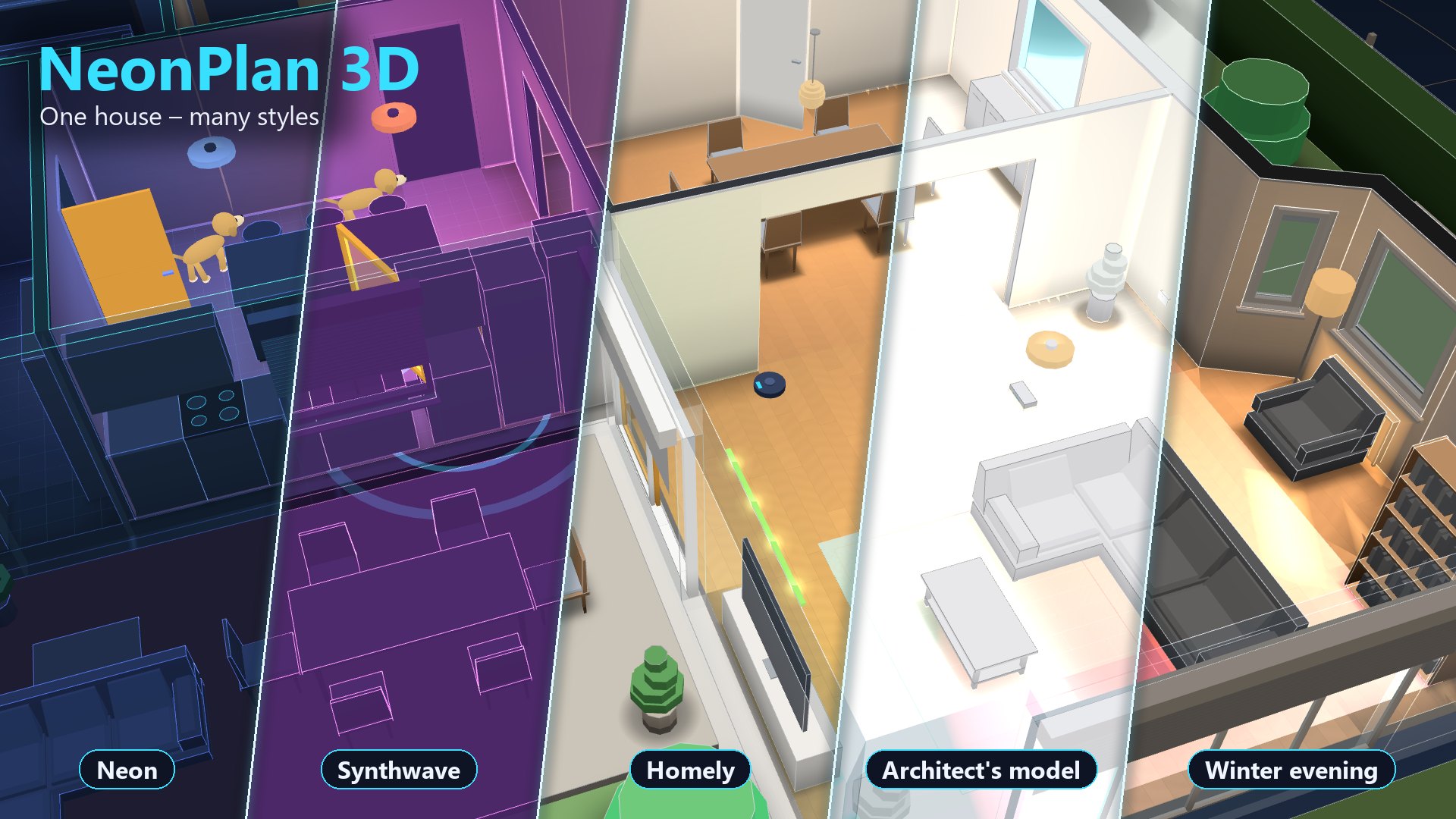
🎨 Eleven styles to start with
| Group | Styles |
|---|---|
| Neon & classic | Neon (still the default), Blueprint, Day, Night / Focus |
| Homely – real materials | Homely, Homely evening, Winter evening: wooden floors, tiles, light walls, soft shadows under the furniture, a warm dim in the evening |
| Designed | Synthwave, Architect's model, Pastel, Warm / Wood & paper |
Lights, open windows and running devices keep their signal colours in every style – you still see at a glance what is going on.
Where: in the 3D view tap ⚙ (top, next to the version) → 🎨. Every device remembers its own style.
🖌️ Wall colours
- Select a room in the editor: the box Wall settings (formerly Wall heights) starts with Wall colours. Colour all walls at once, then give single walls a colour of their own.
- The outer walls get a Facade colour under ⚙ Settings → 🎨 Styles.
- Wall colours show in the homely styles; the 3D pane beside the plan switches to Homely while you colour.
✨ Your own styles
- ⚙ Settings → 🎨 Styles shows your house large in the style chosen, and every style as a tile.
- + Make an own style from it – then turn every knob: real materials or your own palette, evening mood, floor texture, light, shadows, background. Every change shows live on the house.
- Your styles appear in every style list – view, card, card templates – and answer to their name by voice.
🕒 By time of day, by voice, by automation
- House plan: homely during the day, warm in the evening, calm at night – switched by the sun or by the clock (🕒 Times of day). Set a screen to House plan and it follows.
- Cards: a dashboard card can have its own style in the evening and at night (
theme_evening,theme_night). - Voice: "NeonPlan style homely", "House to synthwave", "Style back" – in the app's microphone and through Assist.
- Automations: the new action
neonplan3d.set_style(style, screens, minutes) – for example Winter evening on the kitchen tablet for an hour. Or a helper entity (input_select) whose state names the style. - The newest setting wins: choosing a style for a screen again ends one set by voice or an action.
How to update
- Settings → System → Updates shows NeonPlan 3D 3.1.0. If it is missing: HACS → NeonPlan 3D → ⋮ → Update information, then Download.
- Restart Home Assistant once (for the new action and the voice commands).
- Reload the browser with Ctrl+F5; in the companion app close the app fully.
How to start
- In the 3D view: ⚙ → 🎨 and pick a style. Nothing changes until you do – Neon stays the default.
📖 Manual: Styles
Found something that doesn't look right? Please open a GitHub issue – with a screenshot and the style you used.
NeonPlan 3D 3.1 – Neon war erst der Anfang
Euer Haus in jedem Stil.
Ihr wolltet es – hier ist es. Euer Haus muss nicht mehr Neon sein. Wohnlich mit Holzboden und euren eigenen Wandfarben, Synthwave, Architekturmodell, Winterabend – oder ein Stil, den ihr selbst baut. Editor und Bedienung bleiben Neon, das Haus trägt, was euch gefällt.
Kostenlos für alle. Und es läuft weiter auf alten Wandtablets – die Stile färben nur anders ein und kosten keine zusätzliche Leistung.
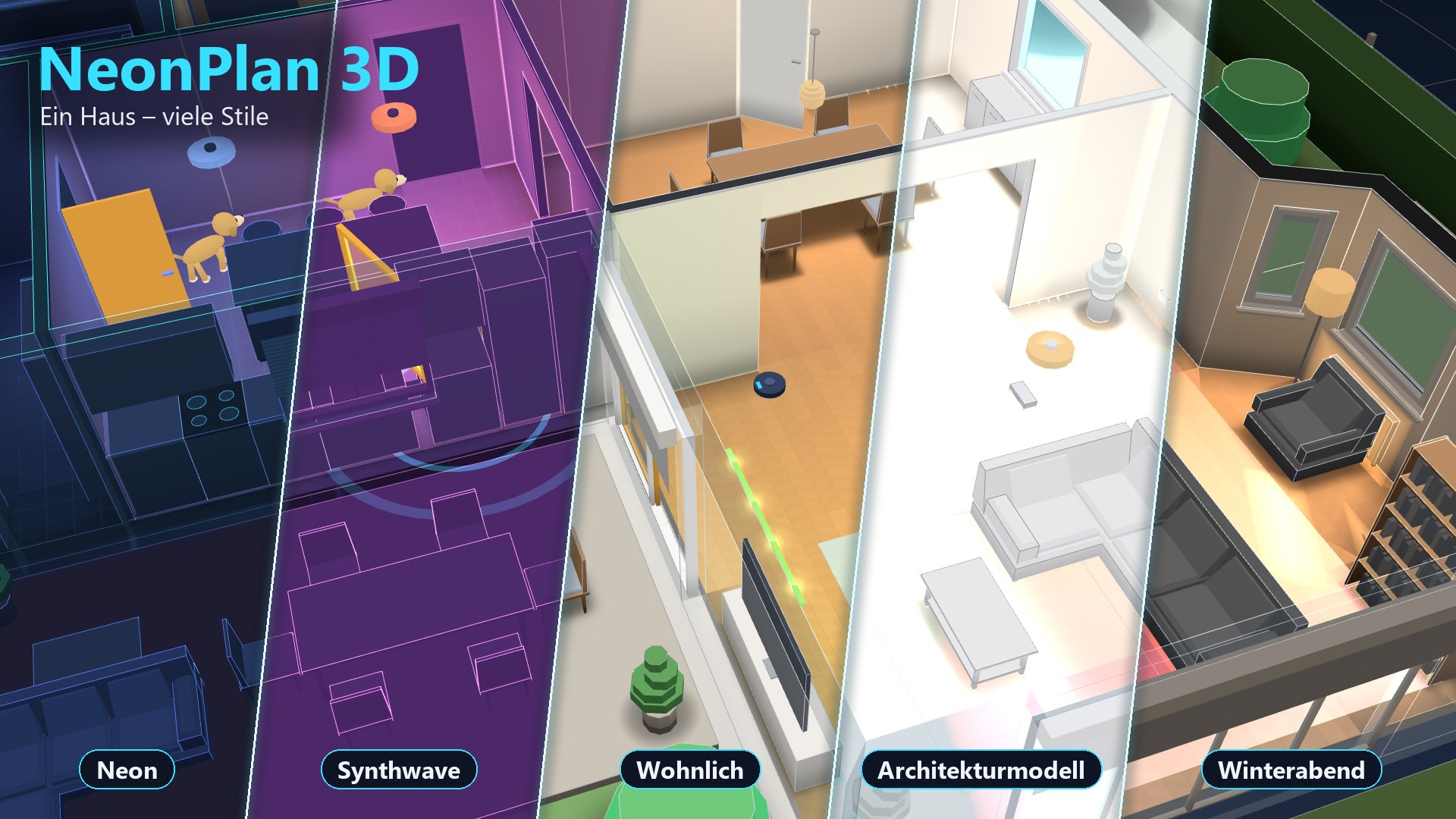
🎨 Elf Stile zum Start
| Gruppe | Stile |
|---|---|
| Neon & Klassik | Neon (weiter der Standard), Blueprint, Tag, Nacht / Fokus |
| Wohnlich – echte Materialien | Wohnlich, Wohnlich Abend, Winterabend: Holzböden, Fliesen, helle Wände, weiche Schatten unter den Möbeln, abends warm gedimmt |
| Gestaltet | Synthwave, Architekturmodell, Pastell, Warm / Holz & Papier |
Lichter, offene Fenster und laufende Geräte behalten in jedem Stil ihre Signalfarbe – ihr seht weiter auf einen Blick, was los ist.
Wo: In der 3D-Ansicht ⚙ (oben neben der Version) → 🎨. Jedes Gerät merkt sich seinen eigenen Stil.
🖌️ Wandfarben
- Im Editor einen Raum auswählen: Der Kasten Wandeinstellungen (bisher Wandhöhen) beginnt mit Wandfarben. Erst alle Wände auf einmal färben, dann einzelne Wände anders.
- Die Außenwände bekommen unter ⚙ Einstellungen → 🎨 Stile eine Fassadenfarbe.
- Wandfarben zeigen die wohnlichen Stile; die 3D-Ansicht neben dem Plan schaltet beim Färben auf Wohnlich.
✨ Eigene Stile
- ⚙ Einstellungen → 🎨 Stile zeigt euer Haus groß im gewählten Stil und jeden Stil als Kachel.
- + Als eigenen Stil anlegen – dann an jedem Regler drehen: echte Materialien oder eigene Palette, Abendstimmung, Bodenstruktur, Licht, Schatten, Hintergrund. Jede Änderung seht ihr sofort am Haus.
- Eure Stile stehen in jeder Stil-Liste – Ansicht, Karte, Karten-Vorlagen – und hören per Sprache auf ihren Namen.
🕒 Nach Tageszeit, per Sprache, per Automation
- Hausplan: tagsüber wohnlich, abends warm, nachts ruhig – nach Sonne oder Uhrzeit (🕒 Tageszeiten). Einen Bildschirm auf Hausplan stellen, und er folgt.
- Karten: Eine Dashboard-Karte kann einen eigenen Stil abends und nachts haben (
theme_evening,theme_night). - Sprache: „NeonPlan Stil Wohnlich“, „Haus auf Synthwave“, „Stil zurück“ – im Mikrofon der App und über Assist.
- Automationen: die neue Aktion
neonplan3d.set_style(Stil, Bildschirme, Minuten) – etwa eine Stunde Winterabend auf dem Küchentablet. Oder eine Helfer-Entität (input_select), deren Zustand den Stil nennt. - Die neueste Einstellung gewinnt: Wählt ihr für einen Bildschirm neu einen Stil, endet ein Stil per Sprache oder Aktion.
So bekommst du das Update
- Einstellungen → System → Updates zeigt NeonPlan 3D 3.1.0. Fehlt es: HACS → NeonPlan 3D → ⋮ → Update-Informationen, dann Herunterladen.
- Home Assistant einmal neu starten (für die neue Aktion und die Sprachbefehle).
- Browser mit Strg+F5 neu laden; in der Companion-App die App ganz schließen.
So geht's los
- In der 3D-Ansicht: ⚙ → 🎨 und einen Stil wählen. Bis dahin ändert sich nichts – Neon bleibt der Standard.
📖 Anleitung: Stile
Sieht etwas nicht richtig aus? Bitte ein GitHub-Issue aufmachen – mit Screenshot und dem Stil, den ihr benutzt habt.