Repository navigation
Workflow Markdown Harness.en
中文 | English
Agent Deck is built around one core principle: Markdown, outlines, and journals are the harness. Instead of locking tasks and conversations inside a proprietary plugin database, your regular Obsidian notes drive multi-agent collaboration and receive all results back in place.
When you delegate from any task or subtask (always reading unsaved editor buffers first), Agent Deck automatically assembles:
- Parent outline chain: The hierarchy from root heading/task down to the current subtask so the agent understands the bigger picture.
-
Prior Q&A & progress: Existing
💬logs,❓questions, and✍️answers under the same task. - Relevant long-term memories: Up to 5 relevant entries from your memory library, each with a link back to the original journal block so the agent can verify source context.
-
Linked notes: Excerpts from
[[wikilinks]]referenced in the task (when there are many links, paths are passed for on-demand reading; notes markedprivateare never sent out). -
Skill cards: Mention
[[Skills/xxx]]in a task to attach a local skill's instructions to that run.
Preview before sending: Run
Delegate: write a draft (do not send)to materialize the full dispatch payload right under the task line so you can edit it before sending. Actual dispatches also save an immutable snapshot (Agent Deck/派发/*.md) for later review.
- When a background agent ends a turn with a question, a
❓line is written under the task and surfaced in the sidebar Reply inbox. - Write
✍️ Answer: …directly in the note or use "Answer and continue" from the task menu to resume the same session without switching back to the external client.
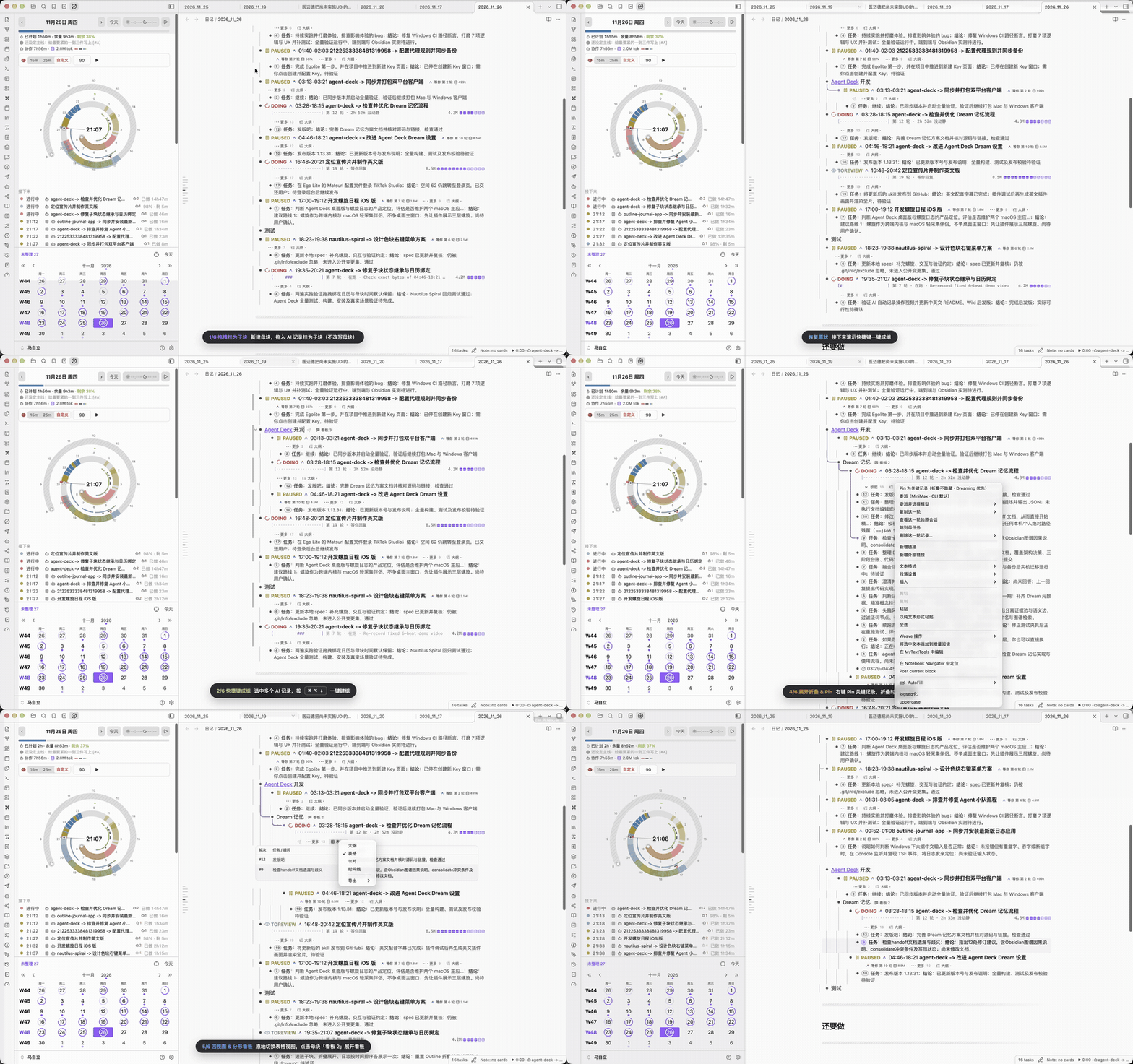
60-second live demo (each workflow shown once) · click for the HD MP4 with music
Every AI auto-logged journal entry is plain Markdown, so you can organize, highlight, and re-view it like any outline while background tracking keeps syncing cleanly:
-
Drag-bind (nests as a child block by default): create a parent outline item (e.g.
- [[Agent Deck]] 开发), then drag a sidebar session card or an existing AI record's drag handle onto it. It nests underneath as a child block while leaving the parent's prose and time range untouched; hold⌥(Alt) to directly 1:1 bind or merge into the target line. -
Group rows shortcut (
⌘⌥↓/Ctrl+Alt+↓) & progressive nesting: select multiple AI auto-logged blocks and press⌘⌥↓(or right-click Group rows) to indent the selection under a fresh parent bullet ready for your project name or wikilink. Repeat inside a group to build multi-level Project → Sub-topic → AI record outlines. With multiple blocks selected, right-click or click any status badge to bulk-update statuses in one step. -
Fold/expand & right-click Pin: older rounds stay folded by default so only the latest conclusion is shown; click
⋯ More N/› Collapse Nto toggle. Right-click any round (in Outline, Table, Cards, Timeline, or Reading View) and pick the top item Pin as key record (stays visible when folded · Dreaming priority)—pinned rounds stay visible with a subtle accent highlight even when folded and carry higher priority during Dreaming memory distillation. The same menu also copies conclusions, opens the original session, jumps to the parent task, re-delegates that round to another agent/model, or deletes the round. - In-place record views & fractal board: switch any AI record in place between Outline / Table / Cards / Timeline (and export the active view) without touching the underlying Markdown. Any parent or sub-topic holding multiple task children gets a Board N toggle to open an in-place fractal Kanban board where dragging cards updates statuses.
-
Tidy journal layout (
⌃⌥L/Ctrl+Alt+L) & lossless safeguards: press⌃⌥Lor click Tidy journal layout to group scattered top-level AI blocks under Done / Doing / To do, ordered by status priority and round count, while keeping your grouped parent trees and nested sub-blocks intact. Click any status keyword to manually lock it, press⌘⇧Dto markDONEand move to Done, and edit any AI title or prose knowing Agent Deck will never overwrite hand-edited text.
-
How to write it (parent holds the estimate/plan, child
- ⏱holds actual active time):- Write your estimated task or time-blocked entry in today's daily note, for example:
-
- TODO [#A] Refactor auth module 1h(explicit duration estimate1h) -
- TODO **10:30** Research caching 45m(intermittent timestamp + estimate45m) -
- 14:00-15:00 Design review(reserved time block)
-
- Drag a sidebar session card or an existing AI auto-logged block onto that parent line (nests as a child block by default, or hold
⌥to bind directly to the line).
- Write your estimated task or time-blocked entry in today's daily note, for example:
-
Default child
- ⏱scheme & unified active-session timing:- In Settings → Recording → Journal & archive → Session timing scheme, the default is
Child ⏱ block (Default · Nautilus Spiral): the parent headline, duration estimate, and timestamps stay untouched while live session spans are written to- ⏱ HH:MM–HH:MM · total Xm · Xk tok · Agent. If you prefer the legacy headline range (HH:MM-HH:MM), you can switch back toLeading HH:MM-HH:MM (Legacy)in the same control. - Agent Deck uses the exact same activity segmentation logic as Nautilus Spiral: events within
≤ 5 minutesbelong to the same active span, overlapping multi-session segments are union-deduplicated, and manualDONEclicks or desktop archive timestamps are never treated as session end time. With<!-- ad-clock:... -->signatures, Agent Deck and Nautilus Spiral Pomodoro- ⏱child lines coexist without overwriting one another.
- In Settings → Recording → Journal & archive → Session timing scheme, the default is
-
Reviewing Estimate vs. Actual in Nautilus Spiral:
- Nautilus Spiral merges multiple
- ⏱lines under the same task and rolls up- ⏱time from nested🤖child blocks to the human parent task (or reserved event), so Day review and 30-day Estimate vs. actual accurately compare your upfront estimate against real net active duration.
- Nautilus Spiral merges multiple
Inspect the exact same Markdown from multiple perspectives without rewriting the underlying file:
- Four AI record views: Outline, Table, Cards, and Timeline (interactive in Live Preview, clean read-only preview in Reading View), with view-aware export to PDF, HTML, Markdown, JSON, or CSV.
-
Pin & re-delegate: Right-click any round in Outline, Table, Cards, Timeline, or Reading View to pin it as a key record (
<!-- ad-pin -->, preserved when folded and prioritized by Dreaming) or re-delegate that round to your default agent or a chosen model. -
In-place fractal boards: Any block with multiple direct child tasks gets a Board N toggle (clean non-editable read-only preview in Reading View) — split by status or by group, drag cards across columns, zoom into nested sub-boards, inspect queued-stage pills, recover failed workers (
Retry failed) or skip partial failures to start the next batch, re-dispatchNEEDOKcards, dismiss finished summary strips, and use mirror cards (![[Note#^block-id]]) that write status changes back to the source note.
-
Goal →
task.md→ Board: RunPlan: turn this line into task.mdto break a single goal line into steps with acceptance criteria; the output automatically opens as a board. -
Staged squads & Steward loop: Five built-in squads (full-stack, debugging/refactoring, research & docs, deep report, long-form writing) that skip missing CLIs and disabled/rate-limited agents; switch planner models on demand, validate working directories before launch, stagger file-overlapping tasks into Batch 1 / 2 / 3 with automatic upstream summary and
Answers/archive path handoffs, inject direct-execution instructions when "Skip confirm-first" is checked (or hold inNEEDOKuntil answered via reply/desktop/re-dispatch when unchecked), and let the Steward agent synthesize results once complete (with a 15-minute mid-run stall check covering both workers and the Steward). -
Workbench overview: Run
Workbench: refresh overviewto generate a single index note listing active boards, memory statistics, and recent plans.