Repository navigation
Releases
GloomhavenVR 1.2.3

GloomhavenVR 1.2.3 — play Gloomhaven (digital) as a room-scale VR board game.
You stand at the table and pick your cards up with your hands.
What's new
Hotfix 1.2.3 for 1.2.2. This update corrects the 3D character preview during
character creation.
- Name entry: the figure stands beside the keyboard at a usable size, leaving the keys
clear. - Personal quest selection: the figure is slightly smaller and its feet sit above the
lower text. Characters retain their natural relative heights.
For the full feature list, controls and known issues, see the
1.2.2 release notes.
Update with the complete 1.2.3 release archive, including its VR assets.
All VR players in a multiplayer group must update together; flat players can continue
without installing the mod.
Install
Install BepInEx once, then download GloomhavenVR-1.2.3.zip below and extract it
into your Gloomhaven folder, beside GH.exe. The archive includes the mod and its
VR assets. Follow INSTALL.txt or INSTALL-DEUTSCH.txt inside the archive for
the BepInEx download and headset setup.
Updating from an older version? Unpack this zip over the top of the old one.
Nothing to uninstall first. The game will close and reopen by itself once on the
first start after that — that is meant to happen. Your settings and save games are
untouched.
Playing with other people: everyone in a session needs this same version of the
mod. If someone has a different one the game tells you, rather than letting the
session go quietly wrong. People without the mod at all can still play with you.
Everything else — the controls, all the settings, the known rough edges and what to
send if something breaks — is in the README.
Technical change log — 13 change(s) since v1.2.2, written by and for developers
- docs: record 1.2.3 hotfix compatibility and trusted release proof
- docs: describe the 1.2.3 character creation hotfix
- docs: record larger naming preview and final pixel clearance proof
- test: verify the full head silhouette clears the keyboard
- fix: reserve perspective clearance beside the naming keyboard
- test: cover naming size and preserve accepted quest framing
- fix: use an upright frame for the character naming preview
- chore: stamp Build753 naming preview size correction
- docs: record Build752 focused rendering proof and cleanup
- docs: record minimal Build752 creation layout verification
- test: exercise native creation page figure clearances in final head pixels
- fix: reserve keyboard and quest text space in character creation
- chore: stamp Build752 creation preview hotfix
Full comparison: v1.2.2...v1.2.3
Built from b87477f8a (2026-10-30).
GloomhavenVR 1.2.2
GloomhavenVR 1.2.2 — play Gloomhaven (digital) as a room-scale VR board game.
You stand at the table and pick your cards up with your hands.
What's new
- Story illustrations and live character previews now have 3D depth. Lean or move around
the window to see the perspective change, including the back of a character. To turn a
preview, point at the figure, hold the laser trigger and move sideways. Its position and
window stay fixed. You can disable character depth under VR Options → Panels → 2D screen
→ 3D character previews. - Menu cards stand out from their windows. Ability and item hover previews have stronger
depth, and the laser lands on their raised surfaces. More Cards previews stay complete,
leave their card names readable and provide the usual hover feedback. - Sharper, steadier character windows. Text, buttons and figures remain clear while you
move, with corrected character framing, tooltip placement and overlapping UI. - Level-up choices stay together. New cards appear correctly oriented from the first
frame, the selection list remains available, and confirmations appear on the window that
opened them. Use More Cards on the character's Cards page to browse outside a level-up. - Leaving a page cancels its pending decision. Switching tabs, characters or windows
declines the old confirmation, including switching from Perks to Cards for the same
character. - The main menu is a movable, resizable world window, with laser and hand grabbing and
free movement. Your chosen surroundings also appear in the main menu and on the map,
starting after the intro. The Default environment remains a finite space you can leave. - More reliable shared windows. Simultaneous grabs no longer pull players' copies apart;
after a laser drag, a window turns toward the player who last let go. Scenario story windows
remain usable with the laser, and story and encounter windows lose their oversized backing. - Town residents stay put when anyone changes surroundings. Woodland ground meets their
feet while their shared height stays fixed. Travel audio also avoids overlapping loops
after an encounter.
Update with the complete release archive, including its VR assets. All VR players in a
multiplayer group must update together; flat players can continue without installing the mod.
Install
Install BepInEx once, then download GloomhavenVR-1.2.2.zip below and extract it
into your Gloomhaven folder, beside GH.exe. The archive includes the mod and its
VR assets. Follow INSTALL.txt or INSTALL-DEUTSCH.txt inside the archive for
the BepInEx download and headset setup.
Updating from an older version? Unpack this zip over the top of the old one.
Nothing to uninstall first. The game will close and reopen by itself once on the
first start after that — that is meant to happen. Your settings and save games are
untouched.
Playing with other people: everyone in a session needs this same version of the
mod. If someone has a different one the game tells you, rather than letting the
session go quietly wrong. People without the mod at all can still play with you.
Everything else — the controls, all the settings, the known rough edges and what to
send if something breaks — is in the README.
Technical change log — 100 change(s) since v1.2.1, written by and for developers
- Record hardware acceptance and local log review for release 1.2.2
- Note the startup studio logo safe 2D fallback in release highlights
- Describe spatial menus and multiplayer fixes for release 1.2.2
- Record Build751 paired regression causes and minimal affected checks
- Probe native woodland sole contacts and their environment-owner consumer
- Cover complete native sole triangles before contact blending
- Reproduce retired card-plane failure through story laser and following bar query
- Stamp Build751 stable town contacts and restored story laser input
- Seat local woodland contacts beneath fixed town residents
- Ignore destroyed menu card planes before native readiness reads
- Record Build750 feedback, native navigation and qualified complete validation
- Check real native gamepad history before supplementary call counts
- Prove authored outer navigation and native reentrant gamepad history
- Refresh confirmation patch source locations after navigation repair
- Keep authored outer menu and active navigation context across UI modes
- Bind natural-outcome control to the native persistent enhancement listener
- Exercise native confirmation navigation, callbacks and causal controls
- Register opening-scoped native Hide completion repair
- Preserve new native openings across an outgoing confirmation Hide
- Register native decision navigation and outcome guards
- Complete native navigation scoping and preserve chosen outcomes
- WIP: bind native decision lifetime to accepted navigation
- Decline page-owned decisions before an admitted user window close
- test: prove native More Cards feedback parity and permissions
- test: expose missing native More Cards hover haptics
- fix: restore More Cards preview hover feedback
- Start Build750 native feedback and page-scoped decision repair
- Record Build749 native More Cards hover validation and cleanup
- test(menu-depth): validate native More Cards input ownership and canvas gates
- fix(menu-depth): retain native nested input priority on equal canvas orders
- test(menu-depth): reproduce blocked More Cards centre hover
- fix(menu-depth): route raised More Cards to its native row input
- Declare the unused native row boundary in desktop rendering fixtures
- Start Build749 native More Cards hover ownership repair
- Record Build748 physical menu fixes and complete aggregate integration evidence
- Exercise native repair and hover delivery across the genuine receipt grace period
- Validate exact native original repairs before selecting the captured hover delta
- Bind portable level-up geometry to its live Cards context and native callback boundary
- test(menu-depth): declare inactive tooltip performance context
- Bind integrated rotation faults to the original capture method
- Keep render-fault and desktop fixture boundaries compatible with menu hit receipts
- Keep local suite inventory contract aligned with physical menu tests
- Register physical menu laser integration suite in the local gate
- Exercise physical menu laser hits through native Unity geometry and input
- Return native backdrop receipts to the active story owner
- Own native story backdrops before the first visible frame
- Bound menu ray diagnostics and preserve native far-pointer filtering
- Preserve native menu hit ownership and source render receipts through pooling
- Bind menu laser surfaces to original physical geometry and native UI coordinates
- test(menu-depth): supply absent atlas context to material fixture
- Record Build748 native evidence and integration scope
- Bind world-menu consumer to depth surface input with explicit empty-source ports
- test(world-ui): document left-gap and row-ink capture boundaries
- Bind isolated conversion consumers to inventory and background ownership seams
- fix(world-ui): place More Cards left and retire orphaned browsing
- Start Build748 menu depth interaction and story transition repairs
- Record Build747 bounded render validation, repairs and cleanup
- Separate preview presentation helper from Harmony patch parameter analysis
- Keep native preview offset reads clear of Harmony parameter-write analysis
- Integrate Build747 native preview and story visibility repairs
- fix(world-ui): keep More Cards previews outside inventory clip
- Fix native loadout backdrop during composed story
- Record final Build746 multiplayer verification, limits and evidence retention
- Retain complete active-window handover and serial-clock regression coverage
- Document late shared-window claim clock and serial initialization
- Initialize a cold publisher sequence from its observed clock
- Converge shared window poses across publisher and automatic-author handover
- Record completed fixture repairs and preserve pending handover review
- Authorize exact reward opening relays after a proved publisher handover
- test(town): port setting fixture to the common native floor
- Repair legacy shared-window fixture ports and retain focused run evidence
- Record integrated multiplayer evidence and bounded fixture repairs
- fix(tests): preserve older successful run evidence
- test(town): align activity and clearance fixtures with native floor frame
- Exercise shared gesture transport, real reflow and final ready-button pixels
- Recheck live shared grip scope when admitting room making
- Gate legacy shared reflow cancellation with the accepted move order
- Retain the existing release-facing diagnostic literal boundary
- Bind new shared openings to their placement author and retain diagnostics
- Record Build746 paired review integration and evidence limits
- Order shared window gestures causally and restore accepted release facing
- Keep completed-frame spike seams Debug-only and record validation
- Measure previously unassigned head-capture callback intervals
- Describe shared window release facing for all participants
- test(worldui): exercise native narrative pixels and restoration
- fix(worldui): hide native narrative dimmers while floating
- fix: isolate town geometry and lighting from local environments
- Record Build745 aggregate validation and native card-list controls
- Observe owned-member sync dispatch in capture fixture boundary
- Observe native confirmation capture handoff in dialog lifecycle fixture
- Prove native card-list entry and confirmation AA producer binding
- Prepare native card-list fixture sour...
GloomhavenVR 1.2.1
GloomhavenVR 1.2.1 — play Gloomhaven (digital) as a room-scale VR board game.
You stand at the table and pick your cards up with your hands.
What's new
- Dismiss living summons and end active card effects in VR. Take the card from the active
area and place it in the highlighted area used for items below the board, then press
Dismiss or End effect. Take it back before confirming to cancel. After confirmation,
the card flies from that spot to its correct pile, both locally and for other players. - Item fans close automatically after placing a card. The placed card and any required
choices remain available; confirm the action or take the card back to cancel. - Shared multiplayer windows keep the same world size and position for everyone, even
when players use different table zoom levels. The host determines where new shared windows
open, with size and opening distance independent of the host's zoom. Shared moving and
resizing remain available. - Quest windows stay in sync. Closing or replacing a browsing selection updates the whole
group. Clicking elsewhere or pressing X no longer privately hides a committed quest proposal;
its normal accept and decline controls remain available. - Fixed missing card-placement guides after joining a multiplayer game, when the game
had assigned a character but still presented another character's hand. - The item-use overlay now clears after surrendering an item, without needing to switch
characters. The item's animation finishes before the area is released.
Update with the complete release archive, including its VR assets. All VR players in a
multiplayer group must update together; flat players can continue without installing the mod.
Install
Install BepInEx once, then download GloomhavenVR-1.2.1.zip below and extract it
into your Gloomhaven folder, beside GH.exe. The archive includes the mod and its
VR assets. Follow INSTALL.txt or INSTALL-DEUTSCH.txt inside the archive for
the BepInEx download and headset setup.
Updating from an older version? Unpack this zip over the top of the old one.
Nothing to uninstall first. The game will close and reopen by itself once on the
first start after that — that is meant to happen. Your settings and save games are
untouched.
Playing with other people: everyone in a session needs this same version of the
mod. If someone has a different one the game tells you, rather than letting the
session go quietly wrong. People without the mod at all can still play with you.
Everything else — the controls, all the settings, the known rough edges and what to
send if something breaks — is in the README.
Technical change log — 89 change(s) since v1.2.0, written by and for developers
- Record repaired release CI fixtures and build721 local validation
- test: restore flight timing coverage for dismissal handovers
- Prepare release 1.2.1 with build721 identity and validation scope
- Write English player highlights for release 1.2.1
- Use hosted SDK in card dismissal and latejoin CI fixtures
- Record build720 item surrender regression evidence and validation
- Prove item surrender result ownership and berth cleanup
- Fix item surrender result ownership across off-turn cleanup
- Record build719 fixed-distance evidence and validation boundaries
- Port reward placement proof to actual captured spawn metric
- test: prove shared host spawn distance ignores independent zoom
- test: port native movie fixture to captured shared spawn reference
- Fix shared window reading distance independently of host zoom
- Record build719 fixed shared-window spawn distance contract
- Complete build718 dismissal flight validation and retain hardware boundaries
- Prove remote dismissal original handoff and delayed native lifecycle
- Preserve frozen dismissal parent while native active membership lags
- Port burn sequencing fixtures to exact dismissal source context
- Expose dismissal artwork wait lifetime for causal runtime proof
- Integrate original dismiss flight publication and mirrored owner context
- Keep accepted dismissal originals through hidden berth and delayed native state
- Prove exact dismissal cohorts and bound saturated presence assembly lifetime
- Retain staged remote original until its first drawable dismissal flight
- Fix remote dismissal berth origin and original card flight handoff
- Carry exact dismissed-card launch origins in additive paged record122
- Preserve confirmed dismiss cards for native pile flights
- Prepare build 718 exact active-dismiss flight context
- Record build717 multiplayer evidence and complete composed gate coverage
- Keep native service close fixtures independent of shared quest windows
- Preserve hardware grep tokens with their corrected placement meaning
- Align reward and movie fixture boundaries with captured shared scale
- Prove captured window reference transport across shared pose lifecycles
- Wait for native map census before shared quest delivery
- Describe canonical window poses accurately in bounded move diagnostics
- Retain item clip source checks across shared berth admission
- Pin reward census and world-frame contracts in golden checks
- Document captured geometry and report the adopted opening scale
- Remove duplicate source link from wire test compilation
- Adopt captured shared geometry with the author's common world pose
- Carry captured shared-window render references in record121
- Prove shared render reference parity across map modes and conversion timing
- Adopt the shared opening render reference before first reveal
- Update native reward fixture boundaries for shared placement
- Publish first accepted quest input without forging refused clears
- Register multiplayer runtime checks and document build717 evidence
- Test shared reward placement against production kernels
- Qualify shared quest browsing by causal opening identity
- Prove native shared-window sizing across menu and rig gaps
- test shared movie reveal and initial-author regressions
- Derive shared window base from native Hex geometry across rig gaps
- Require a current-opening receipt before reusing a same-key map pose
- Complete shared placement handoffs and qualify quest browsing snapshots
- Keep shared movie placement with the host independently of its decoder
- Prove shared pose transport and first visible baseline adoption
- Pin nonwrapping shared quest version ancestry policy
- Pin shared quest selection ancestry with additive golden vectors
- docs(trailer): refine opening slate, damage pacing and multiplayer poses
- Preserve shared quest dismissal through native readiness locks
- Pin shared window author frame with additive golden vectors
- Share host-authored window poses in the actual world frame
- Publish an already revealed host window when its session starts
- Exercise shared window geometry and author reveal in real Unity
- Record focused native and remote card regression evidence
- Give shared windows one fixed world frame and initial placement author
- Fix latejoin selection hand admission through native presenter
- Finalize VR trailer with real multiplayer footage
- Record trailer v20 card zoom and varied travel montage
- Record completed physical dismissal integration and bounded validation
- Retain exact cold atlas timing before its unchanged deadline assertion
- Isolate rejected-publication mutation from successful native send bookkeeping
- Publish the actual dismissal actor and qualify the final packet budget
- Bind environment runtime fixtures to live terrain and exact bank guards
- Bind active-card dismissal presentation to its original actor
- Refresh cabinet category fixture for live figure and world hover ownership
- Keep dismissal wording identical on local and remote boards
- Refresh town transfer fixture for live figure and trigger ownership ports
- docs(trailer): record v19 choice edit and forest angle
- Add physical place-and-confirm dismissal for active cards
- Register remote dismissal preview with its board furniture
- Mirror staged active-card dismissal without duplicating the card
- Claim shared item berth before installing placement controls
- Retain native multiplayer caster window for active-card dismissal
- Add validated native active-card dismissal confirmation lease
- Close item fan after accepted card placement
- docs(trailer): record v18 damage and map corrections
- docs(trailer): record v17 VR edits and multiplayer capture scope
- Qualify shared XR GPU provider repair and maintained focused coverage
- Limit provider repair to GPU samples and preserve existing counter semantics
- Read live XR display timings with explicit seconds-to-milliseconds conversion
Full comparison: v1.2.0...v1.2.1
Built from 7b173b376 (2026-10-23).
GloomhavenVR 1.2.0
GloomhavenVR 1.2.0 — play Gloomhaven (digital) as a room-scale VR board game.
You stand at the table and pick your cards up with your hands.
What's new
Native Steam Link passthrough
Play from your Windows PC on Steam Frame over Steam Link, with Gloomhaven's table and
floating windows in your real room. Native transparency preserves the game's colours and
partially transparent effects without colour replacement. The camera image stays on the Frame.
Install the separate Steam Link Native Passthrough companion on your PC and Frame.
Then choose Mixed Reality under VR Options → World → Scenery and enable
Steam Link native passthrough below the environment choices.
The companion currently supports Windows PCs with NVIDIA GPUs. Check its page for compatible
SteamVR versions and current limitations; brief passthrough interruptions can still occur.
Steam Frame standalone keeps its built-in native passthrough and does not need this companion.
3D videos
The GloomhavenVR intro, character films, ambient films and studio logo now have stereoscopic
depth inside the movable video window. Move and resize the window as usual while the film
retains its recorded camera view. Story playback and shared viewing remain part of the normal
game flow.
Fixes and refinements
- Change your card selection freely before confirming. Taking cards back into your hand and
replacing them now keeps the hand, board slots and placement guides consistent, including
after switching characters and on other players' boards. - Quieter feedback: moving across a card or an action area gives one hover vibration;
tooltip popups no longer add repeated vibrations. Short rests no longer repeatedly play the
card-fan sound while a card burns. - More precise interaction: obstacle and trap hints appear only when the laser points at
their tile. A figure's pickup highlight now represents an available grab, including after
changing the table's scale. - Health bars respect your hands and cards, even with visibility through walls enabled.
Bars are hidden individually where covered, without hiding or flickering unrelated bars. - Continue stays usable on chest rewards and level-up announcements when the pause menu
is independently open. - Merchant and mixed-reality fixes: improved merchant stock recovery after extended play,
corrected water rendering, and kept initiative symbols in front of their window background. - Steam Frame setup restores the required launch options automatically, preserving your
custom options and the separate flat and VR library entries.
Update with the complete release archive, including its VR assets. All VR players in a
multiplayer group must update together; flat players can continue without installing the mod.
Install
Install BepInEx once, then download GloomhavenVR-1.2.0.zip below and extract it
into your Gloomhaven folder, beside GH.exe. The archive includes the mod and its
VR assets. Follow INSTALL.txt or INSTALL-DEUTSCH.txt inside the archive for
the BepInEx download and headset setup.
Updating from an older version? Unpack this zip over the top of the old one.
Nothing to uninstall first. The game will close and reopen by itself once on the
first start after that — that is meant to happen. Your settings and save games are
untouched.
Playing with other people: everyone in a session needs this same version of the
mod. If someone has a different one the game tells you, rather than letting the
session go quietly wrong. People without the mod at all can still play with you.
Everything else — the controls, all the settings, the known rough edges and what to
send if something breaks — is in the README.
Technical change log — 100 change(s) since v1.1.0, written by and for developers
- Prepare release 1.2.0 with native passthrough and stereo video highlights
- Pin carry release ownership independently of block formatting
- Write English 1.2.0 release highlights for native passthrough and stereo videos
- Persist Frame launch options across Steam restarts
- Exercise managed Frame setup against an independently cached Steam client
- Preserve shortcut path spelling in queued Frame setup
- Reject broken managed setup receipts instead of skipping guards
- Apply queued Frame options before managed Steam startup
- Inventory visible trailer UI and strengthen the weakness attack
- Record integrated Build 714 validation scope [skip ci]
- Build 714: retain menu MR source through native anchor swaps
- Exercise menu anchor continuity through actual Unity coverage lifecycle
- Keep the owned menu head through native anchor replacement
- Fix CI inventory for the native initiative backing render test
- Build 713: preserve MR initiative depth and record activation evidence
- fix: seat initiative MR backing behind its visible native depth
- Document UI-focused October 19 VR trailer pass
- Replace the redundant passthrough notice with the new install links [skip ci]
- Keep passthrough guidance brief beside the dedicated install links [skip ci]
- Clarify standalone and Steam Link passthrough installation links
- Ship build 712 with native pointer Continue permission
- Exercise reward pointer input against native continuation lifecycle
- Keep native announcement Continue usable beside the ESC window
- Keep routine reward input waits at Debug
- Keep explicit reward Continue available beside the escape menu
- Fix inherited wall-signature CI counter expectation
- Ship build 711 with live figure pickup guarantees and focused coverage
- test: exercise highlighted figure grab arbitration and producer exclusivity
- docs: distinguish figure pickup priority from prop stretch capture
- docs: scope visual hover dwell to nonfigure targets
- fix: yield world lasers to highlighted figure pickup
- fix: identify the actual owner of refused figure triggers
- fix: revoke figure offer while the hand carries a bar
- fix: make highlighted figures own their grab offer
- Record shared pillar retirement integration and focused validation
- Qualify warm pillar stream pruning and record removal evidence
- Remove structural pillar LOD and its reduced distribution meshes
- Record PC Frame and Quest pillar LOD history before removal
- fix: retain native wall authority over detached pillar LOD draws
- docs: record published paired-only package and public history
- docs: record paired-only retirement and scoped integration evidence
- Remove legacy Steam Link atlas transport; use paired ordinary RGBA only
- Point Steam Link guides to the paired-only passthrough route
- docs: record published Steam Link dispatch repair and scoped validation
- docs: clarify native passthrough routes and current VR menu paths
- Record Build709 Steam Link observer and legacy menu containment
- Pause legacy Steam Link atlas while native XR focus is unavailable
- Retire Steam Link cancellation callbacks off the XR tick
- Deliver Build 708 paired full-resolution Steam Link source
- Negotiate full-frame RGBA coverage source without RGB atlas
- Record bounded native control progress and cleanup after setup publication
- Record published guided patch removal and actual Windows management checks
- Record friendly setup delivery, actual Windows EXE fix and decode-provider progress
- Record published read-only setup preview and actual Windows runtime checks
- Record setup CI and official Linux sender source boundary
- Record guided setup prototype and authenticated integration evidence
- Record negotiated sender authorization and guided setup boundaries
- Record evaluated larger Steam Link carrier and source-proven sizing boundary
- Record app-only mask transport decision and exact current RGB budget
- Synchronize projection fixture on actual worker completion and expose bounded CI failures
- Ship Build707 immediate non-destructive overlay delivery preview
- Verify immediate projection preview and retain bounded local visibility receipts
- Keep game rendering intact and start projection preview on one click
- Port unrelated projection action in movie-only UI fixture
- Package combined projection alpha witness and correct focused-suite census
- Bound projection ownership and verify cold gates and original-source fallback
- Add explicit gated Steam Link projection transport probe
- Package bounded Debug compositor observer and record independent Frame routes
- Accept the native observer single-line refusal fixture and full budget transcript
- Keep uncertain observer process ownership sticky and add bounded focused checks
- Observe public PC compositor state asynchronously only for Debug native Link MR
- Record completed Frame menu capture and focused route observation proof
- Record admitted Frame queue and locally verified census repair
- Record focused queue diagnostic correction evidence
- Record refused dashboard probe and verified public rollback
- Fix native MR CI control expectations and shorten player help
- Check SDK resolution through evaluation and actual build boundaries
- Record Build704 comparison evidence and native MR preparation boundary
- Admit native MR source only after current host settings are prepared
- Document focused Build703 verification and review repairs
- Keep pending PC resolution eligible until its XR display is running
- Record Build703 live resolution repair and native dashboard scope
- Restore live PCVR eye resolution without standalone allocation writes
- Revert "Suspend native scene atlas while the SteamVR dashboard owns XR focus"
- Suspend native scene atlas while the SteamVR dashboard owns XR focus
- Remove fixed native passthrough stream resolution ceiling in Build 702
- Retire independent native passthrough width control
- Derive Steam Link transport width from actual carrier dimen...
GloomhavenVR 1.1.0
GloomhavenVR 1.1.0 — play Gloomhaven (digital) as a room-scale VR board game.
You stand at the table and pick your cards up with your hands.
What's new
Immersive NPCs
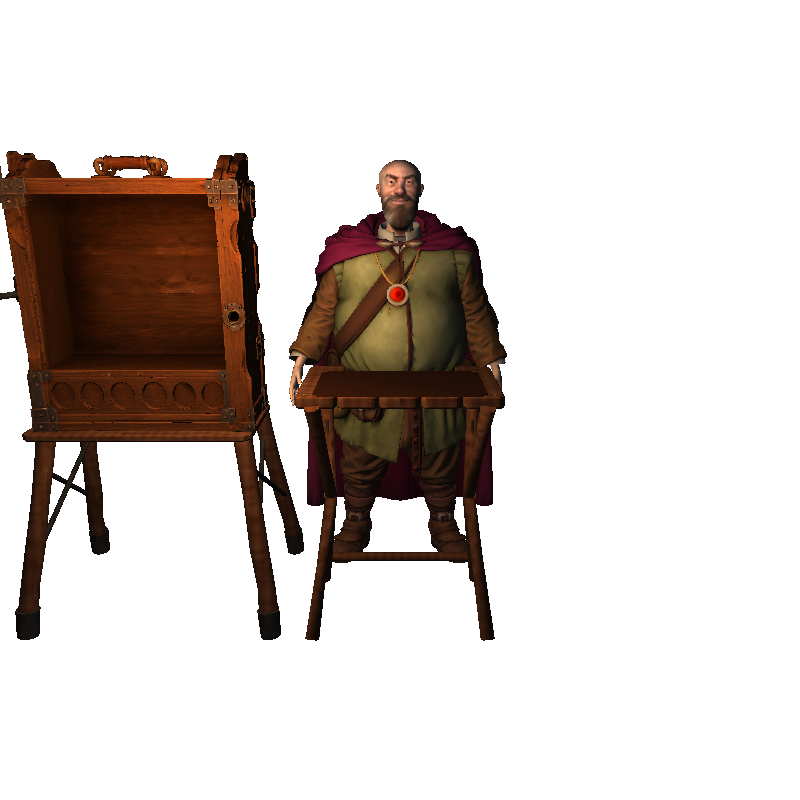 |
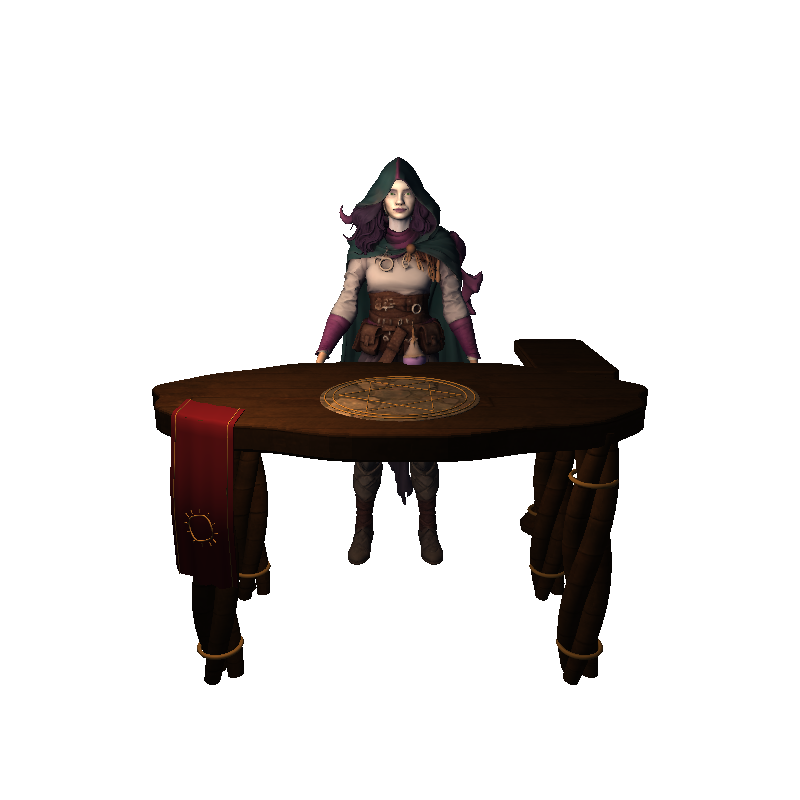 |
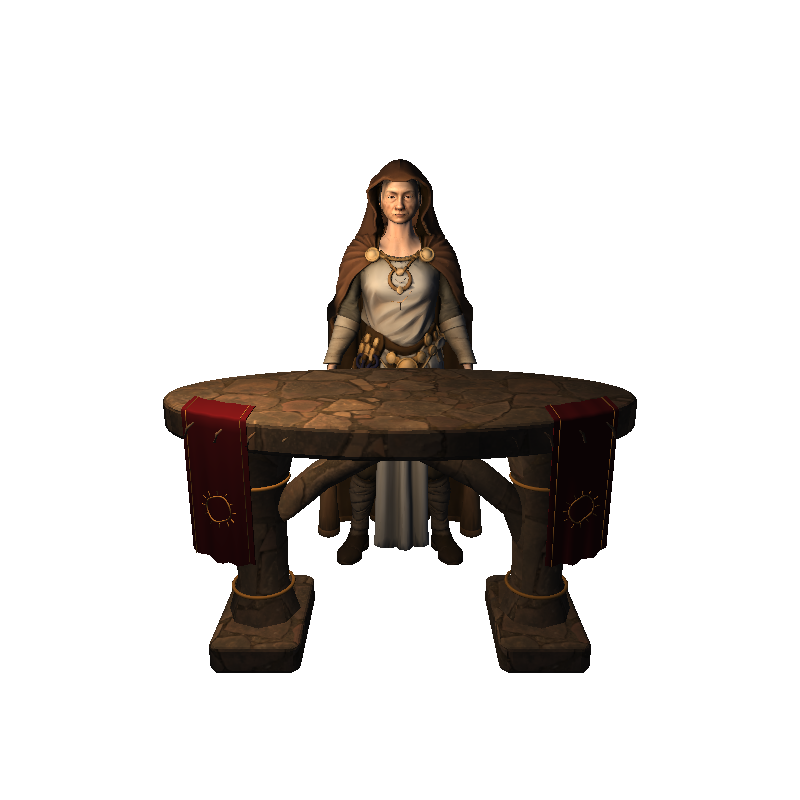 |
| Merchant | Enchantress | Priestess |
Visit the merchant, enchantress and priestess at their stands around the 3D campaign map.
Take an item from the merchant's cabinet or your item fan and place it in his hand to buy or sell.
Hand the enchantress an ability card to choose its enhancements, or offer the priestess your coin
purse to donate.
Immersive NPCs are fully multiplayer compatible, including mixed VR/flat groups and games
hosted by an unmodified flat player. VR players share the merchant's cabinet and see each other's
offered cards, enhancement choices, confirmations and return animations. A name and avatar show
who is using the merchant or enchantress; removing the card frees their hand again.
Enable or disable Immersive town NPCs under
VR Options → World → Campaign map. They start enabled on PCVR; new Steam Frame
standalone configurations use the original windows until you enable them.
Steam Frame compatibility, optimization and standalone passthrough

Play directly on Steam Frame with adapted controller inputs and a separate GloomhavenVR
library entry. Scenario loading, rendering and UI performance have been improved. The
Standalone graphics profile provides performance defaults, with adjustable figure detail,
decoration and clothing simulation. Saved settings are retained, and the graphics controls
also work on PC.
Native passthrough on Steam Frame standalone places the game table in your real room.
Choose Mixed Reality under VR Options → Graphics with a compatible SteamVR/Proton
runtime. If the option is grey, hover over it for compatibility guidance.
Update using the complete release archive, including its VR assets, and update all VR players
in your group together. Flat players can continue without installing the mod.
Install
Install BepInEx once, then download GloomhavenVR-1.1.0.zip below and extract it
into your Gloomhaven folder, beside GH.exe. The archive includes the mod and its
VR assets. Follow INSTALL.txt or INSTALL-DEUTSCH.txt inside the archive for
the BepInEx download and headset setup.
Updating from an older version? Unpack this zip over the top of the old one.
Nothing to uninstall first. The game will close and reopen by itself once on the
first start after that — that is meant to happen. Your settings and save games are
untouched.
Playing with other people: everyone in a session needs this same version of the
mod. If someone has a different one the game tells you, rather than letting the
session go quietly wrong. People without the mod at all can still play with you.
Everything else — the controls, all the settings, the known rough edges and what to
send if something breaks — is in the README.
Technical change log — 100 change(s) since v1.0.8, written by and for developers
- docs(release): record Build671 focused validation and publication gates
- docs(ci): record bounded help fixture cache cleanup
- docs(ci): verify release 1.1.0 trusted pipeline readiness
- Write bilingual NPC and Steam Frame release highlights
- Record Build670 native confirmation and tutorial validation
- Observe exact item confirmation instances before native requests
- test(town): prove native merchant tutorial continuation
- Document first tutorial merchant confirmation cause and native continuation scope
- Reserve Build670 and register exact native item confirmation observation
- Record Build669 composed validation and owned cache cleanup evidence
- Clean the deepest explicitly evidenced native proof run safely
- Record required cache cleanup after each test run
- Clean owned test project caches after completed runs while retaining evidence
- Wait for actual merchant hover admission in native wave proof
- Bind modern fixture API outside historical native-picture controls
- Isolate native bank probes after historical mirror controls
- Record native bank recovery lifetime checks
- Preserve diagnostic and lane lifetimes during native bank recovery
- Record complete town retirement and retry boundaries
- Bind native bank lifecycle suite to local gate inventory
- Document flat-host merchant evidence and integration scope
- Coordinate immersive town grants among VR guests of vanilla hosts
- Recover original town bank atomically after failed preparation
- Reserve Build669 and make flat-host VR discovery reliable
- Record Build668 placement integration and focused validation
- Move native enchantress options 23 cm toward resident
- Reserve Build668 for shared enchantress list placement
- Document integrated NPC666 native repairs and composed212 validation
- docs: record composed pre-release gate and preserved fixture failures
- Keep historical geometry and paint controls fail closed for hover117
- docs(npc666): correct hover receipts and explain packet assertion counts
- Rebind merchant hover control to native named constants
- test(town): bind original summon stat fields in handoff fixture
- Prepare Build667 pre-release review and register bounded regression gates
- fix(net): converge NPC presentation authors across visitor arrival orders
- docs: review pre-1.1.0 network lifetimes and presentation claims
- fix: preserve native map navigation during hover cleanup
- docs: review release 1.1.0 native flow boundaries
- fix: retain Steam Frame VR launch after self-update
- docs: review 1.1.0 compatibility and Frame update restart
- docs: record pre-1.1.0 review findings and repair scope
- fix(town): refresh native summon highlights after late layout
- Document native NPC666 selection and intrinsic effect repairs
- Prove intrinsic hover cold geometry and native lifetime transitions
- Prove native ring yaw across real partitions and local hover
- Evaluate native offered hover per render from canonical source poses
- Fit native offered ring to the rendered print plane
- Register NPC666 native summon ring and hover proofs in complete local gate
- Retain exact offered hover metadata in existing codec proof bindings
- Record reproduced NPC666 geometry failures and approved ring phase
- Bind complete offered hover protocol and playback in shared proofs
- Integrate exact offered hover capture and render lifecycle hooks
- Start paired NPC666 review and reserve offered-hover metadata117
- Record composed NPC665 review and complete validation evidence
- Declare historical geometry return-origin boundary explicitly
- Bind actual return origin dependency in portable delivery and receipt proofs
- test: apply post-wait summon mirror presentation tick
- test: bind historical paint control with explicit return boundary
- Bind return646 artwork control to offered-root guard
- Bind additive return codec in standalone town fixture projects
- Keep historical latency counterproof compatible with inert origin fields
- Retain affinity counterprobe across offered yaw guard changes
- Register NPC665 scopes in complete suite inventory
- Verify offered yaw authority across native return reoffers
- Prove stale return rejection and the next native reoffer flight
- Reject superseded return provenance before stock cancellation arrives
- Integrate NPC665 protocol and composed validation scope
- Prove offered return identity across loss cold originals and reoffers
- Preserve enchantress offered originals across native stock returns
- Record verified NPC665 yaw and native summon evidence
- Preserve native summon layout while masking duplicate enchantment print
- Keep native offered-card yaw continuous across UI updates
- Record paired build664 NPC follow-up scope and causal findings
- Record build664 defaults decisions and focused validation
- docs: align PC and standalone defaults policy for build 664
- Align fresh PC and Standalone defaults with approved profiles
- Record final663 integration over wrist662 and fresh private comparison
- Deliver independent pillar LOD after the wrist662 integration
- Record build662 native pillar evidence and composed controls
- Prove independently measured pillar LOD across every admitted original
- Retain original pillar geometry for degenerate native height
- Record independent pillar LOD repair for build 662
- Select each pillar LOD from its own original geometry and VR camera
- Expose independently measured pillar distance LOD in graphics settings
- Share pure LOD distance constants for independently measured geometry
- docs: repeat Steam Frame install branding and credit Kronosbasher
- build: identify wrist rotation controls as ModBuild 662
- docs: retain strict Release validation for wrist controls
- docs: record focused...
GloomhavenVR 1.0.8
GloomhavenVR 1.0.8 — play Gloomhaven (digital) as a room-scale VR board game.
You stand at the table and pick your cards up with your hands.
What's new
- Quest rewards, level-up notices and other progression windows can be continued in VR without getting stuck.
- Dialogues after a scenario close when their final page is complete. Shared story and reward windows stay in sync during multiplayer continuation.
- The combat log and control board turn smoothly toward you after you release them with the laser.
Install
Install BepInEx once, then download GloomhavenVR-1.0.8.zip below and extract it
into your Gloomhaven folder, beside GH.exe. The archive includes the mod and its
VR assets. Follow INSTALL.txt or INSTALL-DEUTSCH.txt inside the archive for
the BepInEx download and headset setup.
Updating from an older version? Unpack this zip over the top of the old one.
Nothing to uninstall first. The game will close and reopen by itself once on the
first start after that — that is meant to happen. Your settings and save games are
untouched.
Playing with other people: everyone in a session needs this same version of the
mod. If someone has a different one the game tells you, rather than letting the
session go quietly wrong. People without the mod at all can still play with you.
Everything else — the controls, all the settings, the known rough edges and what to
send if something breaks — is in the README.
Technical change log — 39 change(s) since v1.0.7, written by and for developers
- docs: add player release highlights for 1.0.8
- ci: reuse full dev proof for documentation-only descendants
- Record complete build 556 validation
- Preserve retry placement source contract around board tween cancellation
- Record build 556 release-facing changes and hardware checks
- Animate control board facing after laser release
- Animate combat log facing after laser release
- Describe animated board refacing in shared release policy
- Record build 555 validation and repeated-opening handshake coverage
- Verify native Guildmaster reward ownership in hint fixtures
- Retain generation-bound reward declines while rejecting stale map poses
- Exercise native opening provenance in shared reflow fixture
- Bind post-quest poses to native openings and isolate metadata observers
- Keep story layout ownership within its native opening
- Bind shared story poses to exact native openings
- Integrate shared native story and reward continuation on dev
- Exercise native post-quest continuation and preserve original adventure controls
- fix: prove final recipient absence before skipping story predecessors
- Preserve reward hint pagination and retry failed native continuations
- fix: retain native story opening and completion provenance
- fix: rearm shared placement for newly floated stories
- Share native post-quest reward openings and successful continuation
- test: cover native story completion float lifetime
- fix: release completed story windows instead of retaining the final page
- docs: record scenario victory validation for build 554
- test: register scenario victory checks and avoid retaining unloaded state
- test: adapt victory duplicate negative control to weak reference
- test: cover native scenario victory cheat guards
- feat: add hidden scenario victory test action through native results
- docs: record window review validation and confirmed affected release
- fix: keep repeated interactive popups out of the HUD churn fuse
- docs: record complete window continuation audit and test coverage
- fix(ui): ignore stale cancellation on reused text dialogs
- test(ui): cover map confirmation ownership and document window audit
- fix: integrate native window continuation and tutorial close guards
- fix: advance native level-up card reveals from VR Continue
- fix(ui): preserve native message and popup close callbacks
- fix: retain native map reward continuation across VR activation
- fix: preserve map confirmations and native reveal ownership
Full comparison: v1.0.7...v1.0.8
Built from c9831f4f4 (2026-09-24).
GloomhavenVR 1.0.7
GloomhavenVR 1.0.7 — play Gloomhaven (digital) as a room-scale VR board game.
You stand at the table and pick your cards up with your hands.
What's new
- Campaign city events are available from the 3D map and use the same shared choice window for every multiplayer player.
- Character and quest windows remain available when switching between the 2D and 3D map.
- Map-button hints appear beside the physical 3D buttons and are mirrored to other players.
- Area effects rotate with short B/Y taps by default: B rotates clockwise and Y counterclockwise. Both movement sticks remain free. The legacy stick binding remains available in VR Options.
Install
Install BepInEx once, then download GloomhavenVR-1.0.7.zip below and extract it
into your Gloomhaven folder, beside GH.exe. The archive includes the mod and its
VR assets. Follow INSTALL.txt or INSTALL-DEUTSCH.txt inside the archive for
the BepInEx download and headset setup.
Updating from an older version? Unpack this zip over the top of the old one.
Nothing to uninstall first. The game will close and reopen by itself once on the
first start after that — that is meant to happen. Your settings and save games are
untouched.
Playing with other people: everyone in a session needs this same version of the
mod. If someone has a different one the game tells you, rather than letting the
session go quietly wrong. People without the mod at all can still play with you.
Everything else — the controls, all the settings, the known rough edges and what to
send if something breaks — is in the README.
Technical change log — 100 change(s) since v1.0.6, written by and for developers
- docs(release): avoid duplicate 1.0.7 notes heading
- docs(release): add player highlights for 1.0.7
- test(net): preserve tooltip identity while exercising geometry motion
- docs: record build 546 controls and map validation
- test(map): retain city-only discovery in rail source bindings
- fix(options): keep area rotation sensitivity beside its binding
- test(map): integrate tooltip and city runtime gates
- fix(input): rotate area effects with configurable B and Y taps
- test(map): exercise native city event eligibility and discovery
- test(map): cover native tooltip parsing painting and playback
- fix(map): sample inherited city highlight scale and alpha
- fix(net): preserve ordered tooltip close and reopen boundaries
- fix(net): reject malformed map tooltip values without throwing
- fix(map): retain zero-scale native tooltip animation frames
- fix(map): isolate native city pulse animation materials
- fix(map): restore city event cap and mirror native hover hints
- feat(net): add bounded native map tooltip transport for build 546
- test(net): preserve tooltip hold endpoint before movement
- test(net): verify map tooltip transport lifecycle and isolation
- fix(board): restore effect rotation and teach the actual VR stick
- fix(map): restore permanent windows across presentation switches
- fix(tools): support full GH_Data reference layout
- chore(dev): restore 1.0.7 hotfix baseline after town feature split
- docs(town): record build 545 validation and hardware checklist
- feat(town): prepare build 545 physical service hardware candidate
- test(ui): warm the full zero-allocation measurement boundary
- build: repack town assets with stable native flame billboards
- fix(town): register the shared flame shader asset path
- test: exercise bundled town flame shader and batching contract
- fix(town): preserve ritual drop geometry and validate resident teardown
- docs(town): record complete native inventory and final asset evidence
- fix(town): keep complete native merchant inventory reachable above floor
- test: reproduce batched native billboard origin loss
- fix: retain individual origins for native flame billboards
- test(town): register complete physical service gates in suite inventory
- art: ship portrait-fitted town faces and anatomical hands
- fix: retain full two-kilopixel hand atlas in standalone imports
- fix: restore portrait neck clothing and relaxed eyelid aperture
- fix: separate neck skin and cloth from portrait hair projections
- fix: preserve source hoods and align coif and hair materials
- fix: keep anatomical contact markers free of body clip tracks
- fix(assets): model steeper cornea and true fingertip pad contacts
- refactor(assets): fit continuous hood openings and anatomical palm surface frames
- refactor(assets): sew collar lining and replace original generated hand shells
- refactor(assets): fit portrait landmarks and bind anatomical contact frames
- art: integrate anatomical hand frames and skull pivot into NPC authoring
- docs: record hardware authority for NPC identity and hand repair
- fix(town): integrate supported physical ritual layouts and smooth stock changes
- fix: fit complete native ritual stock on supported worktops
- fix(town): share one measured layout across room choices
- fix(town): retain native enhancement capacity and quiet offering checks
- fix(town): roll back partial physical catalogue acquisition
- fix(town): bind deferred offering ownership and final workspace checks
- fix(town): revalidate ritual purchases at native fade completion
- fix(town): animate remote flame clocks without material churn
- fix(town): reserve opened merchant layouts and cull enclosed cards
- fix(town): roll back incomplete physical ritual construction
- fix(town): rest anatomical hands on counters and relax work poses
- feat(town): preserve physical service presentation through multiplayer lifecycle
- fix: calibrate visible town lanterns for readable resident lighting
- feat: expose inert town dressing with workspace practical lighting
- fix(town): render filing labels with supported world canvas text
- fix(town): fit narrower cabinet posts beneath countertop
- fix(town): keep cabinet supports clear of moving card drawers
- fix(town): cancel stale merchant confirmations and validate physical session lifetimes
- test(town): verify physical ritual and drawer publication
- fix: expose persistent drawer content as native mirror boundary
- feat(town): mirror physical registers and mark deliberate offering drops
- feat: add persistent merchant drawers and explicit physical buy sell zones
- fix(town): revalidate offering costs and keep merchant context stable during trades
- fix: rebind native offering textures after network reset
- feat(town): use original game coins for deliberate temple offerings
- fix: restore original town prop materials and grounded practicals
- feat(town): keep original offering and rune details attached during inspection
- feat(town): retain native devotion information on the offering ledger
- art(town): provide open cabinet bays and supported lantern return
- art: author anatomical NPC hands with explicit joint and contact frames
- feat(town): route ritual samples through original service confirmations
- fix(town): allow physical inscriptions without mixed reality panel backings
- feat: add native merchant catalogue and guarded physical transaction input
- feat(town): prepare physical input and full-stock presentation budgets
- docs: define physical town service and portrait correction contracts
- docs: record final NPC activity and facial rig validation
- docs: mark NPC build 544 ready for headset validation
- test: validate final NPC assets at native map depth precision
- art: publish fitted NPC faces and continuous animated costume seams
- docs: record final source-bound merchant cloth repair
- fix: close original merchant cape cut and clean shirt remnants
- art: extend only concealed lower neck overlap and record cached atlas provenance
- test(town): render production solved ledger gaze with activity poses
- docs: distinguish garment review and final runtime validation evidence
- art: integrate source-bound cloth opening repair into final NPC assembly
- fix: repair original NPC cloth openings without cover geometry
- art: remove rejected blouse overlay and order original skin cut before hem repair
- test: measure visible eye illumination for every facial LOD
- art: retain continuous neck rings and cache reviewed face atlas for garment iteration
- fix(town): bound thumb deformation and isolate hosted activity checks
- docs: index NPC anatomy and costume repair evidence
- art: integrate coherent garment support and document repair evidence
- fix(town): smooth cape support over connected costume regions
- … and 208 more.
Full comparison: v1.0.6...v1.0.7
Built from 5cc0ecd0c (2026-09-22).
GloomhavenVR 1.0.6
GloomhavenVR 1.0.6 — play Gloomhaven (digital) as a room-scale VR board game.
You stand at the table and pick your cards up with your hands.
What's new
English
- Short-rest card burns now keep their spent appearance throughout the animation instead of briefly flashing back to their normal state.
- VR Options can be opened and closed reliably from the main menu and pause menu. Closing the window with its X button immediately returns the menu entry to its normal state.
- Opening VR Options no longer makes other available menu entries look disabled.
Deutsch
- Bei der kurzen Rast behalten verbrannte Karten während der gesamten Animation ihr verbrauchtes Aussehen und blitzen nicht mehr kurz in ihren normalen Zustand zurück.
- Die VR-Optionen lassen sich im Haupt- und Pausenmenü zuverlässig öffnen und schließen. Nach dem Schließen über das X ist der Menüeintrag sofort wieder im normalen Zustand.
- Das Öffnen der VR-Optionen lässt andere verfügbare Menüeinträge nicht mehr wie deaktiviert aussehen.
Install
Install BepInEx once, then download GloomhavenVR-1.0.6.zip below and extract it
into your Gloomhaven folder, beside GH.exe. The archive includes the mod and its
VR assets. Follow INSTALL.txt or INSTALL-DEUTSCH.txt inside the archive for
the BepInEx download and headset setup.
Updating from an older version? Unpack this zip over the top of the old one.
Nothing to uninstall first. The game will close and reopen by itself once on the
first start after that — that is meant to happen. Your settings and save games are
untouched.
Playing with other people: everyone in a session needs this same version of the
mod. If someone has a different one the game tells you, rather than letting the
session go quietly wrong. People without the mod at all can still play with you.
Everything else — the controls, all the settings, the known rough edges and what to
send if something breaks — is in the README.
Technical change log — 14 change(s) since v1.0.5, written by and for developers
- docs: add player-facing highlights for 1.0.6
- docs: record build 537 validation and pending headset checks
- test: verify immediate options reconciliation without affecting open rows
- fix: synchronize native VR options close and immediate reopen
- fix: keep VR options toggle independent of native menu focus
- docs: record build 536 integration validation
- fix(ui): keep VR options reachable across repeated openings
- chore: prepare build 536 menu regression validation
- docs: confirm build 535 short-rest hardware result
- docs: verify short-rest report uses release build 534
- docs: record build 535 integration validation
- chore: prepare build 535 after 1.0.5 publication
- fix(cards): preserve spent burn appearance while original is inactive
- docs: record verified 1.0.5 publication
Full comparison: v1.0.5...v1.0.6
Built from 59a5d8844 (2026-09-20).
GloomhavenVR 1.0.5
GloomhavenVR 1.0.5 — play Gloomhaven (digital) as a room-scale VR board game.
You stand at the table and pick your cards up with your hands.
What's new
English
- Guildmaster map: the table stays visible from the first opening in Mixed Reality. Actions are arranged vertically beside the map, with a separate, centred column for the world-map and Gloomhaven buttons.
- The Guildmaster quest list stays visible while browsing and hides when the accepted quest's story or loadout begins.
- Mixed Reality backgrounds are restricted to windows and other UI; they no longer cover water or other scenery inside the play area.
- Cards recovered from the lost pile return to their normal appearance and no longer reappear in an already-used action slot.
- Nearby, overlapping map icons are easier to select with the laser or fingertip. Tutorial hints consistently direct you to confirm actions on the control board.
- Known issue: the short-rest burn animation can still briefly flash or restart. This visual issue remains under investigation.
Deutsch
- Guildmaster-Karte: Der Tisch bleibt in Mixed Reality ab dem ersten Öffnen sichtbar. Die Aktionsbuttons stehen vertikal neben der Karte; Weltkarte und Gloomhaven bilden eine separate, mittig ausgerichtete Spalte daneben.
- Die Guildmaster-Questliste bleibt beim Erkunden der Karte sichtbar und wird ausgeblendet, sobald die Geschichte oder Ausrüstungsauswahl der angenommenen Quest beginnt.
- Mixed-Reality-Hintergründe sind auf Fenster und andere UI-Elemente beschränkt. Sie verdecken kein Wasser und keine andere Umgebung innerhalb des Spielfelds mehr.
- Aus dem Verbrannt-Stapel zurückgeholte Karten sehen wieder normal aus und tauchen nicht erneut in einer bereits verwendeten Aktionsmulde auf.
- Nahe beieinanderliegende, überlappende Kartensymbole lassen sich mit Laser oder Fingerspitze leichter auswählen. Die Tutorial-Hinweise verweisen zur Bestätigung von Aktionen einheitlich auf das Controlboard.
- Bekanntes Problem: Die Verbrennen-Animation bei der kurzen Rast kann weiterhin kurz aufblitzen oder neu starten. Dieser Darstellungsfehler wird weiter untersucht.
Install
Install BepInEx once, then download GloomhavenVR-1.0.5.zip below and extract it
into your Gloomhaven folder, beside GH.exe. The archive includes the mod and its
VR assets. Follow INSTALL.txt or INSTALL-DEUTSCH.txt inside the archive for
the BepInEx download and headset setup.
Updating from an older version? Unpack this zip over the top of the old one.
Nothing to uninstall first. The game will close and reopen by itself once on the
first start after that — that is meant to happen. Your settings and save games are
untouched.
Playing with other people: everyone in a session needs this same version of the
mod. If someone has a different one the game tells you, rather than letting the
session go quietly wrong. People without the mod at all can still play with you.
Everything else — the controls, all the settings, the known rough edges and what to
send if something breaks — is in the README.
Technical change log — 43 change(s) since v1.0.4, written by and for developers
- docs: prepare 1.0.5 release highlights and hardware assessment
- docs: record build 534 integrated validation
- chore: prepare build 534 hardware fixes
- fix: retain native map furniture during cold mixed reality entry
- fix: separate Guildmaster map controls and recognize native table
- fix(cards): keep original short-rest burn running through inactive face
- docs: record build 533 validation and unresolved burn evidence
- diag: trace native burn transitions and rendered materials at Debug
- chore: prepare build 533 recovery verification
- fix: keep recovered action cards out of stale round slots
- docs: record build 532 integrated validation
- docs: preserve historical MR setting descriptions after retirement
- chore: prepare build 532 MR and burn presentation fixes
- fix: retain spent artwork through the final native burn step
- fix: restore card visibility when pile flights replace a fade
- fix: restrict mixed-reality backing geometry to UI
- docs: record build 531 integrated validation
- chore: prepare build 531 recovery and Guildmaster fixes
- fix(cards): restore recovered lost artwork before local and remote presentation
- fix: bound failed rail retries and reject unusably small caps
- fix: preserve Guildmaster controls when furniture fitting fails
- docs: record build 530 validation and board confirmation guidance
- fix: teach board confirmation consistently in tutorial hints
- fix: distinguish Guildmaster browsing from accepted quest stories
- fix: retire inactive supplemental MR terrain sources
- fix: arbitrate overlapping map icons by their visible centres
- fix: fit Guildmaster controls and room floor to native furniture
- fix: keep MR backings out of revealed terrain and wall ownership
- docs: clarify developer and player logging requirements [skip ci]
- fix: keep burn continuity tracing debug-only
- chore: integrate build 528 regression checks and hardware notes
- fix: resolve tabletop materials from ordered native references
- fix: return native card faces before pool and scene teardown
- fix: fit the native campaign tabletop beneath Guildmaster maps
- fix: restore permanent quest log after map story curtains
- fix: protect native burn materials across transient card ownership
- docs: record successful 1.0.4 main release [skip ci]
- docs: record main recovery and draft adapter verification
- fix(ci): resolve draft releases and upload through pinned IDs
- test(ci): keep published asset verification read only
- ci: validate and document main release recovery
- fix(ci): rebuild unpublished tagged releases on main safely
- docs: record verified 1.0.4 build and GitHub upload failure [skip ci]
Full comparison: v1.0.4...v1.0.5
Built from 377d26ec4 (2026-09-18).
GloomhavenVR 1.0.4

GloomhavenVR 1.0.4 — play Gloomhaven (digital) as a room-scale VR board game.
You stand at the table and pick your cards up with your hands.
What's new
English
- Mixed Reality window backgrounds fit the visible content more closely, including the initiative track and repeatedly opened merchant and temple windows. They appear and dissolve with their windows.
- Newly opened map windows keep their position. When windows overlap, older windows can move aside smoothly. Quest details prefer a free position in the centre of your view.
- Card-burning animations play through once without restarting or briefly restoring the card's normal appearance, locally and in multiplayer.
- Multi-page discard choices highlight only the card slots available on the current page.
- The first VR tutorial shows hands for physical interactions and controllers for button instructions, keeping both tracked sides visible.
- Retrying a scenario after defeat restores the original player and control-board positions, including in multiplayer. Scene-reload cleanup is more robust.
Deutsch
- Fensterhintergründe in Mixed Reality passen sich genauer an den sichtbaren Inhalt an, auch bei der Initiativreihenfolge sowie mehrfach geöffneten Händler- und Kirchenfenstern. Sie erscheinen und lösen sich zusammen mit ihren Fenstern auf.
- Neu geöffnete Fenster auf der Karte behalten ihre Position. Bei Überlappungen können ältere Fenster mit einer kurzen Animation Platz machen. Questdetails bevorzugen einen freien Platz in der Blickmitte.
- Kartenverbrennungen laufen einmal vollständig durch, ohne erneut zu starten oder kurz das normale Kartenbild einzublenden – lokal und im Multiplayer.
- Beim Ablegen von Karten über mehrere Seiten leuchten nur die auf der aktuellen Seite verfügbaren Mulden.
- Das erste VR-Tutorial zeigt Hände für physische Interaktionen und Controller für Tastenanweisungen. Beide getrackten Seiten bleiben sichtbar.
- Beim Wiederholen eines Szenarios nach einer Niederlage werden die ursprünglichen Spieler- und Controlboard-Positionen wiederhergestellt, auch im Multiplayer. Das Aufräumen beim Szenariowechsel ist robuster.
Install
Install BepInEx once, then download GloomhavenVR-1.0.4.zip below and extract it
into your Gloomhaven folder, beside GH.exe. The archive includes the mod and its
VR assets. Follow INSTALL.txt or INSTALL-DEUTSCH.txt inside the archive for
the BepInEx download and headset setup.
Updating from an older version? Unpack this zip over the top of the old one.
Nothing to uninstall first. The game will close and reopen by itself once on the
first start after that — that is meant to happen. Your settings and save games are
untouched.
Playing with other people: everyone in a session needs this same version of the
mod. If someone has a different one the game tells you, rather than letting the
session go quietly wrong. People without the mod at all can still play with you.
Everything else — the controls, all the settings, the known rough edges and what to
send if something breaks — is in the README.
Technical change log — 63 change(s) since v1.0.3, written by and for developers
- docs: prepare 1.0.4 release highlights and hardware review
- fix: use visible content for opening-time window displacement
- fix: prefer free centre for quest popup beside standing log
- fix: anchor new windows while older overlaps make room
- fix: refresh MR extents when visible edge contributors disappear
- test: stabilize MR contributor mutation coverage
- fix: fit MR backings to displayed native contributors
- fix: restore shared map banner in its native coordinate frame
- test: cover map header native handoff and repeated reopening in build 525
- fix: detach returned banner when its native home was destroyed
- fix: restore borrowed guildmaster banner geometry after native reparenting
- docs: record build 524 diagnostic validation and open hardware defect
- debug: trace actual mixed reality backing contributors
- diagnostics: expose bounded MR reopen extents in normal logs
- docs: record build 523 painted MR bounds validation
- fix: measure MR backgrounds from native painted geometry
- docs(mr): document supported native text and image geometry
- test(mr): require painted geometry for opening snapshots
- fix(mr): unify map background bounds and exclude phantom glyph overflow
- docs: record build 522 MR animation validation
- test: cover first MR enable during a running reveal
- test: exercise MR backing animation lifecycle and native continuation
- fix(mr): initialise backing materials when enabling MR during an effect
- fix: retire MR backing immediately with native content
- perf: avoid redundant MR backing mesh and material bindings
- fix(mr): retain effect state across MR toggles and isolate cleanup failures
- feat: drive MR backing geometry from the native window erosion field
- fix(mr): couple backing lifetime to window element animation
- fix(tutorial): restore task-specific hands and animated controller swaps
- fix: restore tutorial hands immediately when a controller model is lost
- test(ci): capture expected release rejection annotations
- ci: keep dev evidence planning checkout shallow
- docs: record build 520 validation and MR evidence
- test(mr): bind clone scopes to local native holder ownership
- fix(mr): fit board backings to original content holders
- ci: reuse exact-tree full dev validation for PRs and main releases
- docs: prepare build 520 MR and CI validation record
- docs: record build 519 window arrangement and complete validation
- fix(net): synchronize window room making with manual-grab precedence
- fix(ui): retain drawn pivot during an unfinished shared-window glide
- fix(ui): animate opening-time room making for overlapping map windows
- fix(net): transmit explicit shared-window grip and reflow ownership
- docs: record complete build 518 integration validation
- fix: integrate tutorial visibility and defeat retry in build 518
- fix: restore original scenario player and board seats on retry
- fix: retain both tutorial controllers and isolate their rendering
- fix: integrate uninterrupted local and remote burn playback in build 517
- fix: retain burn episodes across historical widget reconstruction
- fix: identify historical consumed items before hosting native effects
- fix: reject completed burns in round and active flight handovers
- fix: prevent overlapping consumed item burn playback
- fix: preserve one native ability burn through pile refreshes
- fix(cards): bind burn ownership across popup and pool lifetimes
- fix: retain local burn claims across widget replacement
- docs: describe original-card burn discovery lifetime
- fix: retain remote burn identity and native output through UI rebuilds
- fix: integrate build 516 hardware follow-up
- fix(cards): isolate cleanup failures from native scene loading
- fix: fit and animate MR backing to visible native window content
- test(cards): verify locked-page retirement on native widget recycling
- fix(cards): return native faces before scene reload destruction
- fix(cards): retain completed discard pages until native decision resolves
- docs: record verified 1.0.3 publication [skip ci]
Full comparison: v1.0.3...v1.0.4
Built from a6d044c4b (2026-09-17).