Repository navigation
Releases
Factory Seat Companion 0.2.0

What's in this release
Shows what Factory Seat 1.2 adds to the round briefing.
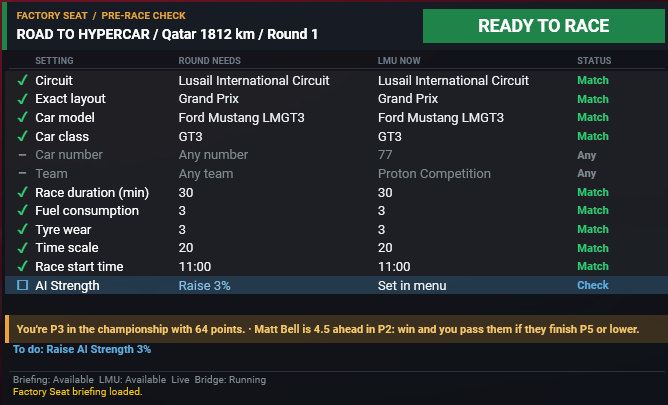
- AI Strength advice. When Factory Seat has advice from practice or earlier races, a blue AI Strength row says how to move LMU's slider, such as "Raise 3%", and the To do line repeats it. Factory Seat can't see the slider and LMU doesn't report it, so it's a Check row that never blocks READY TO RACE.
- What's at stake. A gold line under the checklist shows the first two lines of the briefing's stakes, such as your championship position and the drivers either side of you.
- Taller overlay. The overlay is now 720×436 to fit the new line. The installer resets SimHub's cached size.
Both need Factory Seat 1.2 or later. With 1.1 the overlay works as before.
Which file to download
- FactorySeatCompanion-Setup-0.2.0.exe: the installer. Recommended.
- FactorySeatCompanion-0.2.0.zip: the same files, to extract into your SimHub folder by hand.
Install
- Exit SimHub (tray icon, Exit) and run the installer. It finds your SimHub folder and installs the plugin, its companion program (no .NET install needed), a ready settings file and the overlay.
- Start SimHub and enable Factory Seat Companion when it asks about the new plugin.
- In Dash Studio > Overlays, set Layout automatic visibility to Manual and click Save layout. SimHub's default hides overlays in LMU's menus. The overlay still hides itself while you drive.
- Start the FactorySeatCompanion overlay, open your career in Factory Seat, and set up the race in LMU.
Updating from an earlier version: exit SimHub and run the new installer. Your overlay layout and its Manual visibility are kept. Forcing overlays visible in SimHub isn't saved, so if you used that instead of step 3, do it again after SimHub restarts.
Full instructions and troubleshooting are in the README.
Requirements
- Windows 10 or 11 (64-bit), SimHub (tested with 9.13.2), and LMU in windowed or borderless mode.
- Factory Seat 1.1 or later, which writes the round briefing (
briefing.json). With older versions the overlay stays at NOT VERIFIED.
Known limits
- Race duration in "% Track Time" mode is a manual check until you change the Race Time once and back (for example 30 to 45 and back to 30 mins). LMU then reports it and the row is compared normally.
- Main menu and race setup look the same to LMU's API, so the overlay also shows on the main menu. Hide it there with the toggle action.
- Layouts added after October 2026 show Unknown until a mapping is added (see the README). All 38 current layouts are mapped.
- Custom teams can't be confirmed through LMU's API. On a custom team round the overlay can read READY TO RACE with Custom team identity shown as Not checkable, so check you picked your custom team's car yourself.
- LMU's local API is unofficial; a game update can break checks, which then show Unknown rather than a false match.
Full changelog: https://github.com/Milky28/factory-seat-companion/commits/v0.2.0
Factory Seat Companion 0.1.1
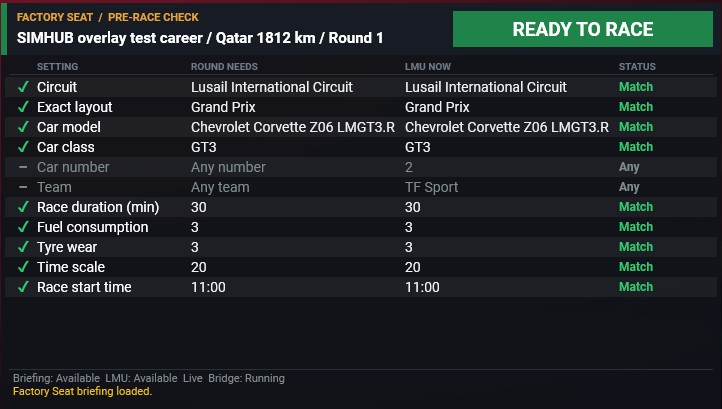
Factory Seat Companion is a SimHub overlay for Le Mans Ultimate. Before you start a race, it checks LMU's race setup against the next round of your Factory Seat career and shows a checklist that reads READY TO RACE only when everything matches. It only reads: it never changes LMU's settings or your career.
What's in this release
A packaging fix; the overlay and checks are unchanged from 0.1.0.
- Fewer antivirus false positives. The companion program is no longer stored compressed inside its exe, which made a couple of scanners on VirusTotal mistake it for a packed program. The download is about the same size.
Which file to download
- FactorySeatCompanion-Setup-0.1.1.exe: the installer. Recommended.
- FactorySeatCompanion-0.1.1.zip: the same files, to extract into your SimHub folder by hand.
Install
- Exit SimHub (tray icon, Exit) and run the installer. It finds your SimHub folder and installs the plugin, its companion program (no .NET install needed), a ready settings file and the overlay.
- Start SimHub and enable Factory Seat Companion when it asks about the new plugin.
- In Dash Studio > Overlays, set Layout automatic visibility to Manual and click Save layout. SimHub's default hides overlays in LMU's menus. The overlay still hides itself while you drive.
- Start the FactorySeatCompanion overlay, open your career in Factory Seat, and set up the race in LMU.
Updating from an earlier version: exit SimHub and run the new installer. Your overlay layout and its Manual visibility are kept. Forcing overlays visible in SimHub isn't saved, so if you used that instead of step 3, do it again after SimHub restarts.
Full instructions and troubleshooting are in the README.
Requirements
- Windows 10 or 11 (64-bit), SimHub (tested with 9.13.2), and LMU in windowed or borderless mode.
- Factory Seat 1.1 or later, which writes the round briefing (
briefing.json). With older versions the overlay stays at NOT VERIFIED.
Known limits
- Race duration in "% Track Time" mode is a manual check until you change the Race Time once and back (for example 30 to 45 and back to 30 mins). LMU then reports it and the row is compared normally.
- Main menu and race setup look the same to LMU's API, so the overlay also shows on the main menu. Hide it there with the toggle action.
- Layouts added after October 2026 show Unknown until a mapping is added (see the README). All 38 current layouts are mapped.
- Custom teams can't be confirmed through LMU's API. On a custom team round the overlay can read READY TO RACE with Custom team identity shown as Not checkable, so check you picked your custom team's car yourself.
- LMU's local API is unofficial; a game update can break checks, which then show Unknown rather than a false match.
Full changelog: https://github.com/Milky28/factory-seat-companion/commits/v0.1.1
Factory Seat Companion 0.1.0
Factory Seat Companion is a SimHub overlay for Le Mans Ultimate. Before you start a race, it checks LMU's race setup against the next round of your Factory Seat career and shows a checklist that reads READY TO RACE only when everything matches. It only reads: it never changes LMU's settings or your career.
What's in this release
This is the first full release, after four public betas.
- Pre-race checklist overlay for SimHub: circuit and exact layout, car model, class, number and team, race duration, fuel, tyre wear, time scale and start time, each marked ✓ match, ✗ mismatch, – any, ☐ check or ○ unknown.
- Every layout is checked. All 38 layouts on LMU's 18 tracks are mapped to Factory Seat's layout names and confirmed in LMU's track picker.
- To do hints in LMU's own wording for every mismatch, such as "Set Tyre Wear to X3", including LMU's "Default ( 11:00 AM )" start time.
- Custom team rounds can be READY TO RACE. Team and Car number show Any, and Custom team identity shows Not checkable, since LMU can't report a Race Control custom team.
- Shows only in LMU's menus. It stays hidden until LMU's menus appear, hides while loading or driving, and has a SimHub action to toggle it.
- Windows installer and zip: no building from source, no settings files to edit. Updating keeps your settings and saved overlay layouts.
- Reads Factory Seat's
briefing.jsonround briefing (Factory Seat 1.1 or later).
Which file to download
- FactorySeatCompanion-Setup-0.1.0.exe: the installer. Recommended.
- FactorySeatCompanion-0.1.0.zip: the same files, to extract into your SimHub folder by hand.
Install
- Exit SimHub (tray icon, Exit) and run the installer. It finds your SimHub folder and installs the plugin, its companion program (no .NET install needed), a ready settings file and the overlay.
- Start SimHub and enable Factory Seat Companion when it asks about the new plugin.
- In Dash Studio > Overlays, set Layout automatic visibility to Manual and click Save layout. SimHub's default hides overlays in LMU's menus. The overlay still hides itself while you drive.
- Start the FactorySeatCompanion overlay, open your career in Factory Seat, and set up the race in LMU.
Updating from an earlier version: exit SimHub and run the new installer. Your overlay layout and its Manual visibility are kept. Forcing overlays visible in SimHub isn't saved, so if you used that instead of step 3, do it again after SimHub restarts.
Full instructions and troubleshooting are in the README.
Requirements
- Windows 10 or 11 (64-bit), SimHub (tested with 9.13.2), and LMU in windowed or borderless mode.
- Factory Seat 1.1 or later, which writes the round briefing (
briefing.json). With older versions the overlay stays at NOT VERIFIED.
Known limits
- Race duration in "% Track Time" mode is a manual check until you change the Race Time once and back (for example 30 to 45 and back to 30 mins). LMU then reports it and the row is compared normally.
- Main menu and race setup look the same to LMU's API, so the overlay also shows on the main menu. Hide it there with the toggle action.
- Layouts added after October 2026 show Unknown until a mapping is added (see the README). All 38 current layouts are mapped.
- Custom teams can't be confirmed through LMU's API. On a custom team round the overlay can read READY TO RACE with Custom team identity shown as Not checkable, so check you picked your custom team's car yourself.
- LMU's local API is unofficial; a game update can break checks, which then show Unknown rather than a false match.
Full changelog: https://github.com/Milky28/factory-seat-companion/commits/v0.1.0
Factory Seat Companion 0.1.0-beta.4
Factory Seat Companion is a SimHub overlay for Le Mans Ultimate. Before you start a race, it checks LMU's race setup against the next round of your Factory Seat career and shows a checklist that reads READY TO RACE only when everything matches. It only reads: it never changes LMU's settings or your career.
What's in this release
- Custom team rounds can be READY TO RACE. LMU can't confirm a Race Control custom team, so the Custom team identity row now reads "Not checkable" and no longer holds the banner at amber when every other setting matches. A real mismatch still shows SETUP MISMATCH.
- The overlay waits for LMU's menus. It stays hidden while LMU starts up and appears once the menus are on screen.
- Career names in capitals, matching Factory Seat.
- Includes everything in 0.1.0-beta.3: the custom team Team row fix, all 38 layouts mapped and confirmed, LMU's default start time read, and the clearer race duration hint.
Which file to download
- FactorySeatCompanion-Setup-0.1.0-beta.4.exe: the installer. Recommended.
- FactorySeatCompanion-0.1.0-beta.4.zip: the same files, to extract into your SimHub folder by hand.
Install
- Exit SimHub (tray icon, Exit) and run the installer. It finds your SimHub folder and installs the plugin, its companion program (no .NET install needed), a ready settings file and the overlay.
- Start SimHub and enable Factory Seat Companion when it asks about the new plugin.
- In Dash Studio > Overlays, set Layout automatic visibility to Manual and click Save layout. SimHub's default hides overlays in LMU's menus. The overlay still hides itself while you drive.
- Start the FactorySeatCompanion overlay, open your career in Factory Seat, and set up the race in LMU.
Full instructions and troubleshooting are in the README.
Requirements
- Windows 10 or 11 (64-bit), SimHub (tested with 9.13.2), and LMU in windowed or borderless mode.
- Factory Seat 1.1 or later, which writes the round briefing (
briefing.json). With older versions the overlay stays at NOT VERIFIED.
Known limits
- Race duration in "% Track Time" mode is a manual check until you change the Race Time once and back (for example 30 to 45 and back to 30 mins). LMU then reports it and the row is compared normally.
- Main menu and race setup look the same to LMU's API, so the overlay also shows on the main menu. Hide it there with the toggle action.
- Layouts added after October 2026 show Unknown until a mapping is added (see the README). All 38 current layouts are mapped.
- Custom teams can't be confirmed through LMU's API. On a custom team round the overlay can read READY TO RACE with Custom team identity shown as Not checkable, so check you picked your custom team's car yourself.
- LMU's local API is unofficial; a game update can break checks, which then show Unknown rather than a false match.
Full changelog: https://github.com/Milky28/factory-seat-companion/commits/v0.1.0-beta.4
Factory Seat Companion 0.1.0-beta.3
Factory Seat Companion is a SimHub overlay for Le Mans Ultimate. Before you start a race, it checks LMU's race setup against the next round of your Factory Seat career and shows a checklist that reads READY TO RACE only when everything matches. It only reads: it never changes LMU's settings or your career.
What's in this release
- Custom team rounds no longer show SETUP MISMATCH. LMU reports a Race Control car by its generic name, such as "Lexus Custom Team 2026", so the Team row now shows Any, like Car number, instead of asking for a livery that doesn't exist. These rounds read NOT VERIFIED.
- All 38 layout mappings confirmed. Factory Seat's owner captured every layout from LMU's track picker independently, and the list matches the installed settings exactly.
- Includes everything in 0.1.0-beta.2: every layout checked, LMU's default start time read, the overlay hidden until LMU is running, and the clearer race duration hint.
Which file to download
- FactorySeatCompanion-Setup-0.1.0-beta.3.exe: the installer. Recommended.
- FactorySeatCompanion-0.1.0-beta.3.zip: the same files, to extract into your SimHub folder by hand.
Install
- Exit SimHub (tray icon, Exit) and run the installer. It finds your SimHub folder and installs the plugin, its companion program (no .NET install needed), a ready settings file and the overlay.
- Start SimHub and enable Factory Seat Companion when it asks about the new plugin.
- In Dash Studio > Overlays, set Layout automatic visibility to Manual and click Save layout. SimHub's default hides overlays in LMU's menus. The overlay still hides itself while you drive.
- Start the FactorySeatCompanion overlay, open your career in Factory Seat, and set up the race in LMU.
Full instructions and troubleshooting are in the README.
Requirements
- Windows 10 or 11 (64-bit), SimHub (tested with 9.13.2), and LMU in windowed or borderless mode.
- Factory Seat 1.1 or later, which writes the round briefing (
briefing.json). With older versions the overlay stays at NOT VERIFIED.
Known limits
- Race duration in "% Track Time" mode is a manual check until you change the Race Time once and back (for example 30 to 45 and back to 30 mins). LMU then reports it and the row is compared normally.
- Main menu and race setup look the same to LMU's API, so the overlay also shows on the main menu. Hide it there with the toggle action.
- Layouts added after October 2026 show Unknown until a mapping is added (see the README). All 38 current layouts are mapped.
- Custom teams can't be confirmed through LMU's API, so such rounds stay NOT VERIFIED.
- LMU's local API is unofficial; a game update can break checks, which then show Unknown rather than a false match.
Full changelog: https://github.com/Milky28/factory-seat-companion/commits/v0.1.0-beta.3
Factory Seat Companion 0.1.0-beta.2
Factory Seat Companion is a SimHub overlay for Le Mans Ultimate. Before you start a race, it checks LMU's race setup against the next round of your Factory Seat career and shows a checklist that reads READY TO RACE only when everything matches. It only reads: it never changes LMU's settings or your career.
What's in this release
- Every layout is checked. The installed settings now map all 38 layouts on LMU's 18 tracks, so Exact layout no longer shows Unknown with "No layout mapping" outside Bahrain and Lusail.
- LMU's default start time is read. "Default ( 11:00 AM )" is compared as 11:00 instead of showing Unknown.
- The overlay stays hidden until LMU is running.
- Clearer race duration hint in "% Track Time" mode: change the race time once and back so LMU confirms it.
Which file to download
- FactorySeatCompanion-Setup-0.1.0-beta.2.exe: the installer. Recommended.
- FactorySeatCompanion-0.1.0-beta.2.zip: the same files, to extract into your SimHub folder by hand.
Install
- Exit SimHub (tray icon, Exit) and run the installer. It finds your SimHub folder and installs the plugin, its companion program (no .NET install needed), a ready settings file and the overlay.
- Start SimHub and enable Factory Seat Companion when it asks about the new plugin.
- In Dash Studio > Overlays, set Layout automatic visibility to Manual and click Save layout. SimHub's default hides overlays in LMU's menus. The overlay still hides itself while you drive.
- Start the FactorySeatCompanion overlay, open your career in Factory Seat, and set up the race in LMU.
Full instructions and troubleshooting are in the README.
Requirements
- Windows 10 or 11 (64-bit), SimHub (tested with 9.13.2), and LMU in windowed or borderless mode.
- Factory Seat 1.1 or later, which writes the round briefing (
briefing.json). With older versions the overlay stays at NOT VERIFIED.
Known limits
- Race duration in "% Track Time" mode is a manual check until you change the Race Time once and back (for example 30 to 45 and back to 30 mins). LMU then reports it and the row is compared normally.
- Main menu and race setup look the same to LMU's API, so the overlay also shows on the main menu. Hide it there with the toggle action.
- Layouts added after October 2026 show Unknown until a mapping is added (see the README). All 38 current layouts are mapped.
- Custom teams can't be confirmed through LMU's API, so such rounds stay NOT VERIFIED.
- LMU's local API is unofficial; a game update can break checks, which then show Unknown rather than a false match.
Full changelog: https://github.com/Milky28/factory-seat-companion/commits/v0.1.0-beta.2
Factory Seat Companion 0.1.0-beta.1
Factory Seat Companion is a SimHub overlay for Le Mans Ultimate. Before you start a race, it checks LMU's race setup against the next round of your Factory Seat career and shows a checklist that reads READY TO RACE only when everything matches. It only reads: it never changes LMU's settings or your career.
What's in this release
This is the first public beta.
- Pre-race checklist overlay for SimHub: circuit and exact layout, car model, class, number and team, race duration, fuel, tyre wear, time scale and start time, each marked ✓ match, ✗ mismatch, – any, ☐ check or ○ unknown.
- To do hints in LMU's own wording for every mismatch, such as "Set Tyre Wear to X3".
- Shows only in LMU's menus and hides while loading or driving, with a SimHub action to toggle it.
- Windows installer and zip: no building from source, no settings files to edit.
- Reads Factory Seat's
briefing.jsonround briefing.
Which file to download
- FactorySeatCompanion-Setup-0.1.0-beta.1.exe: the installer. Recommended.
- FactorySeatCompanion-0.1.0-beta.1.zip: the same files, to extract into your SimHub folder by hand.
Install
- Exit SimHub (tray icon, Exit) and run the installer. It finds your SimHub folder and installs the plugin, its companion program (no .NET install needed), a ready settings file and the overlay.
- Start SimHub and enable Factory Seat Companion when it asks about the new plugin.
- In Dash Studio > Overlays, set Layout automatic visibility to Manual and click Save layout. SimHub's default hides overlays in LMU's menus. The overlay still hides itself while you drive.
- Start the FactorySeatCompanion overlay, open your career in Factory Seat, and set up the race in LMU.
Full instructions and troubleshooting are in the README.
Requirements
- Windows 10 or 11 (64-bit), SimHub (tested with 9.13.2), and LMU in windowed or borderless mode.
- Factory Seat 1.1 or later, which writes the round briefing (
briefing.json). With older versions the overlay stays at NOT VERIFIED.
Known limits
- Race duration in "% Track Time" mode is a manual check: LMU doesn't report the menu's race length in that mode. Set the finish to Time to have it compared.
- Layouts need a mapping. Bahrain (Endurance, Outer) and Lusail ship mapped; other layouts show Unknown until a mapping is added (see the README).
- Custom teams can't be confirmed through LMU's API, so such rounds stay NOT VERIFIED.
- LMU's local API is unofficial; a game update can break checks, which then show Unknown rather than a false match.
Full changelog: https://github.com/Milky28/factory-seat-companion/commits/v0.1.0-beta.1