Repository navigation
OpenCutter 0.1.0

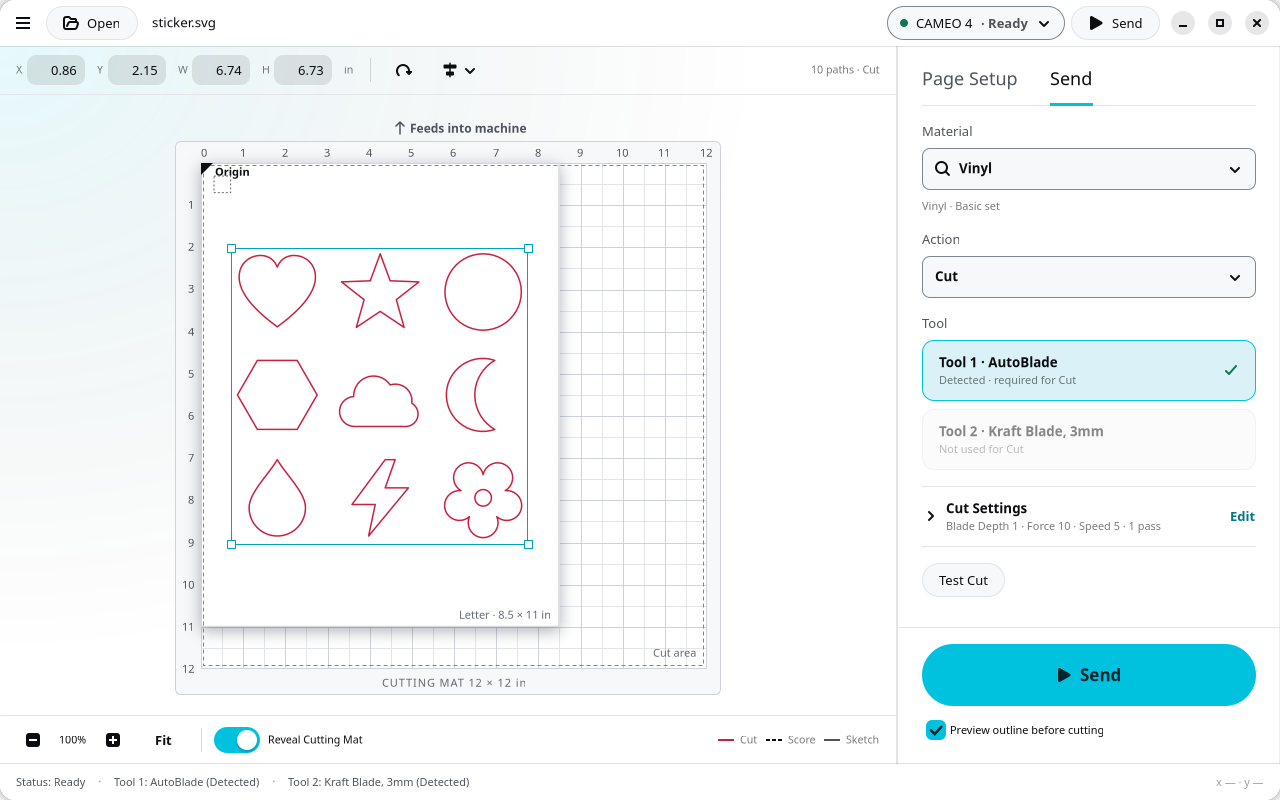
OpenCutter is free cutting software for Linux. It opens an SVG design from Inkscape or any other editor, places it on the cutting mat and cuts, draws or scores it on a Silhouette cutting machine over Bluetooth LE. This is an alpha release, tested on one CAMEO 4 with firmware V5.05; the other models it drives have not been tested on a real machine yet. OpenCutter moves a sharp blade: please read the safety notes before your first job.
Highlights
- Your design on the mat. Move, scale, rotate by 90° and align it on the cutting mat of your machine, or let Fit to Mat place it, with the cut area shown.
- Cut, draw or score. Choose Material, Action and Tool: take a preset from the small built-in set (for the CAMEO 4 family) or from your own presets file, or set Blade Depth, Force, Speed and Passes yourself.
- Checks before anything moves. The tool in the machine must match the material, the design must lie on the media and inside the cut area, and an optional outline preview traces the outer box of the design with the tool up and waits for you to confirm.
- Bluetooth in the background. A small background service holds the link to the machine. The
opencuttercommand line talks to the same service, and the service releases the machine 15 minutes after you close the app. - Sandboxed. The Flatpak may use the window, the GPU and BlueZ (Bluetooth) and nothing else: no network, and no files except the designs you open or drop on the window.
Machines
OpenCutter reads the model and firmware a machine reports and uses that model's profile.
- Tested on a real machine: the CAMEO 4 with firmware V5.xx (tested on V5.05).
- Not yet tested: the CAMEO 4 with firmware V1.xx, the CAMEO 4 Plus, CAMEO 4 Pro, CAMEO 5, CAMEO 5 Plus, CAMEO Pro MK-II, CAMEO 5 Alpha, CAMEO 5 Alpha Plus, Portrait 3 and Portrait 4. OpenCutter sends them jobs, but none of them has been run with it yet: keep the outline preview on, use scrap material and keep the power button within reach for your first jobs.
- Recognized, not supported yet: the CURIO 2, the CAMEO 3, the Portrait 2 and older USB-only models. OpenCutter names them but sends them no job.
Supported machines in the README has the details.
Install
OpenCutter needs Linux on a 64-bit PC (x86_64), with Flatpak and BlueZ, the Bluetooth service of most distributions. Download opencutter-0.1.0.flatpak and SHA256SUMS from the assets below into one folder, or with the first two commands. In that folder, check the download and install the bundle for your user:
curl -LO https://github.com/MortyNiners/opencutter/releases/download/v0.1.0/opencutter-0.1.0.flatpak
curl -LO https://github.com/MortyNiners/opencutter/releases/download/v0.1.0/SHA256SUMS
sha256sum --check SHA256SUMS   # prints: opencutter-0.1.0.flatpak: OK
flatpak install --user ./opencutter-0.1.0.flatpak
The bundle runs on the GNOME 51 runtime from Flathub. flatpak install lists what it will install and asks first: without the Flathub remote it adds it, and without the GNOME 51 runtime it installs the runtime from there too (up to about 1.5 GB to download when you have no Flathub apps yet). To add the Flathub remote yourself beforehand:
flatpak remote-add --user --if-not-exists flathub https://dl.flathub.org/repo/flathub.flatpakrepoThen pair the machine in your desktop's Bluetooth settings, switch it off and on again, and open OpenCutter from your app menu. First run in the README walks you through the first connection, and The Flatpak covers updates, uninstalling and the command line.
Known limitations
- Stopping a running cut with Cancel Job has not been tried on a real machine yet, and where a design lands against the printed grid of the mat has not been measured. Use the outline preview and scrap material for your first jobs.
- Not supported yet: Print & Cut (registration marks), matless cutting, a USB connection, and on the CAMEO 4 every mat but the 12 × 12 in.
- Ending the background service outside the app (under Background Apps in GNOME's quick settings, or with
flatpak kill) skips the stop and the clean release of the Bluetooth link. Press Disconnect in the app instead. - The bundle is not signed.
sha256sum --checkshows that the download is complete and unchanged, not who made it, so download the bundle andSHA256SUMSfrom this page only.
More in the README: Known limitations and Safety.
Report a model
Do you own a model that is not yet tested, or one that OpenCutter only recognizes? Please tell us how it went with the model report form: reports are how a model moves up a level, and a report of the connection alone helps too. Reporting a model in CONTRIBUTING.md lists what helps most. Before you post, replace the machine's Bluetooth name (it holds the serial number) and its Bluetooth address.
OpenCutter is free software, licensed under the GNU General Public License, version 3 or later. It is an independent project, not affiliated with, endorsed by or supported by Silhouette America, Inc. Silhouette, CAMEO, Portrait and CURIO are trademarks of their respective owners.