Repository navigation
Repository Layout
Delivery status — November 9, 2026: Stable 0.12.3 and preview 0.15.6 are published and publicly verified. Both include the guided repository connection repair.
The workbench holds SkillJetty's editable drafts, saved builds, background preparation and recovery. A separate local Git repository holds the shared files, and its remote is the matching GitHub repository. The workbench itself does not need .git.
Choose Connect repository or Change connection, enter the GitHub address, and select an existing local Git root or confirm a new local copy. Review the exact mapping before it becomes active. Full paths are visible. New pairs use separate folders; existing accepted work and historical upload receipts are not moved.
Sync repository downloads changes explicitly. Connection does not upload a package, pull an existing working tree or merge a PR. The trees below explain the files; they are not folders you must create by hand.
Stable keeps its established skill packaging. Preview retains its existing plugin/bundle layouts; see Plugin Exports and Archiving. The connection repair does not promote preview-only exports into stable.
Connect and Sync describes the repaired flow; Release Notes retains older settings and layout history.
This page follows one example skill, meeting-notes, through its different locations. Every location has a different purpose. Directory names in the examples are fictional; the structure inside the work folder and published version follows SkillJetty's current guided workflow.
If a diagram does not render in your viewer, its adjacent text/tree gives the same relationships.
You might already have:
C:/AI-Work/Original-Skills/       You chose/created this location
└── meeting-notes/               This is a skill folder
    ├── SKILL.md                 Its main file is directly inside the folder
    ├── references/
    │   └── format.md
    └── assets/
        └── example.png
To open this skill, select meeting-notes, the folder containing SKILL.md. Do not select its parent Original-Skills or the references subfolder. An external original folder is copied into a managed draft; that import does not move or edit the external original. A .skill archive can be opened instead.
The following is a stable work-folder example after importing and saving a version. Some private/optional folders only appear when their corresponding action has been used.
C:/AI-Work/SkillJetty-Work/              You choose this work folder
├── skills/                            SkillJetty's guided editable draft area
│   └── meeting-notes/
│       ├── SKILL.md                    Edit this managed draft
│       ├── references/format.md
│       └── assets/example.png
├── releases/                          SkillJetty's saved local version library
│   └── meeting-notes/
│       └── 1.0.0/
│           ├── source/
│           │   └── meeting-notes/
│           │       ├── SKILL.md        Snapshot; not the active draft
│           │       ├── references/format.md
│           │       └── assets/example.png
│           ├── meeting-notes-1.0.0.skill
│           ├── CHANGELOG.md            Notes for this version
│           ├── release.json            Identity and integrity information
│           └── original.skill          Only when an imported original exists
├── .skill-workbench/                   Private app state; do not share as a skill
│   ├── catalog.json                    Active draft registrations
│   ├── connection.json                 This work folder's sharing connection
│   ├── recovery/                       Conflicting/earlier text edits, when saved
│   ├── publications/                   Recorded upload receipts
│   ├── pull-requests/                  Recorded PR results
│   ├── completed/                     Recoverable finished-draft sessions
│   ├── replaced/                      Recovery copies from replacements
│   ├── git-control/                   Private controls for explicit Git pull
│   └── meeting-notes/
│       └── originals/                 Preserved imported archive, when applicable
└── workbench/                         Optional session data from supporting workflows
What you normally create: the outer work folder, the skill's content and its version notes through the UI. What SkillJetty manages: the internal directories, manifests, records and recovery copies. Do not create a release.json or edit the private catalog by hand to register a skill.
The work folder does not need .git. Nothing in this tree is automatically uploaded just because it exists. Save package prepares a local bundle. The guided bundle location is releases/<skill>/<version>, regardless of the legacy distDirectory setting.
After successful submission, an unchanged managed draft can be archived under private completed-session storage and disappear from the active list. The saved release remains in the local library. Newer edits that no longer match the submitted version are retained rather than silently cleared.
After cloning/pulling the example shared repository:
C:/AI-Work/Skills-Repository/            Select THIS as Local project
├── .git/                              Git creates this directory; do not select it
├── README.md                          Optional deliberate repository document
├── meeting-notes/
│   ├── 1.0.0/
│   │   ├── source/meeting-notes/SKILL.md
│   │   ├── meeting-notes-1.0.0.skill
│   │   ├── CHANGELOG.md
│   │   ├── release.json
│   │   └── original.skill              If the release has an imported original
│   └── 1.1.0/
│       ├── source/meeting-notes/SKILL.md
│       ├── meeting-notes-1.1.0.skill
│       ├── CHANGELOG.md
│       └── release.json
└── another-skill/
    └── 1.0.0/
        └── ...
Git tracks the intended repository files, including published version bundles after they reach the relevant branch. .git is local Git metadata, not an ordinary tracked folder uploaded into GitHub's file tree. The version folders become visible on the default branch after the PR is merged, not merely because an upload branch exists.
The shared layout starts with <skill-name>/<version> at the repository root. It does not add a skills/ prefix. That is different from the work folder's editable skills/<skill-name> area.
https://github.com/example/skills
└── meeting-notes/                     Skill name at repository root
    └── 1.0.0/                         A version BUNDLE, not a skill source folder
        ├── source/
        │   └── meeting-notes/          Select THIS to import this version's source
        │       ├── SKILL.md
        │       ├── references/...
        │       └── assets/...
        ├── meeting-notes-1.0.0.skill   Or open this archive as a package
        ├── CHANGELOG.md
        ├── release.json
        └── original.skill             Optional preserved imported archive
For Open skill from project…, navigate inside the local clone to meeting-notes/1.0.0/source/meeting-notes and choose that folder. It has the skill's SKILL.md directly inside it. Choosing the repository root or meeting-notes/1.0.0 does not select a valid source folder for this layout.
To use the .skill package route, choose the .skill file itself. The original imported archive is provenance; the versioned meeting-notes-1.0.0.skill is the rebuilt package for the saved release. The two can contain different bytes when you have edited the draft.
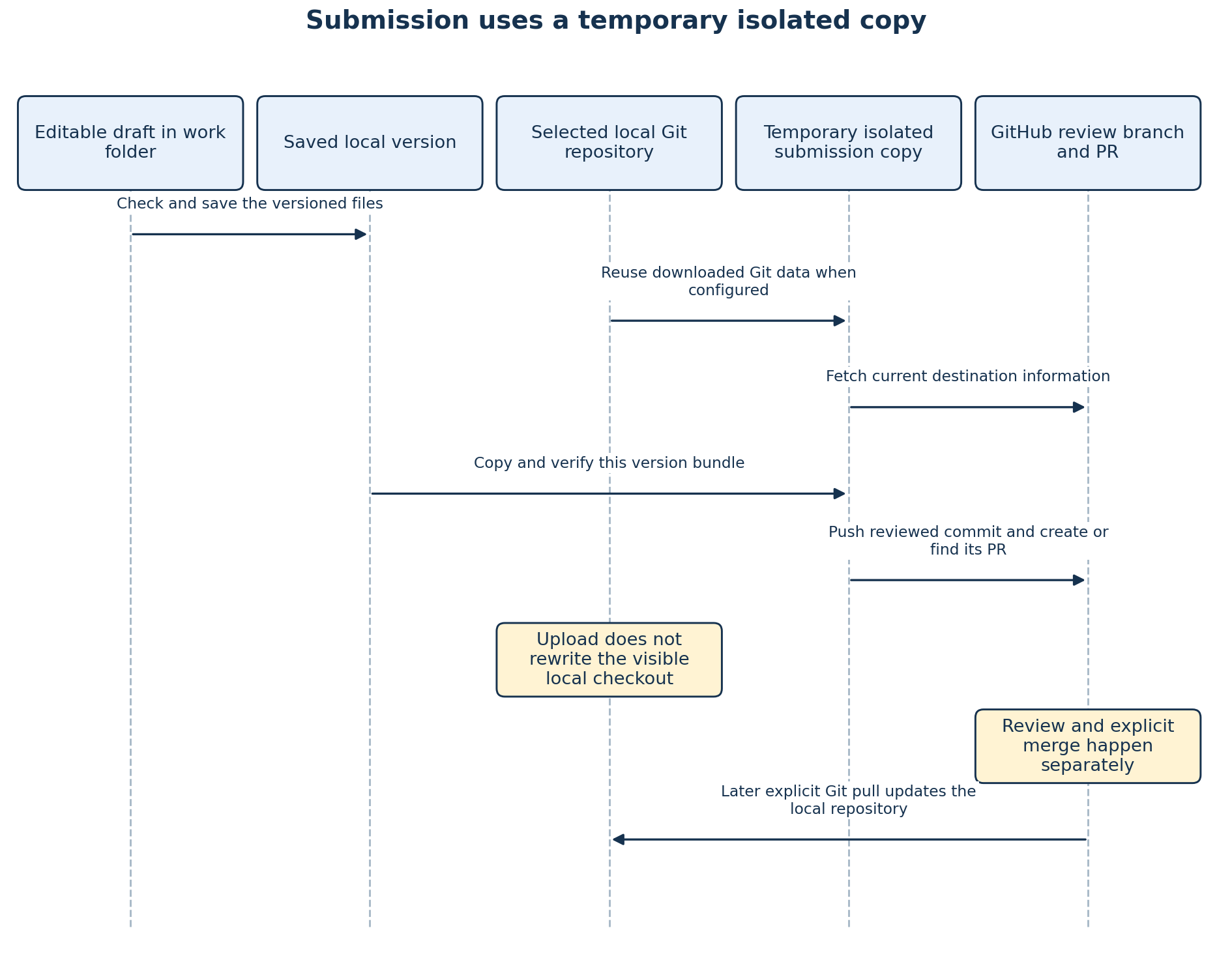
Alternative Mermaid version
sequenceDiagram
    participant D as Editable draft in work folder
    participant V as Saved local version
    participant L as Selected local Git repository
    participant T as Temporary isolated submission copy
    participant G as GitHub review branch and PR
    D->>V: Check and save the versioned files
    L->>T: Reuse downloaded Git data when configured
    T->>G: Fetch current destination information
    V->>T: Copy and verify this version bundle
    T->>G: Push reviewed commit and create or find its PR
    Note over L: Upload does not rewrite the visible local checkout
    Note over G: Review and explicit merge happen separately
    G->>L: Later explicit Git pull updates the local repository
Text alternative: a saved version is prepared in the work folder. Upload uses a separate temporary copy, reusing local Git data when available, fetching the current remote and checking the chosen version before pushing it. The temporary copy is not a new permanent work folder you must manage. The configured local repository's visible files are preserved. A later explicit pull updates that local copy after remote changes.
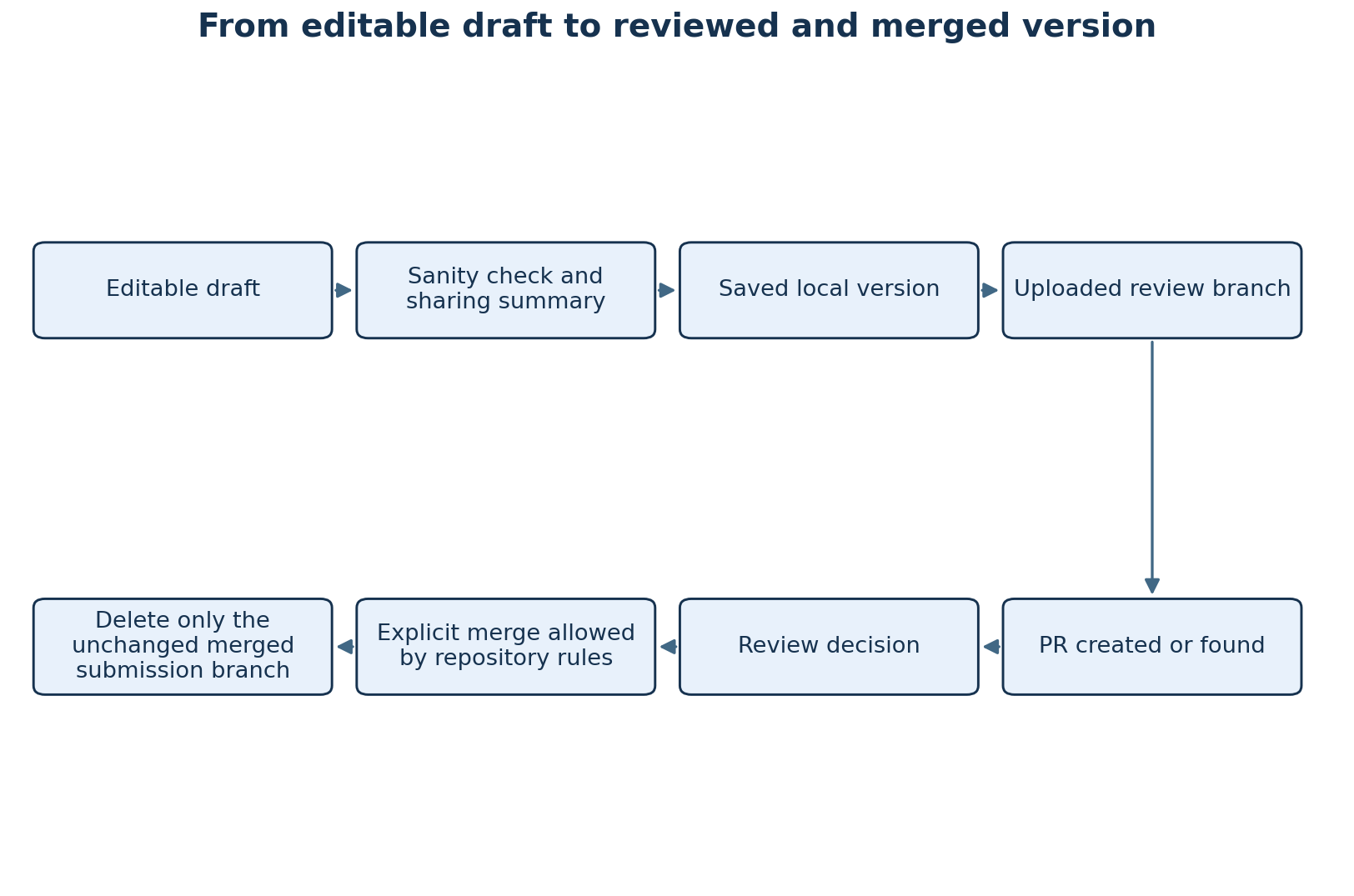
Alternative Mermaid version
flowchart LR
    D["Editable draft"] --> C["Sanity check and sharing summary"]
    C --> P["Saved local version"]
    P --> U["Uploaded review branch"]
    U --> R["PR created or found"]
    R --> A["Review decision"]
    A --> M["Explicit merge allowed by repository rules"]
    M --> B["Delete only the unchanged merged submission branch"]
Text alternative: draft → check → local version → upload → PR → review → explicit merge → guarded branch cleanup. A successful earlier arrow does not prove the later steps happened. For example, an uploaded branch can exist while PR creation still needs attention.
C:/AI-Work/SkillJetty-Work/
├── skills/                            Stable drafts
├── releases/                          Stable local versions
├── .skill-workbench/                   Stable private records
└── .skilljetty-prerelease/             Preview's effective work root
    ├── skills/                        Preview drafts
    ├── releases/                      Preview local versions
    └── .skill-workbench/               Preview private records/connection
The preview root is not a directory to choose as stable's work folder or as the local sharing repository. Changing the extension channel does not automatically copy drafts or connection records between these locations.
See Settings and Repository Setup before changing paths, and Troubleshooting before trying to fix a warning by moving or deleting folders.