Repository navigation
Releases
Folichon 0.3.0

Share previews that look like your page, and backups that keep your images.
🔗 Share preview card
Links to your page shared on WhatsApp, LinkedIn, Discord or X now show a card drawn like the top of your page, instead of your photo cropped at random:
- your short intro line, your name and your headline, with the words between asterisks in your accent colour;
- your photo in its gradient ring;
- your key figures in their colours.
The card is a 1200 × 630 PNG generated by your server (/share-card.png). It updates by itself when you save in the editor, and its address changes with each change, so apps don't keep showing an old version.
- If
SITE_URLis set, the site address is shown on the card when there is room. - A photo in WebP or AVIF, or hosted on another site, is replaced by your initials: the card renderer reads PNG and JPEG only.
📦 Export and import with your images
Export in the editor menu now downloads one ZIP archive: content.json, plus the images, PDF and fonts your content uses. Unsaved changes are included.
Import a ZIP to move everything to another Folichon at once:
- each file is checked against its real content, like any upload;
- if one file is refused, nothing is written;
- the content loads in the editor, and nothing changes until you click Save.
A plain JSON file (content only) can still be imported.
🛠️ Other changes
- New dependency:
@resvg/resvg-js, which turns the card into a PNG without a browser. Builds are included for Alpine on amd64 and arm64. - Fixed versions of the site fonts for the card are in
src/share-card/(SIL Open Font License). - The website and README describe the new features.
- More tests.
🐳 Upgrade
Change the image tag and restart. Your data folder is kept as is.
image: ghcr.io/mrddream/folichon:0.3.0docker compose pull && docker compose up -dImages for linux/amd64 and linux/arm64: ghcr.io/mrddream/folichon:0.3.0, 0.3 and latest.
Full changelog: v0.2.0...v0.3.0
Folichon 0.2.0
Seven themes, your own fonts, and a website. Folichon 0.2.0 lets you change the whole look of your page from the editor.
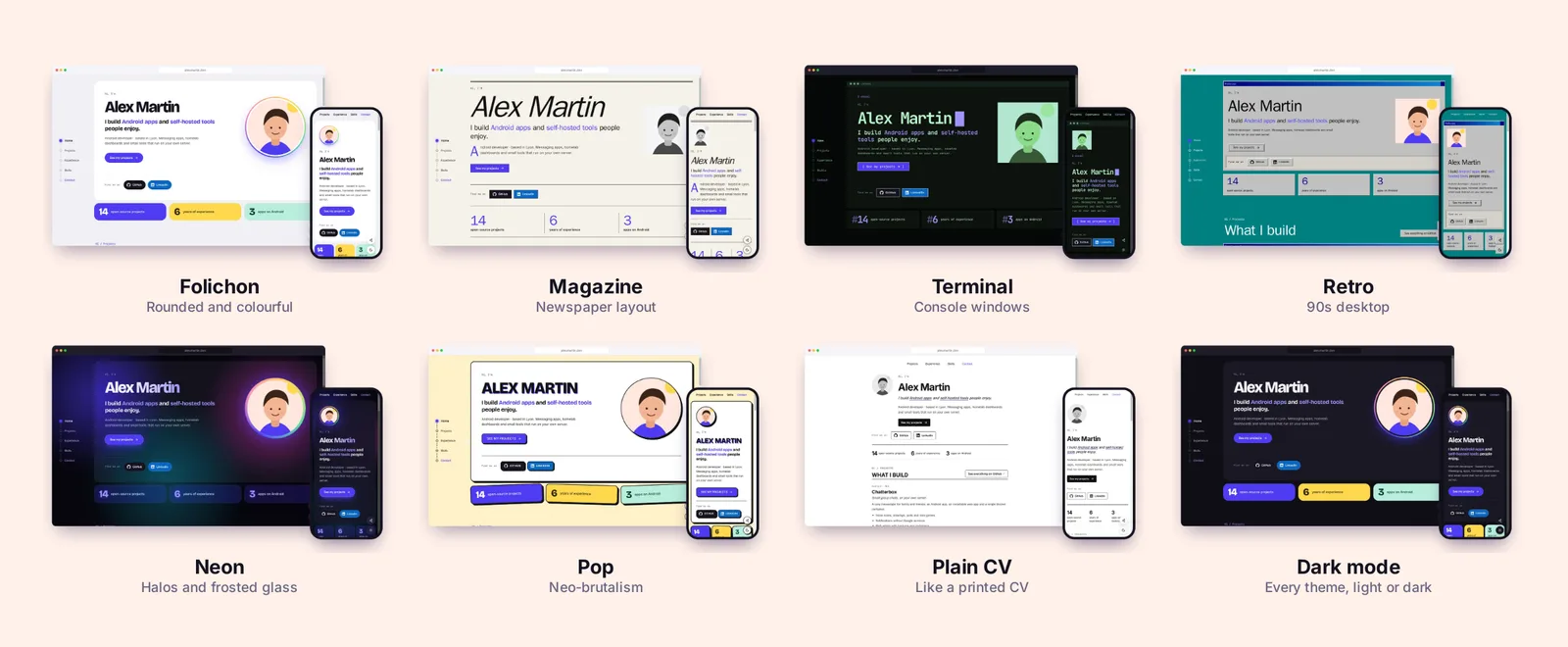
🌐 Browse every theme, in light and dark, on the new website: https://mrddream.github.io/Folichon/
🎨 Themes
Seven themes that change the layout, not just the colours. Your accent colour and the light / dark switch stay yours.
- Folichon: the original, with rounded, colourful blocks.
- Magazine: newspaper layout with large serif headings and rules.
- Terminal: console windows, monospace type, blinking cursor.
- Retro: 90s windows, grey bevels, teal desktop.
- Neon: colour halos behind frosted-glass cards.
- Pop: neo-brutalism, thick outlines and hard shadows.
- Plain CV: a single column, like a printed CV.
Each theme's stylesheet loads only when it is chosen. The main stylesheet goes from 12.3 kB to 7.0 kB gzipped.
🔤 Fonts
Pick one font for headings and one for body text:
- a bundled font (Bricolage Grotesque, Inter, JetBrains Mono);
- a family already installed on visitors' devices (serif, rounded, handwritten…);
- or your own file (WOFF2, WOFF, TTF or OTF), served by your server.
✏️ Editor
- New Appearance section, apart from your content: page language, accent colour, theme and fonts.
- Theme previews follow your accent colour as soon as it changes.
- Each upload field accepts only its own kind of file (image, document or font).
- A custom font you stop using is no longer referenced by the page.
🛠️ Other changes
- The
latestDocker tag now follows released versions only. Builds ofmainare taggedmain. - The update notice only links to this repository's releases.
.env.exampleis now in English, andHOST_PORTsets the host port when you build with the repository'sdocker-compose.yml.- The README and the website use an invented demo profile.
- More tests.
🐳 Upgrade
Change the image tag and restart. Your data folder is kept as is.
image: ghcr.io/mrddream/folichon:0.2.0docker compose pull && docker compose up -dImages for linux/amd64 and linux/arm64: ghcr.io/mrddream/folichon:0.2.0, 0.2 and latest.
Full changelog: v0.1.0...v0.2.0
Folichon 0.1.0
The first release of Folichon: your CV and projects, on your own server.
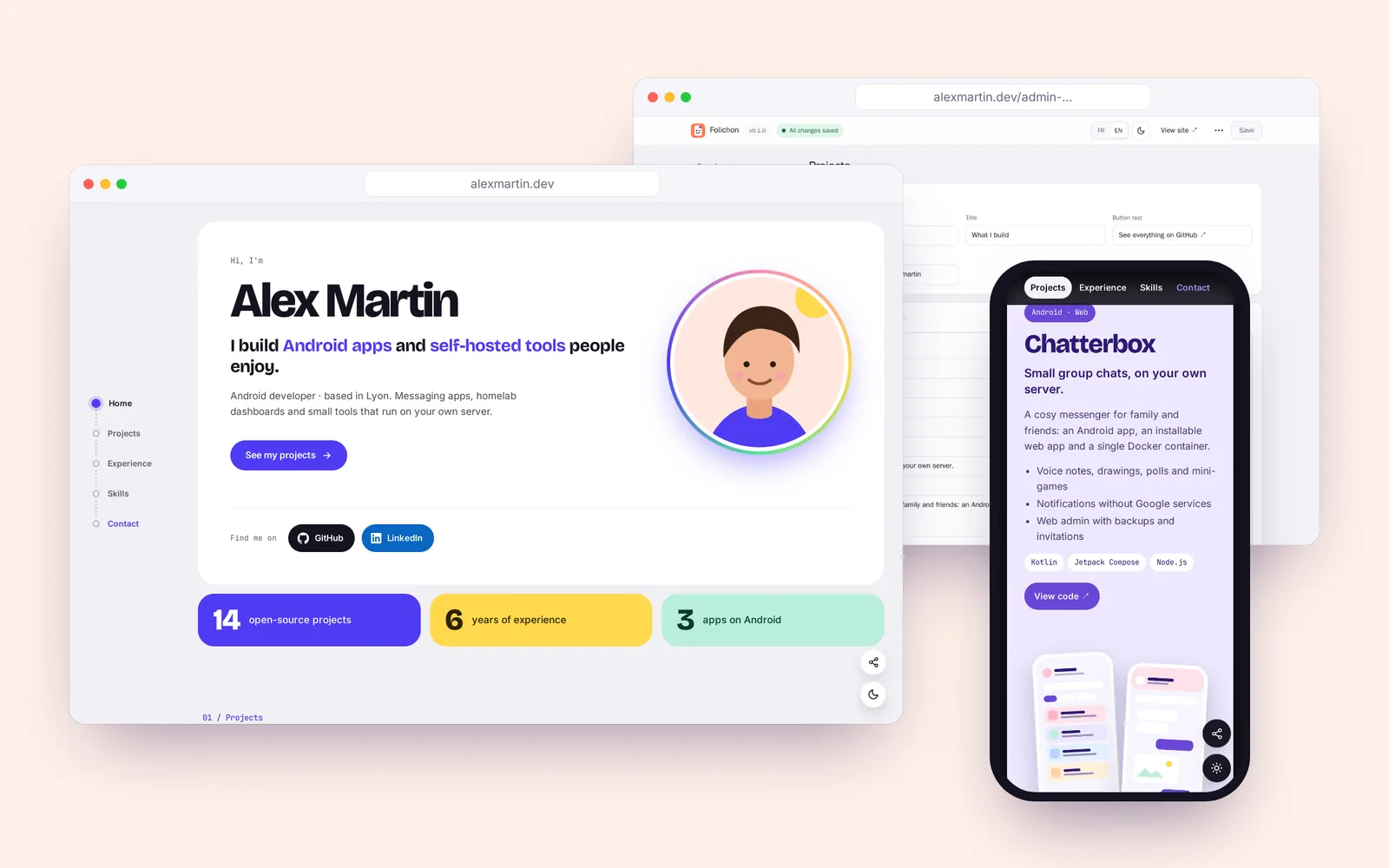
✨ Highlights
- A page that looks like you: introduction with photo, key figures, project cards with their own colours and screenshots (phone, browser or wide layouts), small projects, experience timeline, skills, languages and contact.
- Built-in editor at a secret address: every text, link, colour and image is editable from the browser, sections as tabs, lists you reorder, undo on delete, export and import as JSON.
- Two-factor authentication: password, then a 6-digit code from any authenticator app (QR code on first sign-in).
- Light and dark mode on the page and in the editor, following the system or a switch.
- French and English: the editor and the public page speak both.
- Mobile first: sticky menu, compact layout, the phone's own share sheet (with a fallback menu).
- Share-ready: Open Graph and Twitter tags, canonical URL, e-mail address never shown in clear.
🔐 Security
- At most 5 failed attempts per IP and 30 in total every 15 minutes; a code works only once.
- Sessions tied to the password and the 2FA key, revoked on sign-out.
- Strict
Content-Security-Policy,Permissions-Policy,Cross-Origin-Opener-Policy, HSTS over HTTPS. - Uploads checked against their real content; unused files cleaned up after 24 h.
- No external resource: fonts are served by the site.
🐳 Install
services:
  folichon:
    image: ghcr.io/mrddream/folichon:0.1.0
    container_name: folichon
    restart: unless-stopped
    init: true
    ports:
      - "3000:3000"
    env_file: .env
    volumes:
      - ./data:/data
Set ADMIN_PASSWORD and ADMIN_PATH in .env, create the data folder (mkdir -p data && sudo chown 1000:1000 data), then docker compose up -d. Full instructions in the README.
Images for linux/amd64 and linux/arm64 (Raspberry Pi 4/5): ghcr.io/mrddream/folichon:0.1.0, 0.1 and latest.