Repository navigation
Releases: NOVA-TECH-KIT/nova-island
Release list
Nova Island 1.8.0

Download
👉 Download Nova-Island-Setup-1.8.0.exe from the Assets list below, then run it.
Windows may say "Windows protected your PC" because the app is new and not code-signed yet. Choose More info → Run anyway.
Once installed, the island appears at the top of your screen. Press Ctrl + Alt + I to open it.
Windows 10 / 11, 64-bit · Free and open source (GPL v3)
What's new in 1.8.0
A performance update: the same Nova Island, much lighter on your PC.
- Half the processor use. With the island resting on your screen, Nova now takes about half the CPU it did before.
- Less memory. About 22% less RAM in everyday use.
- A tiny download. The installer went from 107 MB to under 1 MB, and Nova takes about 2 MB on disk instead of 325 MB.
- Quicker updates. Future updates download in a moment.
Everything you use stays the same: your settings, apps, themes and plugins carry over as they are.
Using 1.3.0 or newer? This update arrives on its own. Using 1.2.0? Install this version once, and future updates will come automatically.
Nova Island 1.7.0
Download
👉 Download Nova-Island-Setup-1.7.0.exe from the Assets list below, then run it.
Windows may say "Windows protected your PC" because the app is new and not code-signed yet. Choose More info → Run anyway.
Once installed, the island appears at the top of your screen. Press Ctrl + Alt + I to open it.
Windows 10 / 11, 64-bit · Free and open source (GPL v3)
What's new in 1.7.0
- VLC in the island. Play something in VLC and the island shows its title and whether it's playing, with play/pause, next and previous. It works even with VLC minimized to the tray.
- A bell for news from Nova. A new bell sits beside the Settings gear and keeps every news item, with a dot while there's something you haven't read. News notifications now stay on screen for 30 seconds.
- Three times more reminders. 94 new verses, du'as and adhkar, all in the King Fahd Complex Hafs script. Long ones fit neatly in the card.
- More by Nova. A new Settings page with our other free, open-source apps, starting with QR Nova for beautiful QR codes in seconds.
Using 1.3.0 or newer? This update arrives on its own. Using 1.2.0? Install this version once, and future updates will come automatically.
Nova Island 1.6.0
Download
👉 Download Nova-Island-Setup-1.6.0.exe from the Assets list below, then run it.
Windows may say "Windows protected your PC" because the app is new and not code-signed yet. Choose More info → Run anyway.
Once installed, the island appears at the top of your screen. Press Ctrl + Alt + I to open it.
Windows 10 / 11, 64-bit · Free and open source (GPL v3)
What's new in 1.6.0
- 13 free themes. A new Settings → Themes page with a live preview of each: Original Nova, Bakka, Outline, Midnight, Forest, Snow, Cat, Galaxy, Aurora, Ocean, Nody, Lava and Retro. None of them makes Nova heavier, and the solid ones skip the glass capture, so they're even lighter.
- New eyes for Nova. On Nody, two sakura flowers follow your cursor. On Cat, two little paws do.
- Works with screen recorders. NVIDIA Instant Replay no longer turns off while Nova runs. Solid themes never block recording, and the glass themes turn solid in their own colors while a recorder (NVIDIA, OBS, Streamlabs) is running, then come back.
- Nova on Facebook. A link in Settings, right above the shortcut hint.
Using 1.3.0 or newer? This update arrives on its own. Using 1.2.0? Install this version once, and future updates will come automatically.
Nova Island 1.5.0
Download
👉 Download Nova-Island-Setup-1.5.0.exe from the Assets list below, then run it.
Windows may say "Windows protected your PC" because the app is new and not code-signed yet. Choose More info → Run anyway.
Once installed, the island appears at the top of your screen. Press Ctrl + Alt + I to open it.
Windows 10 / 11, 64-bit · Free and open source (GPL v3)
What's new in 1.5.0
- Plugins. A new Settings → Plugins page. Add only the features you want, with one click. Every plugin is signed and checked before it installs.
- Quran Radio, the first plugin. Live Qur'an radio from Cairo, Saudi Arabia and 170+ reciters, with its own Radio tab. It keeps playing in the background, and a small mark by the prayer countdown shows it's on. It can pause itself at prayer time.
- News from Nova. New plugins, updates and news show up on the island, once a day at most. You can turn this off in Settings → Alerts & Privacy. Nothing is sent from your PC.
- Apps open where they are. Clicking an app that's already open brings its window to the front. Right-click opens a new window. A dot marks the apps that are open.
- In the browser: choose Address bar, or Stay in place to keep the island where it is and let your clicks reach the tabs below.
- Performance options: Remove blur, Remove animations and Freeze glass, for lighter PCs. Battery saver turns them on by itself when your battery runs low.
- Lighter on your PC. Nova Island now uses about 25% less CPU and 50 MB less memory while it sits still.
- The Music tab is now called Media.
Thanks to @mahmoudplay for the ideas behind the performance options and battery saver, and for the code that made the island lighter.
Using 1.3.0 or newer? This update arrives on its own. Using 1.2.0? Install this version once, and future updates will come automatically.
Contributors

Assets 5
Nova Island 1.4.0
Download
👉 Download Nova-Island-Setup-1.4.0.exe from the Assets list below, then run it.
Windows may say "Windows protected your PC" because the app is new and not code-signed yet. Choose More info → Run anyway.
Once installed, the island appears at the top of your screen. Press Ctrl + Alt + I to open it.
Windows 10 / 11, 64-bit · Free and open source (GPL v3)
What's new in 1.4.0
- Prayer times work offline. They're now calculated on your PC, with the method your country follows, and match the times you're used to. The Hijri date comes from the Umm al-Qura calendar.
- Browser downloads on the island. Downloads from Chrome, Edge, Firefox and others show up with their speed and a "Downloaded ✓" note. You can add your own download folders in Settings → Connections.
- Screenshots go straight to the Shelf. Each one stays for 20 minutes, a time you can change, and the file stays where Windows saved it.
- Smoother updates. "Update now" counts down for 10 seconds, then Nova restarts into the new version by itself.
- Back in sync after sleep. Weather and prayer times refresh as soon as your PC wakes up or the internet comes back.
- Stays where you put it. If you move the island, or make it vertical, it no longer jumps into the browser's address bar.
- Smaller download: the installer is about 8 MB lighter.
Using 1.3.0 or 1.3.1? This update arrives on its own. Using 1.2.0? Install this version once, and future updates will come automatically.
Nova Island 1.3.1
Download
👉 Download Nova-Island-Setup-1.3.1.exe from the Assets list below, then run it.
Windows may say "Windows protected your PC" because the app is new and not code-signed yet. Choose More info → Run anyway.
Once installed, the island appears at the top of your screen. Press Ctrl + Alt + I to open it.
Windows 10 / 11, 64-bit · Free and open source (GPL v3)
What's new in 1.3.1
- No more location requests: Windows 11 counted the Wi-Fi check as a location request and showed the location icon. Nova Island no longer reads the Wi-Fi network name, so it never asks for your location. Wi-Fi and internet alerts still work.
- Support page in Settings: buy us a coffee on Ko-fi, InstaPay from Egypt, or star the project on GitHub.
- Version number is now shown in Settings, under the shortcut hint.
- The update button now says Update now.
Using 1.3.0? This update arrives on its own. Using 1.2.0? Install this version once, and future updates will come automatically.
Nova Island 1.3.0
Download
👉 Download Nova-Island-Setup-1.3.0.exe from the Assets list below, then run it.
Windows may say "Windows protected your PC" because the app is new and not code-signed yet. Choose More info → Run anyway.
Once installed, the island appears at the top of your screen. Press Ctrl + Alt + I to open it.
Windows 10 / 11, 64-bit · Free and open source (GPL v3)
What's new in 1.3.0
Auto-update: Nova Island now keeps itself up to date. New versions download in the background, and the island shows Update ready · Restart when one is ready. You can turn this off in Settings → General.
Already using 1.2.0? Install this version once, and future updates will come automatically.
Nova Island 1.2.0
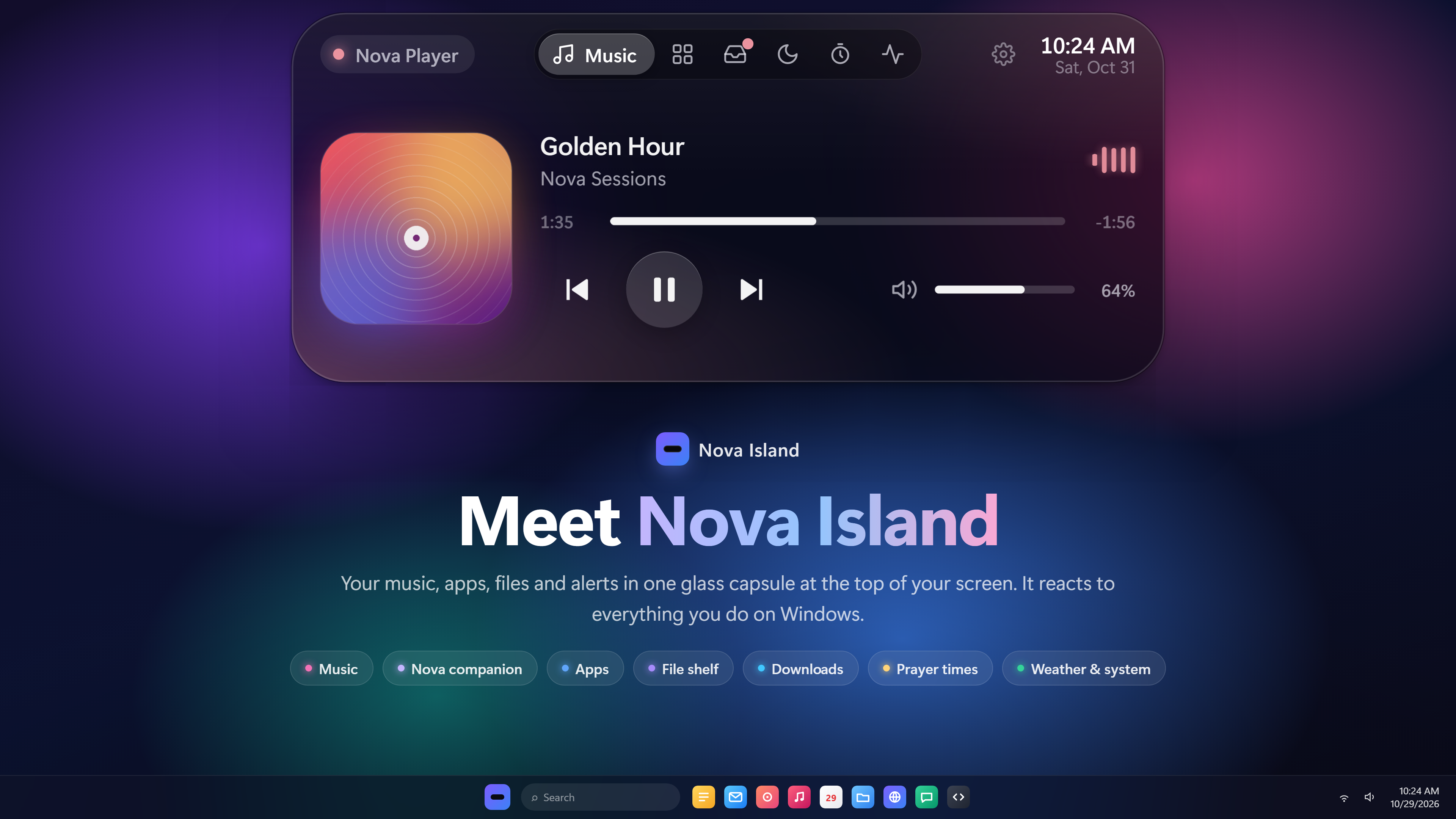
The first public release of Nova Island — a living island for your Windows desktop.
What's inside
- Music & media — title, artwork and live waveforms, plus a floating mini player
- Nova — a little companion for focus sessions, water and eye breaks, and a warm welcome back
- Downloads — progress, speed and time left at a glance (with IDM Nova)
- Smart clipboard — copy a link, a sum or a color and the island knows what to do
- Privacy alerts — know when an app turns on your mic or camera
- Prayer times & dhikr — a heads-up before the adhan, and Qur'an verses in the KFGQPC Hafs script
- Simple settings — turn on only what you need
Install
- Download Nova Island Setup 1.2.0.exe below.
- Windows may say "Windows protected your PC" because the app isn't code-signed yet — choose More info → Run anyway.
- Press Ctrl + Alt + I to open the island.
Windows 10 / 11, 64-bit. Free and open source under the GPL v3.