Repository navigation
Releases
VRTRAKILL 2.0.3

Play ULTRAKILL in VR on the current Steam version (build 22957324). No downgrade needed. Works through SteamVR with PS VR2, Quest, Index, Steam Frame, Pico, Vive and WMR.
Install in one click
- Download
VRTRAKILL-2.0.3-full.zipbelow and extract it anywhere. - Double-click
INSTALL VRTRAKILL.bat. It finds ULTRAKILL through Steam, on any drive, and keeps your settings when you update. - To play in VR, start SteamVR first, then ULTRAKILL. Without SteamVR running, the game starts flat on your monitor as usual.
To remove it, double-click UNINSTALL VRTRAKILL.bat. Already have BepInEx 5.4.23.5? Use VRTRAKILL-2.0.3-modonly.zip. Step-by-step instructions and troubleshooting are in the README.
New in 2.0.3
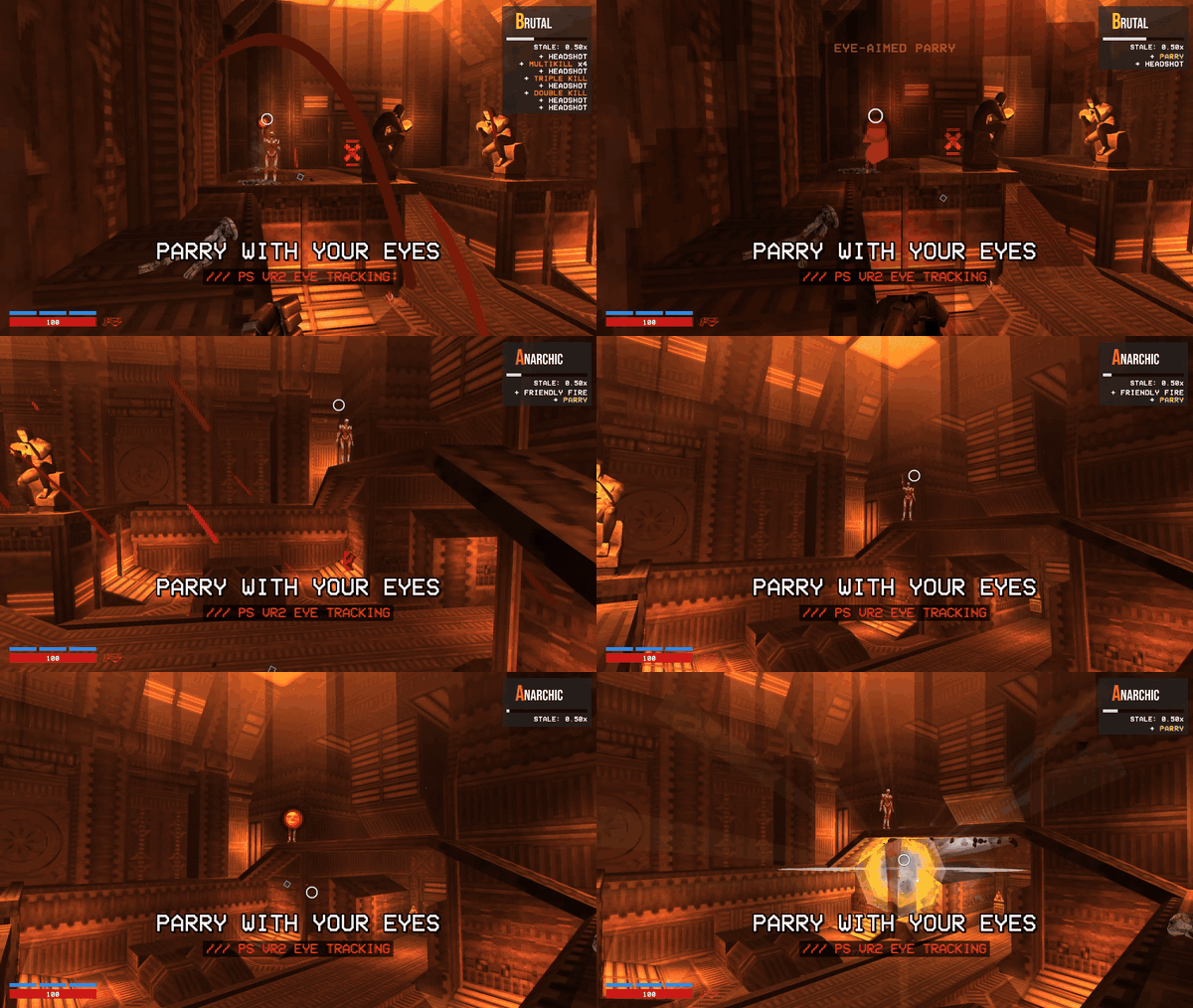
Fixes for the streamer view, found while recording the gameplay video:
- Parries and hits look right on the monitor. The parry flash, the hurt screen and the fades now cover the whole picture. Before, they showed as big pixel blocks over part of it.
- The pause menu and the VR column show in levels. Before, the monitor only showed the controller's laser while you paused.
- A clearer gaze ring. Thicker and more opaque, so it stays visible in a compressed video.
- The log has a line for every eye-aimed parry, handy to find them in a long recording.
What's in 2.0
- Runs on the current game. The most reported problem of the original mod, "the game does not start in VR", is fixed: no frozen boot screen, VR starts by itself as soon as the headset is ready, and the game window says why while it is not.
- One Play button for VR and flat. SteamVR running: VR. Not running: the unmodded flat game.
"Start in VR"or the--vr/--novrlaunch options change that. - Your hands are the weapons. Guns shoot where you point, punch by swinging your fist (or with the button), whiplash and coin throws from your hands, health and stamina on your wrist.
- Optional movement gestures. Slam by driving both fists down in the air, pull the whiplash by yanking your hand back, slide by crouching for real. Off by default; the buttons keep working.
- Comfort. BEGINNER / STANDARD / ULTRAKILL presets, snap or smooth turning, a comfort vignette, reduced screen flashes, calmer weapon shake, auto height for seated or standing play, no forced roll after portals.
- PS VR2 extras (with the PSVR2 Toolkit): adaptive triggers that follow each weapon's state (charging, ready, locked), parries aimed with your eyes, and a tick in your hand when a parry is possible.
- Streamer view. Press
T: the monitor shows a smoothed, level 16:9 camera with a HUD (health, stamina, weapon, style rank and bonuses) and an optional overlay of where your eyes look, instead of the shaky headset mirror.Yadds the raw headset view beside it. Never drawn in the headset. - Settings in the headset. A VR column next to the pause menu, with button prompts that name your controller's buttons and layouts for every common controller, left-handed included.
The full list is in CHANGELOG.md.
Files
VRTRAKILL-2.0.3-full.zip: the mod with BepInEx 5.4.23.5 (x64) and the one-click installer.VRTRAKILL-2.0.3-modonly.zip: the mod only, for an existing BepInEx 5.4.23.5.SHA256SUMS.txtandSHA256SUMS.txt.sig: checksums, signed for the in-game updater.
AI use
Version 2.0 was made with the help of an AI assistant: Anthropic's Claude wrote and refactored much of the new code, the tests and the documentation, under the maintainer's direction. The changes were reviewed and tested in game, with automated in-game checks and by playing with a PS VR2.
Credits
Based on VRTRAKILL by whateverusername0, with work from Squaresweets (Matthew Collier), Guillaume-Lechevallier, Motaweh, Graze, Rokic, Party Wumpus and NavaShield. The globalgamemanagers patcher approach comes from Raicuparta's Two Forks VR; PS VR2 triggers and eye tracking go through BnuuySolutions' PSVR2 Toolkit. AGPL-3.0.
VRTRAKILL 2.0.2
Play ULTRAKILL in VR on the current Steam version (build 22957324). No downgrade needed. Works through SteamVR with PS VR2, Quest, Index, Steam Frame, Pico, Vive and WMR.
Install in one click
- Download
VRTRAKILL-2.0.2-full.zipbelow and extract it anywhere. - Double-click
INSTALL VRTRAKILL.bat. It finds ULTRAKILL through Steam, on any drive, and keeps your settings when you update. - To play in VR, start SteamVR first, then ULTRAKILL. Without SteamVR running, the game starts flat on your monitor as usual.
To remove it, double-click UNINSTALL VRTRAKILL.bat. Already have BepInEx 5.4.23.5? Use VRTRAKILL-2.0.2-modonly.zip. Step-by-step instructions and troubleshooting are in the README.
New in 2.0.2
- Headset comparison for videos. Press
Y(or COMPARE in the VR column) to show the raw headset view, shaking and rolling like a plain VR recording, next to the streamer view, in a corner or side by side. - Optional movement gestures (off by default, GESTURES in the VR column): slam by driving both fists down in the air, pull the whiplash by yanking your hand back, slide by crouching for real. The buttons keep working.
- The Thunderstore version has no update check at all; your mod manager updates it. These GitHub zips keep the check and the signed installer.
What's in 2.0
- Runs on the current game. The most reported problem of the original mod, "the game does not start in VR", is fixed: no frozen boot screen, VR starts by itself as soon as the headset is ready, and the game window says why while it is not.
- One Play button for VR and flat. SteamVR running: VR. Not running: the unmodded flat game.
"Start in VR"or the--vr/--novrlaunch options change that. - Your hands are the weapons. Guns shoot where you point, punch by swinging your fist (or with the button), whiplash and coin throws from your hands, health and stamina on your wrist.
- Comfort. BEGINNER / STANDARD / ULTRAKILL presets, snap or smooth turning, a comfort vignette, reduced screen flashes, calmer weapon shake, auto height for seated or standing play, no forced roll after portals.
- PS VR2 extras (with the PSVR2 Toolkit): adaptive triggers that follow each weapon's state (charging, ready, locked), parries aimed with your eyes, and a tick in your hand when a parry is possible.
- Streamer view. Press
T: the monitor shows a smoothed, level 16:9 camera with a HUD (health, stamina, weapon, style rank and bonuses) and an optional overlay of where your eyes look, instead of the shaky headset mirror. Never drawn in the headset. - Settings in the headset. A VR column next to the pause menu, with button prompts that name your controller's buttons and layouts for every common controller, left-handed included.
The full list is in CHANGELOG.md.
Files
VRTRAKILL-2.0.2-full.zip: the mod with BepInEx 5.4.23.5 (x64) and the one-click installer.VRTRAKILL-2.0.2-modonly.zip: the mod only, for an existing BepInEx 5.4.23.5.SHA256SUMS.txtandSHA256SUMS.txt.sig: checksums, signed for the in-game updater.
AI use
Version 2.0 was made with the help of an AI assistant: Anthropic's Claude wrote and refactored much of the new code, the tests and the documentation, under the maintainer's direction. The changes were reviewed and tested in game, with automated in-game checks and by playing with a PS VR2.
Credits
Based on VRTRAKILL by whateverusername0, with work from Squaresweets (Matthew Collier), Guillaume-Lechevallier, Motaweh, Graze, Rokic, Party Wumpus and NavaShield. The globalgamemanagers patcher approach comes from Raicuparta's Two Forks VR; PS VR2 triggers and eye tracking go through BnuuySolutions' PSVR2 Toolkit. AGPL-3.0.
VRTRAKILL 2.0.1
Play ULTRAKILL in VR on the current Steam version (build 22957324). No downgrade needed. Works through SteamVR with PS VR2, Quest, Index, Steam Frame, Pico, Vive and WMR.
Install in one click
- Download
VRTRAKILL-2.0.1-full.zipbelow and extract it anywhere. - Double-click
INSTALL VRTRAKILL.bat. It finds ULTRAKILL through Steam, on any drive, and keeps your settings when you update. - To play in VR, start SteamVR first, then ULTRAKILL. Without SteamVR running, the game starts flat on your monitor as usual.
To remove it, double-click UNINSTALL VRTRAKILL.bat. Already have BepInEx 5.4.23.5? Use VRTRAKILL-2.0.1-modonly.zip. Step-by-step instructions and troubleshooting are in the README.
2.0.1
Same mod as 2.0.0. The README and the DLLs now say that version 2.0 was made with the help of an AI assistant (see AI use below), as Thunderstore asks of mods made with AI. If you have 2.0.0, nothing changes in game.
What's in 2.0
- Runs on the current game. The most reported problem of the original mod, "the game does not start in VR", is fixed: no frozen boot screen, VR starts by itself as soon as the headset is ready, and the game window says why while it is not.
- One Play button for VR and flat. SteamVR running: VR. Not running: the unmodded flat game.
"Start in VR"or the--vr/--novrlaunch options change that. - Your hands are the weapons. Guns shoot where you point, punch by swinging your fist (or with the button), whiplash and coin throws from your hands, health and stamina on your wrist.
- Comfort. BEGINNER / STANDARD / ULTRAKILL presets, snap or smooth turning, a comfort vignette, reduced screen flashes, calmer weapon shake, auto height for seated or standing play, no forced roll after portals.
- PS VR2 extras (with the PSVR2 Toolkit): adaptive triggers that follow each weapon's state (charging, ready, locked), parries aimed with your eyes, and a tick in your hand when a parry is possible.
- Streamer view. Press
T: the monitor shows a smoothed, level 16:9 camera with a HUD (health, stamina, weapon, style rank and bonuses) and an optional overlay of where your eyes look, instead of the shaky headset mirror. Never drawn in the headset. - Settings in the headset. A VR column next to the pause menu, with button prompts that name your controller's buttons and layouts for every common controller, left-handed included.
The full list is in CHANGELOG.md.
Files
VRTRAKILL-2.0.1-full.zip: the mod with BepInEx 5.4.23.5 (x64) and the one-click installer.VRTRAKILL-2.0.1-modonly.zip: the mod only, for an existing BepInEx 5.4.23.5.SHA256SUMS.txtandSHA256SUMS.txt.sig: checksums, signed for the in-game updater.
AI use
Version 2.0 was made with the help of an AI assistant: Anthropic's Claude wrote and refactored much of the new code, the tests and the documentation, under the maintainer's direction. The changes were reviewed and tested in game, with automated in-game checks and by playing with a PS VR2.
Credits
Based on VRTRAKILL by whateverusername0, with work from Squaresweets (Matthew Collier), Guillaume-Lechevallier, Motaweh, Graze, Rokic, Party Wumpus and NavaShield. The globalgamemanagers patcher approach comes from Raicuparta's Two Forks VR; PS VR2 triggers and eye tracking go through BnuuySolutions' PSVR2 Toolkit. AGPL-3.0.
VRTRAKILL 2.0.0
Play ULTRAKILL in VR on the current Steam version (build 22957324). No downgrade needed. Works through SteamVR with PS VR2, Quest, Index, Steam Frame, Pico, Vive and WMR.
Install in one click
- Download
VRTRAKILL-2.0.0-full.zipbelow and extract it anywhere. - Double-click
INSTALL VRTRAKILL.bat. It finds ULTRAKILL through Steam, on any drive, and keeps your settings when you update. - To play in VR, start SteamVR first, then ULTRAKILL. Without SteamVR running, the game starts flat on your monitor as usual.
To remove it, double-click UNINSTALL VRTRAKILL.bat. Already have BepInEx 5.4.23.5? Use VRTRAKILL-2.0.0-modonly.zip. Step-by-step instructions and troubleshooting are in the README.
What's new in 2.0.0
- Runs on the current game. The most reported problem of the original mod, "the game does not start in VR", is fixed: no frozen boot screen, VR starts by itself as soon as the headset is ready, and the game window says why while it is not.
- One Play button for VR and flat. SteamVR running: VR. Not running: the unmodded flat game.
"Start in VR"or the--vr/--novrlaunch options change that. - Your hands are the weapons. Guns shoot where you point, punch by swinging your fist (or with the button), whiplash and coin throws from your hands, health and stamina on your wrist.
- Comfort. BEGINNER / STANDARD / ULTRAKILL presets, snap or smooth turning, a comfort vignette, reduced screen flashes, calmer weapon shake, auto height for seated or standing play, no forced roll after portals.
- PS VR2 extras (with the PSVR2 Toolkit): adaptive triggers that follow each weapon's state (charging, ready, locked), parries aimed with your eyes, and a tick in your hand when a parry is possible.
- Streamer view. Press
T: the monitor shows a smoothed, level 16:9 camera with a HUD (health, stamina, weapon, style rank and bonuses) and an optional overlay of where your eyes look, instead of the shaky headset mirror. Never drawn in the headset. - Settings in the headset. A VR column next to the pause menu, with button prompts that name your controller's buttons and layouts for every common controller, left-handed included.
The full list is in CHANGELOG.md.
Files
VRTRAKILL-2.0.0-full.zip: the mod with BepInEx 5.4.23.5 (x64) and the one-click installer.VRTRAKILL-2.0.0-modonly.zip: the mod only, for an existing BepInEx 5.4.23.5.SHA256SUMS.txtandSHA256SUMS.txt.sig: checksums, signed for the in-game updater.
Credits
Based on VRTRAKILL by whateverusername0, with work from Squaresweets (Matthew Collier), Guillaume-Lechevallier, Motaweh, Graze, Rokic, Party Wumpus and NavaShield. The globalgamemanagers patcher approach comes from Raicuparta's Two Forks VR; PS VR2 triggers and eye tracking go through BnuuySolutions' PSVR2 Toolkit. AGPL-3.0.