Repository navigation
Daemon application
Documentation on Go daemon application
Daemon application for Hactar is used for reporting data related to miner performance. This is done by querying lotus node and miner. Complete code can be found in hactar-daemon repository.
go.mod - all project dependencies are defined inside.
main.go - main entry point of hactar-daemon. Set up cli commands and initialize configuration and session.
magefile.go - similar to make files but written in pure go (build binaries, run linter + test together, ...) For more details see magefile documentation
.
+-- cmd         // cli setup, individual cli command implementation
+-- internal    // project specific code, most logic is implemented here
+-- pkg         // shared code, logger setup and util functions
+-- mocks       // generated mocks
.
More about this project structure and reasoning behind it can be found here.
Project configuration is expected as a yaml file. Depending on the ENV environment variable, the expected configuration file name is: config-ENV.yaml. For example, if the program is started with: ENV=test hactar-daemon start than expected configuration file name is config-test.yaml.
For example of configuration and description of all properties see config-sample.yaml.
Library Viper is used for loading and managing configuration files.
As hactar-daemon is cli application it supports multiple commands that can be invoked. The most important one is start. It starts monitoring processes trough LotusClient and reporting trough HactarClient. The basic data flow and components communication is shown in the picture below.
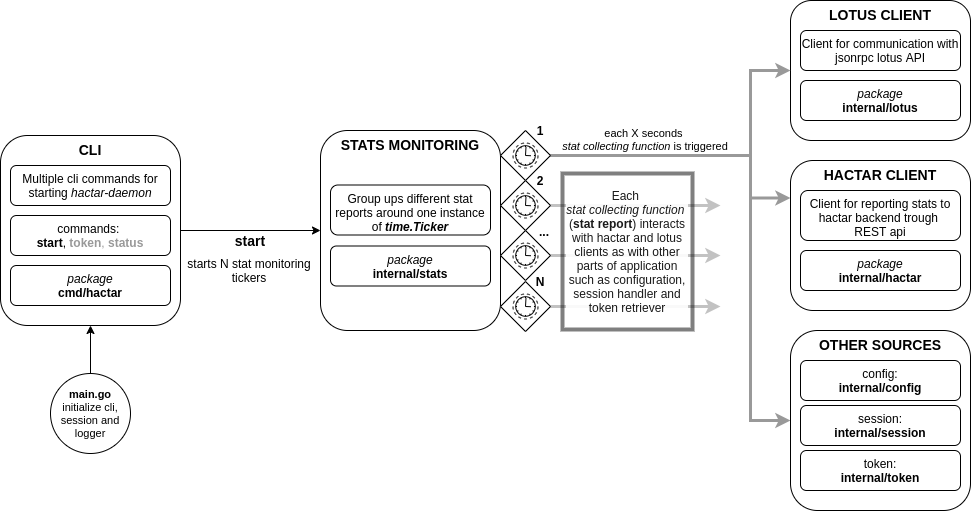
The entry point of the whole application is main.go file. Here configuration is loaded from file (or set to default values), session object is loaded from file and cli setup is done.
Implementations of specific cli commands are found inside cmd/hactar package. These commands are implemented using an external library for building command-line interfaces (lib documentation).
Start command creates multiple tickers (time.Ticker) that invoke stat collecting functions on set intervals. Additionally, instances of HactarClient and LotusClient are created here and passed to ticker initialization functions (see code snip below).
stats.StartMonitoringStats(hactarClient, lotusClient)
stats.StartMonitoringBlocks(hactarClient, lotusClient, currentSession)
stats.StartMonitoringNodeUptime(hactarClient, lotusClient, currentSession)
stats.StartMonitoringBalance(hactarClient, lotusClient, currentSession)
Inside stats package there are multiple groups of stat collecting functions. For example, inside balance.go file there are 2 functions. StartMonitoringBalance that starts new Ticker on specific interval defined in configuration as stats.balance.interval and SubmitNewBalanceReport that collects balance information and reports it to backend. This pattern of one initialization and one stat reporting function is used for all different stat groups that are being collected (each stat group has different intervals in configuration).
Package: internal/lotus/
Client definition, initialization and helper functions are defined inside lotus.go. The client is defined as a structure that holds private instances of jsonrpc2client.Client for Miner lotus api and Node lotus api and public instances of multiple services.
type Client struct {
    lotusNodeClient  jsonrpc2client.Client
    lotusMinerClient jsonrpc2client.Client
    Blocks           BlocksService
    Miner            MinerService
    Sectors          SectorService
    Client           ClientService
    Wallet           WalletService
    PastDeals        PastDealsService
    Rewards          RewardService
}
Each of these services allows access to part of lotus api (groups api functions based on information that they are providing).
Adding a new service means expanding Client structure with new service and instantiating service inside the client constructor function func NewClient. The service itself should be implemented in a separate file.
The service file should contain the interface with defined public methods of service and private structure that will implement these methods. Below is part of file sector.go where SectorService is defined and service function func GetSectorSize implemented.
type SectorService interface {
    GetSectorSize(miner string) (string, error)
    GetNumberOfSectors(miner string) (int, error)
}

type sectorService struct {
    client *Client
}

func (ss *sectorService) GetSectorSize(miner string) (string, error) {
    response, err := ss.client.lotusNodeClient.Call(lotus.SectorSize, miner, nil)
    if err = ValidResponse(response, err, lotus.SectorSize); err != nil {
        return "", err
    }

    return util.String(response.Result), nil
}
...
It is important to mention that interface is used to define service inside Client structure (see Client definition two snips before) and structure, with implemented functions, is used when initializing service as shown in snip below.
func NewClient(lClient jsonrpc2client.Client, mClient jsonrpc2client.Client) (*Client, error) {
..
client.Sectors = §orService{client: client}
..
return client, nil
}Additionally inside package internal/lotus there is folder requests with definitions of jsonrpc methods names as constants. They are separated on Miner lotus api (requests/miner) and Node lotus api(requests/lotus) methods.
Package: internal/hactar/
It is important to read Expanding lotus client first, because the same model for building a client with multiple services is used here.
Client definition, initialization and helper functions are defined inside hactar.go. The client is defined as a structure that holds a private instance of http.Client, additional client public parameters (base api url and security token) and public instances of multiple services.
type Client struct {
    // HTTP client used to communicate
    client *http.Client
    // Base URL for API requests.
    BaseURL *url.URL
    // JWT token
    Token string
    // Services used for communicating with the API
    Nodes     NodesService
    DiskInfo  DiskInfoService
    Blocks    BlocksService
    Miner     MinerService
    PastDeals PastDealsService
}
Each service, groups up a set of api methods toward hactar backend, similar to services inside LotusClient.
Adding a new service means expanding Client structure with new service and instantiating service inside client constructor method func NewClient. The service itself should be implemented in a separate file.
Internal structure of services is the same as the services of LotusClient. Service is defined as a public interface and private structure with implementations.
It is important to note that HactarClient actually has two constructor functions: func NewAuthClient(email string, password string) and func NewClient(token interface{}). The difference is that NewAuthClient function creates client and then tries to authenticate to hactar backend and retrieve security token, where NewClient expects security token as an argument.
Package: internal/stats/
As described in Code structure, stat gathering functions are grouped around instances of time.Ticker(or even more precisely, around a frequency of sending reports). Example of grouping multiple reports around the same ticker can be found in stats.go which is the main aggregation of reports (general stats).
Additional stat reports can be added in two different ways. I will be referencing example balance.go described in the last paragraph of Code structure. The first one is adding a report inside the existing ticker execution function (example: extending func SubmitNewBalanceReport). The second one is creating a new ticker instance for stat report (example: creating new file new_stat.go and implementing two functions as described before).
If creating new ticker instance it is important to call initialization function inside start cli command implementation (cmd/hactar/start.go)`.
Package: cmd/hactar/
First, we need to create a new instance of cli.Command that defines the new command. All commands are initialized inside commands.go (example snip below)
var StartCommand = &cli.Command{
    Name: "start",
    Desc: "Start hactar daemon application",
    Text: "",
    Fn:   RunStartCommand,
    Argv: func() interface{} { return new(StartParams) },
}
A code that needs to be executed on command is extracted to function inside a separate file. For the upper example that would be function RunStartCommand defined inside start.go.
For more details on command arguments and different ways to define them read used cli library documentation.
The last step is to register this command inside main.go. Just remember to wrap command instance inside cli.Tree (see snip below).
// initialize commands
 if err := cli.Root(hactar.RootCommand,
    cli.Tree(cli.HelpCommand("Display help information")),
    cli.Tree(hactar.StartCommand),
    cli.Tree(hactar.TokenCommand),
    cli.Tree(hactar.StatusCommand),
).Run(command); err != nil {
    _, _ = fmt.Fprintln(os.Stderr, err)
    os.Exit(1)
}Package: internal/session/
As hactar-daemon needs to hold information about the last block that it had checked for reward and security token for hactar backend, an additional file is created on the first run of hactar-daemon. This file is called status.yaml and will be created inside .lotus/hactar folder in the users home directory.
This file is treated as an additional Viper configuration file inside the code (see documentation) but is used as hactar-daemon current state record.
As seen before, inside session.go file there is a public interface that defines all methods available for manipulating current session data and private structure that holds implementations of defined methods and current values of variables that define daemon state.
It is important to note that private structure holds more information than saved inside status.yaml. These additional parameters are part of the current state but there is no need for persisting them.
If expanding session data it is important to decide if new information should be persisted. In case it should than expanding is a four-step process:
- Expand private structure with a new variable that will hold the current state of new information.
- Expand public interface with getter and setter for the new variable.
- Define configuration key (example:
hactar.token) that will be used for saving new information and expandfunc InitSessionwith setting a default value for the chosen key (if needed) and adding it to current session creation. - Expand
func SaveSessionwith new information.
If it is not necessary to persist new data than just omit last two step from list above.
Interfaces mocks are autogenerated using mockery tool (see documentation) and all saved inside mocks root package.
It is important to autogenerate interfaces mocks after adding new interface (mostly new service) or after making changes on existing interface.
Use this command to run mock generation tool:
mockery -all -dir=./internal -recursive=true -keeptree=true
All test files are positioned in the same directory as a go file (set of functions) that is being tested. For example, inside /internal/config folder there is config.go and its corresponding test inside config_test.go. These are unit tests for functions defined in go files.
.
+-- internal
|   +-- config
|       +-- config.go
|       +-- config_test.go
.
Testing itself is done using built in golang package testing(package documentation). Each test is represented with one function with signature func TestXxx(*testing.T).
Test function names are constructed as follows:
Test FunctionNameThatIsTested _ additionalTestDescription
Here is an example of naming test functions. It is test for function InitMainConfig() inside config.go file that checks if default values are set on init.
TestInitMainConfig_testDefaultValues
Hactar daemon project is using Github actions for automated workflow of running tests and creating a new release.
Repository contains running tests config and release config.
Running tests will only run Go tests while release workflow will build the Go app, create released for supported distributions and upload those assets to releases. Release is triggered with tag that matches v*, i.e. v1.0, v20.15.10.
In case you have any issues with Hactar daemon app, feel free to join our Discord and ask us in the #hactar channel. Alternatively, feel free to open issue in the Github repository.