Repository navigation

Before you upgrade
-
Notifuse now refuses to start on PostgreSQL older than 17, the version it is tested on, and says which version it found. Upgrade the database server before upgrading Notifuse.
-
compose.yamlmoves to PostgreSQL 18: an installation on PostgreSQL 17 is upgraded by its nextdocker compose up -d, after a copy of its data to thepostgres-upgrade-backupvolume, which needs free disk space for the data plus 10 % (without it, the upgrade stops before changing anything). Every variable of.envnow reaches Notifuse, not only those the file names: remove stale settings first. PostgreSQL is now published on 127.0.0.1 only. See thecompose.yamlFeature below and Self-hosting › Upgrading PostgreSQL. -
The upgrade to 44 builds indexes on the message history, removes the instance's own links from the click statistics and recompiles the segment queries; sending and tracking wait meanwhile, about a second per 2 million messages when the table fits in memory, longer otherwise. Plan the upgrade outside a large send.
-
Liquid outputs in the HTML of emails are now HTML-escaped. Data meant to be HTML, such as a feed holding an HTML block, needs the new
rawfilter ({{ global_feed.html | raw }}), and{{ bio | newline_to_br }}becomes{{ bio | escape | newline_to_br }}. See Security below. -
Liquid follows Shopify Liquid on more templates:
{% for pair in hash %}loops over the key-value pairs of an object,caserenders everywhenthat matches, a decimal divided by zero writesInfinity, and very large integers stay exact. A filter missing an argument it requires (such as{{ name | replace }}) is now an error, as any filter error: an email is not sent, and a blog page leaves it empty. Malformed Liquid (such as an unclosed[or a trailing.in{{ }}) now renders as in Shopify Liquid. Notifuse renders Liquid with liquidgo v5.14.6. -
An email whose Liquid would write a "Liquid error: ..." text in the message is no longer sent: the send fails, and the preview and the test send show the error. In practice this is a comparison of a text with a number, such as
{% if contact.custom_string_1 >= 10 %}when the field holds "12" ("comparison of String with 10 failed"), an unknown operator (=for==), or a filter that fails, such as{{ total | divided_by: count }}whencountis 0 ("divided by 0"). A missing field is no error, and display conditions never cause one.transactional.sendandbroadcasts.sendToIndividualanswer such a send with a 422 that carries the error, instead of a 500 that named nothing. -
If you set
email.textthrough the API: it was stored and never sent, and is now sent as the email's text version. It is checked when the template is saved (Liquid syntax, 64 KiB at most, 400 otherwise), for the default language and for each translation the request sends; a save withouttranslationskeeps the stored ones as they are, unchecked unless it changes the template's channel. The text is rendered with Liquid, so a literal{{needs{% raw %}. -
The
/v/path is now reserved for web versions: on a blog's custom domain, a blog category whose slug isvis no longer reachable, and a new category cannot take it. Rename such a category before upgrading. -
Testing an email provider (
email.testProvider) is reserved to workspace owners, like creating and editing integrations. The console already offered it to owners only; an API key or a member calling it now gets 403. -
Segment memberships change after the upgrade: memberships of deleted contacts are removed, segments with relative dates drop the contacts that no longer match, and filters on custom JSON values now match as written. Automations and webhooks that react to a contact leaving or joining a segment receive those changes at once. See Fixes below.
Features
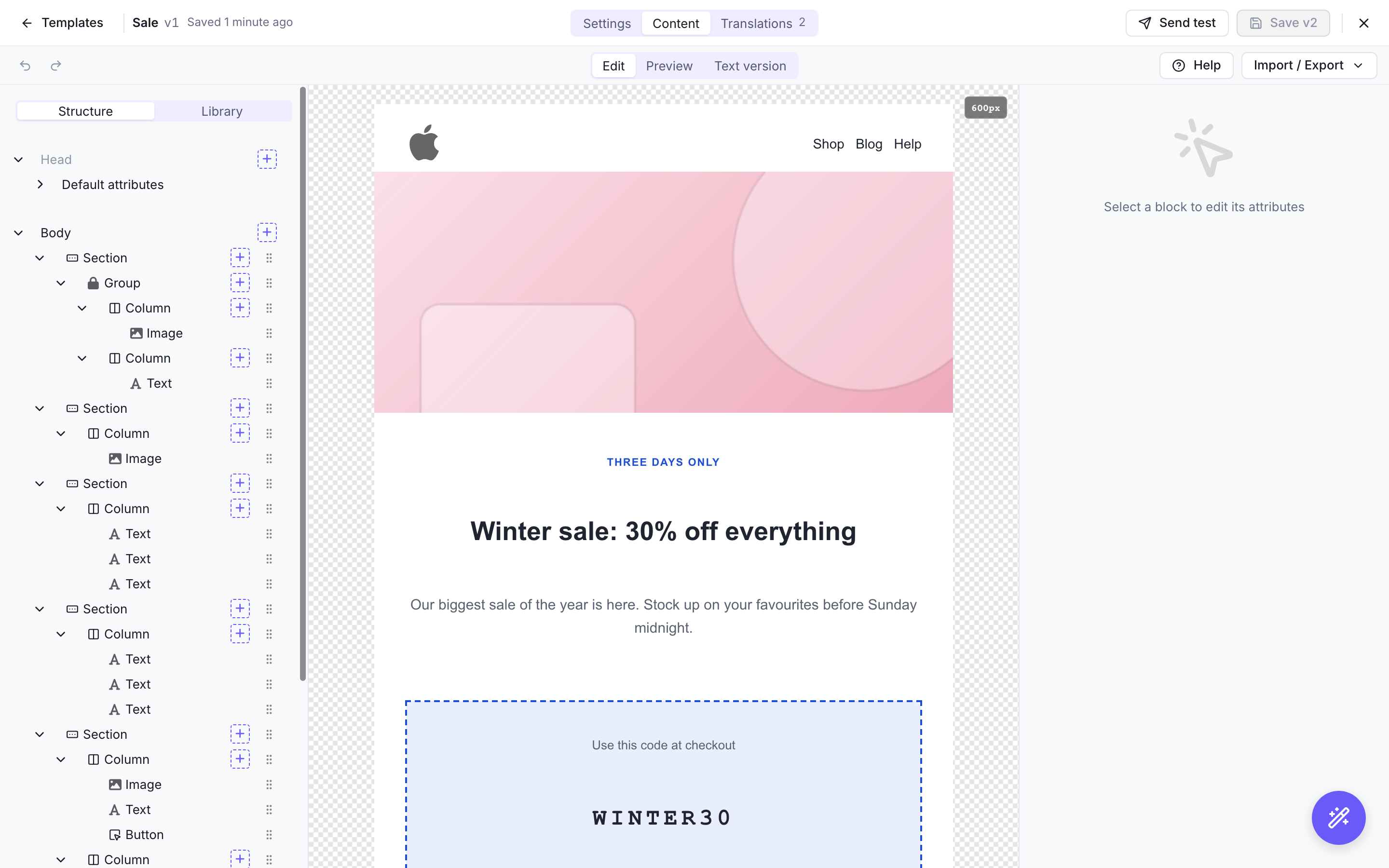
-
The workspace list tells the root user and workspace owners when a newer Notifuse version is available, with what each missing version brings and what to do before upgrading; a version that fixes a vulnerability is shown in red and cannot be dismissed.
CHECK_FOR_UPDATES=falseturns it off. -
Emails sent by an automation can use the event that started the journey, as
{{ trigger_event }}: a custom event's properties ({{ trigger_event.properties.items }}), the list or segment the contact joined, or the link clicked. Journeys that started before the upgrade have no event. -
Creating a template starts from a gallery of 15 ready-made emails (verification code, receipt, order confirmation, abandoned cart, newsletter…) written in the workspace's language, from one of your templates, or from « Simple », a logo, a paragraph and the footer.
-
A scheduled broadcast that has not started sending can go back to draft, with the new
broadcasts.unscheduleAPI endpoint and « Back to draft » in the console. It keeps its date, and can be edited and scheduled again. Once its sending has started, the request is refused: cancel it instead. -
Contacts, lists and segments share one page in the console, with your lists and segments in a side rail; the Lists page now opens it. A contact opens in a sheet with its own link: move through the table with J and K, edit fields in place, and see its key figures, its activity day by day in sentences, each message with its journey (delivered, opened, clicked) and the email sent, and its web visits, each visit with its pages and goals (a very long one says it shows only its first). The contacts table is denser, keeps each row on one line (its first lists and segment, then « +N » naming the others) and counts the contacts it shows at its foot. « Filter » picks a field by group and shows each filter as a pill that says how it matches (« Country contains FR », « Opens tracking consent is Granted »). A selection replaces the toolbar with its actions. A segment view says what defines it, its goals and activity conditions included, with Recompute and Edit segment beside it; the ⋯ menu of every view gathers Bulk update, Displayed columns and Manage custom fields. Importing a CSV shows each column with sample values, lists the imports this browser can resume, and counts the contacts created and updated; its failed rows download as a CSV. Bulk update lets you pick the email column, counts duplicates and invalid addresses before it starts, and retries the addresses that failed.
-
The blog page in the console lists posts with a tab per status, scheduled posts included, and their counts, a title search, and each post's views over 30 days once the web analytics script is in the blog's theme. Categories show their post counts in the side rail, with a menu to edit or delete them.
-
The file manager in the console shows your folders as a tree with their file counts, lists files as a table or a grid with their dimensions, and previews the selected file beside the list, with its own link. Files can be searched across folders. The file picker shows the chosen file's name, dimensions and size before you insert it.
-
The Logs page shows the tabs you may open, and the Logs menu entry appears with any of them, the audit log included. Messages show the last 24 hours by default, with counts by status you can click, a search by email or message ID, a filter by origin (newsletter, automation, transactional) and the journey of each message; a message opens in a side panel with its events, the content sent and its data. Incoming webhooks can be filtered by provider, and an event opens with its raw payload. The audit log reads as sentences, such as "Invited ann@example.com", filtered by period, actor, resource, action or outcome, with its filters kept in the link. An outgoing webhook delivery opens in a side panel with its response and payload.
-
Automations can start when a contact clicks a specific link, with the new "Clicked a link" trigger (
email.link_clicked). It starts the first time a contact clicks each link of an email, and can be limited to links containing some text, to one broadcast or to one template. Its broadcast and template filters take at most 64 characters. A click on an email the automation sent itself does not start it again. Clicks made before the upgrade, and clicks on links in emails sent before 42.2, do not start it; a link clicked before the upgrade starts it on its next click. The new event does not count toward the monthly event usage. -
The per-link statistics of a broadcast open the message log on the emails where that link was clicked, so you see who clicked it. The message log takes the same filter (
clicked_url, withbroadcast_id) through the console and the API. -
The analytics API splits message history by what sent each message, with the new
origindimension (broadcast,automation,transactionalorother, the values of themessages.listfilter). -
The analytics API gives when each transactional notification last sent successfully, with the new
last_sent_atmeasure of message history, andmessages.listfilters bytransactional_notification_id. -
The API counts the recipients of a broadcast audience before it is sent, with the new
broadcasts.estimateAudience.broadcasts.listgives the number of broadcasts in each status (with_status_counts) and keeps the ones started from a date (started_after), and the message history analytics takeopened_atandclicked_atas time dimensions. In the console, broadcasts get a new list with status tabs, a search and their 30-day results, a detail page with the funnel, opens and clicks per hour (per day over 30 days), the A/B test and the clicked links, and a one-screen editor that saves as you type, previews the email and checks everything before sending. -
The API gives the statistics of each step of an automation, over a period or all time, with the new
automations.nodeStats: visits (each time a journey reached the step, a loop counting each time round), results, the path each split took, the journeys waiting or retrying there, and for email steps the messages sent, delivered, opened and clicked.automations.listgives each automation's journeys by status (with_journey_counts),messages.listfilters byautomation_id, and the message history analytics split byautomation_id. In the console, automations get a list with status tabs, a search and their journeys, completion and open rates, and the editor becomes a full-screen canvas that opens at 100 % on the trigger: read-only while live, warning before you leave unsaved changes, with a Stats switch on the canvas that shows each step's results over the last 7 or 30 days or all time, each split's share on its link, and in the step's panel with the email's preview; laying the steps out leaves more room under a step that branches. -
The new
messages.countAPI endpoint counts messages by status for the same filters asmessages.list, which also takesorigin,created_afterandcreated_before;inboundWebhookEvents.listfilters bysource. -
The API counts what uses each template with the new
templates.usageendpoint (broadcasts that may still send, counting only the winning variation once an A/B test has one, transactional notifications, automations and double opt-in lists), and lists them for one template (atemplate_idthat is not valid UTF-8 or holds a NUL byte answers 400). It counts posts by status and category with the newblogPosts.countsendpoint;blogPosts.listlists the posts still to come withstatus=scheduledand searches titles withsearch(400 for a search that is not valid UTF-8 or holds a NUL byte);workspaces.membersreturns each member'sname. -
Text blocks of the visual email editor can hold real headings, H1 to H6, chosen from the text style menu of the toolbar, so that screen readers can list and jump between an email's sections (#485). A level that skips one after the heading before it is marked in the menu, on the block and above the preview, without being refused. The look of each level is set once in Default attributes > Headings and written onto every heading of the email, for every mail client.
-
Blocks of the visual email editor can now be sent only to some recipients, with a display condition on the email's data, such as "
order.totalis greater than 100" or "contact.custom_string_1equalsvip" (#395). Add it at the top of a section, text, image, button or other block's settings, where its result with the test data shows; the preview hides the blocks it would hide. Columns and groups cannot have one. Through the API, a block ofvisual_editor_treetakes it asdisplay_condition. The MJML export writes conditions as Liquid; importing that file back into the visual editor drops them. -
The visual email editor sets the space between the columns of a section (Column gap, MJML 5's
gutter), a border on social icons, for one icon or for the whole social block, and whether a social block lays out its icons in a row or a column. The canvas shows the font, border and spacing a social block gives its icons, as the email does, and a border radius written as text, such as50%, stays readable in its field. -
Every email now includes a plain-text version, for mail clients that show text only and for better deliverability. By default it is generated from the HTML at every send, its links tracked like the links of the HTML. In the template editor's new Text version mode, and in the MJML editor's Text version tab, you can instead write your own, starting from the automatic version, with Liquid like the subject, for the default language and for each translation; a language without its own text gets the automatic version. A custom text is sent as written: its links are not tracked, and a marketing template's text should keep
{{ unsubscribe_url }}, which the editor reminds you of. A custom text that cannot be rendered at send time is replaced by the automatic version. The template preview shows the text sent and where it comes from, andtemplates.compilereturns it astext, withtext_sourceandtext_error. A custom text is at most 64 KiB, at save and intemplates.compile. -
Broadcast and automation emails can link to their web version with
{{ view_in_browser_url }}, for recipients whose mail client renders the email badly. The page shows the email as it was sent, in the language it was sent in, with the template version and the data of that send. Viewing it records no open and its links record no click; they keep their UTM parameters. With click tracking on, the click on the link in the email itself counts as a click. Only emails whose template uses the variable have a web version; transactional, double opt-in and broadcast test emails leave it empty. Deleting the template takes its web versions down, and so does deleting the contact. The link signs the domain it was sent with, and the page opens there and on the API endpoint only, which keeps another workspace's custom domain from showing it. The API endpoint shows every workspace's web versions, and workspaces that already share a custom domain show each other's on it. After a workspace changes custom domain, its old links keep working while the old domain points to Notifuse, and stop within a few minutes of another workspace taking it; a redirect keeps them working only if it goes to the API endpoint. Behind a reverse proxy, forward the originalHostor setX-Forwarded-HostorForwarded, which is then the only host the request is judged on; a proxy that sends the API endpoint's host asHostturns the rule off. The link editor of the visual builder offers it as a link type, "Web version of the email".From this version on, automation emails keep the data they were rendered with in the message history, encrypted, as broadcasts already did, so their web version can be shown. Deleting a contact removes it.
-
A broadcast can now send from a sender other than its template's: each variation, in an A/B test too, chooses one of the marketing email integration's senders, or keeps its template's. A transactional email can do the same with
email_options.sender_id. A sender that is not one of the integration's is refused when saving or sending. A variation whose chosen sender is removed from the integration afterwards is queued for no further recipient until another sender is chosen: the broadcast cannot be scheduled, cannot be resumed while that variation still has recipients to queue, and pauses before its next batch if it is queuing them. The console then offers to change the sender of the paused broadcast. Emails already queued keep the sender they were queued with, and no email falls back to another address. -
contacts.listtakessearch, which matches a contact's email, first, last and full name, first and last name together ("Jane Doe"), and external ID. -
The visual email editor has a Library tab beside Structure, with previews of your saved blocks that you can search and filter, and the basic blocks. A block's Insert button adds it at the selected block, where it fits, and the confirmation offers to undo it; you can also drag a saved or basic block onto the email, where a line shows where it lands and a label says why a place does not take it. Saving a block to the library suggests a name from its content, says that templates already using a saved block do not change when it is replaced, and opens the library on the new block. In the editor opened from the Templates page, members who can edit templates can rename a saved block from the library, replace it with the selected block, duplicate it or delete it. The "+" menus of the email's body list every saved block, with a preview, and say why the ones that cannot go there do not fit.
-
The console has a new, denser look: the Inter typeface, new colors and tighter spacing.
-
The console has a new navigation: a lighter sidebar, which folds to icons and opens over the page when you point at it, or stays open once pinned (Contacts and Broadcasts open with it unpinned, for room), now holds the workspace switcher, the help and the account menus, and the top bar is gone. The sign-in page has a new background photo, by Sean Oulashin.
-
The dashboard shows website visits, how rates moved since the previous period, emails sent each day by origin (broadcasts, transactional, automations, other), the latest failures and new contacts, and your upcoming broadcasts. Members who cannot read message history land on the first page they can open. A new workspace's owners get a "Get started" checklist that ticks itself from the provider and senders to the first email, and until then each card says what will fill it rather than showing zeros.
-
Settings have a new layout. The side menu groups the pages into Workspace, Sending, Content and Security. General shows the workspace, its languages, email tracking and custom domain in separate panels, with a logo preview. Team & API keys lists members and keys in tables with each one's access, and invitations with when they expire. Each email provider is a card with its roles, webhook status, settings and senders, which you can add from the card. Webhooks are listed with their success rate over the last 7 days and their last success; a webhook opens in a side panel, with its statistics, its secret, a test and a link to its deliveries. Custom fields list the named slots, and how many of each type are still free.
-
Templates are listed in a table with a tab per category and a search on name or subject. Each template shows where it is used (newsletters, transactional notifications, automations, lists), and deleting one lists what still uses it first. A Notifuse export or an MJML file is imported from the page header into a new template, and a template's preview has its own link.
-
The transactional page shows each notification's open and click rates and its last send, and opens a detail view with sends per day, the latest sends, a preview of its template and the API call in cURL, TypeScript and Python. The message log can be filtered by transactional notification in the console. Each notification's name links to its detail view, a disabled action says why in its menu, and the sends per day can be read as a table by screen readers.
-
In web analytics, the attribution rule editor and tester, an explore row's breakdown and a goal's dashboard open full width. The rule tester runs a visit through the rules as you type and can fill it from a pasted link, and the rule editor adds a Quick test of the fields the rule reads, the order of the rules writing the same dimensions and checks on its values and regular expressions; a member without web analytics write permission sees rules read only. A breakdown opens straight on the row's figures, chart and tables, with each value's share and scroll depth, and a goal's dashboard adds its conversion rate, its landing and goal pages, a card for named custom dimensions and buttons to the previous or next goal.
-
compose.yamlinstalls Notifuse without a clone, from the image published for its release (NOTIFUSE_VERSIONin.envpins another; from a clone,--buildbuilds it), and moves to PostgreSQL 18. An installation made on PostgreSQL 17 is upgraded by its nextdocker compose up -d, after a copy of its 17 data to thepostgres-upgrade-backupvolume, which you delete once satisfied (Self-hosting › Upgrading PostgreSQL says how, and how to roll back). PostgreSQL is now published on 127.0.0.1 only, and every variable of.envreaches Notifuse, not only those the file names: check that.envholds no stale setting. Notifuse still runs on PostgreSQL 17. -
Liquid follows Shopify Liquid 5.14:
{{ self['first name'] }}reads a variable by its name, thesquishfilter turns each run of spaces and line breaks into one space, andfirstandlastgive the first and last letter of a text. A{% for %}whoselimitoroffsetis not a number now fails with "invalid integer", so an email that would show it is not sent; before, the loop ignored it. Display conditions decide as before. Notifuse renders Liquid with liquidgo v5.14.2.
Improvements
-
Importing MJML into the visual editor keeps the Liquid written between blocks. An MJML export from Notifuse marks its Liquid blocks and display conditions with Liquid comments, and the import gives them back; in other MJML files, a passage with Liquid between blocks (a
{% for %}loop around sections, for example) becomes a Liquid block holding that code.templates.compiletakesliquid_markersfor these marks. -
The SparkPost and Mailjet integrations are marked deprecated in the console and will be removed in a later version: SparkPost no longer accepts new customers, and Mailjet does not allow sending marketing emails through its API.
-
The AI integrations suggest current models: Claude Opus 5.5, Sonnet 5.5 and Haiku 5.5 for Anthropic, Gemini 4 Carbon, Argon and Hydrogen for Google, and GPT-6.1 Sol, GPT-6 Astra and GPT-6.1 Terra for OpenAI. A new integration starts on Claude Sonnet 5.5, Gemini 4 Argon or GPT-6.1 Sol Existing integrations keep the model they name; one saved without a model now uses the new default.
-
Emails are rendered with safe-mjml v1.1.0, the new name of the MJML engine Notifuse used (gomjml), and their HTML is the HTML the official MJML 5.4.1 writes: inline
mj-styleapplies every selector as MJML does,mj-html-attributesis applied, and Liquid tags are kept intact. Moving to MJML 5 changes two things a template can show: the CSS class ofmj-bodyis on the<body>tag, so a rule aimed at thedivit was on stops matching, and theinner-paddingofmj-heroapplies in every mail client, not only Outlook. A condition written inmj-rawtags between sections now applies to the plain-text version too, as it does to the HTML. A template withoutmj-bodyfails to compile instead of giving an empty email. -
Most dates in the console follow its language: month and weekday names, "3 days ago", the date pickers, the web analytics charts, ranges and annotations, the licence and invitation expiry dates, the day an integration was connected, and the dates in the prompts to restore a blog draft or resume a contact import. Counts and amounts use its separators too ("12 345" in French): contact imports and exports, sending progress, analytics amounts, rate limits and the values in a contact's activity and fields. So do the web analytics counts, percentages and durations ("1,5 k", "12,5 %", "5 min 12 s"). Weeks start on Monday in French, Spanish, German, Catalan and Italian.
-
tasks.get,tasks.delete,tasks.reset,tasks.triggerandtasks.execute(with the internal scheduler off) answer 500 when the database fails, without the internal error in the response, 404 only for a task that does not exist, and 400 for a task ID that is not a UUID. A refusal of a reset or a trigger because of the task's state (not recurring, not failed, already completed) still answers 400, its message now starting with "validation error: ". -
When Notifuse stops normally, during an upgrade for example, an automation step already under way finishes and is recorded before the server exits (for up to 35 seconds, so a webhook step whose endpoint takes its full 30 seconds finishes too), so it does not run again after the restart and its email or webhook is not sent twice.
-
The Docker Compose files give Notifuse 75 seconds to stop instead of Docker's default 10, so the work under way (an automation step, emails being sent, web analytics visits) finishes before the container exits. It applies once the container is recreated, for example by
docker compose up -d. With your own Compose file,docker runor Kubernetes, setstop_grace_period: 75s,--stop-timeout 75orterminationGracePeriodSeconds: 75on the Notifuse container. -
DB_EXPECT_EXISTING=truemakes Notifuse refuse to start instead of creating or initialising its system database, and refuse to create a missing workspace database, on a server that must already hold the data (an upgrade, a restore). Without it, a first start on an empty database is now logged as a warning. -
Upgrading to 44 indexes failed, bounced and complained messages, so the latest ones are found at once on large workspaces. Sending and tracking wait while the indexes build, about a second per 2 million messages when the table fits in memory, longer otherwise, and then while the instance's own links are removed from the click statistics, which takes longer the more clicked links the workspace has recorded.
-
blogPosts.listanswers 400 instead of 500 for an invalid status or acategory_idthat is not a UUID. -
Segments filtering on a clicked link now include a contact as soon as they click it in an email sent from 42.2 on, even when it was not the first link they clicked in that email.
-
Opens and clicks on an email whose contact was deleted are no longer recorded. The link still redirects.
-
Behind a reverse proxy, clicks on an email's unsubscribe and notification center links are no longer recorded per link, so the contact address these links carry is no longer stored with the click. The public host is read from
X-Forwarded-HostorForwarded, and links to the instance on another port, or to blog posts on the workspace's custom domain, are not recorded either. Behind a proxy that forwards neither the public host nor one of these headers, links on a custom domain the workspace no longer uses are still recorded. Upgrading to 44 removes from the per-link statistics the links recorded on the API endpoint and on the workspace's current custom domain. -
A tracked link to the instance's own host written with a trailing dot, or to its IPv6 address written another way, now opens directly instead of showing the confirmation page.
-
/api/cronruns at most 100 tasks per call, orTASK_SCHEDULER_MAX_TASKSwhen it is higher; a largermax_tasksis lowered to that limit, and the response gives the number used. -
A broadcast whose last attempt cannot record its outcome is tried again instead of staying in Sending; a run that outlives its time no longer makes the next run send to recipients again.
-
With Exit on reply, an email whose journey cannot be checked is retried later instead of being sent, and an email whose journey no longer exists is not sent.
-
A reply to an automation email whose subject is only "stop", "unsubscribe", "remove", "remove me" or "opt out" now appears in the contact's activity like any other reply, and ends the journey when the automation has Exit on reply. It changes no list subscription.
-
audience.exclude_unsubscribedcan only be changed before a broadcast starts sending, and a scheduled broadcast that has started sending can no longer change its tracking mode. -
A graceful shutdown ends within 70 seconds, even when closing the database hangs.
-
A broadcast run that ends while its recipient feed waits to retry stops at once instead of waiting out the delay.
-
A blog category can no longer take a slug whose address another route answers on the blog's domain:
v,t,rand any slug starting withapi,consoleornotification-center, where none of its pages would show, andtrack,unsubscribe,healthand the like, where its own page would not while its posts and feed do. An existing category keeps its slug and stays editable; the sitemap lists only its addresses that reach the blog. -
Blocks can now be dragged into empty columns, sections, wrappers, groups and social blocks, wrappers get a drag handle, and a section dragged below nested content finds its place without a sideways move. While dragging, moving the pointer left or right picks the level where the block goes, and the line shows that level. Moving, adding, duplicating or deleting a column keeps the other columns' proportions when their widths are percentages adding up to 100.
-
Test emails can now be sent for a mailing list, chosen in the test dialog of a template or a broadcast and preselected with the broadcast's audience list (#423). They then carry that list's working unsubscribe and confirmation links and the List-Unsubscribe header, as a broadcast to the list does; a test for the audience list of a broadcast that also goes to the list's unsubscribed contacts has no header, as the broadcast. Unsubscribing or confirming from such a test, or a bounce or complaint on it, changes the recipient's subscription to the list.
transactional.testTemplatetakeslist_idandomit_list_unsubscribe_header; a test for a list also needs Lists read. -
Groups in email templates now render as in MJML: a group without a width takes its share of the section, a group with a percentage width keeps it, and in Outlook a group sits side by side with the columns and groups of its section, with raw HTML blocks placed between them. A group saved with a width of 100% next to another column or group now makes a row wider than the email in Outlook: give the group and the columns next to it widths that add up to 100%.
-
The email editor no longer gives a new group a width of 100%, unless the template's default attributes give groups one, so it takes its share of the section, and the canvas shows each group at the width the email gives it. The Width field of a group shows that share when it is empty. Adding, moving, duplicating or deleting a group in a section resizes the section's columns to the room the groups leave, keeping their proportions.
-
A translation's visual editor can import an MJML or JSON file into its language, and export that language's email.
-
A temporary database error while updating segment members, or in an automation's "Add to list" or "Remove from list" step, is now retried instead of leaving the contact out of the segment or the list.
-
An import of custom events that holds several events of the same name for one contact is no longer refused when an automation runs on every occurrence: each event starts its own journey.
-
An automation set to run once per contact no longer starts twice when two events for the same contact arrive at the same time.
-
An email event that the provider posts again, after a timeout or an error, is recorded once, so a soft bounce posted again counts once toward marking the contact bounced.
-
The soft bounce threshold counts emails: an email the provider tries to deliver several times, as Mailgun reports each attempt, counts once.
-
Building a segment takes the same time for each batch of contacts, however far the build has gone, instead of slowing down as it goes (#571). On a workspace with hundreds of thousands of contacts, the daily update of segments with relative dates no longer keeps the database busy for over an hour. Contacts created or deleted during a build no longer make it skip or repeat others.
-
blogPosts.listreturns all posts by the date they are shown with (publication date, or a draft's last edit), newest first, and drafts by their last edit. -
Demo data: the email templates are built from the template gallery's models, and delivery, bounce and complaint events read as Amazon SES notifications, with bounced and complained contacts no longer receiving later emails. Contacts have example.com, example.org or example.net addresses, each broadcast's emails and their timeline entries are dated from that broadcast's own send, and the A/B test shows its sample split between both variations, the winner sent to everyone else, and its recipient counts.
-
An A/B test broadcast can be paused or cancelled during its test, while it waits for its winner and while the winner is sent; resumed, it picks up where it was, and the time it spent paused while waiting for its winner does not count toward its test duration.
Security
-
Liquid outputs (
{{ }},echo,cycle) in the HTML of emails are HTML-escaped, so a value of the data, such as a contact field filled in a public form, can no longer add markup or links to an email. Data meant to be HTML, such as a feed that holds an HTML block, needs the newrawfilter:{{ global_feed.html | raw }}; so does a value written into CSS (mj-style, a<style>) or a script, for data you trust only. Outputs already escaped withescapeare not escaped twice, also throughnewline_to_br,striportruncate; the text of acaptureis not escaped; the subject and the text version are not escaped. A filter that writes HTML from the data, such as{{ bio | newline_to_br }}, now shows its<br />as text: write{{ bio | escape | newline_to_br }}. In the safe-mjml engine, escaped text placed between components can no longer become a component. -
A template preview, creation or update whose request is larger than 1 MB is refused (413), and the Liquid of one email stops after 10 seconds or a fixed amount of work for all its blocks together, where each block had its own limits.
-
A custom domain can no longer be saved on a workspace when another workspace already uses it, whatever its case, port or trailing dot, since that workspace could show its own pages and emails under the other's brand. Notifuse checks that a domain points to it, not who owns it, so the first workspace to save a domain holds it. Workspaces that already share one keep it and can still edit its URL while the host stays the same; one that removes it cannot save it again. A custom domain URL whose domain cannot be read is refused.
Fixes
-
Importing MJML into the visual editor reads the file as MJML does: a bare
&, a<in a Liquid condition, an unclosed<p>, an HTML entity such as−or an attribute without quotes no longer fail with a syntax error. -
The setup wizard sends telemetry and update checks as it shows them; they were sent switched off unless « Advanced Settings » was opened. It also saves the EHLO hostname it tests with, accepts several root emails as documented, asks for the SSO redirect URI and scopes, accepts a setup where the environment sets only some SMTP or SSO values, and waits for the restarted server before offering to sign in.
-
The sender name set in the setup wizard or in System settings is used for system emails; it was always replaced by « Notifuse » unless
SMTP_FROM_NAMEwas set. -
Importing contacts from a CSV file no longer counts the newline at the end of the file as a row, nor reports it as a failed contact. Blank lines inside the file are skipped too.
-
Undo in the visual email editor no longer drops a change made by the AI assistant or an import: that change is an undo step of its own, where Undo used to go back past it to the email as it was before the last edit made in the editor, and Redo could not bring the change back.
-
A
DB_NAMEwith capital letters, such asNotifuse, no longer stops Notifuse at its second start: the system database is created under that exact name, where it was folded to lower case and then not found. -
An automation started by a custom event no longer starts again when that event is updated, deleted or restored. To start it for a new occurrence, send the event with a new
external_id. -
A hard bounce, an unsubscribe or a soft bounce that the provider posts again no longer changes a list subscription changed since Notifuse first received it, so a contact whose bounce was cleared, or who subscribed again, stays subscribed.
-
Bounces and spam complaints sent by Postmark are applied; their webhook was refused. Auto-replies and the other reports that do not say the address cannot be reached (address change, spam notification, DMARC rejection…) do not count toward marking the contact bounced, and a block by a mailbox provider counts as a soft bounce.
-
Liquid's
url_decodefilter keeps a value that holds a lone%(as in50%) instead of rendering nothing, andescapewrites quotes as". Notifuse renders Liquid with liquidgo v5.11.3. -
In Liquid,
{{ list[-1] }}reads the last item of a list, a{% comment -%}no longer removes the space after its{% endcomment %}, and{{ list['1'] }}(an index in quotes) reads nothing, as in Shopify Liquid;{{ order.items.0.sku }}still reads the first item. -
In Liquid, a filter is called by its exact name, as in Shopify Liquid:
{{ name | Capitalize }}now leaves the name as it is (writecapitalize).{{ list | join: missing }}joins the items with nothing, and{{ text | truncate: 5, missing }}adds no ellipsis, as in Shopify Liquid. Notifuse renders Liquid with liquidgo v5.11.11, which renders templates faster. -
Opening a Text block in the visual email editor keeps its tables, shown as they are and edited in code mode or a Raw HTML block (Liquid written between table rows, such as a
{% for %}loop around<tr>, is moved out of the table by the browser: write such tables in a Raw HTML block), and the ids, classes and data attributes of its paragraphs and text, the id and title of its links and its empty anchors (<a name="top"></a>). HTML pasted from elsewhere loses its classes, ids and data attributes, and its tables become paragraphs. -
Opening a Text block in the visual email editor no longer turns its headings into paragraphs; a heading keeps its level and its own style.
-
Opening a text in the visual email editor no longer alters it: styled paragraphs stay apart instead of merging, styled bold or italic text keeps its formatting, images stay, and styles are saved as written (Liquid values and hex colours included). Clearing a text colour removes only the colour, a link inserted with nothing selected appears with its text, the toolbar shows the formatting where the cursor is, and button text held in nested blocks no longer shows twice. Bold, italic and the other styles clicked with nothing selected apply to the text typed next, instead of selecting the whole paragraph, which typing then replaced; they also show and remove bold or italic written as CSS. Button text keeps its images and line breaks, and pasted Liquid is no longer turned into italic or bold. Images keep their srcset, class, border and align, and text written loose in an aligned wrapper keeps the alignment.
-
In a blog theme, a post without a publication date no longer shows
<nil>where its date goes ({{ post.published_at | date: "%b %d, %Y" }}), and a whole object written with{{ }}lists its fields in the same order at every render. A date written without thedatefilter ({{ post.published_at }}) reads2026-11-15 10:00:00 UTC, as in Shopify Liquid, instead of2026-11-15 10:00:00 +0000 UTC. Notifuse renders Liquid with liquidgo v5.11.8. -
A blog post created through the API without
template_versionopens in the console's editor; it stayed on « Loading template... ». Saving it from the console keeps it on the template's latest version, so the template edits made later through the API still reach the page. -
A Liquid render that reaches its 5-second timeout always fails. In rare cases it could return the text written so far as the email or blog page.
-
A blog theme whose Liquid would loop or build without end is refused with an error, within a fraction of a second, instead of running past the 5-second timeout and using the server's CPU after it.
-
A Liquid template that would loop or build without end in an email is refused with an error, within a fraction of a second, instead of running until the 5-second timeout and, past its output limit, sending "Liquid error: Memory limits exceeded" as the email's text. Notifuse renders Liquid with liquidgo v5.11.2.
-
In the contacts table, Remove from list and Unsubscribe from list on a selection are offered only to members who may write lists as well as contacts, as the server requires and as Add to list already was: a member without lists write had them refused.
-
Stopping a CSV contact import, or closing its drawer, stops it: the import went on in the background, and after a closed tab its resume could restart near the start of the file. Each import error is shown on the row it is about; errors were shown on other rows of the batch.
-
A bulk unsubscribe from CSV counts the contacts that were not in the list as skipped, not as unsubscribed, and a resumed bulk update keeps the results of its earlier run.
-
Importing contacts into lists and the bulk unsubscribe from CSV are offered only to members who may write lists, as the server requires: a member without lists write had every row refused.
-
The French console has its apostrophes back: many of its translations had lost them ("Accepter l invitation", "Clé d accès").
-
Web analytics durations and counts no longer read "4m 60s", "1h 60m" or "1000.0K" at a rounding boundary, and a small negative value reads "0", not "-0".
-
A custom web analytics range starts at midnight in the workspace's timezone on a daylight saving day too, instead of an hour off when the browser is in another timezone.
-
The blog theme preview in the console uses pictures bundled with the console, instead of photos of people loaded from Unsplash.
-
Negative web analytics amounts, such as refunded goal values, drop their cents from a thousand like positive ones: "-1,235", not "-1,234.57".
-
In a contact's activity, a removal from a list reads "Removed from Newsletter" instead of a status change ending in "undefined".
-
In a contact's activity and fields and in the message history, the full date shown on hover is the time in the timezone it names (the contact's or the workspace's), in the console's language, not in your browser's.
-
automations.get,automations.update,automations.delete,automations.activateandautomations.pauseanswer 404 instead of 500 for an automation that does not exist. -
Contacts who leave an automation by replying now count in its exited total, past exits included.
-
A journey whose saved context is not a JSON object no longer stops the automations of its workspace.
-
When saving a journey's last step fails and the journey has a retry left, it ends as that step decided, counted in the automation's completed or exited total, with its end in the contact's activity.
-
A journey ended by a reply or by its automation's deletion while one of its steps runs is no longer counted as completed or failed, nor shown as such in the contact's activity.
-
With several Notifuse instances, a contact could go through the same automation step twice and receive the same email twice; an instance now claims each journey before it runs it, so another instance leaves it alone. A shutdown hands back the journeys it has not run yet, due at once, and a claim that keeps failing is logged as an error once every 5 minutes.
-
In the automation editor, deleting the link out of a branch's path or default path clears that path, which no longer leads to the step it was linked to.
-
broadcasts.getandbroadcasts.listgive the number of recipients of an A/B test and of its winner (test_phase_recipient_count,winner_phase_recipient_count) instead of 0, and so do thetest_recipients,winner_recipientsandavg_test_recipientsbroadcast analytics measures, whilecount_with_ab_testcounts them, for A/B broadcasts sent from 44.0 on. -
In the console, an API key name keeps its hyphens ("website-signup"), as the API accepts them, and the integration drawers are titled with the provider's name, in the console's language: "Add Mailgun integration", not "Add New MAILGUN Integration".
-
An API key named with a trailing space, such as "website ", is created as
website@…, notwebsite_@…: the name loses its leading and trailing underscores and hyphens when the key is created. -
An automation's statistics no longer count every journey that entered as in flight; each step shows the journeys actually on it.
-
The status filter of outgoing webhook deliveries now filters them.
webhookSubscriptions.deliveriestakesstatus. -
The email provider webhook (
/webhooks/email) answers 400 for a request it cannot read (a payload its provider's parser refuses, a missingworkspace_idorintegration_id) or an integration that is not an email provider, 404 for an unknown workspace or integration, and 500 for a failure on our side, so providers send those events again instead of dropping them. An SES subscription confirmation that AWS does not accept answers 500 too, so SNS sends it again. -
Filtering incoming webhooks by Auth email or User created no longer fails.
-
A link to a webhooks tab, filtered or not, opens that tab again, not the messages.
-
View more on the failed messages card opens the failed messages.
-
A contact's activity (
timeline.list) no longer shows messages and provider events such as bounces to members and API keys without Message history read, nor website visits to those without Web analytics read. -
Scheduled broadcasts now record when they started sending, as broadcasts sent at once already did. Upgrading to 44 dates the ones already sent from their first email.
-
A broadcast paused while its last emails are being queued stays paused, and those emails wait for the resume.
-
Scheduling a broadcast fails when its sending task cannot be created, instead of leaving a broadcast that never sends. "Send now" starts that broadcast at once, not another one that is due.
-
With Exit on reply, the last email of a journey is sent.
-
The test send of a broadcast renders Liquid in its subject and no longer counts in the broadcast's statistics.
-
A scheduled blog post now appears on the blog's pages, cached ones included, and at its address only from its publication date.
-
The blog's post list in the console now shows every post, not only the first 100.
-
On the blog page in the console, a member with Blog write but without Workspace write can now write posts, and a member without Blog write no longer gets buttons that fail: New post, Create Your First Post and Theme are disabled, and the category buttons and the post menus are not shown. Writing or editing a post is disabled, with its reason, for a member without Templates read or write, since a post's content is a template.
-
The email builder's AI assistant is in the console's language: its title, its placeholder and its messages were in English whatever the language.
-
The subtitle of an integration card in Settings, "Type: …", is translated and names the integration's type in words.
-
For a member without Templates read, the message history no longer asks for the template of each message, which the server refused.
-
The button that picks the message history's columns has an accessible name, "Select columns", for screen readers.
-
The system emails (workspace invitation, sign-in code, circuit breaker alert) now put their text part before their HTML part, as the standard asks, so a mail client that picks the last part it can display shows the HTML.
-
The Send Test Email buttons of the templates and broadcasts pages are now enabled for members with Templates read and Transactional write, what sending a test needs, instead of Templates read and Contacts write. The transactional notifications page offers its test only with Templates read too, and the test dialog shows CC and BCC only to members with Contacts read, which they need. The permissions matrix now lists the test email, and the creation and console edit of a transactional notification, under Templates read.
-
New notification and Edit are now disabled, with a tooltip naming the missing permission, on the transactional notifications page for members without Templates read: creating offered a template picker they could not load, and saving an edit was refused. Editing a notification managed by an integration stays available with Transactional write alone. Its edit drawer then shows the template's ID, with a note that Templates read is needed to see the template, instead of an empty field, and the page no longer requests templates without Templates read.
-
A member without Templates read now sees the template's ID instead of an empty field or "Untitled" in a list's double opt-in template, a broadcast's templates, an automation's email nodes and a segment's email conditions, and these screens no longer request templates such a member cannot read. The template fields carry a lock saying that Templates read is needed.
-
After you switch workspace, the console's menu and pages no longer use the previous workspace's permissions until the new ones arrive, nor keep them when the previous workspace answers last.
-
transactional.update,transactional.deleteandtemplates.deletenow answer 400 with the reason, instead of 500, when they refuse to change the name or channels of a notification managed by an integration, or to delete such a notification or template.templates.deletealso answers a missing permission with 403 and a revoked API key with 401, as the other endpoints do, instead of 500. -
transactional.updateclears a notification's description sent as"", instead of keeping the old one while answering 200; leavingdescriptionout, or sendingnull, still keeps it. An API client that always sends"description": ""should leave the key out to keep the stored description. Editing a notification in the console no longer erases autm_termset through the API: the form shows it beside the other UTM parameters. -
Liquid in templates now matches Shopify Liquid in more cases:
{% if order.total == 100 %}matches numbers from your data, accented text is no longer corrupted bycapitalizeortruncate, amounts are exact (0.1 | plus: 0.2is0.3),datesupports%-dand formats timestamps, and conditions on a text containing "and" or "or", tags written over several lines and{%- raw -%}work. -
The blog's sitemap now lists the blog's posts, with the date of their last change, and the page and feed of each of its categories, on the custom domain in lower case. robots.txt names the sitemap by its absolute address, as search engines require, and both answer 405 to a method other than GET or HEAD.
-
A blog feed read with both
If-None-MatchandIf-Modified-Sinceis sent again when it changed, instead of answering 304 because of the date;If-None-Matchalso matches a list of ETags and*. A feed'sLast-Modifiedmoves when a scheduled post goes live, so a reader that only sends the date sees the post. -
{% if tags contains "vip" %}on a list now matches only the elementvip, no longervip_gold. Check templates that relied on the partial match. -
As in Shopify Liquid,
{{ item.size }}on an object without asizefield now gives its number of fields: useitem["size"]to test an optional field. A filter given too many arguments now shows nothing instead of the unfiltered text. -
As in Shopify Liquid 5.11,
{% snippet %}and{% render variable %}are no longer supported: a template or blog theme using them shows a Liquid error. Use{% render 'name' %}. -
In the email editor, saving a block now always starts as a new saved block, and "Replace an existing block" only lists saved blocks of the same type. Before, the dialog could open on updating another saved block that merely looked alike. The confirmation now appears once the block is saved, and the dialog stays open if saving fails.
-
In the email editor, the canvas now fits the space left for it. It was taller, which made the bottom of a long email hard to reach.
-
In the email editor's structure tree, a block dragged down now lands where the line shows, and the line only appears where the block can go.
-
The file manager now lists up to 10,000 files of the bucket instead of the first 1,000, says when there are more, and shows folders created outside Notifuse.
-
Deleting a folder in the file manager now deletes its files too.
-
Emails sent in a template's translation now leave from the sender chosen on the template, with its reply-to, instead of the email integration's default sender with no reply-to. Emails already queued before the upgrade keep the sender and reply-to they were queued with.
-
A transactional email sent with
email_options.reply_to, or relayed through the SMTP bridge with aReply-Toheader, now uses that address even when its template has a reply-to of its own. -
Test emails sent to an address typed with capital letters are now recorded under the contact's address, so they show in the contact's history and are erased with the contact.
-
In templates written in the MJML editor, an attribute value containing an escaped double quote or angle bracket, such as
alt="27" monitor"on an image, no longer fails the compile, and a quote escaped in the HTML of a text or raw block now reaches the email intact. -
broadcasts.getwithwith_templates=truenow returns the latest version of each variation's template, the one that is sent, instead of its first version. -
The
count_transactional_messagesmeasure of message history counts only the messages sent by a transactional notification. It counted every message outside a broadcast, automation emails, template tests and double opt-in confirmations included. -
An analytics query can be ordered by any of its schema's measures, selected or not. A time series with a date range stays in period order as long as its periods are filled (see the next line). Ordering by a measure whose SQL is a column or
*rather than an aggregate failed before. -
An analytics time series split by a dimension keeps every value of each period: the periods filled because they had no data get a row for each value, and two values of the same period no longer overwrite each other. In a filled period, a
max,minoravgmeasure is empty instead of 0. A series that would fill more than 50,000 rows, split by a dimension or not, is returned without the filled periods, in the order the query asks for, if it asks for one. -
templates.compilewith an emptymjml_sourceand a visual tree renders the Liquid of the tree'smj-liquidblocks, and applies the preview text override to a tree without anmj-previewblock; it left the first as raw Liquid and dropped the second. -
timeline.listanswers an empty list instead ofnullfor a contact without entries. -
The audit log names the theme version a
blogThemes.createsaved, also when the theme's files are large. -
Segments with relative dates, such as "opened in the last 7 days", now drop the contacts that no longer match at their daily update, and a segment updated to match nobody is emptied. The first daily update after the upgrade removes the contacts that stopped matching earlier, so automations and webhooks on leaving a segment receive those exits at once.
-
The upgrade to 44.0 removes the segment memberships left behind by deleted contacts, mostly by deletions before 38.0, without any segment exit in the timeline, webhooks or automations, so segment counts and member lists no longer include them.
-
A broadcast or automation email being sent when Notifuse stops normally is waited for up to 40 seconds after the stop begins, instead of 10, so one that ends within that time, as every send through an HTTP provider (Postmark, Mailgun, Mailjet, SparkPost, SendGrid) does, is no longer sent again after the restart. An SMTP or SES send now gives up after 100 seconds and is retried: it had no limit, and one over 2 minutes was already sent again. A send that times out is retried, never failed for good as a refused recipient. A transactional, test, double opt-in or SMTP bridge email sent through an SMTP integration now also ends with its request: when the caller disconnects, or after the SMTP bridge's 30 seconds, the SMTP exchange is closed.
-
When Notifuse stops normally, a broadcast being sent records the batch it has just queued before its task is handed back, and one started by "Send now", a winner selection, a resume,
/api/cronortasks.executeis stopped and waited for: no batch of it is sent twice after the restart. -
A blog's canonical URL set in Settings › Blog, or a category's, no longer reaches every page under it. Themes received them as fallbacks, so the default theme told search engines that each post was a copy of the category page or of that one address; each page now keeps its own canonical, else its own address. Settings › Blog no longer has a blog-wide canonical field.
-
Adding a third variant to an automation's A/B test step no longer makes the editor redraw without end.
-
In the email editor, a unitless line height such as 1.5 is shown as it is instead of "2 %", and an image without a width fills its column as it does once sent.
-
Cancelled broadcasts are no longer listed under Failed, and a data feed no longer says its URL is required as soon as it is switched on.
-
The links of a template preview (unsubscribe, preferences, notification center) are built for the test data's contact instead of john.doe@example.com.
-
Pressing Escape while editing a contact's field cancels the edit instead of closing the contact. An email previewed from a contact's timeline shows its personalisation:
timeline.listreturns message data decrypted, asmessages.listdoes. -
A web analytics goal's dashboard shows the period's median, as its card does, instead of an average of daily medians. Filtering from page 2 of an expanded table no longer leaves an empty page, attribution rule errors clear once fixed, and a cancelled backfill is no longer shown as failed.
-
A web analytics attribution rule without conditions, such as the seeded Default Channel, can be edited and saved in the console, where it always matches as the server allows. The editor required at least one condition.
-
In Web Analytics Explore, a minimum of 1 session per row now stays applied instead of reverting to 10, including when the AI assistant sets it.
-
Blog themes made from the default theme keep the space in "Mar 14, 2024 · 8 min read" and no longer cut post text on phones; existing themes keep their own CSS.
-
Settings › Webhooks no longer reports a failed save when Save is pressed with fields missing, renaming a custom field label can no longer move it to another field, and new API keys get an address without the API endpoint's port.
-
A scheduled broadcast with an A/B test now sends its test sample first and waits for its winner, as one sent right away does, instead of sending every variation to the whole audience. A scheduled broadcast shows as sending once it starts, and can be paused. Scheduled A/B broadcasts sent this way before the upgrade, which stayed scheduled, show as sent.
-
Creating a list under an ID that another list already uses, or that a deleted list used, now says so instead of failing with « Failed to create list ». The console checks the ID while you type and shows the refusal on the ID field; through the API,
lists.createanswers 400 with the codelist_id_existsorlist_id_deleted. A deleted list's ID cannot be reused. -
A segment or automation filter reading a value inside a custom JSON field as a date, with « greater than » or « less than », was refused when counted or saved. Such a value now offers before, after and equal to, with a date picker, and in or not in the last N days, automation entry conditions included.
-
A filter on a text value inside a custom JSON field now matches it: « equals » never matched and « not equals » matched every contact, a date in an automation entry condition never matched, and a number stored as text made a segment fail. Segments whose stored query changes are rebuilt after the upgrade, so contacts join or leave them, with their segment events, which can start automations; a filter written with the quotes typed in (
"gold") stops matching. An automation entry condition on an event property or a timeline change no longer blocks the contact's write when a value looks like a date or a number and is not one, such as 2026-02-30. A segment that meets a value it cannot convert says which contact holds which value, in its count and in the contacts view, instead of failing without a word. -
A contact holding a custom JSON value that cannot be converted no longer stops its memberships from updating in every other segment, nor fails automation branch and filter steps, which now treat it as a missing value; there, as in entry conditions, a date must be written as ISO 8601 (2026-01-05).
-
A segment or automation entry condition created through the API with a single condition at its root, without a group around it, opens in the console's editor instead of « A branch condition is required... ».
-
The segment form no longer drops unsaved changes when closed (it asks first), no longer sends a condition still being written, says why it cannot be saved instead of doing nothing when there is no condition, and refuses a name that gives no ID (one without a Latin letter or digit), which the server rejected. A failed save stays in the form with its reason.