Repository navigation
Releases
Prostir 0.1.0

733721f  OlexiyOdarchuk
Олексій Русланович Одарчук
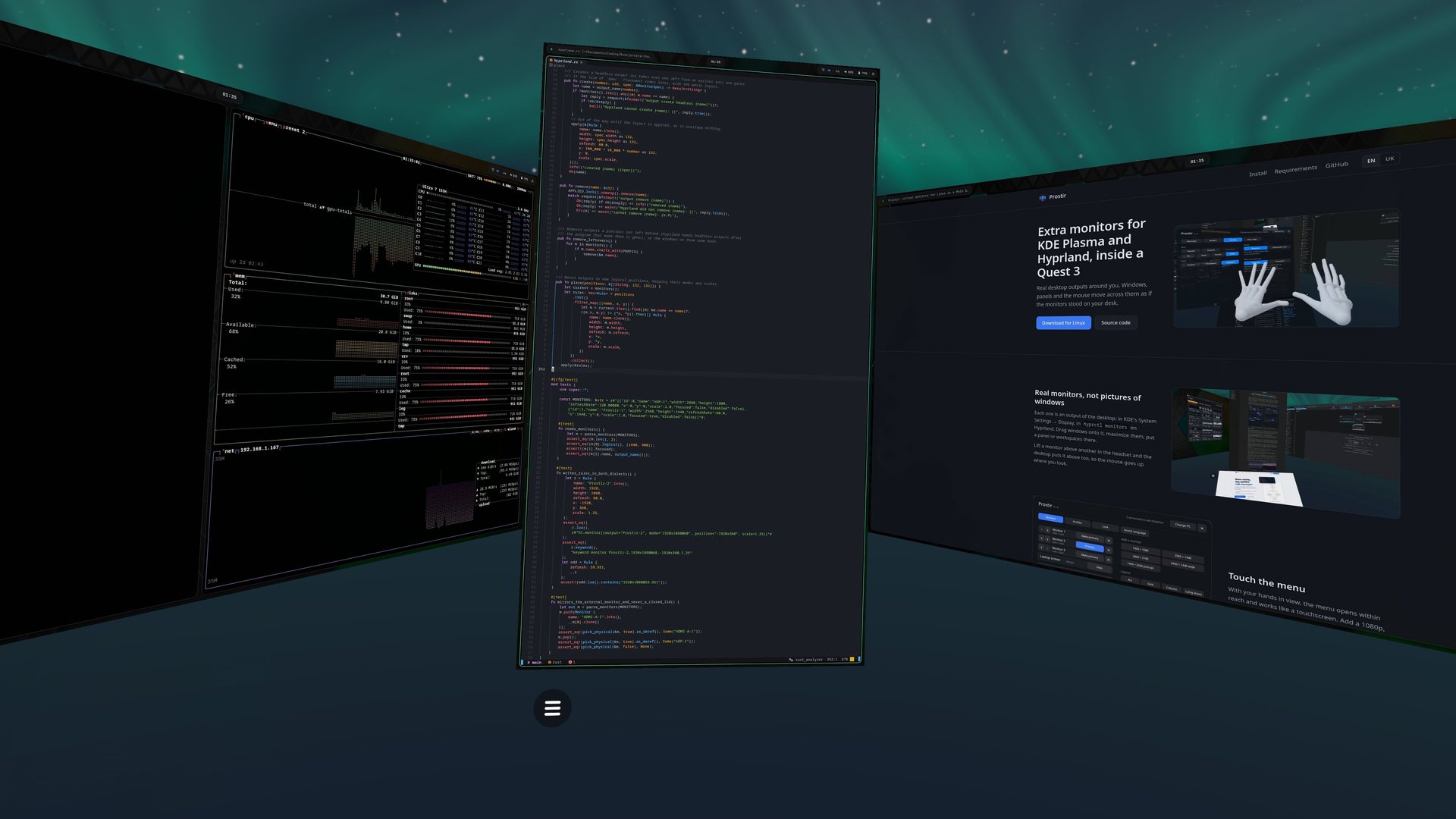
Prostir puts extra monitors for your Linux PC around you in a Meta Quest 3 or 3S. They are real outputs of the desktop on KDE Plasma 6 or Hyprland: drag windows onto them, keep a panel there, and the mouse crosses from one to the next where they meet in front of you.
This is the first public version.
Highlights
- Up to six monitors in five sizes, flat or curved, drawn as OpenXR layers so small text stays sharp.
- Arranged the way you see them. Line them up with the A button, let them stick together, move all of them at once. The desktop follows, so the mouse goes across, up and down.
- Made for your hands. Pinch to click, and a round palm menu with the time, the date and the headset battery.
- Windows of their own. Detach up to three PC windows into floating panels, or send the active window to the monitor in front of you.
- Sound both ways. PC sound plays in the headset, optionally from the side of the screen that plays it, and the headset microphone becomes the PC's microphone.
- Cinema, focus, follow my head, profiles, and backgrounds from plain black to your own room.
- Private by design. Encrypted connection (Noise XX), one-time pairing with a 6-digit code; the picture and the sound never leave your network.
Install
On the PC
| Distribution | Command |
|---|---|
| Arch | yay -S prostir-bin |
| Debian 13, Ubuntu 25.04 or newer | sudo apt install ./prostir_0.1.0-1_amd64.deb |
| Fedora | sudo dnf install ./prostir-0.1.0-1.x86_64.rpm |
| Nix | nix run github:OlexiyOdarchuk/prostir |
| Anything else | unpack prostir-0.1.0-x86_64-linux.tar.gz, then ./install.sh |
On the headset, with developer mode on: adb install prostir-0.1.0.apk. A version in the Meta Horizon Store is in review.
Then start Prostir on the PC, open it in the headset and pair with the code it shows. The README walks through everything, including the firewall and Hyprland setup.
Good to know
- Graphics. Hardware encoding is tested on Intel. AMD (VA-API) should work but has not been tried, and NVIDIA (NVENC) is experimental and untested. Without a GPU encoder Prostir encodes on the CPU. If you run it on AMD or NVIDIA, a short report helps a lot.
- Headsets. Made for Quest 3 and 3S. Quest 2 and Pro are untested.
- Usage count. Official builds send one anonymous request a day with only the date in it, so it is known how many PCs use Prostir. It is announced on the first start and can be turned off in the tray or with
PROSTIR_NO_COUNT=1. Details are in the privacy policy. - Checksums.
sha256sum -c --ignore-missing SHA256SUMSchecks the downloads.
Everything in 0.1.0
Monitors
- Virtual monitors that are real outputs of the desktop: KWin virtual outputs on KDE
Plasma 6, headless outputs captured with wlr-screencopy straight into GPU buffers on
Hyprland. Windows, panels and the mouse treat them like plugged-in screens. - Up to six, at 1920×1080, 2560×1440, 3840×2160, 3440×1440 or 1440×2560, added,
removed and made primary from the headset, on a map of the monitors as seen from
where you sit. - Shown as OpenXR compositor layers, flat or curved, so text stays sharp.
- Layouts: Around me, Wall and Lying down. Move, turn, bring nearer and resize any
monitor with a controller or your hands, one at a time or all together. - Line up (the A button, the Monitors tab or the palm menu) closes the seams in your
own arrangement: neighbours join edge to edge, curving around you at the sides and
tilting towards you above or below. Monitors put clearly apart stay. - Stick together: a monitor let go almost against another joins it edge to edge; the
edge lights up while you drag. - The desktop is arranged the way you see it, so the mouse crosses where the monitors
meet in the headset, sideways and up or down. - The laptop screen in the headset, as part of the arrangement; it hides when the lid
is closed. - Profiles Work, Cinema and Lying down, each of which can be overwritten with your own
setup. Monitors of the same size stay when you switch, so their windows do not move. - Cinema mode (one big screen, and you pick which), focus mode (other monitors dim) and
follow my head. - Detach up to three PC windows into floating panels and attach them back; move the
active window to the monitor in front of you; save a screenshot of that monitor to a
Prostir folder in your Pictures folder (on KDE taken from that monitor's own stream). - Monitor brightness for all monitors at once (100, 80, 60 or 40 %).
In the headset
- A menu with Quick, Monitors and Settings tabs, which you can touch with a finger when
your hands are in view. - A round palm menu: hold an open palm to your face for In front, Focus, Cinema,
Mouse?, Screenshot, Line up and Menu, with the time, the date and the headset's
battery in the middle. Left or right hand; 24- or 12-hour clock, the date in
Ukrainian, English or numbers. The round menu button by the monitor can be hidden. - Hands shown, and if you like used for pointing: pinch to click, pinch and hold to
drag. - Backgrounds: black, your room through the passthrough cameras (plain or dimmed),
four built-in panoramas or a picture of your own. A keyboard window shows the real
desk. - The "Mouse?" button shows where the pointer is, with rings; on Hyprland the mouse can
follow your gaze. - Optional PC notifications in the headset and rest reminders; a 72 Hz display rate to
save battery. - First-run tips, and a start screen that explains where to get the PC part.
- Ukrainian and English, in the headset and on the PC.
Sound
- PC sound plays in the headset, and the headset microphone becomes the PC's
microphone. The headset records only while a PC app listens and the microphone switch
in the headset is on. - Optional sound from the screen: the sound comes from the side of the monitor whose
window is playing it.
PC
- Encoding on the GPU through VA-API (tested on Intel; AMD should work but is
untested) or NVENC on NVIDIA (experimental and untested), and on the CPU with x264
everywhere else. HEVC or H.264, video quality and sharper text, set from the headset
or the tray. - Tray icon: connection status, headset battery with a warning at 15 %, monitors in
front of you, video quality, autostart (KDE), the usage counter, forgetting paired headsets. - Taking the headset off pauses streaming; after 10 s the virtual monitors go away and
windows, the panel, sound and microphone return to the laptop until you put it on
again. - When the headset and the PC run versions that cannot talk, both say which one to
update. - Packages:
prostir-binon the AUR, a.deband an.rpm(Fedora), a tarball with
install.sh(with--autostartand--uninstall --purge), and a Nix flake
(nix run github:OlexiyOdarchuk/prostir, NixOS andnix develop). Every release
shipsTHIRD-PARTY-LICENSES.txt. - Official builds count how many PCs use Prostir: one anonymous request a day with only
the date in it, announced on the first start; off in the tray or with
PROSTIR_NO_COUNT=1. Builds from source never count.
Connection and security
- The headset finds the PC over Wi-Fi by itself, or you pick it from a list or type its
IP address. In developer mode a USB cable works too (adb reverse). - Encrypted connections (Noise XX) and one-time pairing with a 6-digit code (SPAKE2),
confirmed in the headset first and typed on either side. The PC slows down repeated
failed attempts. - The headset lists the paired PCs, and you can forget any of them.
- The protocol between the headset and the PC is documented in
PROTOCOL.md. - Website with downloads and the privacy policy: prostir.ishawyha.dev.
Українською. Prostir розставляє додаткові монітори вашого ПК з Linux (KDE Plasma 6 або Hyprland) навколо вас у Meta Quest 3 чи 3S. Інтерфейс і в шоломі, і на ПК є українською. Як встановити й користуватися: README українською.
Prostir is free software under the GPL-3.0-or-later. Third-party licenses are listed in THIRD-PARTY-LICENSES.txt.