Repository navigation
Releases
schneidi 0.24.0

Download
- Linux (any distribution):
schneidi-0.24.0-x86_64.AppImage– make it executable (chmod +x) and run it. No installation needed. The CLI is inside too:./schneidi-0.24.0-x86_64.AppImage cli help. x264 and x265 are inside for the best software export quality (GPL – the sources are the assetschneidi-0.24.0-gpl-sources.tarbelow). Built on Ubuntu 22.04, so it runs on distributions with glibc 2.35 or newer. - Debian 13:
schneidi_0.24.0_amd64.deb– install withsudo apt install ./schneidi_0.24.0_amd64.deb. Uses the system Qt and FFmpeg (with Debian's x264/x265). It needs exactly Debian 13's Qt 6.8.2 (the GPU viewer uses Qt's private RHI interface) – on Ubuntu and other systems use the AppImage. - Arch Linux:
schneidi-0.24.0-1-x86_64.pkg.tar.zst– install withsudo pacman -U schneidi-0.24.0-1-x86_64.pkg.tar.zst. Built against Arch's current Qt and FFmpeg; after an Arch update to a new Qt version it may not start until rebuilt – then use thePKGBUILDin packaging/linux/arch or the AppImage. - Server / Docker:
ghcr.io/onkeltheorie/schneidi– see packaging/docker. - GPL sources:
schneidi-0.24.0-gpl-sources.tar– the complete sources of the GPL/LGPL parts inside the packages (FFmpeg with its build script, x264, x265, numactl), as the licenses require. - Windows: no download yet – build it yourself (Building); an installer is planned for 1.0.
Optional downloads inside the program (Workspace › Extensions, or schneidi-cli extensions --install …): speech
recognition, text to speech, face detection and person cutout. schneidi
works without all of them.
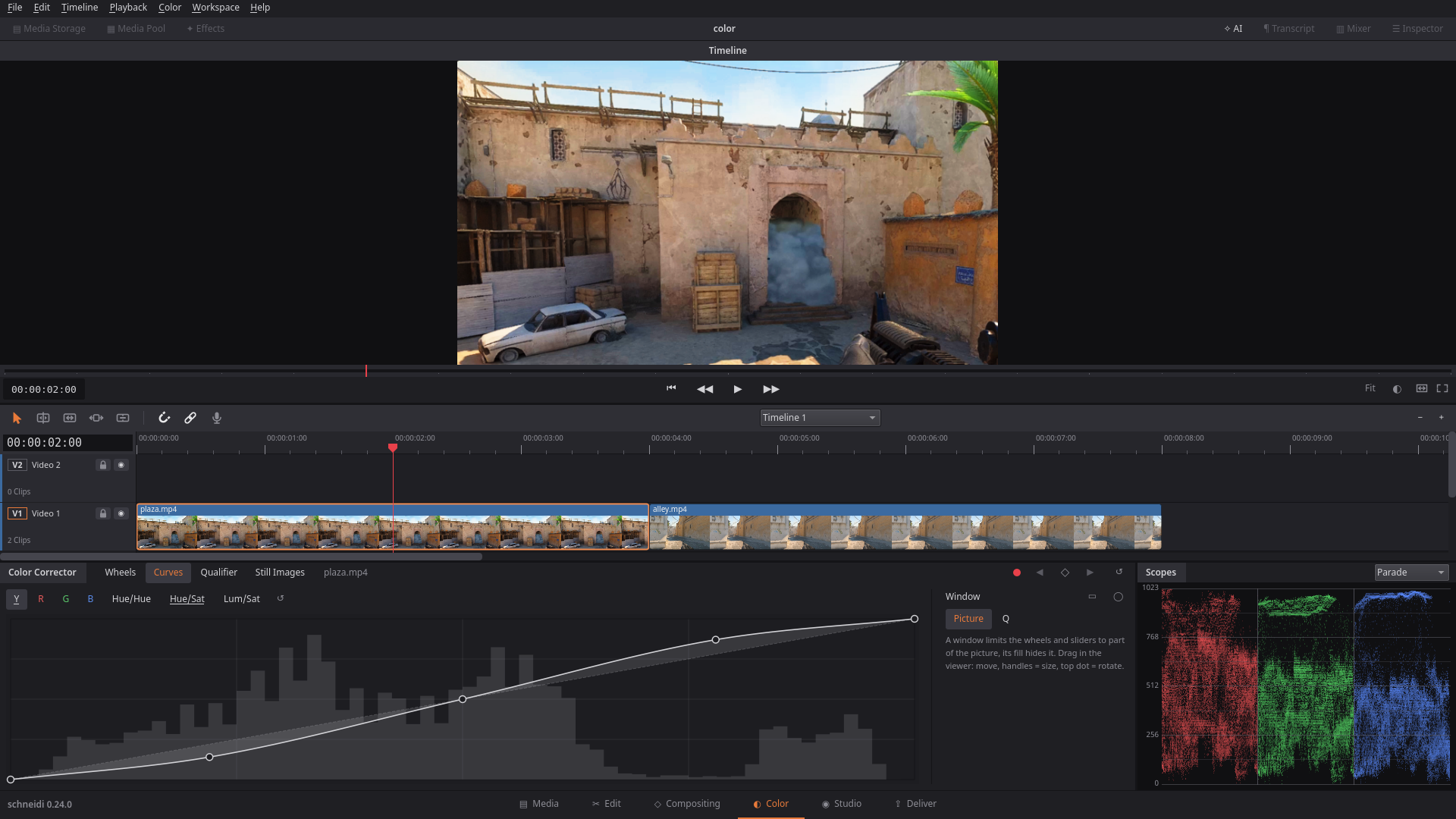
Color page 2: the Color page gets the tools real grading needs. Curves for Y/R/G/B and for hue against hue,
saturation or luminance, drawn over the histogram of the picture; an HSL qualifier that picks a range by hue,
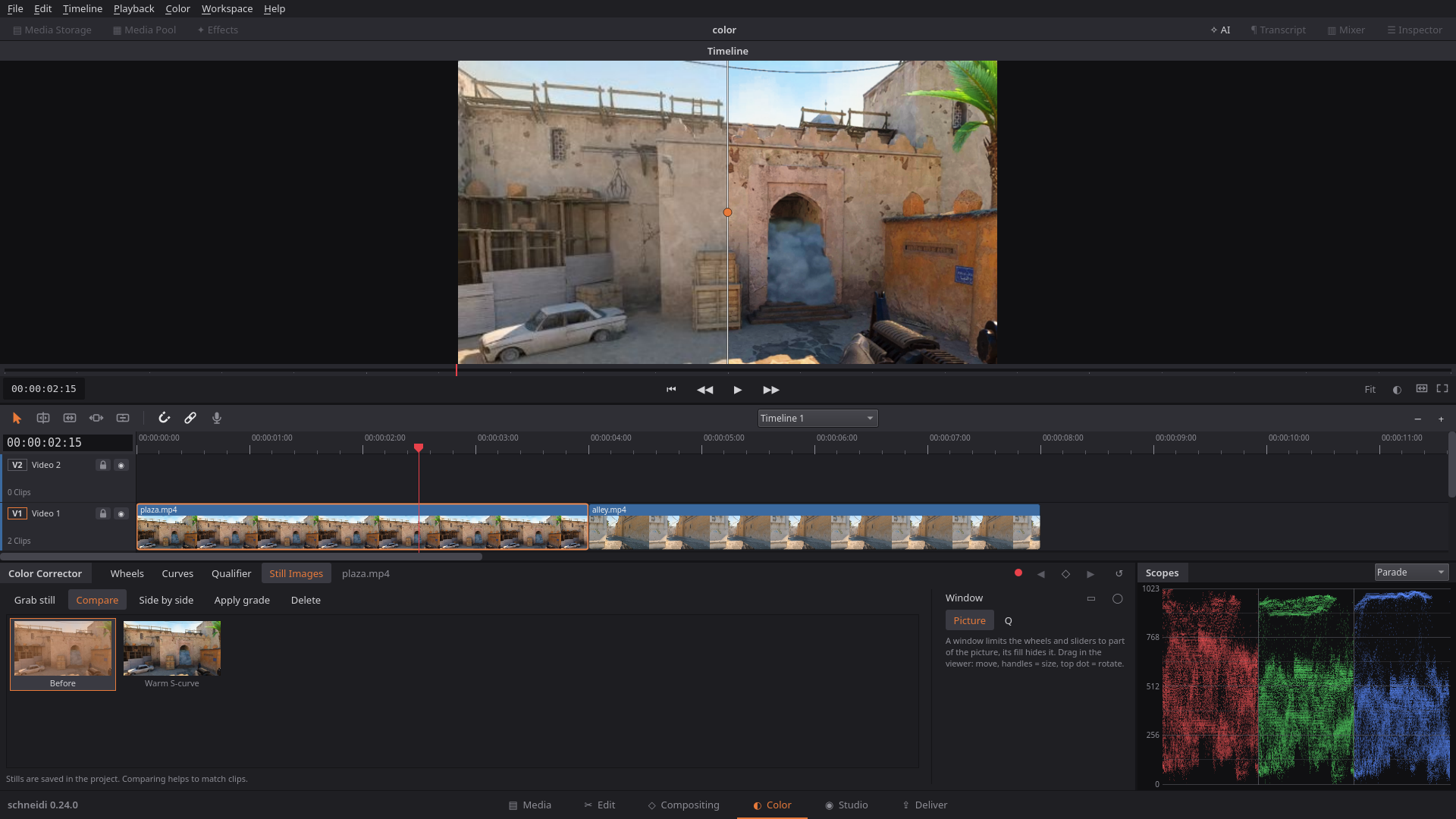
saturation and luminance and gives it its own correction; a master wheel under each color wheel; and a stills gallery
to grab a graded frame and compare it with the current picture as a wipe or side by side. Everything works the same in
the app, the CLI and over MCP.
HDR footage (phones): HLG and PQ videos (iPhone, many Android phones) no longer look pale and flat. schneidi maps
them to normal SDR (BT.709) in the preview and the export alike: tone mapped, BT.2020 colors brought into BT.709.
It happens automatically; Inspector › Crop › "Show HDR as SDR" (or edit op hdr to_sdr:false) keeps a clip's signal
as it is. The Media Pool marks HDR files. H.265 and AV1 can now be exported in 10 bit.
s264 (experimental): schneidi's own H.264 encoder, written from scratch, is now an extra export format. It is never
the default and never chosen automatically – x264 stays the encoder to use. On a quiet 6-thread machine it is faster
than x264 medium on game recordings, calm and animated footage in two-pass, and slower on dense camera footage,
clearly so at constant quality. At the same bit rate it is about even with x264 on a phone clip, a little behind on
animation and behind on game recordings (1.2–2.6 VMAF). The numbers are in
BENCHMARKS.md.
New
- Curves (Color page › Curves): Y/R/G/B tone curves (linked to Y or separate) plus hue vs hue, hue vs saturation
and luminance vs saturation, with the histogram behind them. CLI/MCP:color curves:{…}. - Qualifier (Color page › Qualifier): select by hue, saturation and luminance with soft edges, draggable bars,
a picker in the viewer and "Show mask"; the selection gets its own correction and can be limited to a shape window.
CLI/MCP: opqualifier. - Master wheel under each color wheel (lift, gamma, gain, offset): drag for brighter/darker, Shift for fine,
double-click to reset. - Stills gallery (Color page › Stills): grab a frame with its grade, compare it as a wipe or side by side, apply
its grade to the selected clips. Stills are saved in the project (at most 32). CLI/MCP: opstill,frames still:<id>. - HDR to SDR for HLG and PQ sources on CPU and GPU, on by default for HDR clips, switchable per clip (op
hdr);
probeandinfoname HDR files. - 10-bit export for H.265 and AV1 (Main10), in software and with NVENC, Quick Sync and VAAPI; the GPU renders such
exports in 16-bit float, and 10-bit sources that need no change go through bit-exact. - s264, experimental: schneidi's own H.264 encoder as an extra export format (Deliver › Format › s264
(experimental), CLI/MCPformat s264); 8-bit 4:2:0 only, two-pass, constant quality and VBV. - The color tour has steps for curves, qualifier and stills.
Better
- AI editing, from comparing AI agents editing with schneidi against plain FFmpeg on the same jobs:
shortkeeps only the game sound of a game recording with several audio streams (no voice chat or music);
audio_stream: allkeeps everything. Other material keeps all its streams.<command> --help(or-h) works on every command.render --format mp4(= H.264) and--format webm(= VP9) are accepted.checkwarns about a wide loudness range (over 15 LU), and reports a mix where every sound clip is muted.- Tracks can be named ("Mix") in
remove_track,trackandmixer;keep/append/placetakeaudio_streams.
- The color page fits narrow windows and large fonts (the wheels move into a 2 × 2 grid, button rows wrap).
- A ripple head trim moves the clips of the other tracks with it (a sound effect on a kill stays on the kill), and linked
clips always move together. - Grading a clip no longer makes it "expensive" for the render cache: in Smart mode a grading touch no longer re-renders
the whole clip. - HDR detection runs in the background, also for older projects.
- Windows: the picture engine, viewer and decoder use the high-performance graphics card; NVENC works with NVIDIA
drivers from 522 on, and a clear hint appears when the driver is too old. - The README is shorter and grouped, with an honest maturity table; the full feature list moved to FEATURES.md.
- The new texts are translated into all 16 languages.
Fixed
- A recording with a single audio stream no longer lands on a muted track of a start template (a podcast came out silent).
transcribereports silent audio instead of inventing text, removes the typical made-up subtitle credits, and
reports the language you asked for.- A color grade also reaches the kill-feed copies of a clip (the copy looked washed out above the graded clip).
- A transparent picture (a logo PNG) is no longer reported as having black bars.
- A trim for a transition no longer pulls linked clips apart.
Worth knowing
- Projects with HDR clips graded in an earlier version look different now: the grade was made on the unmapped
(pale) picture and now sits on the mapped one. There is no automatic conversion – turn "Show HDR as SDR" off for such
a clip to get the old look back, or adjust the grade. - HDR clips sit at about 80 % for HDR reference white, so next to SDR clips in the same timeline they can look a little
darker – lift them with the grade if needed. - PQ above 1000 nits is compressed into white (no MaxCLL/mastering metadata is read yet); Dolby Vision is shown by its
HLG/HDR10 base layer, profile 5 (no base layer) is not supported. - Proxies and render cache files of HDR clips are made again once (they showed the unmapped signal).
- There is no HDR export yet: an HDR clip with "Show HDR as SDR" off is exported with SDR tags.
- Timeline thumbnails of an HDR file are always shown mapped, also for a clip with "Show HDR as SDR" off.
- Hue curves and the qualifier are computed in a 33³ table; when they are on, a finer 3D LUT of your own is resampled
to it, and preview and export can differ by a few code values at hard qualifier edges. Curves have no keyframes yet. - 10-bit export through VAAPI and Quick Sync has not been checked on real hardware; groups and transitions still use
8-bit intermediate pictures. - s264 is experimental: 8-bit 4:2:0 only (it refuses 10-bit, 4:2:2/4:4:4 and alpha), and the comparison so far is small
(three clips, one run each).
Early development – the project file format may still change.
What's next
Plans can still change – the full list is in the README.
| Version | What it brings |
|---|---|
| 0.25 – Regie | A page for automatic editing: clips in, a recipe picked (a short, highlights, a podcast without pauses), suggestions with a reason for each |
| Later | Color management and HDR export, camera RAW (DNG first), s264 faster |
SHA256SUMS
b0e56d9adb486cba5a90526247830d461ea16c61d7e748bbac1381a0144c0065  schneidi-0.24.0-x86_64.AppImage
c07dba085af6d3e43e7144b67a755d5e33a39b4b0235546d6ae36fdeffef3210  schneidi_0.24.0_amd64.deb
7cabd83dab8ed51a8c83f2a4dcee95ab68572019580dcc5f78edfc4735b2ec48  schneidi-0.24.0-1-x86_64.pkg.tar.zst
0fc721d92132d2880fe616eb47d0ab817834c0a0882f3590e871cf94d028c3c4  schneidi-0.24.0-gpl-sources.tar
schneidi 0.23.0
Download
- Linux (any distribution):
schneidi-0.23.0-x86_64.AppImage– make it executable (chmod +x) and run it. No installation needed. The CLI is inside too:./schneidi-0.23.0-x86_64.AppImage cli help. x264 and x265 are inside for the best software export quality (GPL – the sources are the assetschneidi-0.23.0-gpl-sources.tarbelow). Built on Ubuntu 22.04, so it runs on distributions with glibc 2.35 or newer. - Debian 13:
schneidi_0.23.0_amd64.deb– install withsudo apt install ./schneidi_0.23.0_amd64.deb. Uses the system Qt and FFmpeg (with Debian's x264/x265). It needs exactly Debian 13's Qt 6.8.2 (the GPU viewer uses Qt's private RHI interface) – on Ubuntu and other systems use the AppImage. - Arch Linux:
schneidi-0.23.0-1-x86_64.pkg.tar.zst– install withsudo pacman -U schneidi-0.23.0-1-x86_64.pkg.tar.zst. Built against Arch's Qt 6.12 and FFmpeg 9 (added after the release); after an Arch update to a new Qt version (6.13) it may not start until rebuilt – then use thePKGBUILDin packaging/linux/arch or the AppImage. - Server / Docker:
ghcr.io/onkeltheorie/schneidi– see packaging/docker. - GPL sources:
schneidi-0.23.0-gpl-sources.tar– the complete sources of the GPL/LGPL parts inside the packages (FFmpeg with its build script, x264, x265, numactl), as the licenses require. - Windows: no download yet – build it yourself (Building); an installer is planned for 1.0.
Optional downloads inside the program (Workspace › Extensions, or schneidi-cli extensions --install …): speech
recognition, text to speech, face detection and person cutout. schneidi
works without all of them.
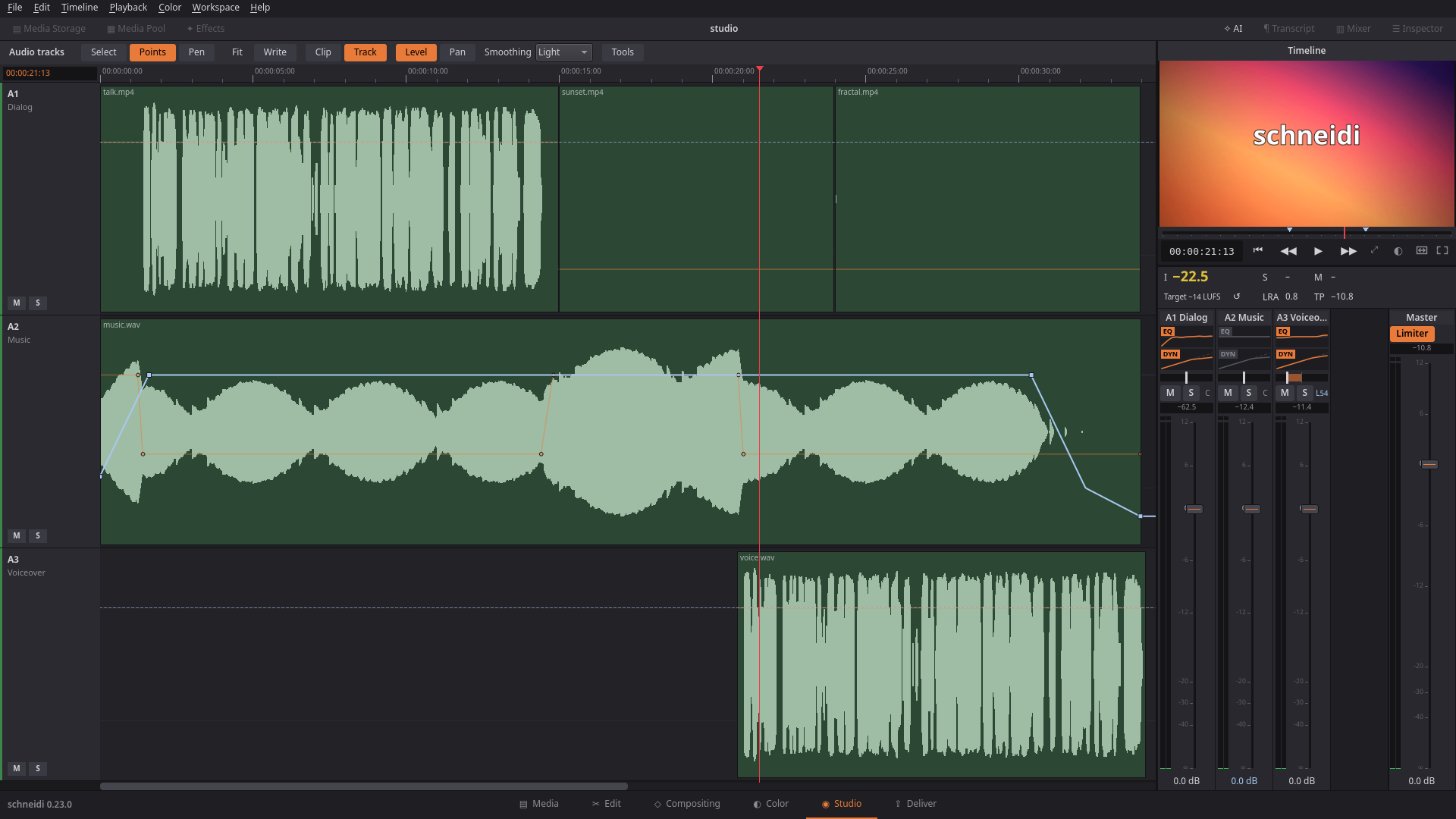
Studio: sound gets its own page. The tracks fill the page with large waveforms, a narrow mixer column shows every
track's EQ and compressor, and the common jobs – clean a voice, duck the music, hit a loudness target – are one click.
Volume and pan become curves you set with points, draw with a pen or ride live in write mode. And the mix is no longer
fixed to stereo: 5.1 and 7.1 projects with channel routing, a surround panner, meters per speaker and AC-3 export.
Everything works the same in the app, the CLI and over MCP, so an AI can mix on its own.
New
- Studio page (Shift+7, between Color and Deliver; hide it like any page): the audio tracks take the page with
large waveforms that follow what you hear, their height changes with Shift+wheel, zoom and scroll change only on your
input. On the right a small viewer and a mixer column: a narrow strip per track with its EQ and compressor curves
(drag the points, "…" opens the full window), pan, mute/solo, peak and fader; the master with its limiter and a large
loudness readout (integrated colored to the target, short-term, momentary, LRA, true peak in red above the ceiling).
A guided tour explains the page the first time it opens. CLI/MCP:appactionpageswitches pages. - Tools drawer under the tracks: Clean voice (noise reduction plus a mild "Voice" EQ on the track),
Duck music under all other tracks (−30…−3 dB, the curve shows in the track, "Remove" takes it out again),
Loudness to target for the whole mix (YouTube −14, podcast −16, broadcast −23 LUFS, limiter on, before → after
and true peak shown), Record a voice-over straight onto a track with its input level, and the effect sounds
with search – listen, insert at the playhead or drag onto a track. CLI/MCP:clean_voice eq:true,
mixer eq:'voice',duck remove:true,mixer target_lufsreports the numbers. - Track automation: a track's volume and pan as a curve in timeline time. Points (the default tool) puts a point
on the line and drags it at once, right-click deletes, double-click resets; the Pen (P) draws a whole stretch,
smoothed (Off/Light/Medium/Strong), one undo step per stroke. "Clip | Track" picks clip keyframes or the track curve,
"Level | Pan" the curve. The faders and pan knobs show the curve's value at the playhead; dragging them moves the
whole curve. The curves follow ripple edits and show in the Edit timeline (track header menu "Show Automation:
Volume / Pan"). CLI/MCP: opstrack_volumeandtrack_pan,infolists the curves. - Write mode: switch on "Write" on the Studio page and ride a fader or pan knob while it plays – the move is
recorded (touch: only while you hold it, then a 0.5 s glide back to the old curve); holding still holds the value.
Off by default and after a restart, so writing never surprises you. - Multichannel sound: a project can mix in stereo, 5.1 or 7.1 (Project Settings, or CLI
format channels). Route
single channels of a source to their own track (a wireless mic on channels 3/4 of a camera file; CLI/MCP oproute,
also as an import preset per stream). Each track gets a surround panner (depth front → back, center share, LFE
send), the Studio master shows a meter per speaker (L R C LFE Ls Rs …), you listen through a stereo downmix, and
loudness (EBU R128) measures all channels. Export 5.1/7.1 as AAC, FLAC or WAV; MP3 falls back to a stereo downmix
with a note.probenames a file's channel layout. Stereo projects sound bit-for-bit as before. - AC-3 (Dolby Digital) for 5.1: in a 5.1/7.1 project the MP4 formats offer the sound codec AC-3 (640 kbit/s; 7.1 is
mixed down to 5.1). CLI/MCP:render audio_codec ac3. - Waveform per stream and channel: a routed clip shows exactly the channels it plays, in the timeline and on the
Studio page; all routings of one stream share one decode. Room tone of a routed take is measured on its channels. - Markers, notes and story sections follow ripple edits: what lies behind a ripple delete, insert or ripple trim
moves with the content; markers in removed content go with it, closing a gap or trimming for a transition moves them
to the cut point. Undo brings them back exactly; the CLI does the same.
Changed
- The new texts are translated into all 16 languages.
- Changing only the mix's channels (stereo ↔ 5.1) keeps playback, thumbnails, waveforms and the render cache.
- Relinking media fits each clip's channel routing to the files found.
- Clean voice in a 5.1/7.1 project cleans the center channel and keeps all channels aligned.
- Projects that use 5.1/7.1, channel routing or track automation are saved as project format 8; schneidi 0.22 and older
refuse them with a clear message instead of playing them wrong. Stereo projects without automation stay as before.
Fixed
- Builds with extra library checks (
_GLIBCXX_ASSERTIONS, as Fedora, Arch and openSUSE build) no longer abort on a
very small window, a tracker on a tiny picture, a surface pick near the picture's edge or a song a hair shorter than
its target. - A hook made by the story tools no longer moved the markers twice.
Known issues
- Write mode records only while you hold a control (touch); there is no latch mode yet.
- Automation is edited on the Studio page; the Edit timeline only shows it.
- Pan automation moves left/right of the surround panner; depth, center and LFE stay fixed per track.
- A retime with ripple does not squeeze the markers and notes inside the clip.
- Loudness to target measures in the foreground (wait cursor) – long projects take a moment.
- Import presets with channels only apply to files with two or more audio streams; for a camera file with one
four-channel stream use therouteop or the clip's routing. - Blur, pixelate and spotlight shapes and drawings are rendered on the CPU, not the graphics card.
- Loop playback jumps back with a short sound fade (about 10–25 ms), not sample-exact.
- The shader effect needs a graphics card; on a computer without one it is skipped (preview, render and
checksay so).
Early development – the project file format may still change.
What's next
Plans can still change – the full list is in the README.
| Version | What it brings |
|---|---|
| 0.24 – Color Update 2 | Curves on the Color page, qualifier, a master wheel, more scope overlays, HDR to SDR for phone footage |
| Later | A page for automatic editing: clips in, a short, highlights or a podcast without pauses out |
SHA256SUMS
2a3cb9dab0d0a2bb8aa81bd6e9533a95e16a5770e071a4ac8cb07fe0f80785a0  schneidi-0.23.0-x86_64.AppImage
9d96d8cd5c419c1c59543fd4344088bd03eed4d03a7539e3c9476ad2571b7bca  schneidi_0.23.0_amd64.deb
2d09bf68865a418166d62d3e93d5470396f624fa45cce5419c9da7949d606f1d  schneidi-0.23.0-gpl-sources.tar
25e9e42af7582b48dd68f77fe54aaae908633addf2d9dc2e1ab17ff0970ffcb5  schneidi-0.23.0-1-x86_64.pkg.tar.zst
schneidi 0.22.1
A packaging fix: the AppImage now runs on older distributions too.
Fixed
- AppImage on older systems: 0.22.0 was built on Debian 13 and needed glibc 2.38, so it would not start on Ubuntu 22.04, Linux Mint 21 and other older distributions. 0.22.1 is built on Ubuntu 22.04 (glibc 2.35) and runs on every current Linux distribution. Nothing else changed in the program.
Download
- Linux (any distribution):
schneidi-0.22.1-x86_64.AppImage– make it executable (chmod +x) and run it. No installation needed. The CLI is inside too:./schneidi-0.22.1-x86_64.AppImage cli help. x264 and x265 are inside for the best software export quality (GPL – the sources are the assetschneidi-0.22.1-gpl-sources.tarbelow). - Debian 13: the
.debof 0.22.0 is unchanged. - GPL sources:
schneidi-0.22.1-gpl-sources.tar– the complete sources of the GPL/LGPL parts inside the AppImage (FFmpeg with its build script, x264, x265, numactl from Ubuntu 22.04), as the licenses require.
The AppImage without GPL parts (-lgpl) is no longer published.
schneidi 0.22.0 – Tracking Update
Download
- Linux (any distribution):
schneidi-0.22.0-x86_64.AppImage– make it executable (chmod +x) and run it. No installation needed. The CLI is inside too:./schneidi-0.22.0-x86_64.AppImage cli help. x264 and x265 are inside for the best software export quality (GPL – the sources are the assetschneidi-0.22.0-gpl-sources.tarbelow). - Linux without GPL parts:
schneidi-0.22.0-x86_64-lgpl.AppImage– the same without x264/x265 (H.264/H.265 through the graphics card, else OpenH264/kvazaar, AV1 from SVT-AV1). - Debian 13:
schneidi_0.22.0_amd64.deb– install withsudo apt install ./schneidi_0.22.0_amd64.deb. Uses the system Qt and FFmpeg (with Debian's x264/x265). It needs exactly Debian 13's Qt 6.8.2 (the GPU viewer uses Qt's private RHI interface) – on Ubuntu and other systems use the AppImage. - Arch Linux: a
PKGBUILDis in packaging/linux/arch. - Server / Docker:
ghcr.io/onkeltheorie/schneidi– see packaging/docker. - GPL sources:
schneidi-0.22.0-gpl-sources.tar– the complete sources of the GPL/LGPL parts inside the packages (FFmpeg with its build script, x264, x265, numactl), as the licenses require. - Windows: no download yet – build it yourself (Building); an installer is planned for 1.0.
Optional downloads inside the program (Workspace › Extensions, or schneidi-cli extensions --install …): speech
recognition, text to speech, face detection and person cutout (and x264/x265 for the -lgpl AppImage). schneidi
works without all of them.
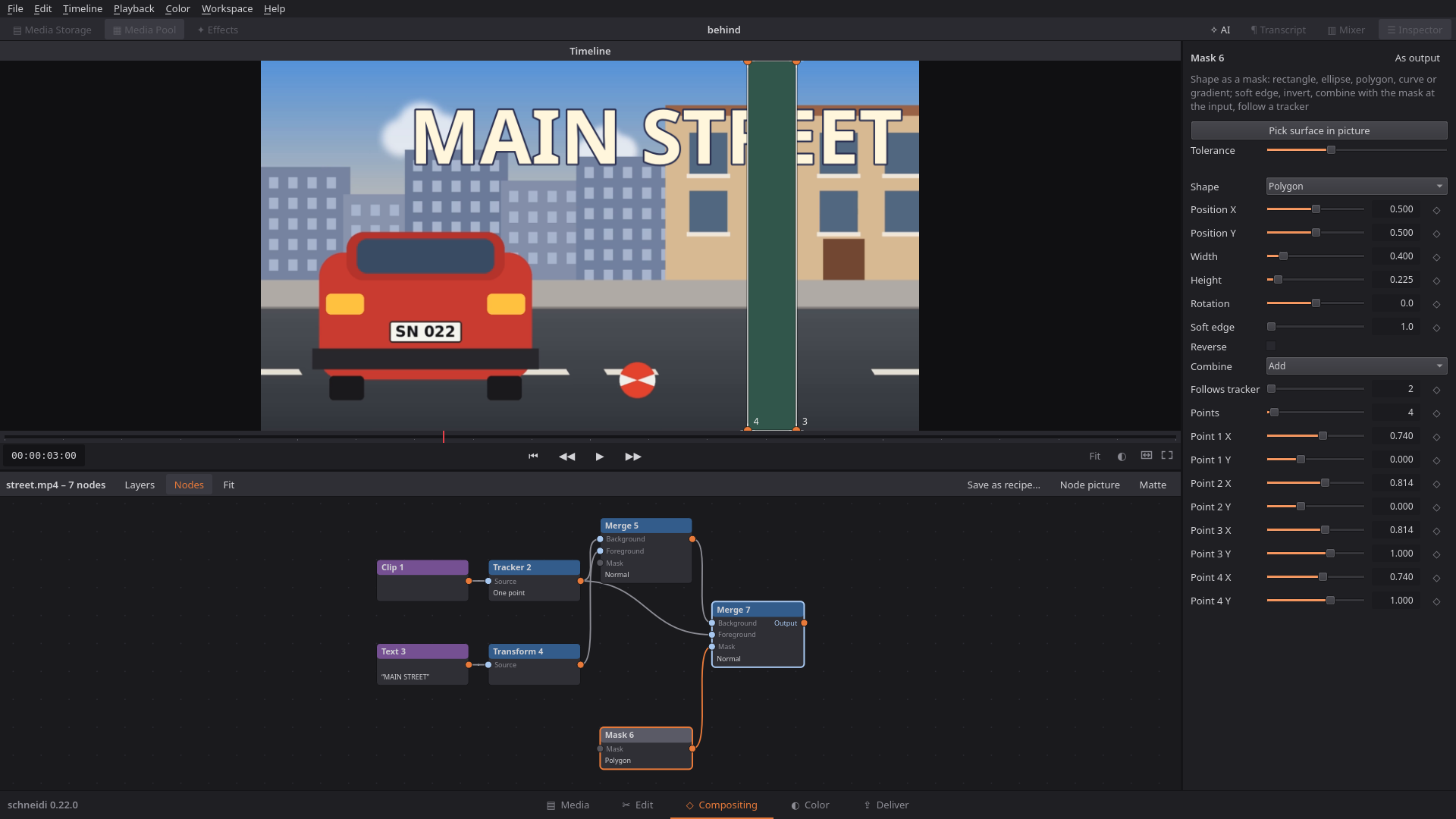
Tracking Update: what follows a tracker now stays right on hard footage. It fades out (or holds) when the point is
lost, hides behind a wall, sticks to a sign in perspective and moves in depth with a shared camera. On top: shapes and
simple drawing right on the video, for everyone who never opens the Compositing page. Everything works the same in the
app, the CLI and over MCP, so an AI can use it on its own. And the window opens faster again.
New
- Lost points are noticed: the tracker has a "When lost" choice – Fade Out (default, a soft 0.2 s fade), Hold
(stays at the last sure place) or Bridge (as before). Gaps up to 5 frames are always bridged; a face tracker holds,
so a face blur never lets the face show. Lost ranges are red in the node's keyframe lane, the node gets a warning
badge;checknames them (tracker_lost,tracker_ended),track_nodeandinfolist the gaps. - Time range of any node in the timeline: text, pictures and other nodes of a compositing graph get thin bars
under their clip – drag to move, drag the ends to trim, snapping to playhead, cuts and markers; a double-click opens
the node. CLI/MCP:nodewithrange:[from, to]in timeline times. - Text behind an object: recipes "Text behind an object" and "Sticker behind an object". Click "Pick surface in
picture" and then the wall, pillar or car in the viewer: schneidi draws a mask around it that follows the tracker.
Shift-click adds an area, Alt-click takes one away, a tolerance slider picks again, the points can be moved by hand.
CLI/MCP: oppick_region. - Four-corner tracking: tracker mode "Surface (4 corners)" follows a sign, screen or house wall in perspective, even
when a corner is hidden for a while. The new Corner pin node lays a picture or video onto it – following the
tracker or with corners dragged by hand. Recipe "Picture on a screen". - Shared camera with parallax: a Camera node (pan, push, zoom, tilt, roll, a steady drift, or following a
tracker) and a Depth value on media, text, 3D text and transform layers: near layers move more than far ones.
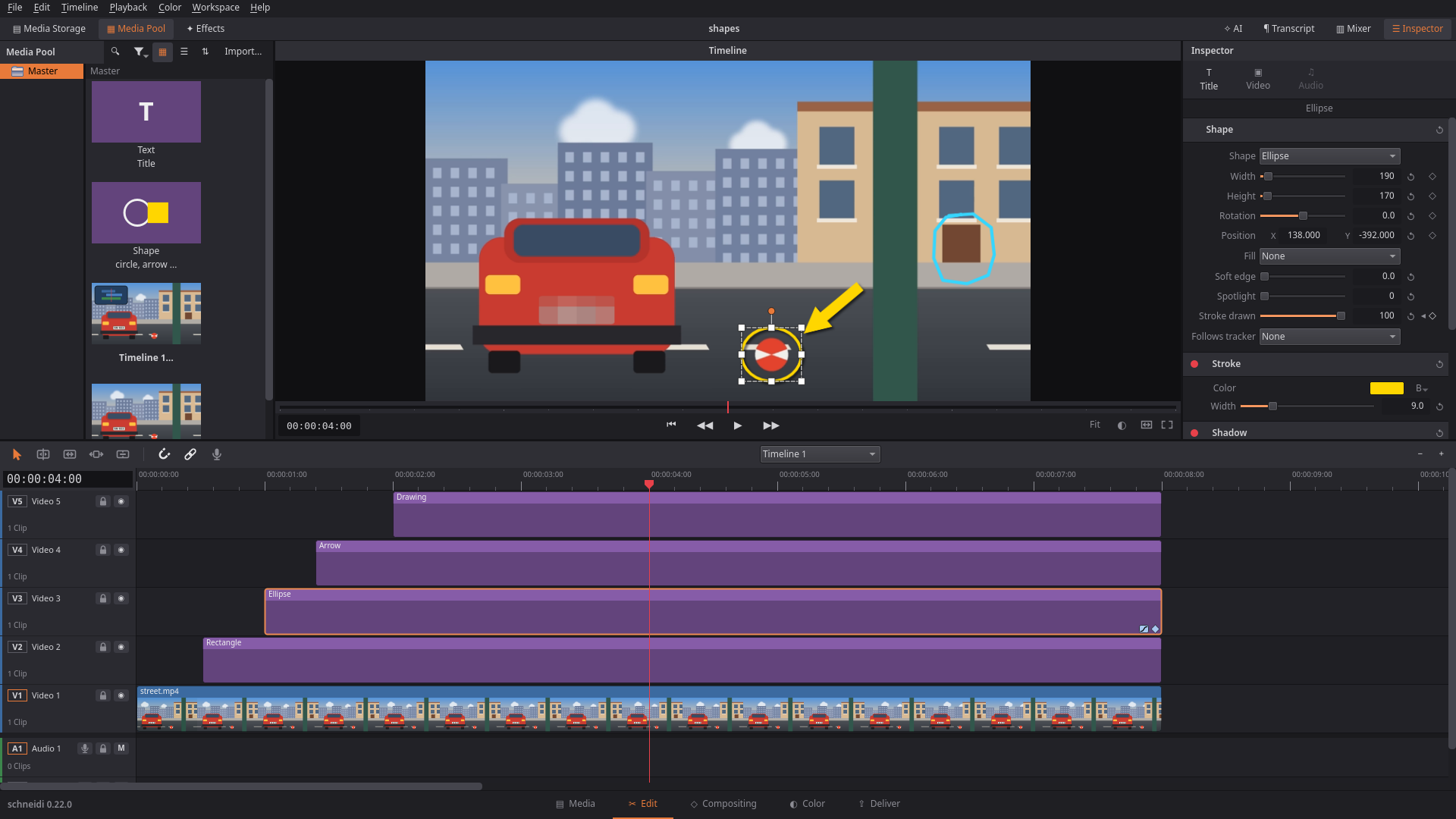
Recipe "Parallax photo" turns one photo into foreground and background with a slow move forward. - Shapes: a "Shape" entry next to Text in the Media Pool – ellipse/circle, rounded rectangle, triangle, arrow, line,
star, polygon; fill, stroke, shadow, a stroke that draws itself, all with keyframes, moved and turned in the viewer,
and following a tracker (a circle around a player). A shape can also blur or pixelate what lies below it (a face,
a number plate, a name) or darken everything around it (spotlight). Clip in Shape cuts a clip to a shape with
stroke and shadow (a round facecam). CLI/MCP: opsshapeandclip_shape. - Simple drawing: press P and paint right on the video in the viewer – brush (colour, width, opacity), eraser, undo
per stroke. The strokes become a Drawing clip on a track above (move, trim, fade, follow a tracker); "Draw on"
lets them appear one after another. CLI/MCP: opdraw, so an AI can set arrows and circles. - Render cache visible: while the cache renders, the job shows in the status bar with a ✕ that pauses it; the bar
above the ruler says per clip what is done or missing. Theapptool reports and pauses it too. - Effects sorted by purpose: the effect list is grouped by what you want to do, with a "Shapes & Drawing" group
that lists every shape on its own. Press F on an effect to make it a favourite; favourites and recently used effects
sit on top. CLI/MCPeffectsnames the categories too. - Kill feed in 9:16 shorts follows its lines: the kept kill-feed copy in a vertical reframe is only as tall and wide
as the kill lines that are really there, hides when there are none (no more box of empty wall) and its text is
larger. Works for the app's auto reframe, CLIreframe/new timelines andshort. - Export quality "Like source": a fourth quality next to High/Medium/Small/Web. The video gets the bit rate of the
recordings it was cut from (weighted by how long each one shows, scaled when the resolution or frame rate changes),
so the file is about as big as the original and visibly lossless; the Deliver page and the render queue show the
target ("≈ 30 Mbit/s"). Works with every encoder (software, NVENC, VAAPI, Quick Sync) and H.264/H.265/AV1/VP9.
CLI/MCP:renderwithquality: "source". - Interface size: Settings › General › Size makes the whole interface larger or smaller. On a 4K screen at 100 %
schneidi offers a larger interface once. - AI chat with small local models: older tool results are shortened before each request so the instructions are
never cut off, and the chat advises at least 32k context (better 64k). 8k contexts are refused with a clear message.
Changed
- Faster start: the first picture of the window comes after ~0.26 s instead of ~0.47 s on our test machine – the
panels are built in place, rarely used Inspector pages on first use, fonts are warmed up on the side. - Blur and pixelate shapes are fast at any size: a 1000 px blur circle went from ~80 ms to ~4.5 ms per frame,
playback from 6–17 to 60 fps. - The Edit page fits a 1024 px wide window (compact buttons, shortened titles with the full text as tooltip).
- The window opens on the screen under the mouse and fits that screen (90 % of it, never larger).
- Brush width is now absolute: set in timeline pixels (
draw/widthPx), the same thickness whatever the viewer's zoom or size. - The Toolbox search also finds filters such as "Clip in Shape"; its icons are no longer rebuilt on every key press.
- Esc ends painting; in a text or number field it leaves the field first.
schneidi --helpand--versionprint and quit without opening a window; on Windows they follow a redirect
(--version > file; in PowerShell use| Out-File).- A transform node tilted in depth is now drawn on the graphics card (it fell back to the CPU), like the new corner pin.
Fixed
- A source file that went missing while the project was open stayed black until the file changed – now it is tried
again on the next play or seek, and the export error and status line name the file. - A cut-off recording (e.g. a Matroska file after a crash) no longer counts as lost; it just ends there.
- Settings dialog: nothing is cut off in Russian or with a large font; Export settings scroll on small screens.
- Page buttons all stretch to the bar's height when one symbol needs a taller fallback font.
- Stabilizer: no more read outside its motion data (crashed in distribution builds with extra checks, e.g. Arch).
- With FFmpeg 9, proxies of interlaced footage are deinterlaced again (the filter list changed its format).
- Smart render of HEVC into MP4/MOV with FFmpeg 8 or newer: copied pieces no longer play with the wrong parameter
sets. - Windows: app, CLI and tests use the same settings folders.
Known issues
- Blur, pixelate and spotlight shapes and drawings are rendered on the CPU, not the graphics card.
- The eraser removes whole strokes; a drawing's box can be moved and scaled, not turned.
- Four-corner tracking can drift when the surface turns strongly.
- Shapes and drawings show as nothing in 0.21 and older (the project still opens there).
- Loop playback jumps back with a short sound fade (about 10–25 ms), not sample-exact.
- The shader effect needs a graphics card; on a computer without one it is skipped (preview, render and
checksay so).
Early development – the project file format may still change.
What's next
Plans can still change – the full list is in the README.
| Version | What it brings |
|---|---|
| 0.23 – Studio | A page for sound: a big mixer, large waveforms, volume curves to draw, EQ and compres... |
schneidi 0.21.0 – Languages Update
Download
- Linux (any distribution):
schneidi-0.21.0-x86_64.AppImage– make it executable (chmod +x) and run it. No installation needed. The CLI is inside too:./schneidi-0.21.0-x86_64.AppImage cli help. New: x264 and x265 are inside for the best software export quality (GPL – the sources are the assetschneidi-0.21.0-gpl-sources.tarbelow). - Linux without GPL parts:
schneidi-0.21.0-x86_64-lgpl.AppImage– the same without x264/x265 (H.264/H.265 through the graphics card, else OpenH264/kvazaar, AV1 from SVT-AV1). - Debian 13:
schneidi_0.21.0_amd64.deb– install withsudo apt install ./schneidi_0.21.0_amd64.deb. Uses the system Qt and FFmpeg (with Debian's x264/x265). It needs exactly Debian 13's Qt 6.8.2 (the GPU viewer uses Qt's private RHI interface) – on Ubuntu and other systems use the AppImage. - Arch Linux: a
PKGBUILDis in packaging/linux/arch. - Server / Docker:
ghcr.io/onkeltheorie/schneidi– see packaging/docker. - GPL sources:
schneidi-0.21.0-gpl-sources.tar– the complete sources of the GPL/LGPL parts inside the packages (FFmpeg with its build script, x264, x265, numactl), as the licenses require. - Windows: no download yet – build it yourself (Building); an installer is planned for 1.0.
Optional downloads inside the program (Workspace › Extensions, or schneidi-cli extensions --install …): speech
recognition, text to speech, face detection and person cutout (and x264/x265 for the -lgpl AppImage). schneidi
works without all of them.
Languages Update: schneidi now speaks 16 languages – new are Ukrainian, Japanese, Portuguese (Brazil), Chinese
(Simplified), Italian, Hindi, Dutch, Turkish, Korean and Indonesian. The translations are made by AI; if you are a native
speaker and something reads wrong, please open an issue. Besides that, this release is a big round of fixes, and the
start got faster again: the window opens smoothly and a project's first picture comes sooner.
New
- Ten new languages (Settings › Language), each named in its own script with the English name next to it. Fonts
for Japanese, Chinese, Korean and Hindi are picked so no text turns into boxes. - x264/x265 in the downloads: the AppImage and the Docker image export H.264/H.265 with x264/x265 – no extra
download needed any more. A-lgplAppImage without them is there too. - Proxy size to choose (Settings › Proxies): 540p, 720p, 1080p or full size. The viewer says when a proxy plays.
- Place only picture or only sound: hold Shift (picture) or Ctrl (sound) while dropping, or use the media pool
menu, the viewer's handles or the sticky option; CLIvideo_only/audio_only. Dragging a clip's edge now
overwrites the neighbour instead of stopping at it. - Drop-frame timecode (29.97/59.94) from cameras and EDLs, in the timeline and in CLI/MCP times.
- Sound output device in the settings.
- Full-screen app (Ctrl+F11); panel sizes you drag stay across restarts, inner splitters too.
- Experimental own H.264 encoder as an export format (never the default) – a look at what is coming.
highlightscounts CS2 teamkills on their own (not as kills, lower score; ignored in deathmatch).- A long freeze of the window is now written to the log with where it hung, and the log of such a run (or of a crash)
is kept inlogs/kept/instead of being rotated away – useful for bug reports.
Changed
- Faster and smoother start: on X11 the window appears before the graphics setup, the open animation runs
without stutter, and a project's first picture shows ~250 ms sooner (the clips under the playhead open while the
window is built). Opening a project is 25–60 % faster. - Media Storage previews ~18× faster (keyframe thumbnails, disk cache).
- Edits that would pull linked picture and sound apart are refused with a reason; locked tracks count as on purpose.
- Proxy failures show a notice in the status bar instead of a message box.
- Smoother downscaling in the GPU preview (no more stair steps on strong scaling).
- The AI chat can't undo, redo, save or open projects while it only plans or reviews.
Fixed
- Raspberry Pi: 720p30 plays at 29 fps again instead of stalling after 2.5 s (the preview's frame cache now
follows the machine's memory). highlightsno longer counts a CS2 assist as an extra kill; a new kill feed line in the same slot is tracked apart.- Export fails with a message instead of hanging or crashing; cancel works while preparing.
- No crash when the X11 connection goes away; no black viewer for frames larger than the graphics card's texture
limit; graphics device loss falls back to the CPU. - A file whose sound or picture stream can't be played no longer hides the rest of it; unreadable files say why.
- Reverse playback keeps its sound filters and meters.
- Many undo fixes (per-clip title changes, slider steps, a curve drag is one step, target track and bins on redo).
- Key bindings: a taken key moves to the new action, keys work under any keyboard layout, Esc can be bound.
- CLI and importers: exact imported frame rates (no silent snapping), 100/120 fps renders, safer EDL/FCP7/WebVTT
input,--x=valuekeeps hyphens. - Broken project files are repaired on load; subtitle files are no longer overwritten by accident.
Known issues
- Loop playback jumps back with a short sound fade (about 10–25 ms), not sample-exact.
- The shader effect needs a graphics card; on a computer without one it is skipped (preview, render and
checksay so). - A source file that goes missing while the project is open stays black in the preview until the file changes again.
Early development – the project file format may still change.
What's next
Plans can still change – the full list is in the README.
| Version | What it brings |
|---|---|
| 0.22 – Tracking Update | Better tracking: lost points detected, text behind a wall, four-corner tracking, a shared camera with parallax |
| 0.23 – Studio | A page for sound: a big mixer, large waveforms, volume curves to draw, EQ and compressor per track |
| 0.24 – Color Update 2 | Curves on the Color page, qualifier, more scope overlays |
SHA256SUMS
2bf5b86a2789e725b0392def7dbc2a215d31faa37f1e4916293dad0ef46ae04c  schneidi-0.21.0-x86_64.AppImage
b1356dcb5057ad996aa8665751cf5f5cf5d9d35cd75b4761fc2faca38b30b874  schneidi-0.21.0-x86_64-lgpl.AppImage
e3c1b79f8843a3318e0a08c963d40d6ab88cc68e994bfbfbf9f0105b88149d70  schneidi_0.21.0_amd64.deb
b748bd60904b97039e5ca524c373cf707cce3128c7a170e841c9ab674d3ff6e3  schneidi-0.21.0-gpl-sources.tar
schneidi 0.20.0 – Newcomer Update
Download
- Linux (any distribution):
schneidi-0.20.0-x86_64.AppImage– make it executable (chmod +x) and run it. No installation needed. The CLI is inside too:./schneidi-0.20.0-x86_64.AppImage cli help. Nothing GPL inside (own LGPL FFmpeg): H.264/H.265 through the graphics card, else OpenH264/kvazaar, AV1 from SVT-AV1 – or x264/x265 as an optional download (see below). - Debian 13:
schneidi_0.20.0_amd64.deb– install withsudo apt install ./schneidi_0.20.0_amd64.deb. Uses the system Qt and FFmpeg (with Debian's x264/x265). It needs exactly Debian 13's Qt 6.8.2 (the GPU viewer uses Qt's private RHI interface) – on Ubuntu and other systems use the AppImage. - Server / Docker:
ghcr.io/onkeltheorie/schneidi– see packaging/docker. - Windows: no download yet – build it yourself (Building); an installer is planned for 1.0.
Optional downloads inside the program (Workspace › Extensions, or schneidi-cli extensions --install …): speech
recognition, text to speech, x264/x265 for better software export quality, face detection and person cutout.
schneidi works without all of them.
Newcomer Update: schneidi now shows you around. Guided tours run on a built-in practice project – your own
project, layout and undo history stay untouched – and point at the real controls. The window comes up much faster,
the preview goes to a second monitor, key sets from Premiere Pro and Final Cut Pro are one click away, and recording a
voice-over is now done right in the timeline.
New
- Tours in the app (Help › Tours): First steps, Editing, Color and Compositing, plus guides (green screen, blur a
part of the picture, picture in picture). Asked once at the first start (Show me / Later / Don't offer tours), never
again after that. Each tour runs on a practice project with built-in clips – no own footage needed – and gives your
project, panels, window size, playhead and undo history back exactly as they were. Steps that wait for you
(drag a clip in, split it, trim it) go on by themselves; the dimmed area never blocks a click. Keys in the texts
follow your key set. An AI connected live waits while a tour runs. - Hide pages you don't use: right-click the page bar (or Workspace › Visible pages).
- Preview on a second monitor (Ctrl+Shift+F, Workspace › Preview on second monitor): the timeline plays full
screen on the other monitor; the main window shows source clips there, or hides the preview area so the timeline
moves up and gets the room. Unplugging the monitor brings the preview back. - Preview resolution (Workspace › Preview resolution, or the viewer's right-click): Automatic (follows the
viewer), 360p to 2160p, or the project size – separately for the main window and the second monitor. The viewer
shows the size it renders for a moment. - Key sets for Premiere Pro and Final Cut Pro, import of Premiere
.kysfiles, and a key trainer
(Help › Practice keys). - Clips tilted in 3D: tilt X/Y and perspective on any clip and in the compositing transform node.
- Voice-over straight onto a track: a mic button in every audio track header arms it (with a level meter);
Shift+R records onto the armed track, else a free unnamed track or one new "Voiceover" track – never onto tracks you
named yourself, never over your clips. The take grows live in the timeline with its waveform; recording goes on past
the end of the timeline; the words right after the key press are kept. A take is safe in a crash and offered at the
next start. - In/Out range on the ruler: drag its handles or the grip in its middle, draw a new one with a right-button drag,
right-click for In/Out here; loop playback in the range (off by default, a loop sign shows when it is on). - Proxies easier to find: Playback › Make proxy media (selected clips / whole timeline / everything in the pool),
the timeline clip menu, and an option to make them on import (never, from 4K/H.265/AV1/10-bit, always); a progress
bar in the status bar with cancel. - Mixer in its own column below the Inspector: the timeline grows on its own without stretching the mixer.
Changed
- Faster start: the window is up in about 0.4 s on our test server (it waited up to a second for the splash before),
the graphics card check runs after the window is shown, the Color page is built on first use. - A file overwritten under the same name (re-rendered in another program) is read again: picture, sound, caches and
its length in the media pool; clips that now reach past its end are named in the status bar. - "Clean voice" in the mixer takes the selected sound clips first and says when there is nothing to clean.
- A recipe dropped on a clip selects that clip; the built-in recipes are laid out so their links don't cross.
- The viewer shows black when the playhead is past the end of the timeline.
Fixed
- The Effects panel stayed invisible after it was switched on with fresh settings.
- Closing the main window with the preview on a second monitor left the preview open.
- Proxies on import no longer start on undo/redo; cancelling also stops a queued import probe.
- A failed
.kysimport left a changed key set behind; two actions could get the same key from an imported file. - The mixer column grew back to its old width on every page switch.
- Sizes dragged while the preview area was hidden were lost when it came back.
Known issues
highlightscan count a teamkill in CS2 as a kill (fixed in the next version).- Loop playback jumps back with a short sound fade (about 10–25 ms), not sample-exact.
- The shader effect needs a graphics card; on a computer without one it is skipped (preview, render and
checksay so).
Early development – the project file format may still change. Projects with tilted clips are saved as format 7;
0.19 and older say that the file is from a newer version.
What's next
Plans can still change – the full list is in the README.
| Version | What it brings |
|---|---|
| 0.21 – Languages, then Tracking | Ukrainian, Japanese, Portuguese (Brazil), Chinese (Simplified), Italian, Hindi, Dutch, Turkish, Korean and Indonesian; x264/x265 in the downloads; better tracking (lost points, text behind a wall, four-corner tracking) |
| 0.22 – Studio | A page for sound: a big mixer, large waveforms, volume curves to draw, EQ and compressor per track |
| 0.23 – Color Update 2 | Curves on the Color page, qualifier, more scope overlays |
SHA256SUMS
7404627cce85699f4872730274e99a0e2ae196ade4792d5cc1a8ceb8b8f0f7be  schneidi-0.20.0-x86_64.AppImage
b98362c0c55dadf34eb8748c7d95b1f5aa1f5111f3173a0ea028b58844a7436d  schneidi_0.20.0_amd64.deb
schneidi 0.19.1
Download
- Linux (any distribution):
schneidi-0.19.1-x86_64.AppImage– make it executable (chmod +x) and run it. No installation needed. The CLI is inside too:./schneidi-0.19.1-x86_64.AppImage cli help. Nothing GPL inside (own LGPL FFmpeg): H.264/H.265 through the graphics card, else OpenH264/kvazaar, AV1 from SVT-AV1 – or x264/x265 as an optional download in the program. - Debian 13:
schneidi_0.19.1_amd64.deb– install withsudo apt install ./schneidi_0.19.1_amd64.deb. Uses the system Qt and FFmpeg (with Debian's x264/x265). It needs exactly Debian 13's Qt 6.8.2 (the GPU viewer uses Qt's private RHI interface) – on Ubuntu and other systems use the AppImage. - Server / Docker:
ghcr.io/onkeltheorie/schneidi– see packaging/docker. - Windows: no download yet – build it yourself (Building); an installer is planned for 1.0.
A bug fix release for 0.19.0 – Compositing Update.
Fixed
- Large viewer: switching it off brings back the panel sizes exactly again. Turning it on handed the room of the
hidden panels to the edit column before it noted the sizes of the timeline and the mixer, so it noted sizes that
were already widened. On the way back they were scaled down with rounding, and the mixer beside the timeline came
back a few pixels narrower each time.
Early development – the project file format may still change.
SHA256SUMS
c3cd2d20b4f1f3f78b233bd29b60dd88db21bd84bcf506ef446f39ecb136d57a  schneidi-0.19.1-x86_64.AppImage
3f132fcea903c6ebc9a6dee2cf0f92ba44824ae8fc7ebceff95c39dd530c2772  schneidi_0.19.1_amd64.deb
schneidi 0.19.0 – Compositing Update
Download
- Linux (any distribution):
schneidi-0.19.0-x86_64.AppImage– make it executable (chmod +x) and run it. No installation needed. The CLI is inside too:./schneidi-0.19.0-x86_64.AppImage cli help. Nothing GPL inside (own LGPL FFmpeg): H.264/H.265 through the graphics card, else OpenH264/kvazaar, AV1 from SVT-AV1 – or x264/x265 as an optional download (see below). - Debian 13:
schneidi_0.19.0_amd64.deb– install withsudo apt install ./schneidi_0.19.0_amd64.deb. Uses the system Qt and FFmpeg (with Debian's x264/x265). It needs exactly Debian 13's Qt 6.8.2 (the GPU viewer uses Qt's private RHI interface) – on Ubuntu and other systems use the AppImage. - Server / Docker:
ghcr.io/onkeltheorie/schneidi– see packaging/docker. - Windows: no download yet – build it yourself (Building); an installer is planned for 1.0.
Optional downloads inside the program (Workspace › Extensions, or schneidi-cli extensions --install …): speech
recognition (whisper.cpp, model small ~200 MB), text to speech (Piper and its voices, ~60 MB per voice), x264/x265
for better software export quality (~72 MB), face detection (faces: the YuNet model, 0.2 MB, plus ONNX Runtime,
6 MB; Windows 66 MB) for the footage index and the face tracker, and new: person cutout (cutout: the PP-HumanSeg
person segmentation model, 6 MB, Apache-2.0, plus ONNX Runtime) for the AI cutout. schneidi works without all of them.
Compositing Update: layers, masks, keying, tracking – with nodes or as layers. Every clip can carry a compositing
graph, and the new Comp page shows it either as a simple stack of layers or as nodes with links. Key a green
screen, put a title behind a person, blur a face that moves, stick a logo onto a surface, turn a title in real 3D –
with six ready recipes in one click, or built node by node. An AI builds the same graphs through the command line and
MCP, and when schneidi has no effect for a wish, it can write one: an FFmpeg filter chain or a GLSL shader.
New
- Compositing page ("Comp", between Edit and Color, Shift+3): the viewer over a large node canvas, the node inspector at full
height – no timeline, the page works on the clip under the playhead (selecting a clip moves the playhead into it).
The graph as layers (top to bottom, with blend mode, mask and opacity per layer) or as nodes with links
(Tab or Shift+Space opens the node search; add, link, move, duplicate and remove nodes; Fit). Ports say what they
are (Source, Background, Foreground, Mask) with a tooltip each; linking the output into a new node makes that one
the output; new nodes link themselves behind the selected one, or only get placed (Settings › Compositing). A node
inspector with a slider and a field for every number and keyframes, handles in the viewer (mask shapes, positions,
tracker points), "Node picture" and "Matte" to look at any node's picture or alpha. Clip › Open in Comp, and
Clip › Comp from Selection turns stacked clips into one graph with exactly the same picture. - Nodes: clip, media (a picture or video file), color, gradient, text, 3D text, merge (normal, add, screen,
multiply, overlay, darken, lighten, difference), transform, crop, blur, grade (the Color page's wheels and LUTs),
effect (any picture effect), mask, matte, key, refine matte, tracker, cutout, shadow and glitch. Every number takes
keyframes. - Masks: rectangle, ellipse, polygon, bezier, linear and radial gradient – soft edge, invert, combined (add,
subtract, intersect); a matte from the luma or alpha of any picture (text as a window, a track matte). - Keyer: chroma key with an eyedropper on the screen color, tolerance, soft edge and spill removal, or a luma key;
invert keeps the key color and drops the rest (a mask of the green screen);
a matte refiner shrinks or grows the edge, softens it, clips black and white and removes spill. - Tracker (basic – more in the next update): one point, two points (position, scale and rotation – for a sticker on a surface) or a face (with the
facesextension). Masks and transforms follow it; the analysis says where it lost the point and where it found
it again. - AI cutout (extension
cutout): cuts a person out of normal footage, without a green screen – for text behind
them or a new background. The analysis runs once per clip ("Analyze cutout" in the node inspector, or
cutout_node) and is cleaned up with the proxy media. - Title looks: fill with a gradient or a texture (a picture inside the letters), a 2.5D extruded edge, a drop
shadow and a glow – in the title Inspector and optitle. - Real 3D text: extruded, beveled letters, turned in space and lit (depth, bevel, rotation, field of view, light,
side color, shine, metal) – as a title option (a 3D section in the title Inspector) or as a node that can turn over
time. Drawn by schneidi's own renderer, also without a graphics card. - Recipes: green screen, text behind the subject, a blurred face that follows, picture-in-picture with a frame
and shadow, a title with a mild glitch, a sticker on a tracked surface. In the Effects Library under "Comp recipes"
(drop it on a clip or double-click), orcompwithrecipe. Save your own graph as a recipe (its files go along)
and share it as a ZIP. - Write your own effects: an FFmpeg filter chain on a clip (a checked list of filters; ones that read files,
loop or take too long are refused) or your own GLSL shader (vec4 effect(vec2 uv), eight keyframable values
and two colors; compiled when set, errors with line numbers). Both also as an effect node in a graph. Code that
comes with a project or recipe from someone else runs only after you say you trust it; until then it is kept and
skipped, andchecksays so. - On the graphics card: merge, mask, key and blur run on the GPU when one works; any other graph falls back to the
CPU by itself, frame by frame. - CLI/MCP: new edit ops
comp(a graph, a recipe withwith,save_recipe,remove),comp_from,node(add,
link, unlink, change, remove, set the output),track_nodeandcutout_node;effectswithkind:'nodes'(every
node with its inputs and values) andkind:'recipes'(with their slots, export/import as ZIP);frameswith
clip,nodeandview:'matte'shows any node's picture or alpha;infoshows each graph with its rough cost
per frame;checkfinds a forgotten link (comp_unused_input), a graph too slow for smooth playback (comp_slow),
a key with ragged edges (key_edges) and untrusted custom code. The editing guide has a new compositing chapter.
No new MCP tools. - Text and 3D text nodes fade with an opacity and show only in a range of the clip ("Visible from/until" with a
soft fade; "Here" takes the playhead) – a label stays only while its tracker holds. - Close a gap: click a gap between clips and press Delete (or right-click › Close gap): everything after it moves up
on all unlocked tracks. When another track has something in that range, or a linked sound is on a locked track,
schneidi says so instead of moving tracks apart. - Media Pool right-click: insert at the playhead, place on a free track at the playhead, append at the end of the
timeline. - Projects open as you left them: each timeline's zoom, scroll and playhead are saved with the project; a project
without them shows the whole timeline. Optionally new projects go into a folder of their own
(Settings › General › Projects; off: "Save as" suggests the first clip's folder as before). - German interface in plain German: the German texts say what German editors say (Medienpool, Abspielkopf,
Mischpult, „mit Nachrücken“, Seite Compositing …) and keep the words they really use (Clip, Timeline, Keyframe,
Keyer, Tracker, Hook). Duplicate-looking menu entries now say what tells them apart. - Title animation: titles can pop in, fade or slide up when they appear and leave (title Inspector "Animation",
optitlewithenter/exit); off by default, a title without it looks exactly as before. - Readable subtitles:
transcribeandsubtitleswithreadablegroup speech into cues of at most two lines that
are slow enough to read, never across a pause, split long sentences evenly and keep the word times.
Changed
- Media that only a graph uses (a background file, a texture) counts as used: Media Pool, templates, relink and
the render cache know it. Removing such a file from the Media Pool keeps the clip that uses it. - Effect "FFmpeg filter" and "Shader" need
libavfilterand Qt'sqsbprogram (qt6-shader-baker) when you build
schneidi yourself; without them those two effects say they are not available. The AppImage has noqsb(it is
GPL-3) and uses an installed one. - Development builds relink less, link with lld when installed and keep only line tables (
-DSCHNEIDI_FULL_DEBUG=ON
for full debug info). Release builds are unchanged. - Project file: graphs, title looks and 3D titles are saved with the clip. The file version stays the same:
0.18 opens such a project, shows the plain clip without its graph and keeps the graph when it saves. - A timeline without compositing renders exactly as before, as fast as before.
- Loudness targets with the master limiter on (
mixer target_lufs,normalize) are measured after the limiter
and reached on quiet, peaky recordings (game clips); when a target cannot be reached, the answer says how far it got. - Recordings with several audio streams: a later piece placed into empty space puts each stream on the track that
already holds it, never onto other material. Removing single sound clips by id removes only those, and a freeze of
the picture alone keeps its sound playing in syn...
schneidi 0.18.1
Download
- Linux (any distribution):
schneidi-0.18.1-x86_64.AppImage– make it executable (chmod +x) and run it. No installation needed. The CLI is inside too:./schneidi-0.18.1-x86_64.AppImage cli help. Nothing GPL inside (own LGPL FFmpeg): H.264/H.265 through the graphics card, else OpenH264/kvazaar, AV1 from SVT-AV1 – or x264/x265 as an optional download in the program. - Debian 13:
schneidi_0.18.1_amd64.deb– install withsudo apt install ./schneidi_0.18.1_amd64.deb. Uses the system Qt and FFmpeg (with Debian's x264/x265). It needs exactly Debian 13's Qt 6.8.2 (the GPU viewer uses Qt's private RHI interface) – on Ubuntu and other systems use the AppImage. - Server / Docker:
ghcr.io/onkeltheorie/schneidi– see packaging/docker. - Windows: no download yet – build it yourself (Building); an installer is planned for 1.0.
A bug fix release for 0.18.0 – Template Update.
Fixed
- Recordings without a length: a recording that was cut off (the recorder crashed or was killed) has no length in
its header, so schneidi looks at the end of the file. A big Matroska recording of this kind came out too short (an
80 MB test file at 581 of its 700 frames), and a recording with many GB of zeros at its end was read whole on import.
schneidi now jumps straight to the last piece of the recording: the full length, about 3 MB read. - 4K export on normal PCs: with little free memory the automatic thread count took a thread or two away and, with
them, shortened x264's lookahead – a silent loss of quality. The lookahead is now shortened only when many threads
are cut (weak hardware). The memory estimate now also counts MPEG-TS/M2TS sources (camcorders), and in containers
(cgroups) all of the file cache the system can free. - A dialog open in the app blocked the AI completely: with Preferences or a message box open, every call of an AI
(alsoinfo) failed withAPP_WAITING. Reading now works meanwhile; only changes wait until the dialog is closed. - Brand kit: saving the brand kit in the app wrote back the whole kit as it was when the dialog opened, so an AI's
brand setmade meanwhile was lost. Now only the fields you changed are saved. - Templates: while an AI saved a template with large media, renaming or saving templates in the app froze the
window for up to a minute. The media are copied first now, the app waits at most 2 s and then says the templates are
busy. On Windows a template's own files were copied into itself when its folder was written in another
case. - Project files with broken characters: a project file with characters that are no valid UTF-8 (umlauts saved
differently by another program) opened silently with the characters replaced, so media went offline without a
reason. The app now shows a notice, andinfoandeditanswers say so too. - Windows build:
NOMINMAXbefore<windows.h>.
Early development – the project file format may still change.
SHA256SUMS
a4bdef2116e045eb33ed100251c9990359a8808edf0caf747dcea8486309c40c  schneidi-0.18.1-x86_64.AppImage
dafd6ba6998f918d9f2a423f34c380a0e5b1e0ed58b6755046e8ff7e5863f431  schneidi_0.18.1_amd64.deb
schneidi 0.18.0 – Template Update
Download
- Linux (any distribution):
schneidi-0.18.0-x86_64.AppImage– make it executable (chmod +x) and run it. No installation needed. The CLI is inside too:./schneidi-0.18.0-x86_64.AppImage cli help. Nothing GPL inside (own LGPL FFmpeg): H.264/H.265 through the graphics card, else OpenH264/kvazaar, AV1 from SVT-AV1 – or x264/x265 as an optional download (see below). - Debian 13:
schneidi_0.18.0_amd64.deb– install withsudo apt install ./schneidi_0.18.0_amd64.deb. Uses the system Qt and FFmpeg (with Debian's x264/x265). It needs exactly Debian 13's Qt 6.8.2 (the GPU viewer uses Qt's private RHI interface) – on Ubuntu and other systems use the AppImage. - Server / Docker:
ghcr.io/onkeltheorie/schneidi– see packaging/docker. - Windows: no download yet – build it yourself (Building); an installer is planned for 1.0.
Optional downloads inside the program (Workspace › Extensions, or schneidi-cli extensions --install …): speech
recognition (whisper.cpp, model small ~200 MB), text to speech (Piper and its voices, ~60 MB per voice), x264/x265
for better software export quality (~72 MB) and face detection for the footage index (faces: the YuNet model, 0.2 MB,
plus ONNX Runtime, 6 MB; Windows 66 MB). schneidi works without all of them.
Template Update: one edit, many videos. Mark the clips, texts, song and logo of a project as placeholders and it is
a template: drop your clips onto it in the app, or let a script or an AI fill it from a list or a table – one finished
video per product, episode or match. A brand kit keeps your logo, colours, fonts and intro/outro in one place, and five
built-in templates and an Edit look come with it.
New
- Placeholders (slots): a clip (video or picture), a title's text, the song or the logo of any project can be marked
as a placeholder with rules. Clip: fixed or flexible length (min/max), what to do with a clip that is too short (trim,
slow down, freeze, loop) and whether other shapes are reframed. Text: a maximum length and "get smaller" for longer
text. Music: cut to length on its phrases (fit_music), cuts onto the beat if you like. Logo: the brand kit's logo
when left empty. Stored as an extra field on the clip; 0.17 opens such a project and ignores it. templatestool: lists start and content templates;infoshows every field with its rules and where it sits;
fillwithvaluesmakes a project (and withrenderthe video) and says per field what it adjusted.dry_run
checks the values first,strictmakes an unfilled field an error, a bad value fails the call and writes nothing.
Also fills a project in place or the one open in the app, as one undo step.save,rename,removemanage your own
templates;export/importpass them on as a ZIP (archives with unsafe paths, links or names other systems
misread are refused). Command line:schneidi-cli template …. CLI/MCP.- Many videos from a table:
templateswithfillandrows(a CSV, a JSON file or the rows inline) andout_dir
makes one project and one video per row. CSV as Excel writes it:,or;, quotes, UTF-8 with or without BOM,
Windows-1252 and UTF-16. File names from a pattern ("{n:03}-{product}"), made safe for every system. A bad row is
reported and the rest is done (continue_on_error:falsestops at the first);dry_runchecks every row first.
schneidi-cli template fill product-15s --rows products.csv --out_dir out. - New from Template (app): File › New from Template… shows the templates as tiles with preview, format, length and
number of fields, with filter, rename, delete and ZIP import/export. - Make a template in the app: Clip › Mark as Placeholder… with the rules in the Inspector (Placeholder section),
placeholders marked in the timeline (dashed, with a badge), File › Save as Template… (the media goes along, the
preview is a still). - Fill by dragging: a file from the Media Pool dropped onto a placeholder fills it; onto a placeholder that cannot
take it (a text field, a song on a clip field) it drops as always, Alt always drops normally. Clip › Check Fields…
lists fields that are empty or break a rule. - Brand kit: logo (corner and size), up to four colours, two fonts (heading, body) and an intro/outro clip, set once
under Workspace › Brand Kit for all projects, and overridden per project. Titles can take "brand colour 1" or "brand
font" instead of a fixed value and follow when the kit changes (a stored value keeps the render independent of the
kit). Logo and intro/outro go into the timeline only when you ask. CLI/MCP: the new toolbrand(the only new MCP
tool of this version;templatesis older),edittitles takecolor:"brand1". - Five built-in templates:
short-hook(9:16, hook text, three clips, music),gaming-highlight(16:9, title,
five clips with the Edit look, music),product-15s(1:1, three pictures, name, claim, call to action, logo, music),
podcast-clip(9:16, one speaker clip, topic, sample captions, logo) andintro-outro(16:9, intro 4 s and outro
6 s with the logo). Their sample material is synthetic or CC0. - Edit look: a bundled look preset – teal shadows, warm highlights, skin kept, a soft glow – in one click (Effects
Library › Presets › Built-in),effectwithpreset:'edit', or only the colour aslut:'edit'. The glow has two new
parameters, strength and threshold; the default is the old glow. CLI/MCP.
Changed
- Render picks fewer threads when memory is short: it looks at free RAM and at container (cgroup) limits, counts the
source decoders (a dissolve counts both sides) and gives x264/x265 a shorter lookahead when it would not fit. A
Raspberry Pi Zero 2 W renders the template example in 129 s instead of 797 s; 8K renders stay within memory. The
render answer reportsthreadsandthreads_reason. new --mediatakes frame rate and size from the first video.- CLI/MCP edits on a project file keep one undo step – memory no longer grows with every op. The CLI waits up to
30 s for a project lock. - AI calls get
APP_WAITINGwhile the app shows a dialog, instead of hanging. - Easier for distribution packagers: a bundled copy of miniaudio when the system has none, an AppStream metainfo
file for software centres, a reference spec file for openSUSE (packaging/linux/opensuse) and fixes for 32-bit x86
and ARM (RNNoise, subtitle start). - Development builds link shared libraries: only for people building schneidi from a git checkout on Linux – a
build folder is a few GB instead of tens (-DSCHNEIDI_SHARED_LIBS=ON/OFFoverrides). Release builds (AppImage,
Docker), Windows and builds from a source tarball are unchanged. - Project file: placeholders and brand references are saved with the project. The file version stays the same –
0.17 opens such a project and leaves them out. - Benchmarks: BENCHMARKS.md lists all our
benchmark runs.
Fixed
Found by trying to break it with damaged media, damaged projects and input, and parallel use.
Media
- Matroska files without a duration (crashed recorder, live stream) were refused; they get it from the last packets.
- Pictures up to 1 GB decode (large TIFF frames failed); a picture without a timestamp no longer overflows.
- MPEG-2 timestamp overflow.
- Pipes, devices and undecodable stills hung frames, render and check; they are refused at once with the reason.
- 64-channel WAV (channels without positions) was silent.
- 100k subtitle cues were slow to import.
Projects and input
- One non-UTF-8 byte made a project unopenable.
- A broken autosave was offered at every start; it is moved aside and says why.
checkhung with a clip far out on the timeline.- A repeated CLI option silently replaced the one before; it is a list or refused now.
- MCP: batches are answered, a request without a method gets an error.
serve: a too-long file name is a 400, not a 500.- The live connection failed with a long
TMPDIR.
Parallel use
- The project lock is per real file (also through symlinks) and no longer in
TMPDIR; edits could be lost. - A render without overwrite no longer replaces a file another render just finished.
- Brand kit, template library, batch fills and shot notes are safe under parallel writers.
- Two apps no longer make one proxy at the same time; leftover
.partfiles are cleaned up.
Templates
- Template ids work in any case.
- Template ZIP names that other systems misread are refused; macOS ZIPs open.
- Review fixes from the template work (slot length, compound follow, CSV encoding,
--map).
Known issues
- On very low RAM (Raspberry Pi Zero 2 W) preview playback can stop after a few seconds (audio watchdog).
- 8K60 playback without proxies is not smooth – use proxies.
- 32-bit x86: one colour-measuring test varies between runs.
Early development – the project file format may still change.
What's next
Plans can still change – the full list is in the README.
| Version | What it brings |
|---|---|
| 0.19 – Fusion Light | Light node compositing on the picture engine – layers, masks, keyer and tracking as nodes, textured and 3D-edged text |
| 0.20 – Newcomer Update | Premiere/Final Cut key presets, export for Shotcut/Kdenlive and Final Cut, apt repository |
| 0.21 – Color Update 2 | Curves on the Color page, qualifier (select by hue, saturation and lightness), more scope overlays |
SHA256SUMS
381dfe316e1977cadbeac95b2103aac31f32204752c82f83d577d06df64c76fd  schneidi-0.18.0-x86_64.AppImage
ad1fd4f4fe50534f76ec2e46519a47b61ca4909d1c0787ed76fa2a8d77889449  schneidi_0.18.0_amd64.deb