Repository navigation
bootlock
The bootloader lets a board take new firmware without a programmer, and it starts only an image that is whole and meant for that board. The lock closes the board to the programmer, so nobody reads or overwrites its flash. Each works without the other, and together they protect a product, as Security describes. Forge basics are in the readme. How the bootloader works inside is in Bootloader and Firmware Update of the Core wiki.
A prototype needs only Switching on. A product goes on through Keys, Daily work and Release, and ends in the Factory.
The bootloader is a small program at the start of flash that runs before your application after every reset.
Forge builds it from Core together with your application, with the settings from boot.h of your project.
Behind the bootloader Forge splits the rest of PRO_FLASH_kB into two equal slots: the application slot, where your firmware runs, and the staging slot, where an update lands first.
The last page of the bootloader region is the mailbox, where the application reports an update and the bootloader leaves its result.
The bootloader copies an image into the application slot only once it is whole and checked, so an interrupted transfer or a power cut during the copy is harmless: the old version runs, or the copy repeats on the next start.
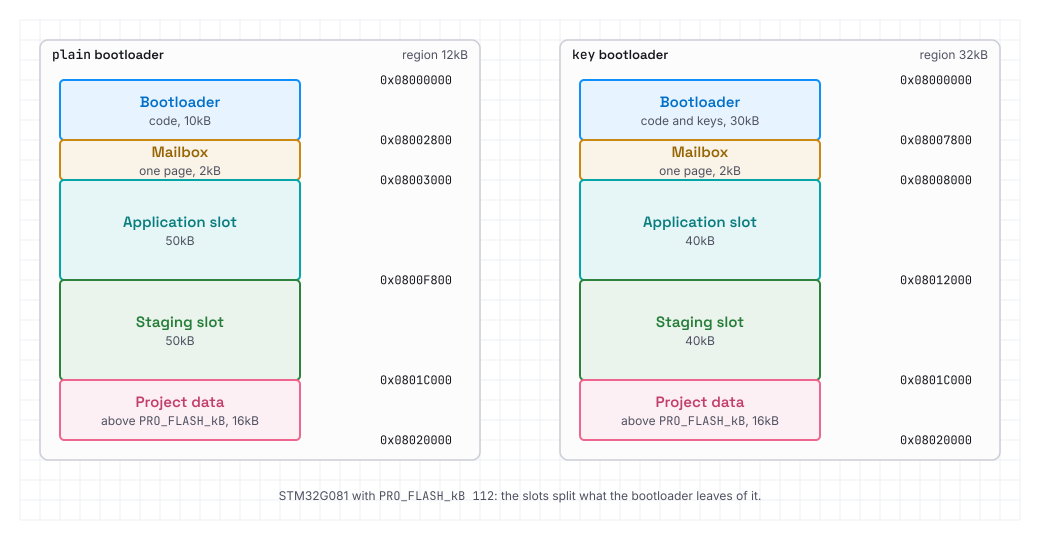
The bootloader works in one of two modes:
plain |
key |
|
|---|---|---|
| Starts | image with a valid CRC | image signed with your key |
| Bootloader region | 12kB on G0, 16kB on WB | 32kB |
| Cost | none | smaller slots, longer start, keys to guard |
| For | prototypes, learning | a product that takes updates |
plain guards against accidents only: an interrupted or damaged update, a power cut, a file for another device.
It is not a secure product configuration, as anyone who reaches the update link of your application can install any image built for this board.
key also checks an Ed25519 signature at every start, so only images signed with your keys run.
The bootloader settings lie in boot.h beside main.h, and one line of main.h switches the bootloader on:
#include "boot.h"A new project gets both right away through opencplc -n myapp -b uno -B.
In an existing one add the line and create an empty boot.h beside main.h.
make run # bootloader and application over ST-LinkThe bootloader now runs before your application, as plain until you add keys.
To see what it did, give the console the boot command:
#define CMD_BOOT ONboot info shows mode:plain, in result what happened at this start and in last the outcome of the last update.
To switch the bootloader off, remove #include "boot.h" and run make run again: a plain image replaces it.
Signed updates need keys, made once per product:
opencplc --keygen acme 3 # product key and two spare ones--keygen makes the keys acme, acme-1 and acme-2 in the key folder of this computer, %LOCALAPPDATA%/OpenCPLC/keys, and writes their public parts into boot.h:
#define BOOT_KEYS \
  "bffaf48c944589091627837a361bda7ab914aa87bf0b396d868788d305cc8d80" \
  "74f466497f944fe491df8c5653c28041b71dfe815f8ed291397b0825b0f598e6" \
  "c9191a33dda22d8ca8b1784ca20f8d3e3c34d4256b8fc7362ee08a0b356daed8"
With BOOT_KEYS the bootloader is key: from now on it starts only images signed with one of these keys.
A project without the bootloader gets boot.h and its #include in main.h along with its first keys.
Without a number --keygen makes one key, and acme is an example: name the keys after your product.
The spare keys are there for the worst case. The bootloader in a device is never replaced, so it trusts only the keys it got in the factory, and a key added later never reaches the devices already shipped. When the first key leaks, you sign with the second one, and the devices drop the first, see Leaked key.
The public parts may go into git, as they sit in every device anyway.
Only the .key files are secret, each with its public part beside it in a .pub file; on Linux the key folder is ~/.local/share/OpenCPLC/keys, and OPENCPLC_KEYS points to another one.
--keygen asks for a password, which is optional: an empty one stores the keys without it.
Warning
A leaked key lets anyone sign software your devices take, and losing all keys ends their updates.
Keep the .key files in two offline copies, the spare ones away from the first, under a password or on an encrypted drive.
make run     # build and flash
make update  # the image of this build over the console
Under key you need no product key on the desk.
On the first build Forge makes a development key for this computer, signs your builds with it and puts it into the bootloader in place of your keys, so the board on the desk takes everything you build here.
Nothing on that board is permanent: its bootloader takes the epoch and the key floors from the image in the slot, not from OTP, so make run always brings the board back.

make update sends the image of the build over the console, the way a device in the field gets it, so main.h needs #define CMD_BOOT ON.
The board resets, the bootloader installs the image, and make update ends with boot info showing result:installed.
make update FILE=<file> sends another image, e.g. the .bin of a release.
F5 has the symbols of the bootloader beside the application, so the debugger steps from one into the other.
On the computer make test has flash and OTP in a model in RAM, so the epoch, the keys and power cuts are tested without limits, see 🧪 Tests.
make dist TAG=1.2.0projects/myapp/ gets two files:
-
myapp-1.2.0.hex: the bootloader with your keys and the image, for a programmer -
myapp-1.2.0.bin: the image alone, for an update
Under key both are signed with the first key of BOOT_KEYS, and make dist asks for its password, if it has one.
The bootloader in this .hex keeps the epoch and the key floors in OTP, where they stay for good.
A board on the desk refuses this .bin with signature, as its bootloader has the development key.
With a single key in BOOT_KEYS, make dist warns that its leak would end the updates.
Without the key on this computer make dist refuses with no private key for ..., and with a wrong password with wrong password for key acme, in both cases without any file.
In CI the key and its password come from variables:
export OPENCPLC_KEYS=/secure/keys  # acme.key and acme.pub
export OPENCPLC_KEY_PASSWORD=...   # only for a key with a password
opencplc myapp
make dist TAG=1.2.0
To put the release on a board, flash its .hex:
opencplc --program projects/myapp/myapp-1.2.0.hex # no lockThe board now has your keys: it takes only files from make dist, and refuses a build of make with signature.
boot info shows mode:key and rdp:0, and make run brings the development key back.
A unit for a customer gets the same file, only with --lock, see Factory.
The application receives myapp-1.2.0.bin over its own link, e.g. BLE, RS or USB, and hands the bytes to BLD_Begin, BLD_Write and BLD_End of hal/stm32/sys/bld.h, and the signature to BLD_Signature.
BLD_End reports the image in the mailbox, the board resets, and the bootloader checks the image, copies it and starts it.
The application does not check the image, the bootloader decides.
Who may start an update and whether the link is encrypted is up to the application.
The application updates the STM32WB radio stack too: it receives the ST binary over its link and has FUS install it, while the bootloader never touches the stack.
The application should start without the stack as well and keep taking updates over USB, as a power cut during the install leaves CPU2 without a stack: WPAN_Start returns ERR then, and the copy in the staging slot lets the install finish.
A refused update leaves the previous version running, and boot info gives the reason in result at that start and in last until the next update:
-
installed: new image installed,nonewhen the start had no update -
crc: image damaged or other than reported -
size: image larger than the slot -
origin: image for another slot, e.g. built forplainunder akeybootloader -
chip: image for another chip -
board: image for another board variant -
signature: no signature, or one by another or revoked key -
epoch: epoch below the floor
Beside them boot info shows mode, epoch and revoked with the floors, loader with the fingerprint of the bootloader and rdp with the lock level.
A release that closes a security hole raises the epoch:
# in main.h: #define PRO_SECURITY_EPOCH 1
make dist TAG=1.2.1
A device that installs it, or starts it fresh from the programmer, writes the new floor into OTP and no longer takes an image of epoch 0, so nobody can bring the version with the hole back. Raise the epoch only with a fix, as it blocks going back past the hole, not every return to an older version, e.g. after a failed release.
When the first key leaks or gets lost, sign with the next one:
# in main.h: #define PRO_SIGNING_KEY 1
make dist TAG=1.2.2
PRO_SIGNING_KEY is the position of the key in BOOT_KEYS, counted from 0.
A device that installs this image writes into OTP that the keys below 1 are revoked, and from then on it neither takes nor starts an image signed with the leaked key.
Devices that install this release before the attacker's image are protected, so put it out at once.
All applications of a product give their bootloaders the same keys in the same order, as the number of the key is written in every image.
In the next application run the same command, and --keygen takes the existing keys from the key folder and writes the same list:
opencplc panel --keygen acme 3On a computer without the keys copy the BOOT_KEYS lines into boot.h of the next application instead.
When the processor holds the power of the board itself, e.g. on a battery switched on by a button, it has to take the hold right after a reset, or it loses its power.
The bootloader does it: after every reset it sets the hold output first, before the clock and the signature check, and never releases it, even with nothing to start.
The output is named in boot.h:
#define BOOT_HOLD { .port = GPIOB, .pin = 5, .reverse = true }The pin is a GPIO_t, as everywhere in Core.
.reverse = true holds the power at low level, without it at high level.
The application finds the pin active and must not release it.
Its GPIO_t there takes .mode = GPIO_Mode_Output and .set = true, as GPIO_Init sets the pin to the level of set.
Another hardware version on the same chip that needs another binary gets its own variant in boot.h:
#define BOOT_BOARD_VARIANT 2The bootloader of that version starts only images of variant 2, and the bootloader of the version with variant 0 only images of variant 0.
So you support both side by side: each gets its own releases, and a file of one never installs on the other.
That sets a variant apart from the epoch, which only rises and closes the way to older images.
The application code can use the variant too, e.g. #if BOOT_BOARD_VARIANT == 2.
make erase  # erases the bootloader too
make stack  # STM32WB radio stack, erases the bootloader too
make flash  # bootloader and image back
Without a bootloader or with an empty slot the board does not start the application, and the outputs stay as after reset: whether that is safe for the machine depends on the board design.
make erase takes no write protection off, so it leaves pages the firmware protects through FLASH_Protect; --lock 0 takes it off.
The settings of this guide lie in two files of the project.
main.h describes the application and how Forge builds and signs it:
-
#include "boot.h": puts the application behind the bootloader -
PRO_SIGNING_KEY: position of the keymake distsigns with,0by default -
PRO_SECURITY_EPOCH: epoch of the image,0by default -
CMD_BOOT:ONgives the console thebootcommand forboot infoandmake update
boot.h is read by the application and the bootloader alike:
-
BOOT_KEYS: public parts of your keys, written by--keygen; without them the bootloader isplain -
BOOT_BOARD_VARIANT: board variant,0by default -
BOOT_HOLD: power hold output the bootloader sets right after a reset and never releases
Forge keeps the two apart: a setting in the wrong file stops it with a hint where it belongs.
--lock changes the chip settings (option bytes) over the programmer:
- RDP1: the debugger and the programmer lose access to flash, and lifting the lock erases all of flash
- starting the ST bootloader in ROM is off, whatever the
BOOT0pin says - with a bootloader, write protection of its code comes on top, in area A, without the mailbox, while area B stays for data the firmware protects itself through
FLASH_Protect
The lock works under plain, under key and without a bootloader.
It checks only that the programmer sees the chip of the project, not what is in flash: --program decides the content, so in the factory both go in one command.
--lock, RDP1 |
--lock 2, RDP2 |
|
|---|---|---|
| Debugger | cut off, --lock 0 erases flash and gives it back |
cut off for good |
| Bootloader write protection | a hole in the application lifts it by rewriting option bytes | frozen |
| Failure analysis of a unit at ST | possible | impossible |
| Radio stack on WB |
make stack before the lock |
only FUS from the application |
opencplc myapp
opencplc --program projects/myapp/myapp-1.2.0.hex --lock     # full image from dist, then RDP1
opencplc --program projects/myapp/myapp-1.2.0.hex --lock -y  # production line, no question
Under key always flash the file of make dist: a build of make run has the development key, and a unit with it would take updates only from the developer's computer.
After the lock make flash, F5 and --program no longer reach flash, updates still pass over the link of the application, and boot info shows rdp:1.
With several ST-Links, opencplc myapp -s <serial> binds the right one to the project, otherwise --lock hits a foreign chip and refuses.
On STM32WB the radio stack goes before the image, as make stack uses SWD and erases the bootloader:
make stack
opencplc --program projects/myapp/myapp-1.2.0.hex --lock
Note
After the lock switch the power off completely and on again, as a chip locked with the debugger attached does not start the application.
A USB-UART adapter on the console pins can power the chip, so unplug it too, and on a Nucleo move the power jumper to CHG.
opencplc --program projects/myapp/myapp-1.2.0.hex --lock 2Warning
RDP2 shuts the programmer port for good, for the manufacturer too. The unit can no longer be unlocked, reprogrammed or examined with a debugger, only updates over the link of the application remain.
Forge asks a second time, with -y too.
RDP2 goes only to a product whose customer or standard requires an unchangeable bootloader.
opencplc myapp
opencplc --lock 0  # lifts the lock and every write protection, erasing all of flash
make flash         # bootloader and image back
After make flash switch the power off completely, as an STM32G0 starts from ROM after its flash is erased until a full restart.
STM32WB lifts the lock through STM32CubeProgrammer, the same one make stack needs, and the erase takes a few seconds.
All of flash goes together with the lock, so the analysis of a unit from the field relies on logs collected before.
The bootloader is responsible for what starts: signature, CRC and epoch, checked at every start. The lock is responsible for whether the bootloader can be bypassed: the programmer port, the start from ROM and the write protection of the bootloader. The application is responsible for who sends an update and how: access to the link, authentication, e.g. pairing, and encryption.
Encryption stays in the application, as the bootloader never changes, so neither its key nor its algorithm could be replaced there. The signature is computed over the plain content, so the bootloader checks the result of the decryption anyway, and the staging slot lies in internal memory under the lock. One encryption key per product, read out of one taken-apart unit, still opens all update files, so whether and how to encrypt is up to the manufacturer.
✅ protects, ❌ does not protect,
| Threat | plain |
plain + --lock
|
key |
key + --lock
|
|---|---|---|---|---|
| Interrupted or damaged update | ✅ | ✅ | ✅ | ✅ |
| Power loss during the install | ✅ | ✅ | ✅ | ✅ |
| Update for another device | ✅ | ✅ | ✅ | ✅ |
| Foreign software over the update link | ❌ | ❌ | ✅ | ✅ |
| Development version through an update on a production unit | ❌ | ❌ | ✅ | ✅ |
| Going back to an old version with a known hole | ❌ | ❌ | ✅¹ | ✅¹ |
| Image signed with a leaked key | ❌ | ❌ | ||
| Foreign software flashed with a programmer | ❌ | ✅ | ❌ | ✅ |
| Copying the software out of the device | ❌ | ✅ | ❌ | ✅ |
Start of the ST bootloader in ROM (BOOT0 pin) |
❌ | ✅ | ❌ | ✅ |
| Bootloader overwritten by a bug in the application | ❌ | ✅ | ❌ | ✅ |
| Lasting takeover through a hole in the running application | ❌ | ❌ | ❌ | |
| Learning the software content from an update file⁴ | ❌ | ❌ | ❌ | ❌ |
| Hardware attacks: power glitching, power analysis | ❌ | ❌ | ❌ | ❌ |
¹ Once a release with a raised epoch closed the hole. ² From the release signed with a spare key on, on devices that install it before the attacker's image, and on units flashed with it in the factory. ³ A hole that runs foreign code can rewrite option bytes and lift the write protection of the bootloader, and only RDP2 freezes them. ⁴ Confidentiality is the job of the application.
A project without a bootloader but with the lock is protected from the programmer, copying and the start from ROM, and simply has no updates.
Deliberately missing:
- bootloader updates in the field, as an interrupted swap would leave a dead device, so a bootloader bug is fixed by service,
- adding keys in the field, for the same reason, so the spare keys go into the bootloader from the first unit,
- a hardware secure area, as STM32G0 has one and STM32WB does not, and one way for both families is simpler to verify,
- an automatic lock at the first start, as every test of a release on a board would end with erasing flash,
- a watchdog in the bootloader, as it clashes with sleep modes, so the application starts it itself.
The EU Cyber Resilience Act (CRA), IEC 62443-4-2 for automation components, and for radio devices the RED directive with the EN 18031 standards expect, among other things, authentic software, secure updates and closed service interfaces:
| Expectation | Ready | On the manufacturer's side |
|---|---|---|
| Authentic software only | signature checked at every start | protecting the product keys |
| Secure updates | signature, power loss resistance, result report | who may start an update, issuing fixes |
| Protection against rollback | epoch | raising the epoch with every fix |
| Cutting off a leaked key | spare keys and revocation in OTP | spare keys offline from the first unit |
| Closed service interfaces |
--lock: programmer port and BOOT0
|
locking every unit before shipping |
| Secure factory configuration |
key and --lock, one command each |
key + --lock for a product |
| Software confidentiality | not in the bootloader | encryption in the application, if required |
| Vulnerability handling | outside the bootloader | reports, fixes, informing customers |
Note
This document is no declaration of conformity. It shows what the mechanisms help with, and the manufacturer decides which regulations cover the product.