Repository navigation
v0.37.0

Release v0.37.0
Video:
maki-v0.37.0.mp4
Highlights
The Library grew up. It has a table view with columns you pick, can group by status, tag, type or root folder, has many more filters and sorts, and keeps the whole view in the address bar so it can be bookmarked. Every series now has your own reading status (Plan to read, Reading, Completed, On hold, Dropped), and it reaches your trackers too. Auto-tag rules and root folder rules sort new series as they arrive, and a new Manual import tab and a drop folder bring in files from anywhere on the server.
Downloads put new chapters ahead of big backlogs, pause on their own when a drive runs low, can be paused per series and show how long the queue has left. Torrents that stall are caught and replaced, can stay seeding until a ratio or time, and Maki now searches your indexers for chapters no source has. The reader can leave out scanlator credit pages and skip webtoon recaps, and gets pinch zoom, swipe and wheel page turns and four tap zone layouts. Page conversion adds JPEG XL and can split very tall webtoon pages for e-readers. After the upgrade, a new tab in Settings lists every setting added since your last version.
Before you upgrade
- Building the Docker image yourself now needs
-f distribution/docker/Dockerfile. The copies of the Dockerfile and entrypoint at the repository root are gone. - Maki now searches your indexers on its own for chapters no source has, at most once a week per series. It's on by default when an indexer and a download client are set up; turn it off under Settings > Downloads > Volume releases.
- The first search by meaning after the update writes a memory-mapped copy of the search model, about 110 MB in the config folder. Set
MAKI_EMBED_MMAP=0if your filesystem has trouble with memory-mapped files. - Every series gets a reading status on first start: series you had started become Reading, finished ones Completed, and the rest Plan to read.
- Pages upscaled on the server before the update are made again the next time you read them, because of the Maki 2x black-box fix and the new colour page quality.
Library
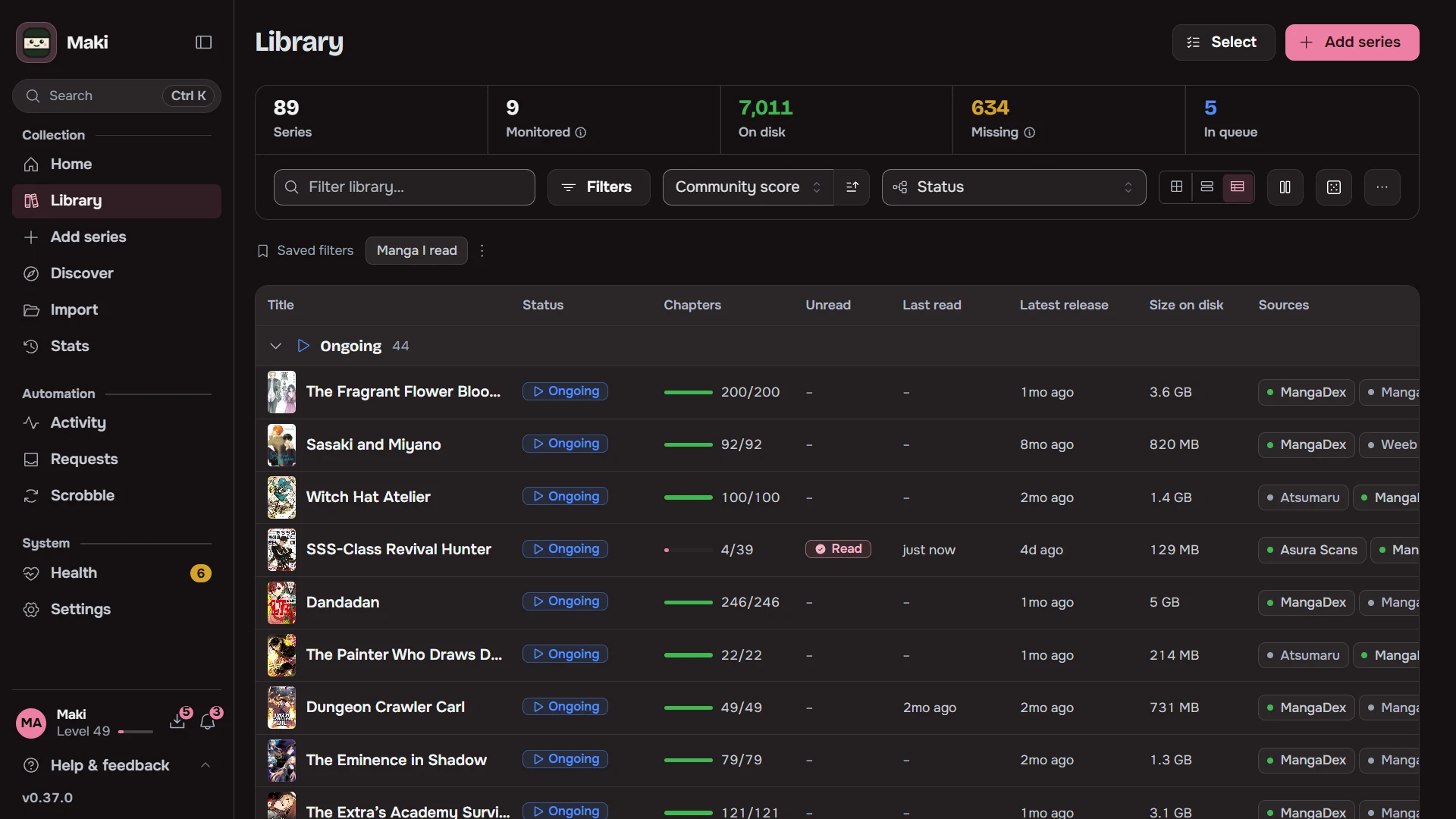
- Table view. A third view next to Grid and List: a dense table with a small cover and the title, plus columns you pick and order yourself (status, chapters, unread, added, last read, latest release, size on disk, sources, quality profile, next check, year, author, community score, your rating and tags). Click a header to sort, drag its edge to resize, double-click the edge to reset.
- Group by status, tag, type or root folder (root folder only with more than one). Each group has a header with its colour, name and count and folds away on click. A series with several tags is listed under each of them. Grouping works in every view and is saved with a saved filter.
- More filters: year range, author or artist, publisher, root folder, incognito, muted notifications, anime adaptation, numbering clash, series with their own read file cleanup or page conversion setting, and series added in the last N days. Genres and tags can be included or left out from one list.
- More sorts: year, community score, most unread, latest chapter released, chapter count and author. Series with no value always go last. Sorting by status now follows the lifecycle (Ongoing, Hiatus, Completed, Cancelled, Unknown) instead of the alphabet.
- The filter panel is easier to scan: status, reading status, type and your most common genres are chips at the top, and every other filter is a row that opens its own page in the panel.
- Search, sort, filters, grouping and the view now live in the address bar, so a view can be bookmarked or sent to someone.
- Saved filters can be renamed, reordered, and one can be the view the Library opens with.
- In select mode, shift-click selects every series between your last click and this one.
- Select mode has more bulk actions: Rescan files, Rename files, Mark read or unread (without logging reading time), Incognito, Clean up read files and Page conversion. Refresh, Rescan, Metadata, Search missing, Monitoring, Move and Rename now run on the server as one job, so a big selection starts in seconds and keeps going if you close the tab.
- A Home library rail can show one of your saved Library filters, in its sort, and follows later changes to the filter.
- "N new" on cards now counts the unread chapters in the latest batch of added files, the same number Home's Recently added shows.
Reading status
Every series now has your own reading status: Plan to read, Reading, Completed, On hold or Dropped.
- A new series starts as Plan to read. Reading it anywhere Maki can see (the reader, OPDS, Komga or Kavita) moves it to Reading.
- A series becomes Completed when MangaBaka lists it as completed and you have read every chapter its progress counts. If you switched some chapters off and read the rest, the series page and the reader's end screen ask whether you're done instead of guessing. Nothing completes while another chapter is still expected.
- Set it from the series page (one control with your rating), a Continue reading card's menu, or a Library selection. The Library can filter by it.
- On hold and Dropped series leave Continue reading and the OPDS and Komga on-deck shelves until you read them again.
- Connected trackers get the status too: On hold as paused, Dropped as dropped, Completed as completed with the tracker's full chapter count. A completed entry is never changed.
- Settings > Reading status has two optional rules: put a series on hold, or drop it, after a number of days without reading, counting only days when something was waiting to be read.
- The Dropped list in Stats and Rewind shows the series you dropped instead of guessing from 60 days without reading.
Adding, importing and organising
- Auto-tag rules tag a series as it is added when it matches every condition you set: genre, type, content rating, root folder, who added it and how (search, Discover, a request, an import list, a Mihon import or a library import). Apply to existing series shows how many it will tag first. Settings > Library > Auto-tag rules.
- Root folder rules send a new series to the right root folder by type, genre, content rating, who added it or how it came in, for example every manhwa to a webtoon folder. The first match wins, and the add form and request approval open on the folder a rule picked. Settings > Library > Root folder rules.
- Manual import: a new tab on the Import page to browse to a folder or file on the server, see the chapters and volumes each file carries, pick the series and import it, copied, hardlinked or moved. The review shows which existing files would be replaced. Admins can browse anywhere; other users with the import permission only inside their own root folders.
- Drop folder: point Maki at a folder in Settings > Library and it checks it every few minutes. A file or folder whose ComicInfo link or name matches exactly one series is imported once its size stops changing. Anything else stays put and is listed on the Manual import tab.
- The library import looks inside grouping folders such as
A-Z/or a publisher folder, up to two levels deep, and offers loose comics in the root folder as their own rows. It also reads ComicInfo.xml and Mylar'sseries.json, so a MangaBaka, AniList, MyAnimeList or MangaUpdates link matches the exact series. - Edit metadata now covers the year, story and art credits, publisher, alternative titles, sort title, type and content rating. Each stays as you set it through refreshes until you reset it.
- The poster can come from a page of a downloaded chapter or a linked source's cover, and admins can fetch one from an image URL.
- Naming formats can mark a part as optional with
<and>, so<({Chapter Group})>adds the group in brackets only when there is one (#197). Six new tokens: the chapter's source and release date, the series' status, author and publisher, and the file's quality tier. - Chapter files carry your tags in ComicInfo's SeriesGroup field, so Kavita and Komga can build collections from them. ComicInfo also marks the cover and two-page spreads, credits the scanlation group as Translator, and records the source, chapter URL and quality tier in Notes.
Reader
- Hide credit pages. The reader can leave out scanlator credit, recruitment, donation and notice pages at the start and end of a chapter. Maki finds pages that repeat at the same edge of nearby chapters and reads their text, so copyright pages, title pages and "to be continued" cards stay. It works without setup, never changes your files, and the reading settings show what was left out with a button to bring it back.
- An admin can have Maki find the credit pages of the whole library in the background (Settings > Library > Credit pages, off by default). It pauses while anyone reads and shows under Running now on the Health page. The same settings card lists the release groups behind those pages: confirm or merge their names, mark an aggregator's ad, choose per page whether it is always hidden or shown, and give the group to every chapter whose file has none. A page Maki read no name off, or the wrong one, is listed with the group whose pages share its text (a handle, a staff line, a sign-off), waiting for you to confirm it.
- Skip recap. Webtoon chapters that open by repeating the end of the previous chapter get a Skip recap button in Continuous layout, or skip it automatically with the new reading setting.
- Pinch to zoom in the Single and Double layouts, around the point between your fingers, with drag to pan. Ctrl and the wheel or a trackpad pinch zoom the same way. Double-tap zoom now zooms in where you tapped.
- Swipe sideways to turn the page, following the reading direction. The scroll wheel turns pages too, scrolling a tall page first.
- Tap zones come in four layouts: Sides, L-shape, Kindle and Edges. The size can be changed, back and forward swapped, and the zones are drawn on the page while you adjust them.
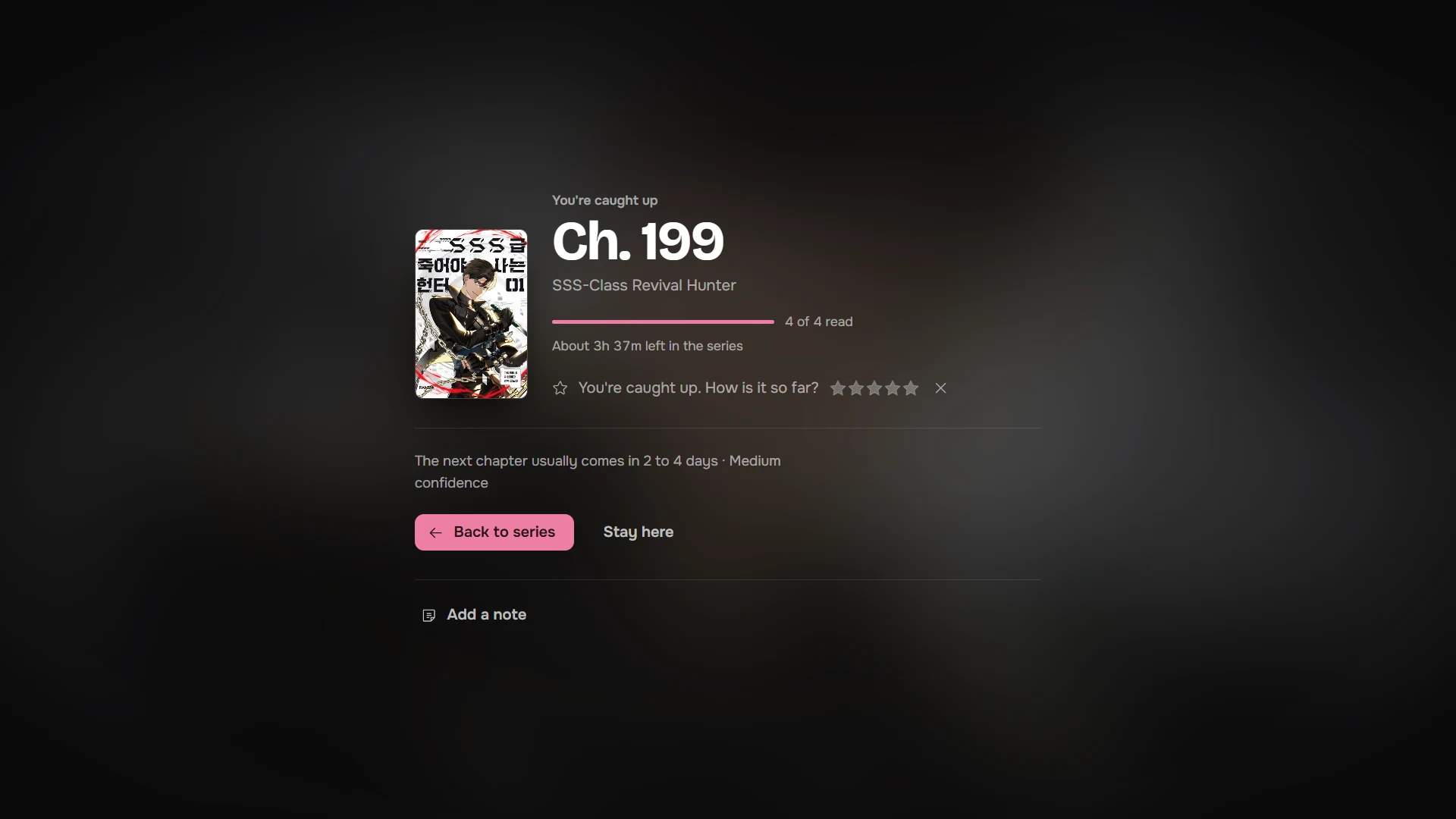
- The end of a chapter does more. On a finished series it asks for your final rating. It shows about how much reading time is left in the series at your pace, and when you're caught up, a rough span for the next chapter ("usually comes in 1 to 2 weeks"), never a date. A next chapter that finishes downloading while the screen is open gets a Read button.
- Bookmarks are flagged on the page slider, and the comma and full stop keys jump between them.
- Three more page backgrounds: white, grey and Auto, which takes the colour of the page's edge.
- Continuous mode can show a progress rail down the right edge that you drag with the bars up. It also reopens a chapter where you stopped inside a tall slice, not at the slice's top, and that carries across devices.
- The back arrow and Escape return to the page you opened the chapter from, such as Home or the Library.
- The mouse cursor hides after a couple of seconds of rest over the page.
- The Enhance method is a row that opens a page listing each method on this device and on the server.
Downloads
- Priority lanes. New chapters no longer wait behind a backlog. Monitored refresh finds, Smart Download top-ups and a chapter you click go first, then everything else, with "Download all", bulk downloads and upgrades last. When you read close to the last chapter on disk, that series' next queued chapters move to the front.
- Low disk hold. Downloads for a root folder pause when its drive drops below 5 GB free (change it, or set 0 to turn it off, in Settings > Library). Other folders keep going, and Activity says which folder is held.
- Pause a single series from its rows in Activity or the download menu on the series page.
- Activity shows roughly how long the queue has left, overall and per series, once there is enough download history to guess fairly.
- A chapter that is early access on one source is taken from another linked source that already has it free. Chapters still behind early access show as "Waiting for release" with the next check time instead of as failed.
- The download history on Activity folds a batch of chapters from one series into a single row, with filters for Completed, Cancelled and Upgrades and a search by series. Grouping can be switched off.
- Pause downloads opens a small panel under its button instead of a dialog.
- The built-in quality profiles have shorter descriptions that say what the name doesn't. Profiles you edited keep your wording.
Volume releases and torrents
- Look for volume releases first (opt-in, Settings > Downloads). When you add a series with nothing on disk, Maki asks your indexers for a volume release before downloading chapter by chapter, and source downloads skip the chapters it covers while it is pending. The series page says what is waiting and has a "Download from sources now" button. Thanks to kizuna (#178).
- Approve volume releases automatically (opt-in). A digital release under a size limit (12 GB by default) is grabbed when the only reasons it waited were missing volume names, added chapters or the auto-grab size. An approved release only replaces files it is at least as good as (#178).
- Search for missing chapters. Maki searches your indexers on its own for chapters no source has, such as a licensed series a site took down. Each series at most once a week, and releases Maki is unsure about wait for you.
- Stalled torrents are caught by a limit you set under Settings > Downloads > Download client (one hour unless changed, 0 turns it off). A torrent with no progress, or no seeds or peers, for that long fails with a reason, leaves the client, is declined so it isn't grabbed again, and the search looks for the next best release. Releases with no seeders are skipped, and a new Declined releases list lets you allow one again.
- Remove after seeding. Maki can leave a torrent in the client until it reaches a seed ratio, a seeding time or both. It reads the client's own defaults from qBittorrent, Transmission and Deluge when you add it.
- A minimum seeders setting for releases Maki grabs or approves on its own, under Settings > Downloads > Volume releases (starts at 1).
- The volume search can tell what a volume covers when your sources list chapters without volumes, by reading MangaDex's chapter-to-volume list, filling English gaps from other languages (#176).
- A pack with one folder per volume (such as "Title v01-08") is imported as one file per volume (#175).
- Search releases keeps the series title in the box when nothing turns up, says which titles it searched, and has buttons to try each alt title. It also tries the original title.
- A series page shows its torrent downloads under the header, with a Review button when one needs it.
Series page
- The chapter table can sort by release date and hide the Title, Released, Source and Status columns.
- The chapter table can group chapters under collapsible volume headers, each with the chapter range, counts, its own Want switch, a download button and a read/unread menu. It turns on by itself when most chapters have a volume.
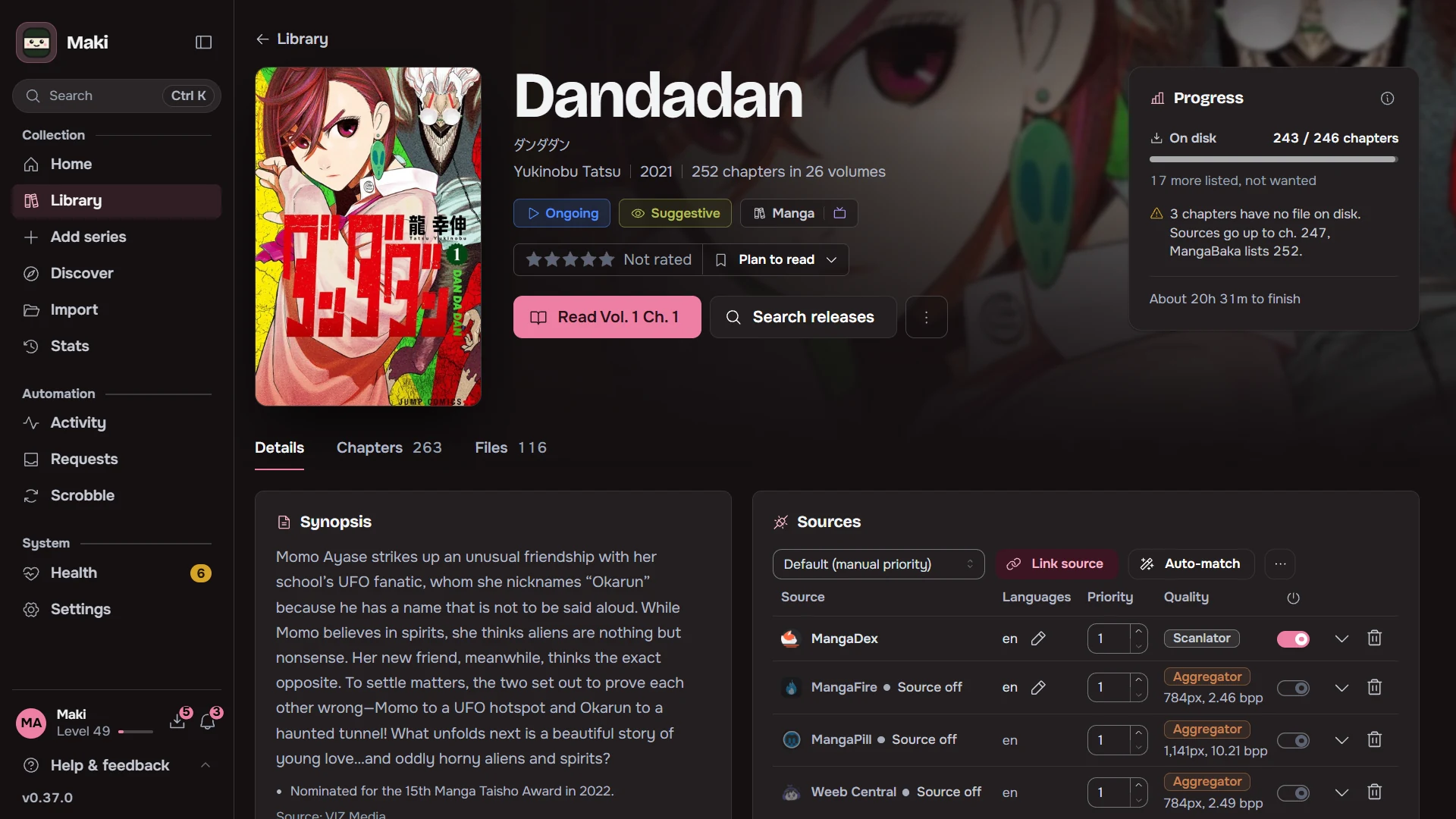
- The header is tidier: one line under the title with author, year, chapters and volumes; status, content rating and type as matching pills; your rating and reading status as one control; and a Progress card with Read and On disk bars, wanted chapters not fetched yet, warnings, when you started and about how long is left.
- A new "Your reading" panel on the Details tab shows your time spent, usual time per chapter, a weekly chart and how long is left. It appears once Maki's reader has timed some reading.
- The Details tab shows the MangaBaka score and each tracker's score next to its links. The Metadata panel shows the chapter total split into chapters and extras.
- "More like this" also uses what readers of a series went on to read, so its picks are closer in story and feel.
Discover
- The detail card's header takes much less room. Long titles shrink and stop at three lines, the reason a pick was suggested sits above the title, and status, content rating and type are pills. The score says where it stands ("8.6 Exceptional", "Top 1% of popular manhwa"), and each site is one chip with its score. Adding is one card with Folder, Incognito and Automation pages, and a slim bar keeps the title and add button in view as you scroll.
- The pick at the top of Discover uses the same header.
- Scores look the same across the app: a gold star and one decimal, in the Library table, the shortlist, reviews and list rows. Your own rating has a star in your accent colour.
- Reviews come from AniList as well as MyAnimeList, with the most liked Kitsu one-line takes below. Series with only an AniList or Kitsu link get reviews too, and a site that doesn't answer is named.
- The minimum rating filter moves in steps that match how scores spread, and each step says how much of the popular catalogue it keeps.
- Each group on the Your taste tab has a More like this button.
- The series named under a card ("Fans of", "Feels like") can take two lines.
- You get a notification when the catalogue lists a new sequel, prequel, spin-off or side story of a series you read. Turn it off under Discover in your notification settings.
Enhance
- Prepare chapters ahead (Settings > Server upscaling, off by default). While nobody is reading, the server upscales the next chapter of series you're reading with Enhance on Always and a server model, so they open sharp even on a phone. Days, series, chapters and disk space (4 GB by default) are adjustable, reading always comes first, and it uses half the upscaling threads. Anyone who can edit a series can set its own number of chapters under Automation in the series menu.
- Whole chapter now carries straight on through the next chapter, so it opens already upscaled. A next chapter in a tier your settings skip (volumes, by default) is left alone.
- Server upscaling with Maki 2x is faster: the next page starts while the previous one saves, colour pages save in less than half the time, and machines with many cores can run up to 18 threads.
- Upscaled colour pages are saved as JPEG XL, so dark gradients stay smooth on OLED screens and files are about 14% smaller. Browsers that can't show JPEG XL, such as Edge, get WebP. An admin can turn it off under Settings > Server upscaling.
Page conversion
- Conversion setup is one page. Rules and the default sit in one table, and each row has its own format and quality for black-and-white and for colour pages, previewed on your own pages with sizes in the other formats. The library total updates as you edit.
- JPEG XL is a new format: about the size of WebP, about three times faster to convert. The reader shows it where the browser supports it and WebP elsewhere, and OPDS, Komga and KOReader always get WebP. A downloaded CBZ keeps its JPEG XL pages, which KOReader and most comic apps can't open.
- The setup page asks where you read, and the answer fills in the default: Only in Maki gives AVIF Compact for black-and-white pages and JPEG XL High for colour pages, apps like Mihon change colour pages to AVIF High, and KOReader or an e-reader changes both to WebP. Switching conversion on for the first time starts on the Maki setup, and each target marks the recommended format and quality. The "Squeeze volumes harder" template is gone, since Balanced made volumes larger than the new default.
- Split tall pages. Very tall webtoon pages can be cut into shorter ones in the blank gaps between panels, which e-readers handle far better. It applies to new downloads and existing files, and reading positions, bookmarks and notes move with their page.
Health
- The Health page shows what Maki is busy with right now, beside its CPU and memory use: scheduled jobs, server Enhance, Prepare ahead, conversion, downloads, bulk edits and source matching. Jobs and bulk edits can be stopped and the conversion pass and queue paused. A list of scheduled jobs shows when each last ran and runs next, with Run now.
- Moved archives are now relinked by themselves after each library scan, for example when a series folder was renamed outside Maki.
- Scheduled jobs have readable names in Health, its history and job notifications.
- History keeps 90 days of events (at least the newest 300) instead of growing forever.
- Starting on a database from a newer version shows an error on the Health page with the way back.
Sources
- When auto-match finds a near-miss, the Sources card shows it as "Is this it?" with Link and Dismiss.
- Choose which scanlation group's upload Maki takes when MangaDex has several copies of a chapter: preferred and blocked groups for every series from the MangaDex row in Manage sources, overridden per series from its actions menu.
- Custom source definitions can mark locked or premium chapters and read each chapter's scanlation group. Locked chapters wait or come from another source instead of failing.
Settings
- New tab. After an upgrade, Settings lists the settings added since the version you upgraded from, each linked to where it lives, with a New pill on its usual tab. A fresh install doesn't show it.
- Root folders have an edit button for a re-mounted share or new storage. It checks the new path and counts the series folders there before saving. Files are not moved.
- The FlareSolverr, indexer, download client, Kavita and Suwayomi cards remember their last Test and show Connected or Failed with the reason.
- The recycle bin opens in a window, grouped by series, with filters, and a whole removed series can be restored or deleted at once.
- Discord and ntfy notifications have their own colour, icon or tag for every event. ntfy sends health problems at high priority unless the connection sets its own.
- The background picker shows each background as a small preview of the app, grouped into dark and light.
- The Naming tokens dialog keeps the format field at the top while you scroll.
Look and feel
- Older screens now match the rest of the app: Health's system checks, Your taste, reader and quality profiles, backups, integrations, the setup guide, Account, and Users & security. Adding a custom source is a step-by-step dialog.
- Dialogs, drawers, section titles and empty states share one build, with the same pinned footer and Cancel on the left of the main action.
- Label pills share one look, a tint and an edge in the pill's own colour, across the chapter table, Library, Progress card, Health history and the shortlist.
- Work in progress is blue everywhere, small covers share one look, notices share one box, and times in lists read as "3m ago" with the full date on hover.
- Links to AniList, MyAnimeList, MangaUpdates, Kitsu and MangaDex show each site's coloured icon.
- Toasts stack and spread on hover, can be swiped away on a phone, and wait while hovered or in a background tab. Alt+T focuses them.
- Small labels and helper lines that repeated a heading or control are gone across dialogs, empty screens, Settings and Rewind.
- Changing pages in Safari, on an iPad and on an iPhone now cross-fades as it does in Chrome and Firefox, instead of snapping in late. Opening a series from its cover still flies the cover into place.
- On a touch screen, tapping a cover presses it down straight away. The hover lift and zoom, which started late after a tap, are now for mouse and trackpad only.
Performance
- Home, the Library and Discover stay loaded once you have opened them, so going back to one is close to instant and its covers no longer load in again one by one.
- An idle Maki holds less memory. After a restart it no longer keeps 40 to 90 MB of search and recommendation database pages, and memory used by Discover or a search is handed back after about a minute instead of 10 to 17. Startup uses about a quarter less CPU.
- Searching by meaning uses about 100 MB less memory, and a search after a pause is answered by meaning straight away.
- MangaFire and TopManhua's background browser takes 110 to 170 MB less and closes after one idle minute.
- Converting very tall webtoon strips peaks about 200 MB lower.
- A health rescan of verified files no longer leaves several hundred MB on the container's memory figure.
Stats
- Reading a finished series again from the start counts as another series finished in stats, goals and achievements.
Security
- Log lines can no longer be forged by a search, folder name or host name containing a line break.
- The OPDS cover fallback can only redirect within Maki.
Bug Fixes
- Fixed the volume search grabbing an English release on its own for a series whose files are Japanese, which then replaced them. Releases tagged in the other language are ignored, and a series in Japanese only takes a release automatically when its title says it is Japanese. Thanks to kizuna.
- Fixed volume files attaching to chapters they don't contain when the source's volume boundaries disagreed with the files, which could show a 20-chapter series as 60 readable chapters. A rescan moves chapters onto the file that holds them (#198).
- Fixed free sample and trial volumes from Suwayomi sources showing up as chapters that could never download. Ebook volume editions are listed as volumes (#174). Thanks to kizuna.
- Fixed a download waiting for an import decision being impossible to find when the queue held more than 200 items. Thanks to kizuna.
- Fixed torrent packs whose title names no release group leaving the group empty when the files inside name one.
- Fixed approving a new-series request ignoring the monitoring choice.
- Fixed MangaDex never finding series it rates as pornographic.
- Fixed WEBTOON and MANGA Plus linking a series to an edition in a language you haven't enabled, which listed every chapter twice.
- Fixed server upscaling leaving faint boxes on black and dark panels, most visible on OLED screens.
- Fixed a reader page occasionally failing to load when pages from many chapters were requested at once.
- Fixed auto-scroll keeping the screen awake and counting reading time while nobody was there.
- Fixed a series losing its read count after its Wanted switches were turned off and on again.
- Fixed the read percentage filter disagreeing with the progress ring on the cover.
- Fixed Rename series leaving Health out of step with the files it moved.
- Fixed a failed request asking Kavita to scan a series folder being dropped. Maki retries after one, two and four minutes.
- Fixed the "This series is archived" toast showing every time you opened an archived series.
- Fixed long titles filling the top of the series page on a laptop screen.
- Fixed the offline notice on a series page pushing the header down.
- Fixed the series page's Scrobbling section ignoring progress pushed from the built-in reader.
- Fixed a MangaBaka entry marked as rereading being switched back to reading on the next sync.
- Fixed single sign-on accounts being unable to turn on OPDS or regenerate its token. Creating an API key from a single sign-on account says up front when it needs a fresh sign-in.
- Fixed account errors (password too short, username taken, wrong current password) always showing in English.
- Fixed the restore dialog saying the current data is not kept. The current database is kept for 7 days.
- Fixed catalogue search stopping at 60 results. Load more now reaches 200.
- Fixed the empty Following rail telling you to follow from a series page. Follow is on creator pages.
- Fixed the Year view in Stats comparing the year so far against all of last year.
- Fixed the badge count giving away how many secret achievements are left.
- Fixed the leaderboard showing the streak of people who switched streaks off.
- Fixed a flood of achievement notifications the first time progress was worked out for an account.
- Fixed the page error screen pointing to the server log instead of the browser console.
- Fixed the cover flight between the library and a series page on iPad and Safari: the cover showed twice before it flew, and jumped a few pixels as it landed in the installed app.
- Fixed two Safari glitches: the rows of figures on the Library, Health and the series page piled up on top of each other, and a "Skip to content" button showed above the top bar when the page bounced past its top.
- Fixed the Continue reading card on a tablet held upright: the reading summary now sits under it instead of squeezing into a narrow column where its numbers ran together.
- Fixed Edit metadata keeping the old chapter or volume total when you cleared the field.
- Fixed missing highlights in the setup guide and the Archived list, cover edges vanishing in the Light and Paper themes, and a pending request in Discover showing as done.