Repository navigation
Releases
Wavelength for Android 0.3.0

Wavelength for Android — YouTube Music with listen-together, no ads, no microG. Rooms work with Wavelength on PC.
Install
Download Wavelength-Android-0.3.0.apk below on your phone, open it, and allow installing from your browser/files app if Android asks. Already on 0.2.0? It installs right over it and you stay signed in.
From now on the app updates itself: when a new version is out, a banner appears in the app — tap Update and confirm.
New in 0.3.0
- Background playback that stays on — music no longer stops with the screen off or the app in the background, including music videos.
- No more random skips — if YouTube Music skips a song by itself (a stream error), Wavelength puts it right back where it was.
- Big lock screen player — art, seek bar, play/pause, next/previous, like and what's up next. Swipe up to unlock.
- Home screen widget — resize it from a small bar to a full player with Up Next; colors follow the album art.
- Square album art everywhere (no more cut-off video thumbnails), resume your last song when you open the app, Like and Radio on the notification, headphones unplugged = pause.
On first launch, allow "run in background" and full screen notifications (for the lock screen player) when asked.
The Windows app is unchanged — its latest version is still 1.4.0.
Wavelength 1.4 — smooth Discord audio + live player in voice chat
Smooth Discord audio, and a much easier Discord bot.
Fixed
- No more skipping in Discord. Audio used to drop for a moment whenever your PC was busy (a song loading, the window redrawing, other apps). Wavelength now captures the music on its own audio thread and keeps a small cushion for Discord, so the bot plays smoothly. If your connection hiccups it rebuilds the cushion once instead of stuttering.
- Garbled symbols (like
🔊) in bot messages and settings now show properly.
New in the Discord bot
- Live player in the voice channel's chat. When the bot joins, it posts a player in that voice channel's chat: cover art, progress, who added the song, and the whole Up Next with who added each one. It updates by itself and stays at the bottom.
- Buttons: ⏮ ⏯ ⏭ 🔀, Add song (opens a search box), 🔉 / 🔊 volume, Full Up Next.
- An Up Next menu: pick any song to play it now, move it next, or remove it.
- Profile shows what's playing: "Listening to Song — Artist".
- Better /play: suggestions appear while you type. Pick one, then choose Play now, Play next or Add to end. Type anything else and you get a list of matches to choose from.
- New commands:
/shuffle,/remove(suggests songs from Up Next),/clear,/seek 1:30,/player(post the player in any channel),/help.
Updating
Wavelength finds this on its own within a minute. Click Update ready · Restart in the title bar, or go to Settings → Updates → Check now. Nothing to change in Discord: the new commands show up by themselves.
New install? Download Wavelength-Setup-1.4.0.exe below.
(The .asar and .json files are for the built-in updater.)
📱 Android: Wavelength-Android-0.3.0.apk is attached below too. Android release notes: https://github.com/OrionVW42/wavelength/releases/tag/android-v0.3.0
Wavelength 1.3.2 — bot joins voice again after updating
Fixes the Discord bot not joining voice after updating to 1.3.1 ("Cannot find native binding").
Fixed
- Updating to 1.3.1 through the app left behind the voice-encryption file Discord requires, so
/joinfailed. Wavelength now brings those files along with every update, and a copy that's missing them repairs itself on start. Nothing to do by hand.
Updating
Wavelength finds this on its own within a minute of starting. Click Update ready · Restart in the title bar, or go to Settings → Updates → Check now → Restart to update. Then /join works again.
New install or coming from 1.2 or older? Download Wavelength-Setup-1.3.2.exe below.
(The .asar and .json files are for the built-in updater.)
Wavelength 1.3.1 — the Discord bot plays for everyone
The Discord bot now plays for everyone in the voice channel.
Fixed
- Friends heard nothing. Your own Wavelength volume was shrinking what the bot sent, so at a low volume the bot played near-silence for everyone else. Discord now always gets full-quality audio, whatever your volume is.
- The bot went quiet when the song changed. It stopped sending audio for good after a split-second gap while YouTube Music loaded the next song. It now rides through gaps and restarts itself if it ever stops.
- Muting Wavelength muted Discord too. Mute and volume in Wavelength now only affect your own speakers. Ads stay silent in Discord.
New
- Settings → Discord bot → Play on this PC: turn it off to play only into Discord while the bot is in voice.
- The bot's default volume is now 50% (music at full level is loud next to voices). Change it anytime with
/volumeor the slider in Settings.
Updating
Wavelength 1.3 updates itself: Settings → Updates → Check now → Restart to update (a small download).
Coming from 1.2 or older? Use the same steps, or download Wavelength-Setup-1.3.1.exe below.
(The .asar and .json files are for the built-in updater.)
Wavelength 1.3 — a Discord bot, built in
Wavelength now has a Discord bot built in. Your server hears exactly what Wavelength plays.
Discord bot
Turn it on in Settings → Discord bot: paste your bot's token, optionally your server ID, flip the switch, and use Add to server.
/joinbrings the bot into your voice channel. It plays whatever Wavelength is playing (your music, a room you host, or a room you joined) straight from the player: same moment, no ads./playadds a song to Up Next, credited to whoever asked, even inside a listening room./searchlets you pick from the results./npposts a live now-playing card with ⏮ ⏯ ⏭ and Up Next buttons. Also/queue,/skip,/previous,/pause,/resumeand/volume(the bot's volume is separate from yours).- Room codes work in Discord:
/room starthosts a room,/room join code:K7Q-M2Xjoins one, and/room infoshows the code so friends can join from the app. - If nobody's left in the voice channel, the bot leaves after 2 minutes.
- The bot is online while Wavelength is open.
Also
- Fixed: some settings switches could silently not take effect.
/jointells you exactly which permission is missing if the bot isn't allowed in a channel.
Updating
This update is the full installer (it adds the voice-encryption component Discord requires), so it's a bigger download than usual. Wavelength 1.1 and 1.2 find it under Settings → Updates → Check now, then Restart to update runs the installer.
Or download Wavelength-Setup-1.3.0.exe below. It installs over older versions and keeps your sign-in, settings and playlists.
Windows may say "Windows protected your PC" because the installer isn't code-signed: click More info → Run anyway.
Wavelength 1.2 — rooms that just connect
Friends can now join your room from almost any network.
Rooms that just connect
Until now, joining a room needed a direct connection between the two computers. That fails on strict routers, phone hotspots, Starlink and many school or work networks, and joining just said it couldn't reach the room.
Now Wavelength tries the direct connection first, and if it isn't up within a few seconds, it switches to a relay automatically:
- Room messages go through several free public MQTT servers at once, so one being down doesn't matter.
- Everything is encrypted with a key made from the room code. The servers only ever see scrambled data.
- Only room messages travel (the queue, play/pause, names). Music still plays from each person's own YouTube Music.
- In testing, a relay join took under 3 seconds and stayed in sync within a third of a second.
You can see how someone is connected: members on the relay get a small relay tag, and a guest's room card says via relay.
Settings → Room connection has Automatic (the default), Always relay and Direct only, in case a network is extra picky.
Important: everyone needs 1.2
The relay only works when both the host and the guest are on 1.2 or newer.
- On 1.1? Wavelength updates itself. Look for Update ready · Restart in the title bar, or open Settings → Updates → Check now.
- On 1.0.1? Install this one by hand. It updates itself from then on.
Install
Download Wavelength-Setup-1.2.0.exe below and run it. It installs over older versions and keeps your sign-in, settings and saved playlists.
Windows may say "Windows protected your PC" because the installer isn't code-signed: click More info → Run anyway.
(The .asar and .json files are for the built-in updater. You don't need to download them.)
Wavelength 1.1 — updates itself, a better mini player
A quality-of-life update, and Wavelength now updates itself.
Updates itself
Settings → Updates. New versions download quietly in the background, usually just the app file (about 4.5 MB). When one is ready, a Restart to update button appears in the title bar and the tray menu. If an update ever fails to start, Wavelength goes back to the version that worked and never tries the broken one again.
- Coming from 1.0.1? Install this one by hand. From now on it updates itself.
Mini player
- Move it by the handle on top (you get the grab hand), and resize it by dragging the corner. It remembers both. There's also a size slider in Settings.
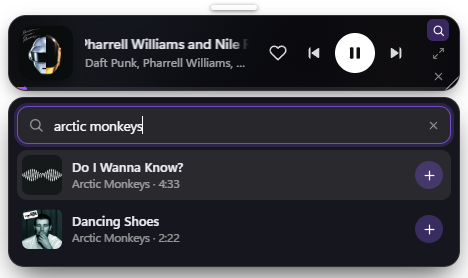
- Search on the mini player (🔍 or
Ctrl+Alt+S): the top two songs drop down, click one and it's in Up Next. The search resets and the bar shows what you added. - It pops out by itself when you minimize or close the full player.
Adding songs
- Right-click any song (or album / playlist) in YouTube Music to add it to Up Next, with Undo. YouTube Music's own popup no longer opens stuck under the app.
- The ⋮ menu still has every option, and its Play next / Add to queue now go into your visible Up Next. Before, they went into YouTube Music's hidden queue.
- Search is always in the title bar (
/orCtrl+F). Results open at the top of Up Next: click to add, ▶ to play next, or "See all" for the full YouTube Music results.
Data saver (on by default)
Album art instead of music videos, with the stream held at 144p, so a song uses a fraction of the data. Click ▶ Show video on the player, the camera button in the title bar, or press Ctrl+Alt+V to switch.
Also
- A ❤ like button on Now Playing in the full player.
- Settings: hotkeys grouped (Playback / Volume / Windows / Video) with Reset all, plus the two new hotkeys.
- After signing in to Google, YouTube Music reloads once so it starts cleanly signed in. No more restarting after the first sign-in.
- Bringing the full player back from the tray is quicker.
Install
Download Wavelength-Setup-1.1.0.exe below and run it. It installs over 1.0.1 and keeps your sign-in, settings and saved playlists.
Windows may say "Windows protected your PC" because the installer isn't code-signed: click More info → Run anyway.
(The .asar and .json files are for the built-in updater. You don't need to download them.)
Wavelength 1.0.1 — YouTube Music, together
The first public release of Wavelength: YouTube Music on your desktop, with a mini player that floats over everything and rooms where friends hear the same song at the same moment.
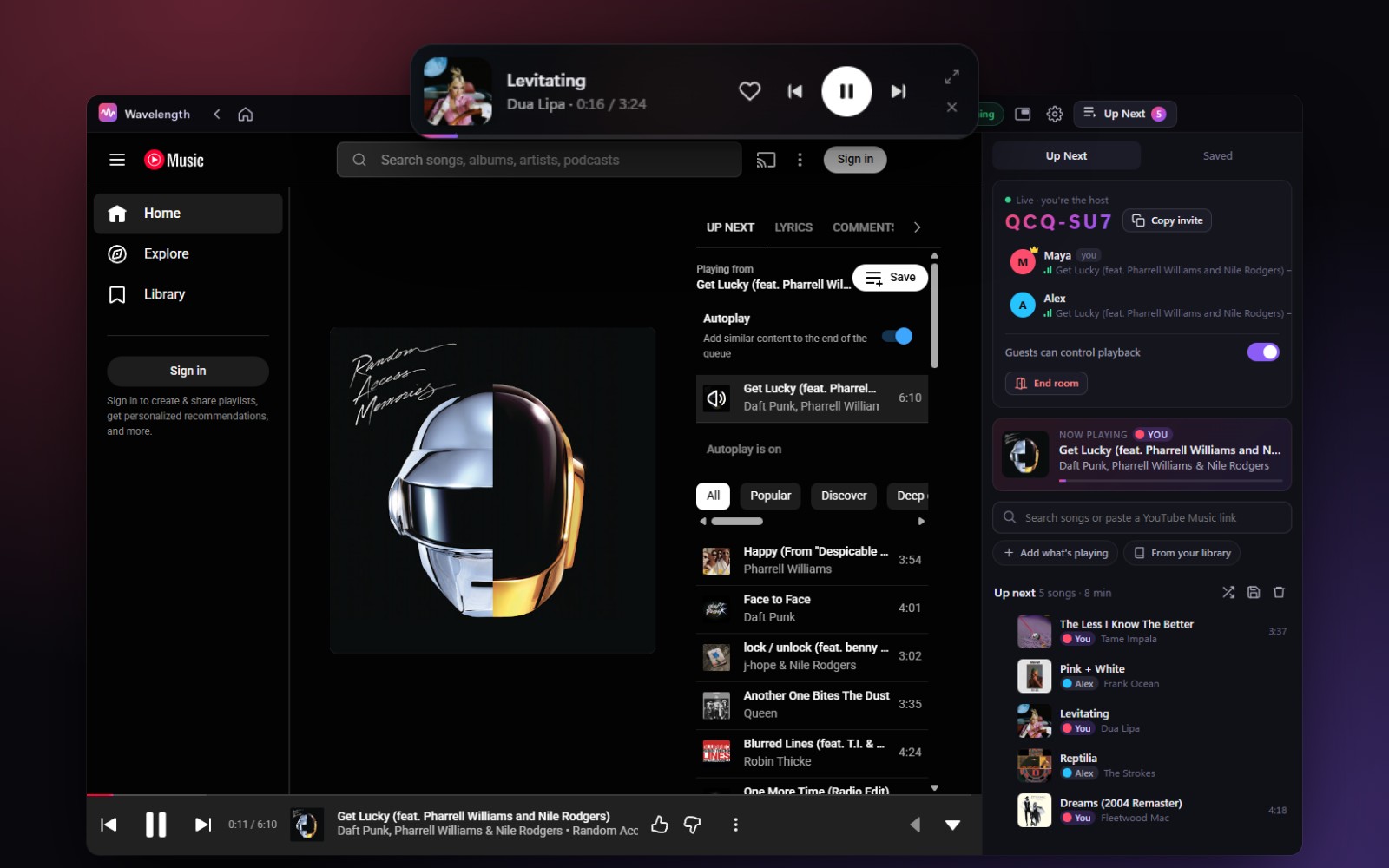
Listen together
Up Next → Start a room, then Copy invite. Friends paste the code (like K7Q-M2X) into Join.
- Everyone's player follows the host: same song, same spot, within a fraction of a second.
- Play, pause and skip from anyone move the whole room.
- Anyone can add songs. Each one is tagged with who added it, and you can see what every member is listening to, live.
- Turn off Listen in sync to play your own thing without leaving. The host can lock playback so guests can only add songs.
- Rooms connect computers directly. Guests don't need Premium or even an account.
Mini player
- A slim bar drops in at the top of your screen when music plays and stays above every window.
- Art, title, artist, time, like, previous, play/pause, next. Scroll for volume, click the bar to seek, drag it anywhere.
- Show it while playing, only when the main window is hidden, always, or never.
Hotkeys
Work everywhere and can be changed in Settings. Keyboard media keys work too.
| Play / pause | Ctrl+Alt+Space |
| Next / previous | Ctrl+Alt+→ / Ctrl+Alt+← |
| Volume | Ctrl+Alt+↑ / Ctrl+Alt+↓ |
| Like | Ctrl+Alt+L |
| Full player / mini player | Ctrl+Alt+M / Ctrl+Alt+N |
Your own Up Next
- Search or paste a link in the Up Next panel, or right-click any song, album or playlist in YouTube Music → Play next / Add to Up Next. Drag to reorder.
- From your library adds a whole playlist or Liked Music, in order or shuffled.
- Save turns a session's queue into a playlist you can play again later or push into your YouTube Music library.
Ad blocker
Removes YouTube Music's audio and video ads, promo banners and trackers, and answers "Are you still listening?" for you. If an ad ever slips through, it plays muted with a countdown and Skip is pressed the moment it appears.
Also
- Sign in with your Google account: your playlists, likes and mixes are all there.
- Closing the window keeps the music going in the tray.
- Fixed since the 1.0.0 test build: songs no longer stop with "Something went wrong" around 40 seconds in.
Install
Download Wavelength-Setup-1.0.1.exe below and run it. It installs for your Windows user (no admin prompt).
Windows may say "Windows protected your PC" because the installer isn't code-signed: click More info → Run anyway.
Not affiliated with YouTube or Google.