Repository navigation
How It Works
Workflow: Crawl → Discover → Download → Rewrite → Save
Watch the crawler turn a live website into a saved mirror, with simplified code from the real modules alongside each stage. The animation is silent and runs for 32 seconds.
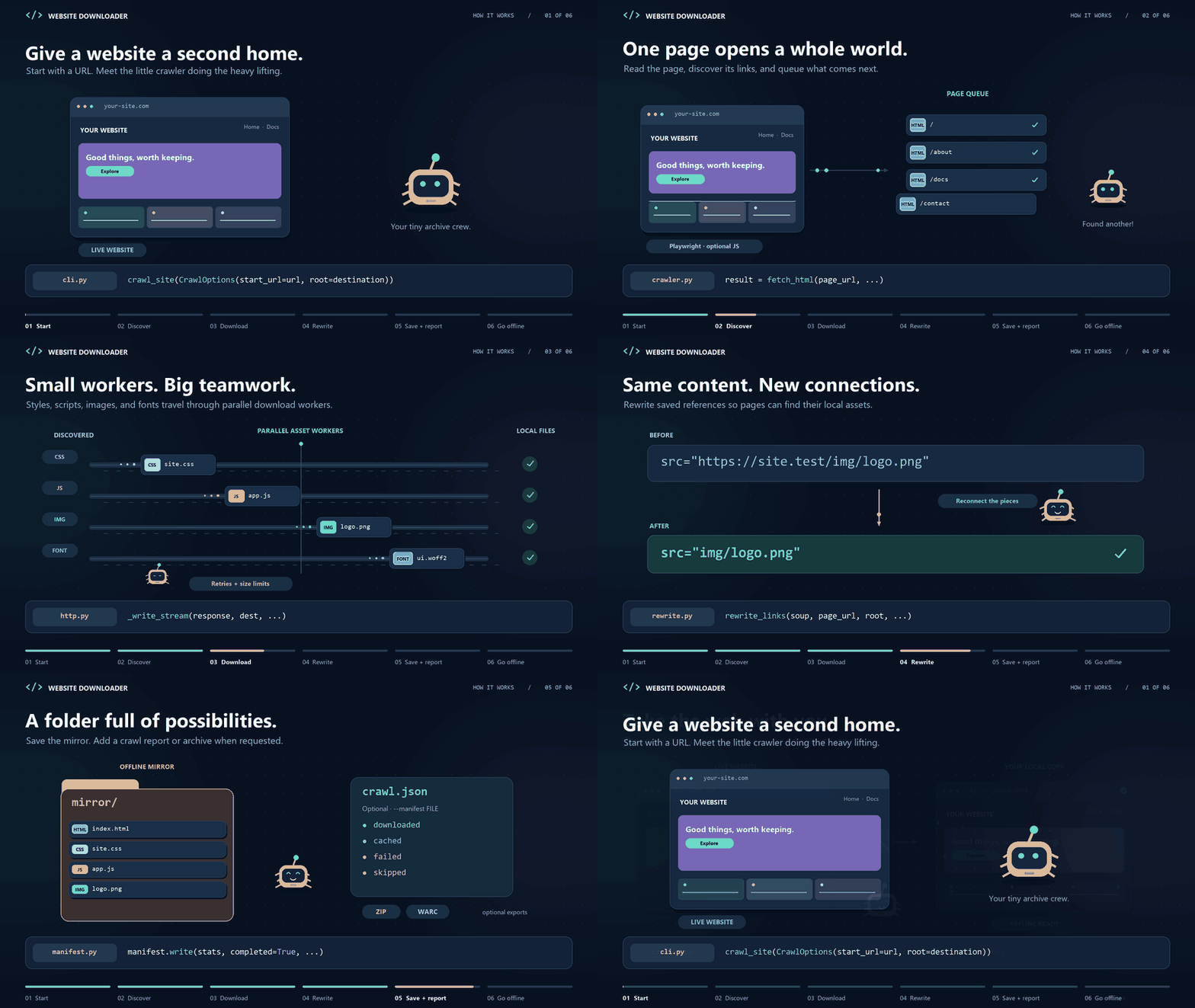
Download the 720p video for local playback, or read the chapters below. The media is shared with the repository README and pinned to its approved version.
| Time | What happens | Code to explore |
|---|---|---|
| 0:00–0:04 | A starting URL and crawl options give the crawler its task. | cli.py |
| 0:04–0:09 | Pages are fetched, parsed, and searched for more page links and assets. Playwright rendering is optional. |
crawler.py, render.py
|
| 0:09–0:15 | CSS, JavaScript, images, and fonts move through parallel asset workers with retries and size limits. | http.py |
| 0:15–0:20 | Recognized page and asset references are rewritten to point to saved local files. | rewrite.py |
| 0:20–0:26 | The mirror is saved. --manifest FILE adds resource outcomes; ZIP and WARC exports are optional. |
manifest.py, exports.py
|
| 0:26–0:32 | Saved pages and local assets remain available for offline browsing. | The destination folder and index.html
|
The chapters illustrate the crawl model: asset downloads, discovery, rewriting, and saving can overlap during a real crawl. A mirror preserves downloaded content; live APIs and server-side features may still require their original services.
- Parse and validate command-line options.
- Build an HTTP session with your cookies, headers, User-Agent, and a retry/backoff policy.
- Optionally seed the page queue from
sitemap.xml. - Fetch each page (optionally rendering it with Playwright first).
- Parse the HTML with BeautifulSoup (lxml when the
[fast]extra is installed). - Discover page links and asset references.
- Queue assets for download and follow same-origin pages up to
--max-pages. - Rewrite references to local relative paths.
- Save rewritten HTML and downloaded assets into the destination folder.
- Optionally write a JSON crawl manifest and zip / WARC archives.
The crawler does a breadth-first walk of same-origin HTML pages:
- Only
<a href>links to same-site, page-like URLs are queued as pages. - Everything else that looks like an asset goes to a separate download queue.
- External links are ignored unless you opt in (see External Assets and CDN).
Page fetching is sequential by default (polite) and can be parallelized with --page-threads. Asset downloads always run on a pool of worker threads (--threads), each with its own HTTP session.
As each page is parsed, the tool looks for resources in the places modern sites actually use:
- standard attributes:
src,href,data-src,poster - responsive images:
srcset - metadata images:
og:image,twitter:image - inline
style="… url(…)"and<style>blocks - CSS
url(...)and@import(including inside downloaded stylesheets) - common static-asset strings inside JavaScript files
Downloaded CSS and JS are themselves scanned so nested assets (fonts, images, imports, sourcemaps) are captured recursively.
References are rewritten to local relative paths so the saved copy works from disk. The tool also:
- inserts
index.htmlfor directory-style URLs and adds.htmlto extensionless pages - hashes query strings into filenames to avoid collisions
- sanitizes Windows-reserved names and shortens over-long paths with a hashed fallback
- drops
<base>tags and strips SRI/CORS attributes on localized CDN tags
A typical run produces:
example_backup/
  index.html
  about.html
  assets/  (css, js)
  img/     (images)
  fonts/
  cdn/<domain>/  (approved external assets)
Plus a web_scraper.log crawl log, an optional JSON report with --manifest FILE, and optional zip / WARC archives. See the manifest format for resource outcomes, cache behavior, and limits.
See also: Incremental Updates, JavaScript Rendering, Exports Zip and WARC.