Repository navigation


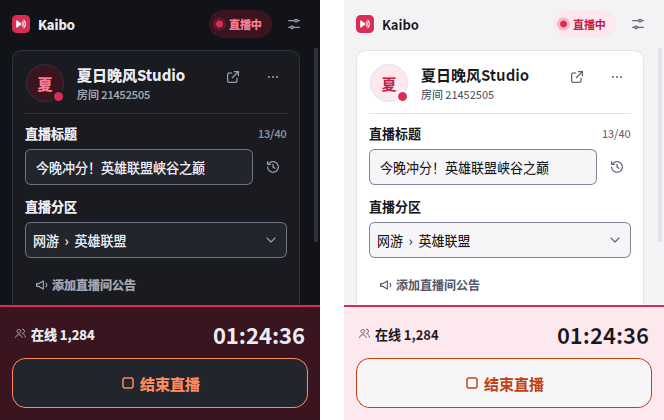
Kaibo 开播 1.2.0:面板重新設計,開播按鈕固定在底部,直播狀態一眼可見;Windows 版現在支援到 OBS 28。
1.2.0 redesigns the dock around a pinned go-live bar and extends Windows support down to OBS 28.
下载哪个文件 / Which file
| 系统 / System | 文件 / File |
|---|---|
| Windows(推荐 / recommended) | obs-kaibo-1.2.0-windows-x64-installer.exe |
| Windows 便携版 OBS / manual | obs-kaibo-1.2.0-windows-x64.zip |
| macOS(Apple Silicon + Intel) | obs-kaibo-1.2.0-macos-universal.pkg |
| macOS(仅 Intel / Intel only) | obs-kaibo-1.2.0-macos-x86_64.pkg |
| Ubuntu 24.04 / 22.04 | obs-kaibo-1.2.0-x86_64-ubuntu-24.04.deb / …-22.04.deb |
| Flatpak 版 OBS | obs-kaibo-1.2.0-flatpak-x86_64.flatpak |
Windows 安装程序会原地升级旧版本,设置和登录保留;安装前请先关闭 OBS。
相容性 / Compatibility
| 平台 / Platform | 支援的 OBS / Supported OBS |
|---|---|
| Windows 10/11 x64 | 28.0 – 33.x |
| macOS 12+ | 31.1 – 33.x |
| Ubuntu 22.04 / 24.04 | 與建置時發行版 OBS 相符 / Matches the distribution's OBS |
| Flatpak | 與 stable runtime 相符 / Matches the stable runtime |
CI 會在每次建置時啟動官方 OBS 28.0.0、28.0.3、28.1.2、29.0.2、29.1.3、30.0.2、30.2.3、31.1.2、32.2.2、33.0.1,確認插件能載入並持續運行。
Every build starts these official OBS releases and confirms the plugin loads and keeps running.
面板 / Dock
- 底部操作欄:開播按鈕、本場時長和在線人數固定在面板底部,不會被捲走。直播中整條變成品牌色,需要處理時變成警告色。
The go-live button, timer and viewer count stay pinned at the bottom, and the bar's colour shows the broadcast's state. - 更精簡:帳號和直播間合併成一張卡片,推流資訊預設收起,狀態文字縮短,窄面板不再被截斷。
The account and room share one card, stream info is folded away, and status text fits narrow docks. - 人臉認證:二維碼排到最上面,不再被表單擋住。
The face verification code now comes first instead of sitting below the form.
修復 / Fixed
- 登入失效能提前發現:每 30 分鐘確認一次登入,不用等到開播或關播才知道。
An expired sign-in is noticed within 30 minutes instead of when you go live or end. - 開播時一起保存的公告不再一直顯示「未保存」。
An announcement saved while going live no longer stays marked as unsaved. - 保存時公告失敗,已成功的標題和分區不再被標成未保存。
When only the announcement fails to save, the title and area are no longer marked as unsaved. - 人臉認證後會接著開始推流,不再只開啟房間。
Streaming now starts after face verification instead of only opening the room. - 簡體中文的「将面板放到右侧全高」選單項不再顯示成繁體字。
The Simplified Chinese menu item is no longer in Traditional characters.
更快、更省 / Faster and lighter
- 連續請求複用網路連線,開播和掃碼輪詢更快。
Repeat requests reuse the connection, which speeds up going live and QR polling. - 未開播時減少輪詢:面板可見時每 60 秒,隱藏時每 5 分鐘,離線時逐步退避;直播中維持 30 秒。
Polling slows down when idle or offline, and stays at 30 seconds during a broadcast.
完整變更見 CHANGELOG。
Checksums
obs-kaibo-1.2.0-flatpak-x86_64.flatpak: eaabd371385bbd3c5bc7c3868e6947aa7c4735b51bb31d8366204bbabc367aae
obs-kaibo-1.2.0-macos-universal.pkg: 0fb511d3e94ff89ae44186802623e5cebfd0cfd7ecf1f312d0be185047543c2a
obs-kaibo-1.2.0-macos-x86_64.pkg: 336f5ec829b93b3490771f18b89f3d6bc0fcc9da2256acd59960af01ba8a6026
obs-kaibo-1.2.0-source.tar.xz: 76a84236b98df53a7d5f5800f49224f7b9556c39fd95036744f8b668f1695ebf
obs-kaibo-1.2.0-windows-x64-installer.exe: 112a5c9100ae4fae98465c000f9cfd7eef76b6d87d5600ac99b5d4a58dc38cb8
obs-kaibo-1.2.0-windows-x64.zip: 664347e5bbdc935222a2af633aea826cf1272ab5eb9d06b0304513440bf7a03f
obs-kaibo-1.2.0-x86_64-ubuntu-22.04-dbgsym.ddeb: a65dd7cf45d49317032390b357645fa6ce02afebc4b1ddda84ef8f5139b3c76c
obs-kaibo-1.2.0-x86_64-ubuntu-22.04.deb: e0c1a787b9bd71a2c38ac9c3df9a058991c19c1f833c1901c4ad18481a5736c7
obs-kaibo-1.2.0-x86_64-ubuntu-24.04-dbgsym.ddeb: e87714d4edbe9a2b684fe67ae305c21d2b3df19a70a80d477249047119229e68
obs-kaibo-1.2.0-x86_64-ubuntu-24.04.deb: 41b5a6b768749ace824eb7c838935719b0ca074e0274af6f9b91ae573f1b124f