Repository navigation
Inkboard v0.9.0

Inkboard is a free infinite whiteboard for pen tablets.
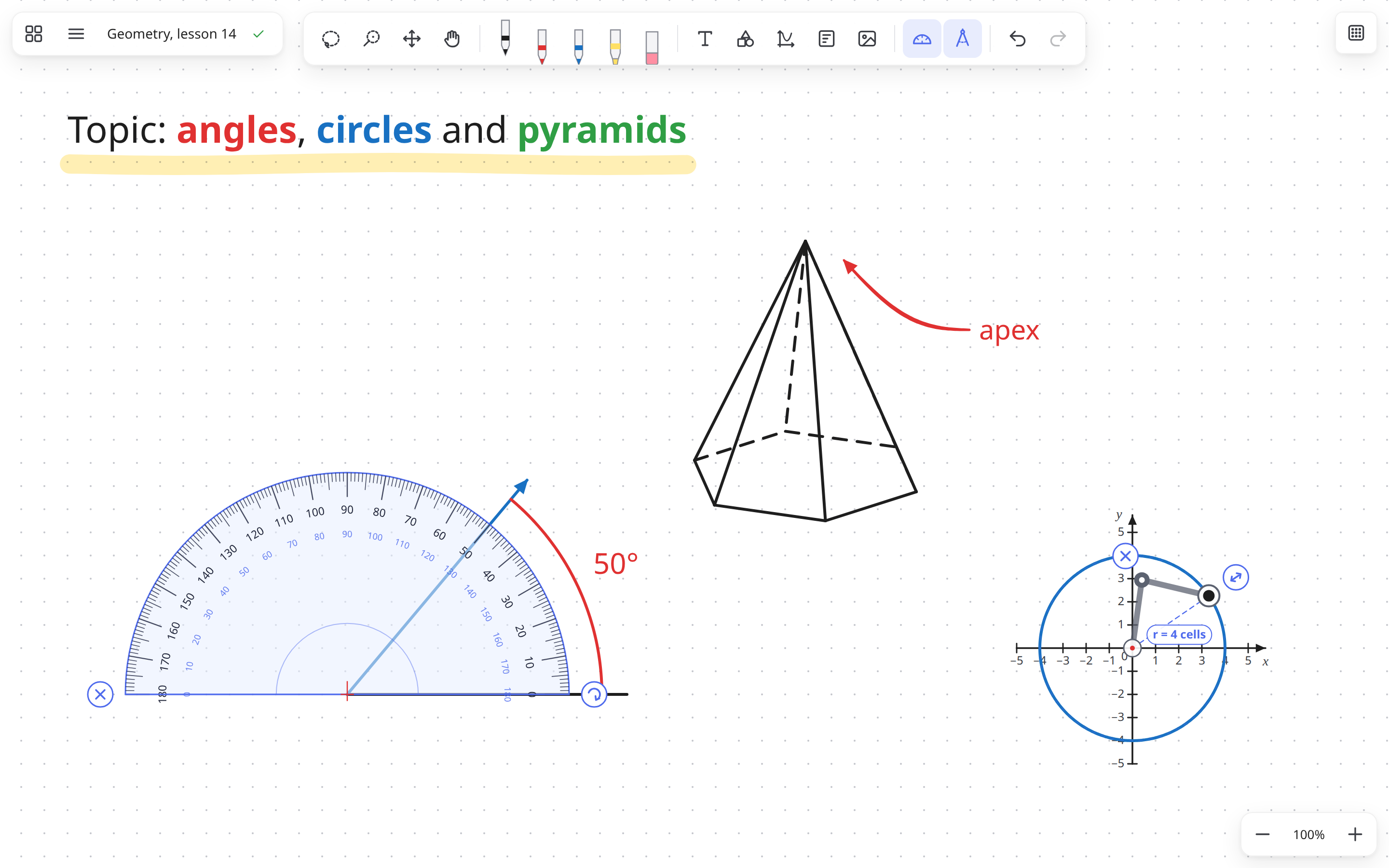
What's new in 0.9.0
- Dark theme: choose System, Light or Dark in Settings. Theme selection is available by default.
The interface follows your system appearance unless you choose a theme yourself. - Refreshed interface: updated toolbars, menus and board library with clearer spacing and colors.
- Experimental chalkboard: enable Chalkboard in Settings → Experimental features, then choose a
green surface in Background. Dark ink is displayed in readable chalk colors without changing the
stored vector data. Thumbnails and exports preserve the board's appearance. - Updated website: new English and Ukrainian examples with screenshots that follow the site theme.
Chalkboard files use format version 8 and need Inkboard 0.9.0 or newer. Older boards remain readable;
boards without chalkboard surfaces continue to use the lowest compatible format version.
Also in 0.8.0
- Formulas on the board. The new √x tool opens an on-screen math keypad: fractions, roots of any
degree, powers and indices, logarithms, trigonometry, limits, derivatives, integrals, sums, matrices,
combinations and Greek letters. Keys with a red dot have more variants (hold the key or right-click it):
∛,x³, a free power. A formula stays vector; double-click it to edit. - Typing works too:
/divides,Alt + /makes a fraction,^a power,_an index;
sqrt,sin,piturn into their signs. - Show answer: plain arithmetic gets a button that reveals its value, so the class can work it out
first. - Plot formulas from the board: select one or more formulas (
y = x²,f(x) = …) and press the plot
button to get a coordinate plane with their graphs. - More in the Functions panel: any name and variable (
s(t) = 2t), a range ofxand ofyfor
each curve, and equations such as the circlex² + y² = 4orx = y². - Fit to graphs sets a plane's axes to just hold its curves, growing or shrinking it.
- The bar above a selection is smaller and always stays on screen.
Boards with formulas, ranges or equations can't be opened by 0.7.2 or older, so update every computer you
use. Other boards still open there.
Also in 0.7.2
- Ruler and set squares: all measuring and drawing instruments (ruler, 45° set square, 30°/60° set square,
protractor and compass) now live in a dedicated Drawing tools menu on the toolbar. Draw with the pen
along any edge of the ruler or set square for a straight segment measured in centimetres and millimetres
(1 cm = 2 paper cells). - Grid snap for instruments: hold
Ctrl(⌘on macOS) while moving any instrument to snap its origin
(the ruler's0 cmmark, the set square's90°corner, the protractor's centre or the compass's needle)
to paper grid intersections. - New library storage: boards, templates, tags and thumbnails now live in one local database, with each
image stored once. Your boards move over automatically on first launch; the old files are kept in the
legacy-0.6folder inside the library, nothing is deleted. - Every board lives in Inkboard now. Save as file… saves a copy you can send or keep. Opening an
.inkboardfile adds it to your boards once; opening the same file again opens that board. - Autosave writes at most 5 seconds after you change something, even while you keep drawing.
- Version history has been removed.
Boards from 0.7 can't be seen by older versions, so update every computer you use.
Also in 0.6.0
- Function graphs: Graph menu → Function graph…, or select a coordinate plane and click Function.
Type formulas such asx^2,2x + 1,sin(x),sqrt(x),|x|or1/x(up to 8 per plane): the
curves appear as you type, with the formula written next to each one as in a textbook. - The protractor follows the pointer: the part under the pen lights up with a hint, the edge shows the
degree you are pointing at, and arcs and rays snap to whole degrees. The new ⚙ handle sets the step
(off, 1°, 5° or 15°). - The compass follows the pointer too: lit parts and hints, cell marks on the radius, and arcs snap to
quarter, half and full turns. - Narrow windows: the top toolbar no longer covers the menu; it moves aside or to a second row.
Boards saved by 0.6 can't be opened by older versions, so update every computer you use.
Also in 0.5.2
- macOS: the
.dmgwindow now shows how to install Inkboard and how to open it the first time.
Also in 0.5.1
- The Linux AppImage starts on Ubuntu 24.04 and newer without installing anything extra
(it used to need libfuse2). - Version history saves a snapshot every 5 minutes of editing and keeps the last 36 (about three hours).
- After restoring a version the view moves to show the whole board, so it never looks empty.
- New boards are named like "Board of 11 Nov 2026, 18:30".
- Clearer wording in the interface (English and Ukrainian) and a fuller description of the
.debpackage.
Also in 0.5.0
- Compass (K): set the radius, then drag the pencil around the needle for an arc or a full circle.
- Protractor arcs get their angle written next to them ("50°").
- Formatted text: select words (or right-click) → colour, size, bold, italic, underline.
Double-click text to edit it. - Any number of sides (3–24) for the base of a pyramid or prism.
Boards saved by 0.5 can't be opened by older versions, so update every computer you use.
Also in 0.4
- Text, line end dragging, editable shapes, lock, brush select (C), arrows on freehand lines, 3D axes,
replacing templates. Fix for the pen getting "stuck" moving the board.
Download
| System | File |
|---|---|
| Windows | Inkboard-Setup-…-x64.exe |
| macOS (Intel and Apple Silicon) | Inkboard-…-mac-universal.dmg |
| Linux | .AppImage (any distro, auto-updates) or .deb (Ubuntu / Debian) |
First launch
The builds are not code-signed yet, so the system will warn you once:
- Windows: "Windows protected your PC" → click More info → Run anyway.
- macOS: open the
.dmg, drag Inkboard to Applications and open it. macOS says it can't verify the app:
click Done, open System Settings → Privacy & Security, scroll down and click Open Anyway.
You only do this once. - Linux AppImage: allow it to run (file Properties → Executable as Program, or
chmod +x Inkboard-*.AppImage) and open it.
Feedback and bug reports: open an issue in this repository.