Repository navigation
Releases
v3.6.0 - Dexed A/B, sustain pedal, Global:MIDI, GR-1-style Grains

🧪 In active testing. Releases will come thick and fast for a while. Suggestions, bug reports and ideas for changes are very welcome — please open an issue.
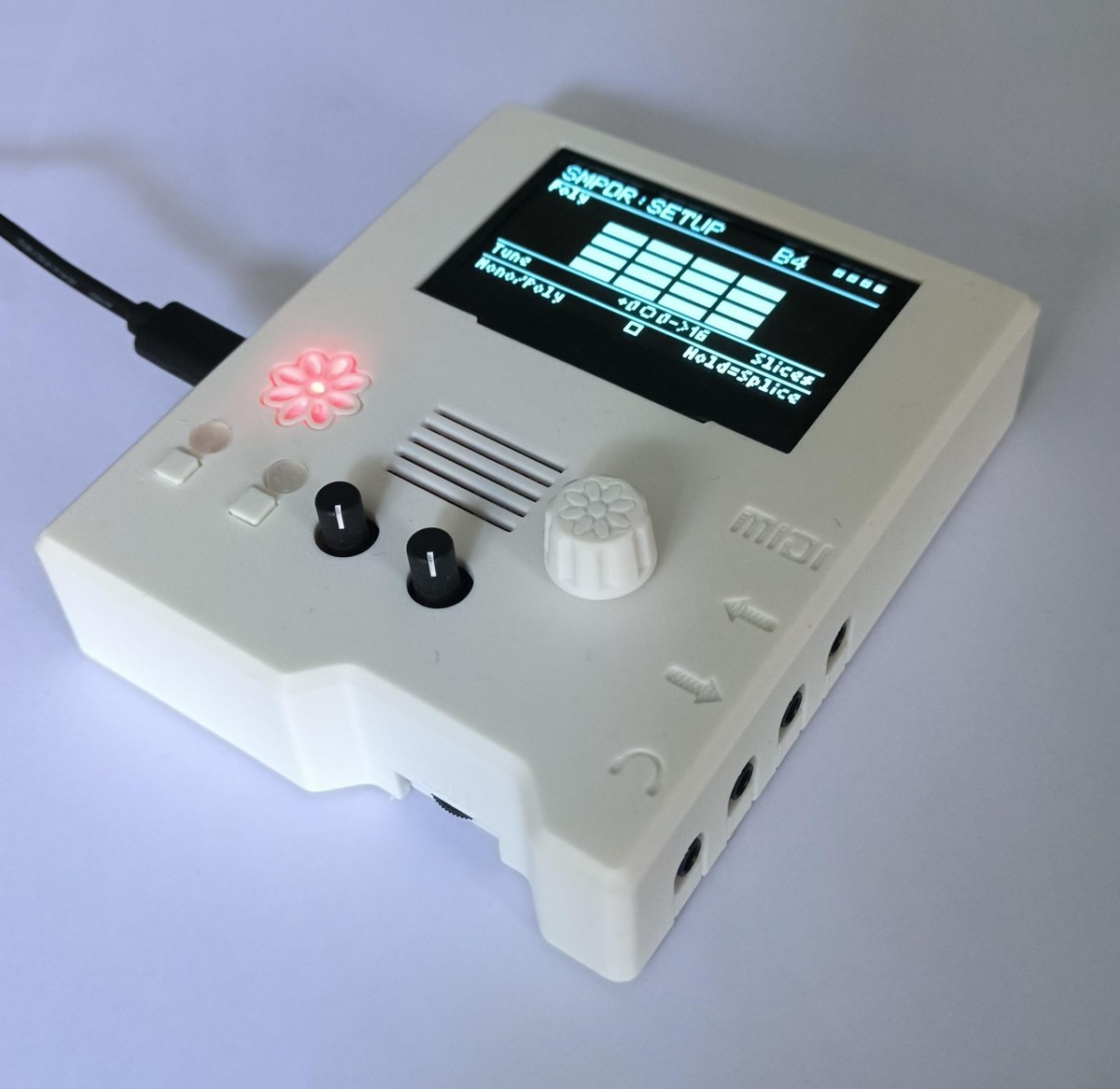
New case: the PZD Daisy Pod Groovebox case is now on Cults3D.
What's new
Dexed A/B: two Dexed engines
- DXD-B is a second, full Dexed engine with its own patch. Turn it on from
Global:DXD-B. Clicking into either Global page chooses which engine the Dexed pages edit. - The two engines share one bus: filter, fold, gain, limiter, level, pan and sends.
- Mix page: DXD-A, DXD-B and BUS level bars with pan sliders, plus a live OUT meter. B1 picks which bar K1 and K2 set.
- MIDI page: B1 Lock keeps both engines on one channel (on by default). Turn Lock off to give each engine its own channel.
- Split page: play DXD-A and DXD-B in Layer or Split. K1 sets the split point and K2 shifts each engine's octave from -2 to +2. Changing the split while you hold a key never leaves a note stuck.
- Voices: up to 16 for one engine, and up to 24 across both.
- Snapshots save both engines and how the pair is set up. Older snapshots load as a single Dexed.
Sustain pedal
- A pedal sending CC 64 now holds notes on Grains, DXD-A, DXD-B, Ensemble and SMPVO. Each engine follows the pedal on its own MIDI channel.
- Pedal up lets go of every held note except keys you're still pressing. Playing a held note again restarts it.
New Global:MIDI page
- Every engine's MIDI channel is in one list. K1 picks the engine and K2 sets its channel.
- B1 Sus-Pedal:Norm / B2 Sus-Pedal:Rev fixes a pedal that works backwards. The setting is saved to the card straight away.
- A SUS box in the title shows what the pedal is doing.
Grains: GR-1-style rework
- Engine: one grain cloud per voice, with 4-voice polyphony and Mono/Poly.
- Controls, now using GR-1 names:
- Position and Spray.
- Scan, from -2x through Hold to +2x, with Loop, One shot and Ping pong.
- Loop Start and End.
- Grain Size and Density.
- Pitch with Keymap.
- Pages: Grain, Position, Scan, Rhythm, Loop and Pitch, and Mix now has Gain like the other engines.
- Presets: older presets and snapshots convert automatically. The Starter sounds are set up to scan and play chords.
Dexed under the hood
- Faster operator code: about 1% less CPU, with the same sound.
- Smoother voice steals: notes cut off during big chords now fade out instead of being cut short.
- Fold at 0% is skipped completely: loud chords no longer crackle when Fold is off.
- Pan in %: the Mix pages now show pan in % like every other page.
Looks and navigation
- Splash: a PZD GROOVEBOX splash shows at power-on, with a pixel-drawn logo. Press a button or the encoder to skip it.
- Graphics: every engine's Global page, plus Looper and Export, has its own graphic and the same layout.
- All Notes Off: triple-click the encoder to stop every note on every engine, for a stuck note.
Sampler imports
- OP-1 Field stereo drum kits now slice in the right places.
- SMPVO sound-pack import: the progress bar moves gradually.
SD card changes
sdcard-template.zip has the reworked Grains Starter sounds, and Ethereal Piano is renamed Airy Piano. To get them, copy GRAINS/PRESETS/ from the zip onto your card. Your own saves aren't affected.
Flashing this release
This firmware boots through a small separate bootloader and runs from the Pod's external QSPI flash. If your Pod has run this bootloader before (anything from v1.6.0 onward), skip to step 2.
- One-time bootloader setup (only if you've never flashed this project's bootloader): put the Pod into DFU mode (hold
BOOT, tapRESET, releaseBOOT), then flashdsy_bootloader_v6_4-intdfu-2000ms.bin(attached below) with Electrosmith's web programmer. No toolchain needed. - Flash the firmware (every time, including right after step 1): copy
main.bin(attached below) onto the root of a FAT32 SD card, insert it into the Pod, and power-cycle with a steady power supply. The bootloader finds the.binand flashes it automatically. - New card? Unzip
sdcard-template.ziponto its root.
Building it yourself instead? See Building and flashing in the README.
🤖 Generated with Claude Code
v3.5.3 - Dexed 16 voices with a Voices control, click-free voice steals
🧪 In active testing. Releases will come thick and fast for a while. Suggestions, bug reports and ideas for changes are very welcome — please open an issue.
What's new
Dexed: more voices, and you choose how many
- Dexed now has 16 voices (up from 10). It starts at 12, which keeps Dexed around 20% CPU.
- Voices is on K2 of the Dexed MIDI page. Set it anywhere from 1 to 16:
- Turn it down when other engines need the CPU, or for a mono bass or lead.
- Turn it up to 16 for big chords and pads. 16 held notes is about 27% CPU.
- Turning it down while you hold notes releases the extra notes, which fade out on their own release.
- Voices is saved in Dexed User presets and in snapshots. Factory patches,
.syximports and older saves leave it unchanged. Snapshots saved before this release load at 16.
No more clicks when a note takes over a voice
- When a new note needs a voice that's still sounding, the old sound now fades out over about 5 ms instead of cutting off.
- This removes the small click you could hear on voice steals, most obviously at Voices = 1 when playing legato. It also fixes the click when re-striking a key that's still ringing.
SD card changes
None. sdcard-template.zip is the same as in v3.5.2.
Flashing this release
This firmware boots through a small separate bootloader and runs from the Pod's external QSPI flash. If your Pod has run this bootloader before (anything from v1.6.0 onward), skip to step 2.
- One-time bootloader setup (only if you've never flashed this project's bootloader): put the Pod into DFU mode (hold
BOOT, tapRESET, releaseBOOT), then flashdsy_bootloader_v6_4-intdfu-2000ms.bin(attached below) with Electrosmith's web programmer. No toolchain needed. - Flash the firmware (every time, including right after step 1): copy
main.bin(attached below) onto the root of a FAT32 SD card, insert it into the Pod, and power-cycle with a steady power supply. The bootloader finds the.binand flashes it automatically. - New card? Unzip
sdcard-template.ziponto its root.
Building it yourself instead? See Building and flashing in the README.
🤖 Generated with Claude Code
v3.5.2 - Snapshots, MIDI channels in presets, full DX7 voice editing
🧪 In active testing. Releases will come thick and fast for a while. Suggestions, bug reports and ideas for changes are very welcome — please open an issue.
What's new
Global:Snap — snapshots of every synth at once
- One snapshot saves Grains, Dexed, Ensemble and the Sampler together:
- Each engine's sound, Mix settings, MIDI channel and mod wheel target.
- Which engines are on, and whether the Sampler is SMPVO or SMPDR.
- The Grains audio itself, so an unsaved capture comes back too. The Sampler's Sound or Kit is referenced by name, as in its User presets.
- To save: press B1, use K1 to pick Overwrite or Save New, then hold B2 to confirm.
- To load: B2 opens the list, K2 scrolls, and a tap on B2 loads.
- The grid shows each engine's on/off dot, sound and MIDI channel. That's what's live now, or, while browsing, what the highlighted snapshot holds.
- Where they're kept: snapshots are saved in
SNAPSHOTS/on the card. You can duplicate or delete them inGlobal:SdMgmt→ GLOBAL → Snapshots.
MIDI channels now live in presets
- Each engine's User presets save its MIDI channel and mod wheel target. One preset can bring back "Dexed on channel 1", another "SMPDR kit on channel 10".
- Grains User presets now also save Level, Pan, Gain and Delay send.
- Older presets and factory sounds leave the current channel unchanged.
- Performances no longer store MIDI channels. Startup defaults (hold B2 on
Global:Tempo) still do. Global:Fileis renamedGlobal:Perf.
Dexed Advanced: full DX7 voice editing
- 16 pages, using the DX7's own names:
- ALGORITHM, OSC FREQUENCY, OSC DETUNE, OUTPUT LEVEL
- EG RATE, EG LEVEL
- KEYBOARD LEVEL SCALING CURVE and BREAK POINT, KEYBOARD LEVEL SCALING DEPTH, KEYBOARD RATE SCALING
- SENSITIVITY (KEY VELOCITY, A MOD SENS)
- PITCH EG RATE, PITCH EG LEVEL
- LFO, LFO DEPTH, P MOD SENS / OSC KEY SYNC, KEY TRANSPOSE
- Button 1 picks OP1–OP6 on the operator pages.
- OP ON/OFF is on the OUTPUT LEVEL page. It's saved in User presets and snapshots, and older saves load with all six operators on.
- Envelope graph like the DX7's: L1–L4 are numbered squares and R1–R4 are numbered slopes, with a dotted key-OFF line. Button 2 shows
1/2* 3/4to mark which pair you're editing. - Level scaling graph: shows the curve, with BREAK POINT marked by note name.
- ALGORITHM is now set in Advanced. The Dexed Algo page just shows the diagram, which is now drawn like the DX7's:
- OP1 is on the left.
- All carriers sit on one row above OUT.
- Operators that are switched off show as dotted boxes.
- Feedback across several operators is drawn as an FB line.
- New on the Dexed User page loads INIT VOICE, like a DX7, and keeps your Mix and MIDI settings.
Dexed sound fixes
- TRANSPOSE, OSC KEY SYNC, LFO KEY SYNC and LFO DELAY now affect the sound. Earlier firmware stored them but ignored them.
- Algorithms 4 and 6 now feed back through 2–3 operators, like a real DX7. They no longer sound the same as 3 and 5. This can change how some factory patches that use them sound.
SD card changes
sdcard-template.zip adds an empty SNAPSHOTS/ folder. You don't need it, because the first snapshot save creates it.
Flashing this release
This firmware boots through a small separate bootloader and runs from the Pod's external QSPI flash. If your Pod has run this bootloader before (anything from v1.6.0 onward), skip to step 2.
- One-time bootloader setup (only if you've never flashed this project's bootloader): put the Pod into DFU mode (hold
BOOT, tapRESET, releaseBOOT), then flashdsy_bootloader_v6_4-intdfu-2000ms.bin(attached below) with Electrosmith's web programmer. No toolchain needed. - Flash the firmware (every time, including right after step 1): copy
main.bin(attached below) onto the root of a FAT32 SD card, insert it into the Pod, and power-cycle with a steady power supply. The bootloader finds the.binand flashes it automatically. - New card? Unzip
sdcard-template.ziponto its root.
Building it yourself instead? See Building and flashing in the README.
🤖 Generated with Claude Code
v3.5.1 - Unified Mix pages with Gain, final-mix scopes, Delay Sync buttons
🧪 In active testing. Releases will come thick and fast for a while. Suggestions, bug reports and ideas for changes are very welcome — please open an issue.
What's new
Mix pages now share one layout, with Gain on every engine
- Dexed, Ensemble, SMPVO and SMPDR Mix pages now look the same. Each has:
- Level and Pan.
- Gain, from 0 to +12 dB. Press a button to switch the knobs between Level/Pan and Gain.
- A scope of that engine's output.
- A meter bar at the right edge that shows clipping.
- Gain is applied before each engine's limiter. That lets you push quiet patches up, or drive them into soft saturation. The limiters still protect the output.
- Grains has its own version of the page: a smaller scope beside the Grain, Scan and Out mix bars.
- What gets saved:
- Gain is saved in Dexed presets and in SMPVO/SMPDR user presets.
- Older preset files still load, and they start at 0 dB.
- Grains Gain is not saved, the same as Grains Level and Pan.
Global:Bypass: the status line now uses the small font, and the page gets the same scope and meter as the other Mix pages.
Global FX pages show the final mix: Filter, Reverb, RevTone, RevDiff, Dly-Rev, Delay and DlyTone now show a scope of the master output. Filter's mode line uses the small font to make room.
Global:Delay Sync:
- Button 1 turns Sync off; Button 2 turns it on.
- The top line always shows the state:
Sync: Off, orSync: Onwith the BPM.
SD card changes
None. sdcard-template.zip is the same as in v3.5.0.
Flashing this release
This firmware boots through a small separate bootloader and runs from the Pod's external QSPI flash. If your Pod has run this bootloader before (anything from v1.6.0 onward), skip to step 2.
- One-time bootloader setup (only if you've never flashed this project's bootloader): put the Pod into DFU mode (hold
BOOT, tapRESET, releaseBOOT), then flashdsy_bootloader_v6_4-intdfu-2000ms.bin(attached below) with Electrosmith's web programmer. No toolchain needed. - Flash the firmware (every time, including right after step 1): copy
main.bin(attached below) onto the root of a FAT32 SD card, insert it into the Pod, and power-cycle with a steady power supply. The bootloader finds the.binand flashes it automatically. - New card? Unzip
sdcard-template.ziponto its root.
Building it yourself instead? See Building and flashing in the README.
🤖 Generated with Claude Code
v3.5.0 - Much more CPU headroom, one-level-back encoder, Kits/Breaks browsing
🧪 In active testing. Releases will come thick and fast for a while. Suggestions, bug reports and ideas for changes are very welcome — please open an issue.
What's new
Much more CPU headroom: no more crackle with everything playing
Previously, running every engine plus four looping layers with effects pushed the CPU past 100%, which caused crackles, dropouts and a frozen display. That same test now peaks in the mid-80s %.
- Faster processor clock: the Pod now runs at 480 MHz instead of 400 MHz.
- Idle engines cost almost nothing: an engine that's switched on but not playing now skips its processing entirely. Release, chorus and filter tails still finish naturally.
- Looper layers: filters and effects are much cheaper. Filter and effect settings are now worked out once per audio block instead of every sample.
- AutoWah, Tremolo and Phaser: about 3–4× cheaper, and they sound the same. The Phaser now also sounds the same on every power-on; before, it could vary slightly from boot to boot.
- Grains: faster grain rendering, and no more CPU spikes on note changes.
- Leaner engine limiters in Dexed, Ensemble, Grains and the Sampler.
See where the CPU goes: on Global:Mixer, press Button 1 for a per-part breakdown (Grains, Dexed, Ensemble, Sampler, Looper, Delay, Reverb and the rest), each shown as average/peak %.
Encoder click goes one level back
- Inside an engine or the Mixer screen: click returns to its Global page.
- On a layer's pages or any other Global page: click returns to Home.
- Hold: still goes to Home.
- Dexed's Advanced page: click still enters the operator editor, and clicks back out.
- Pausing the loops: use Button 1 on Home. The old "click to pause all loops" is gone.
SMPDR Preset page: starts with Kits / Breaks, then that type's banks, matching SMPVO's Sounds / Captured / Multi. This also fixes kits sometimes loading wrongly after using SMPVO.
Grains mix: Grain and Scan start at 60% and 80%, and the starter presets are updated to match.
SD card changes
No folder changes. The Grains starter presets in sdcard-template.zip (GRAINS/PRESETS/) now use the new 60/80 mix. To get it on an existing card, copy that folder across. Your own saved presets keep their own mix.
Flashing this release
This firmware boots through a small separate bootloader and runs from the Pod's external QSPI flash. If your Pod has run this bootloader before (anything from v1.6.0 onward), skip to step 2.
- One-time bootloader setup (only if you've never flashed this project's bootloader): put the Pod into DFU mode (hold
BOOT, tapRESET, releaseBOOT), then flashdsy_bootloader_v6_4-intdfu-2000ms.bin(attached below) with Electrosmith's web programmer. No toolchain needed. - Flash the firmware (every time, including right after step 1): copy
main.bin(attached below) onto the root of a FAT32 SD card, insert it into the Pod, and power-cycle with a steady power supply. The bootloader finds the.binand flashes it automatically. - New card? Unzip
sdcard-template.ziponto its root.
Building it yourself instead? See Building and flashing in the README.
🤖 Generated with Claude Code
v3.4.2 - Multi-samples, drag-and-drop kits, import folders, reverb crackle fix
🧪 In active testing. Releases will come thick and fast for a while. Suggestions, bug reports and ideas for changes are very welcome — please open an issue.
What's new
Multi-samples (new MULTISMP banks)
- A folder of WAVs, one per sampled note with the note in each name (
Cello C3.wav,Cello_C3.wav, or Salamander-styleA0v10.wav), plays as one instrument: every key uses its nearest recording. Up to 24 notes and about 33 s of audio. - SMPVO's Preset page now starts with Sounds / Captured / Multi, then a folder, then an item.
- The SD card template includes a ready-made Upright Piano (13 notes, CC0, from FreePats).
Build kits, breaks and sounds on your computer, no import needed
- Sounds: copy
.wavfiles into anySAMPLES/SOUNDSnfolder. - Kits and breaks: make a folder in
SAMPLES/KITSnorSAMPLES/BREAKSnand copy WAVs into it. They load in name order, one per key from C2, up to 24 pads. - WAVs of any sample rate (8–192 kHz) now load, including EP-133 exports and 24-bit DAW exports.
- A kit can now hold about 33 s of audio, up from 20.8 s. If one doesn't fit, the status line says how many pads were left out.
Sampler imports
- Drum packs go in
DRUM PACK IMPORT/KITS/or/BREAKS/, and the folder decides what each becomes. Nothing is guessed any more. - The Import page lets you choose where imports go: a new bank (the default), or an existing bank with room for all of them.
- Kits now import poly; breaks import with Choke on.
- Fixed: re-importing a file that was already in
Done/brought it in again on every press. It's now kept asname (2). - Repeated "padding" pads in OP-1 drum packs are skipped.
SD card management: the SMPIMP box manages imported sounds, multi-samples, kits and breaks: Voice → Sounds/Multi, Drum → Kits/Breaks.
Fixes
- Reverb: removed a faint crackle under held notes and chords.
- Dexed: imported voices with an out-of-range release level (e.g. EP.SawBel) no longer ring forever.
- Dexed: imported
.syxbanks get their own folders, and user saves show up again. - The Daisy Seed's red LED turns off 10 s after boot.
SD card changes
- New folders:
DRUM PACK IMPORT/KITS/andDRUM PACK IMPORT/BREAKS/, plusSAMPLES/MULTISMP1/. The firmware creates the import folders when you open the SMPDR Import page.BREAK PACK IMPORT/is no longer used, so move anything waiting in it intoDRUM PACK IMPORT/BREAKS/. - Old multi-samples (
.snd) convert automatically intoMULTISMP1/the first time you open SMPVO's Preset page. Your SMPVO User presets are updated to match. - For the Upright Piano and the new READMEs, copy
SAMPLES/MULTISMP1/fromsdcard-template.ziponto your card.
Flashing this release
This firmware boots through a small separate bootloader and runs from the Pod's external QSPI flash. If your Pod has run this bootloader before (anything from v1.6.0 onward), skip to step 2.
- One-time bootloader setup (only if you've never flashed this project's bootloader): put the Pod into DFU mode (hold
BOOT, tapRESET, releaseBOOT), then flashdsy_bootloader_v6_4-intdfu-2000ms.bin(attached below) with Electrosmith's web programmer. No toolchain needed. - Flash the firmware (every time, including right after step 1): copy
main.bin(attached below) onto the root of a FAT32 SD card, insert it into the Pod, and power-cycle with a steady power supply. The bootloader finds the.binand flashes it automatically. - New card? Unzip
sdcard-template.ziponto its root.
Building it yourself instead? See Building and flashing in the README.
🤖 Generated with Claude Code
v3.4.1 - Knobs no longer change sounds when switching pages
What's fixed
Sounds no longer change when you scroll through pages. Arriving on a page could make a knob take over a setting just because it happened to sit near that setting's value — without being touched. On Dexed this was dramatic: load a preset, scroll on, and the Algorithm page could switch the patch to a neighbouring algorithm so it sounded nothing like itself. Now a knob does nothing on a page until you actually turn it, then picks up the setting as before. This applies to every page and engine.
No SD card changes since v3.1.0.
Flashing this release
This firmware boots through a small separate bootloader and runs from the Pod's external QSPI flash. If your Pod has run this bootloader before (anything from v1.6.0 onward), skip to step 2.
- One-time bootloader setup (only if you've never flashed this project's bootloader): put the Pod into DFU mode (hold
BOOT, tapRESET, releaseBOOT), then flashdsy_bootloader_v6_4-intdfu-2000ms.bin(attached below) with Electrosmith's web programmer. No toolchain needed. - Flash the firmware (every time, including right after step 1): copy
main.bin(attached below) onto the root of a FAT32 SD card, insert it into the Pod, and power-cycle with a steady power supply. The bootloader finds the.binand flashes it automatically. - New card? Unzip
sdcard-template.ziponto its root.
Building it yourself instead? See Building and flashing in the README.
🤖 Generated with Claude Code
v3.4.0 - Gain staging, master limiter, dB meters, Master/Bypass Vol
What's new
Louder, cleaner gain staging
- Recordings now come back at the level you heard them. Every channel used a pan law that dropped centred sounds by 6 dB — and a synth recorded into a loop layer paid it twice. All channels now use an equal-power pan law (−3 dB in the centre), so centred sounds are 3 dB louder and recordings match much more closely.
- Master soft limiter. Loud peaks are now rounded off smoothly at the output instead of clipping, so you can run the mix hotter. The Master meter's clip light now means "the limiter is working hard".
- Meters in dB. The Mixer's peak meters read from −48 dB to 0 dBFS like a studio meter, so a healthy level sits near the top instead of half way.
Existing performances will play back about 3 dB louder — turn Master Vol down a touch if needed; the limiter keeps it clean either way.
Global:Mixer
- K1 Master Vol, K2 Bypass Vol — pull a live mic down right there without touching the mix, so it doesn't feed back when Master is up. Bypass now starts at 60% at power-on.
- The CPU readout (average / peak) moves to the bottom row.
- The overview bars are spaced a little wider.
Home's K1 is now labelled Master Vol.
No SD card changes since v3.1.0.
Flashing this release
This firmware boots through a small separate bootloader and runs from the Pod's external QSPI flash. If your Pod has run this bootloader before (anything from v1.6.0 onward), skip to step 2.
- One-time bootloader setup (only if you've never flashed this project's bootloader): put the Pod into DFU mode (hold
BOOT, tapRESET, releaseBOOT), then flashdsy_bootloader_v6_4-intdfu-2000ms.bin(attached below) with Electrosmith's web programmer. No toolchain needed. - Flash the firmware (every time, including right after step 1): copy
main.bin(attached below) onto the root of a FAT32 SD card, insert it into the Pod, and power-cycle with a steady power supply. The bootloader finds the.binand flashes it automatically. - New card? Unzip
sdcard-template.ziponto its root.
Building it yourself instead? See Building and flashing in the README.
🤖 Generated with Claude Code
v3.3.0 - Ensemble Gain and 16 presets, new filter, lower CPU
What's new
Ensemble: Gain and 16 re-voiced presets
- Gain — on Ensemble's Mix page, press B2: 0 to +12 dB into the limiter. Ensemble's loudness follows how many drawbars are up, so thin registrations used to be quiet; Gain brings them up front, and pushed hard it saturates gently. Saved in Ensemble presets (older saves load at 0 dB and sound as before).
- 16 factory presets, each now shaped with its own envelope, filter, chorus, Gain and reverb: Warm Pad, Bright Ensemble, Organ, Thin Strings, Sub Swell, Chorus Lead, Mellow Choir, Bright Pluck, plus new Solina Strings, Glass Bells, Poly Stab, Dark Drone, Reed Organ, Shimmer Pad, Brass Swell and Sub Bass.
A new filter everywhere — cleaner and ~10% less CPU
Every filter (all engines, the loop layers and the master filter) now uses a modern trapezoidal state-variable filter. It stays clean at high resonance and loud input, cutoff is more accurate, and it does half the work of the old one: a full-load test went from 73% / 85% to 65% / 76% CPU (average / peak). Resonance knobs keep the same feel; full resonance is now very high but stable rather than self-oscillating.
Built-in presets no longer need an SD card
Ensemble's Preset page and Dexed's Roms/Dexed groups work with no card inserted. Your own saves (User pages, Dexed Imports) still live on the card.
No SD card changes since v3.1.0.
Flashing this release
This firmware boots through a small separate bootloader and runs from the Pod's external QSPI flash. If your Pod has run this bootloader before (anything from v1.6.0 onward), skip to step 2.
- One-time bootloader setup (only if you've never flashed this project's bootloader): put the Pod into DFU mode (hold
BOOT, tapRESET, releaseBOOT), then flashdsy_bootloader_v6_4-intdfu-2000ms.bin(attached below) with Electrosmith's web programmer. No toolchain needed. - Flash the firmware (every time, including right after step 1): copy
main.bin(attached below) onto the root of a FAT32 SD card, insert it into the Pod, and power-cycle with a steady power supply. The bootloader finds the.binand flashes it automatically. - New card? Unzip
sdcard-template.ziponto its root.
Building it yourself instead? See Building and flashing in the README.
🤖 Generated with Claude Code
v3.2.0 - Stereo delay with Ping-Pong, Sync, Tone and Dly-Rev
What's new
A proper stereo delay, with its own pages. The Global reverb and delay controls are now split by job:
| Page | K1 | K2 | B1 | B2 |
|---|---|---|---|---|
| Reverb | Size | — | — | — |
| RevTone / RevDiff | unchanged | |||
| Dly-Rev | Delay → Reverb: puts the echoes into the reverb | — | — | — |
| Delay | Time (20 ms – 3 s, or a note value when synced) | Feedback | Sync on/off | — |
| DlyTone | Ping-Pong | Tone | — | — |
| Bypass | Reverb / Delay send | Shared Size / Time | Reverb | Delay |
- Ping-Pong — at 0% the echoes follow each sound's own pan. At 100% every echo bounces L, R, L, R, even on centred sounds.
- Tempo sync — the Time knob steps through 1/16, 1/8T, 1/8, 1/4T, 1/8D, 1/4, 1/4D and 1/2 at the current BPM, and follows tempo changes. The delay can now be up to 3 seconds.
- Tone — each repeat gets a little darker than the one before.
- Dly-Rev — echoes used to be dry even with reverb on. This sends them into the reverb, so they sit in the same space as the sound.
- Bypass page — the live input now has its own Reverb and Delay sends, laid out like every engine's FX page.
- Saved — all delay settings are now stored in performances and in the startup defaults (Global:Tempo, hold B2). Before, the delay's Time and Feedback weren't saved at all.
- WAV export uses exactly the same delay as the Pod.
Also in this release
- ~4% less CPU at full load — the engines' working data now lives in the processor's fastest memory.
- Safer save lists — if the card has a read error, lists of your saves now say so instead of quietly leaving files out, and Save New can no longer overwrite a save it failed to see.
No SD card changes since v3.1.0.
Flashing this release
This firmware boots through a small separate bootloader and runs from the Pod's external QSPI flash. If your Pod has run this bootloader before (anything from v1.6.0 onward), skip to step 2.
- One-time bootloader setup (only if you've never flashed this project's bootloader): put the Pod into DFU mode (hold
BOOT, tapRESET, releaseBOOT), then flashdsy_bootloader_v6_4-intdfu-2000ms.bin(attached below) with Electrosmith's web programmer. No toolchain needed. - Flash the firmware (every time, including right after step 1): copy
main.bin(attached below) onto the root of a FAT32 SD card, insert it into the Pod, and power-cycle with a steady power supply. The bootloader finds the.binand flashes it automatically. - New card? Unzip
sdcard-template.ziponto its root.
Building it yourself instead? See Building and flashing in the README.
🤖 Generated with Claude Code