Repository navigation
V2pn 1.1.1

A release about speed. On Windows V2pn opens twice as fast and stays quiet after it starts; everywhere it updates big subscriptions in a fraction of the time. Nothing in the window changes, and your servers, settings and look stay as they are.
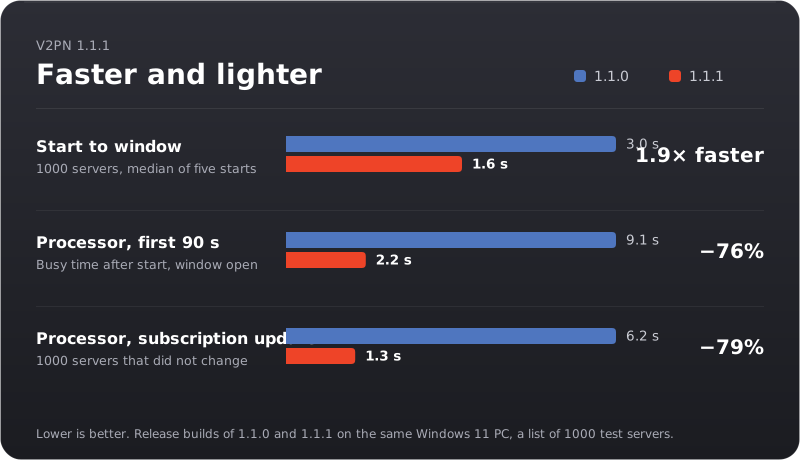
Opens twice as fast on Windows
With a thousand servers the window now appears after about 1.6 s instead of 3. The Windows app comes precompiled, so the interface no longer has to be compiled every time it starts, and the log, the server table and the Clash pages are built the first time you open them instead of at every start.
Quiet after it starts
On Windows, V2pn used to look through your Downloads, Desktop, Documents, Program Files and home folder for other VPN apps every time it started, even when you had moved your servers long ago. On a computer with many folders that took up to ten seconds of processor time in the background. Now it looks only when it can offer you something: on the first-run card, in the walkthrough and in "Move from another app". The search itself is about five times faster and finds the same apps.
In the first minute and a half after start, V2pn now keeps the processor busy for 2.2 s instead of 9.1 s.
Big subscriptions update faster
Updating a subscription wrote every server that stayed in it to disk on its own: two thousand writes for a thousand servers. It is one write now, and an update takes about a fifth of the processor time it did. Every server keeps its ping, star and place in "Recent", as before.
Smaller things
- Testing the ping of all servers no longer makes the window stop responding for a moment while the test starts.
- With V2pn switched off, update checks no longer wait five seconds for a proxy that isn't running before they go direct.
- V2pn uses 15–30 MB less memory. On Windows, Chinese, Japanese and Korean server names are drawn with Windows' own fonts instead of a 10 MB font V2pn loaded at every start.
The price
On Windows the app is about 12 MB larger: precompiled code takes more room. The update V2pn downloads by itself is 76 MB instead of 64, the full x64 download 157 MB instead of 144.
Based on v2rayN 7.25.6.
Download


| System | File |
|---|---|
| Windows 10 and 11, x64 | V2pn-windows-x64.zip |
| Windows 11 on ARM | V2pn-windows-arm64.zip |
| macOS 13.6 or later, Apple silicon (M1 and later) | V2pn-macos-arm64.dmg |
| macOS 13.6 or later, Intel | V2pn-macos-x64.dmg |
Or in one command. Windows (Terminal): irm https://github.com/Piwqust/V2pn/releases/latest/download/install.ps1 | iex. Mac (Terminal): curl -fsSL https://github.com/Piwqust/V2pn/releases/latest/download/install.sh | bash. Both install without the first-launch warning and move your servers from v2rayN.
Already using V2pn? Nothing to download: it updates itself.
On the first launch of a downloaded file, Windows and macOS warn that they do not know the developer, because the app has no paid signature. How to get past it is in the README.
The other files in the list below
They are for the app, not for people. The updater reads -update.zip, the macOS .zip, release.json and release.json.sig; -update.zip has no cores, so it does not work as a first install. .sha256 files are checksums: sha256sum -c V2pn-windows-x64.zip.sha256. install.ps1 and install.sh are the one-command installers above.
По-русски: README.ru.md. Интерфейс переключается на русский в «Appearance».