Repository navigation
RPG Reactor 0.99.2

Work since 0.99.1. The full technical list is in the editor changelog.
Highlights
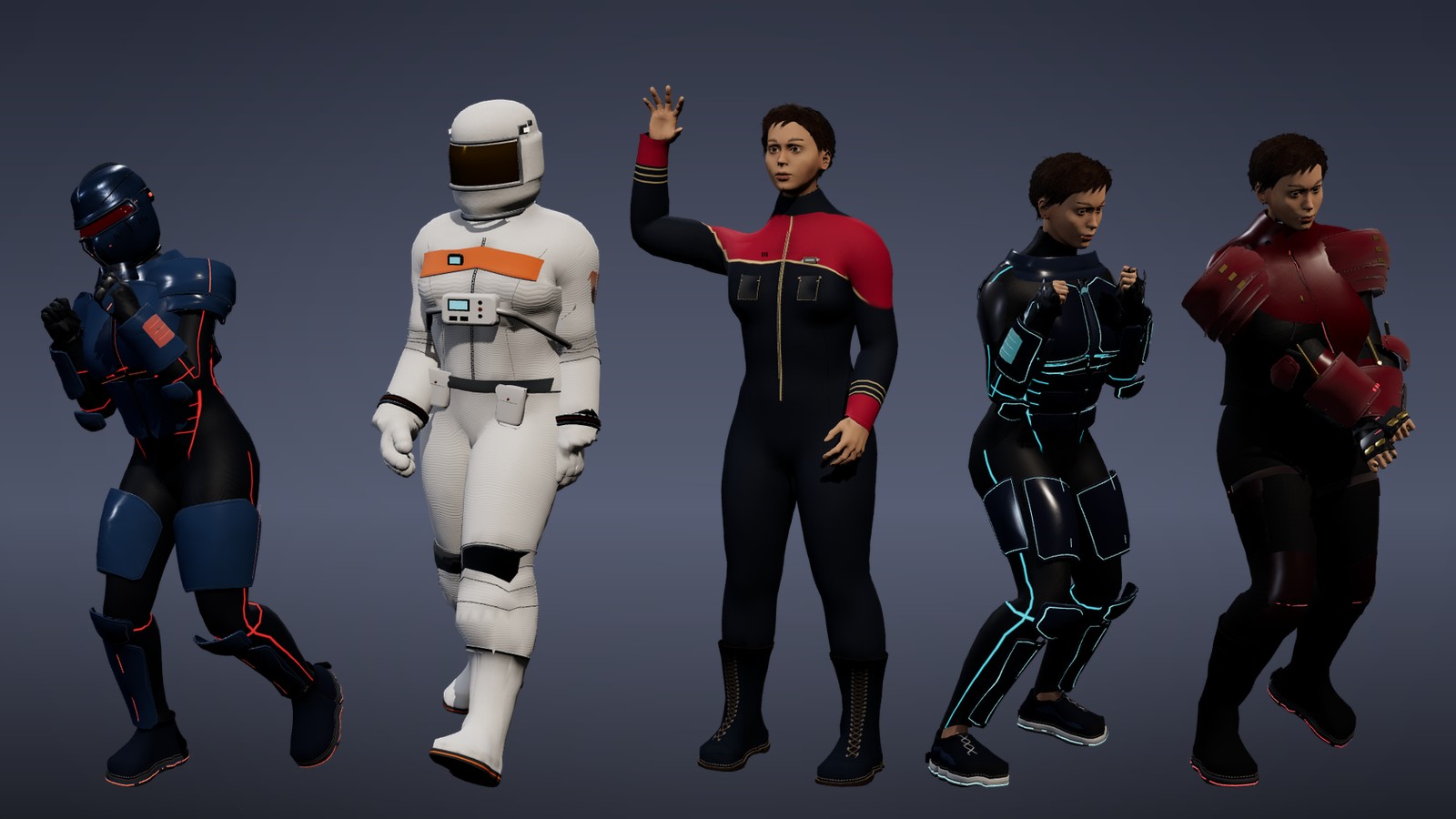
Ready-to-wear looks: Dress your hero in one click: a space marine with a sealed visor, an astronaut, starship crew, a neon Glow runner and a street samurai.
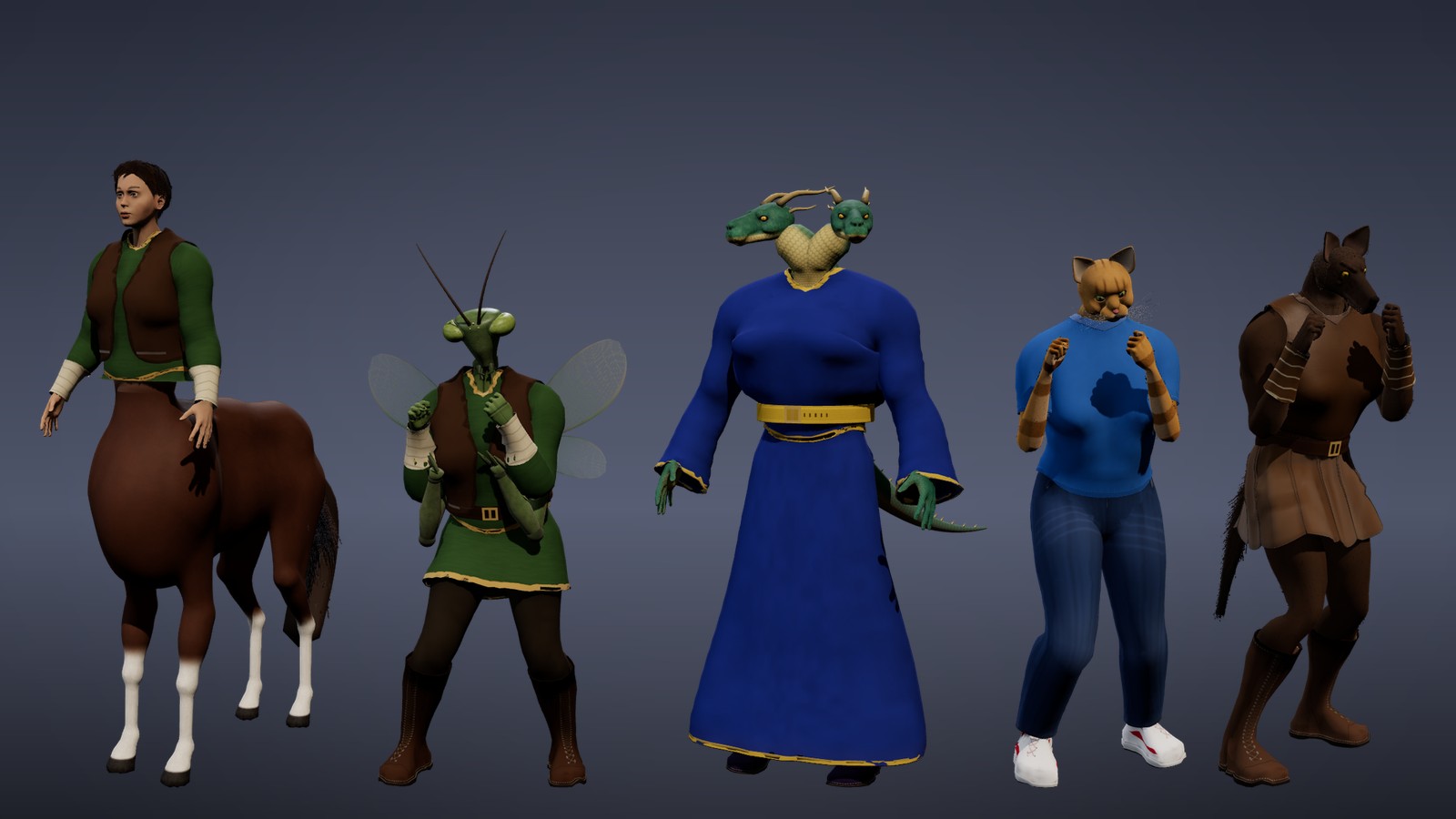
Centaurs and more: Meet the new centaur, plus insectfolk with compound eyes, the two-headed Hydrata, catfolk and werewolves, all wearing the same outfits as everyone else.
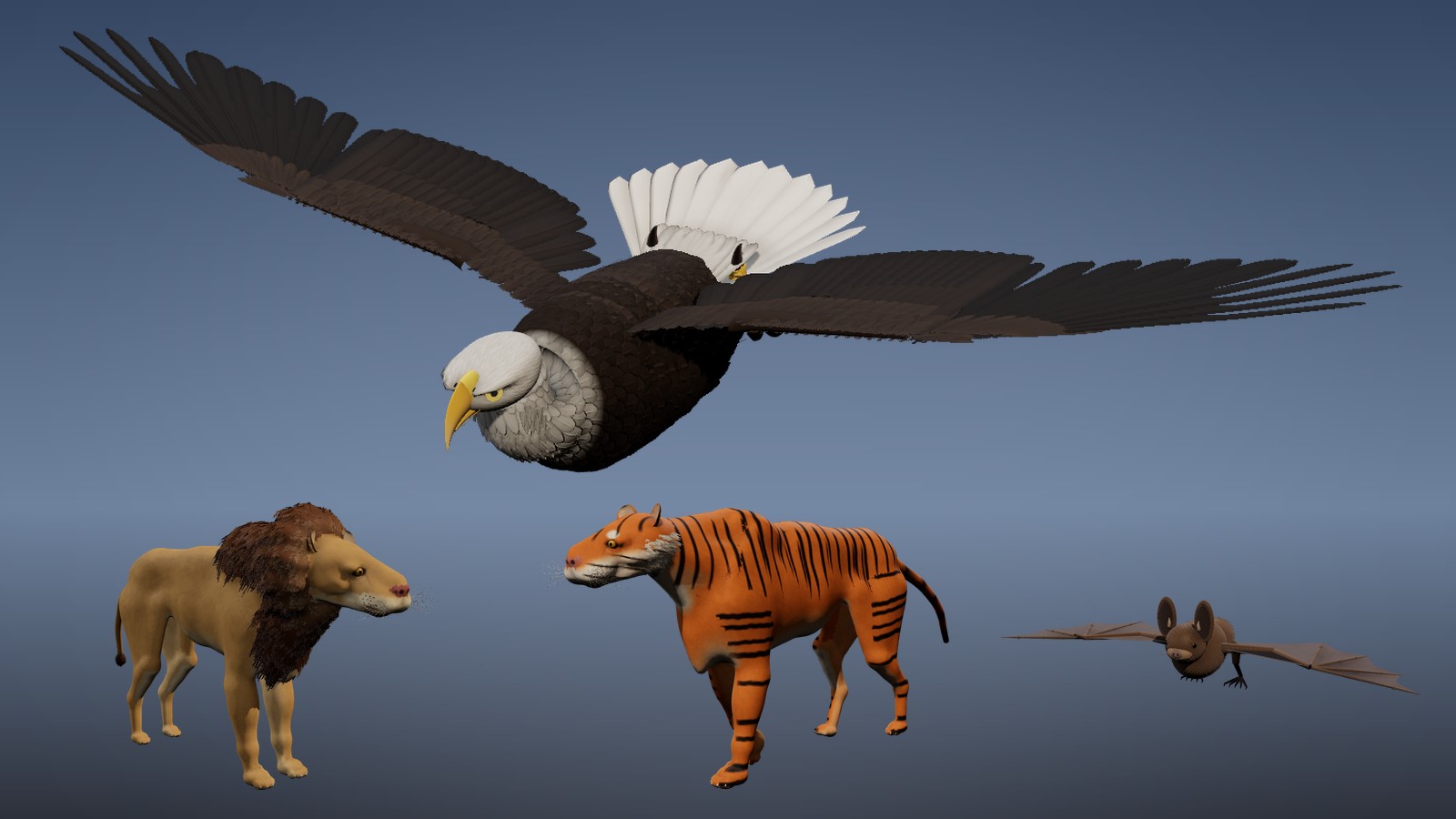
Eagles, bats and big cats: The rebuilt bald eagle glides on spread wings with a feathered head and hooked beak, joined by rebuilt bats, lions and tigers.
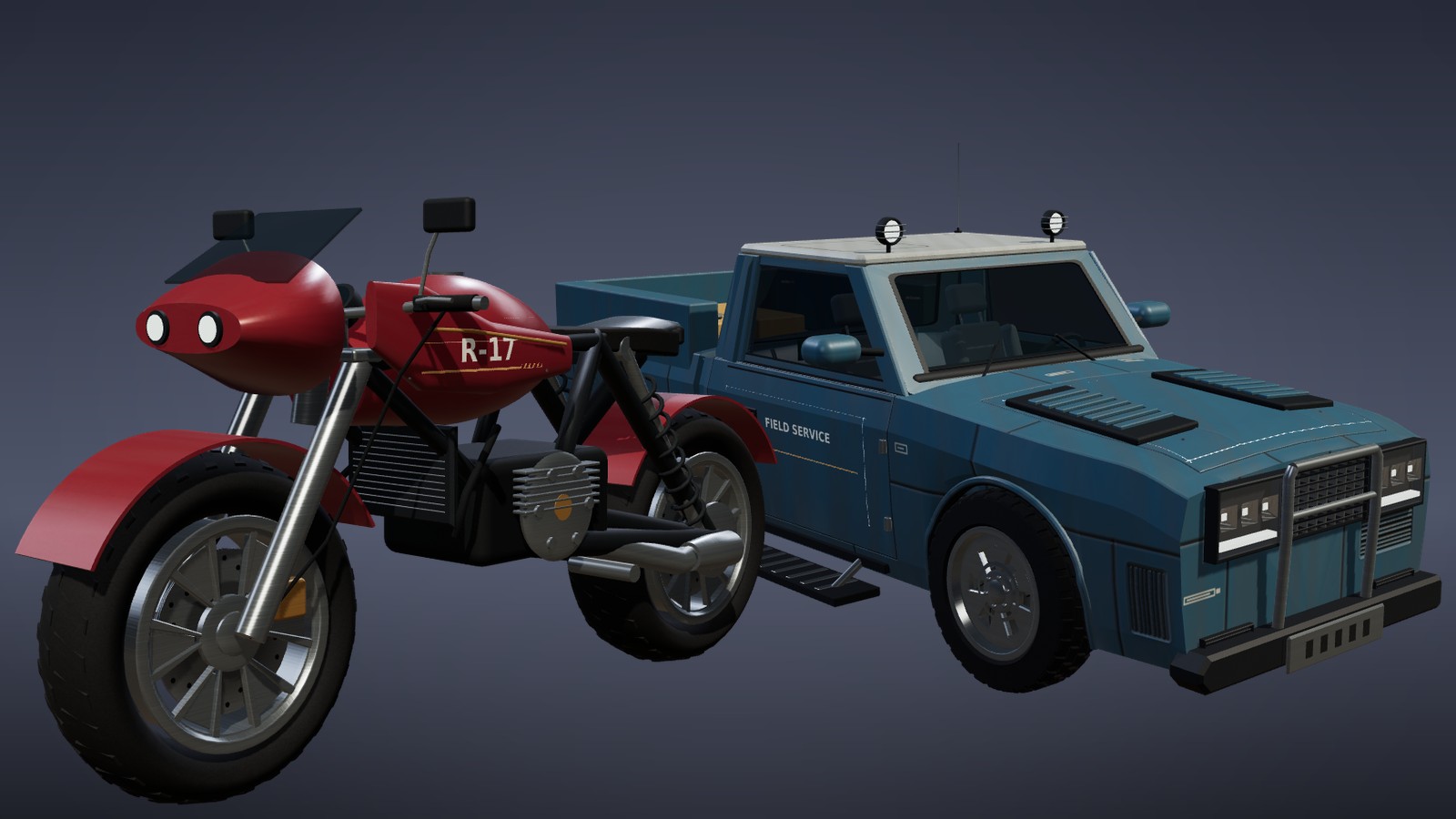
Rebuilt vehicles: Motorcycles and trucks come with real wheels, doors and headlights, and body styles you can tune with a few sliders.
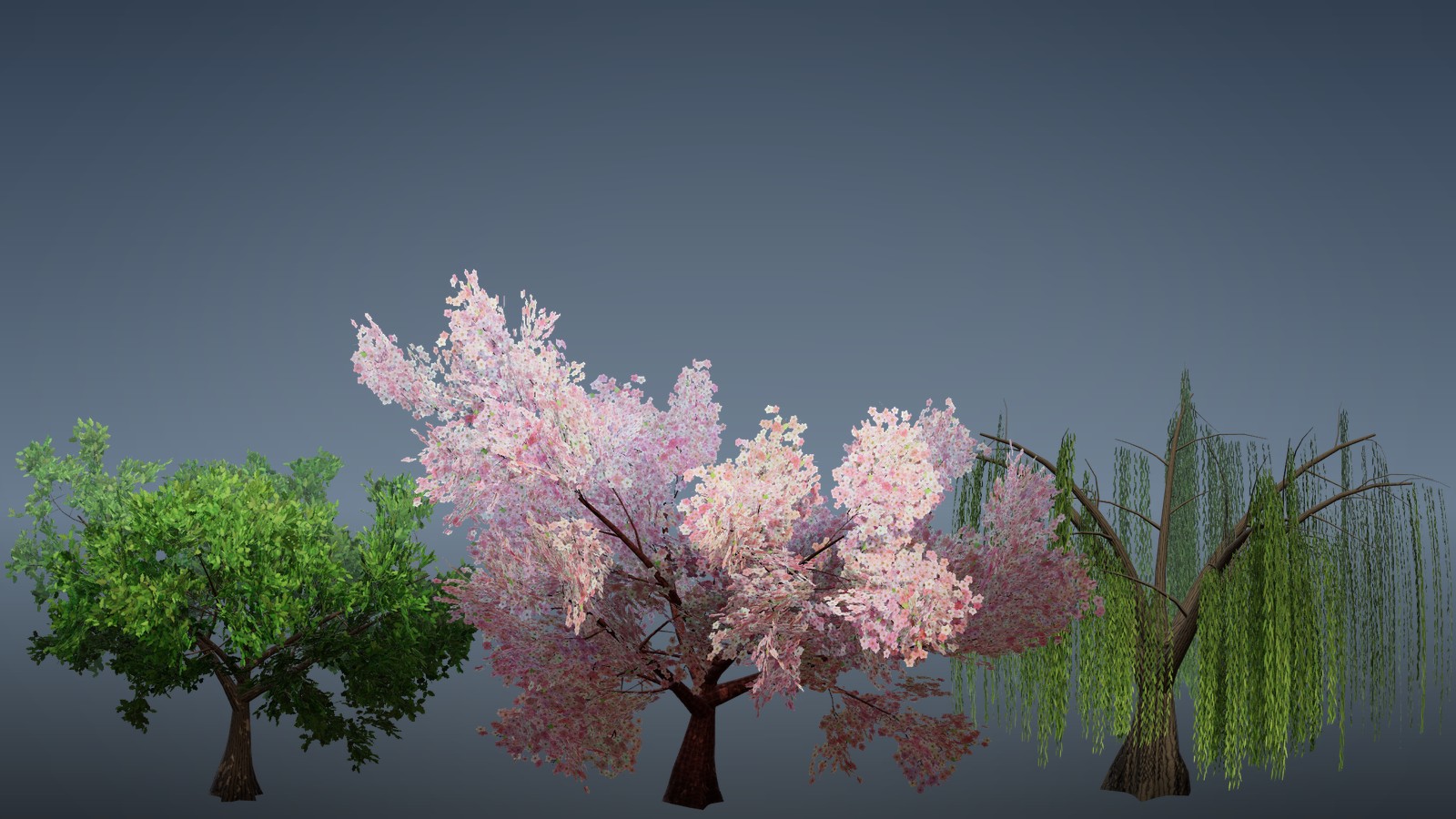
Trees in bloom: Plant oaks, cherry blossoms and weeping willows that change with the seasons and sway in the wind.
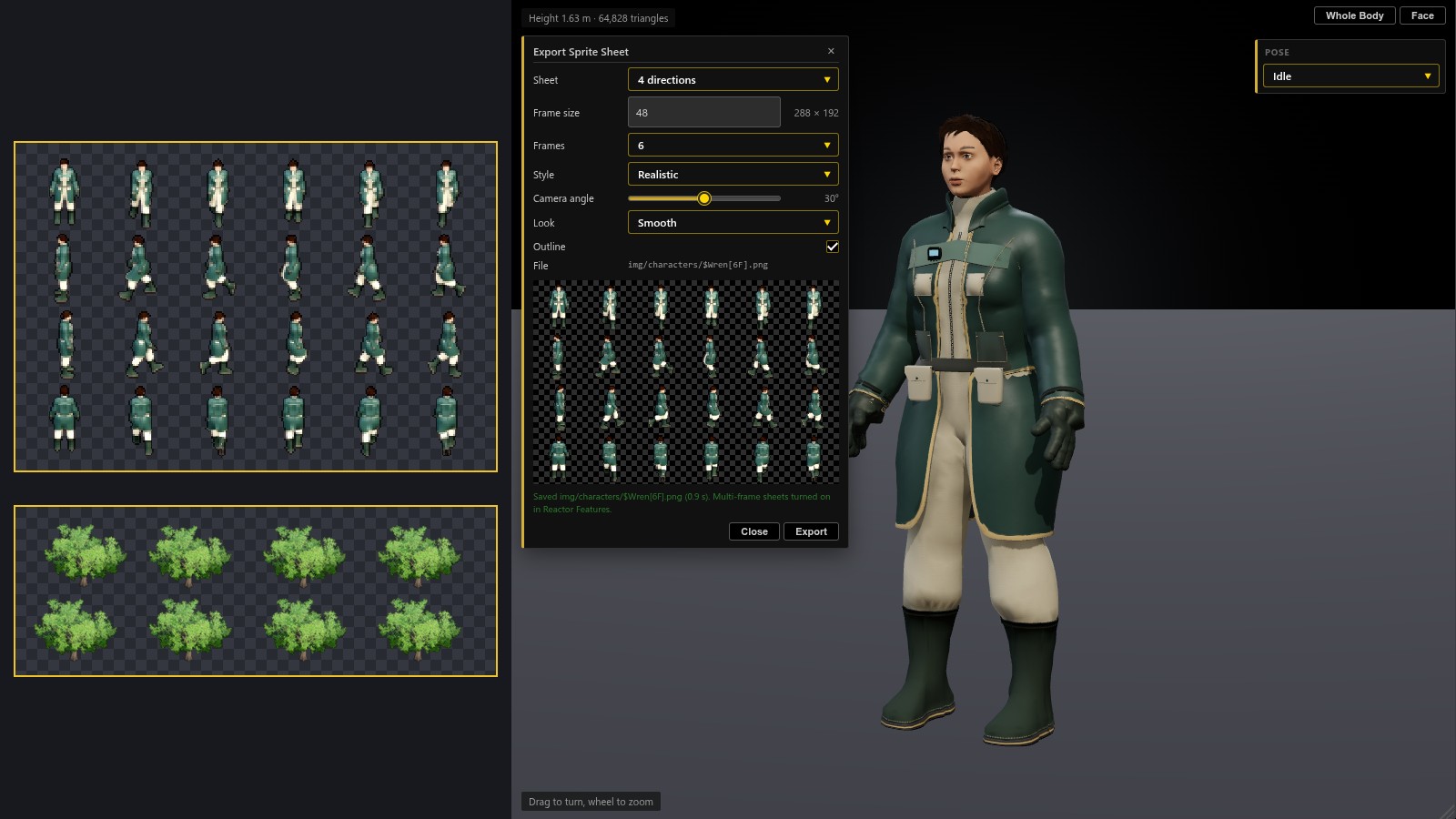
Sprite sheets from 3D: Export a walking character with six frames per step, or a tree that sways in eight frames, ready for your 2D maps.
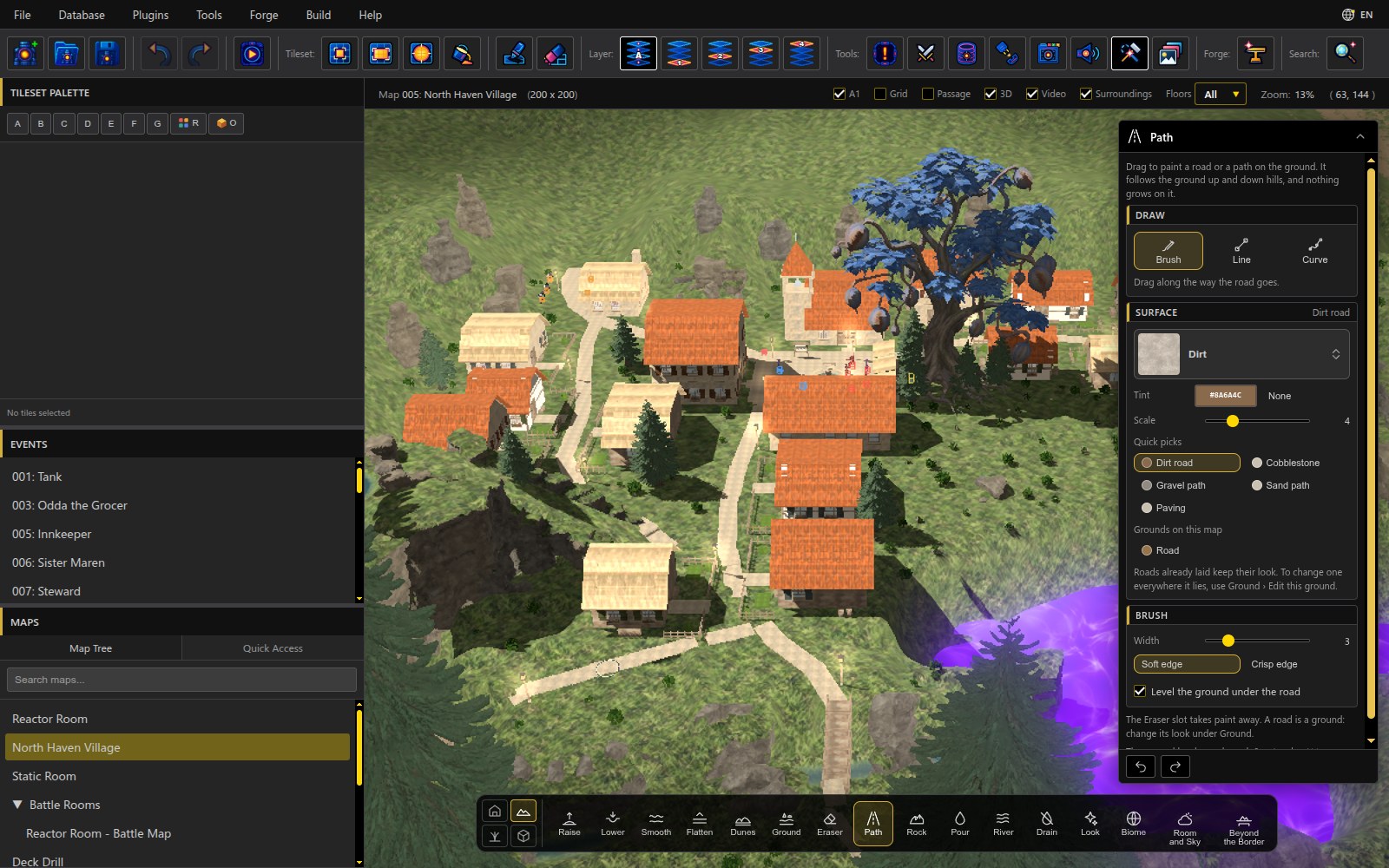
Paint roads on 3D maps: Drag the Path tool to lay dirt roads, cobblestone or paving that follow the hills through your village.
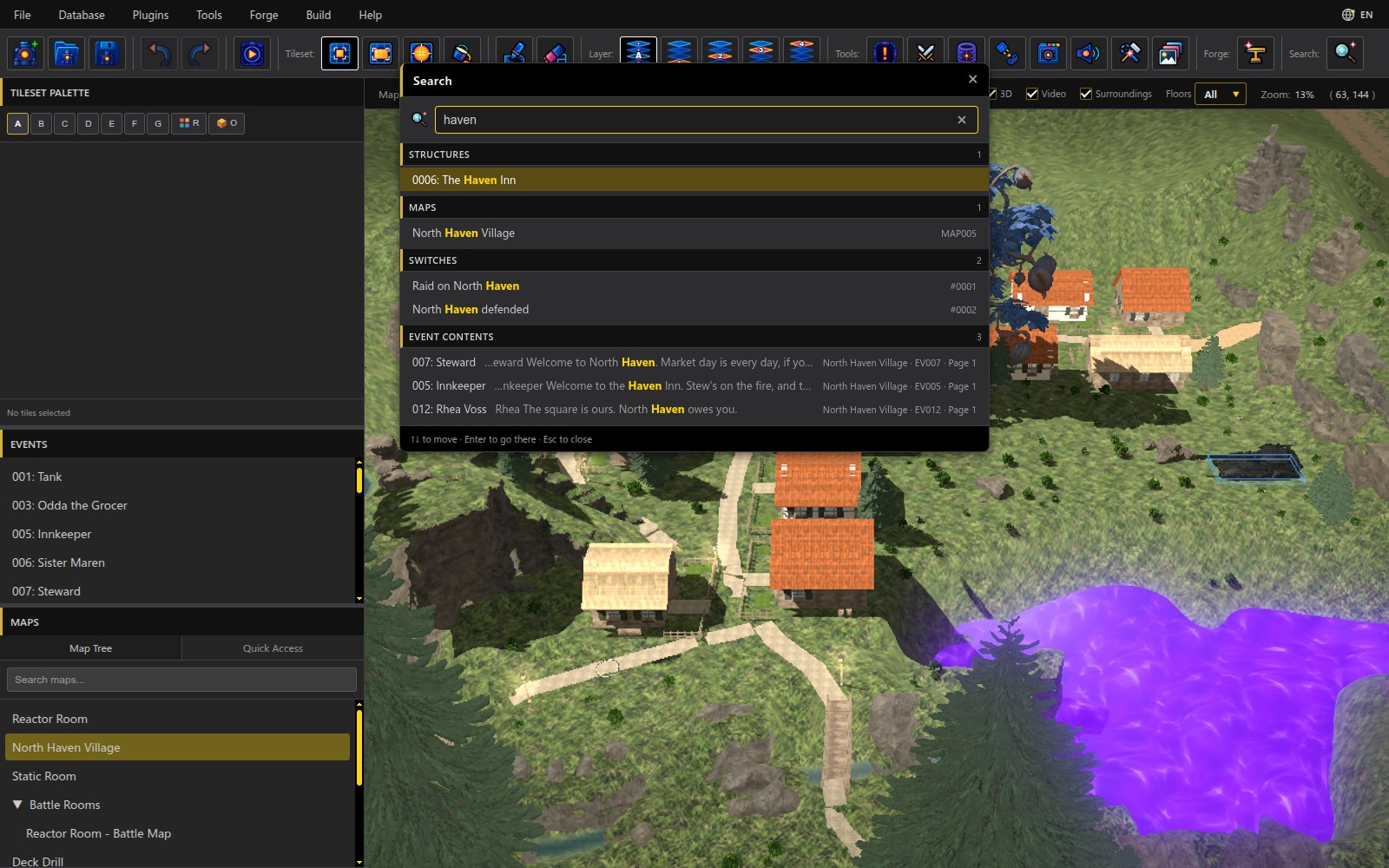
Search everything: Type a word in the new toolbar Search to find structures, maps, switches and event text, grouped and one click away.
Added
- HDR effects. An Effekseer effect can opt in to HDR rendering with a small
.hdr.jsonfile beside it: its light adds up in a floating-point buffer, gains bloom and is graded once for display. A normally graded copy of the effect plays instead when the computer cannot render it. Effects without the file draw exactly as before. The editor's animation previews play the normally graded copy and say so. See the HDR effect overlay guide. - Reactor Features (Database › System › Reactor Features): Reactor's own additions to MZ in one list, Basic and Advanced, each with a switch. Turn one off when a plugin does the same job: its fields hide, what you entered stays saved, and the game behaves as MZ. The new options below are all on it.
- Search (toolbar, Ctrl+Shift+F): find anything in the project and go straight there: maps, map events (by number and name), event commands, common events, every Database record by type ("0004: Poison") and Reactor's own pages (Vehicles, Action Sequences, User Interfaces, Quests, Structures, Music Sequences, 3D Models).
- Database extras. Items, weapons and armors can be marked Can't be sold. Enemies roll their stats within a Stat Variance %, give EXP and Gold within a range and drop a random quantity. Change Gold, Items, Weapons and Armors take a random range. Slot Layouts (Database › Types) add equipment slot sets beyond Normal and Dual Wield. Resource Pools (System 1) turn MP or TP off, and the trait list offered can be trimmed. Higher Limits raises the item, gold and shop caps.
- Turn, flip and mirror sprites. An event page's picture has Direction, Frame, Mirror, Flip and Rotation right under it, shown in the preview. Set Movement Route gains Rotate (to an angle, by an angle, or to face a direction, about the feet or the middle), Mirror, Flip, Reset Image, Teleport to Tile and its own Frequency, as RPG Maker 2000/2003 had it.
- Sprite sheets with more frames. The 3D Character Builder exports 1 to 12 frames a row, named
$Hero[6F].pngor$Hero[8D][6F].png(the game and editor also read[F6]). The Prop Builder exports sprite sheets too: 1, 4 or 8 directions ([1D]is new: one row for every facing), 1 to 12 frames from the prop's own loop (a tree swaying in the wind) and a Width (tiles) of your choosing, at character scale by default. Exporting turns multi-frame sheets on for the project. - Face sheets from 3D. The 3D Character Builder exports an RPG Maker face sheet of eight expressions, framed to fill each portrait; the Face tab's Expressiveness, Blushing and Blush color are saved with the character.
- Character Builder › new looks. A Centaur, sci-fi suits (space marine, astronaut, starship crew, pilot, recon) and more wasteland pieces; faces start out attractive; species necks join their heads (insectfolk, Hydrata, dragonborn, lizardfolk, catfolk, werewolf, wolffolk, rabbitfolk); birds, bats, frogs, snakes, armadillos and big cats refined.
- Prop Builder › more to make. Instruments (a real saxophone, flutes and an ocarina with open bores, speakers), wires and cables with editable colour swatches, a railgun rifle, a dense hedge, eight kinds of mushroom through the seasons, furniture styles that look different, vehicle doors and wheels that move, and a rebuilt motorcycle front. Pages are raised tabs, and Save Design keeps props in groups.
Changed
- Path in the Terrain group paints roads and paths on the ground: drag freehand or draw a straight Line, pick Dirt road, Cobblestone, Gravel, Sand or Paving and a width in tiles. A road follows the hills, nothing grows on it, and a fast drag no longer leaves gaps (the Ground brush fills its strokes in the same way). Curve draws a road by clicking points along the way: it bends smoothly through them and is laid when you click the last point again, press Enter or press Lay road (Backspace takes off the last point, Esc cancels). Level the ground under the road, on by default, smooths the ground along the road and flattens it across, so it doesn't tilt sideways on a hillside; one Ctrl+Z takes back both. A road's Surface can be any of the project's materials, with a tint and a scale; the old five are quick picks, and the map's own grounds are there to paint more of one. Changing the look never changes roads already laid. The Floor tool has a Size, 1×1 to 5×5, and a Line of floor is that wide.
- Foliage is more your own: a new color paints a new patch and leaves the plants already on the map alone (flowers painted with new petal colors used to recolor the ones planted). The panel shows Color (Color, Tips, Glow, petals; crystals can mix several colors, a shard each) and Shape (Height up to 12 tiles, Thickness, Lean, Variety; a bush's Size up to 8 and Tall or squat) up front, with quick colors for the kind in hand. Recolor brushes the look in hand onto plants already growing, Pick takes a plant's look from the map, and recoloring everything from a palette moved under Whole map.
- A map holds 64 ground types instead of 8, and grounds that share a material (a road in two tints, say) share its picture, so they cost almost nothing extra.
- Ground takes any material (or a picture of your own) as a new ground, paints along a Line or over a Rectangle filled or outlined, can level the ground under it, and fills by rule (Fill where…: height, slope, near or away from water, patchy). Every material picker in the builder has Your own picture…, which copies a picture into the project's materials (the Resource Manager has a Materials folder now).
- 3D builder audit: the Eraser has its own Line and Rectangle and an Only filter (roofs, walls, floors, shapes, rocks); Blueprint shows each plan as a picture, stamps at ×1 to ×4 and a direction, and has buttons to move, turn, size, nudge and remove a building; every piece takes a Tint; a fence a Height; a door's width and casing material and a window frame's material are in the panel; Duplicate and a shape's Handles choice are buttons; Flatten draws a level bed or pad to a height you type or pick; Lower can dig sheer sides; Pour and River show and set the liquid (any material) and a river its Flow; a Biome can leave planted colours, water and cliffs alone; Models settings sections stay open together; the colour swatches' labels read on any colour; the bar's hint line wraps and fits each mode.
- And the rest of the audit: Scatter in Models lays a model every few tiles along a drag, each turned and sized its own way (a wood, a field of stones); a pond's Level can be set below its rim (Fill to the rim puts it back); Save this map's look as a biome… keeps your own biomes in the project; a pillar takes a Thickness and a roof a Ridge height (flat to steep); the room's floor takes a Tint and a Scale; the bar's slot names wrap onto two lines instead of being cut, and stay readable on narrow windows.
- Fixed: selecting or picking up a building by what touches it no longer takes the rocks beside it, so a finish given to a mirror wall's building no longer turned nearby rocks into mirrors. A mirror in the editor no longer lags behind when you turn the view: its reflection keeps updating until it has caught up. The slots' number badges are gone (the keys still work and show in each slot's tooltip). A window of its own (Database, event editor, Forge) is drawn whole after you move it, so its rounded corners don't keep old pixels.
- Character Builder › creatures made believable. Birds are rebuilt on real layered feathers: the bald eagle stands upright with a white head and tail, a narrow hooked yellow bill with a cere, a hard brow shelf over pale yellow eyes, feathered legs and black talons, slotted wingtips in flight, and wings that fold properly when perched; the owl, crow, sparrow, pigeon, duck, chicken, parrot, flamingo, hummingbird and penguin follow with their own bills, feet and plumage. Sharks lose the cartoon grin (an underslung mouth with teeth inside, crisp countershading, dark eyes, denticle skin), whales and fish get real markings and fins, the stingray is a true flat disc that ripples, the octopus and squid have mottled skin, papillae and rimmed suckers, the jellyfish is translucent with its inner anatomy, and spiders, centipedes, ticks, worms, crabs, lobsters and insects get real anatomy. Hair coats lose a diamond-lattice texture, the horse gets a flowing mane and tail, and tiger stripes follow the body.
- Character Builder › clothing that reads as clothing. Edges are real turned hems as thick as their fabric instead of cord piping; garments fold at elbows, knees, waistbands and down skirts; trouser legs and sleeves hang instead of being painted on; coats stop ballooning; hoods have volume; a beanie no longer has hair poking through. Every fabric has its own surface (denim twill with wear, knit rib, leather grain, satin sheen, brushed or hammered steel and more), the moiré on silk is gone and stripes run level. Armor is rebuilt: plates with rolled edges that catch the light, overlapping lames, tassets on buckled straps, gauntlets with finger plates, armored boots, moulded and studded leather, and a Style choice (Smooth, Fluted, Riveted, Anatomical; Moulded, Studded, Lamellar). Saved characters are about 4 MB smaller and count their hair once.
- Character Builder › cloth that hangs and is sewn. Soft garments now settle on the body as real cloth when they are built: held at the neckline, waistband and cuffs, they bridge hollows instead of clinging to the skin and fold where spare cloth gathers (around a flared skirt, below the chest, above a cuff). Jackets, coats, shirts and trousers gain modeled construction: lapels and collars cut to the front, welt and flap pockets, plackets, real buttons, zips, seams and top-stitching, belts, rib-knit bands and linings.
- Character Builder › wasteland and wear. Outfit → Wasteland adds 16 post-apocalyptic pieces (a duster, a patched field jacket, rag wraps and shawl, a hooded poncho, head and shin wraps, scrap chest armor and pauldrons from hubcaps, tires and road signs, a bandolier or chest harness, a tool belt, a gas mask and dust goggles) and eight one-click looks (Scavenger, Wasteland drifter, Raider, Road warrior, Desert nomad, Settler, Mechanic, Medic). Every garment has a Wear slider: grime and sun fading, worn cloth, frayed hems, torn holes, and patches and duct tape (Patches and tape turns the repairs off).
- Character Builder › Body art. A new Body art tab: tattoos (tribal, mandala, rose and vine, dragon, circuitry, a picture of your own and more), body and war paint, scars, glowing implant lines and piercings, each placed on a body region and wrapped around the limb so bands close on themselves. Cybernetics: replaced or plated cyber arms, hands and legs that bend with every motion, a cyber eye, face studs and plates, and cyber tails, wings, horns and ears, in four styles (sleek chrome, military, salvaged, glowing tech). Looks such as Netrunner, Street samurai and Wasteland scavenger set it all at once.
- Character Builder › cyberware and cyberpunk clothing. Accessories gains Cyber faces (jaw, half-face, full faceplate, brow plate), Cyber masks (respirator, LED mask, armored mask, mouth guard, face shield), HUD eyewear (monocle, ear scouter, AR glasses, tactical goggles, halo projector) and Implants (temple and neck jacks, spinal column, chest core, forearm screen, under-eye lights, ear antennas); a jaw piece moves with the jaw. Outfit → Cyberpunk adds techwear (jacket, trench, glow bomber, smock, joggers, compression suit, smart shirt, rig, gloves, mag-sole shoes) with light channels and LED piping, and cyber chest, shoulder, arm and leg armor, plus Netrunner, Street samurai, Corporate agent, Techwear courier, Cyber enforcer, Chrome mercenary, Neon punk, Glow runner and Chrome scrapper looks. The Prop Builder lists the cyberware too.
- Randomize › pick what it changes. Beside 🎲 Randomize in the Character Builder and the Prop Builder, a box list chooses which parts are rolled: face, hair and body but not the outfit, only the outfit, or everything. Each builder remembers the choice.
- Character Builder › lighter hair, firmer animal heads. Hair and beards save with about half the triangles and look the same, and build faster in the preview. Wolf, dog, fox, horse and bear heads are rebuilt on a real skull shape with a defined stop, cheekbones and brow, with eyes set in sockets.
- Prop Builder › emblems you can see. Shields use the flag designer's whole Design page: background patterns and emblem shapes as picture tiles drawn on the shield's own outline, your own pictures as emblems, and several emblems stacked and placed. Banners and flags gain the same picture tile in their emblem grid and thumbnails of chosen pictures, and container hazard symbols are shown as pictures instead of names.
- Prop Builder › vehicles that look like their class. The compact is now a hatchback with wheels at the corners, the sport car a low mid-engine wedge, the truck a pickup with a separate cab and bed, and the rover a tall, flat-sided armored patrol truck with small deep-set windows and big outboard wheels. The shuttle and hover craft sit their pilot low under a long fighter canopy, and the walker has heavier plated legs.
- Prop Builder › vehicle body styles and panel detail. Every vehicle takes a Body style (Rounded, Faceted or Armored); flight craft have a sealed one-piece canopy (no more open cockpit); a panel layer of seams, rivets, louvers, grilles and hatches with grime and edge wear is baked into the paint; a Detail density slider adds antennas, sensor pods, racks, hydraulics, work lamps, jerrycans and a spare wheel; the walker and drone are framed, plated and pistoned; lamps glow brighter; and an optional insignia can be painted on doors, bays and fins.
- Prop Builder › vehicle wheels, lamps and bodywork. Road vehicles and the motorcycle get rebuilt wheels: chamfered tread blocks in a road, all-terrain or mud pattern (a new Tread pattern choice), deep-dish rims in five styles with lug nuts, and vented, drilled or slotted brake discs with calipers. Lamps sit in real housings with a reflector, lens and glow (round, projector with a halo, LED bar, caged), with ladder and light-bar tails. Doors and bonnets are cut into the body with shut lines, character lines are crisp, arches have dark liners, bodies sit lower over their wheels, the chassis slab and the truck's lump under its bed are gone. Vehicles have fewer triangles than before and draw in far fewer pieces.
- Prop Builder › bows, staffs, axes, polearms and shields. Four new weapon families with 35 presets: longbow, recurve, horse, compound, elven and energy bows, a crossbow, arrows and a quiver; wizard, druid, cleric, bone and energy staffs, a quarterstaff and three wands; hand and battle axes, war hammer, maul, mace, morning star, spear, halberd, glaive, trident and war scythe; round, heater, kite, tower, buckler and energy shields painted with the flag designer's emblems. Characters hold them as they hold swords (the crossbow as a gun), staffs can cast light, and runes and crystals can glow.
- Prop Builder › Nature. A new family of standout trees, plants, rocks and alien flora: 31 kinds and 82 presets, from an ancient oak with mossy roots, a sacred tree, conifers, palms, a weeping willow, baobabs and blossom trees to hoodoos, basalt columns, a glowing rune stone, natural arches and a crystal geode, and alien lantern trees, fungus towers, tentacle plants, coral fans and spore puffballs. Each has a few shape sliders, a Shuffle for a new take, seasons, stone and moss or snow cover, palettes and glow, and trees and plants sway in the wind in the game.
- Prop Builder › firearms rebuilt. Every gun is now built from chamfered plates that catch the light, with skeleton stocks and guards that have real holes, rails at real scale, ejection ports, slide serrations, vent banks, ported brakes, suppressors and a new flash hider, ribbed drums and curved magazines, and glow strips sunk into the panels. Each preset has its own receiver style (eight in all, any gun can take any), the frame, underframe, furniture and metal read apart, and the view shows guns standing up instead of lying flat in the dark. The rifle's grip no longer turns black.
- 3D Models › motions made easy. Adding a motion to a rigged humanoid now starts with the motion capture from Forge › 3D Character Builder: pick Jumping, Rolling, a flip, a stance or a wave, ▶ to see it on the model, one click to use it (in a state it replaces what played there, so a hand-keyed Jump gives way to the captured one). Motions you make by hand are a storyboard instead of a row per bone: the poses as cards with the seconds between them, + for the next pose (a copy of the one shown), Mirror, Copy, Paste and Delete, and a part bent by clicking it on the model, which lights it up; the per-part timeline is a link away (Fine timing…). The part being bent wears colour-coded rings to turn it and arrows to move it, both at once (red, green, blue, matching the sliders, which switch to whichever was grabbed), and Reset puts it back. The time between two poses is a card of its own: click it for its seconds and its pace (Smooth, Steady, Start slow, End slow, Slow both ends, Snap, Overshoot), each drawn as a little curve. ▶ sits before the motion's name. Mirror is now Flip pose and Flip motion (every pose: a left punch becomes a right one), and a flip lands mirrored on any rig, with a newly added side resting in the other poses rather than drifting through them. A one-off motion now ends on its last pose and eases back to rest afterwards in the game, rather than swinging back before it ends or jumping back after. The map bar's Storeys list is now Floors (and a structure's Storey is its Floor height); it lists as many floors as the map's tallest piece reaches. The picker's buttons match the editor's theme, and its Make your own starts a new motion instead of the old hand-keyed presets. The state buttons under the model now work while a motion is open, and the preview follows the motion you pick.
- Fences join their neighbours: rails run to each fence beside them, round corners and corner to corner on a diagonal, and into a wall a run ends against, so a fence is laid by dragging or drawing a Line and never turned by hand. Windows, doorways and panes also go into straight (slanting) walls; a doorway there is two tiles wide so it can be walked through.
- Build bar: a window, doorway, pane or door clicked onto a wall goes into the wall where you point, in place of that piece of wall, keeping its material, height and building; a window on a stretched wall sits where you aim with wall left below it, a door opens its doorway as wide as the door, and both look out of the building. A wall clicked onto a window or doorway walls it up. The placing ghost shows the opening inside the wall.
- Making a whole selected building taller lifts what stands above each storey with its walls: the upper floors, the next storey and the roof. Doorways and windows grow with the wall, their openings keeping their size. Stairs and ladders keep their steps, and the bar says so.
- Build bar: a Draw card with Brush, Line and Rectangle (filled, outlined or Auto) in place of the hidden drag rules; a slanting wall line is one straight wall, or Stepped as before. A Level card (− / +, Q / E) for what is in hand and what is selected, a Position card for a placed piece, and a Height for walls, glass and pillars (one, placed or a whole selection). Floors and blocks stand at quarter-tile levels, so a slab can sit under a raised fountain. Every slot shows its key, and the Rectangle button lights while Ctrl is held.
- A Database vehicle's starting position can be dragged on the map, in the 2D and 3D views, and the Vehicles entry is updated (Undo puts it back). The map's Events list shows these vehicles under Vehicles (Database), named like "Vehicle 1 · Motorcycle · Unit 3", and the map marker covers the vehicle's Length along the way it faces.
- Database › Vehicles: every Starting Position row says Delete (the first said Clear), and the rows' place, direction and Delete line up. Deleting the first row moves the next vehicle up into it.
- Rigged humanoids can play any motion of the motion-capture library the 3D Character Builder uses. In Database › 3D Models, a clip animation can pick a Motion library motion, and one Add gives a model the whole battle set (attack, guard, damage, death, victory and more). Fleagus in the Demo now uses it.
- Action Sequences: "Used by" names each skill, item, weapon or battler that plays the sequence, and a click previews the sequence as that one uses it. The Preview line names the skill or item being previewed. The Show Animation source "Current Action" is now "Each Action’s Own" and lists the animation each skill, item or weapon using the sequence plays, since a shared sequence plays the using action's animation, not the first one's.
- The Database sidebar's section headings carry the accent strip and band the editor's other section headings use, and all 24 pages fit without scrolling in the Database window's first-open size on a 1080p screen.
- The event command picker has a search box; the Common Event command names its variables; Set Movement Route's buttons sit in even columns with Script last; the Rotate and Set Height dialogs close on OK and Cancel; condition fields, scrollbars and the search fields' clear button wear the theme.
- An event page with no picture keeps a full-size Image box; a sheet of eight characters shows which one is used with the file name ("Vehicle (Character 3)").
- Preview Event on a 2D map plays a multi-frame sheet's every frame.
- Fur shows the colour you pick (it rendered about a third darker), so short coats no longer look flecked.
- Walking and running feet keep their soles level and point forward.
Fixed
- An event standing as a 3D model with Auto size (a vehicle event wearing its vehicle's model, too) shows its measured size on the map as soon as the map is open; it used to stay one tile until the event was opened and applied. Measuring alone doesn't mark the map as changed.
- An event with the Vehicle field and no picture of its own can use Auto size: it measures the vehicle's model (it used to see no model and switch Auto off), turned the way the vehicle faces, as the game turns it. A Database vehicle's map marker covers the same tiles.
- In third and first person, losing the captured mouse while the game window stays focused (an overlay or another window taking the pointer) no longer opens the menu by itself, and Escape while riding gets off the vehicle instead of opening the menu.
- A rifle held in both hands no longer spins, and its holder no longer turns backwards, in the Action Sequence preview and in Classic battles in a Battle Room (Sniper Shot on Fleagus). The chest's shooting stance added up every frame on bodies whose animation doesn't reset the chest.
- A new 3D material compiles once in a game that has run a while; it used to compile twice and wait out a second timeout.
- The Database and Plugin Manager take keyboard focus the first time they open in their own window.
- Stamping a saved building is quicker: only the ground, pieces and plants under it are laid again, not the whole map (a cottage on North Haven, 0.8 s to about 0.3 s). The Blueprint slot's plan pictures are drawn one at a time and kept, so the slot opens at once after the first time.
- The 3D Character Builder, the Prop Builder and the other windows of their own turn smoothly while the map behind them has water, lights or videos: the map waits while another window is the one in use.
- Dragging Height in the Character Builder no longer tears a long gown's hem into spikes while the slider moves.
- Closing the Database's own window no longer stops the editor: on the 2D map, lights that don't change aren't redrawn, model shadows follow an idle pose twice a second instead of every frame, and effects and previews wait while another window is in use. Model thumbnails in the Database are drawn at 256 px.
- Database › 3D Models shows a model's media surfaces that play on demand (a picture a map's model calls by name, like the monitor arm's Psychronic logo) in its preview, beside the ones that always play; it showed only an empty outline.
- The 3D Character Builder's tabs are grouped: Species, Body (Shape, Face, Hair, Colors, Body art) and Outfit (Clothing, Accessories) as tabs along the top, with the chosen group's own tabs under them; a group opens on the tab last used in it.
- Save Design in the 3D Character Builder keeps a character's settings in the Forge (the project's
forge/character_3d/characters/) with its picture, without making a model, in a Group of your own chosen beside it (New Group makes one). Open lists your designs by group above the models exported to the project; a design opens to be changed, saved again (into another group, it moves there) or exported as a model, and its ✕ deletes it. - The builders' buttons read in Title Case without trailing dots: Open, Save Design, Export Sprite Sheet, Export Model To Project, Whole Body; Randomize has a die drawn like the editor's other icons instead of an emoji.
- Randomize › Gender: untick it and every roll keeps the character's gender (only women, or only men, run after run), with hair and clothes rolled to match; tick only Gender to roll just that.
- Games imported from RPG Maker 2000/2003 (Sunset over Imdahl): panoramas no longer flash to another part of the picture; choice cursors lose the two lines through them; timer page conditions work, so the rat hunt's timer no longer runs out at once; move routes keep the old engine's timing, so the hero no longer runs too fast after the rat hunt.
- A gamepad stick flick moves a menu cursor once.