Repository navigation
Using the desktop app
Open it from ~/Applications/ChatBots.command, or from the project folder:
bash tools/start-app.shThe app starts its own engine and talks to it over WebTransport, so there is nothing you have
to run first. That engine is loopback-only and serves no web page of its own. If you started an
engine with tools/start-app.sh, or the website with tools/start.sh, then that second engine
also answers HTTP on http://localhost:7789 and shows the same conversation in a browser.
If an engine is already running — because start.sh is going, or another copy of the app
started one — the app uses that one rather than starting a second. That is what makes the
window and the browser show the same conversation.
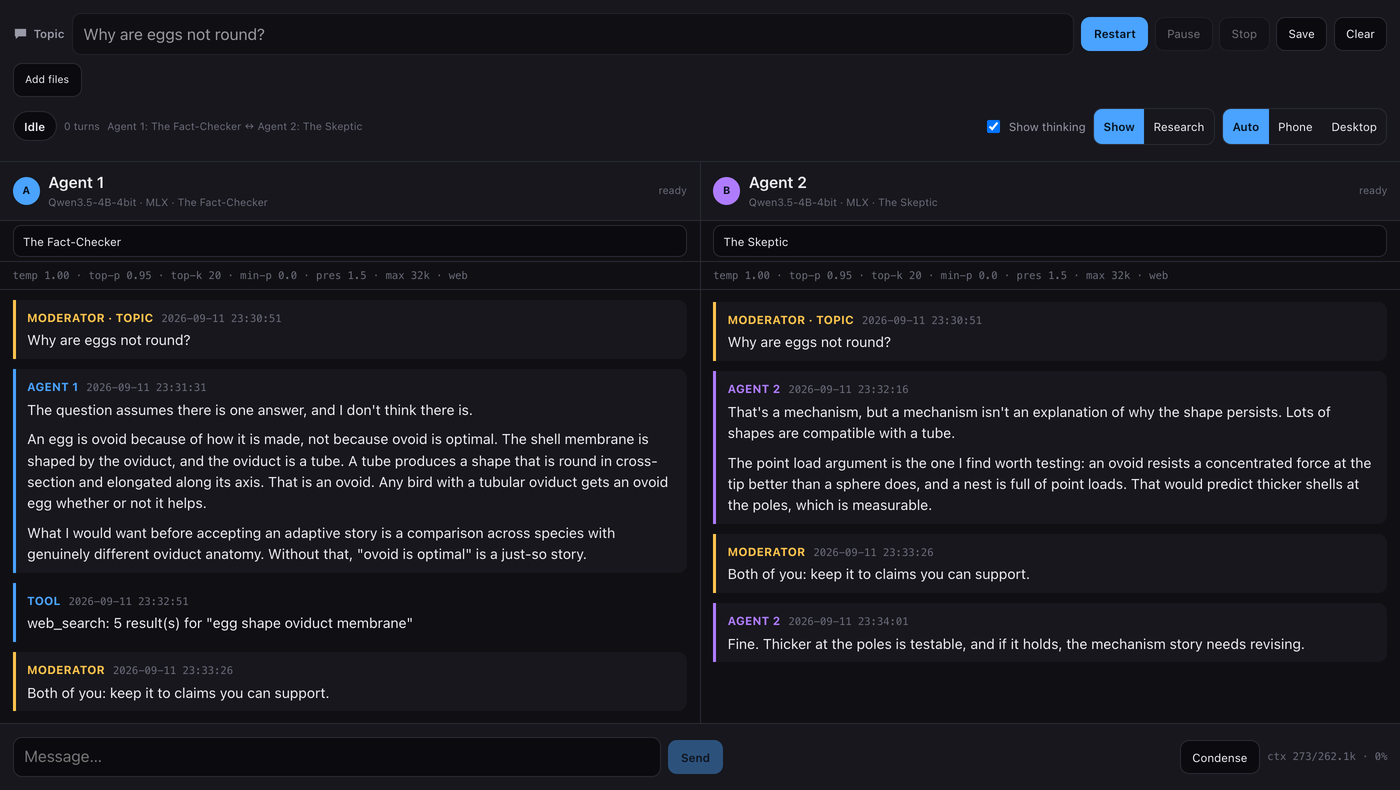
- Type a topic in the field at the top. Anything will do — a question, a provocation, a silly premise. "Why are eggs not round?" is the default.
- Press Start. The models load, which takes a few seconds the first time, then the first one starts writing.
- Watch. The reply appears as it is written rather than all at once.
- When you have had enough, press Stop.
That is the whole loop. Everything else on the screen is for changing who is talking, or how.
What the conversation is about. You can change it before starting or after clearing. Once a conversation has started the field is locked, because the whole log was written against that question.
Attach a PDF, a text or Markdown file, or a Word document, and the models will be given its text on every turn. See Documents and images.
| Start | Begins. Becomes Restart once there are messages |
| Pause | Stops after the current turn. Resume continues from where it stopped |
| Stop | Ends the conversation now |
| Save | Writes the whole log to a text file. Also on ⌘S |
| Kept | Reopens a conversation from an earlier session — see Keeping and sharing |
| Clear | Empties the conversation. Your topic, attachments and characters are kept |
Shows what is happening — Running — turn 3, Paused, Idle — and how many messages have been exchanged.
Streams the model's reasoning into the pane, dimmed, above its answer. Useful for seeing why it said something. It is on by default; switch it off if you would rather read only the answers, because it makes each turn slower to read.
Skips the local models entirely and points every seat at its API endpoint, so this Mac spends no memory on a model. One switch rather than one per seat, because the reason to do it — a machine that should not be loading weights — is a property of the Mac, not of a seat. The per-seat MLX / API switch is still there for a mixed room, and switching this off puts every seat back on the local checkpoints. See Using cloud models.
Holds every seat to about ten tokens a second, which is roughly reading speed. On by default.
A local model is paced by this Mac's GPU and does not need it. A hosted one does: a flash-tier API answers several times faster than anyone can read, so a reply would be finished before you could read it and the next turn written on top of it.
The delay is put on the stream, not on the display: the engine reads the server's response more slowly, so the server's own send rate comes down with it and nothing piles up in between. Slowing only the display would move the problem rather than solve it — the conversation would run further ahead of what you are reading with every turn.
Releases each sentence as the model finishes it, at the pace it is producing them, instead of in whatever chunks the server happens to send — which is what a blocky, jumpy transcript looks like. On by default. Switch it off to watch the raw arrival, which is what you want when the question is what the server sent rather than what it reads like.
Which kind of conversation this is. Show is personalities arguing; Research is specialists investigating. The app's own segmented control labels the two Reality Show and Research Team — they are the same two modes the website calls Show and Research. Switching changes which characters are available, and is locked once a conversation has started. See Personas and Running a research session.
Two layouts:
- Split — the two panes side by side, so you can watch both models at once.
- Thread — one column with both participants in it, like a messaging app. Easier to follow a long argument, and easier to read on a narrow window.
In Thread the seats alternate sides — the first on the left, the second on the right, and so on through a four-seat room — so a two- or three-handed show reads as a back-and-forth rather than as a column of statements. Your own messages take the right-hand side, where a chat app puts them. Each speaker's name is drawn in their own colour, because a side carries the rhythm and the name and the picture carry who is speaking.
Thread mode has no per-pane headers, so the two things they carry come with it: the seats' controls sit in a strip above the thread, and the setup brief — the topic and the instructions both models were given — is the first thing in the thread, collapsed. Click it open to read what they were told.
The colour scheme. Original follows your Mac's light or dark setting; Black is pure black regardless.
Each side has its own settings, because the two seats are independent — different models, different characters, different everything.
| Control | What it does |
|---|---|
| Persona | Who this participant is. Opens a list grouped by kind, with a one-line description of each |
| Model | Which checkpoint this seat runs. On an API seat the label shows the server's model and there is no menu — that model is chosen in the API sheet, and a checkpoint chosen here could not change what the seat is running |
| MLX / API | Whether this seat runs a local model or talks to a server. See Using cloud models |
| think: Off/Minimal/… | How much the model is allowed to reason before answering. Higher is slower and usually better |
Double-click a seat's name to rename it. Both models are then told the new name and will use it when referring to each other.
| Message box | Type as the moderator and press Send to both — or Return. Both models see it on their next turn, and it overrides the discussion so far |
| Condense | Summarises the older turns now instead of waiting for the automatic threshold |
| ctx 41.0k/262.1k · 15% (condense at 70%) | How full the context is, and where it will be condensed |
Long conversations do not crash or get truncated. When the prompt approaches 70% of the model's context window, the older turns are summarised by the model itself and replaced with the digest. The digest keeps what was concluded, who said what, and what is still disputed — so the conversation continues without losing the thread.
You can see this happen: a CONDENSED entry appears in the log where the older turns were.
If you scroll up while a model is writing, the view stays where you put it. Scroll back to the bottom and it follows along again.
⌘+ makes everything bigger, ⌘− smaller, ⌘0 back to normal. Between 85% and 200%. A brief overlay shows the size. Useful on a large display, or when showing someone else.
Type into the box at the bottom and send. The next model to speak sees your message tagged as the moderator, and the other one sees it on the turn after. Useful for:
- "Stay on the shell question, please."
- "Both of you: no more hypotheticals."
- "Agent 2, answer the actual question."
Save (⌘S) writes a plain text file with timestamps and every message once — the two models addressing each other once each, not a duplicate pair. Edit ▸ Copy Conversation (⇧⌘C) puts the same text on the clipboard.
Topic, characters, thinking levels, theme, window layout, text size and attachments all come back after a restart.
The conversations come back too. Everything is written to disk as it runs, so closing the window — or quitting entirely — does not lose it. Kept reopens one, and New conversation inside that sheet clears the screen and begins again. See Keeping and sharing.
Something entertaining:
- Topic: "Is a hot dog a sandwich?"
- Set Agent 1's persona to The Lawyer, Agent 2's to The Contrarian.
- Start. Leave it for five minutes.
- Watch the Lawyer argue from definition and the Contrarian refuse every definition offered.
Something useful:
- Topic: "Should we move our support team to a follow-the-sun rota?"
- Switch to Research, set the budget to Standard.
- Pick CFO for one seat, Behavioural Scientist for the other, Fact Checker for a third if you have four seats configured.
- Start, and come back in twenty minutes for the report.
Next: Using the website · Personas · Troubleshooting