Repository navigation
Read only Proxmox MCP with Claude Code
Which guests are stopped, and which nodes are offline? You can ask Claude Code for that inventory using ProxmoxMCP-Plus. This walkthrough uses v0.7.0 and exposes three tools: get_nodes, get_vms, and get_containers.
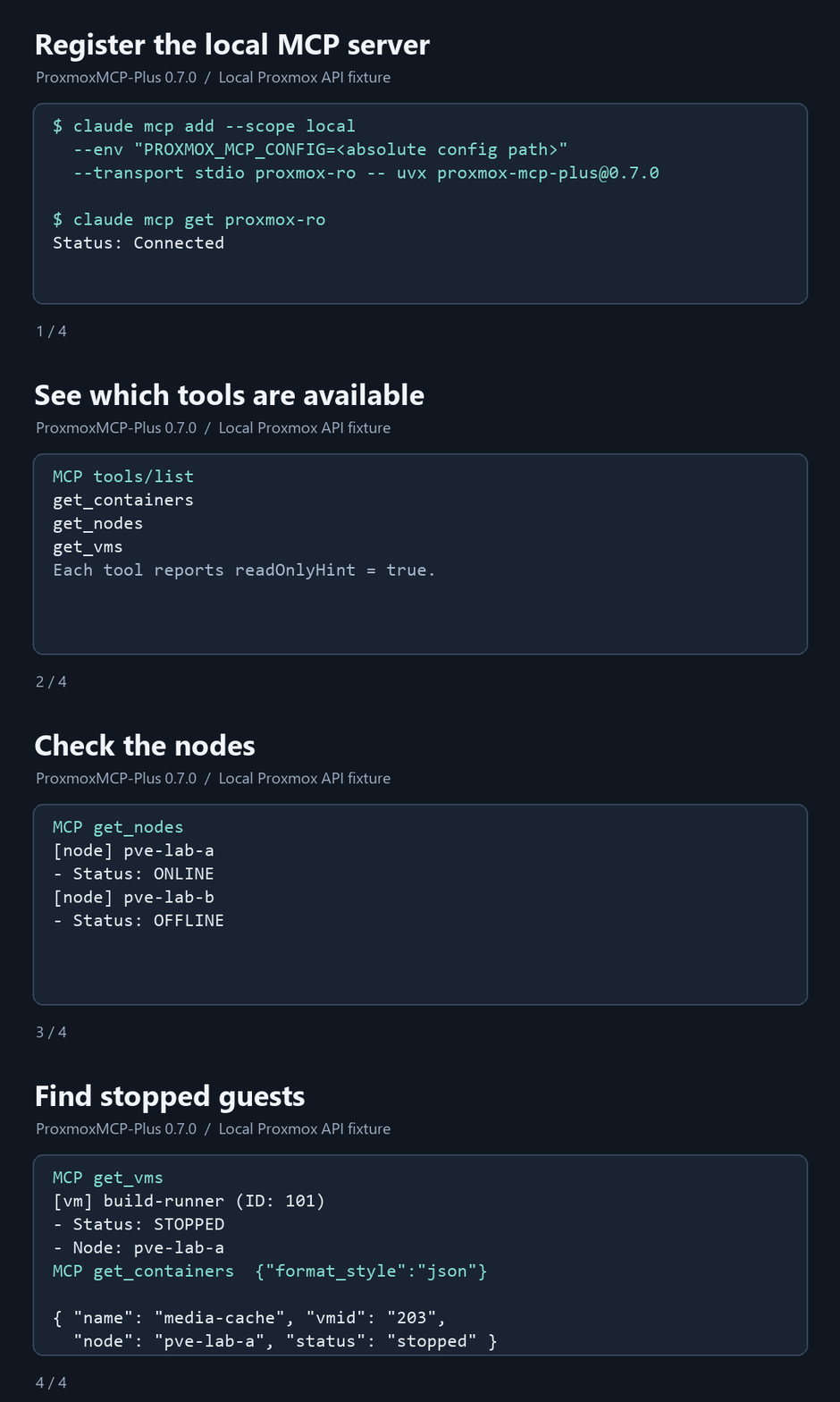
The demo uses the published package against a local Proxmox API fixture. The node and guest names are sample data.
You'll need Claude Code, uv, and network access from your workstation to the Proxmox VE API, usually on port 8006. Use a hostname that matches the API's TLS certificate.
In Datacenter → Permissions → Users, create a dedicated account such as lab-audit@pve. In API Tokens, create a token named claude-code for that account and keep Privilege Separation checked. Copy the token secret when Proxmox displays it.
For a lab-wide inventory, grant PVEAuditor at path / with propagation to both the user and the API token. Use Add → User Permission and Add → API Token Permission. A privilege-separated token can only use permissions granted to both identities. For a smaller inventory, scope those permissions to the resources you want it to see. Proxmox VE access control documentation
Save this as proxmox-readonly.json in a private directory outside any Git checkout. Put only the part after ! in token_name, and enter the token secret in token_value.
{
  "proxmox": {
    "host": "pve.example.net",
    "port": 8006,
    "verify_ssl": true
  },
  "auth": {
    "user": "lab-audit@pve",
    "token_name": "claude-code",
    "token_value": "REPLACE_WITH_YOUR_TOKEN_SECRET"
  },
  "mcp": {
    "transport": "STDIO",
    "tool_allowlist": ["get_nodes", "get_vms", "get_containers"]
  }
}
In the directory where you plan to use Claude Code, run this command with the absolute path to your JSON file. On Windows, substitute a path such as C:\Users\you\proxmox-readonly.json inside the quotes. The server starts locally over stdio. Claude Code MCP documentation
claude mcp add --scope local --env "PROXMOX_MCP_CONFIG=/absolute/path/to/proxmox-readonly.json" --transport stdio proxmox-ro -- uvx proxmox-mcp-plus@0.7.0
claude mcp get proxmox-ro
A connected status confirms that Claude Code started the MCP process. Your first tool call checks whether its token can read the Proxmox API. The allowlist controls which tools the client sees. Proxmox enforces what the token can do.
Start Claude Code in the same directory. Run /mcp to find proxmox-ro, then send this prompt.
Use proxmox-ro to list offline Proxmox nodes and stopped VMs and LXC containers.
For every stopped guest, include its type, name, ID, and node.
Report any failed queries or missing data separately.
Your answer should contain the actual node and guest names from your cluster. A stopped guest can be intentional, so use the report as an inventory check. This is an example based on the demo's sample data.
Offline node: pve-lab-b
Stopped VM: build-runner (101), pve-lab-a
Stopped LXC: media-cache (203), pve-lab-a
If the process fails to start, check that uvx is on your PATH and Claude Code can read the JSON path. For a TLS error with a private CA, add "REQUESTS_CA_BUNDLE=/absolute/path/to/ca-bundle.pem" after the config path in the same --env argument list. Keep verify_ssl enabled. If an API call returns 401, check the user, token name, and secret. For 403 or unexpectedly empty results, check the ACLs for both the user and the token.
If you try this on your lab, I'd like to hear which check you'd add to the first report. Please leave hostnames and credentials out of anything you share. ProxmoxMCP-Plus on GitHub