Repository navigation
07 Pull
flowline pull exports the current solution state from DEV and unpacks it into the repo. Run it
after changing DEV in the Maker Portal or any other tool, to capture those changes in source control.
- After modifying entities, forms, views, or business rules in the Maker Portal
- Before committing, so source control reflects what's actually in Dataverse
Plugins and web resources flow from code into DEV with
push. Everything else flows from DEV back into source withpull.
pull also snapshots the pushed plugin assembly and web resources into Solution/src, so those
binaries land in git alongside the metadata. To keep them out instead, which is the usual reason
teams reach for pac solution pack --map, see
Why no solution mapping.
flowline pull # pull the solution configured in .flowlineAfter pull completes, Flowline prints a readable summary of what changed: entities and components added, modified, or removed, with attribute-level detail for entities, column changes in views, and option changes in option sets. Review that before committing.
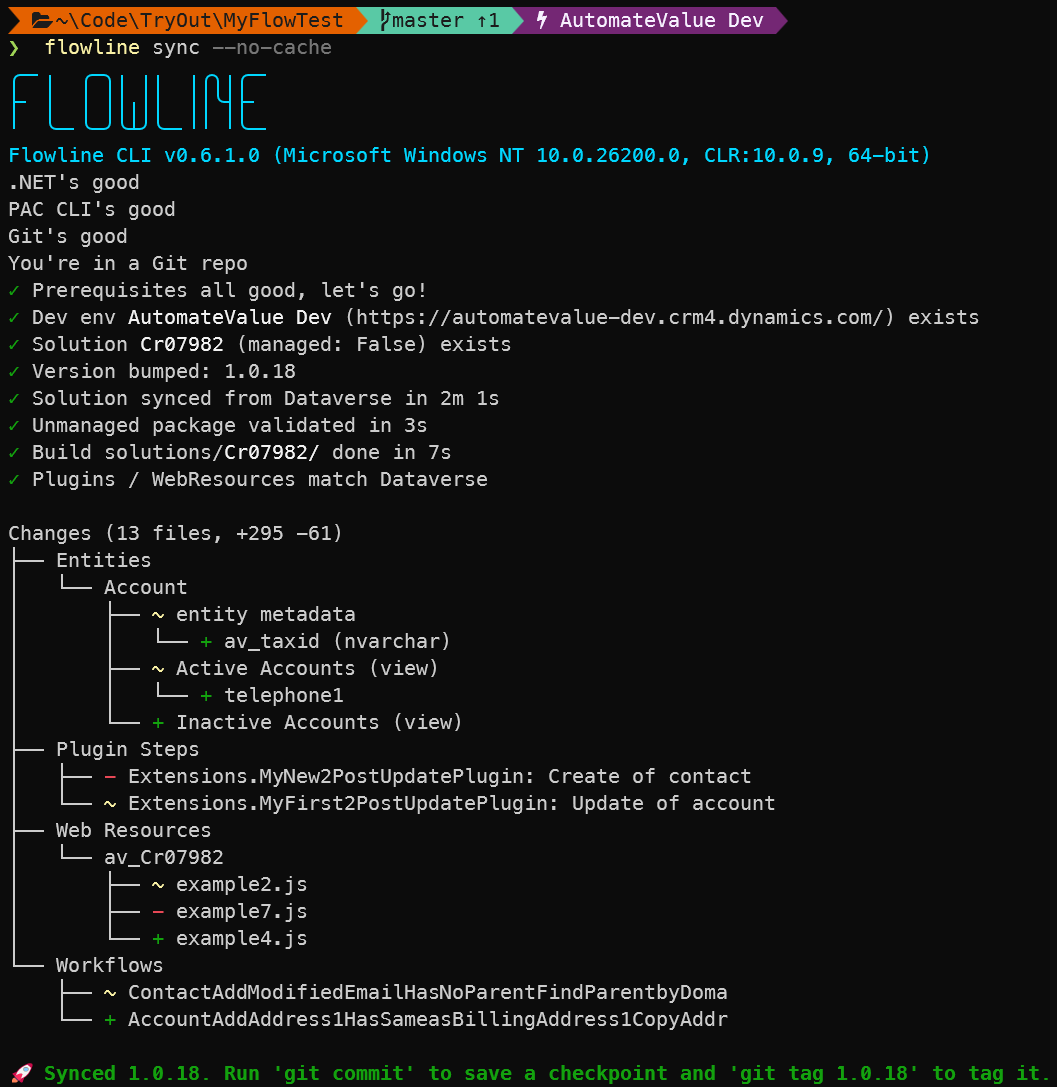
A full CHANGES.md is also written to the project root on every successful
pull. It has the full detail, and works as a PR description.
CI tip: CHANGES.md stays untouched when there are no changes. You can use it as a filter for a deploy trigger, so no-op deploys can be skipped.
To read that summary again later, or to compare two other points such as a pair of release tags, run flowline diff (see 04-Command-Reference#diff).
docs/DATAVERSE_CONTEXT.md is also regenerated on every successful pull. See
12-AI-Agents#dataverse-schema-context for what it contains and how AI agents consume it.
Then commit the result:
git commit -m "pull: add account validation form"pull has no --dry-run flag. To preview, pull, read the summary, then discard the unpacked source:
flowline pull --bump none      # don't bump the version for a look-only run
# review the printed summary and CHANGES.md
git checkout -- Solution/src # discard the unpacked sourceBy default, Flowline pulls only the unmanaged solution. To deploy managed, pass --managed once:
flowline pull --managedThe flag is saved to .flowline. To revert, pass --managed false.
Increment the solution version as part of pull with --bump:
flowline pull --bump patch     # 1.0.0 → 1.0.1 (default)
flowline pull --bump minor     # 1.0.0 → 1.1.0
flowline pull --bump major     # 1.0.0 → 2.0.0
flowline pull --bump none # 1.0.0 → 1.0.0 (no change)| Option | Description |
|---|---|
-e, --env <role|url>
|
Target DEV environment: dev keyword, the saved DEV URL, or a DEV environment URL. Only needed on first run; saved to .flowline automatically |
--managed [true|false] |
Export and unpack the managed solution in addition to unmanaged. Only needed on first run; saved to .flowline automatically. Pass --managed false to revert. |
--bump <component> |
Version component to increment: patch, minor, major, or none to skip bumping |
--no-build |
Skip the dotnet build validation step |
flowline push      # push code changes to DEV
# ... make changes in Maker Portal ...
flowline pull       # pull Dataverse changes back to source
git commit -m "feat: add validation"
flowline deploy test
See 04-Command-Reference#pull for the full option reference.