Repository navigation
Releases
Y2Linux 1.0 Beta 9.3.16

Y2Linux 1.0 Beta 9.3.16: steady Bluetooth. Linux 6.18 and the native Reborn music player for the Innioasis Y2.
Already running Y2Linux
Settings → System → Software Update → Update Now (on Beta 9.2.8 and older: Settings → About & Updates → Check for Updates → Update Now).
What changed
Bluetooth headphones no longer go silent after a skip, a seek or the end of a song (#96, Y2Reborn #99, part of Y2Reborn #87). From Play until you pause, the player now keeps a steady stream going to the headphones, as a phone does: music when there is music, silence while the next song gets ready. Before, the stream could run empty for a split second between songs, and AirPods and some other earbuds stayed silent until you paused and played again.
- Pause: silence for 3 seconds, then the stream stops. Play within 3 s continues at once.
- Play starts the headphones' stream once (it used to start, stop and start it again).
- One rate for every headset: 44.1 kHz, and SBC and AAC at one fixed bit rate by default. Codec settings you changed in the maintenance menu stay as you set them.
- Headphones that drop right after connecting (for example after pairing them with another device) are no longer reconnected over and over: after three quick drops the player asks you to pair them again.
- Wheel clicks with no music no longer stutter; gapless song changes no longer run the output empty.
- A skip, seek or pause is heard up to about 0.2 s later on Bluetooth than before; that small reserve keeps the stream full.
Before release: all Bluetooth events in 28 error reports read, the platform's full check, Reborn's workspace tests (new: a simulated pair of headphones that consumes the stream at real time; the old code ran it empty on skips and song ends, the new code never does), a new radio test for headphones that keep dropping, and the 552 tests of the release images. Installed by update on the developer's player.
What changed and why, in plain words: Beta 9.3.16 report.
Install (from stock)
You need SP Flash Tool v5.2032, a USB cable, Y2Linux-1.0.0-beta.9.3.16-first-install.zip below and the Innioasis Y2 firmware package v3.2.0 from Innioasis (only this version works; it is also your way back to stock).
- Unpack both.
- SP Flash Tool → Download Only → load
MT6582_Android_scatter.txtfrom the Y2Linux zip. Exactly BOOTIMG, RECOVERY, ANDROID and USRDATA are ticked. - Click Download and connect the switched-off Y2; wait for the green tick.
- Unplug and press Power: the player sets up its Internal Storage (a few seconds), then Y2Linux and Reborn start, music works.
- Connect the Y2 to the computer and copy (don't move)
system.imgfrom the Innioasis package into the Firmware folder on Internal Storage. The player takes the Wi-Fi/Bluetooth firmware from it and turns the radios on.
Full guide: INSTALL · How updates work: Recovery and updates · Storage: Storage · Audiobooks · Headphone settings: Headphone output · Error reports · Skins: skin guide
Known issues (beta)
- After a sleep (a pause longer than 15 minutes, or the Power button) the Bluetooth link ends; the player reconnects within a few seconds of waking. Buds that have gone back to a phone meanwhile must be picked again in Settings → Bluetooth.
- WPA3-only and Enhanced Open Wi-Fi networks can't be joined (hardware); ask for "WPA2/WPA3 mixed" where you can. A router that keeps refusing the player (#83) is still being worked on.
- Everything listed for Beta 9.0 still applies. If anything behaves differently from 9.3.15, send an error report (Settings → System → Error Reports); Restore Previous System (Settings → System → About, tap Version seven times, then Diagnostics) goes back to the version you had, with your data kept.
- Battery life in sleep: about 2 mA overnight on the developer's player (estimated from the battery voltage); stock is about 1.3 mA.
- Sony WH-1000XM4 on LDAC with Wi-Fi on can still drop out (Y2Reborn #87); AAC or Wi-Fi off is steadier. A report from 9.3.16 helps.
- Some players turned off by themselves during playback; the cause is not found yet. If yours does, start it again and send a report.
- The speaker uses the same volume as the headphones; its loudest step is the stock speaker's. Start low the first time.
- BBC radio stations stream only in HLS, which the player does not play yet. FM radio is in the works for a later beta.
Files
Y2Linux-1.0.0-beta.9.3.16-first-install.zip: images, scatter files and checksums for SP Flash Tool. The data image has no SSH key (developers:tools/production/first_owner.py).manifest.json,manifest.sig,rootfs.ext4.gz,bootimg.img.gz,recovery.img.gz: the signed over-the-air update (Ed25519 keyplatform-v1-release-20261015, sequence 14900).Y2Linux-1.0.0-beta.9.3.16-sources-buildroot-legal-info.tar(licences, manifests, this project's packages) and the third-party, toolchain and Linux sources linked below: corresponding sources. Our own code: Y2Linux and Y2Reborn at tagbaseline-224. The speaker amplifier driver is Chris Hendrickson's GPL-2.0 AW87559 driver. The headphone profiles are AutoEq results (MIT, Jaakko Pasanen); their licence ships with them.SHA256SUMSfor the attached files.
Beta software: use at your own risk. Not affiliated with Innioasis, MediaTek, Awinic, Last.fm, AutoEq, Strawberry or Google. Noto Sans CJK is licensed under the SIL Open Font License 1.1. Details: Beta 9.3.16 report.
Sources unchanged since an earlier release
Y2Linux-sources-toolchain-f7cda4c7d213.tar(attached tobaseline-120), SHA-256f7cda4c7d2134bed15dacc7afd7e1687621a57412d60e49c725efc3880bf1bc6linux-6.18.56.tar.xz(attached tobaseline-120), SHA-2564633bbda2ab95eaf2a7af4041236451d6759c72e6946265531af4b3aacefbf89
Y2Linux 1.0 Beta 9.3.15
Y2Linux 1.0 Beta 9.3.15: the Quick Menu. Linux 6.18 and the native Reborn music player for the Innioasis Y2.
Already running Y2Linux
Settings → System → Software Update → Update Now (on Beta 9.2.8 and older: Settings → About & Updates → Check for Updates → Update Now).
What changed
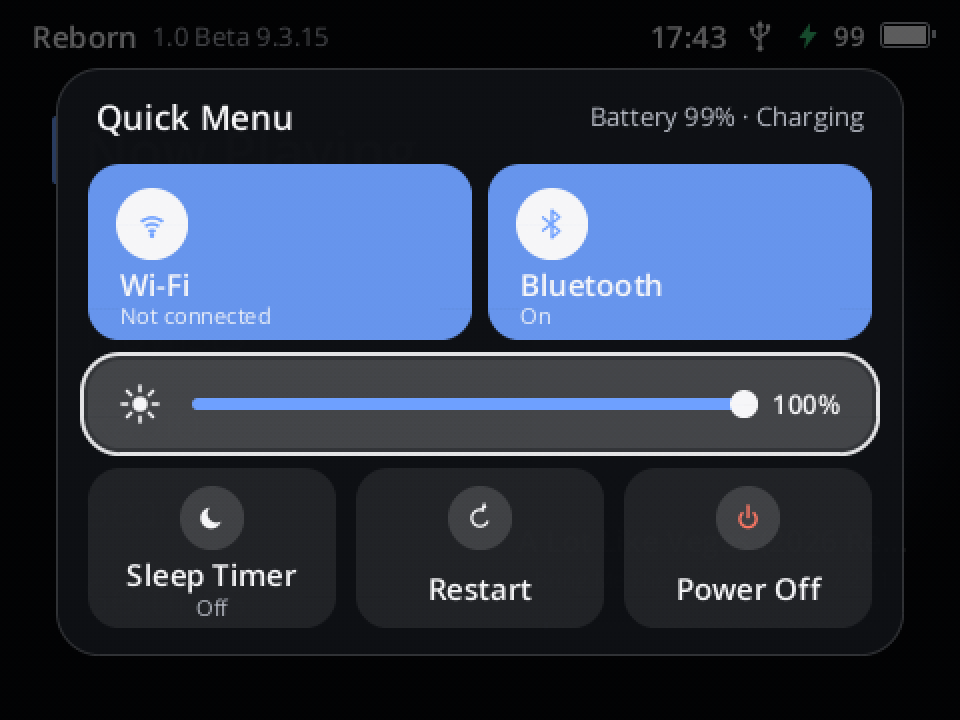
Hold Power on any screen and the Quick Menu opens (#85): Wi-Fi and Bluetooth on or off, the screen's brightness, the sleep timer, Restart and Power Off, without going into Settings.
- A panel of tiles in the middle of the screen; it grows in over the dimmed screen and the focus glides from tile to tile as you turn the wheel. Let go of Power and it stays; Back or a short press of Power closes it.
- Brightness: Select, turn the wheel, Select. Wi-Fi / Bluetooth: Select switches them; the tile is coloured while on. Restart / Power Off act at once.
- Still turns off when held: keep holding Power and a ring fills around Power Off; the player turns off after about 4 s (it was 2 s).
- Every skin shows the panel in its own colours.
Before release: the platform's full check, Reborn's workspace tests (new ones for the menu) and the 552 tests of the release images; the panel checked on host renders in four looks and on the developer's player. Version 9.3.14 was an unpublished test build; everything from Beta 9.3.13 is included.
What changed and why, in plain words: Beta 9.3.15 report.
Install (from stock)
You need SP Flash Tool v5.2032, a USB cable, Y2Linux-1.0.0-beta.9.3.15-first-install.zip below and the Innioasis Y2 firmware package v3.2.0 from Innioasis (only this version works; it is also your way back to stock).
- Unpack both.
- SP Flash Tool → Download Only → load
MT6582_Android_scatter.txtfrom the Y2Linux zip. Exactly BOOTIMG, RECOVERY, ANDROID and USRDATA are ticked. - Click Download and connect the switched-off Y2; wait for the green tick.
- Unplug and press Power: the player sets up its Internal Storage (a few seconds), then Y2Linux and Reborn start, music works.
- Connect the Y2 to the computer and copy (don't move)
system.imgfrom the Innioasis package into the Firmware folder on Internal Storage. The player takes the Wi-Fi/Bluetooth firmware from it and turns the radios on.
Full guide: INSTALL · How updates work: Recovery and updates · Storage: Storage · Audiobooks · Headphone settings: Headphone output · Error reports · Skins: skin guide
Known issues (beta)
- After a sleep (a pause longer than 15 minutes, or the Power button) the Bluetooth link ends; the player reconnects within a few seconds of waking. Buds that have gone back to a phone meanwhile must be picked again in Settings → Bluetooth.
- WPA3-only and Enhanced Open Wi-Fi networks can't be joined (hardware); ask for "WPA2/WPA3 mixed" where you can. A router that keeps refusing the player (#83) is still being worked on.
- Everything listed for Beta 9.0 still applies. If anything behaves differently from 9.3.13, send an error report (Settings → System → Error Reports); Restore Previous System (Settings → System → About, tap Version seven times, then Diagnostics) goes back to the version you had, with your data kept.
- Battery life in sleep: about 2 mA overnight on the developer's player (estimated from the battery voltage); stock is about 1.3 mA.
- Some players turned off by themselves during playback; the cause is not found yet. If yours does, start it again and send a report.
- The speaker uses the same volume as the headphones; its loudest step is the stock speaker's. Start low the first time.
- BBC radio stations stream only in HLS, which the player does not play yet. FM radio is in the works for a later beta.
Files
Y2Linux-1.0.0-beta.9.3.15-first-install.zip: images, scatter files and checksums for SP Flash Tool. The data image has no SSH key (developers:tools/production/first_owner.py).manifest.json,manifest.sig,rootfs.ext4.gz,bootimg.img.gz,recovery.img.gz: the signed over-the-air update (Ed25519 keyplatform-v1-release-20261015, sequence 14800).Y2Linux-1.0.0-beta.9.3.15-sources-buildroot-legal-info.tar(licences, manifests, this project's packages) and the third-party, toolchain and Linux sources linked below: corresponding sources. Our own code: Y2Linux and Y2Reborn at tagbaseline-223. The speaker amplifier driver is Chris Hendrickson's GPL-2.0 AW87559 driver. The headphone profiles are AutoEq results (MIT, Jaakko Pasanen); their licence ships with them.SHA256SUMSfor the attached files.
Beta software: use at your own risk. Not affiliated with Innioasis, MediaTek, Awinic, Last.fm, AutoEq, Strawberry or Google. Noto Sans CJK is licensed under the SIL Open Font License 1.1. Details: Beta 9.3.15 report.
Sources unchanged since an earlier release
Y2Linux-sources-third-party-d665a5f06500.tar(attached tobaseline-220), SHA-256d665a5f065004ae5d56bd8ed75f2ad0af8f9a040db9f171ffc6044cb348cf8f3Y2Linux-sources-toolchain-f7cda4c7d213.tar(attached tobaseline-120), SHA-256f7cda4c7d2134bed15dacc7afd7e1687621a57412d60e49c725efc3880bf1bc6linux-6.18.56.tar.xz(attached tobaseline-120), SHA-2564633bbda2ab95eaf2a7af4041236451d6759c72e6946265531af4b3aacefbf89
Y2Linux 1.0 Beta 9.3.13
Y2Linux 1.0 Beta 9.3.13: Wi-Fi that tries harder, square covers in skins. Linux 6.18 and the native Reborn music player for the Innioasis Y2.
Already running Y2Linux
Settings → System → Software Update → Update Now (on Beta 9.2.8 and older: Settings → About & Updates → Check for Updates → Update Now).
What changed
A small release of fixes from your reports.
- Joining a Wi-Fi network that "isn't found" tries once more after a Wi-Fi restart (#83). A report showed the player scanning for 34 s after Wi-Fi came on without seeing a network that was right there; switching Wi-Fi off and on found it in 3 s. The player now does that switch itself the first time a join finds nothing. Routers that keep refusing the player (also #83) are a different problem and still open.
- A network the player can't join says why (#91): WPA3 only, Needs a login (work or school networks) or WEP, instead of only "Unsupported security". The Y2's Wi-Fi chip can't join WPA3 networks at all (its firmware only knows open, WEP, WPA and WPA2), and no update can change that; networks that offer WPA2 and WPA3 together work, with WPA2.
- Letter scrolling puts the letter's first entry at the top, forwards as backwards (Y2Reborn #91).
- Covers fit their frames in skins (Y2Reborn #81): no more cut corners in Terminal, Winamp and Paper, Winamp's cover is centred. Cassette's stripe no longer runs through the title (Y2Reborn #82).
Before release: the platform's full check, Reborn's workspace tests (new ones for the Wi-Fi retry, the reasons a network can't be joined and letter scrolling) and the 552 tests of the release images; skins and the Wi-Fi page checked on host renders. This build was not run on a player before release: if anything behaves worse than in 9.3.12, please send an error report.
What changed and why, in plain words: Beta 9.3.13 report.
Install (from stock)
You need SP Flash Tool v5.2032, a USB cable, Y2Linux-1.0.0-beta.9.3.13-first-install.zip below and the Innioasis Y2 firmware package v3.2.0 from Innioasis (only this version works; it is also your way back to stock).
- Unpack both.
- SP Flash Tool → Download Only → load
MT6582_Android_scatter.txtfrom the Y2Linux zip. Exactly BOOTIMG, RECOVERY, ANDROID and USRDATA are ticked. - Click Download and connect the switched-off Y2; wait for the green tick.
- Unplug and press Power: the player sets up its Internal Storage (a few seconds), then Y2Linux and Reborn start, music works.
- Connect the Y2 to the computer and copy (don't move)
system.imgfrom the Innioasis package into the Firmware folder on Internal Storage. The player takes the Wi-Fi/Bluetooth firmware from it and turns the radios on.
Full guide: INSTALL · How updates work: Recovery and updates · Storage: Storage · Audiobooks · Headphone settings: Headphone output · Error reports · Skins: skin guide
Known issues (beta)
- After a sleep (a pause longer than 15 minutes, or the Power button) the Bluetooth link ends; the player reconnects within a few seconds of waking. Buds that have gone back to a phone meanwhile must be picked again in Settings → Bluetooth.
- WPA3-only and Enhanced Open Wi-Fi networks can't be joined (hardware); ask for "WPA2/WPA3 mixed" where you can. A router that keeps refusing the player (#83) is still being worked on.
- Everything listed for Beta 9.0 still applies. If anything behaves differently from 9.3.12, send an error report (Settings → System → Error Reports); Restore Previous System (Settings → System → About, tap Version seven times, then Diagnostics) goes back to the version you had, with your data kept.
- Battery life in sleep: about 2 mA overnight on the developer's player (estimated from the battery voltage); stock is about 1.3 mA.
- Some players turned off by themselves during playback; the cause is not found yet. If yours does, start it again and send a report.
- The speaker uses the same volume as the headphones; its loudest step is the stock speaker's. Start low the first time.
- BBC radio stations stream only in HLS, which the player does not play yet. FM radio is in the works for a later beta.
Files
Y2Linux-1.0.0-beta.9.3.13-first-install.zip: images, scatter files and checksums for SP Flash Tool. The data image has no SSH key (developers:tools/production/first_owner.py).manifest.json,manifest.sig,rootfs.ext4.gz,bootimg.img.gz,recovery.img.gz: the signed over-the-air update (Ed25519 keyplatform-v1-release-20261015, sequence 14600).Y2Linux-1.0.0-beta.9.3.13-sources-buildroot-legal-info.tar(licences, manifests, this project's packages) and the third-party, toolchain and Linux sources linked below: corresponding sources. Our own code: Y2Linux and Y2Reborn at tagbaseline-221. The speaker amplifier driver is Chris Hendrickson's GPL-2.0 AW87559 driver. The headphone profiles are AutoEq results (MIT, Jaakko Pasanen); their licence ships with them.SHA256SUMSfor the attached files.
Beta software: use at your own risk. Not affiliated with Innioasis, MediaTek, Awinic, Last.fm, AutoEq, Strawberry or Google. Noto Sans CJK is licensed under the SIL Open Font License 1.1. Details: Beta 9.3.13 report.
Sources unchanged since an earlier release
Y2Linux-sources-third-party-d665a5f06500.tar(attached tobaseline-220), SHA-256d665a5f065004ae5d56bd8ed75f2ad0af8f9a040db9f171ffc6044cb348cf8f3Y2Linux-sources-toolchain-f7cda4c7d213.tar(attached tobaseline-120), SHA-256f7cda4c7d2134bed15dacc7afd7e1687621a57412d60e49c725efc3880bf1bc6linux-6.18.56.tar.xz(attached tobaseline-120), SHA-2564633bbda2ab95eaf2a7af4041236451d6759c72e6946265531af4b3aacefbf89
Y2Linux 1.0 Beta 9.3.12
Y2Linux 1.0 Beta 9.3.12: Bluetooth pauses and skips like a phone. Linux 6.18 and the native Reborn music player for the Innioasis Y2.
Already running Y2Linux
Settings → System → Software Update → Update Now (on Beta 9.2.8 and older: Settings → About & Updates → Check for Updates → Update Now).
What changed
Beta 9.3.7 kept a Bluetooth stream open while you paused, so that no headphones would be asked to stop and start. Phones never do that, and it caused three complaints at once: silence after a pause or after the second or third song (#89), the connection drop about 20 seconds into a pause (AirPods Pro), and Buds that "disconnected" a minute into a pause (#90, where the player had in fact gone to sleep). This release goes back to what phones and Beta 9.2.16 do.
- Pause stops the stream, Play starts a new one. Headphones that went silent after a pause or a skip, and the drop 20 s into a pause, both came from a stream kept open without sound: the headphones run dry and some (AirPods) never recover until a new stream starts.
- A track change no longer interrupts the stream. The old song's last fraction of a second plays out and the next follows without a gap; before, the stream stopped for about 60 ms per skip (#89: "the second song is laggy, the third plays without sound").
- A paused player with Bluetooth headphones stays awake 15 minutes before it sleeps (#90). The hold was there since Beta 8.18 but counted from the first pause after boot, so a later pause slept after 60 s, and sleep ends the Bluetooth link.
- No more connect/drop loop for headphones that connect with a different codec than the chosen one (Y2Reborn #94: Bose SoundLink Flex 2, Sony WF-C710N).
Before release: the platform's full check, Reborn's workspace tests (new ones for the paused-headset hold and the kept Bluetooth sink) and the 552 tests of the release images. On the developer's player with AirPods Pro: skips in a row and pauses of various lengths, all with sound afterwards. A capture of the previous test build showed the packets to the headphones running on without a gap at the skips and silence only after the pause/resume gaps, which is what settled the cause. Other headphones were not re-tested yet: if yours behave worse than in 9.3.7, please send an error report.
What changed and why, in plain words: Beta 9.3.12 report. Versions 9.3.8 to 9.3.11 were unpublished test builds; everything from Beta 9.3.7 is included (Beta 9.3.7 report).
Install (from stock)
You need SP Flash Tool v5.2032, a USB cable, Y2Linux-1.0.0-beta.9.3.12-first-install.zip below and the Innioasis Y2 firmware package v3.2.0 from Innioasis (only this version works; it is also your way back to stock).
- Unpack both.
- SP Flash Tool → Download Only → load
MT6582_Android_scatter.txtfrom the Y2Linux zip. Exactly BOOTIMG, RECOVERY, ANDROID and USRDATA are ticked. - Click Download and connect the switched-off Y2; wait for the green tick.
- Unplug and press Power: the player sets up its Internal Storage (a few seconds), then Y2Linux and Reborn start, music works.
- Connect the Y2 to the computer and copy (don't move)
system.imgfrom the Innioasis package into the Firmware folder on Internal Storage. The player takes the Wi-Fi/Bluetooth firmware from it and turns the radios on.
Full guide: INSTALL · How updates work: Recovery and updates · Storage: Storage · Audiobooks · Headphone settings: Headphone output · Error reports · Skins: skin guide
Known issues (beta)
- After a sleep (a pause longer than 15 minutes, or the Power button) the Bluetooth link ends; the player reconnects within a few seconds of waking. Buds that have gone back to a phone meanwhile must be picked again in Settings → Bluetooth.
- The Hisense soundbar of Y2Reborn #94 (SBC only, connected but silent) is not resolved; try SBC quality High.
- Everything listed for Beta 9.0 still applies. If anything behaves differently from 9.3.7, send an error report (Settings → System → Error Reports); Restore Previous System (Settings → System → About, tap Version seven times, then Diagnostics) goes back to the version you had, with your data kept.
- Battery life in sleep: about 2 mA overnight on the developer's player (estimated from the battery voltage); stock is about 1.3 mA.
- Some players turned off by themselves during playback; the cause is not found yet. If yours does, start it again and send a report.
- The speaker uses the same volume as the headphones; its loudest step is the stock speaker's. Start low the first time.
- BBC radio stations stream only in HLS, which the player does not play yet. FM radio is in the works for a later beta.
Files
Y2Linux-1.0.0-beta.9.3.12-first-install.zip: images, scatter files and checksums for SP Flash Tool. The data image has no SSH key (developers:tools/production/first_owner.py).manifest.json,manifest.sig,rootfs.ext4.gz,bootimg.img.gz,recovery.img.gz: the signed over-the-air update (Ed25519 keyplatform-v1-release-20261015, sequence 14500).Y2Linux-1.0.0-beta.9.3.12-sources-buildroot-legal-info.tar(licences, manifests, this project's packages) and the third-party, toolchain and Linux sources linked below: corresponding sources. Our own code: Y2Linux and Y2Reborn at tagbaseline-220. The speaker amplifier driver is Chris Hendrickson's GPL-2.0 AW87559 driver. The headphone profiles are AutoEq results (MIT, Jaakko Pasanen); their licence ships with them.SHA256SUMSfor the attached files.
Beta software: use at your own risk. Not affiliated with Innioasis, MediaTek, Awinic, Last.fm, AutoEq, Strawberry or Google. Noto Sans CJK is licensed under the SIL Open Font License 1.1. Details: Beta 9.3.12 report.
Sources unchanged since an earlier release
Y2Linux-sources-toolchain-f7cda4c7d213.tar(attached tobaseline-120), SHA-256f7cda4c7d2134bed15dacc7afd7e1687621a57412d60e49c725efc3880bf1bc6linux-6.18.56.tar.xz(attached tobaseline-120), SHA-2564633bbda2ab95eaf2a7af4041236451d6759c72e6946265531af4b3aacefbf89
Y2Linux 1.0 Beta 9.3.7
Y2Linux 1.0 Beta 9.3.7: Bluetooth rebuilt for reliability. Linux 6.18 and the native Reborn music player for the Innioasis Y2.
Already running Y2Linux
Settings → System → Software Update → Update Now (on Beta 9.2.8 and older: Settings → About & Updates → Check for Updates → Update Now).
What changed
Bluetooth used to be handled by five separate pieces that coordinated through lock files; when two acted at once, headphones stayed half connected or reconnects stalled. One radio program now owns Bluetooth and the radio it shares with Wi-Fi. The player says what it wants, and the radio program gets there and repairs itself. Every codec, rate and quality setting from 9.2.16 is kept.
- Headphones come back after sleep, also when they reconnect by themselves: AirPods Pro were ready 2.5–5 s after a wake (before: often 15–20 s).
- Bluetooth repairs itself (cancel a stuck step, restart the radio, BlueALSA, BlueZ). If everything fails it says so: switching Bluetooth off and on in Settings now restarts all of Bluetooth.
- Connect Automatically per device (Y2Reborn #78): Settings → Bluetooth → a paired device.
- Codec and quality changes apply without restarting the player (the headphones are back in about 7–9 s).
- Your library is no longer emptied when a Bluetooth output fails (Y2Reborn #92).
- Headphones that are switched off are no longer paged forever; pausing keeps the connection instead of stopping the stream; Wi-Fi uses its power saving while Bluetooth plays; after sleep Wi-Fi waits for your headphones; each pair of headphones starts at the rate it managed last time.
Before release: the platform's full check, Reborn's workspace tests, the 552 tests of the release images, and a fake Bluetooth stack with six failure scenarios. On the developer's player with AirPods Pro: 19 sleep/wake cycles without a failed connection. Only AirPods Pro were tried, and there is no overnight run on this exact build yet: if your headphones behave worse than in 9.2.16, please send an error report.
What changed and why, in plain words: Beta 9.3.7 report. Versions 9.3 to 9.3.6 were unpublished test builds; everything from Beta 9.2.16 is included (Beta 9.2.16 report).
Install (from stock)
You need SP Flash Tool v5.2032, a USB cable, Y2Linux-1.0.0-beta.9.3.7-first-install.zip below and the Innioasis Y2 firmware package v3.2.0 from Innioasis (only this version works; it is also your way back to stock).
- Unpack both.
- SP Flash Tool → Download Only → load
MT6582_Android_scatter.txtfrom the Y2Linux zip. Exactly BOOTIMG, RECOVERY, ANDROID and USRDATA are ticked. - Click Download and connect the switched-off Y2; wait for the green tick.
- Unplug and press Power: the player sets up its Internal Storage (a few seconds), then Y2Linux and Reborn start, music works.
- Connect the Y2 to the computer and copy (don't move)
system.imgfrom the Innioasis package into the Firmware folder on Internal Storage. The player takes the Wi-Fi/Bluetooth firmware from it and turns the radios on.
Full guide: INSTALL · How updates work: Recovery and updates · Storage: Storage · Audiobooks · Headphone settings: Headphone output · Error reports · Skins: skin guide
Known issues (beta)
- Bluetooth after a long pause: with AirPods Pro, a pause longer than about 20 seconds drops the connection once; they reconnect within seconds, but pressing play during those 20 seconds can stay silent until they are back. Being investigated.
- Everything listed for Beta 9.0 still applies. If anything behaves differently from 9.2.16, send an error report (Settings → System → Error Reports); Restore Previous System (Settings → System → About, tap Version seven times, then Diagnostics) goes back to the version you had, with your data kept.
- Battery life in sleep: about 2 mA overnight on the developer's player (estimated from the battery voltage); stock is about 1.3 mA.
- Some players turned off by themselves during playback; the cause is not found yet. If yours does, start it again and send a report.
- The speaker uses the same volume as the headphones; its loudest step is the stock speaker's. Start low the first time.
- How loud the wheel click should be is a first guess; tell us if it is too loud or too soft.
- BBC radio stations stream only in HLS, which the player does not play yet. FM radio is in the works for a later beta.
Files
Y2Linux-1.0.0-beta.9.3.7-first-install.zip: images, scatter files and checksums for SP Flash Tool. The data image has no SSH key (developers:tools/production/first_owner.py).manifest.json,manifest.sig,rootfs.ext4.gz,bootimg.img.gz,recovery.img.gz: the signed over-the-air update (Ed25519 keyplatform-v1-release-20261015, sequence 14000).Y2Linux-1.0.0-beta.9.3.7-sources-buildroot-legal-info.tar(licences, manifests, this project's packages) and the third-party, toolchain and Linux sources linked below: corresponding sources. Our own code: Y2Linux and Y2Reborn at tagbaseline-215. The speaker amplifier driver is Chris Hendrickson's GPL-2.0 AW87559 driver. The headphone profiles are AutoEq results (MIT, Jaakko Pasanen); their licence ships with them.SHA256SUMSfor the attached files.
Beta software: use at your own risk. Not affiliated with Innioasis, MediaTek, Awinic, Last.fm, AutoEq, Strawberry or Google. Noto Sans CJK is licensed under the SIL Open Font License 1.1. Details: Beta 9.3.7 report.
Sources unchanged since an earlier release
Y2Linux-sources-toolchain-f7cda4c7d213.tar(attached tobaseline-120), SHA-256f7cda4c7d2134bed15dacc7afd7e1687621a57412d60e49c725efc3880bf1bc6linux-6.18.56.tar.xz(attached tobaseline-120), SHA-2564633bbda2ab95eaf2a7af4041236451d6759c72e6946265531af4b3aacefbf89
Y2Linux 1.0 Beta 9.2.16
Y2Linux 1.0 Beta 9.2.16: steadier Bluetooth sound. Linux 6.18 and the native Reborn music player for the Innioasis Y2.
Already running Y2Linux
Settings → System → Software Update → Update Now (on Beta 9.2.8 and older: Settings → About & Updates → Check for Updates → Update Now).
What changed
- Steadier Bluetooth, lower default rates (Y2Reborn #87): crackling and cut-outs on Sony WH-1000XM4 headphones came from AAC at 320 kbit/s while Wi-Fi was on; the Y2 has one antenna that Wi-Fi and Bluetooth share. AAC now runs at 220 kbit/s by default (was up to 320) and LDAC at 330 kbit/s (was 660).
- An extra limit while Wi-Fi is on: AAC at most 192 kbit/s and SBC one step below its top quality as long as the Wi-Fi radio is on; the full rate returns when Wi-Fi goes off. It changes while the music plays, without a reconnect.
- Auto picks AAC first, then aptX, then SBC; LDAC and aptX HD only when you choose them in the service menu.
- Your chosen codec is used even when the headphones connect during playback (Y2Reborn #87): it is asked for again at the next pause instead of being dropped until the next reconnect.
Before release: the platform's full check, Reborn's workspace tests and the tests of the release images, with new tests for the Wi-Fi limit (AAC and SBC), the defaults, Auto's order and the codec retry. Not yet tried on a player: if Bluetooth sounds worse or behaves differently than in 9.2.15, please send an error report (Settings → System → Error Reports).
What changed and why, in plain words: Beta 9.2.16 report. Everything from Beta 9.2.15 is included (Beta 9.2.15 report).
Install (from stock)
You need SP Flash Tool v5.2032, a USB cable, Y2Linux-1.0.0-beta.9.2.16-first-install.zip below and the Innioasis Y2 firmware package v3.2.0 from Innioasis (only this version works; it is also your way back to stock).
- Unpack both.
- SP Flash Tool → Download Only → load
MT6582_Android_scatter.txtfrom the Y2Linux zip. Exactly BOOTIMG, RECOVERY, ANDROID and USRDATA are ticked. - Click Download and connect the switched-off Y2; wait for the green tick.
- Unplug and press Power: the player sets up its Internal Storage (a few seconds), then Y2Linux and Reborn start, music works.
- Connect the Y2 to the computer and copy (don't move)
system.imgfrom the Innioasis package into the Firmware folder on Internal Storage. The player takes the Wi-Fi/Bluetooth firmware from it and turns the radios on.
Full guide: INSTALL · How updates work: Recovery and updates · Storage: Storage · Audiobooks · Headphone settings: Headphone output · Error reports · Skins: skin guide
Known issues (beta)
- Everything listed for Beta 9.0 still applies. If anything behaves differently from 9.2.14, send an error report (Settings → System → Error Reports); Restore Previous System (Settings → System → About, tap Version seven times, then Diagnostics) goes back to the version you had, with your data kept.
- Battery life in sleep: about 2 mA overnight on the developer's player (estimated from the battery voltage); stock is about 1.3 mA.
- Some players turned off by themselves during playback; the cause is not found yet. If yours does, start it again and send a report.
- The speaker uses the same volume as the headphones; its loudest step is the stock speaker's. Start low the first time.
- How loud the wheel click should be is a first guess; tell us if it is too loud or too soft.
- BBC radio stations stream only in HLS, which the player does not play yet. FM radio is in the works for a later beta.
Files
Y2Linux-1.0.0-beta.9.2.16-first-install.zip: images, scatter files and checksums for SP Flash Tool. The data image has no SSH key (developers:tools/production/first_owner.py).manifest.json,manifest.sig,rootfs.ext4.gz,bootimg.img.gz,recovery.img.gz: the signed over-the-air update (Ed25519 keyplatform-v1-release-20261015, sequence 13200).Y2Linux-1.0.0-beta.9.2.16-sources-buildroot-legal-info.tar(licences, manifests, this project's packages) and the third-party, toolchain and Linux sources linked below: corresponding sources. Our own code: Y2Linux and Y2Reborn at tagbaseline-207. The speaker amplifier driver is Chris Hendrickson's GPL-2.0 AW87559 driver. The headphone profiles are AutoEq results (MIT, Jaakko Pasanen); their licence ships with them.SHA256SUMSfor the attached files.
Beta software: use at your own risk. Not affiliated with Innioasis, MediaTek, Awinic, Last.fm, AutoEq, Strawberry or Google. Noto Sans CJK is licensed under the SIL Open Font License 1.1. Details: Beta 9.2.16 report.
Sources unchanged since an earlier release
Y2Linux-sources-toolchain-f7cda4c7d213.tar(attached tobaseline-120), SHA-256f7cda4c7d2134bed15dacc7afd7e1687621a57412d60e49c725efc3880bf1bc6linux-6.18.56.tar.xz(attached tobaseline-120), SHA-2564633bbda2ab95eaf2a7af4041236451d6759c72e6946265531af4b3aacefbf89
Y2Linux 1.0 Beta 9.2.15
Y2Linux 1.0 Beta 9.2.15: Settings scrolls smoothly with a large library. Linux 6.18 and the native Reborn music player for the Innioasis Y2.
Already running Y2Linux
Settings → System → Software Update → Update Now (on Beta 9.2.8 and older: Settings → About & Updates → Check for Updates → Update Now).
What changed
- Settings is fast again with a large library (Y2Reborn #85, fixed by @mrtngamper in #86): since the Settings redesign in 9.2.10, the Settings page and Settings → Library counted every song on the player again for each picture drawn, so with tens of thousands of songs scrolling there lagged. They now use the count the player already keeps. Every other screen was checked the same way with 72 000 songs; none does this.
Before release: the platform's full check, Reborn's workspace tests (776; new, failing without the change: Settings and Settings → Library count the songs they are given) and the tests of the release images. On a computer with 72 000 songs, a Settings frame went from about 20 ms to under 0.01 ms. Installed on the developer's player by update from 9.2.14.
What changed and why, in plain words: Beta 9.2.15 report. Everything from Beta 9.2.14 is included (Beta 9.2.14 report).
Install (from stock)
You need SP Flash Tool v5.2032, a USB cable, Y2Linux-1.0.0-beta.9.2.15-first-install.zip below and the Innioasis Y2 firmware package v3.2.0 from Innioasis (only this version works; it is also your way back to stock).
- Unpack both.
- SP Flash Tool → Download Only → load
MT6582_Android_scatter.txtfrom the Y2Linux zip. Exactly BOOTIMG, RECOVERY, ANDROID and USRDATA are ticked. - Click Download and connect the switched-off Y2; wait for the green tick.
- Unplug and press Power: the player sets up its Internal Storage (a few seconds), then Y2Linux and Reborn start, music works.
- Connect the Y2 to the computer and copy (don't move)
system.imgfrom the Innioasis package into the Firmware folder on Internal Storage. The player takes the Wi-Fi/Bluetooth firmware from it and turns the radios on.
Full guide: INSTALL · How updates work: Recovery and updates · Storage: Storage · Audiobooks · Headphone settings: Headphone output · Error reports · Skins: skin guide
Known issues (beta)
- Everything listed for Beta 9.0 still applies. If anything behaves differently from 9.2.14, send an error report (Settings → System → Error Reports); Restore Previous System (Settings → System → About, tap Version seven times, then Diagnostics) goes back to the version you had, with your data kept.
- Battery life in sleep: about 2 mA overnight on the developer's player (estimated from the battery voltage); stock is about 1.3 mA.
- Some players turned off by themselves during playback; the cause is not found yet. If yours does, start it again and send a report.
- The speaker uses the same volume as the headphones; its loudest step is the stock speaker's. Start low the first time.
- How loud the wheel click should be is a first guess; tell us if it is too loud or too soft.
- BBC radio stations stream only in HLS, which the player does not play yet. FM radio is in the works for a later beta.
Files
Y2Linux-1.0.0-beta.9.2.15-first-install.zip: images, scatter files and checksums for SP Flash Tool. The data image has no SSH key (developers:tools/production/first_owner.py).manifest.json,manifest.sig,rootfs.ext4.gz,bootimg.img.gz,recovery.img.gz: the signed over-the-air update (Ed25519 keyplatform-v1-release-20261015, sequence 13100).Y2Linux-1.0.0-beta.9.2.15-sources-buildroot-legal-info.tar(licences, manifests, this project's packages) and the third-party, toolchain and Linux sources linked below: corresponding sources. Our own code: Y2Linux and Y2Reborn at tagbaseline-206. The speaker amplifier driver is Chris Hendrickson's GPL-2.0 AW87559 driver. The headphone profiles are AutoEq results (MIT, Jaakko Pasanen); their licence ships with them.SHA256SUMSfor the attached files.
Beta software: use at your own risk. Not affiliated with Innioasis, MediaTek, Awinic, Last.fm, AutoEq, Strawberry or Google. Noto Sans CJK is licensed under the SIL Open Font License 1.1. Details: Beta 9.2.15 report.
Sources unchanged since an earlier release
Y2Linux-sources-third-party-a6aaa039273c.tar(attached tobaseline-186), SHA-256a6aaa039273c141a32e9c392305e2c3f75a4b48077ec78576b8f2c2a735551fdY2Linux-sources-toolchain-f7cda4c7d213.tar(attached tobaseline-120), SHA-256f7cda4c7d2134bed15dacc7afd7e1687621a57412d60e49c725efc3880bf1bc6linux-6.18.56.tar.xz(attached tobaseline-120), SHA-2564633bbda2ab95eaf2a7af4041236451d6759c72e6946265531af4b3aacefbf89
Contributors

Assets 10
Y2Linux 1.0 Beta 9.2.14
Y2Linux 1.0 Beta 9.2.14: Bluetooth stays connected while you change stations. Linux 6.18 and the native Reborn music player for the Innioasis Y2.
Already running Y2Linux
Settings → System → Software Update → Update Now (on Beta 9.2.8 and older: Settings → About & Updates → Check for Updates → Update Now).
What changed
- Bluetooth no longer drops when you change radio stations quickly (from an error report): every new station or song closed the Bluetooth output and opened it again, twice, and each time the headphones were asked to start streaming anew. Some earbuds answer that slowly; when one answer took longer than six seconds, the connection ended. The player now keeps the Bluetooth output open from one station or song to the next while the headphones stay the same, as it already did for the headphone jack. Pause still releases it at once.
- New issue forms on GitHub: a new issue now opens a short form for its kind of problem (something wrong, slow, battery, sound and Bluetooth, Wi-Fi and radio, install or update, a feature request, a question), so the details needed to find the cause are there from the start.
Before release: the platform's full check, Reborn's workspace tests (new, each failing without its change: a Bluetooth output plays the next stream in the open sink; it is taken only while the headphones' connection, codec, rate and format are unchanged) and the tests of the release images. On the developer's player: installed by update from 9.2.13, and six quick skips on AirPods Pro each played at once in the open Bluetooth output.
What changed and why, in plain words: Beta 9.2.14 report. Everything from Beta 9.2.13 is included (Beta 9.2.13 report).
Install (from stock)
You need SP Flash Tool v5.2032, a USB cable, Y2Linux-1.0.0-beta.9.2.14-first-install.zip below and the Innioasis Y2 firmware package v3.2.0 from Innioasis (only this version works; it is also your way back to stock).
- Unpack both.
- SP Flash Tool → Download Only → load
MT6582_Android_scatter.txtfrom the Y2Linux zip. Exactly BOOTIMG, RECOVERY, ANDROID and USRDATA are ticked. - Click Download and connect the switched-off Y2; wait for the green tick.
- Unplug and press Power: the player sets up its Internal Storage (a few seconds), then Y2Linux and Reborn start, music works.
- Connect the Y2 to the computer and copy (don't move)
system.imgfrom the Innioasis package into the Firmware folder on Internal Storage. The player takes the Wi-Fi/Bluetooth firmware from it and turns the radios on.
Full guide: INSTALL · How updates work: Recovery and updates · Storage: Storage · Audiobooks · Headphone settings: Headphone output · Error reports · Skins: skin guide
Known issues (beta)
- Everything listed for Beta 9.0 still applies. If anything behaves differently from 9.2.13, send an error report (Settings → System → Error Reports); Restore Previous System (Settings → System → About, tap Version seven times, then Diagnostics) goes back to the version you had, with your data kept.
- Battery life in sleep: about 2 mA overnight on the developer's player (estimated from the battery voltage); stock is about 1.3 mA.
- Some players turned off by themselves during playback; the cause is not found yet. If yours does, start it again and send a report.
- The speaker uses the same volume as the headphones; its loudest step is the stock speaker's. Start low the first time.
- How loud the wheel click should be is a first guess; tell us if it is too loud or too soft.
- BBC radio stations stream only in HLS, which the player does not play yet. FM radio is in the works for a later beta.
Files
Y2Linux-1.0.0-beta.9.2.14-first-install.zip: images, scatter files and checksums for SP Flash Tool. The data image has no SSH key (developers:tools/production/first_owner.py).manifest.json,manifest.sig,rootfs.ext4.gz,bootimg.img.gz,recovery.img.gz: the signed over-the-air update (Ed25519 keyplatform-v1-release-20261015, sequence 13000).Y2Linux-1.0.0-beta.9.2.14-sources-buildroot-legal-info.tar(licences, manifests, this project's packages) and the third-party, toolchain and Linux sources linked below: corresponding sources. Our own code: Y2Linux and Y2Reborn at tagbaseline-205. The speaker amplifier driver is Chris Hendrickson's GPL-2.0 AW87559 driver. The headphone profiles are AutoEq results (MIT, Jaakko Pasanen); their licence ships with them.SHA256SUMSfor the attached files.
Beta software: use at your own risk. Not affiliated with Innioasis, MediaTek, Awinic, Last.fm, AutoEq, Strawberry or Google. Noto Sans CJK is licensed under the SIL Open Font License 1.1. Details: Beta 9.2.14 report.
Sources unchanged since an earlier release
Y2Linux-sources-third-party-a6aaa039273c.tar(attached tobaseline-186), SHA-256a6aaa039273c141a32e9c392305e2c3f75a4b48077ec78576b8f2c2a735551fdY2Linux-sources-toolchain-f7cda4c7d213.tar(attached tobaseline-120), SHA-256f7cda4c7d2134bed15dacc7afd7e1687621a57412d60e49c725efc3880bf1bc6linux-6.18.56.tar.xz(attached tobaseline-120), SHA-2564633bbda2ab95eaf2a7af4041236451d6759c72e6946265531af4b3aacefbf89
Y2Linux 1.0 Beta 9.2.13
Y2Linux 1.0 Beta 9.2.13: one song from search, quick audiobook resume, letter scrolling you can reach. Linux 6.18 and the native Reborn music player for the Innioasis Y2.
Already running Y2Linux
Settings → System → Software Update → Update Now (on Beta 9.2.8 and older: Settings → About & Updates → Check for Updates → Update Now).
What changed
- One song from search (Y2Reborn #79): picking a song in the search results played every song found. Now it plays just that song; Play All plays them all.
- Long MP3 and AAC files continue at once (Y2Reborn #80): after the player had slept, audiobooks and long recordings in these formats took seconds to continue, longer the further in you were, because the player read the file from the start to find your place. It now remembers the places it passed and starts just before yours (the first resume after a restart still reads once). M4A, M4B and Opus were never affected.
- Letter scrolling you can reach (Y2Linux #64): since 9.2.2 the letter jumps needed the wheel's very fastest speed, which a hard spin did not reach. They start at a real spin again; a quick, steady turn still moves row by row.
- Why Bluetooth disconnected: error reports now say whether the link was lost, the headphones ended it or the player did. If your headphones drop often, send a report right after it happens (Settings → System → Error Reports).
Before release: the platform's full check, Reborn's workspace tests (new, each failing without its change: one song from search; a reopened AAC file lands on its place without reading from the start; letter scrolling at a spin; Bluetooth disconnect reasons) and the tests of the release images. Still to check on a player: resume time after sleep and how the letter speed feels.
What changed and why, in plain words: Beta 9.2.13 report. Everything from Beta 9.2.12 is included (Beta 9.2.12 report).
Install (from stock)
You need SP Flash Tool v5.2032, a USB cable, Y2Linux-1.0.0-beta.9.2.13-first-install.zip below and the Innioasis Y2 firmware package v3.2.0 from Innioasis (only this version works; it is also your way back to stock).
- Unpack both.
- SP Flash Tool → Download Only → load
MT6582_Android_scatter.txtfrom the Y2Linux zip. Exactly BOOTIMG, RECOVERY, ANDROID and USRDATA are ticked. - Click Download and connect the switched-off Y2; wait for the green tick.
- Unplug and press Power: the player sets up its Internal Storage (a few seconds), then Y2Linux and Reborn start, music works.
- Connect the Y2 to the computer and copy (don't move)
system.imgfrom the Innioasis package into the Firmware folder on Internal Storage. The player takes the Wi-Fi/Bluetooth firmware from it and turns the radios on.
Full guide: INSTALL · How updates work: Recovery and updates · Storage: Storage · Audiobooks · Headphone settings: Headphone output · Error reports · Skins: skin guide
Known issues (beta)
- Everything listed for Beta 9.0 still applies. If anything behaves differently from 9.2.12, send an error report (Settings → System → Error Reports); Restore Previous System (Settings → System → About, tap Version seven times, then Diagnostics) goes back to the version you had, with your data kept.
- Battery life in sleep: about 2 mA overnight on the developer's player (estimated from the battery voltage); stock is about 1.3 mA.
- Some players turned off by themselves during playback; the cause is not found yet. If yours does, start it again and send a report.
- The speaker uses the same volume as the headphones; its loudest step is the stock speaker's. Start low the first time.
- How loud the wheel click should be is a first guess; tell us if it is too loud or too soft.
- BBC radio stations stream only in HLS, which the player does not play yet. FM radio is in the works for a later beta.
Files
Y2Linux-1.0.0-beta.9.2.13-first-install.zip: images, scatter files and checksums for SP Flash Tool. The data image has no SSH key (developers:tools/production/first_owner.py).manifest.json,manifest.sig,rootfs.ext4.gz,bootimg.img.gz,recovery.img.gz: the signed over-the-air update (Ed25519 keyplatform-v1-release-20261015, sequence 12900).Y2Linux-1.0.0-beta.9.2.13-sources-buildroot-legal-info.tar(licences, manifests, this project's packages) and the third-party, toolchain and Linux sources linked below: corresponding sources. Our own code: Y2Linux and Y2Reborn at tagbaseline-204. The speaker amplifier driver is Chris Hendrickson's GPL-2.0 AW87559 driver. The headphone profiles are AutoEq results (MIT, Jaakko Pasanen); their licence ships with them.SHA256SUMSfor the attached files.
Beta software: use at your own risk. Not affiliated with Innioasis, MediaTek, Awinic, Last.fm, AutoEq, Strawberry or Google. Noto Sans CJK is licensed under the SIL Open Font License 1.1. Details: Beta 9.2.13 report.
Sources unchanged since an earlier release
Y2Linux-sources-third-party-a6aaa039273c.tar(attached tobaseline-186), SHA-256a6aaa039273c141a32e9c392305e2c3f75a4b48077ec78576b8f2c2a735551fdY2Linux-sources-toolchain-f7cda4c7d213.tar(attached tobaseline-120), SHA-256f7cda4c7d2134bed15dacc7afd7e1687621a57412d60e49c725efc3880bf1bc6linux-6.18.56.tar.xz(attached tobaseline-120), SHA-2564633bbda2ab95eaf2a7af4041236451d6759c72e6946265531af4b3aacefbf89
Y2Linux 1.0 Beta 9.2.12
Y2Linux 1.0 Beta 9.2.12: Bluetooth switches off at once, readable grey text in light skins. Linux 6.18 and the native Reborn music player for the Innioasis Y2.
Already running Y2Linux
Settings → System → Software Update → Update Now (on Beta 9.2.8 and older: Settings → About & Updates → Check for Updates → Update Now).
What changed
- Bluetooth off at once: while your saved headphones were switched off, turning Bluetooth off could take up to 20 seconds (it waited for the automatic reconnect's try to fail), and pressing again meanwhile turned it back on, so it cycled on and off. Switching off now goes through immediately and stops the try; going to sleep is quicker for the same reason.
- Grey text in light skins (Y2Reborn #76): since 9.2.3, skins such as Bunny Bow showed the dark design's brighter grey instead of their own, pale on a pale background (Cover Flow's details, hints, values). Every skin's grey text uses the skin's colours again.
Tested on the developer's player (Beta 9.2.11): switching Bluetooth off during a reconnect try took 0.1 s instead of about 20 s. Before release: the platform's full check, Reborn's workspace tests (new: Bluetooth off while a reconnect runs; a light skin's greys) and the tests of the release images.
What changed and why, in plain words: Beta 9.2.12 report. Everything from Beta 9.2.11 is included (Beta 9.2.11 report).
Install (from stock)
You need SP Flash Tool v5.2032, a USB cable, Y2Linux-1.0.0-beta.9.2.12-first-install.zip below and the Innioasis Y2 firmware package v3.2.0 from Innioasis (only this version works; it is also your way back to stock).
- Unpack both.
- SP Flash Tool → Download Only → load
MT6582_Android_scatter.txtfrom the Y2Linux zip. Exactly BOOTIMG, RECOVERY, ANDROID and USRDATA are ticked. - Click Download and connect the switched-off Y2; wait for the green tick.
- Unplug and press Power: the player sets up its Internal Storage (a few seconds), then Y2Linux and Reborn start, music works.
- Connect the Y2 to the computer and copy (don't move)
system.imgfrom the Innioasis package into the Firmware folder on Internal Storage. The player takes the Wi-Fi/Bluetooth firmware from it and turns the radios on.
Full guide: INSTALL · How updates work: Recovery and updates · Storage: Storage · Audiobooks · Headphone settings: Headphone output · Error reports · Skins: skin guide
Known issues (beta)
- Everything listed for Beta 9.0 still applies. If anything behaves differently from 9.2.11, send an error report (Settings → System → Error Reports); Restore Previous System (Settings → System → About, tap Version seven times, then Diagnostics) goes back to the version you had, with your data kept.
- Battery life in sleep: about 2 mA overnight on the developer's player (estimated from the battery voltage); stock is about 1.3 mA.
- Some players turned off by themselves during playback; the cause is not found yet. If yours does, start it again and send a report.
- The speaker uses the same volume as the headphones; its loudest step is the stock speaker's. Start low the first time.
- How loud the wheel click should be is a first guess; tell us if it is too loud or too soft.
- BBC radio stations stream only in HLS, which the player does not play yet. FM radio is in the works for a later beta.
Files
Y2Linux-1.0.0-beta.9.2.12-first-install.zip: images, scatter files and checksums for SP Flash Tool. The data image has no SSH key (developers:tools/production/first_owner.py).manifest.json,manifest.sig,rootfs.ext4.gz,bootimg.img.gz,recovery.img.gz: the signed over-the-air update (Ed25519 keyplatform-v1-release-20261015, sequence 12800).Y2Linux-1.0.0-beta.9.2.12-sources-buildroot-legal-info.tar(licences, manifests, this project's packages) and the third-party, toolchain and Linux sources linked below: corresponding sources. Our own code: Y2Linux and Y2Reborn at tagbaseline-203. The speaker amplifier driver is Chris Hendrickson's GPL-2.0 AW87559 driver. The headphone profiles are AutoEq results (MIT, Jaakko Pasanen); their licence ships with them.SHA256SUMSfor the attached files.
Beta software: use at your own risk. Not affiliated with Innioasis, MediaTek, Awinic, Last.fm, AutoEq, Strawberry or Google. Noto Sans CJK is licensed under the SIL Open Font License 1.1. Details: Beta 9.2.12 report.
Sources unchanged since an earlier release
Y2Linux-sources-third-party-a6aaa039273c.tar(attached tobaseline-186), SHA-256a6aaa039273c141a32e9c392305e2c3f75a4b48077ec78576b8f2c2a735551fdY2Linux-sources-toolchain-f7cda4c7d213.tar(attached tobaseline-120), SHA-256f7cda4c7d2134bed15dacc7afd7e1687621a57412d60e49c725efc3880bf1bc6linux-6.18.56.tar.xz(attached tobaseline-120), SHA-2564633bbda2ab95eaf2a7af4041236451d6759c72e6946265531af4b3aacefbf89