Repository navigation
Releases: SgtBilko76/FotG-VR
Release list
Fate of the Galaxy VR v0.3.1-beta: One-Tap Installer, multiplayer fix

Fate of the Galaxy VR 0.3.1-beta: Fate of the Galaxy, the free Star Wars Original Trilogy total conversion, running natively on the Meta Quest 3 and PICO, built on the FreeSpace Open engine with OpenXR on OpenGL ES.
New: One-Tap Installer. Just install the APK and start the game: on the first start it downloads the free Fate of the Galaxy data by itself (2.6 GB download, 4.6 GB on the headset) and then starts the game. No PC, no copying files. FreeSpace 2 is not needed.
Download, install guide, controls and pictures: portroyale.online/fotg.html
New in 0.3.1
- Multiplayer works: the network no longer fails to start on the headset ("TCP/IP protocol not found"). Local-network games show up under Multiplayer → Join; for the online server list, create a free account at pxo.nottheeye.com, switch PXO on in Options → Multi and enter your login there.
New in 0.3.0
- One-Tap Installer: on the first start a panel opens. Allow file access, press Download and install, and it downloads the game data from the official FSNebula mod server, checks it, packs it into a few archives for fast loading and halves the largest ship and planet textures (cockpits stay full size). About 15 – 30 minutes on Wi-Fi (13 minutes on our Quest 3). If it is interrupted, start the app again and it continues where it stopped. When it is done, the game starts by itself.
-
Mission hints name your controller: "Press
$T$ " style hints in the training and story missions now say which button or radial menu item to use, e.g. "Press Next target (left ring)" or "Press A", instead of a keyboard key. - Right ring: next turret, escort ship and bombs / bombers (missions ask for them).
Since 0.2.0
- No button combinations: two small radial menus above your hands (left grip: flight functions; right grip: the keys the missions ask for, 1 – 0, mouse mode, floodlight, active pause, next turret, escort ship, bombs).
- Controller layout made for Fate of the Galaxy: S-foils on the right grip, laser fire mode on the left stick, throttle lever on the right stick.
- Sharp, readable text: menus, briefings and cutscenes on their own high-resolution layer; the HUD at 2048 x 1536 with larger text.
- Hits and explosions flash all around you.
- Locked 72 fps in battle on Quest 3; own app icon.
Install
- Install
FotG-VR-v0.3.1-beta.apkwith SideQuest oradb install -r -g FotG-VR-v0.3.1-beta.apk. - Start Fate of the Galaxy VR from Unknown Sources. The One-Tap Installer opens: press Allow file access (switch on "Allow access", go back), then Download and install. Keep the headset on and on Wi-Fi until the game starts by itself.
Already have the data from 0.1 / 0.2 in /sdcard/FotG/FotG_R? Then the game starts straight away; nothing to download.
Without Wi-Fi on the headset: on a PC with Python 3, 7-Zip and the headset on USB, run get_fotg_data.py (with pack_vp.py and shrink_textures.py next to it): python3 get_fotg_data.py --push.
PICO: install with adb install -r -g (SideQuest is a Quest tool); the installer asks for storage access instead.
Controls
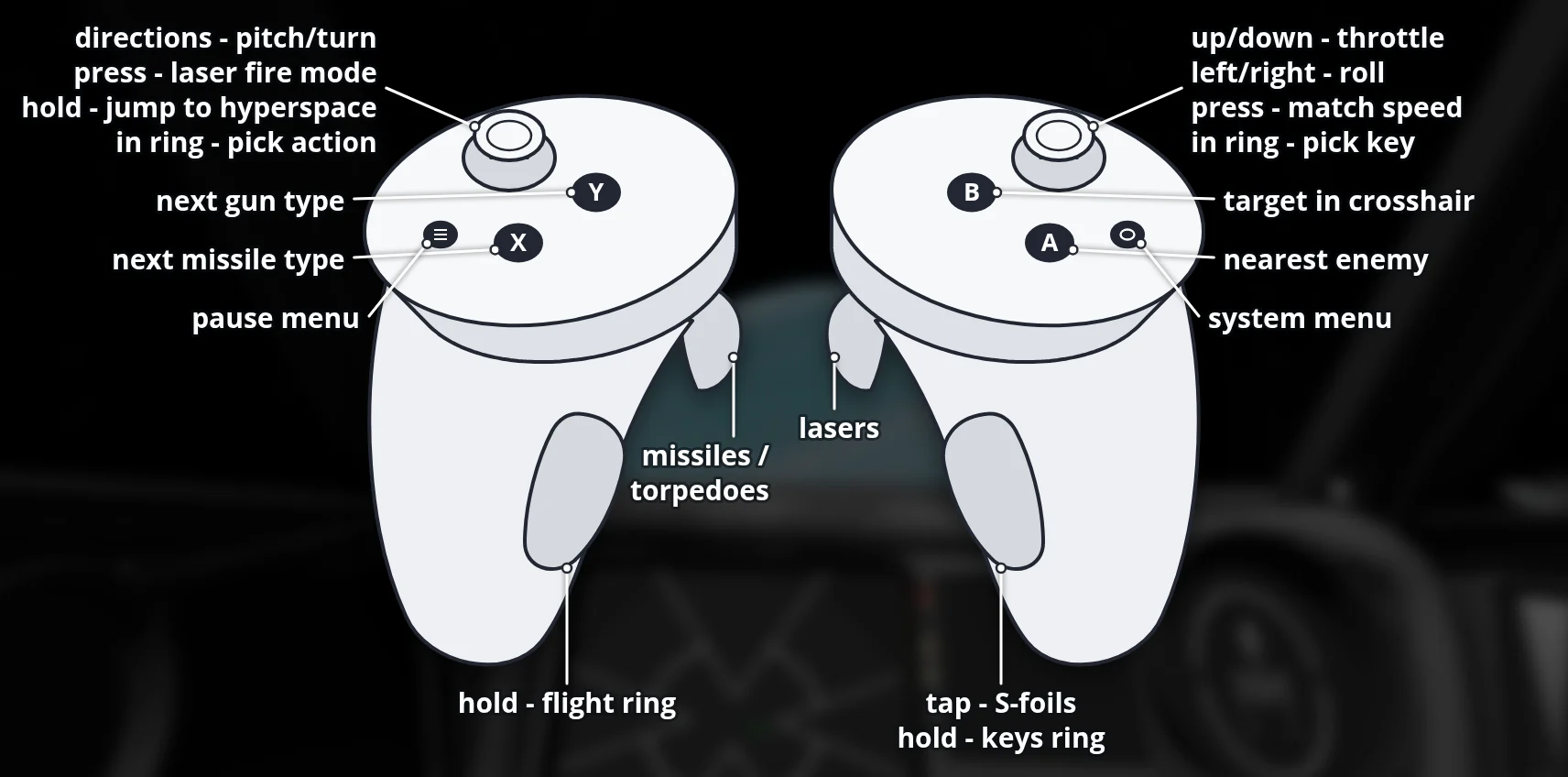
Menus:
| Input | Action |
|---|---|
| Laser (either controller) + trigger | Click |
| A | Enter |
| B / left Menu button | Escape (back / pause) |
| A, B, Menu or trigger during a cutscene | Skip it |
| X / Y | Fleet information / next page (Galactic Civil War campaign) |
Flight:
| Input | Action |
|---|---|
| Left stick | Pitch and turn |
| Right stick left/right | Roll |
| Right stick up/down | Throttle (stays where you leave it) |
| Right stick click | Match target speed |
| Left stick click (tap) | Laser fire mode (single / linked) |
| Left stick click (hold 1 s) | Jump to hyperspace (end mission) |
| Right trigger | Lasers |
| Left trigger | Missiles / torpedoes |
| Right grip (tap) | S-foils open / closed |
| A | Target nearest enemy |
| B | Target ship in crosshair |
| X / Y | Next missile type / next gun type |
| Left Menu button | Pause menu |
| Left grip (hold) + left stick | Flight ring: shields front / rear, next target, target attacker, next subsystem, targeting computer, nearest friendly, comms menu, chase view, missile salvo, balance power, power to engines / shields / lasers |
| Right grip (hold) + right stick | Keys ring: 1 – 9, 0, mouse mode, floodlight, active pause, next turret, escort ship, bombs / bombers |
Mission hints tell you which button or ring item to use. The first training mission keeps your ship in place until you have done its targeting lessons; follow the orders top left.
Known limitations (beta)
- Tested on Quest 3 only; PICO 4 / Neo 3 untested (
adb logcat -s FotGVR:* QuestVR:*shows how far it gets). - Deferred lighting is off to keep 72 fps in the detailed cockpits; ships and planets are still lit.
Source: branch fotg-vr of this repository (README-QUEST.md). FreeSpace Open engine under the Volition source code license (non-commercial). Fate of the Galaxy is a fan project by the Fate of the Galaxy Dev Team, not associated with Lucasfilm Ltd or Disney; its data is not included.
SHA-256 (FotG-VR-v0.3.1-beta.apk): d59f8bb82726bf8838afe754daf7801aaa1ca81eb43b6fce0a749329ba35274b