Repository navigation
Releases
Citrus v0.3.0-preview.12

Download the standard Windows installer: Citrus-Setup.exe.
This preview reduces repeated editor and conversion work while retaining the complete offline engine pack:
- Editor validation reuses type metadata and builds numeric error messages only on failure.
- Image adjustments skip neutral color work and inactive whites/blacks calculations.
- HEIC and HEIF rasters decode once per load instead of twice.
- Multi-page PDF OCR initializes its engine once per extraction.
- PDF bitmap decoding and shelf polling run in background workers, with cancellation and stale-result checks.
- Drag-hover admission is reused within one drag; an actual drop always reads and validates the selection afresh.
- Fresh engine hydration preserves the destination permissions needed by isolated Office workers. Interpreter startup captures conversion diagnostics and prevents unrelated processes from retaining private logs.
Measured Linux Release workloads, on one AMD EPYC 7763 with .NET 10.0.13:
- Validate a 100,000-point stroke: 104.5 → 22.0 ms, with about 49% less managed allocation.
- Apply grain to a 2000 × 1500 image: 370.6 → 119.4 ms. Vignette: 320.5 → 70.2 ms.
- Extract six selected PDF pages, five using OCR: 1457 → 1049 ms; native engine initialization count fell from five to one.
These isolate named operations and are not Windows or whole-application speed claims. One mixed-tone image workload was 1.8% slower. Thirty-six exact/scaled image comparisons and the checked OCR semantic models match their baselines. See the performance review for sample counts, runtime differences and verification boundaries.
Preview.10 stopped at compiler acquisition, and preview.11 stopped during native conversion qualification before Python worker entry. Neither published an installer. Preview.12 retains the application changes and verified official download fallbacks for the pinned installer compiler.
The final release workflow recorded zero failures across 327 core, 26 managed-updater, 664 conversion and 24 editor checks; 10 Linux helper/link cases and the opt-in published-pack relocation smoke test were skipped. Fourteen isolated installer-transition tests, 36 package tests and 15 native hash results passed, along with the complete engine/source/license inventory and sealed-installer checks for released source 71ee22a218be4a74b41706a8030dd5937464ddb1. All five uploaded assets matched their final local bytes before publication, and their public download hashes matched afterward: publisher receipt. Automated checks do not establish clean-PC, physical mixed-DPI, full Explorer/OLE or universal output-fidelity acceptance.
Windows x64. Unsigned preview; Windows may report an unknown publisher. Review converted outputs and retain important originals. release-manifest.json records the exact source revision and signature status; SHA256SUMS records the final installer and metadata hashes. Corresponding third-party sources are the separate optional download on this release.
Citrus 0.3.0-preview.9

Citrus 0.3.0-preview.9 uses the standard offline Windows setup wizard. Download Citrus-Setup.exe; no separate web installer or second installer window is needed.
- Download: 390,006,041 bytes (390 MB). Installed application: 1,462,568,540 bytes (about 1.46 GB).
- Fresh installation reached a visible, enabled Finish screen in 133.385 seconds on the test PC. Finish closed setup successfully with exit code 0.
- The upgrade test completed in 69.156 seconds, including installed-file verification. These measurements exclude download time and time spent choosing wizard options; other PCs may take longer.
- All 10,127 installed file hashes matched the prepared payload. Installed conversion smoke checks and uninstall preservation checks passed.
- Bundled conversion engines remain available offline. Unused Office translations and localized help are excluded; conversion engines and OCR models retain their original bytes.
This is an unsigned public preview for Windows x64. The corresponding third-party source archive is provided separately for license compliance and is not needed to install or run Citrus.
Source commit: ba1872b42f093f539188f35e6f62f109d4c42a9f
Installer SHA-256: 0dd0c040f82f3a246286b8b2c088aaa8229ac1e617b72fc1a4c33a1446e825bb
Citrus 0.3.0-preview.8
Download Citrus-Setup.exe: 429.7 MiB (450,624,717 bytes). It opens the standard Windows setup wizard directly, without a separate downloader window. The download is about 14% smaller than preview.7.
This release removes 5,561 unused Office spelling, thesaurus and help files totaling 462,147,095 bytes. Conversion engines, the compact English OCR model, fonts, hyphenation data, locales and license notices remain included. Document, presentation, spreadsheet and OCR processing remain available offline.
The assembled app files occupy 1,742,493,355 bytes (1.62 GiB), about 21% less than preview.7. Allow additional space for Windows disk allocation, temporary files and updates. The separate third-party source archive is optional for installation.
After extraction, setup verifies the installed files before the Finish step. The Details list reports verification counts during this stage.
Verification:
- The exact source commit passed GitHub's full Release solution build with zero warnings/errors and all 274 core contracts.
- The reduced engine bundle passed all 36 representative conversion/regression checks without skips. All 12 detailed comparisons matched the unchanged baseline, including PDF pixels/text geometry, editable structures, formulas, images and OCR. One generated EPUB navigation-title UUID is compared using its narrowly qualified metadata rule; ODS must exactly match one complete observed baseline artifact.
- Every retained file in the private feature pack passed full hash, closure, stream and link checks; generated input files and protected notices remain unchanged.
- The final installer passed archive CRC and all 15,999 extracted runtime-file hashes. All 18 source-archive entries passed CRC and SHA256 checks.
- Isolated full-payload fresh installation, preview.7-to-.8 update and both uninstalls passed. Every installed owned-file hash matched. The installed DOCX-to-PDF smoke test passed without skips. Uninstall removed all unchanged previous files and preserved modified and unknown files; the real Citrus installation was untouched.
The local silent fresh installation took 546.6 seconds (about 9.1 minutes). The bundle is smaller, but setup still takes time to extract and verify the offline engines. This is one observation on this PC.
Windows x64. Unsigned preview. Interactive Finish-screen and clean-PC acceptance remain unverified.
Citrus 0.3.0-preview.7
Download the standard Windows installer: Citrus-Setup.exe (497.3 MiB). Open this file to start the normal setup wizard directly. The complete package is downloaded before installation; no separate web downloader is needed.
This preview reduces repeated processing in large submissions, image previews, PDF thumbnails, audio trim refreshes and glass presentation. Every offline conversion engine remains included. It retains preview.6's installer recovery and audit fixes.
Measured medians on one Ryzen AI 9 HX 370 machine running Windows 11 build 26200 and .NET 10.0.13:
- PDF thumbnails: 9.18 → 3.85 ms, with no temporary PNG files. Managed allocation increased by about 13 KB per render.
- Cached 1024 × 1024 image rendering: 8.08 → 5.21 ms, with about half the managed allocation.
- Submission preflight for 10,000 inputs: 359.32 → 10.43 ms. This measures preflight, without conversion or file I/O.
- Four repeated trim edits on an eight-second stereo fixture: 374.13 → 1.75 ms. Every reuse still hashes the complete original source.
Thirteen image output hashes, six PDF PNG hashes and 15 glass body/composite hash pairs match their baselines. The removed transparent glass surface saves 668,288 bytes of bitmap pixel payload at 368 × 454 pixels. Decoder allocation decreased; its overall timing comparison does not establish a speed improvement. See the performance record for sample counts, conditions and limits. These figures do not describe overall application speed or memory.
Source checks passed: the exact commit's GitHub build and 274 core contracts, 639 local conversion tests with four environment skips, and 63 selected Release Windows checks. These batches have separate scopes.
Installer qualification passed in an isolated per-user namespace: preview.6 to preview.7 upgrade, fresh preview.7 installation, every installed ownership hash after each, an installed DOCX to PDF conversion independently reopened by two PDF readers, and both uninstalls. Uninstall before the first normal app launch cleaned the previous runtime while preserving changed and unknown fixture files. The real installation registry and inventory snapshot remained unchanged. The public installer archive also passed full extraction, CRC and file-hash checks; all 20,955 engine files match preview.6.
Windows x64. Unsigned preview; Windows may report an unknown publisher. Clean-PC acceptance, the interactive Finish screen and physical mixed-DPI visuals remain unverified. Corresponding third-party sources are a separate optional download on this release.
v0.3.0-preview.6 - Installer reliability and audit fixes
This preview fixes an intermittent setup crash when reading the Windows user identity. Setup now shows installed-file verification progress and reuses its hashing provider; a full 21,560-file test fell from 451 to 116 seconds on the test machine. Every offline conversion engine remains included.
The six audit findings are fixed: publishing rejects linked output ancestors; PDF image export enforces the 32MP memory limit; TXT export skips unnecessary artwork recovery while retaining OCR; media/crop editors confirm before discarding edits; uninstall cleans committed rollback payloads while preserving changed and unknown files; and recent history retains 100 completed jobs plus all active jobs with virtualized rows.
Targeted checks passed: 271 core, 60 PDF, 36 desktop, 22 managed update and 14 native installer-transition tests, plus the protected-page installer identity regression. These batches overlap. The broader desktop run still has two existing foreground-fixture failures and one navigation timeout that passed its isolated recheck.
The download is 521,409,104 bytes (497.3 MiB). Full-payload native tests using the same installer source and sealed files in a separate installation namespace passed update, uninstall-before-first-launch, fresh install and uninstall. The uninstall test executed the real WPF cleanup entry and preserved changed and unknown files. All 21,559 installed owned files independently matched the sealed release inventory. The user's existing installation was left untouched.
An independent extraction of the public installer verified all 21,560 runtime files. All 20,955 backend files are unchanged from preview.5, and the separate corresponding-source archive passed all file hashes and CRC checks.
Windows x64. Unsigned preview; Windows may report an unknown publisher. Fresh-PC acceptance and the interactive Finish screen remain unverified. Corresponding third-party sources are a separate free download on this release.
Citrus 0.3.0-preview.5 - smaller complete installer
Citrus preview.5 reduces the complete Windows download from 696,222,232 to 520,476,818 bytes (25.2% smaller; 60.1% below the original 1.30 GB download) using non-solid LZMA compression. It keeps every offline conversion engine and the application behavior from preview.4.
Citrus-Web-Setup.exe is the small online setup. It downloads the version-pinned complete installer and verifies its size and SHA-256 before opening the normal installer. Citrus-Setup.exe is the complete offline installer. Third-party sources are a separate optional Citrus-ThirdParty-Sources.zip download on this same release; runtime license notices and exact source links remain installed.
This is an unsigned Windows x64 preview. Packaging and download verification are separate from clean-PC installation, physical Explorer, mixed-DPI and full native acceptance. Runtime/UI test records from preview.4 are identified in the preview notes. This release changes packaging only.
Citrus 0.3.0-preview.4
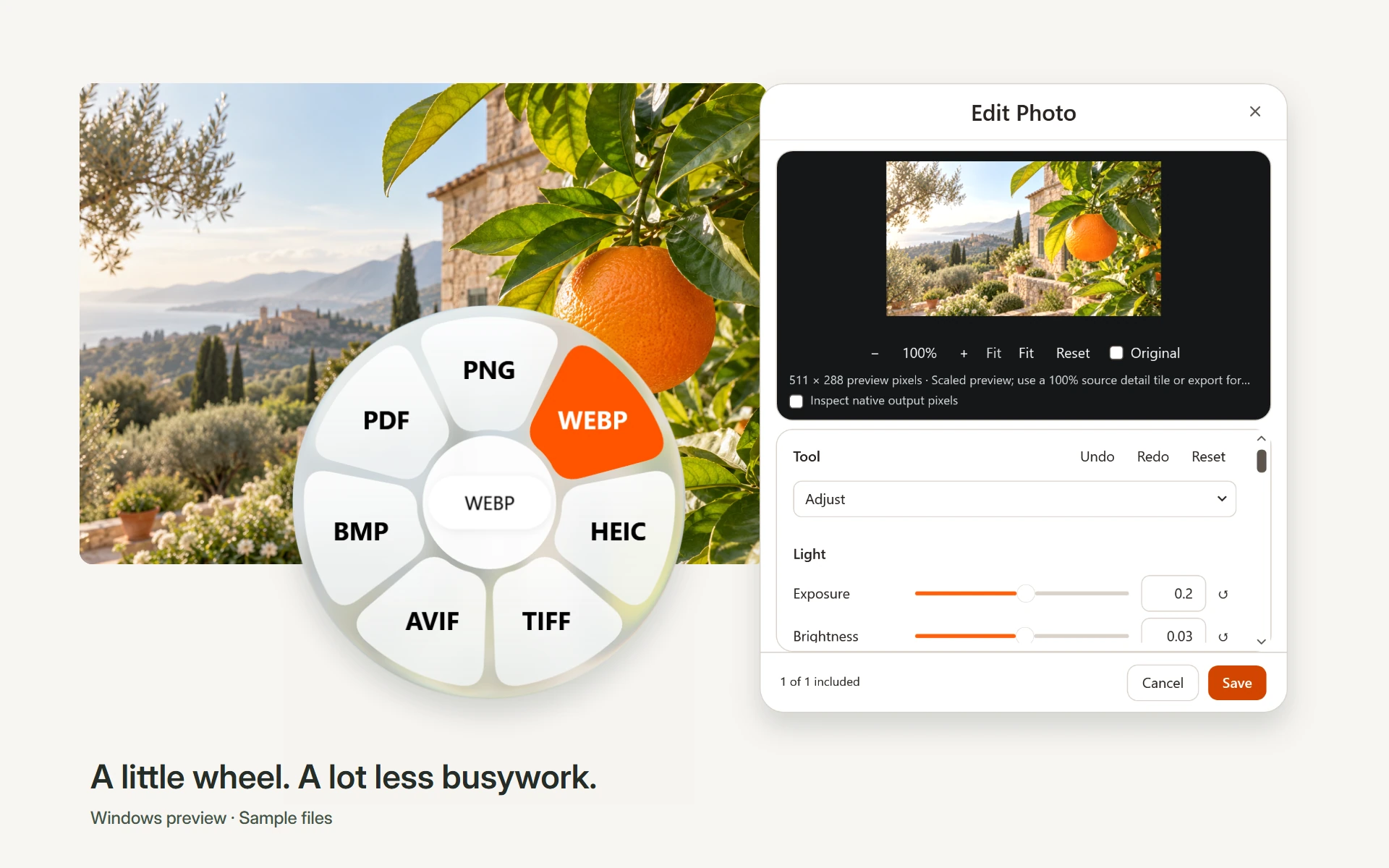
Citrus 0.3.0-preview.4 polishes the Windows app and fills the wheel backing through its center while keeping the selected-format label and center cancellation. Menu scrollbars, file previews in the wheel, and unnecessary interface copy have been removed.
This release fixes all eight audited issues: PDF text-edit deletion, stale audio auto-trim, uncommitted editor fields, long audio export limits, interrupted-upgrade recovery, repeated video source hashing, image-to-PDF memory use, and one-pixel screenshot rounding.
Download Citrus-Web-Setup.exe for the small online installer or Citrus-Setup.exe for the complete offline package. Check the matching SHA256SUMS file. The smaller runtime installer preserves every offline engine; corresponding third-party sources are provided separately in Citrus-ThirdParty-Sources.zip. Existing preview.2 installations can receive this release through automatic updates.
This is an unsigned Windows x64 preview. Automated core, conversion, focused wheel/editor and isolated installer checks passed. The full native Windows suite remains unqualified: compositor/foreground proof failures, symlink privilege, physical Explorer and mixed-DPI checks, and clean-machine acceptance are still open. See preview notes.
v0.3.0-preview.2
Small online installer — October 21, 2026
Download Citrus-Web-Setup.exe for a 58 KiB initial download. Setup downloads the complete 1.2 GiB package, checks its exact size and SHA-256, then opens the normal installation wizard. An internet connection is required during setup; Citrus works offline afterward. The original full offline installer remains available.
The online installer is also unsigned. Its checksum is in SHA256SUMS-web-installer; the original SHA256SUMS still applies to the full offline installer. Exact downloader source and build instructions.
Cleaner editor corners and automatic updates
- Fixed the square black corners behind rounded video and audio editor windows.
- Added automatic GitHub release checks at startup and every six hours, verified background downloads, and installation when Citrus is idle.
- Added Check for updates, Restart to update, and an automatic-update preference in Settings.
- Added transactional installation, rollback and interrupted-update recovery. A failed version does not cause a repeated restart loop.
Installing this release
Earlier previews do not contain an updater. Install this release once manually: quit Citrus from the tray, then run Citrus-Setup.exe. Settings and source files are preserved. Future published versions can update automatically. README, website and media edits do not trigger application downloads.
Updates wait for conversions, file actions and wheel drags to finish, and for editor windows to close. They do not interrupt work. Unchanged accepted component terms carry forward; changed terms require an interactive installation.
Verification and scope
Source build: zero warnings/errors. Core contracts: 268 passes. Window contours: 23 passes. The final updater/development batch: 22 passes, with a separate passing native shutdown check. Native installer fixtures: eight passes covering changed and consecutive upgrades, exact-parent checks, failed/corrupt installs, rollback, interrupted recovery and component-term refusal. Package unit checks: 17 passes and two explicitly gated skips. These overlapping batches are not summed.
This is an unsigned Windows x64 preview, with its runtime and offline engine pack included. Complete-package integrity and delivery are checked separately. Clean-machine installation, physical Explorer/mixed-DPI workflows and full application-performance acceptance remain separately unqualified; this is not a zero-delay claim. See the source preview notes for existing format limitations.
Citrus 0.3 Preview — Convert files. Keep your flow.
Citrus 0.3.0-preview.1
Convert files. Keep your flow. A Windows preview with a compact file wheel and focused image, video, audio and PDF editors. Processing stays local; conversion and editing outputs are saved separately.
Explore Citrus · Watch the product film · Quick start
In this preview
- A compact drag wheel: Shift to convert, Alt for tools, Ctrl for file actions. Scroll for pages; Escape, right-click or the neutral center cancels.
- White menus, centered titles and close buttons on the right. Glass stays on the wheel backing and pagination.
- Photo adjustments, cropping, annotation, redaction, backgrounds, compression and metadata.
- Real video playback and scrubbing, direct trim/crop controls, speed, mute, snapshot, split and redaction.
- Audio waveforms, trimming, channels, normalization, bleeps and visualizations.
- PDF organization and reconstruction, Office/EPUB conversions, archive repacking and subtitle conversion with the bundled offline engines.
Choose a download
Citrus-Setup.exe is the Windows x64 installer. It includes the .NET runtime and offline engine pack, so it is a substantial download. Installation is per user. The installer presents the bundled components' notices and applicable Microsoft runtime terms. This preview is unsigned; Windows may show an unknown publisher. Verify the release source and SHA-256 before deciding to run it.
SHA256SUMS records the hashes of the supplied assets. Citrus-Launch-Media.zip contains product pictures, three silent edited demonstration videos, posters, captions, sample outputs and provenance. Product sequences use the actual native interface; they are composed demonstrations rather than live Explorer recordings or speed benchmarks.
Windows 11 is recommended. The technical minimum is Windows 10 build 19041. No macOS, Linux or native ARM64 installer is included. No account is needed for local file processing.
Known limits and verification
This is a public preview, not a stable-release or zero-delay claim. Codec/container support varies. PDF reconstruction and OCR can require correction. Pages destinations produce clearly labeled compatible DOCX files. Lossy processing can change output quality; compression targets may be unreachable.
The clean public source builds, and its 234 core tests pass. Prior bounded application checks recorded 604 backend passes across two disjoint batches and 52 passes in the final compact-video UI batch. Launch demonstrations include independently reopened engine outputs. These checks do not establish every native workflow.
Full Explorer/OLE combinations, physical mixed-DPI transitions, clean-machine installation/recovery and five-cold/thirty-warm activation timing remain unqualified. Measured native target-show timings exceeded the 16.7-ms target. Read the full preview notes and the release's verification summary for the exact package checks.
Report a problem using a small non-sensitive sample. Keep backups and inspect your exported result.