Repository navigation
Releases
Silverbud 1.0.3

Noise control now matches what the Galaxy Buds3 can actually do.
What's new
- No more Ambient sound option on the Buds3. The open-fit Buds3 have no ambient mode, and the buds turned down every request for it, so selecting it did nothing. Silverbud now offers Ambient sound and its level and tone settings only on the Buds3 Pro.
- Explains noise canceling on open-fit buds. On the Buds3, the Noise control card says what to expect: it quietens steady low sounds like engines, fans and air conditioning, but not voices.
Download
Silverbud.exe is a single self-contained file for Windows 10/11 x64. Updating? Right-click the Silverbud tray icon, choose Quit Silverbud, then replace the exe.
The exe isn't code-signed, so Windows SmartScreen may show "Windows protected your PC". Select More info → Run anyway.
SHA-256: 01C7E48F77AE17767C314FAE2DCE975D29AE313E5DE65D0D065917E7F5C82F8F
Silverbud 1.0.2
Connection reliability fixes, tested on Galaxy Buds3 paired as LE Audio.
What's new
- Connects by itself when the buds are already connected. No more pressing Connect after opening Silverbud. While your buds are connected to the PC, it keeps retrying in the background until the buds accept.
- Reliable Connect for LE Audio buds. Connect now brings the buds' audio back first (a Bluetooth LE wake-up plus the classic audio request), waits until Windows has working audio, and only then attaches the settings link. Before, the buds dropped the link after about 10 seconds.
- Turns Bluetooth on. If Bluetooth is off when Silverbud starts or when you select Connect, it turns Bluetooth on and connects your buds. Controlled by Turn on Bluetooth automatically in the Device tab.
- Clearer messages when the buds refuse the settings connection, for example when the Galaxy Wearable app on your phone holds it.
- --quit closes a running Silverbud cleanly.
Download
Silverbud.exe is a single self-contained file for Windows 10/11 x64. Updating? Right-click the Silverbud tray icon, choose Quit Silverbud, then replace the exe.
The exe isn't code-signed, so Windows SmartScreen may show "Windows protected your PC". Select More info → Run anyway.
SHA-256: 8C0ACBF4A0EF1C60B960EC9554CB84777E56840D53E1448417787BA974231700
Silverbud 1.0.1
A small usability fix on top of 1.0.0.
What's new
- Clear explanation when noise canceling is refused. Galaxy Buds3 refuse noise canceling and ambient sound while only one bud is in your ear, unless noise controls with one earbud is on. Silverbud now shows a notice right in the Noise control card, naming the bud that's in. Its Allow with one bud button turns on the setting and switches modes in one click.
Download
Silverbud.exe is a single self-contained file for Windows 10/11 x64. If you already use Silverbud, close it from the tray icon and replace the old exe.
The exe isn't code-signed, so Windows SmartScreen may show "Windows protected your PC". Select More info → Run anyway.
SHA-256: 475C28CD1238C87857FC25F00BADFFBAEB3F7A05133F02678BCE463123EED51D
Silverbud 1.0.0
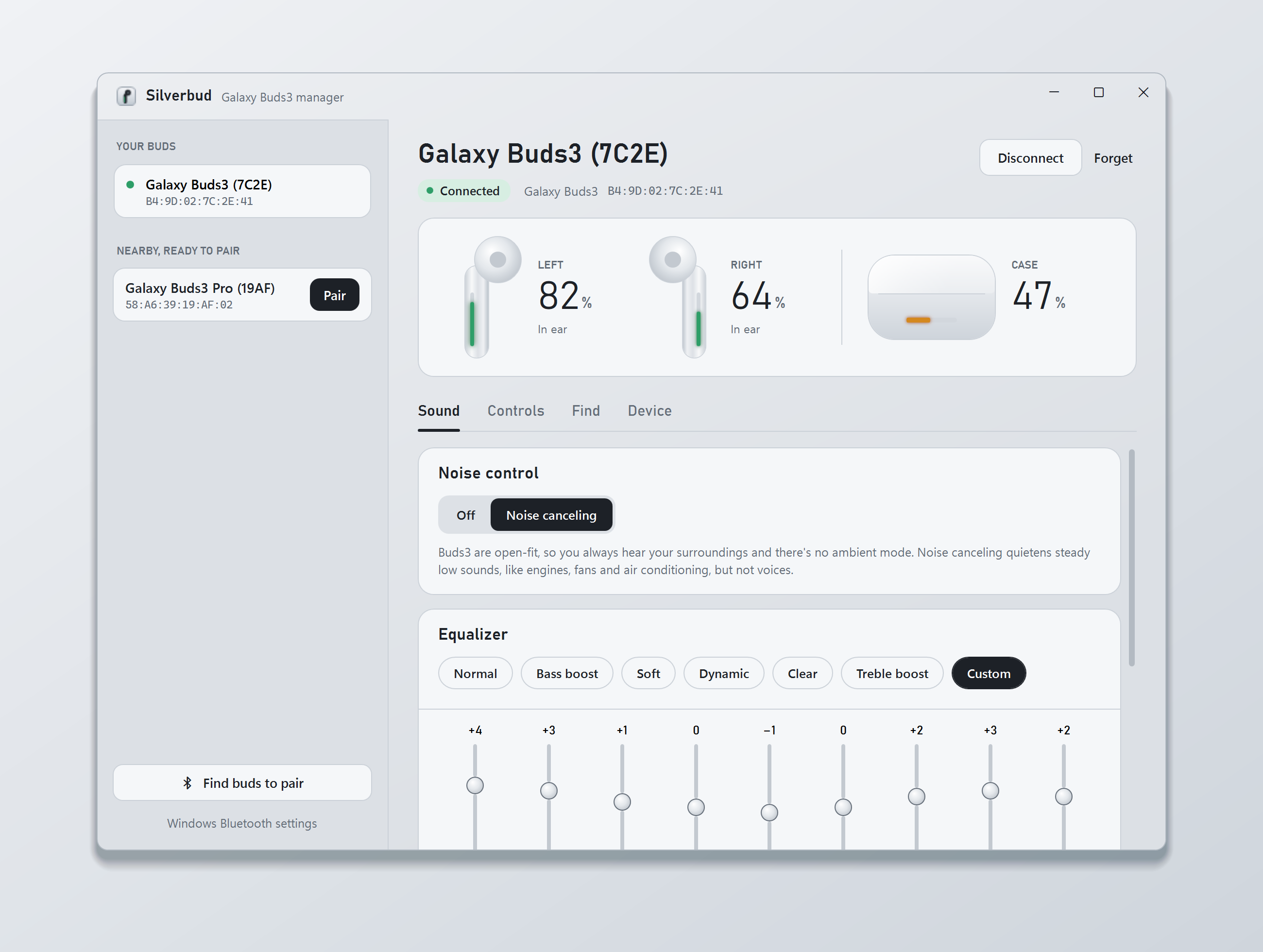
The first release of Silverbud, a Galaxy Buds3 manager for Windows.
Download
Silverbud.exe is a single self-contained file (72 MB) for Windows 10/11 x64. Nothing to install.
The exe isn't code-signed, so Windows SmartScreen may show "Windows protected your PC". Select More info → Run anyway.
SHA-256: C44F1AF72AFEBF3294D1F76F5651CB58D799658EBBC371FF04007E46ACD1D71E
What's in it
- Pair, connect, disconnect and forget Galaxy Buds3. Works with LE Audio and classic Bluetooth.
- Connects automatically when the buds come out of the case.
- Live battery for left, right and case, with in-ear and charging state, plus a low-battery notification.
- Noise control (off, noise canceling, ambient), ambient level, custom ambient.
- Equalizer presets and an experimental 9-band custom EQ.
- Balance and game mode.
- Pinch gesture switches, pinch-and-hold action per ear, double-tap edge volume.
- Find my buds with left/right mute.
- Call settings, seamless connection, pairing mode, factory reset.
- Notification-area icon with battery tooltip and quick controls.
Tested end to end on Galaxy Buds3 (firmware R530XXU0AYG3) with Windows 11.