Repository navigation
v0.2.0-beta.1 (closed beta)
Pre-release
Pre-release


✨ New
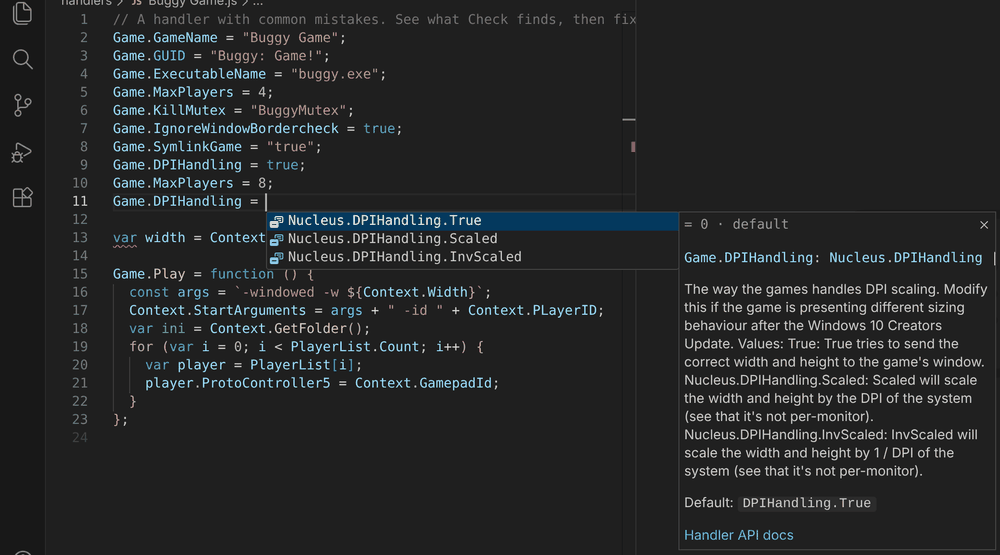
- Value suggestions as you type. After
=, completion offers the option's values:Game.DPIHandling =offersNucleus.DPIHandling.True,.Scaledand.InvScaledwith the default first; on/off options offertrueandfalse.
- AI agents can use the tools directly.
nucleus mcpis an MCP server for Claude Desktop, Cursor, VS Code Copilot and others: check, fix, Try it, API lookup, templates and Hub search. VS Code's agents get it automatically (VS Code 1.101+), and each release includes a single-filenucleus.jsfor other clients. - What's new, right here. After an update, one note shows the highlights, with a button to read them all. Nucleus: What's New opens this list any time;
splitscreenme.showWhatsNewturns the note off.
- The workbench as one offline file. Each release includes
workbench.html, andnucleus workbenchsaves it: open it locally or host it yourself.
🛠️ Improved
- Easier on the Hub. Searching Hub handlers (command-line tool, MCP server, Browse the Hub) reads our daily copy of the Hub's list instead of the Hub, checked at most once an hour; each handler version is downloaded once, and requests say which tool sent them. Agents are told to fetch one or two handlers, never in bulk.
- Options and docs stay current. A daily check notices when Nucleus Co-op or the splitscreen.me docs change and proposes the updated options for review.
📦 Install: download splitscreenme-vscode-v0.2.0-beta.1.vsix below, then in VS Code run Extensions: Install from VSIX… (Ctrl+Shift+P). New to the tools? Start with the intro and install guide and TESTING.md.
🤖 AI agents: nucleus.js (below) is the command-line tool and MCP server: node nucleus.js mcp. See the README.
🌐 Offline workbench: workbench.html (below) is the whole browser workbench in one file; open it locally or host it yourself.
💬 Feedback: tester feedback form.