Repository navigation

⚠️ Changed
-
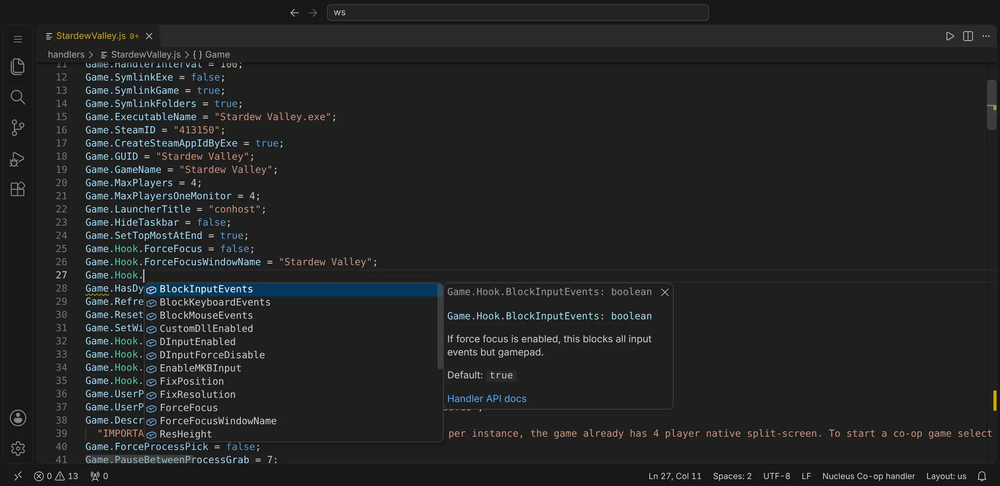
Handlers open as "Nucleus Co-op handler", without VS Code's JavaScript suggestions. VS Code's own JavaScript suggestions and type lines no longer mix in with the handler's: no browser globals, and no newer methods that Nucleus' engine doesn't have. Colours, brackets and folding stay those of JavaScript. Click the language in the status bar to switch a file back, or set
splitscreenme.languageModetojavascriptto keep all handlers as JavaScript; Set Up Type Definitions does that for its folder.Screenshot
-
Handlers are coloured like any JavaScript file. Nucleus names now use JavaScript's own categories, so your theme colours them as it colours everything else:
GameandContextas variables, what's on them as properties, what you call as methods. Option groups (Game.ProtoInput,Nucleus.Folder), fixed choices (Nucleus.Folder.InstancedGameFolder) and callbacks (Game.Play) keep a colour of their own in VS Code, through your theme's namespace, enum value and function colours.Gameis no longer shown in the type colour. Other editors can style these three with the newgroup,choiceandcallbackmodifiers (PORTING.md).
✨ New
- Options compared as numbers or booleans. When the player starts from a saved profile, Nucleus gives every
Game.AddOptionvalue back as text, soContext.Options["players"] === 4,== trueorcase 4:never match, and afalseoption is the text "False", which anifcounts as true. The new check,option-compare, finds these, also through the handler's own variables (var p = Context.Options["players"]; if (p === 4)), and offers==orcase "4":as the fix. Loose== 4works and stays quiet.
🐛 Fixed
- No "has no effect" warning on
File.Exists((Context.filePath = ...)). An unknownContextproperty assigned inside a call or a condition passes its value on, like thevar x = (Context.X = ...)idiom, so it's now the same quiet hint instead of a warning that said the line does nothing.
📦 Install: download splitscreenme-vscode-v0.8.0.vsix below, then in VS Code run Extensions: Install from VSIX… (Ctrl+Shift+P). New to the tools? Start with the intro and install guide and TESTING.md.
🤖 AI agents: nucleus.js (below) is the command-line tool and MCP server: node nucleus.js mcp. See the README.
🌐 Offline workbench: workbench.html (below) is the whole browser workbench in one file; open it locally or host it yourself.
💬 Feedback: tester feedback form.