Repository navigation
Dioptra 0.7.3

The DNS records of the site you are testing, one click away.
Downloads
| Platform | File |
|---|---|
| macOS, Apple silicon (M1 and later) | Dioptra-0.7.3-mac-arm64.zip |
| macOS, Intel | Dioptra-0.7.3-mac-x64.zip |
| Linux x86-64 | Dioptra-0.7.3-linux-x86_64.AppImage |
Checksums are in SHA256SUMS.txt.
What's in 0.7.3
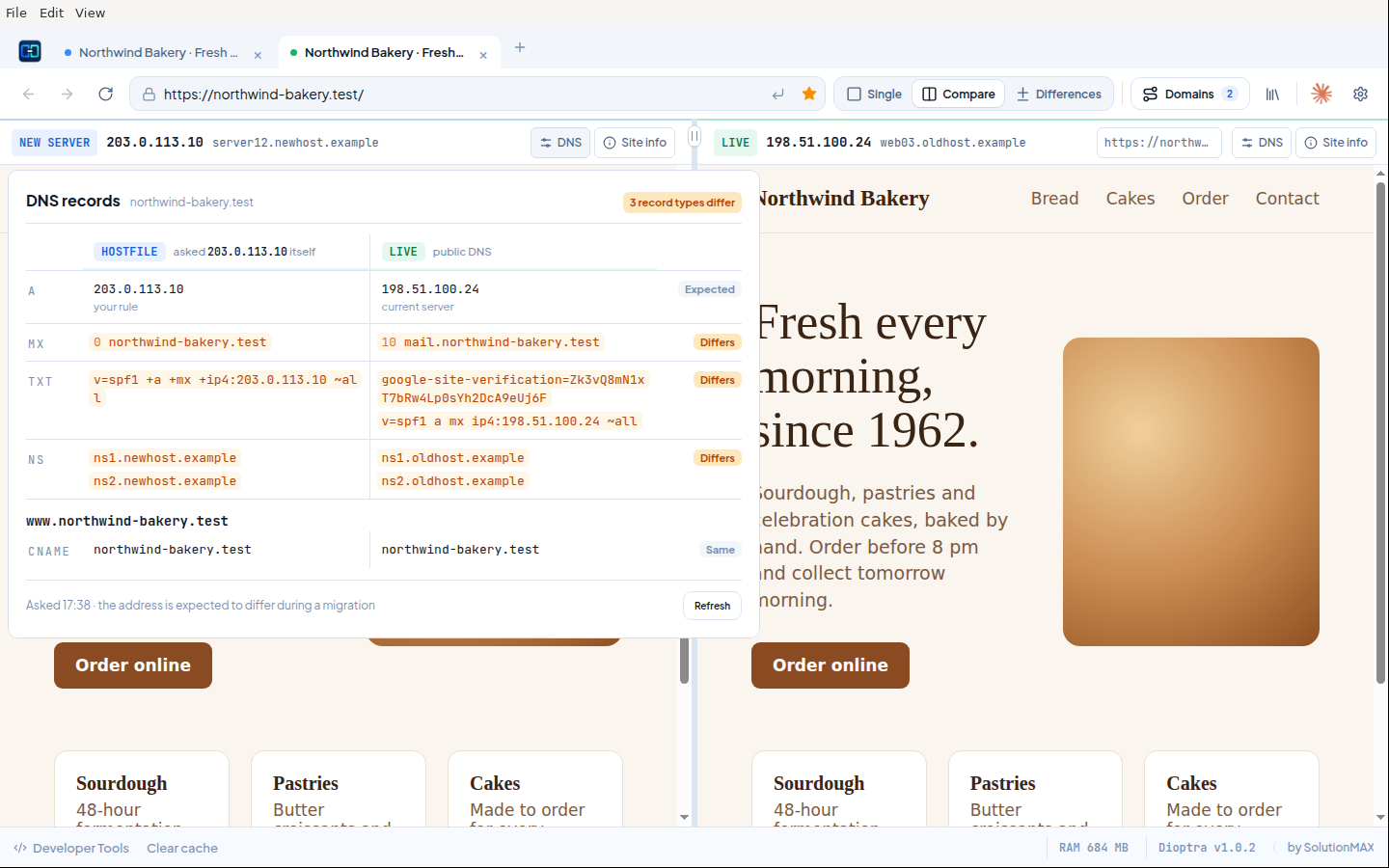
- DNS button in the route bar, next to the domain name. It opens a card with the A, AAAA, CNAME, MX, TXT and NS records that public DNS gives for the name you are visiting, plus its
wwwname. Addresses show their TTL. In a Hostfile tab the card also tells you where your rule sends this browser instead. - DNS side by side in Compare and Differences. The card becomes a table: on the left what the new server answers when Dioptra asks it directly, on the right public DNS. Values that exist on one side only are marked, so a mail, SPF or verification record that did not come along stands out before you switch. The address record is expected to differ during a migration and is labelled that way.
- When the new server does not run DNS, the card says so and shows public DNS.
- Nothing is looked up in the background. Dioptra asks DNS when you click the button and again on Refresh.
- In narrow Compare panes the connected IP is now cut off cleanly instead of running into the text next to it.
Updating
From 0.7.2: open Updates, choose Download update and then Install and restart. Tabs and domain rules come back after the restart.
On macOS 0.7.0 and 0.7.1 cannot install an update themselves: download the zip once, quit Dioptra and replace the app in Applications (see the 0.7.2 notes).
Tested
An installed 0.7.2 updated itself to 0.7.3 from this release on Apple silicon and restarted with a valid signature. Unit tests (68) pass on Linux and macOS, including DNS lookups against a local test DNS server. The browser, workspace and route bar tests pass on Linux. The route bar test, with the DNS card against a real site, passes on Apple silicon as packaged app. The comparison was exercised in the app against a local DNS server standing in for the new server. Not tested on real Intel hardware.