Repository navigation
Releases: Solutionmax/dioptra
Release list
Dioptra 1.0.2

Dioptra 1.0.2 updates the built-in browser to Electron 44.9.3 with Chromium 152.0.7977.167.
- Electron 44.7.2 → 44.9.3 and Chromium 152.0.7977.149 → 152.0.7977.167, with the security and stability fixes from Chromium and V8 in that range.
- No changes to features, settings, domain rules or stored data. Installed copies keep their profile.
| Platform | Download |
|---|---|
| Mac, Apple Silicon (M1 and later) | DMG · ZIP |
| Mac, Intel | DMG · ZIP |
| Linux x86-64 | AppImage |
| Ubuntu / Debian amd64 | .deb |
| Windows x64 | Installer |
Installed copies update themselves from Settings → Updates. Install the Ubuntu package with sudo apt install ./Dioptra-1.0.2-ubuntu-amd64.deb; make the AppImage executable before opening it.
Mac packages keep the SolutionMAX signing identity for in-app updates. They are not notarized by Apple; a first manual install may need System Settings → Privacy & Security → Open Anyway. The Windows installer is unsigned and may show SmartScreen.
Checksums are in SHA256SUMS.txt.
Dioptra 1.0.1
Dioptra 1.0.1 updates the built-in browser to Electron 44.7.2 with Chromium 152.0.7977.149.
- Electron 44.6.0 → 44.7.2 and Chromium 152.0.7977.130 → 152.0.7977.149, with the security and stability fixes from Chromium and V8 in that range.
- No changes to features, settings, domain rules or stored data. Installed copies keep their profile.
| Platform | Download |
|---|---|
| Mac, Apple Silicon (M1 and later) | DMG · ZIP |
| Mac, Intel | DMG · ZIP |
| Linux x86-64 | AppImage |
| Ubuntu / Debian amd64 | .deb |
| Windows x64 | Installer |
Installed copies update themselves from Settings → Updates. Install the Ubuntu package with sudo apt install ./Dioptra-1.0.1-ubuntu-amd64.deb; make the AppImage executable before opening it.
Mac packages keep the SolutionMAX signing identity for in-app updates. They are not notarized by Apple; a first manual install may need System Settings → Privacy & Security → Open Anyway. The Windows installer is unsigned and may show SmartScreen.
Checksums are in SHA256SUMS.txt.
Dioptra v1.0.0
Dioptra 1.0.0 brings the reviewed browser layout, clearer text and immediate domain changes to every desktop package.
- Larger tab titles, address field, view buttons, route details, footer and SSL status badge.
- Settings organized into six sections inside the existing sidebar. Library adds search and clearer bookmark, history and download controls.
- Domain and IP changes apply immediately. Affected pages reload; Dioptra and unrelated tabs remain open.
- Claude extension version checks, optional automatic checking, explicit update installation and readable connection diagnostics. Updating reloads Claude only; save an unfinished Claude draft first. Failed replacements retain the previous extension.
- Per-domain SSL exceptions, native Site info/DNS comparisons, direct Compare URLs, the TwinView start page and first-run setup.
- Ubuntu/Debian amd64 installer added alongside the Linux AppImage.
| Platform | Download |
|---|---|
| Mac, Apple Silicon (M1 and later) | DMG · ZIP |
| Mac, Intel | DMG · ZIP |
| Linux x86-64 | AppImage |
| Ubuntu / Debian amd64 | .deb |
| Windows x64 | Installer |
Install the Ubuntu package with sudo apt install ./Dioptra-1.0.0-ubuntu-amd64.deb, then open Dioptra from the applications menu as your normal user. For AppImage, make the file executable before opening it.
Mac packages retain the existing SolutionMAX signing identity for in-app updates. They are not notarized by Apple; an initial manual install may require System Settings → Privacy & Security → Open Anyway. The Windows installer remains unsigned and may display SmartScreen. Existing profiles, domain rules and browser data retain their original location.
Public installations can check for this release in Settings → Updates. Private beta builds deliberately disable public updates: install v1.0.0 manually once. App replacement can require a restart; editing domain rules during use does not.
Checksums are in SHA256SUMS.txt. Claude compatibility remains experimental; this release does not claim full Chrome-extension support.
Verification details document platform tests and their limits.
Dioptra 0.7.6
Cover the www name with one switch, import your servers from a CSV file and pick them by name when you add a domain.
Downloads
| Platform | File |
|---|---|
| macOS, Apple silicon (M1 and later) | Dioptra-0.7.6-mac-arm64.zip |
| macOS, Intel | Dioptra-0.7.6-mac-x64.zip |
| Windows 11 and 10, 64 bit | Dioptra-0.7.6-win-x64.exe |
| Linux x86-64 | Dioptra-0.7.6-linux-x86_64.AppImage |
Checksums are in SHA256SUMS.txt.
What's in 0.7.6
- Include www. A new switch under Domain and IP address. Leave it on and one rule covers
example.comandwww.example.com. The list shows one row with a+ WWWlabel; switching the rule off or removing it applies to both names. Typingwww.example.comwith the switch on gives the same rule. Rules you already have stay as they are. - Server list. Settings has a new section, Servers. Import a CSV file with a server name and an IP address on each line. Comma, semicolon or tab all work and a header line is fine. The list shows eight servers per page. Importing again replaces the list, Clear list removes it. The list stays on your computer.
- Pick a server by name. With a server list, type the first letters of a server name or part of an IP address in the IP field and Dioptra suggests up to five servers. Choose one with the mouse or with the arrow keys and Enter, and its IP address is filled in. Typing an IP address yourself still works.
- Server names in your rules. When the IP address of a rule belongs to a server in your list, the row shows the server name next to it.
- Quitting right after starting. Quitting Dioptra while its window was still loading could stop on an error box, and the saved tabs were replaced by one empty tab. Dioptra now quits at once and keeps your tabs.
- The screenshots in the README are up to date, with a new one for the server list.
Updating
From 0.7.2 or later: open Updates, choose Download update and then Install and restart. Tabs and domain rules come back after the restart.
On macOS 0.7.0 and 0.7.1 cannot install an update themselves: download the zip once, quit Dioptra and replace the app in Applications (see the 0.7.2 notes).
On Windows the installer is not signed yet, so a fresh download shows Windows protected your PC. Click More info and then Run anyway. Updating from inside Dioptra works the same way as on the other platforms.
Tested
Unit tests (73) pass on Linux, macOS and Windows. Two new tests cover this release from start to finish: one for the www switch, the server list and the suggestions (including a www name that really loads from the rule address), one for quitting during startup.
Linux: the browser, workspace, site, route bar and drag tests and both new tests pass. One workspace run failed once in the Compare with step and passed on four reruns; that part did not change in this release.
macOS: the packaged Apple silicon build and the packaged Intel build (under Rosetta) pass both new tests and the workspace test, the workspace test four times each. Nothing was tested on real Intel hardware.
Windows: tested on Windows 11 in a virtual machine. After a fresh install the unit tests, both new tests and the workspace, site and route bar tests pass against the installed app. Not tested on Windows 10 or on real hardware.
Linux AppImage: the packaged source is checked against the tested source; the packaged app itself was not started.
Updating: the official 0.7.5 Apple silicon build was started on a Mac and updated itself to 0.7.6 from this release: download, install, restart, signature valid. On Windows the official 0.7.5 was installed from GitHub and updated itself to 0.7.6 from this release and restarted. Updating on Intel Macs and on Linux was not tested.
Dioptra 0.7.5
Resize the Compare panes by dragging the bar between them. Plus a new SolutionMAX logo and a GitHub button in Settings. And Dioptra now runs on Windows.
Downloads
| Platform | File |
|---|---|
| macOS, Apple silicon (M1 and later) | Dioptra-0.7.5-mac-arm64.zip |
| macOS, Intel | Dioptra-0.7.5-mac-x64.zip |
| Windows 11 and 10, 64 bit | Dioptra-0.7.5-win-x64.exe |
| Linux x86-64 | Dioptra-0.7.5-linux-x86_64.AppImage |
Checksums are in SHA256SUMS.txt.
What's in 0.7.5
- Resize the Compare panes. Drag the bar between the two panes to make Hostfile or Live larger. Both sites stay visible and resize while you drag, and the bar shows the share of each pane. Each pane keeps at least a quarter of the width.
- Equal again with one click. As soon as the panes are not equal, a small button appears between the two pane bars. Click it, or double click the bar, and both panes are the same size again.
- Remembered. The position stays after closing Compare and after a restart.
- Keyboard. Tab to the bar and use the arrow keys to move it in steps of 5%. Escape while dragging puts the bar back where it was.
- Settings. New SolutionMAX logo. There is a GitHub button next to solutionmax.net, and Buy me a coffee is a proper button now. The three buttons stay on one row at every window size.
- The screenshots in the README are up to date again.
New: Windows
Dioptra is now available for Windows, with the same features as on macOS and Linux. The installer was added to this release on 5 October 2026.
- Run
Dioptra-0.7.5-win-x64.exe. The installer is not signed yet, so Windows shows Windows protected your PC. Click More info and then Run anyway. - Dioptra installs for your user only, without administrator rights, and starts when it is ready.
- Updates work from inside Dioptra, the same way as on the other platforms.
Updating
From 0.7.2 or later: open Updates, choose Download update and then Install and restart. Tabs and domain rules come back after the restart.
On macOS 0.7.0 and 0.7.1 cannot install an update themselves: download the zip once, quit Dioptra and replace the app in Applications (see the 0.7.2 notes).
Tested
Unit tests (70) pass on Linux and macOS. The browser, workspace, site and route bar tests pass on Linux. A new test drags the bar with a real mouse on Linux: live resize over both sites, Escape, the quarter limit, saving on release, the reset button and double click. The packaged Apple silicon build passes the workspace test, and so does the packaged Intel build of this code under Rosetta. The official 0.7.4 Apple silicon build was started on a Mac and updated itself to 0.7.5 from this release: download, install, restart, signature valid. The drag test with a real mouse does not run on macOS, and nothing was tested on real Intel hardware.
Windows: tested on Windows 11 in a virtual machine. Installing through the SmartScreen prompt, the unit tests (70) and the workspace, site and route bar tests against the installed app pass, and dragging the bar between the Compare panes works with a real mouse. An older-labelled build of the same code updated itself to 0.7.5 and restarted. The Claude extension installs and loads; signing in was not tested. Not tested on Windows 10 or on real hardware.
Dioptra 0.7.4
Compare a site with its copy on another address, such as a temporary test domain.
Downloads
| Platform | File |
|---|---|
| macOS, Apple silicon (M1 and later) | Dioptra-0.7.4-mac-arm64.zip |
| macOS, Intel | Dioptra-0.7.4-mac-x64.zip |
| Linux x86-64 | Dioptra-0.7.4-linux-x86_64.AppImage |
Checksums are in SHA256SUMS.txt.
What's in 0.7.4
- Compare with another URL. In Compare the domain in the right pane bar is now a button. Click it and the bar turns into a Compare with field: type another address, press Enter, and the right pane loads that site next to the left one. Handy when a customer site has been copied to a temporary test domain and you want both on screen.
- Compare without a domain rule. The Compare button now works on every website. Without a rule the right pane starts empty and asks which address to compare with; nothing is loaded until you give one.
- Same URL puts the right pane back on the page of the left pane. Cancel or Escape closes the field and changes nothing.
- The domain is shown in both pane bars, so you always see which site is which. In a narrow pane the connected IP is cut short before the domain is.
- Differences is switched off while the two panes are on different sites: it compares what two servers send for the same page.
- Fixed: the message for a pane that could not load was hidden behind the page area.
The right pane keeps using normal DNS, without your rules. A site that is only reachable through a rule goes in the left pane.
Updating
From 0.7.2 or later: open Updates, choose Download update and then Install and restart. Tabs and domain rules come back after the restart.
On macOS 0.7.0 and 0.7.1 cannot install an update themselves: download the zip once, quit Dioptra and replace the app in Applications (see the 0.7.2 notes).
Tested
Unit tests (68) pass on Linux and macOS. The browser, workspace and route bar tests pass on Linux; the workspace test covers the new field with and without a domain rule. The packaged Apple silicon build passes the workspace test, and so does the packaged Intel build of this code under Rosetta. Not tested on real Intel hardware. Updating an installed 0.7.3 from this release was not run again for this version; the update mechanism is unchanged since 0.7.3.
Dioptra 0.7.3
The DNS records of the site you are testing, one click away.
Downloads
| Platform | File |
|---|---|
| macOS, Apple silicon (M1 and later) | Dioptra-0.7.3-mac-arm64.zip |
| macOS, Intel | Dioptra-0.7.3-mac-x64.zip |
| Linux x86-64 | Dioptra-0.7.3-linux-x86_64.AppImage |
Checksums are in SHA256SUMS.txt.
What's in 0.7.3
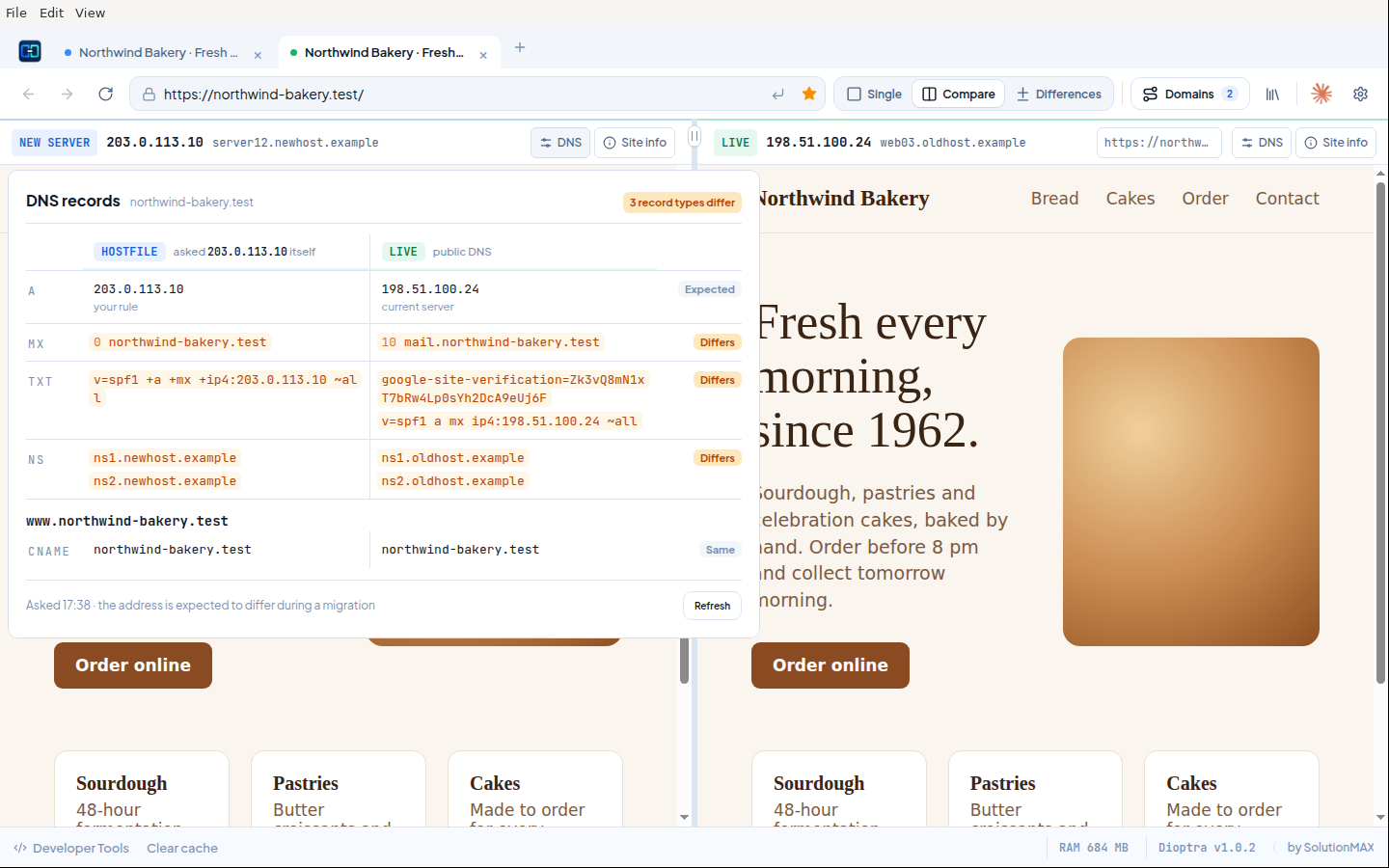
- DNS button in the route bar, next to the domain name. It opens a card with the A, AAAA, CNAME, MX, TXT and NS records that public DNS gives for the name you are visiting, plus its
wwwname. Addresses show their TTL. In a Hostfile tab the card also tells you where your rule sends this browser instead. - DNS side by side in Compare and Differences. The card becomes a table: on the left what the new server answers when Dioptra asks it directly, on the right public DNS. Values that exist on one side only are marked, so a mail, SPF or verification record that did not come along stands out before you switch. The address record is expected to differ during a migration and is labelled that way.
- When the new server does not run DNS, the card says so and shows public DNS.
- Nothing is looked up in the background. Dioptra asks DNS when you click the button and again on Refresh.
- In narrow Compare panes the connected IP is now cut off cleanly instead of running into the text next to it.
Updating
From 0.7.2: open Updates, choose Download update and then Install and restart. Tabs and domain rules come back after the restart.
On macOS 0.7.0 and 0.7.1 cannot install an update themselves: download the zip once, quit Dioptra and replace the app in Applications (see the 0.7.2 notes).
Tested
An installed 0.7.2 updated itself to 0.7.3 from this release on Apple silicon and restarted with a valid signature. Unit tests (68) pass on Linux and macOS, including DNS lookups against a local test DNS server. The browser, workspace and route bar tests pass on Linux. The route bar test, with the DNS card against a real site, passes on Apple silicon as packaged app. The comparison was exercised in the app against a local DNS server standing in for the new server. Not tested on real Intel hardware.
Dioptra 0.7.2
Dioptra can now update itself on macOS.
Downloads
| Platform | File |
|---|---|
| macOS, Apple silicon (M1 and later) | Dioptra-0.7.2-mac-arm64.zip |
| macOS, Intel | Dioptra-0.7.2-mac-x64.zip |
| Linux x86-64 | Dioptra-0.7.2-linux-x86_64.AppImage |
Checksums are in SHA256SUMS.txt.
What's in 0.7.2
- Updates install from inside the app on macOS. Open Updates, choose Download update and then Install and restart, the same as on Linux. Tabs and domain rules come back after the restart.
- The Mac builds are now signed with SolutionMAX's own code signing certificate, so every version carries the same identity. That is what makes the in-app update possible.
Updating from 0.7.0 or 0.7.1 on macOS
Those versions cannot install an update themselves, so this is the last update by hand: download the zip, quit Dioptra and replace the app in Applications. The app is still not notarized by Apple: open System Settings → Privacy & Security and click Open Anyway once. macOS may also ask once for access to the "Dioptra Safe Storage" keychain item, because the signature changed; choose Always Allow. From 0.7.2 on, updates need none of this.
Tested
A build labelled as an older version updated itself to 0.7.2 on Apple silicon, for the arm64 build and for the Intel build under Rosetta; the app restarted on the new version with a valid signature. Unit tests (53) and the browser test pass on Linux, unit tests and the route bar test pass on Apple silicon as packaged app. Not tested on real Intel hardware.
Dioptra 0.7.1
More detail in the route bar, a memory overview and a clearer update flow.
Downloads
| Platform | File |
|---|---|
| macOS, Apple silicon (M1 and later) | Dioptra-0.7.1-mac-arm64.zip |
| macOS, Intel | Dioptra-0.7.1-mac-x64.zip |
| Linux x86-64 | Dioptra-0.7.1-linux-x86_64.AppImage |
Checksums are in SHA256SUMS.txt. The macOS app is not yet notarized: the first time, open System Settings → Privacy & Security and click Open Anyway. On macOS, update by downloading the zip and replacing the app; rules, tabs and logins are kept. See the README for details.
What's in 0.7.1
- Hostname behind the IP: the route bar shows the reverse DNS name of the server you are really connected to. It is a pure DNS lookup, so entries in your hosts file do not show up there.
- Certificate details: with SSL verification on, click Certificate valid to see who the certificate was issued to, the issuer and the expiry date with the days left.
- What the site runs on: a chip in the route bar shows the platform (WordPress, WooCommerce, Drupal, Joomla, Laravel, Shopify and more) and the PHP version when the server reports it. Click it for shop, theme, visible plugins and web server. In Compare, a difference between the old and new server is marked.
- Memory per tab: click RAM in the footer to see which tab uses how much memory and jump to it.
- Version in the footer: shows the installed version and turns blue when an update is available. The Updates panel now shows when Dioptra last checked and explains in three steps how to update on your platform.
- Clear cache reloads the page: it now reloads the visible page (both panes in Compare) and also clears the Live side.
Tested
Unit tests (53), browser, workspace/compare and the new route bar test pass on Linux. Unit tests and the route bar test pass on Apple silicon from source and as packaged app. The Intel build is built and signed but was not started for this release.
Dioptra 0.7.0
First public release of Dioptra, a browser for website migrations by SolutionMAX.
Downloads
| Platform | File |
|---|---|
| macOS, Apple silicon (M1 and later) | Dioptra-0.7.0-mac-arm64.zip |
| macOS, Intel | Dioptra-0.7.0-mac-x64.zip |
| Linux x86-64 | Dioptra-0.7.0-linux-x86_64.AppImage |
Checksums are in SHA256SUMS.txt. The macOS app is not yet notarized: the first time, open System Settings → Privacy & Security and click Open Anyway. See the README for details.
What's in 0.7.0
- New interface: Single / Compare / Differences switch, icon toolbar, and one route bar that shows the rule IP, the connected IP, the certificate state and the HTTP status.
- Differences: fetches the page from the new server and from the live site and compares external domains, HTML and headers. Flags scripts that load on only one side and obfuscated inline code. "Ask Claude about these differences" copies a summary for Claude.
- Clear site data for the current site only (cookies, storage, service workers, cache).
- Update notice in the tab strip when a new version is available; automatic checks at startup and every four hours.
- Fixes: the app no longer hangs on quit on Intel Macs; shutdown errors are logged instead of blocking with a dialog.
- Existing domain rules, tabs, cookies and Claude sign-in carry over from earlier versions (Migratiebrowser and Hostlane).
Tested
Unit tests (45), browser, workspace/compare, Differences and site-data, Claude integration and Claude session tests pass on Linux, and from source and as packaged apps on Apple silicon and Intel (via Rosetta). The Intel workspace test ran 6 times in a row without failures.