Repository navigation
Releases
iOS app 2.0.0

Source of the iOS store build 2.0.0: apps/ios at commit b545024f40dc19b440ac0e601c87a2980ddcbf6d.
Build only from this release: the attached zip, or git clone --branch app-ios-v2.0.0 --depth 1 https://github.com/SongyuQi-Francisco/Watch2Whoop.
Never from main or a zip sent by hand. Before building check:
shasum -a 256 -c watch2whoop-ios-app-v2.0.0.zip.sha256prints OK, andunzip -z watch2whoop-ios-app-v2.0.0.zipprintsb545024f40dc19b440ac0e601c87a2980ddcbf6d
(in a clone:git describe --tags --exact-matchprintsapp-ios-v2.0.0);grep -E '^W2W_(MARKETING_VERSION|BUILD_NUMBER)' apps/ios/Config/Watch2Whoop.xcconfigprints2.0.0and11
(TestFlight shows 2.0.0 (11)). Do not change them, and do not set them in the local xcconfig.
Steps: apps/ios/README.md, "TestFlight" (XcodeGen, signing, capabilities, App Review notes); the zip also
holds the files the project builds in from outside apps/ios, at their repository paths.
Changes
第一个原生 iOS 版本:整个 app 都是 iOS 原生页面(今天、趋势、记录、饮食、朋友、我、Jarvis),打开更快、滑动更顺;打开就是上一次的数据,没网也能看,记下的内容联网后自动发出去;恢复、睡眠、负荷这些分数在你的 iPhone 上算。这一版补上了网页版里还缺的主要功能:「我」页的账号和 AI 设置、饮食和采购、训练动作库、Jarvis 的卡片、今天页和睡眠的细节、圈子成员和家人共享给你的数据;还新增了消息中心、体态分析、圈子举报 / 屏蔽和上架需要的隐私说明。从 TestFlight 直接更新就行,不用重新登录;1.0.8 里的设置和同步进度都会接着用。第一次打开会弹一次「健康」授权,请点「全部打开」再「允许」。服务器上开关默认关闭的功能(消息中心 inbox、体态分析 posture_photos,以及下面各包的手机计算开关)要等服务器打开以后才会出现。
The first native iOS version: the whole app is native iOS pages (Today, Trends, Log, Food, Friends, Me, Jarvis) that open faster and scroll more smoothly; they open on your last data, work offline, and send what you logged when you are back online; recovery, sleep and strain are computed on your iPhone. This version adds the main features the web version had and the app lacked: account and AI settings under Me, Food and Shopping, the exercise library, Jarvis cards, the details of Today and Sleep, and viewing what circle members and family share with you; and it adds a message center, a posture check, report / block in circles and the privacy notes the App Store needs. Update from TestFlight as usual; you stay signed in, and your settings and sync progress from 1.0.8 carry over. The first launch asks for Health access once (tap Turn On All, then Allow). Features whose server flag is off by default (message center inbox, posture check posture_photos, and the on-phone compute flags below) appear only once the server turns them on.
-
薄肌模式(内测,开关
slim_mode):我 → 外观可以换薄肌主题,今天页顶部每天一句。 / Slim mode (beta, flagslim_mode): Me → Appearance now has a slim theme, with a daily quote at the top of Today. -
「我」页可以显示服务器下发的入口,在系统浏览器里打开,默认没有。 / The Me page can show links sent by the server, opened in the system browser; none by default.
-
回归修复:今天页滑动卡死、趋势页从图表上滑不动、冷启动点通知或邀请链接不跳转、饮食卡第一次不出现、克数超限后总量错误、动作库走不下去、屏蔽的邀请人无法恢复等。 / Regression fixes: Today freezing on scroll, Trends not scrolling from a chart, notifications and invite links on cold start, the food card missing on first open, wrong totals after an over-limit amount, a dead end in the exercise library, muted inviters that could not be restored, and more.
-
今天页 AI 优先(内测,开关
ui_ai_first,目前只对内测组开):搜索框也能问 Jarvis,示例问题来自你自己的数据,长按卡片问 Jarvis,首页模块按关注、发现和 AI 用过排列,全部功能随时能看。 / AI-first Today (beta, flagui_ai_first, on for the inner test group only): the search field also asks Jarvis, example questions come from your own data, long-press a card to ask about it, modules follow your focus, findings and what your AI used, and all features are one tap away. -
现在可以在 app 里查看圈子成员和家人共享给你的数据(只读),他们的数据不会存在你的手机上。 / You can now view what circle members and family share with you in the app (read-only); their data is not stored on your phone.
-
今天页一键进同步中心,同步卡住时直接提示并能重试。 / The Today page takes you to the sync center in one tap, and tells you when sync is stuck so you can retry.
-
朋友发来的邀请链接现在直接打开 app,没装 app 时会告诉你怎么装。 / Invite links from friends now open the app, or show how to install it.
-
饮食页补齐多选合并、每餐推荐和饮食档案;采购补齐商品库、家里存货、价格记录和超市链接;采购页一键拍小票交给你的 AI 记价格;今天页加了饮食卡。 / The Food page gains multi-select merge, meal ideas and the diet profile; Shopping gains the product library, pantry, price records and store links; scan a receipt in one tap and your AI records the prices; Today gains a food card.
-
今天页可以看压力详情、今晚入睡建议和身体年龄详情,能前后翻日期;睡眠详情有规则要点;趋势加了 180 天和类别折叠(折叠随开关
trends_v2)。 / Today now has stress and body age details, tonight's bedtime advice and previous / next day; sleep detail shows key points; Trends gains 180 days and foldable categories (folding follows flagtrends_v2). -
「我」页新增消息中心,圈子邀请一步加入,还能把同圈子的朋友邀请进你的另一个圈子;开关
inbox默认关闭,服务器打开后才会出现。 / New Messages in Me: join a circle invite in one tap, and invite friends from one circle into another of yours; flaginboxis off by default and the page appears only once the server turns it on. -
原生 app 补齐训练功能:动作库和动作详情、切换分化、移除 / 恢复动作、我的动作、肌肉详情的推荐动作和让 Jarvis 分析,今天页加了训练卡和肌肉负荷卡。 / The native app now has the full training set: exercise library and details, switching splits, removing and restoring planned exercises, your own exercises, recommended exercises and Ask Jarvis on a muscle, and training and muscle load cards on Today.
-
「我」页补齐:可以在 app 里添加自己的 AI(API key)、绑定登录方式、邀请好友、查看和删除长期记忆、查看反馈记录。 / The Me page now has everything: add your own AI (API key), sign-in methods, invites, long-term memory and your feedback reports, right in the app.
-
Jarvis 的所有卡片都换成原生显示,不再出现英文字段名;卡片上的按钮能直接打开对应页面。 / Every Jarvis card now has a native view with no raw field names, and its buttons open the matching page.
-
Jarvis 可以看体态了:拍正面、侧面、背面 3 张,只发给你选的 AI,回答完服务器上不留原图;只对资料里满 18 岁的人显示;用内置的托底 Jarvis、或 AI 不在 app 里对话 / 不能看图时,现在只给拍照指南,可以改用文字描述;开关
posture_photos默认关闭,服务器打开后才会出现。 / Jarvis can look at your posture: take front, side and back photos; they go only to the AI you picked, and the server keeps no originals after it answers. It is shown only to people whose profile says they are 18 or older; with the built-in fallback Jarvis, or an AI that does not chat in the app or cannot read pictures, it shows the photo guide only for now and you can describe it in words instead. Flagposture_photosis off by default and the entry appears only once the server turns it on. -
训练计划里写成「A + B」的组合动作不再丢失(FB-21):拆成两个动作,在记录 → 训练的今天卡片上按「超级组」放在一起,每个动作各记各的组数和重量,禁用 / 注意动作的提示各管各的。动作库认不出的名字也不会再消失,卡片上标「认不出」并给出可以换成的动作,点一下就换进周计划。 / Combination plan items written 「A + B」 no longer get lost (FB-21): they are split into two exercises and drawn together as one 「Superset」 on today's card under Record → Training, each exercise with its own sets and weights and its own banned / caution note. A name the library does not recognise no longer disappears either: the card marks it 「Not recognised」 and offers library exercises to swap it for, one tap puts it into the weekly plan.
-
采购清单可以复制 / 分享成文字(FB-19):「饮食 → 采购」标题右边多了「复制」和「分享」两个按钮,整张清单按分类排好,每行「□ 名称 — 数量(备注)」,开头一行写明是哪一周、还差几项;已经打勾买过的不列出,复制后有提示,分享用系统的分享面板(也可以选「拷贝」),在超市里贴到备忘录或发给家人。 / The shopping list can be copied or shared as text (FB-19): 「Food → Shopping」 has 「Copy」 and 「Share」 buttons next to the title; the whole list comes grouped by category, one line per item as 「□ name — quantity (note)」, with a first line that says which week and how many are left. Items already ticked are left out, copying shows a confirmation, and sharing uses the system share sheet (which also has Copy), so you can paste it into Notes or send it at the supermarket.
-
手腕温度没有读数时说明原因,并告诉你怎么开(FB-18):同步结果里「手机上没有新记录」的弹层中,手腕温度旁多了「怎么开」,点开是在「健康」里打开睡眠计划、睡眠专注模式和「用 Apple Watch 追踪睡眠」的步骤(iOS 没有直接打开专注设置的链接,app 只给步骤);Apple Watch 只在戴着睡觉并开着这些的夜里才记手腕温度,第一次开启后约 5 晚才有读数,那一晚没有读数是手表没记录,不是同步丢了。健康监测里手腕温度没读数时的原因也改成这句,并有英文。 / Wrist temperature with no reading now says why and how to turn it on (FB-18): in the 「Nothing new on the phone」 sheet of the sync result, wrist temperature has a 「How to turn on」 button that shows the steps in Health to set a Sleep Schedule, turn on Sleep Focus and 「Track Sleep with Apple Watch」 (iOS has no link to the Focus settings, so the app only shows the steps). Apple Watch records wrist temperature only on nights it is worn in bed with these on, and needs about 5 nights before values appear, so a night without a reading is the watch not recording, not a lost sync. The health monitor's reason for a missing wrist temperature says the same, in both languages.
-
圈子可以举报和屏蔽(App Store 1.2):动态右上角的「⋯」、长按评论、成员卡和成员列表的「⋯」里都能举报(选原因)或屏蔽这个人;举报后这条马上对你隐藏,屏蔽后你们在圈子里互相看不到,圈子共享暂停,可以在「我的圈子 → 已屏蔽」里取消。评论、圈子名和称呼里有不允许的词时,服务器会拒收,app 显示原因。打开开关
circle_rules后,第一次建圈子、加入圈子或写评论之前先看并同意《圈子社区规则》。 / Circles can report and block (App Store 1.2): from a post's 「⋯」, a long press on a comment and the 「⋯」 of a member card or member row, report (with a reason) or block the person; a report hides the item for you at once, a block hides you from each other in circles and pauses circle sharing, undone under 「My circles → Blocked」. Comments, circle names and display names with words that are not allowed are refused by the server and the app shows why. With flagcircle_ruleson, the circle community rules are shown and accepted once before the first circle is created or joined or the first comment is written. -
上架准备(隐私和合规):「我」新增「关于」(隐私政策、使用条款、开源许可、版本),登录页底部可以打开使用条款和隐私政策;Jarvis 的回答下面标「AI 生成」,「生病风险」和「可能生病」旁标「非诊断」,点开是「不是医疗建议」的说明;权限说明(健康、相机、麦克风、语音识别)重写并有中英文;加了隐私清单(PrivacyInfo.xcprivacy)。通过 Apple 登录的账号删除时,服务器同时向 Apple 撤销本 app 的授权。 / App Store preparation (privacy and compliance): 「Me」 has a new 「About」 (privacy policy, terms of use, open-source licences, version), and the sign-in screen links to the terms and the privacy policy; Jarvis answers are marked 「AI-generated」 and 「Illness risk」 / 「Maybe ill」 carry 「Not a diagnosis」, each opening a short "not medical advice" note; the permission texts (Health, camera, microphone, speech recognition) are rewritten, in Chinese and English; the app has a privacy manifest (PrivacyInfo.xcprivacy). When an account that signed in with Apple is deleted, the server also revokes this app's access at Apple.
-
同步中心的结果前后一致(修复「同步按...
iOS app 1.0.9
Source of the iOS store build 1.0.9: apps/ios at commit bb23e58f184c7426fd00dc9991d371c84770165d.
Build only from this release: the attached zip, or git clone --branch app-ios-v1.0.9 --depth 1 https://github.com/SongyuQi-Francisco/Watch2Whoop.
Never from main or a zip sent by hand. Before building check:
shasum -a 256 -c watch2whoop-ios-app-v1.0.9.zip.sha256prints OK, andunzip -z watch2whoop-ios-app-v1.0.9.zipprintsbb23e58f184c7426fd00dc9991d371c84770165d
(in a clone:git describe --tags --exact-matchprintsapp-ios-v1.0.9);grep -E '^W2W_(MARKETING_VERSION|BUILD_NUMBER)' apps/ios/Config/Watch2Whoop.xcconfigprints1.0.9and10
(TestFlight shows 1.0.9 (10)). Do not change them, and do not set them in the local xcconfig.
Steps: apps/ios/README.md, "TestFlight" (XcodeGen, signing, capabilities, App Review notes); the zip also
holds the files the project builds in from outside apps/ios, at their repository paths.
Changes
整个 app 换成了 iOS 原生界面(不再用网页),打开更快、滑动更顺。从 TestFlight 直接更新就行,不用重新登录;1.0.8 里的设置和同步进度都会接着用。
更快、离线也能看
- 今天、趋势、记录、饮食、朋友、我,全部是原生页面。打开就是上一次的数据,再在后台更新;没网的时候也能看。
- 记喝水、体重、日记、训练、点赞和评论,没网时先存在手机上,联网后自动发出去;没发出去的能在「我 → 没提交的修改」里重试或丢掉。
分数在手机上算
- 恢复、睡眠、负荷这些分数直接在你的 iPhone 上算,算法和服务器是同一份,服务器会抽查。删掉 app 重装后,从云端取回数据,在手机上接着算。
同步
- 同步中心:一键同步、卡在哪里一句话说清楚、补全历史(90 天 / 全部,后台也会继续)、按天数重新同步、每类数据手机和服务器各自最新的一条。
- 手表有新数据时 app 会在后台同步(睡眠、训练、HRV 等);手机锁着读不到「健康」时,解锁后接着传。
- 不再需要 Open Wearables:新账号扫码就能同步。
页面
- 今天:睡眠分、恢复、昨天负荷三个环并排;当天有异常时三环下面列出「需要注意」(最多 3 项);「今日核心」一眼看负荷 / 目标、恢复 vs 负荷、压力、生病风险、身体电量、HRV 状态、训练状态;核心指标、健康监测、提醒;「全部指标 →」直接看当天的全部数字。点开看睡眠详情和每个指标的讲解。
- 趋势:默认「今天」,当天的全部指标和相对你自己基线的方向;7 天 / 30 天 / 90 天 / 365 天的趋势和「比上期」,卡片上写明是「N 天均」,点开同时看到区间均值和当天的值;状态卡(HRV 状态、训练状态等),最近 14 晚,周报 / 月报。
- 记录:训练(肌肉负荷图、今天的计划逐组记录、动作限制、训练日历)、日记、饮食(今天吃了、快捷记餐、食谱、采购清单)、喝水、体重;「我」里有补剂、化验趋势、身体事件。
- Jarvis:底部中间的键,点开是对话 / 语音 / 拍照 / 快记;按住直接说话(往左上滑取消、往右上滑锁定);回答里有卡片,删除前会先问你。
- 朋友:训练动态、点赞评论、成员卡片、排行榜、邀请朋友(邀请码、链接、图片)、管理圈子、头像。
- 登录:通过 Apple 登录、邮箱验证码、扫设置二维码 / 设置链接、激活码。
第一次打开
- 会弹一次「健康」授权(一个窗口问全部类型),请点「全部打开」再「允许」。
- 用语音、拍照时 iOS 会分别问一次麦克风、语音识别、相机。
English
The whole app is now native iOS (no web pages inside): it opens faster and scrolls more smoothly. Update from TestFlight
as usual; you stay signed in, and your settings and sync progress from 1.0.8 carry over.
- Faster, and readable offline: Today, Trends, Log, Food, Friends and Me are native pages that open on your last data
and refresh in the background. Water, weight, journal, training, likes and comments are kept on the phone while you
are offline and sent when you are back; anything that could not be sent can be retried or dropped in Me → Unsent changes. - Scores computed on your iPhone: recovery, sleep and strain are computed on the phone with the same algorithm the
server uses, and the server spot-checks them. After reinstalling, your data comes back from the cloud and the phone
carries on. - Sync: a sync center with one-tap sync, a plain-words reason when something is stuck, history backfill (90 days or
everything, continuing in the background), re-sync by days, and the newest reading per type on the phone and on the
server. New watch data syncs in the background; when the phone is locked, it continues after unlocking. Open
Wearables is no longer needed: new accounts sync right after scanning the setup code. - Pages: Today (three rings side by side, "Needs attention" when something is off, "Today's core" cards, core
numbers, health monitor, reminders, "All metrics →", sleep detail and explanations), Trends (Today by default: the
day's full metric list against your own baseline; every metric over 7 / 30 / 90 / 365 days labelled as an N-day mean,
with the range mean and the day's value side by side in its sheet; status cards, the last 14 nights, weekly and
monthly reports), Log (training with the muscle map and set-by-set logging, journal, food, water, weight; supplements,
lab trends and body events under Me), Jarvis (tap for chat / voice / photo / quick log, hold to talk, cards, asks
before deleting), Friends (feed, likes and comments, members, leaderboards, invites, circle settings, pictures). - Sign-in: Sign in with Apple, an e-mail code, the setup QR code / link, or an activation code.
- First launch: one Health sheet asks for every type (tap Turn On All, then Allow). iOS asks for the microphone,
speech recognition and camera the first time you use voice or photos.
开发说明 / Developer notes (#340 N0–N9)
- Project skeleton (#340 N0): SwiftUI app generated by XcodeGen. Includes:
- five tabs (Friends in place of Food while circles are on), the design system from the Today page, Lucide icons;
- API client (Bearer token, 401, retries) and Keychain migration from the Flutter app;
- a GRDB database per account, the sync coordinator with an offline queue, the JavaScriptCore algorithm runtime;
- the copied HealthKit sync code;
- a minimal Today tab drawing the three rings from
/v1/users/me/today.
- Native Today tab (#340 N3):
- three rings side by side, core numbers, strain target, health monitor, body status (weight opens a native weigh-in sheet), reminders, sync and circles cards;
- look-back calendar and pull to refresh;
- the sleep detail page (stage chart in Swift Charts) and explain sheets with an 「问 AI」 hook;
- everything is read from the local database; the N1 scoring bundle runs in JavaScriptCore and fills days the server has not scored once the phone has raw samples.
- Sign-in, sync center and Me (#340 N8):
- sign in with Apple, an e-mail code, the setup QR code /
watch2whoop://setuplink, or an activation code; invite code for pending accounts; the consent (text and version from the server), the profile and Health access (one sheet for every type) follow once; - the sync center: one-tap sync, the overall state, where it is stuck in plain words with a button to fix it, first-sync progress, history backfill (90 days / all, continues in the background), re-sync of 7 / 30 / 90 days / all, phone vs server per type;
- the sync engine's background work (BGTasks, HealthKit observers) and the beat-to-beat / ECG / water uploads run in the native app; no Open Wearables SDK;
- Me: profile, AI settings (which AI, AI tokens), notifications, language, appearance (testers), what's new, data status, unsent changes, sign-out, account deletion; health record entries wait for N5;
- upgrading from the Flutter app keeps the sign-in and the sync anchors.
- sign in with Apple, an e-mail code, the setup QR code /
- Circles (#340 N7), the Friends tab:
- training feed (stats, heart-rate zones, exercises and sets), likes with a bounce and double-tap, comments (delete your own, report others'), pull to refresh, endless scrolling, a red dot for new likes / comments;
- member cards (today's recovery / sleep / strain, the last 7 days, cheers, private nicknames) and leaderboards; switch between circles;
- my circles: invites addressed to me, new circle, join with a code or a pasted link / message, invite with a code, a link and a picture card, revoke codes, share settings, pin / mute / archive, rename, logo, remove members, leave, dissolve; my picture;
- opens on the last saved state, offline too; likes and comments wait in the offline queue; a like / comment notification opens the post with its comments;
- a circle summary card other pages can show.
- Jarvis (#340 N6):
- the Jarvis key at the bottom centre: a tap opens a Mission-style dial (chat / voice / photo / quick log); Liquid Glass on iOS 26, material before;
- hold to talk, recognised on the phone: slide up-left to cancel, up-right to lock;
- the chat streams its answer as Markdown, shows native cards (generic card for the other types), asks before deletes, keeps conversations, switches the AI at the top, asks for the fallback AI's terms first, shows quick questions for the current page;
- photos (camera / library) and video frames (≤ 8);
JarvisRouter.ask(prompt:)for the explain sheets and other pages: the in-app chat, or the butler link / a copied question for an AI used elsewhere.
- Food, Log and the health record (#340 N5):
- Food: what was eaten today against the targets (four rings) and each entry by meal, change the portion or delete an entry; water with +250 / +500 and undo; quick meals (log, log again, undo); recipes (search, by meal, detail with servings and meal, favourite); this week's shopping list (tick items); look back at another day;
- Log: training (the muscle load map drawn natively, today's plan with set-by-set logging and submit, banned / caution exercises with the user's own reason, the week, exercise limits, the history calendar with each day's detail) and the journal (tags, numbers, body events); Food moves here while circles are on;
- health record from Me: supplements with today's check-in, lab results with each test's trend chart, body events;
- everything opens on the local copy, offline too; writes wait in the offline queue and show on the page at once.
- Native Trends tab and reports (#340 N4):
- every WHOOP metric of
/trendsover 1 week / 1 month / 3 months / 1 year with "vs previous period", ending on any day (calendar); recovery, strain, sleep vs need, recovery vs strain, training load, weekly aerobic minutes and volume, heart-rate zones, sleep regularity, VO₂max fitness level; - Swift Charts with a tap / press-and-slide read-out of single days; a year's labels carry the year;
- status cards as of the end date (HRV status, training status with load focus, resilience, illness risk, body battery, recovery time, lowest-HR timing, heart-rate recovery, chronotype); seven of them are computed on the phone with the algorithm bundle when the local history covers their window;
- the last 14 nights (stages, schedule, the list opens the sleep detail page), the weekly / monthly report with the behaviour card;
- every metric opens its explanation; with
ui_ai_firstan 「问 Jarvis」 bar on top.
- every WHOOP metric of
- Release regression ...
iOS app 1.0.8
Source of the iOS store build 1.0.8: apps/watch2whoop at commit 7bc4a6e07d7277309cab93493968078ebf31b838.
Build only from this release: the attached zip, or git clone --branch app-ios-v1.0.8 --depth 1 https://github.com/SongyuQi-Francisco/Watch2Whoop.
Never from main or a zip sent by hand. Before building check:
shasum -a 256 -c watch2whoop-ios-app-v1.0.8.zip.sha256prints OK, andunzip -z watch2whoop-ios-app-v1.0.8.zipprints7bc4a6e07d7277309cab93493968078ebf31b838
(in a clone:git describe --tags --exact-matchprintsapp-ios-v1.0.8);grep '^version:' apps/watch2whoop/pubspec.yamlprintsversion: 1.0.8+8(the store build number 8 is
the part after +; TestFlight shows 1.0.8 (8)). Do not change it.
Steps: apps/watch2whoop/README.md, "Building and shipping via TestFlight".
Changes
这一版主要让「手机同步」更稳、更快、出问题时说得清楚。还在用 1.0.6 的测试用户请直接升到 1.0.8(1.0.7 的修复也都在里面)。
同步
- 第一次同步只读最近 14 天(以前是 90 天):几分钟就传完,今天页很快就有数据,不会再出现「首次同步好几天、新数据一直进不来」的情况。已经在用的测试用户保持原来的范围。
- 「补全历史」:在今天页或「手机同步」页选「近 90 天」或「全部历史」,app 先照常传最新的数据,再在后台补更早的历史;app 切到后台、被系统挂起也会继续传,中途被打断(包括 app 被关掉)下次从断点接着传,不会重复,进度在页面上显示。手机空闲、连着 Wi-Fi 时补得最快,不用蜂窝流量。
- 今天页上的「一键开启同步」:点一下,app 自己连接同步、弹出「健康」授权、马上开始第一次上传,卡片上显示进度(首次同步时显示百分比)。登录时点了「跳过」也没关系,之后从今天页一步开启。
- 今天页上的「立即上传」「去设置」「去授权」直接在 app 里完成,不用再跳到「手机同步」页。
- 新用户确认同意书后,今天页马上出现「开启数据同步」卡片和弹窗(以前要等下一次刷新才出现)。
- 同步连接失效时 app 会自己重新连接,并且重新连上后马上同步一轮(以前要等下次打开 app)。
- 如果「健康」授权窗口没有弹出来(以前偶尔会被别的窗口挡住),app 会发现并再弹一次。
- app 会把手机这边影响同步的状态告诉服务器:后台 App 刷新是否打开、低电量模式、锁屏读不到健康数据、哪些健康类型还没授权、上次同步和上次成功上传的时间。今天页因此能说出具体原因,比如「后台刷新被关」「手机锁着」,而不只是「很久没收到」。不包含任何健康数值。
- 「手机同步」页把「只收到 iPhone 的数据、没有手表数据」(多半是手表没配对 / 没戴,或者没授权心率和睡眠)和「同步断了」分开显示。
- 网络很差(连着 Wi-Fi 但上不了网、VPN 丢包)时,打开 app 不会再卡好几分钟;没传完的下次打开接着传。
- 即使后台同步还没连上,逐拍心率、心电图和「站立时间」等 app 自己读的数据,打开 app 时也会照常上传。
Jarvis(AI 助手)
- 按住说话改用这台 iPhone 上的语音识别:边说边出字;中文松手后再交你自己的服务器定稿,更准。识别在手机本机完成,也不保存录音。第一次使用会弹「语音识别」权限。
- 按 Jarvis 键时有轻微震动反馈。
登录
- 今天页里的「通过 Apple 登录」和「我 → 登录方式 → 绑定 Apple 登录」在 app 里可以直接用了。
技术说明(给开发者)
- 页面同步协议见
docs/sync-onboarding-app-requirements.md(sync-connect/sync-now/app-settings/health-settings,BodySyncStatus.onApp进度,PUT /v1/ingest/sync-device手机状态);另有Watch2WhoopSync.enableSync / syncNow / syncStatus(lib/src/sync_bridge.dart)。 - OW 登录失效改用 SDK 的
authErrorStream(日志匹配只作兜底);RawSync 的账号 token 被 401 时改用今天页签发的只上传 token;status 请求 10 秒超时、每轮最多一次(#295 A2 / A3)。 - 自己打包时旧的
config/defaults.json要删掉"W2W_SYNC_DAYS_BACK"那一行(旧示例里是 90,会覆盖 14 天的默认值);config/defaults.example.json已去掉这一行。 - 首次范围和补传参数在
lib/src/sync_params.dart(kFirstSyncDays = 14、kBackfillDays = 90)。补传:今天页「补全历史」按docs/sync-onboarding-app-requirements.md第 10 节——宣布Watch2WhoopFeatures.backfill = true,页面建好服务器的重新同步任务后打开watch2whoop://backfill?days=90|all,appGET /v1/ingest/resync是phone时做手机部分、PUT进度(马上报第一次)、完成时phone_done,并用onApp({kind: "backfill", …})通知页面(lib/src/backfill.dart、resync_flow.dart joinPageBackfill);服务器开了自建引擎(shadow / app)时由原生ios/Runner/Backfill.swift按天往回补:后台 URLSession 上传、BGProcessingTaskwatch2whoop.sync.backfill、游标 200 后才前移、同一批重发用同一个 batch_id;开关关着时走 Open Wearables SDK 自己的全量导出(重置锚点后最新的先传,SDK 自己的后台任务续传;导出期间新数据跟着导出一起上来,没有单独的增量轮次)。 - 自建同步引擎 A1(#219,
lib/src/sync_engine.dart、ios/Runner/SyncEngine.swift、assets/healthkit_types.json):服务器开关apple_sync_engine默认关,关着时不读、不传。 - 本机语音识别
ios/Runner/VoiceInput.swift(#53);Apple 登录桥lib/src/apple_bridge.dart;新增权限说明NSSpeechRecognitionUsageDescription。 - 依赖:
wakelock_plus1.8.2、webview_flutter_wkwebview3.27.2;ios/Podfile.lock与pubspec.lock一致(CI「iOS Podfile.lock」检查);.github/dependabot.yml。 - 推送(#175)的 app 侧在 1.0.7 已经做好;APNs key 交给服务器后才会真正推送,没有 key 不影响构建和其他功能。
iOS app 1.0.7
Source of the iOS store build 1.0.7: apps/watch2whoop at commit 6a7b853c8fc1fea56c409b66e7abf057f8464d80.
Build only from this release: the attached zip, or git clone --branch app-ios-v1.0.7 --depth 1 https://github.com/SongyuQi-Francisco/Watch2Whoop.
Never from main or a zip sent by hand. Before building check:
shasum -a 256 -c watch2whoop-ios-app-v1.0.7.zip.sha256prints OK, andunzip -z watch2whoop-ios-app-v1.0.7.zipprints6a7b853c8fc1fea56c409b66e7abf057f8464d80
(in a clone:git describe --tags --exact-matchprintsapp-ios-v1.0.7);grep '^version:' apps/watch2whoop/pubspec.yamlprintsversion: 1.0.7+7(the store build number 7 is
the part after +; TestFlight shows 1.0.7 (7)). Do not change it.
Steps: apps/watch2whoop/README.md, "Building and shipping via TestFlight".
Changes
Sync center (rollout flag sync_center, server side in #221) and the Health types the Open Wearables SDK cannot read.
- Fix: stand time, exercise minutes, time in daylight, physical effort, sleeping wrist temperature, environmental /
headphone sound, walking heart rate, stair speed and walking steadiness stopped reaching the server once people synced
only through the app (OW SDK 0.15 has none of them). RawSync now reads them too (registrylib/src/hk_types.dart, the
same table as the server'srawdata/hk_types.py, checked by tests on both sides), each type with its own HealthKit
anchor, and uploads them asquantities[]toPOST /v1/ingest/healthkit, only the types the server lists and only
while it takes them (emergency flagapp_types_pause: the anchors stay and the samples go later). They are asked for in
the second, small Health sheet, which shows once more for people who already answered it (automatic asks still stop
after 3). Not behind a flag. - Sync center (flag on; the Today page's 「我」 then has one row 「同步中心」 / "Sync center" instead of 手机同步 / 数据更新 /
数据状态, opened aswatch2whoop://sync-center; the app tells the pageWatch2WhoopFeatures.syncCenter):- 「立即重新同步」 / "Re-sync now" with 7 / 30 / 90 days, all, or a custom number of days (1–3650): the OW SDK stops,
clears its anchors and exports that range again (startBackgroundSync(syncDaysBack:)+resetAnchors(), checked in
its 0.15 source; every other sync of the app keeps that range until the export is done, then the usual one is stored
again); RawSync reads every kind of the range again with a separate set of anchors (the regular ones do not move); the
server then re-imports and re-scores the range. Progress and result on the page; all history asks first and warns
about time and battery; the screen stays on while it runs there; a closed app continues on the next open. - Per data type the newest sample on the phone next to the newest on the server: 「没采集」 / "Not recorded" (none on the
phone, or no permission), 「没同步」 / "Not synced", 「已同步」 / "Synced"; VO₂ max notes that it is only made outdoors.
The row showsphone / serverdates in the order of the group title (with the words, the server date was cut off on
a phone). - Strength-training sources (#210) and when the server data was last updated; everything else of Phone sync stays.
- 「立即重新同步」 / "Re-sync now" with 7 / 30 / 90 days, all, or a custom number of days (1–3650): the OW SDK stops,
- Flag off: the page is exactly as before.
- Fix (simulator end-to-end test): before sync is connected, 「允许读取健康数据」 / "Allow Health data" and 「重新申请健康权限」
/ "Ask for Health access again" showed the rawNotConfiguredExceptionand asked for nothing (the Open Wearables SDK is
only configured by connecting). They now ask for the app's own types; connecting asks for the rest, as before. - Debug builds only: the simulator test-data button also writes the new types HealthKit lets an app write (daylight,
physical effort, sound levels, stair speeds); the Apple-computed ones (stand, exercise minutes, sleeping wrist
temperature, walking heart rate, walking steadiness) can only be checked on a device.
Offline use (rollout flag offline_mode, server side in the Today page pull requests; design in
docs/offline-plan.md).
- Opening the app without network no longer stops at 「连不上今天页」 / "Cannot reach the today page" for people with
offline use on: the app keeps a copy of the Today page (/app/offline-shell.html, scripts inlined, no user data) and
opens it when the page cannot load. The copy shows what the page saved on this phone and queues water, weight and
training sets; back in the foreground (or when the page sees the network again) the app loads the real page, which
sends the queue. The copy is kept only while the page reports offline use on, and deleted on logout. - WKWebView runs no service worker in this app (no App-Bound Domains), so without this a cold start offline had no page.
- New direct dependency
path_provider2.1.6 (already in the lock as a transitive one; no native pod).
Health data status and permissions (#163): iOS never tells an app whether Health read access was granted, so users
could not see whether their data was read or where to change the permissions after the first launch.
- Phone sync → 「服务器收到的数据」 / "Data on the server": per type (heart rate, HRV, resting heart rate, sleep, steps,
active energy, workouts, weight, blood oxygen, respiratory rate, wrist temperature, VO₂ max, beat-to-beat HRV, ECG,
water) the last day the server received data and OK / not received lately / never received, from
GET /v1/ingest/data-status(server side in its own PR; an older server shows a short note). Tapping a type shows the
likely reasons and what helps. - 「重新申请健康权限」 / "Ask for Health access again": shows the iOS prompt only for types it never covered (asked per
type withgetRequestStatusForAuthorization); when every type was asked it explains where to change them instead. - 「打开系统设置」 / "Open Settings" with the steps (Settings → Health → Data Access & Devices → Watch2Whoop). The app
changes nothing for the user. - 「本机最近一次同步」 / "Last sync on this phone": time and result (OK / failed with the reason) of the latest upload.
Push notifications (#175; server side: the notification module notify/ and the Today page bell, rollout flag
notifications). The builder has to switch on Push Notifications for the Bundle ID once (README, step 3, item 5);
the APNs key goes to the server owner, never into the app or git.
- New capability Push Notifications (
aps-environmentinios/Runner/Runner.entitlements; Xcode signs TestFlight builds
asproduction). No new pod or Dart package: the native side isPushBridgeinAppDelegate.swift(channel
watch2whoop/push), the Dart sidelib/src/push.dart. - The app never asks at launch: the Today page asks it the first time someone opens the Friends tab or the notification
settings (push:ask); iOS shows its dialog once. Once allowed, the device token is registered for the signed-in
account (POST /v1/users/me/push-devices) on every start (sent again when it changes or after a day); sign-out removes
it before the account token is revoked. - Tapping a notification opens its page in the Today page (a path on the same server only; anything else opens the
notification list). Notifications that arrive while the app is open show as a banner and refresh the page's unread
count; the app icon badge follows the page's unread count. - Works with older servers: without the notification module nothing is asked or registered (the page never sends
push:ask), and a 404 from the registration is ignored.
Hold-to-talk with our own speech recognition (#171): inside the app 🎤 on the Jarvis chat pointed to the keyboard's
dictation, because the WebView never let the Today page use the microphone.
- The app answers WebKit's media capture request (
WKUIDelegate, iOS 15+): the microphone only, and only for the Today
page's own origin (not the kept offline copy, never cameras or other sites); then tells the page
window.Watch2WhoopFeatures.mic. The page's existing recorder works as on the web: hold to talk, release to recognise
on the user's own server (POST /v1/assistant/transcribe, local SenseVoice, audio not kept, the same daily limit), the
text goes into the box to be checked before sending. Nothing goes to Apple's or any other speech service. - iOS asks for the microphone the first time 🎤 is held (
NSMicrophoneUsageDescriptionnow names hold-to-talk). When it
was declined the page shows 「麦克风没打开」 / "The microphone is off" with 「打开设置」 / "Open Settings" (this app's
page in iOS Settings). - The permissions step no longer says the app never uses the microphone.
- Older apps (1.0.6 and before) do not set the flag, so the page keeps pointing them to the keyboard's dictation.
Fix: no app ever uploaded a beat-to-beat HRV reading, ECG or drink (the server had 0 rows from the app). Reproduced in the
simulator:
- The second, small Health sheet (beat-to-beat, ECG, water) was asked for 10 ms after the Open Wearables sheet closed.
iOS cannot present a sheet while another one is being dismissed ("Attempt to present
HKHealthPrivacyHostAuthorizationViewController … whose view is not in the window hierarchy"): the sheet never came up
and HealthKit never answered, so the permissions step could spin forever. The app had already noted the ask as done
and never asked again. - Those types therefore stayed undetermined; every upload pass failed reading them ("Authorization not determined",
HealthKit error 5) and the error ended the whole pass silently, before any request reached the server. - Now the native side waits until nothing is presented before asking, and answers instead of waiting when no sheet came
up. Whether to ask is what HealthKit says (rawAuthStatus), not a flag of our own: people stuck in this state see the
sheet once after the next sync round on open (automatic asks are counted and stop after 3, so a HealthKit crash cannot
repeat on every open). - A kind that cannot be read no longer ends the pass: the other kinds still go...
Android app 1.0.7
Source of the Android store build 1.0.7: apps/watch2whoop at commit e4b7d74e9b1cecf5131691952b82aec4bafd84bb.
Build only from this release: the attached zip, or git clone --branch app-android-v1.0.7 --depth 1 https://github.com/SongyuQi-Francisco/Watch2Whoop.
Never from main or a zip sent by hand. Before building check:
shasum -a 256 -c watch2whoop-android-app-v1.0.7.zip.sha256prints OK, andunzip -z watch2whoop-android-app-v1.0.7.zipprintse4b7d74e9b1cecf5131691952b82aec4bafd84bb
(in a clone:git describe --tags --exact-matchprintsapp-android-v1.0.7);grep '^version:' apps/watch2whoop/pubspec.yamlprintsversion: 1.0.7+7(the store build number 7 is
the part after +; TestFlight shows 1.0.7 (7)). Do not change it.
Steps: apps/watch2whoop/README.md, "Android". The workflow attaches the signed APK and its .sha256 to this release
(family install guide: apps/watch2whoop/android-install.zh-CN.md).
Changes
First Android build (#253), for Huawei phones on HarmonyOS 4.x and older (Android compatible, no Google services),
installed as an APK from the GitHub Release. Same code base and version as iOS 1.0.7 plus the Android target; the iOS
app is unchanged. Needs Android 10 / HarmonyOS 2 or newer (32- or 64-bit ARM).
- Works: e-mail sign-in, setup QR code (in-app scanner) / pasted setup text /
watch2whoop://links, invite and circle
codes, the Today page with all tabs, the AI chat (Jarvis) with hold-to-talk (microphone asked on first use; without a
microphone the page keeps the keyboard's dictation key), photos and videos for the AI and the meal log (gallery, or
the camera for the camera buttons), Chinese / English following the system or the profile, the Android back button
(back in the page first). - Not yet: phone health sync (the sync page says 「华为手表数据接入开发中」 / "Huawei watch data support is in
development"; how to read Huawei watch data is #253), push notifications (no FCM without Google services), Sign in
with Apple (iOS only). A setup link's sync invitation code is left unused. - No server is compiled in: the first start asks for the setup QR code / link. No cloud backup of the app's data.
- Built by GitHub Actions (
.github/workflows/android-apk.yml), signed with the project's fixed release key so later
APKs install over it.
iOS app 1.0.6
Source of the iOS store build 1.0.6: apps/watch2whoop at commit dff2e2a3676275f0fce3f92709255f24e51fd863.
Build only from this release: the attached zip, or git clone --branch app-ios-v1.0.6 --depth 1 https://github.com/SongyuQi-Francisco/Watch2Whoop.
Never from main or a zip sent by hand. Before building check:
shasum -a 256 -c watch2whoop-ios-app-v1.0.6.zip.sha256prints OK, andunzip -z watch2whoop-ios-app-v1.0.6.zipprintsdff2e2a3676275f0fce3f92709255f24e51fd863
(in a clone:git describe --tags --exact-matchprintsapp-ios-v1.0.6);grep '^version:' apps/watch2whoop/pubspec.yamlprintsversion: 1.0.6+6(the store build number 6 is
the part after +; TestFlight shows 1.0.6 (6)). Do not change it.
Steps: apps/watch2whoop/README.md, "Building and shipping via TestFlight".
Changes
Crash audit of the whole iOS app after the 1.0.0 (4) launch crash (owner request); the findings and evidence are in the
pull request.
- In-page chat: back in the foreground the app tells the Today page (
watch2whoop:foreground), so an answer cut off
while the app was in the background is picked up again instead of showing 「连不上」 (#114, server side in the same PR). - Fix: long press on an image on the Today page (exercise pictures, handbook screenshots, chat thumbnails) →
「存储到照片」 / "Save to Photos" killed the app: WebKit writes to the photo library from the app process and iOS ends
apps withoutNSPhotoLibraryAddUsageDescription(OS_REASON_TCC, reproduced in the simulator). The key is added.
The Today page also turns the long-press menu off on images inside the app (server side, so 1.0.5 is covered once
the server is deployed). - Fix: Jarvis → video → 「拍摄视频」 / "Take Video" records sound, which needs
NSMicrophoneUsageDescription; the key is
added. The camera description now also names photo / video capture for the AI, not only the setup QR code. - Apple Health water (#135): the app reads
dietaryWater(read only; one more Health permission sheet, 「水」 / "Water")
and uploads it with the beat-to-beat readings toPOST /v1/ingest/healthkitwater[]: incremental (HealthKit anchor,
moved only after the server stored the batch), idempotent by UUID, deletions in Health passed on. Only while the
server'swaterflag is on for the account (water_enabled); while it is off nothing is read or sent and nothing is
lost. A missing new consent for beat-to-beat readings no longer holds back water. - ECG upload: a non-finite voltage sample no longer traps when converted to an integer (
RawSync.swift). - Tests (
test/ios_config_test.dart): every privacy service the app or the Today page can reach has a usage
description inInfo.plistand in bothInfoPlist.strings; HealthKit series types are requested together with their
parent types. - Fix: every confirm() on the Today page was false inside the app (webview_flutter's default without a handler), so
deleting an AI provider, disconnecting / revoking an AI client, withdrawing the fallback-AI consent, resetting an
invite link, removing a member, leaving or dissolving a circle did nothing. alert() / confirm() / prompt() now show
native iOS dialogs (js_dialogs.dart); the buttons follow the app language.
iOS app 1.0.5 (build 5)
Source of the iOS store build 1.0.5 (build 5): apps/watch2whoop at commit e1a93cc09a3a2d14987fe2cc4021f484ba56b470.
Build only from this release: the attached zip, or git clone --branch app-ios-v1.0.5+5 --depth 1 https://github.com/SongyuQi-Francisco/Watch2Whoop.
Never from main or a zip sent by hand. Before building check:
shasum -a 256 -c watch2whoop-ios-app-v1.0.5-build5.zip.sha256prints OK, andunzip -z watch2whoop-ios-app-v1.0.5-build5.zipprintse1a93cc09a3a2d14987fe2cc4021f484ba56b470
(in a clone:git describe --tags --exact-matchprintsapp-ios-v1.0.5+5);grep '^version:' apps/watch2whoop/pubspec.yamlprintsversion: 1.0.5+5. Do not change it.
Steps: apps/watch2whoop/README.md, "Building and shipping via TestFlight".
Changes
- Fix: the app crashed on open (SIGABRT) once Health access had been asked, in build 1.0.0 (4) made from
app-ios-v1.0.0+2. The permission request for beat-to-beat HRV and ECG (RawSync.swift) asked for the heartbeat
series without its parent type HRV SDNN; HealthKit rejects such a request with anNSInvalidArgumentException
("Authorization for HKQuantityTypeIdentifierHeartRateVariabilitySDNN should also be requested when requesting
authorization to read HKDataTypeIdentifierHeartbeatSeries"), which Swift cannot catch. The request now includes HRV
SDNN. Checked every HealthKit request in the app: none of the types the OW SDK asks for has a parent type. - The automatic ask for these two permissions is remembered before the system sheet is requested, so a failure in
HealthKit can no longer repeat on every open; the permissions step still asks on demand. - Marketing version 1.0.5 (a bug-fix release; TestFlight shows "1.0.5 (5)"). The build number stays above build 4, which TestFlight already has (the upload of
app-ios-v1.0.0+2).
iOS app 1.0.0 (build 2)
Source of the iOS store build 1.0.0 (build 2): apps/watch2whoop at commit 2f4a02fc1e3218d76f6ce02d59780180a2416e78.
Build only from this release: the attached zip, or git clone --branch app-ios-v1.0.0+2 --depth 1 https://github.com/SongyuQi-Francisco/Watch2Whoop.
Never from main or a zip sent by hand. Before building check:
shasum -a 256 -c watch2whoop-ios-app-v1.0.0-build2.zip.sha256prints OK, andunzip -z watch2whoop-ios-app-v1.0.0-build2.zipprints2f4a02fc1e3218d76f6ce02d59780180a2416e78
(in a clone:git describe --tags --exact-matchprintsapp-ios-v1.0.0+2);grep '^version:' apps/watch2whoop/pubspec.yamlprintsversion: 1.0.0+2. Do not change it.
Steps: apps/watch2whoop/README.md, "Building and shipping via TestFlight".
Changes
- Self-service sign-up: Sign in with Apple, e-mail code, invite code; existing setup links keep working (#16).
Accounts that were activated before sign in directly with Apple or an e-mail code (server side, #70). - Today-page sign-in: the one-time login code from the setup link is kept until the Today page reports
logged-inor
login-failedover theWatch2WhoopJavaScript channel, and an interrupted load retries on the next open (#18). - English: the native screens follow the language chosen on the Today page or the login screen, with a 中文 / English
switch on the native login screen (#20, #61); iOS permission prompts localized in English and Chinese (#68). - The official build is locked to its server (
W2W_LOCK_SERVERin the privateconfig/defaults.json): no server field,
setup links for other servers are refused, the host is never shown (#61). - First-run onboarding: a permissions step (Health) after sign-up; intro and tips on the Today page (#63).
- Sync on open: every time the app is opened or comes back to the foreground it syncs once (throttled) and asks the
server to pull the new data right away; the Today page shows 「同步中… / 已更新」 (#69). - Health read range: 「近 90 天」 (default) or 「全部历史」, chosen in the permissions step or later under Phone sync →
Read range. The app reads the whole history from HealthKit itself (OW SDK, newest first, resumable) with progress and a
rough time left; the server then computes the scores for the whole history and the Today page shows
「历史数据导入中 x%」. The manual export.zip upload on the Today page is gone (admins keepimport-apple-zip). - Beat-to-beat HRV and ECG: the app reads the beat times of each HRV reading (
HKHeartbeatSeriesQuery) and the ECG
recordings (HKElectrocardiogramQuery: waveform, Apple's classification, average heart rate) from Health itself and
sends them straight to the server (POST /v1/ingest/healthkit; OW does not carry these types). Same read range as above,
incremental (HealthKit anchors, moved only after the server accepted a batch), on every sync on open; one extra Health
permission sheet for the two types. Phone sync shows the counts and the last upload. Uploaded only after the person
agreed to consent version 2026-10-22.1, which names ECGs and beat-to-beat intervals (the Today page asks once).
v0.1.0 — alpha: Apple Watch, Quick Start

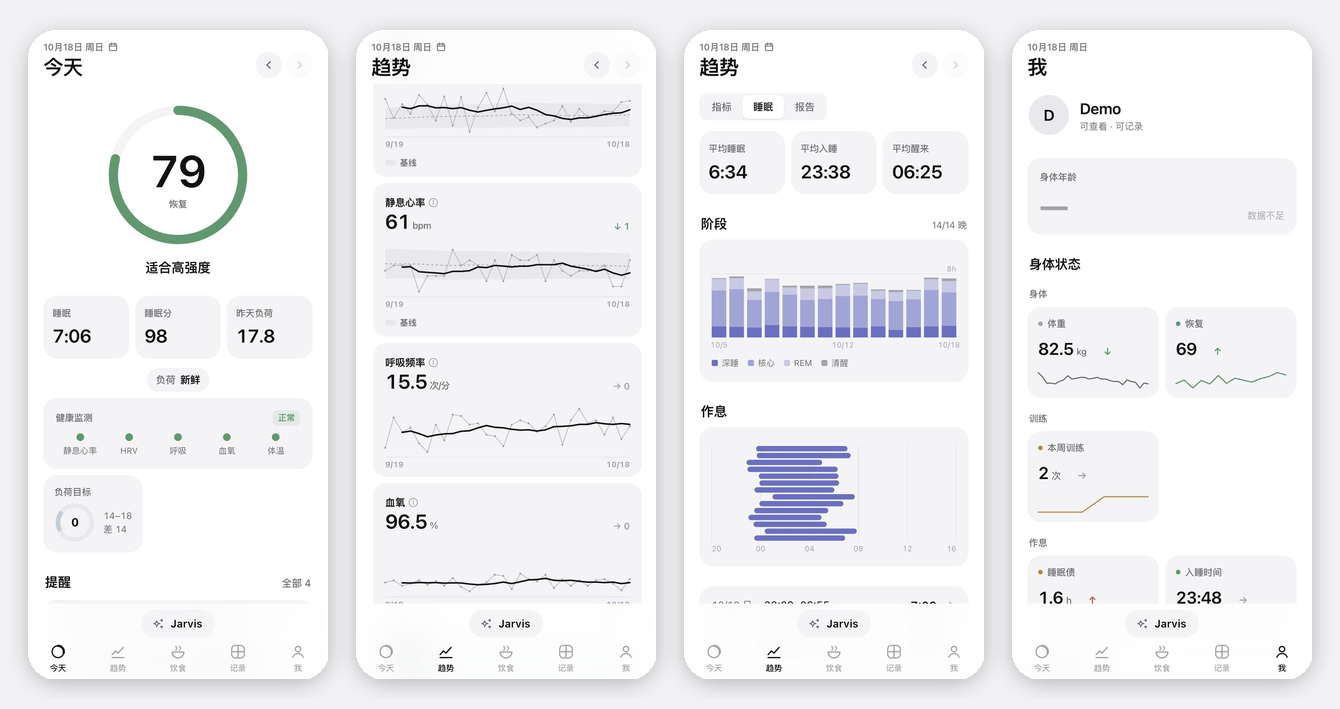
First public alpha. Your body's data layer for AI — self-hosted, any AI reads and writes it through MCP.
- Apple Watch → recovery, strain, sleep, body age, stress, coaches, weekly / monthly reports
- Today page (PWA) with training, food, labs and journal; no input forms — log by talking to your AI
- Bring your own AI (Claude / ChatGPT / Codex / Gemini via MCP, or an API key); optional fallback AI for family
- One-command local demo with synthetic data:
./quickstart.sh - iOS app (Flutter) source attached below for building it yourself — see
apps/watch2whoop/README.md
首个公开 alpha。 给 AI 用的身体数据层:自托管,任何 AI 都能通过 MCP 读写。Apple Watch 恢复 / 负荷 / 睡眠 / 身体年龄,没有表单、跟 AI 说话就能记录,./quickstart.sh 一条命令本地体验。附件是 iOS app 源码,自己编译见 app 目录的 README。
Not affiliated with WHOOP or Apple. Not a medical device.