Repository navigation
Architecture
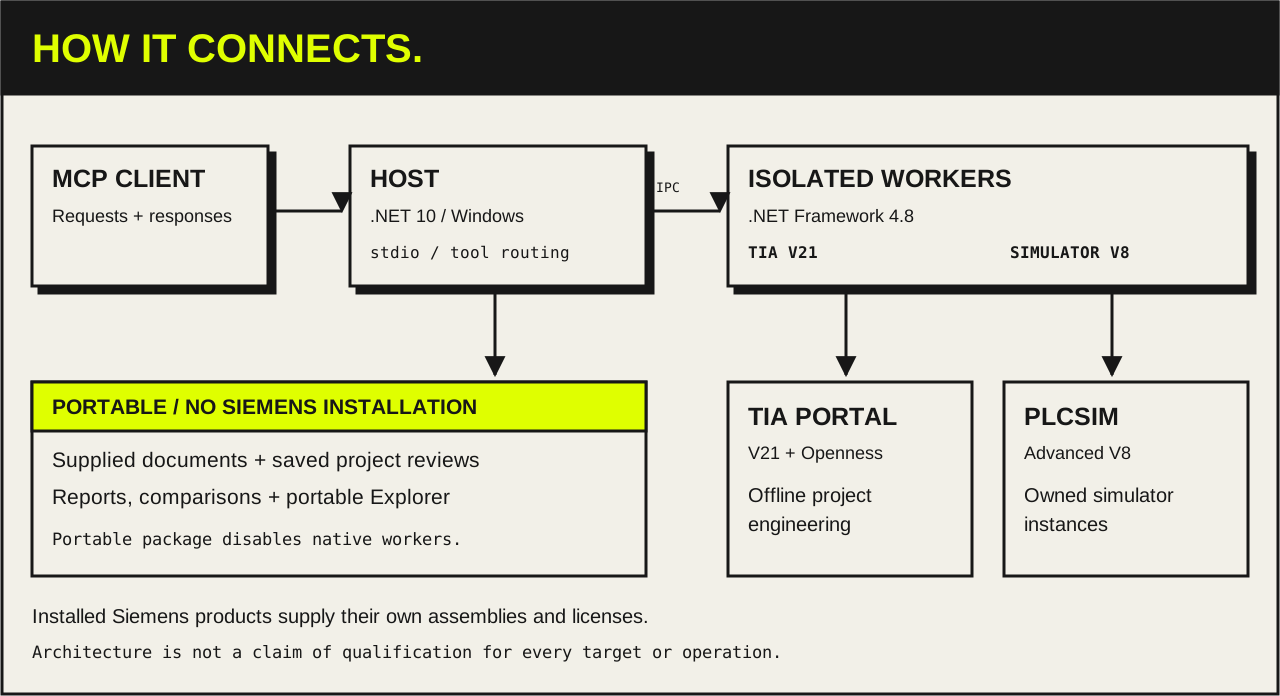
- MCP client talks to the Host over stdio.
-
Host (
TiaMcp.Host, .NET 10, Windows) serves the MCP tools, portable document workflows and saved project reviews. - OPC UA client reads scalar, array and matrix values and captures events without TIA, and writes only to an owned PLCSIM server; see the runtime workflow.
- Runtime diagnostics include bounded Web syslog reads and selectable PLCSIM SingleStep capture modes. These additions have offline checks; native qualification remains open. See CPU diagnostics and capture modes.
-
Native workers (.NET Framework 4.8) run each Siemens call in an isolated process:
-
TiaMcp.Openness.V21for TIA Portal V21 -
TiaMcp.Simulator.V8for PLCSIM Advanced V8
-
- Protected credentials stay in the Host's per-user store. A worker receives a secret only for one block protection or CPU protection-level apply, sealed to that apply; see the credential route.
-
TIA Add-In companion (
TiaMcp.AddIn.V21, .NET Framework 4.8) runs inside TIA Portal. It sends a project-tree selection to a Host that was started with explicit enrollment, over the Host's one-use pipe challenge. It reads only; one native handoff is verified (local.addin.companion.20261029). See the Add-In companion. - Project Explorer is a read-only browser view. It works as a standalone offline HTML snapshot or through a compatible MCP Apps host.
Siemens assemblies are loaded from your installed products and are never redistributed. The portable package disables native workers entirely.
The optional Test Suite adapter also has an exploratory system-test qualification route, with independent Host/worker admission, owned-simulator endpoint checks and durable recovery. Production admission stays closed; see TS-Q03 boundaries.
The engineering worker and its TIA connection are reused across tool calls. Startup checks the worker's saved application identity read-only; registration belongs to explicit setup and approved updates. Separate native helpers are separate applications. See registration and worker boundaries.
Native changes follow prepare → preview → checkpoint → apply → verify. A change can partially fail across Siemens calls; recovery uses its checkpoint and journal. The public simulation workflow works only on adapter-owned simulator instances: it can download a changed program online, set virtual time and inject interrupts there, but it does not expose physical PLC download, force or CPU control.
HMI preservation records export progress before native dispatch and retains failures without rereading a lost project connection. Classic graphic-list exports are temporarily blocked; a preservation scope that needs them refuses the change. See HMI export containment, diagnostics and disposable-copy tests. Capture has separate per-file and project-wide capacity bounds; the exact limits and outstanding native failure are documented in the preservation guide.
The separate hmi_classic_screen_edit workflow compares every regular screen of one Classic RT Advanced HMI without exporting graphic lists. It retains checkpoint, compile and exact readback checks, but explicitly excludes shared-resource, other-HMI, PLC and hardware content. This is bounded screen preservation, with profile-wide qualification still unverified. See the screen editing contract.
Combined PLC component installation admits only exact combinations with native preservation, reopen and recovery evidence. The qualified FBD OB case and remaining restrictions are listed in the component workflow.
Library imports preview dependencies before their selected consumers and refuse cycles before writing. See the engineering workflow.
Classic screen import failures have a bounded restore-and-verify path in the open project. A completed screen edit whose response was lost can also be reconciled there using independent native evidence. Other mutations retain their existing recovery requirements. See screen recovery and timeout handling. The local verification record distinguishes the native lock-release test from managed recovery checks.
The diagram shows component boundaries, not support for every operation, target or environment. Offline tests, native compilation and runtime qualification are separate claims. Check:
- Current status
- Tool reference
- Engineering coverage
-
feature_catalogandtarget_capabilitiesfrom the running server
Full detail: system architecture guide.
The 2 November local completion record covers dependency-ordered library imports, preserved target paths, the production FBD OB route and the remaining operator/equipment prerequisites.
The screen workflow adds bounded batching, lease-scoped observations, native component composition and diagnostic phase progress. The verification record covers the owned two-screen RT Advanced fixture, including native rollback, lost-response reconciliation and fresh reopen. Profile-wide and runtime qualification remain unverified.
Batch reconciliation now requires a receipt for every member, and captured artifact reads reject symbolic links and junctions. The workflow guide keeps the exact request shape and evidence limits.
Area capture can bundle PLC declarations, HMI member paths and native control prototypes. Composition supports blank layers, typed faceplate/navigation constants, multilingual captions and approximate previews. Compiler diagnostics and terminal progress are handled separately from unknown execution outcomes. See the area workflow and evidence limits. The 4 November verification record separates synthetic/Host validation from the outstanding native regression run.