Repository navigation
Build Guide
- 58 x MX Compatible Switches or GLP(KS-33) Switches
- 58 x Kailh Hotswap Sockets or GLP Hotswap Sockets
- 58 x 1N4148 Diodes or 1N4148W T4 SOD-123
- 58 x 1u keycaps
- 3 x nrf52840 Pro Micro
- 2 x EC11 Encoders
- 16 x M2 Heat set inserts, length 2mm(OD3.2mm)
- 16 x M2 bolts, length 5mm
- 2 x MSK12C02 Slide Switch
- 2 x 6x6x4.3MM 4PIN G89 Tactile Tact Push Button
- 2 x 14500 Battery with protection chip
- 2 x 14500 Battery holder(AA holder works or you can use printed holder)
- 2 x PCB
- Case Files
- Case for the dongle
Most of the components can be found on Aliexpress. PCB can be bought from a PCB manufacturer, usually there is a minimum order of 5 pcs. This is fine, because you can use the same PCB design on both sides of the keyboard.
PCB thickness should be 1.6mm, 2 layers and lead free finish. You can find gerber files from the repository.
Case can be printed from PLA or PETG. No supports is required.
Solder pin headers to the microcontroller. Second microcontroller needs to be rotated, so the buttons face down.
If you are going to use battery cell bigger than 500mAh, you can solder 0 ohm resistor or just piece of wire to these two pads. It will change the charging current from 100mA to 300mA.

Solder hotswap sockets, diodes(you can use SMD or THT diodes), power switch, reset switch and EC11 encoders.
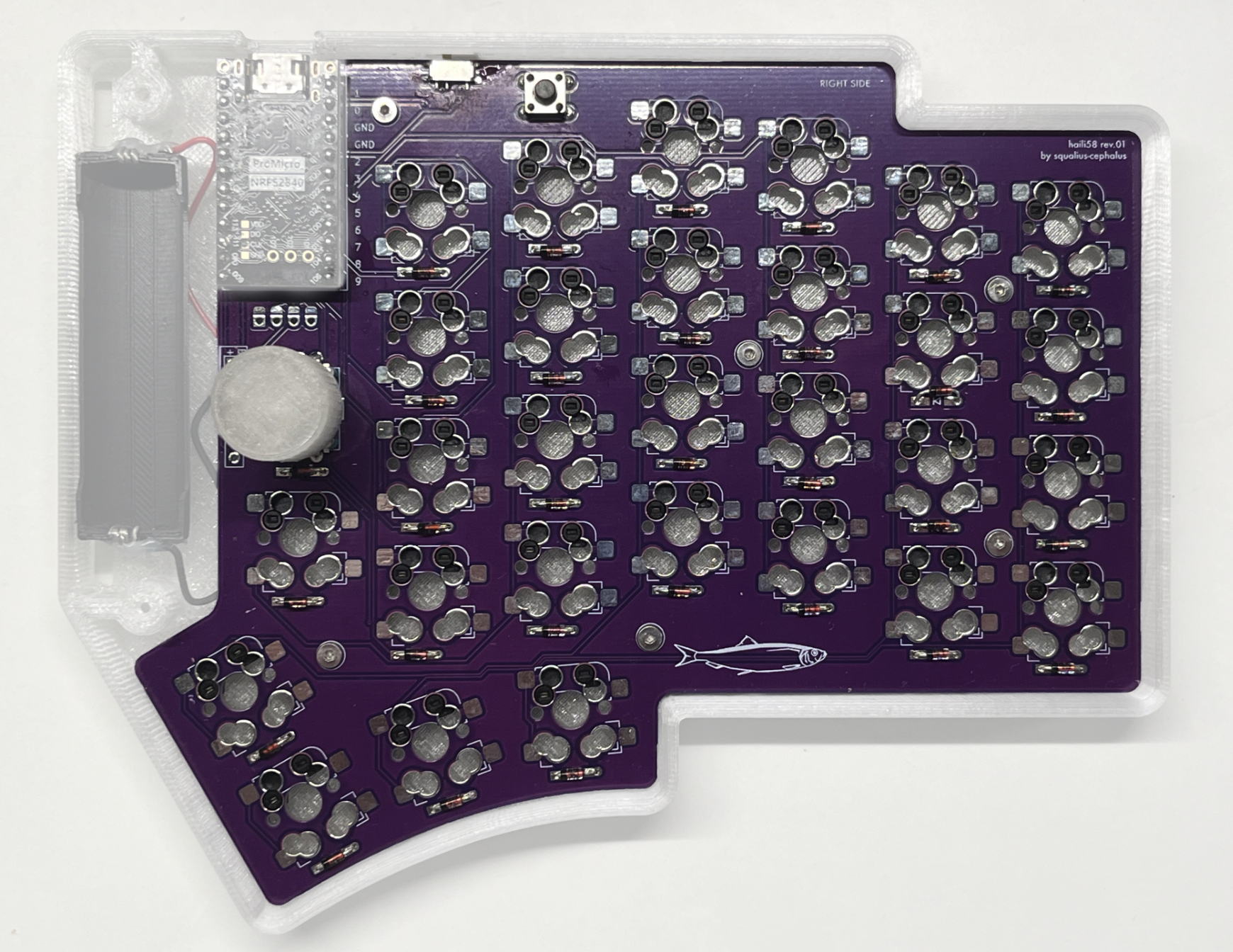
Solder both microcontrollers. Don't solder those too close to the PCB, leave a two-millimeter gap, the legs of the pin header should be long enough.

You can use AA battery holders with the 14500 cells. But be careful! The battery must have its own protection chip! Under no circumstances should you use batteries that don't have built-in protection!
3D printed 14500 holder works fine, you need some wire to make the contacts.
Insert heat set inserts to the bottom plates using soldering iron. Temperature should be around 240°C. Fasten the PCBs to the base with bolts, insert key switches to the top plate and push the plate to the PCB.

Don't bend any pins! Plates should connect without too much force.
Add keycaps, power up both halves and connect the dongle to the PC. If you haven't uploaded firmwares to the halves/dongle, follow the firmware upload guide.