Repository navigation
Imported pdf cuts off words #8645


|
As the title says, I imported a pdf but the words on right-side edge of the page are cut off. Zooming-in/out won't help here because it's not the issue. What do I do ? |
Replies: 2 comments 2 replies

|
This usually isn’t a zoom/display issue. The text sits outside the page’s visible box, so scaling the page down doesn’t bring it back. A few checks to find the cause:
Also cut off there: the source PDF has content beyond its page boundary (the CropBox/MediaBox is smaller than the content). That’s common in PDFs exported from Word or web pages with a mismatched paper size (A4 vs Letter).
Adjust page size/scale: set a larger page size (e.g. A4 → A3 or Letter → Legal) rather than a scale factor below 1. A scale below 1 shrinks content and page together, so whatever was outside stays outside.
Your Stirling-PDF version (shown in the footer or settings) and how you run it (Docker, desktop, or the hosted site). With that I can point to the exact setting.This usually isn’t a zoom/display issue. The text sits outside the page’s visible box, so scaling the page down doesn’t bring it back. A few checks to find the cause:
Also cut off there: the source PDF has content beyond its page boundary (the CropBox/MediaBox is smaller than the content). That’s common in PDFs exported from Word or web pages with a mismatched paper size (A4 vs Letter).
Adjust page size/scale: set a larger page size (e.g. A4 → A3 or Letter → Legal) rather than a scale factor below 1. A scale below 1 shrinks content and page together, so whatever was outside stays outside.
Your Stirling-PDF version (shown in the footer or settings) and how you run it (Docker, desktop, or the hosted site). With that I can point to the exact setting. |

|
Hi thanks for the fast respond waw I should specify that it is an official document from a governement website. So I highly doubt the original pdf is the issues
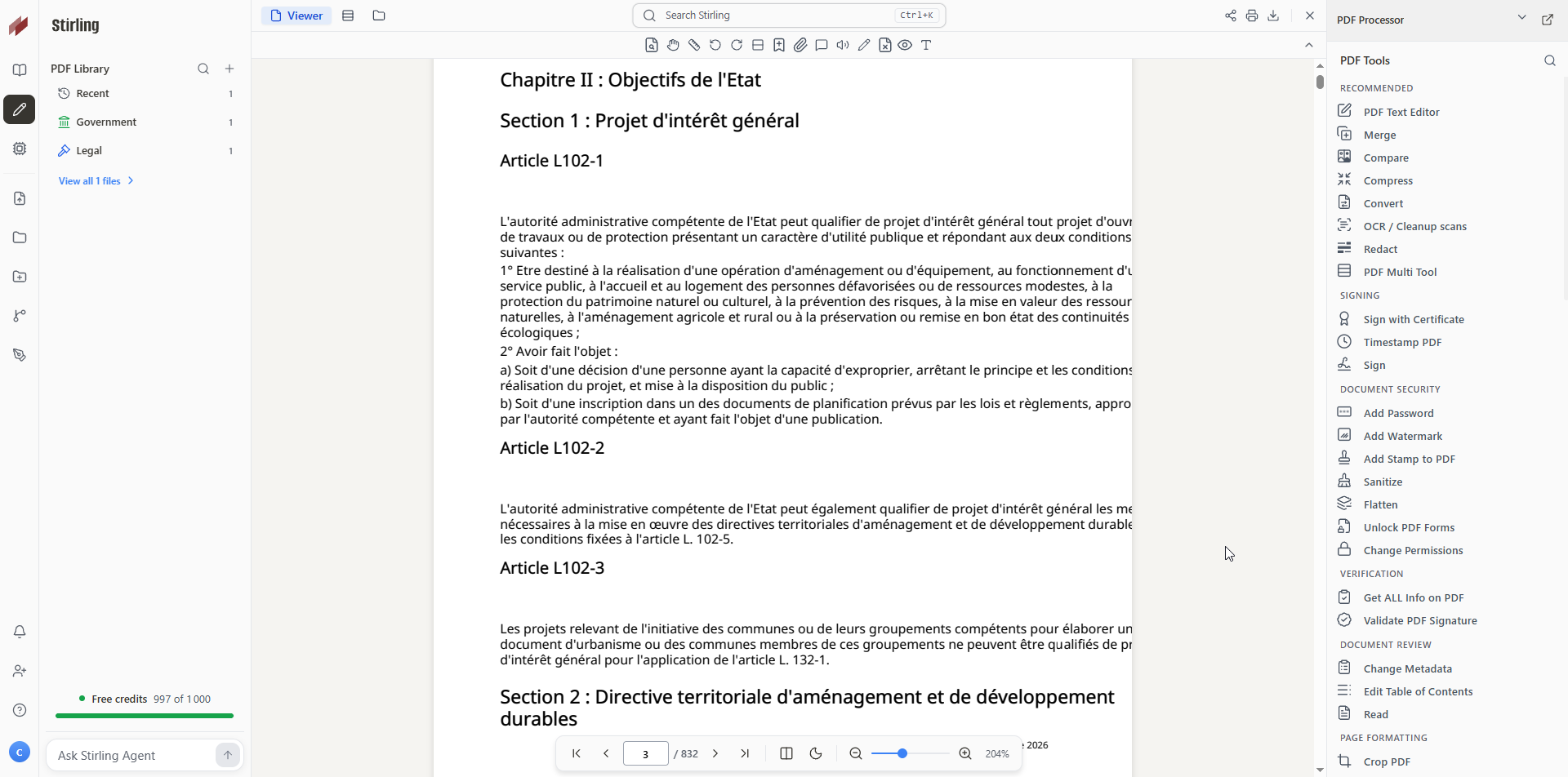
image. For the tools I'm not exactly sure what you mean. I basically only imported the pdf and did nothing else, aside from the things I mentionned. If you need anything else just tell me. |
|
Thanks, that narrows it down! If the original looks fine everywhere else and you only imported it, the PDF itself is OK. The problem is how the web viewer renders it. Most likely cause: fonts that aren’t embedded in the PDF Confirm it (1 min) Check whether it’s only a display issue Looks fine: only the viewer is affected. Your file is intact, and any tool you run on it will produce a correct PDF. Fixes Convert → PDF to PDF/A: this embeds the fonts during conversion, and it’s different from Repair, which doesn’t touch fonts. Then re-import the result. If the downloaded file looks fine but the viewer still cuts it off, it’s worth opening an issue with the PDF (or a page of it), since that’s a rendering bug in the viewer. If this solves it, please mark it as the answer |
|
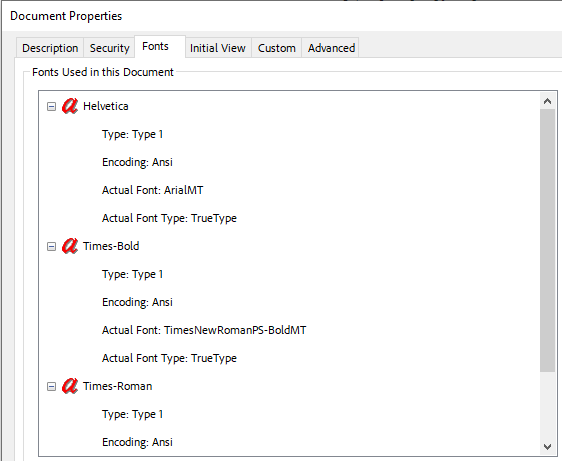
So I searched for "editor" in Stirling and clicked "Text Editor" and for some odd reason it does appear correctly this way. Now I did Convert -> PDF to PDF/A. This seems to have solved it entirely. Now it renders fine in Reader and Editor mode! Your assumption about embedded font were correct: |


Thanks, that narrows it down! If the original looks fine everywhere else and you only imported it, the PDF itself is OK. The problem is how the web viewer renders it.
Most likely cause: fonts that aren’t embedded in the PDF
Government PDFs often reference standard fonts (Arial, Helvetica, Times, or an official typeface) without embedding them. Adobe or your browser then uses the font installed on your computer, so it looks right. The web viewer doesn’t have that font and substitutes a wider one, so each line becomes longer than the page and the end gets clipped. Scaling or changing the page size can’t fix that, because the text is still drawn with the wrong font.
Confirm it (1 min)
Open t…