Repository navigation
Releases
v1.14.0: MOSFET out of the pack temperature

Changed: the MOSFET no longer counts as the pack's temperature
The BMS runs much hotter than the cells and is allowed to, so on a sunny day a pack with 25° cells could show 60° on the Battery Stacked Pack Card. The pack screens and the bank display's temperature now come from the probes only (#23).
- MOS tile: still on the Battery Pack Card, with its colours, unchanged.
- Want the old behaviour? Turn on
temp_include_mos, in the Temperature colours section of the Battery Pack Card's editor or in the Battery Stacked Pack Card's editor. On the stacked card it applies to all packs; a pack (orpack_defaults) can still set its own. - No probes? A pack with only a MOSFET sensor keeps using it.
Install
HACS → Battery Pack Card → Update (or ⋮ → Update information first), then hard-refresh the dashboard. The console shows BATTERY-PACK-CARD v1.14.0 and BATTERY-STACKED-PACK-CARD v1.14.0.
v1.13.0: packs larger than 32 cells, temperature per cell
New: packs larger than 32 cells
The cell grid now goes up to 512 cells, so large traction packs (e.g. a 150-cell 800 V EV pack) show every cell.
- Three-digit cell names: the cell patterns pad to the number of n's, so
{nnn}gives001…150(cell_voltage_pattern: sensor.ev_cell_{nnn}_voltage).{n}and{nn}work as before. - Dense grids stay readable: the cell voltage font scales down with the pack (13 px from 64 cells, 12 px from 96) and never wraps.
cell_font_sizesets it yourself.
New: a temperature in each cell tile
BMSes report module temperatures, so a group of cells shares one sensor. Set cell_temp_pattern with {g} / {gg} for the group number and cell_temp_group_size for the cells per sensor (default 5), or entity_cell_<n>_temp per cell. The temperature follows temperature_unit, works with templates, and is hidden when the sensor doesn't exist. Off unless you set it.
cells: 150
cell_voltage_pattern: sensor.ev_cell_{nnn}_voltage
cell_temp_pattern: sensor.ev_module_{gg}_temperature   # cells 1–5 → 01, 6–10 → 02, …
Packs of 32 cells or fewer look exactly as before. Thanks @stevelea for the contribution, tested on a real 150-cell XPeng G6 pack (#21)!
Install
HACS → Battery Pack Card → Update (or ⋮ → Update information first), then hard-refresh the dashboard. The console shows BATTERY-PACK-CARD v1.13.0 and BATTERY-STACKED-PACK-CARD v1.13.0.
Contributors

Assets 2
v1.12.0: BMS_BLE-HA batteries, ambient temperature
New: BMS_BLE-HA batteries (Bluetooth)
Batteries read over Bluetooth by the BMS_BLE-HA integration (JBD, Daly, JK, Seplos, EG4, …) now work with the card. In the editor, pick your battery under Or a BMS_BLE battery (Bluetooth): the card finds its entities, its name and its cell count by itself.
- Found by device, not by entity name: works with renamed entities, old and new BMS_BLE versions and Home Assistant in any language.
- Cells and temperatures from the battery's own lists; the MOSFET temperature is recognised as such.
- Lowest / highest cell with their numbers, SOH, cycles, remaining capacity, runtime (
1d 11h), and the alarm badge from the battery's Problem sensor. - The Battery Stacked Pack Card offers BMS_BLE batteries under Packs found, and a bank can mix them with JK add-on packs.
- Only cards with
bms_ble_deviceset use any of this; every other card works exactly as before.
Tested on real batteries by @mohrerao, thanks for the idea, the first version and the testing (#19)!
New: ambient temperature
entity_temp_ambient (editor: Advanced → Temperatures) shows an ambient temperature next to the Temperatures heading, e.g. the environment probe of a Pace BMS (Gobel, Jakiper). It's the room, not the battery, so it isn't a tile, doesn't count as the pack's hottest temperature and stays hidden when the entity doesn't exist. Thanks @Bascht74 (#20)!
Install
HACS → Battery Pack Card → Update (or ⋮ → Update information first), then hard-refresh the dashboard. The console shows BATTERY-PACK-CARD v1.12.0 and BATTERY-STACKED-PACK-CARD v1.12.0.
Contributors


Assets 2
v1.12.0-beta.1: BMS_BLE-HA batteries
Pre-release (beta). Builds on v1.11.0.
New: BMS_BLE-HA batteries (Bluetooth)
Batteries read over Bluetooth by the BMS_BLE-HA integration (JBD, Daly, JK, Seplos, EG4, …) now work with the card. In the editor, pick your battery under Or a BMS_BLE battery (Bluetooth): the card finds its entities, its name and its cell count by itself.
- Found by device, not by entity name: works with renamed entities, old and new BMS_BLE versions (some entity ids changed in 2025 and 2026) and Home Assistant in any language.
- Cells and temperatures from the battery's cell and temperature lists. The MOSFET temperature is recognised as such.
- Lowest / highest cell with their numbers, SOH, cycles, remaining capacity, runtime (
5h 30m), and the alarm badge from the battery's Problem sensor. - The Battery Stacked Pack Card offers BMS_BLE batteries under Packs found, and a bank can mix them with JK add-on packs.
Nothing changes for other cards: only a card with bms_ble_device set uses any of this. Every other card was checked to render exactly as in v1.11.0.
This is a beta because it hasn't run on real Bluetooth batteries yet. If you have one, please try it and tell us how it goes in #19. Thanks @mohrerao for the idea and the first version!
Install
In HACS: Battery Pack Card → ⋮ → Redownload → expand Need a different version? → pick v1.12.0-beta.1 → Download, then hard-refresh the dashboard. The console shows BATTERY-PACK-CARD v1.12.0-beta.1 and BATTERY-STACKED-PACK-CARD v1.12.0-beta.1.
Contributors
Assets 2
v1.11.0: invert current
New: invert_current
The card takes positive current as charging. Some BMSes, or the way they reach Home Assistant, count the other way round, and then a charging battery shows as discharging with a negative power. Turn on Invert current and power in the editor (Advanced → display options), or in YAML:
invert_current: trueIt flips the sign of current and power, including the charging / discharging label and its colour.
On the Battery Stacked Pack Card the same option (Bank tab) applies to all packs and to the bank's entity_current / entity_power. A pack (or pack_defaults) can still set its own.
Thanks @babajun12 for reporting (#17)!
Install
HACS → Battery Pack Card → Update (or ⋮ → Update information first), then hard-refresh the dashboard. The console shows BATTERY-PACK-CARD v1.11.0 and BATTERY-STACKED-PACK-CARD v1.11.0.
Contributors

Assets 2
v1.10.0: DRY1 / DRY2 pills
New: DRY1 / DRY2 pills
jkbms-rs485-addon 4.1.12 publishes the live state of the BMS's two dry-contact relays. The card now shows them as two status pills next to Charge / Discharge / Balance / Heater: DRY1 and DRY2, green when the relay is on, grey when it's off. Click one to open the entity.
- Found automatically with the add-on:
binary_sensor.bms_1_dry1_contact/..._dry2_contact. The add-on names these after the bare BMS even when the pack's other sensors carry a longer prefix (bms_1_bms_…), so the card also tries the shorter forms of your prefix. - Other BMSes: point
entity_dry1/entity_dry2at your own entities (editor: Advanced → Status). - Not using a relay? Switch its pill off with
show_pill_dry1/show_pill_dry2(editor: Advanced → Status pills). - No DRY sensors: no pills, nothing changes.
Thanks to @mvincm for this one (#18)!
The 2.0 alerts aren't in this release; they're in the 2.0 pre-releases.
Install
HACS → Battery Pack Card → Update (or ⋮ → Update information first), then hard-refresh the dashboard. The console shows BATTERY-PACK-CARD v1.10.0 and BATTERY-STACKED-PACK-CARD v1.10.0.
Contributors

Assets 2
v2.0.0-alpha.1: alerts
Pre-release (alpha). A new major version: the card can now notify you.
New: alerts
Open the card's editor, go to the new Alerts tab, switch on Alerts for this card and tick where they should go: the Home Assistant app on each phone (several at once), any other notify service, or a notification in Home Assistant itself. The card then sets up the automations for you:
| Alert | When |
|---|---|
| Cell difference | Δ over the card's warning band (warning) or red band (alarm), for 5 minutes |
| Cell voltage | a cell above or below what the chemistry allows (LFP, NMC or LTO) |
| Temperature | the card's amber (warning) or red (alarm), or below its blue |
| Low SOC | 20 % / 10 % (off by default) |
| BMS alarm | the pack's alarm entity |
| Charge / discharge switched off | the BMS turned one off |
- Easy to set: a threshold left blank follows the card's own setting, so if you change the card's Δ or temperature bands the alerts follow.
- Kept up to date automatically: the card makes one ordinary automation per alert, covering all of its packs. When you change the card (add a pack, change an entity, a threshold, who to notify), the card rewrites the automations that changed as soon as the dashboard is opened by an admin. Alerts you switch off are removed. The editor shows whether they're in sync and links to each automation.
- Critical alarms break through silent mode on the phone app, warnings arrive normally. Optional back to normal message (not after a sensor merely dropping out) and quiet hours for warnings.
- Let me edit it myself in Home Assistant per alert: the card makes it once and then leaves it to you. Remove all alerts of this card deletes them.
- A small bell next to the alarm badge: grey while quiet, amber or red with a count when an alert is active. Tap it for each alert's state.
- On the Battery Stacked Pack Card the alerts are set once for the whole bank and cover every pack.
The card only writes its own automations, never to the BMS, and only for admin users, never from the editor preview. See Alerts in the README for the YAML options.
Install
In HACS: Battery Pack Card → ⋮ → Redownload → expand Need a different version? → pick v2.0.0-alpha.1 → Download, then hard-refresh the dashboard. The console shows BATTERY-PACK-CARD v2.0.0-alpha.1 and BATTERY-STACKED-PACK-CARD v2.0.0-alpha.1.
v1.9.0 — find your packs, compact and display-only bank display
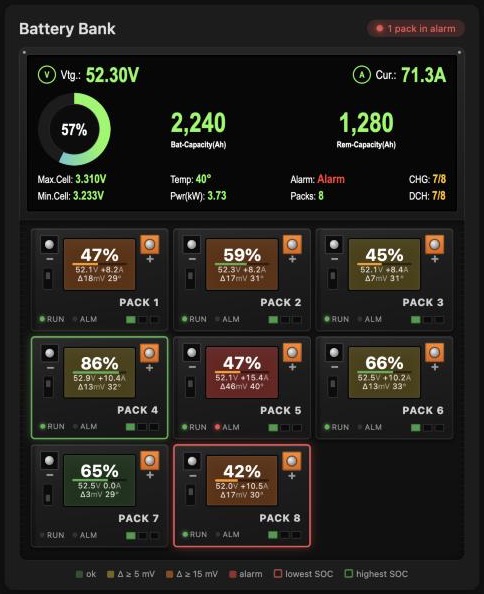
Stable release of 1.9.0-alpha.1 to alpha.4. Thanks to everyone who tested the alphas and sent ideas, especially Andy! Nothing changes for existing setups.
New
-
Pick your pack from a list. With the JK-BMS RS485 add-on, the editor's prefix field lists the add-on's packs found in your Home Assistant; typing any prefix still works. A new Battery Pack Card starts with the first pack found (cell count included), and a new Battery Stacked Pack Card with all of them. Its Bank tab offers to add any packs that are missing in one go.
-
Ready for pack-aware naming. Entity names that include the pack (e.g.
pack_1_bms_1) are simply another prefix. Alarm entities are found automatically when they don't follow the classic<prefix>_<prefix>naming; a configuredalarm_prefixalways wins. -
Compact bank display (
bank_display_size: compact). Instead of the full JK-style screen you get a slim strip that always has the same shape: the SOC ring on the left andVtg,Cur,PwrandRem2 × 2 on the right, scaling with the card's width. An alarm gets its own line underneath. -
Display-only cards. A stacked card without packs is a clean, standalone display, for example one overview of all your stacks combined. New bank fields make the full JK display work without packs:
entity_capacity_totalandnominal_voltage(for kWh);- highest / lowest cell, temperature, alarm, number of packs, and the charge / discharge switches.
The editor shows those extras when the card has no packs.
-
show_cell_resistanceto hide the resistance under each cell's voltage.
Changed
- No resistance line without resistance sensors (#15). BMSes like Seplos don't report the cells' internal resistance; the "0 mΩ" line is now hidden automatically, like the rest of the card's missing sensors since 1.8.
Fixed
- Clear a field with ✕. Entity fields in both editors were marked as required, so Home Assistant showed no clear button. You can now empty a bank total or an override without going into YAML.
Docs
- JK BMS temperatures. On a JK BMS, battery temperature 3 is the same sensor as the MOS temperature. If your integration has five battery temperatures, use 1, 2, 4 and 5 for probes 1–4. There's a note in the README and above the temperature fields in the editor.
Install
HACS → Battery Pack Card → Update to v1.9.0, then hard-refresh the dashboard (in the Companion app: Reset frontend cache). The console shows BATTERY-PACK-CARD v1.9.0 and BATTERY-STACKED-PACK-CARD v1.9.0. HACS checks custom repositories every 48 hours; use ⋮ → Update information on the card's HACS page to see it immediately.
v1.9.0-alpha.4 — compact display 2 × 2, full display without packs
Pre-release (alpha). Builds on v1.9.0-alpha.3. Thanks again Andy!
Changed
- Compact bank display, always the same shape. It used to be a wrapping line, so depending on the card's width it came out as 1, 2 or 3 rows, and every stack looked different. Now it's always the SOC ring on the left and
Vtg: 53.41V,Cur: -10.7A,Pwr: -0.57kW,Rem: 156kWh2 × 2 on the right, whatever the layout (single stack or cabinet grid) or box size. Ring, text and spacing scale with the width: from small text in a narrow 230 px stack up to about 24 px from 600 px wide. An alarm gets its own line under the grid, so the 2 × 2 never shifts.
New
-
Display-only cards can show the full JK display. A stacked card without packs has nothing to work Max/Min Cell, Alarm, Packs or CHG/DCH out from, so there are new bank fields for them:
entity_cell_max/entity_cell_min: highest / lowest cell voltage, in V or mV;entity_temperature;entity_alarm:on,true, a non-zero number or a warning text shows Alarm in red; off,0orNormalshows Normal;entity_pack_count;entity_charge/entity_discharge:ON/OFF.
In the editor they appear under More display values when the card has no packs (or when one is already set, so it can be cleared). On a card with packs they're still worked out from the packs; if you set them anyway, they take priority, like the bank totals.
Install
In HACS: Battery Pack Card → ⋮ → Redownload → expand Need a different version? → pick v1.9.0-alpha.4 → Download, then hard-refresh the dashboard. The console shows BATTERY-PACK-CARD v1.9.0-alpha.4 and BATTERY-STACKED-PACK-CARD v1.9.0-alpha.4.
v1.9.0-alpha.3 — hide cell resistance when the BMS has none
Pre-release (alpha). Builds on v1.9.0-alpha.2.
Changed
- No resistance line without resistance sensors (#15). Some BMSes, like Seplos, don't report the cells' internal resistance, yet every cell tile showed "0 mΩ". The resistance line, and "and resistance" in the cells heading, now only show when at least one cell has a resistance sensor, the same rule the rest of the card follows since 1.8. With
show_missingon it's shown anyway.
New
show_cell_resistance(Basic tab: Cell resistance, default on): hide the resistance in the cell tiles even when the sensors exist.
Install
In HACS: Battery Pack Card → ⋮ → Redownload → expand Need a different version? → pick v1.9.0-alpha.3 → Download, then hard-refresh the dashboard. The console shows BATTERY-PACK-CARD v1.9.0-alpha.3 and BATTERY-STACKED-PACK-CARD v1.9.0-alpha.3.