Repository navigation
Releases: Sweax3169/sweaxcut
Release list
SWEAXCUT 3.0.0

SWEAXCUT 3.0.0 is a redesign of the whole editor, with one-click edits and a caption editor.
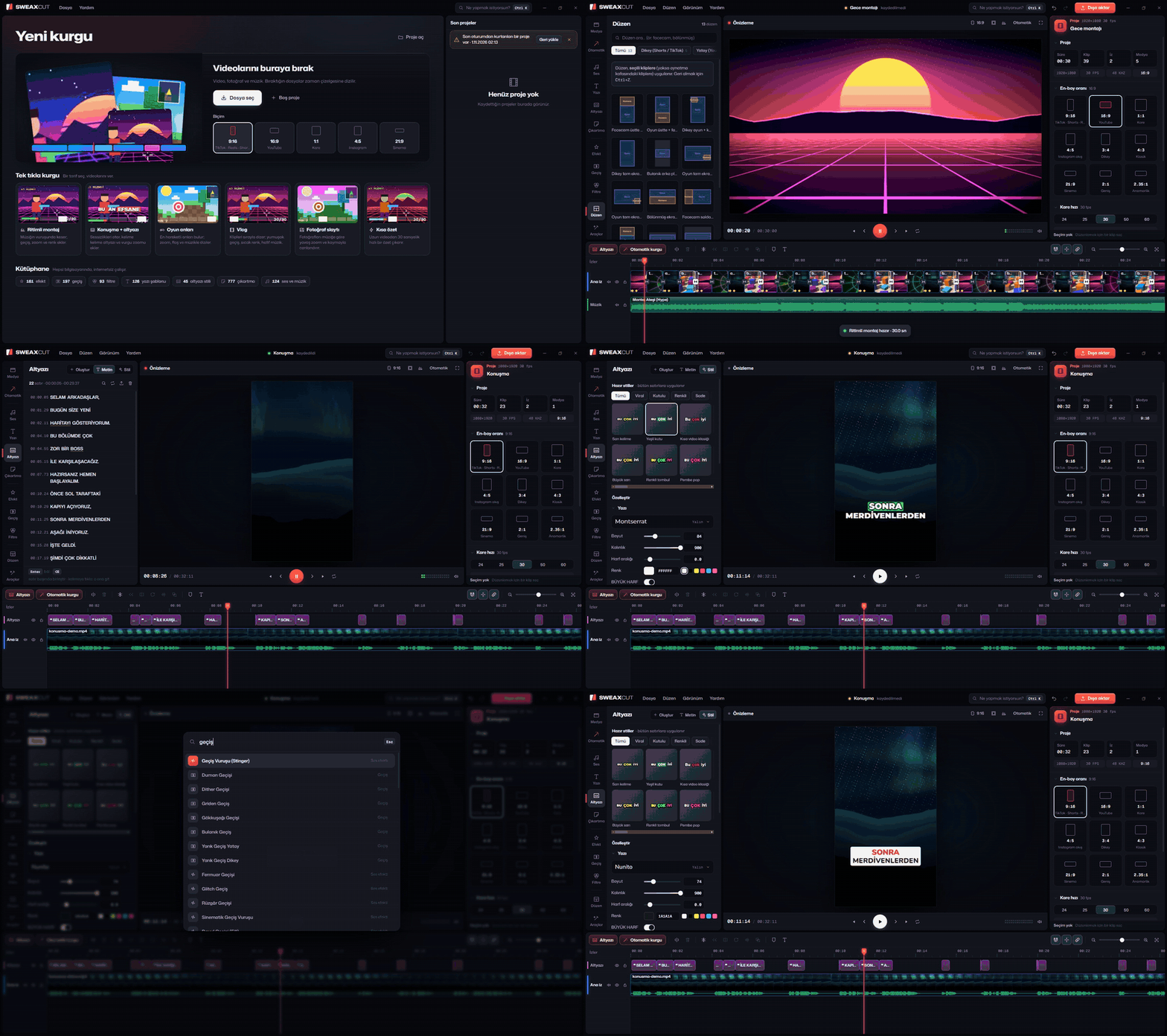
New look
Every screen was redrawn: home, editor, library, inspector, timeline, windows and export. The picture is the only bright thing on screen; the preview casts a soft light from the current frame onto its surroundings (can be turned off in Görünüm). Buttons, menus and panels move on springs.
One-click edits
- Drop videos on a recipe card on the home screen and the edit builds itself: Ritimli montaj (cuts on the beat), Konuşma + altyazı (cuts silences, adds captions and jump zooms), Oyun anları (finds the loud moments), Vlog, Fotoğraf slaytı, Kısa özet.
- Otomatik tab: the same recipes for the current project, Güzelleştir (eight switchable steps: silences, cleaner audio, colour, transitions, highlight zooms, captions, background music, fades) and eight looks that change colour, transitions and caption style together.
- Ctrl+K opens a search for every command, effect, transition, filter, text template and track.
- An empty timeline shows the four steps; dropped files bring up a "next step" strip.
Captions
- One click from a clip: Altyazı oluştur in the inspector, Altyazı in the timeline toolbar or the clip's right-click menu. Runs on your PC with whisper.cpp.
- Accuracy choices measured on a 66-second Turkish recording (Ryzen 5 7600, CPU): small 6.0 % word error in 13.5 s, medium 2.6 % in 42.6 s (default), large-v3-turbo 5.1 % in 78.3 s. Word timing error has a median of 29–49 ms.
- "Müzik ve oyun sesini atla" skips non-speech with Silero VAD, and a new filter drops the humming text whisper sometimes writes over game sound.
- Text editor: all lines as one document. Type to fix a word (timings stay), Enter splits at the cursor, Backspace at the start of a line joins it to the previous one, nudge starts and ends by a frame, find and replace, shift all captions for sync, export SRT, VTT, ASS or TXT.
- Style editor applied to every line live: font, size, weight, spacing, colour, Turkish-correct capitals, the spoken word as colour, box, underline or karaoke fill, growth and bounce, dimmed upcoming words, ten word entrances, three loops, emoji, outline, shadow, glow, line/block/per-word backgrounds, position, width and words per line. Save any style to Kaydettiklerim.
For pros
- Keyframe curve editor: drag two bezier handles (with overshoot and anticipation) or pick one of six curves.
- Scopes on the preview: histogram, luma waveform, RGB parade and vectorscope with a skin-tone line.
- Six export presets (social, YouTube 1080p60, 4K H.265, quick 720p, GIF, MP3).
Fixes
- The app kept its caches (media proxies, caption transcripts, voice-over and music renders) in
%APPDATA%\sweaxcut\cache. Windows treats that as the same folder as Chromium'sCache, and Chromium empties it at every start, so all of it was rebuilt each time. The caches now live inOnbellek; captioning the same audio a second time takes 1.3 s instead of 23.9 s. - A talking-head edit cut at its silences ran speech recognition once per piece and split the captions into as many groups. Each source file is now transcribed once (32 s of speech: 24 s instead of 154 s) into one caption group.
- A false "font loading timed out" warning appeared on every export longer than 15 seconds.
- Re-scheduling a music fade during playback could stop the preview audio with an automation overlap error.
Türkçe: 3.0.0 bütün arayüzü baştan çiziyor. Ana ekrandaki bir tarif kartına video bırakınca kurgu kendiliğinden kuruluyor (ritimli montaj, konuşma + altyazı, oyun anları, vlog, foto slayt, kısa özet). Altyazı artık klipten tek tıkla oluşuyor; satırlar belge gibi düzenleniyor (Enter böler, Geri sil birleştirir), stil bütün satırlara canlı uygulanıyor ve kaydedilebiliyor. Ctrl+K her araca ve efekte götürüyor. Uzmanlar için anahtar kare eğri düzenleyicisi ve renk kapsamları eklendi.
Download
SWEAXCUT-Kurulum-3.0.0.exe (214 MB) installs for your user and updates 2.x in place; projects and downloaded models stay. It is not code-signed, so Windows SmartScreen may ask you to confirm ("More info" → "Run anyway").
SHA-256: 8a2fb5c56a0e0c138d422abf8f125475179fc21ee03ee35ba619b4be3bcde3a6
Third-party programs in the installer
The app's own code is MIT. The installer also carries separate programs under their own licences; the full list is in THIRD_PARTY_NOTICES.md and inside the install folder. These are under the GPL, with their sources:
- FFmpeg 6.1.1:
ffmpeg.exeandffprobe.exe(gyan.dev essentials build, GPL-3.0-or-later) - eSpeak NG, rhasspy fork (GPL-3.0-or-later)
The optional Turkish voice tr_TR-dfki-medium is licensed CC BY-NC-SA 4.0: it is downloaded on request, marked as non-commercial in the app, and not bundled. Stickers are Twemoji by Twitter, Inc. and other contributors, licensed under CC-BY 4.0. Fonts are under the SIL Open Font License.
SWEAXCUT 2.0.2
SWEAXCUT 2.0.2 replaces the bundled FFprobe. The editor itself is the same as 2.0.1.
ffprobe.exereads a file's streams, length, frame rate and rotation when you import it. It now comes from the same gyan.dev FFmpeg 6.1.1 build asffmpeg.exe, so both programs share one version and one source link.- Up to 2.0.1 the installer carried a 2018 build of FFprobe 4.0.2 from Zeranoe, a build site that has since closed.
Türkçe: Bu sürüm yalnızca gömülü FFprobe'u değiştiriyor. İçe aktarırken dosyayı okuyan ffprobe.exe artık ffmpeg.exe ile aynı gyan.dev 6.1.1 derlemesinden geliyor. Kurgu, efektler ve dışa aktarma 2.0.1 ile aynı.
Download
SWEAXCUT-Kurulum-2.0.2.exe (213 MB) installs for your user and updates 2.0.x in place. It is not code-signed, so Windows SmartScreen may ask you to confirm ("More info" → "Run anyway").
SHA-256: 263b54979438b2ff57a208c1030c7161b5b454c12c6076ff8bdf68d2685768f7
Third-party programs in the installer
The app's own code is MIT. The installer also carries separate programs under their own licences; the full list is in THIRD_PARTY_NOTICES.md and inside the install folder. These are under the GPL, with their sources:
- FFmpeg 6.1.1:
ffmpeg.exeandffprobe.exe(gyan.dev essentials build, GPL-3.0-or-later) - eSpeak NG, rhasspy fork (GPL-3.0-or-later)
Stickers are Twemoji by Twitter, Inc. and other contributors, licensed under CC-BY 4.0.
SWEAXCUT 2.0.1
SWEAXCUT 2.0.1: a full timeline video editor for Windows that works offline.
- Timeline editing: cut, trim, speed curves, keyframes.
- Effects library: effects, transitions, filters, clip animations, text animations, templates, subtitle styles and stickers, rendered by one WebGL2 compositor that drives both the preview and the export.
- Captions and voice: automatic captions with whisper.cpp, text to speech with Piper, background removal with MediaPipe.
- GPU export: NVENC, AMF or QSV, depending on your graphics card.
- Offline: no account and no upload.
Türkçe: Windows için çevrimdışı çalışan tam bir kurgu programı. Altyazı, seslendirme, efektler, geçişler ve GPU ile dışa aktarma.
Download
SWEAXCUT-Kurulum-2.0.1.exe (207 MB) installs for your user. It is not code-signed, so Windows SmartScreen may ask you to confirm ("More info" → "Run anyway").
SHA-256: e9b235faf5ee2dae524c67bf31110129f884a1b3a7dd97f3d65160efa349cd8b
Third-party programs in the installer
The app's own code is MIT. The installer also carries separate programs under their own licences; the full list is in THIRD_PARTY_NOTICES.md and inside the install folder. These are under the GPL, with their sources:
- FFmpeg 6.1.1 (gyan.dev essentials build, GPL-3.0-or-later)
- source: FFmpeg/FFmpeg@e38092ef93
- builds: https://www.gyan.dev/ffmpeg/builds/
- FFprobe 4.0.2 (GPL-3.0)
- eSpeak NG, rhasspy fork (GPL-3.0-or-later)
Stickers are Twemoji by Twitter, Inc. and other contributors, licensed under CC-BY 4.0.