Repository navigation

Turn your phone into a twin-stick controller
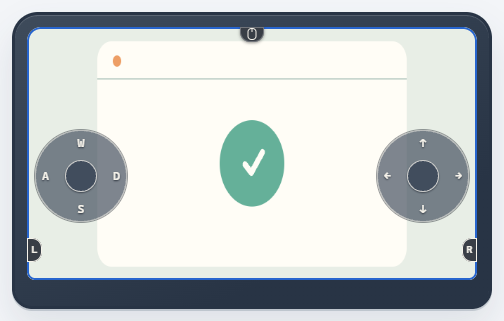
By default, the left stick sends WASD and the right stick moves the mouse. If the host supports a virtual gamepad, you can switch to dual analog sticks.
手机也能当双摇杆手柄了
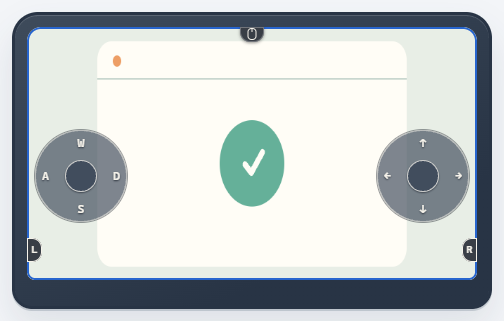
默认左摇杆对应 WASD,右摇杆移动鼠标。主机支持虚拟手柄时,可以切换为双模拟摇杆。
English
On KDE Plasma Wayland, enabling remote control now retries with a temporary session when the desktop rejects permission persistence.
中文
在 KDE Plasma Wayland 中开启远程控制时,如果桌面环境拒绝记住授权,Piik 会改用临时会话重试。
English
Piik 2.8.0 adds configurable touch joysticks for remote control, clearer sound settings when sharing, and help you can open from a failed share or playback screen.
- Control from a phone or tablet. In keyboard and mouse mode, the left stick sends WASD and the right stick moves the mouse. When the Host supports a virtual gamepad, switch to dual analog sticks. Use the main switch to turn both sticks on or off, and expand or reposition each side independently. Piik releases held input if the control session is interrupted.
- Share the sound you want. The source confirmation explains which sound is available and where to enable it. Browser tab audio and supported App system audio are easier to find, with guidance for keeping room voices out of the share. On Windows, capture keeps usable system audio samples even when their timestamps are uncertain.
- Recover a missing picture or sound. Ended viewer video enters the existing recovery flow. Browser video forwarded through the Server uses the layers the browser actually sends. The searchable bilingual Help Center walks through joining, sharing, restoring playback, and collecting diagnostics. English Help Center
- Share windows on Linux. If the desktop portal offers only windows, the App can still share a window and hides remote control when the portal cannot support it.
- Use a fixed HTTPS address for invitations. App operators with an existing public HTTPS endpoint, such as one provided through frp, can configure App to generate invitations with that address. Fixed invitations with frp
Update the App or self-hosted Server with the matching package outside an active share. Reopen the room page after the update.
中文
Piik 2.8.0 为远程控制新增可调整的触屏摇杆,分享前更容易确认声音来源,共享或播放失败时也能直接打开对应的帮助。
- 用手机或平板远程控制。 在键鼠模式下,左摇杆对应 WASD,右摇杆控制鼠标。主机支持虚拟手柄时,可切换到双模拟摇杆。总开关可开启或关闭两个摇杆,每侧可独立展开、调整位置。控制会话中断时,Piik 会释放仍按住的输入。
- 分享想让朋友听到的声音。 确认分享来源时,可以看到有哪些声音可用、在哪里开启。浏览器标签页音频和 App 支持的系统声音更容易找到,帮助还说明了如何避免把房间语音收进共享声音。Windows 系统音频采集会保留时间戳不确定但仍可用的音频采样。
- 画面或声音消失时恢复播放。 观看端的视频轨道结束后会进入现有恢复流程。经服务器转发的浏览器视频会使用浏览器实际发送的分层。可搜索的双语帮助中心介绍了如何加入房间、分享、恢复播放和收集诊断信息。中文帮助中心
- 在 Linux 上分享窗口。 桌面门户只提供窗口时,App 仍可采集窗口,并隐藏门户无法支持的远程控制入口。
- 用固定 HTTPS 地址生成邀请。 已经有公网 HTTPS 入口的 App 部署者(例如通过 frp 配置的入口)可以让 App 用该地址生成邀请链接。使用 frp 配置固定邀请
请在共享结束后使用对应的软件包更新 App 或自托管服务器,更新完成后重新打开房间页面。
构建与校验 / Build and checksums
Source / 源码: 81b4f27eff2a1de1dfe6131c06b525b7ba3508a8
SHA-256:
35529ed9dce85a238e9e520a24bd78888b8f23b244bfe0dccd8409185024f880  piik-81b4f27-linux-arm64-runtime.tar.gz
a0e30542912aa5317caa5c33aa5f4ce94cdf5813138f6052a7f18ad8dfc113fe  piik-81b4f27-windows-amd64-runtime.zip
0fb32fd1951eebc41997803ac6d0ee939ba5cf405bfbc013ea19b99c5144bf7d  piik-81b4f27-runtime.tar.gz
6fde2f65a3dddd8375eedfb787685a0405871b8676c36e4fa6bdf3144a3f2365  piik-app-android-universal.apk
d3ee5dd1d3cbca9a3ddfc8bbfed42b24386a67d2c741fda82269b55bf2b1b78f  piik-app-android-universal.zip
36763dc33d06a54241619896306a52381befad778bee9ef95574c41978616989  piik-app-darwin-amd64.zip
45e518f0a868e7efe60581ab0c9164b725e0c3cf30cc32edc64578be0727ad6d  piik-app-darwin-arm64.zip
1bd8cfce0231bdb7fa733e33631ad3d402cfd624f175790e0d8b4b2dd01be979  piik-app-linux-amd64.zip
16268748979c7d61dcc9b956665d21b9b21df984ca1938dbff5f7ff5807016ee  piik-app-linux-arm64.zip
0af7182c79c8219d505c8e1293a2157ea48aa6fe18eaa9a52a1e9f21aa2d303d  piik-app-windows-amd64.zip