Repository navigation
Releases
HomeLedger Desktop — Windows Preview 1

HomeLedger Desktop — Windows preview 1
Release tag: v1.2.0-desktop-preview.1
Unsigned Windows prerelease for testing with synthetic data. Native dependency notices and corresponding source materials accompany this installer. See the dependency inventory.
What this preview contains
- Windows x64 installer with a bundled local backend, database and English/Spanish OCR. No separate Docker server or Node installation is required.
- Existing Normal and Cyberpunk interfaces, with financial data stored on this computer.
- Manual updates, pre-upgrade database snapshots and recovery dialogs for backend/window failures or a conflicting local port.
- Fixes found during desktop validation: transaction deletion refresh, overlapping budget income, localized budget dates, validated JSON restore review and generic CSV detection/signs.
- Standard application menus; no crash-simulation or QA menu.
Downloads
HomeLedger-1.2.0-win-x64.exeSHA256SUMS.txtHomeLedger-1.2.0-windows-source-materials.zip— native dependency sources, license texts, SBOM and hash manifest; optional for installing the app.
The application/installer version remains 1.2.0; the separate desktop preview tag identifies this experimental distribution. This is not a replacement for the stable web/server release v1.2.0.
Test status and limitations
- Use a separate local account and synthetic data. Do not migrate your only copy of financial data into this preview.
- Unsigned: Windows publisher verification/SmartScreen reputation is not established. Signing remains pending; no OS security bypass is required or recommended by these notes.
- Tested locally on Windows11 x64. Windows10 has not been certified by these tests.
- 742 backend/shared,145 frontend and9desktop tests passed. Packaged Windows runtime tests and external backend/renderer/port-conflict recovery passed with synthetic data.
- Some functional UI paths remain pending; consult the exact QA matrix. Scheduled jobs only run while the app is open.
- Linux and macOS downloads are excluded from this release. Linux graphical installation and macOS native builds/QA remain pending.
- Installer updates are manual; there is no automatic updater or cloud synchronization.
Installation and feedback
After publication, compare the downloaded installer's SHA-256 with SHA256SUMS.txt, install for the current Windows user and create a new local account. There is no default login. Read the desktop guide for storage, backups and removal.
When reporting a problem, include Windows version, application version, theme, reproduction steps and sanitized diagnostics. Do not attach your database, receipts, credentials or private financial details.
Distribution checks
- Windows native source materials contain494hash-verified upstream archives, build recipes/patches and license texts. The package includes native notices and a binary/source manifest; staging rejects changes to the reviewed binary hashes.
- Checksums identify the rebuilt installer and accompanying source-material ZIP.
- This release is marked prerelease, not latest, with Windows assets only.
HomeLedger v1.2.0 - Cyberpunk theme and responsive UI
HomeLedger 1.2.0 includes the new Cyberpunk 2077 theme and the UI, reliability and security fixes accumulated since 1.1.3.
Highlights
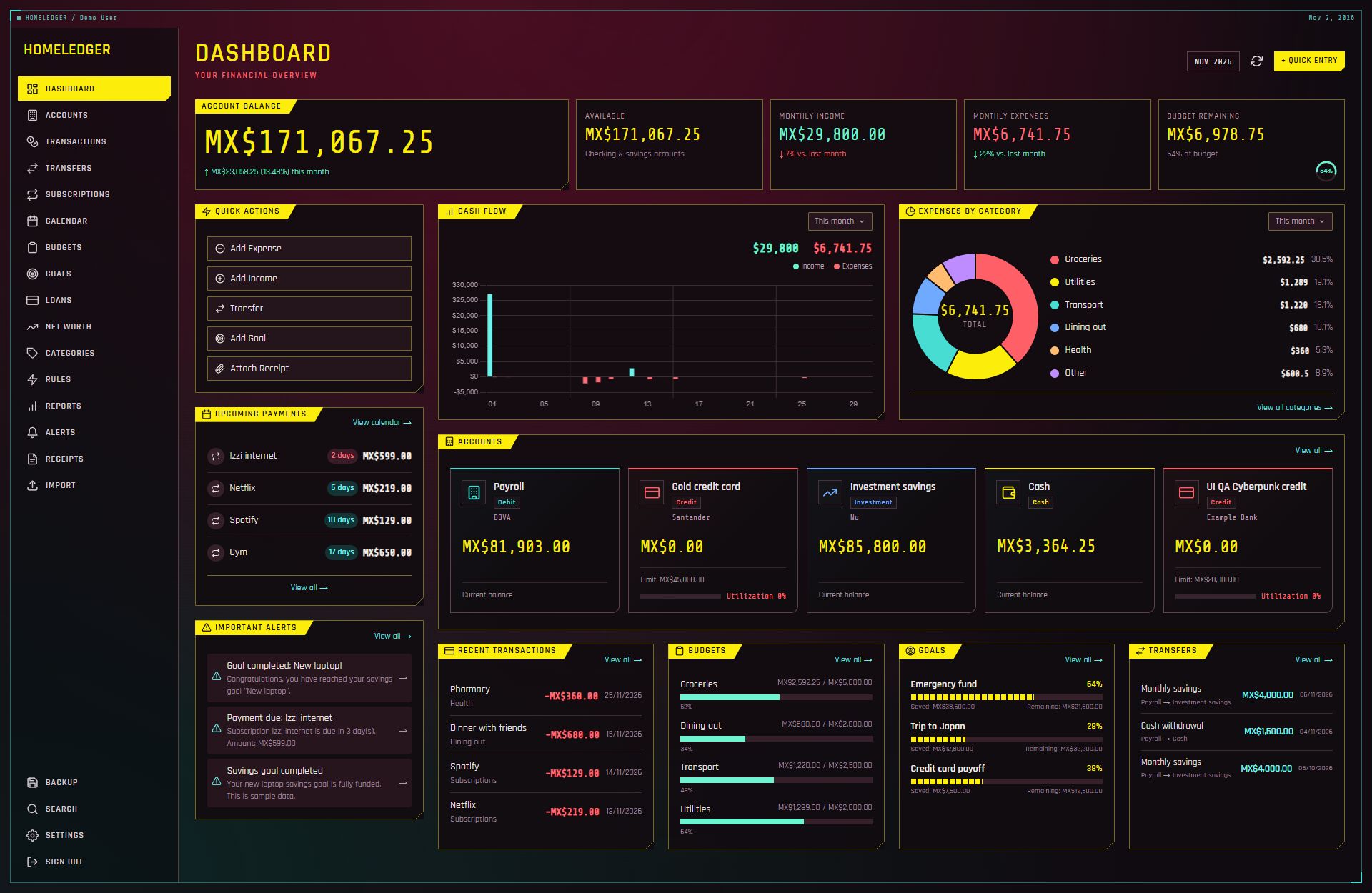
- Switch between Normal and Cyberpunk 2077 in Settings > Profile > Interface design. Normal preserves your light/dark preference.
- Cyberpunk navigation, dashboard, charts, reports, accounts, transactions, receipts, settings, authentication and dialogs, retaining complete application workflows.
- A reusable Quick Entry dialog with keyboard dismissal and focus restoration.
- Improved Normal responsiveness: compact mobile summary cards, adaptive charts, and visible quick actions, upcoming payments and alerts. Mobile transaction filters can be collapsed; long dialogs retain accessible actions and larger touch controls.
- Extensible theme registry, contributor documentation, refreshed manuals and screenshots of both themes.
Fixes
- Account/card creation accepts empty optional fields while retaining credit limits, statement/payment dates, APR and minimum payment.
- English/Spanish generic CSV parsing and correct first-row selection during import.
- Dashboard and calendar totals include every transaction page, account exchange rates and stored calendar dates at month boundaries.
- Budget tags/rollover, real unread dashboard alerts, and calendar links to complete transaction/subscription forms.
- Stale calendar/receipt responses are ignored and temporary preview resources released.
- Home Assistant API-key authentication and transaction date handling.
- Private API responses are excluded from service-worker caches and use Cache-Control: no-store. Production-theme verification is part of CI.
Upgrading
Set a strong JWT_SECRET at runtime before starting the updated container. Images no longer embed fallback credentials, and Compose requires this variable. Preserve your existing /data volume when recreating the container. Dependency installation uses the committed lockfile.
Docker image: irving1flores/homeledger:1.2.0 for linux/amd64 and linux/arm64, published by the tag workflow.
Full changelog | Theme contribution guide | Changes since v1.1.3
Windows desktop installer
Download HomeLedger for Windows x64.
The installer is available below under Assets. It runs locally without Docker or a separate Node.js installation. Create a local account after installing; there is no default login.
The desktop build is an unsigned preview intended for testing with synthetic data. Its source is commit e180175, which includes desktop fixes after the server v1.2.0 tag. The existing server tag and Docker instructions are unchanged.
SHA256SUMS.txt verifies the installer and the optional HomeLedger-1.2.0-windows-source-materials.zip containing native dependency sources and notices. Only the .exe is needed to install the application.
v1.1.3
Fixed
- Admins can change the install currency from Settings > Profile > Preferences. Before, that row was read-only text and the control was only in the admin Registration tab. Non-admins still see it read-only, labelled as set by the administrator.
This release also includes everything in v1.1.2 (opt-in MCP server, API-key scope enforcement). Full details: CHANGELOG.
v1.1.2
Added
- MCP server for AI assistants (#14): Streamable HTTP endpoint at
/api/v1/mcpwith tools to read accounts, categories, transactions, budgets, goals, subscriptions, reports and net worth, and to create/update transactions. Off by default, per user. Enabling is done from Settings > API after an explicit acknowledgement plus password (and 2FA code) re-entry, from a login session only. Needs an API key; each tool enforces the key's scopes. No delete tool. - GBP currency (#18).
- Drag and drop, multiple receipts at once (#17).
- Scanned PDFs are now OCR'd instead of failing (#16).
Fixed
- API-key scopes were not enforced on the REST API. A key limited to
read:accountscould still create transactions, read other resources, or create a new unrestricted API key. Scopes are now checked for every API-key request. Routes with no scope of their own (API keys, webhooks, backup, loans, search, ...) needread:*/write:*, and the Home Assistant endpoints needread:reports. Full-access keys and login sessions are unaffected. If you gave Home Assistant or a script a scoped key, check it holds the scopes above. - Incomplete English translation (#15).
- The Quick Entry amount no longer shows a hardcoded
MX$prefix.
Full details: CHANGELOG.
HomeLedger v1.1.1
Patch release focused on receipt OCR accuracy for English and Spanish documents. No breaking changes — the /api/v1 surface and backups are unchanged (backup metadata version bumped to 1.1.1).
Added
- Image pre-processing before OCR using
sharp(auto-orient, grayscale, contrast normalize, upscale small photos, sharpen, binarize) plus a receipt-oriented Tesseract page-segmentation mode, to improve recognition on phone photos and scans. - Raw OCR text panel in the receipt detail view (collapsible), so the exact recognized text is visible for review and correction.
Fixed
- Date detection (EN + ES). Textual months are parsed in both languages and both orderings — e.g.
02 June, 2030,June 2, 2030,02 de junio de 2030— alongside numeric dates. Ambiguous numeric dates are disambiguated by range (USmm/dd/yyyylike02/15/16reads correctly), and unparseable/garbled dates leave the field empty and editable instead of showingNaN. - Amounts read from the correct column. Totals, subtotals and tax are extracted from the value column on the label's line, ignoring decoys such as a
(3.8 %)tax rate; OCR-split cents (125 00→125.00) are repaired and a dropped-decimal tax larger than the subtotal is recovered (475→4.75). - English field keywords.
TAX/VAT/GSTandTOTAL DUE/AMOUNT DUE/BALANCE DUE/GRAND TOTALare recognized alongside the Spanish forms; RFC (tax id) and UUID are extracted from OCR/plain text; the confidence score reflects how many fields were recovered.
Changed
- Dependabot cadence reduced to quarterly (every 3 months) to cut PR noise.
Full changelog: https://github.com/TastingRogue/HomeLedger/blob/main/CHANGELOG.md · Compare: v1.1.0...v1.1.1
HomeLedger v1.1.0
Feature-depth release (the P4 track). A large batch of additive features on top of 1.0.0, with no breaking changes — the /api/v1 surface stays compatible and existing backups still import (only the MAJOR version gates backup import compatibility, so 1.0.x backups restore fine). Migrations 0008–0017.
Highlights
- Richer transactions (P4.1) — merchant, subtype, reconciled, status,
externalId; tags as a first-class M2M entity; per-transaction audit history. - Credit-card statement modeling (P4.2) — statement/payment-due days, APR, minimum payment.
- Budgets depth (P4.3) — rollover + alert thresholds, available-to-spend, budgets by tag, overspend alerts.
- Smart importer (P4.4) — merchant/date/currency normalization, per-account dedupe, pending→posted matching, account auto-detect, import history + undo.
- Rules & auto-categorization UX (P4.5) — learning suggestions, merchant condition, flag-review / mark-recurring / ignore.
- CFDI invoices (P4.6) — extract IVA, create transaction from receipt (UUID dedupe), item-level categorization + splits.
- Subscription intelligence (P4.7) & forecasting (P4.8) — goal-completion forecast + net-worth history chart.
- Global search (P4.9) across transactions, receipts and subscriptions.
- Reports depth (P4.10) — savings rate, debt, credit utilization, merchant report, custom saved reports.
- Manual-first multi-currency (P4.11) — per-account currency + user-entered exchange rate, base-currency aggregation, cross-currency transfers.
- Two-factor authentication (P4.12) — offline TOTP (RFC 6238) + one-time backup codes, session history + per-session revocation.
- API maturity (P4.13) — OpenAPI 3 + Swagger UI at
/api/docs, scoped API keys, HMAC-signed outbound webhooks. - PWA / mobile (P4.14) — installable PWA + offline page, quick-add FAB, on-device camera receipt capture, optional app lock (WebAuthn/PIN).
Compatibility
/api/v1and the backup file format remain stable (no breaking changes within1.x). See docs/STABILITY.md.- Full changelog: CHANGELOG.md.
Docker
docker pull irving1flores/homeledger:1.1.0Backend 632 tests + frontend 57 tests green; typecheck + build clean.
HomeLedger v1.0.0
HomeLedger v1.0.0 🎉
First stable release. HomeLedger is a self-hosted personal finance manager — accounts, transactions, budgets, savings goals, subscriptions, loans and net worth — with a SvelteKit 5 frontend and a Fastify + SQLite (Drizzle) backend, shipped as a single Docker image and available as a Home Assistant add-on + HACS integration.
As of 1.0.0, the /api/v1 HTTP API and the backup file format are stable under Semantic Versioning — no breaking changes within 1.x. See docs/STABILITY.md.
Highlights
- 🗂️ Per-user categories — every user gets their own editable copy of the default set at sign-up. Rename or delete freely; nobody else is affected.
- 📤 CSV export — download the full filtered transaction list (
/api/v1/transactions/export.csv), Excel-friendly (UTF-8 BOM). - 🔎 Import dry-run preview — see exactly what a backup would restore/replace before the destructive import.
- 🧾 Receipts in backups — attachments (inline), receipt analyses and line items now export/import with foreign keys remapped.
- ♿ Accessibility — aria-labels, keyboard Escape-to-close on every modal, reduced-motion support, and a WCAG-AA contrast fix for muted text in both themes.
- 🎛️ UI polish — spring-free CSS motion, press feedback, translucent materials, popover anchoring, tabular numerals.
- ⚡ Performance — a composite
transactions(account_id, type)index cuts balance/dashboard/net-worth latency ~30% at 20k transactions. - 🐳 Multi-arch Docker —
linux/amd64andlinux/arm64, both built natively.
Security
- Production refuses to boot on insecure
JWT_SECRET/ADMIN_PASSWORDdefaults (override withALLOW_INSECURE_DEFAULTS=trueonly for the zero-config demo). TRUST_PROXYwiring so rate limiting keys on the real client IP behind a reverse proxy — off by default to prevent IP spoofing.- Backup import is multi-user safe: it only touches the caller's data and remaps foreign keys, so overlapping ids can't collide with or clobber another user's rows.
Fixed
- Receipt OCR no longer mistakes item-count lines (e.g. "TOTAL ARTICULOS: 3") for the receipt total.
- Assorted UI fixes (NaN "days remaining", stale shell metadata, misaligned card actions).
Install / upgrade
docker pull irving1flores/homeledger:1.0.0
docker run -d -p 3000:3000 -v homeledger-data:/data \
  -e JWT_SECRET="your-strong-random-secret-min-32-chars" \
  -e ADMIN_EMAIL="you@example.com" \
  -e ADMIN_PASSWORD="your-strong-password" \
  --name homeledger irving1flores/homeledger:1.0.0
Upgrades are safe: your data lives on the homeledger-data volume and migrations run automatically on start. See Upgrading and docs/DEPLOYMENT.md.
Note
Verified quality gate: 549 tests passing, backend + frontend typecheck clean, all workspaces build clean.
Full changelog: CHANGELOG.md
HomeLedger v0.1.0
Changelog
All notable changes to HomeLedger are documented in this file.
The format is based on Keep a Changelog,
and this project adheres to Semantic Versioning.
0.1.0 - 2026-09-01
First public release. HomeLedger is a self-hosted personal finance manager with a
SvelteKit 5 frontend and a Fastify + SQLite (Drizzle ORM) backend, packaged as a
single self-contained Docker image and available as a Home Assistant add-on and
HACS integration.
Added
- Accounts — Debit, Credit, Investment, Vouchers and Cash accounts with
dynamic balance tracking and credit-limit / utilization monitoring. - Transactions — Income/expense recording with month grouping, card grid and
table views, and filtering. - Transfers — Movements between your own accounts with fund validation.
- Subscriptions — Recurring payments with auto-charge, catch-up after
downtime, and a calendar view. - Budgets — Category budgets with allocation-vs-spent progress and dashboard
integration. - Savings goals — Wishlist and debt goals with fund/withdraw actions and
progress tracking. - Net worth (Patrimonio) — Manual assets and liabilities on top of account
balances, with a dedicated page and history. - Categories — Fully editable categories (including system ones) with
expense analysis and type classification (Expense / Income / Both). - Bank import — CSV / XLSX / OFX / QIF / JSON with parsers for BBVA,
Santander and Nu Mexico. - Receipts & attachments — Upload receipts/invoices (images, PDFs), analyze
them (OCR) with editable fields and a side-by-side preview, and link them to a
new or existing transaction. - Alerts — Auto-generated (low balance, high credit, due payments, completed
goals) with persisted per-user settings and manual evaluation. - Reports — 6-month trends, category breakdown, savings rate and monthly
comparison. - Backup — Full JSON export/import with preview, validation and history.
- Light / dark theme — Working theme toggle (dashboard header and Settings),
persisted and applied before first paint. - Multi-currency — MXN, USD, EUR, COP, ARS, CLP, PEN, BRL.
- Bilingual UI — Spanish and English, switchable from Settings and persisted.
- Custom date picker — Used consistently across all date inputs (forms and
filters), localized to the active language. - Home Assistant add-on — Runs the full app inside HA with an Ingress panel;
multi-arch (amd64 / aarch64 / armv7). - Home Assistant integration (HACS) — Exposes finance sensors, binary sensors
and services (homeledger.create_transaction,homeledger.create_quick_expense,
homeledger.refresh_data) via local polling. - Docker — Self-contained image (app + API on port 3000) with zero-config
demo defaults;linux/amd64images published to Docker Hub. (arm64 planned.)
Security
- Ownership checks on alerts to prevent cross-user access (IDOR).
- Rate limiting on authentication endpoints.
- Minimum password length enforcement.
- Configurable CORS via
CORS_ORIGIN(reflects request origin when unset).
Notes
- SQLite database and uploaded attachments live under
DATA_DIR(/datain
Docker) and survive container rebuilds; deleting the volume wipes data. - The backup format is versioned; importing a backup replaces all current data
for the user after explicit confirmation.
Known issues
- Part of the backend test suite is out of date with the current balance model
(the app computes account balances dynamically from transactions rather than
mutating a stored balance). These assertions are scheduled to be updated in a
follow-up; they do not reflect a defect in the running application. - ESLint reports pre-existing style issues in some backend source files. Linting
is not yet enforced in CI and is planned to be cleaned up in a follow-up.