Repository navigation

·
24 commits
to master
since this release
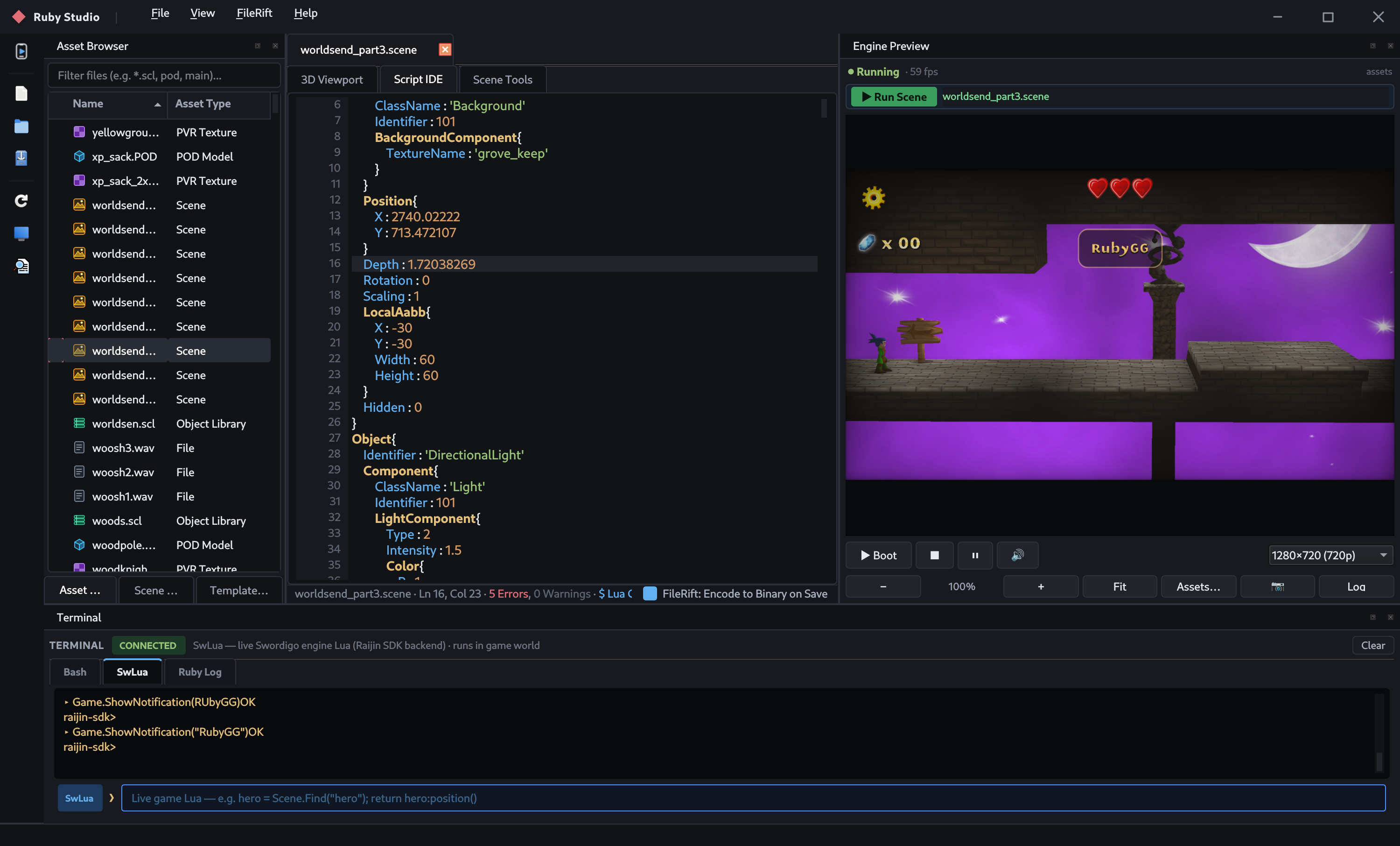
Ruby GG & Ruby CLI — Public Beta 1 Release Notes
Welcome to the Public Beta 1 release of Ruby GG and Ruby CLI, the next-generation developer studio and automation toolkit for the Swordigo modding ecosystem and FileRift asset pipelines.
This release brings standalone prebuilt binaries for both Windows x64 and Linux x86_64, packing rich 3D visualization, visual scene graph authoring, live engine emulation, batch asset conversions, and Model Context Protocol (MCP) server capabilities.
Release Downloads
| Platform | Archive Name | Compression | Contents |
|---|---|---|---|
| Windows x64 | ruby_gg_win64.zip |
ZIP (42 MB) | Standalone portable folder with ruby_gg.exe, ruby_cli.exe, Qt 6.12 release runtime, MSVC 2022 CRT, SDL3, plugins & fonts |
| Windows x64 (7z) | ruby_gg_win64.7z |
7-Zip LZMA2 (23 MB) | Ultra-compact distribution of the Windows package |
| Linux x86_64 | ruby_gg_linux64.zip |
ZIP (21 MB) | Portable stripped Linux binaries (ruby_gg, ruby_cli), launcher scripts, shared libraries (libs/) & fonts |
Major Highlights & What's New
1. Native Visual Studio MSVC Pipeline (Windows)
- Built with Clang-CL 22 + official Microsoft Visual C++ 2022 v145 toolset and the Windows 11 SDK (10.0.26100.0).
- Shipped with official Qt 6.12.0 MSVC release binaries and native Windows 11 Fluent dark styling (
qmodernwindowsstyle.dll). - Completely self-contained: Bundles official Microsoft CRT redistributables (
msvcp140.dll,vcruntime140.dll,concrt140.dll),SDL3.dll, and native Schannel TLS. No external installer or runtime prerequisites required.
2. Native OS Desktop Integration & File Associations
- Register your operating system to open Swordigo formats with a single click:
- Linux: Installs
.desktopand Freedesktop MIME XML database associations (xdg-mime). - Windows: Writes user-space ProgID registrations (
HKCU\Software\Classes\RubyStudio.Asset) with shell change notifications.
- Linux: Installs
- Supported file associations:
.pod,.pvr,.tex,.scl,.scene,.scn,.rbm,.fr,.glb,.gltf,.fbx,.obj. - Double-clicking any registered asset from Windows Explorer or Linux Nautilus instantly launches Ruby GG, opens the file in the 3D viewport or editor, and automatically pivots the asset browser directly to its parent directory.
3. Unconstrained Asset Browser & Collision Safety
- Browse any folder on your drives with the new Up / Back / Forward / Home toolbar and direct path address bar.
- Automatic multi-instance safety: Detects when two assets with identical filenames exist across different folders, safely swapping buffers without overwriting user data.
- Search filters by extension (
.pod,.pvr,.scl,.scene, etc.).
4. Modern 3D Viewport & GLB/glTF Animation Skinning
- Native rendering for PowerVR
.pod3D meshes and.pvrtextures. - Import modern 3D models (
.glb,.gltf,.fbx,.obj) directly into Swordigo's native.podformat. - Full skeletal skinning & animation coherence: Convert complex rigged character meshes into Swordigo-compatible bone hierarchies and animated pose clips with automatic vertex weighing.
- Interactive camera controls: Orbit, pan, zoom, wireframe toggle, camera bounds gizmos, and light controls.
5. Headless Automation Toolkit: Ruby CLI
- Full FileRift compiler: Bidirectional transcoding between binary
.scene/.scland human-readable markup. - World Map (
.scmap) SDK: Validate navigation graphs, print node paths, and analyze zone linkages. - Built-in Model Context Protocol (MCP) server: Exposes Swordigo asset inspection and editing tools over stdio (
ruby_cli mcp) and HTTP (ruby_cli mcp-http) to AI assistants like Claude, ChatGPT, and Cursor.
Quick Launch Guide
Windows (10 / 11 64-bit)
- Download
ruby_gg_win64.ziporruby_gg_win64.7zand extract it to any folder. - Double-click
run_ruby_gg.bat(orruby_gg.exe) to launch the GUI Studio. - To use CLI tools, open Command Prompt / PowerShell in the folder and run
ruby_cli.exe --help.
Linux (x86_64, glibc 2.34+)
- Download
ruby_gg_linux64.zipand extract it. - Open a terminal in the extracted folder and launch:
chmod +x run_ruby_gg.sh run_ruby_cli.sh ruby_gg ruby_cli
./run_ruby_gg.sh
- Run CLI commands via
./run_ruby_cli.sh <command>.