Repository navigation
Releases
StrainVue 0.0.4

What's new
The breaking test uses your GPU. Pick the device under Settings → Acceleration (or the project's solver device in Advanced). The breaking test, and contact and bolt solves, then run the multigrid step on that GPU; it is the expensive part of every solver iteration. The iterations themselves stay on the CPU in full double precision, so the answer is the same: on a 609,000-unknown test, the first failure matches the CPU result to 11 digits. If the GPU fails mid-solve, the CPU takes over.
Progress you can read. While a breaking test runs, you now see:
- how far the current solve is (for example Solving at your loads · 62 %)
- what that stage means
- where it runs (for example on GPU · Apple M4 Pro (Metal) or on CPU · 32 threads)
Gmsh ends with StrainVue. If StrainVue is force-quit or crashes while meshing, the Gmsh process it started stops too, instead of running on. On Windows this uses a job object; on macOS, a watcher.
STL import fails fast. An STL that can't be meshed even after the surface repair now reports this within seconds, instead of falling back to the old path, which took minutes.
Download
| File | |
|---|---|
| macOS (Apple silicon) | StrainVue-0.0.4-macOS.dmg: open it and drag StrainVue to Applications. Signed and notarised. (A .zip of the same app is below.) |
| Windows | StrainVue-0.0.4-Setup.exe: installer, no admin rights needed. |
| Windows (portable) | StrainVue-0.0.4-portable.exe: one file, runs from anywhere. |
Everything ships inside, the Gmsh mesher included. The Windows files are not code-signed yet, so the first start shows a SmartScreen notice: click More info, then Run anyway.
SHA-256
5e8983f91b435a49230694d0ec70aa3b54513382fceea1af265f96da347d3c6d  StrainVue-0.0.4-macOS.dmg
02538c428777db308736dc3bef4ee51adac9cd77259034e39c2c8dd96f72069f  StrainVue-0.0.4-macOS.zip
57acaeafef0c9b506fc81bb376710272b0c8928ee454335faa9afef36cc64c3e  StrainVue-0.0.4-Setup.exe
ac6f00731ebdb5f7ad56ff4d3feefe6158031e5dff188605875d9edaa3f05361  StrainVue-0.0.4-portable.exe
StrainVue 0.0.3
What's new
STL parts mesh in seconds. Printable STLs are often exported very finely, and their surfaces often overlap or intersect. StrainVue used to rebuild smooth surfaces from them, which failed on files like that and kept retrying for minutes.
| STL | Before | Now |
|---|---|---|
| Wall mount, 693k triangles | over 5 min, never finished | 4.5 s (Mac) · 6.2 s (Windows) |
| Router part, 12k triangles | over 4 min | 1.6 s |
- Clean STLs: thinned out when they are far finer than needed, then the volume is filled straight from the surface.
- Messy STLs (overlapping facets, double shells, small holes): a clean, closed surface is rebuilt on a fine grid, deciding solid or empty along all three axes so overlaps can't fool it. It is then snapped back onto your faces, so flat faces stay flat. Sharp outer edges round off by about half a grid step (about 0.5 mm).
- The old path remains as the last resort.
Download
| File | |
|---|---|
| macOS (Apple silicon) | StrainVue-0.0.3-macOS.dmg: open it and drag StrainVue to Applications. Signed and notarised. (A .zip of the same app is below.) |
| Windows | StrainVue-0.0.3-Setup.exe: installer, no admin rights needed. |
| Windows (portable) | StrainVue-0.0.3-portable.exe: one file, runs from anywhere. |
Everything ships inside, the Gmsh mesher included. The Windows files are not code-signed yet, so the first start shows a SmartScreen notice: click More info, then Run anyway.
SHA-256
479dbaaab4406595cdd420027b590580c3b080c34c7e96dca5bd4c081dabd328  StrainVue-0.0.3-macOS.dmg
7d41f783428d9e61cda64ced802dc04ee23c9f4ed92095fcbcb517426a18210f  StrainVue-0.0.3-macOS.zip
568a2c6e16fcec10944bd55fce62a0b03bb4834ccc57d2f849e2561165960278  StrainVue-0.0.3-Setup.exe
072056c5077424c06287e20589095c1a4cb48d3562aa0ac426de50361501464f  StrainVue-0.0.3-portable.exe
StrainVue 0.0.2
What's new
One study type per project. A new project asks what you want to find out: Will it hold? (stress), How does it vibrate?, Will it buckle? or How hot does it get? The type shows as a badge in the top bar, and Setup, the checklist and the results follow it. No more switching types inside a project.
- Thermal studies guide you. Clicking a face offers Fixed temperature, Heat source or Cooled by air, and the checklist says what is still missing instead of showing an error. Thermal stress is optional.
- Results that explain themselves. Buckling opens with Buckles at 656× your loads and what that means. Vibration opens with the lowest natural frequency in Hz and rpm. Thermal opens with the hottest point.
- Working temperature for stress studies. Under Setup → Environment, set the temperature the part works at. Plastics lose stiffness and strength towards their softening point (typical heat-deflection temperatures, an estimate), and the app warns above it. Optionally, it adds the stress of expanding against the supports.
- Settings (⌘, on Mac, or the gear in the top bar or on the home screen):
- General: interface size, splash, reopen the last project.
- Preferences: element size for new projects, recovery copies, the mesh cache.
- Acceleration: where the solver runs and how many threads it uses, plus the detected graphics cards, CUDA/HIP runtimes and Gmsh.
- Fixes:
- Links in About open in the browser.
- On Windows, symbols such as ▾ ✓ ● ⚠ no longer show as empty boxes.
- The delete key shows as Del on Windows.
Download
| File | |
|---|---|
| macOS (Apple silicon) | StrainVue-0.0.2-macOS.dmg: open it and drag StrainVue to Applications. Signed and notarised. (A .zip of the same app is below.) |
| Windows | StrainVue-0.0.2-Setup.exe: installer, no admin rights needed. |
| Windows (portable) | StrainVue-0.0.2-portable.exe: one file, runs from anywhere. |
Everything ships inside, the Gmsh mesher included. The Windows files are not code-signed yet, so the first start shows a SmartScreen notice: click More info, then Run anyway.
SHA-256
545ea25a067fc2addfef633a68dec7d698085816a1a7754a3bfc11dab912095c  StrainVue-0.0.2-macOS.dmg
73b66344afbce39754e6614d7617eacfa9c8bc8ab8dcdaeb0579b57129d482c4  StrainVue-0.0.2-macOS.zip
f8467b05040fabf5569a09ebd35d00a378468b5c54f69e11f7e844475361742e  StrainVue-0.0.2-Setup.exe
0cd22a5e92f2489f316f94b86fa3e51266dd8c8928b122ff7819c2cbc60e595a  StrainVue-0.0.2-portable.exe
StrainVue 0.0.1
The first public build of StrainVue: structural simulation for real parts, on your own machine.
Download
| File | |
|---|---|
| macOS (Apple silicon) | StrainVue-0.0.1-macOS.dmg: open it and drag StrainVue to Applications. Signed and notarised. (.zip of the same app below.) |
| Windows | StrainVue-0.0.1-Setup.exe: installer, no admin rights needed. |
| Windows (portable) | StrainVue-0.0.1-portable.exe: one file, runs from anywhere. |
Everything ships inside, the Gmsh mesher included: nothing else to install. The Windows files are not code-signed yet, so the first start shows a SmartScreen notice (More info → Run anyway).
What's in it
- Import STEP, IGES, BREP or STL; place the part; pick how it is made and the material (over 140, with sources); click faces to hold and load it.
- Check: one solve, a verdict in plain words (how much of the strength is used, and at how many times your loads it is first damaged).
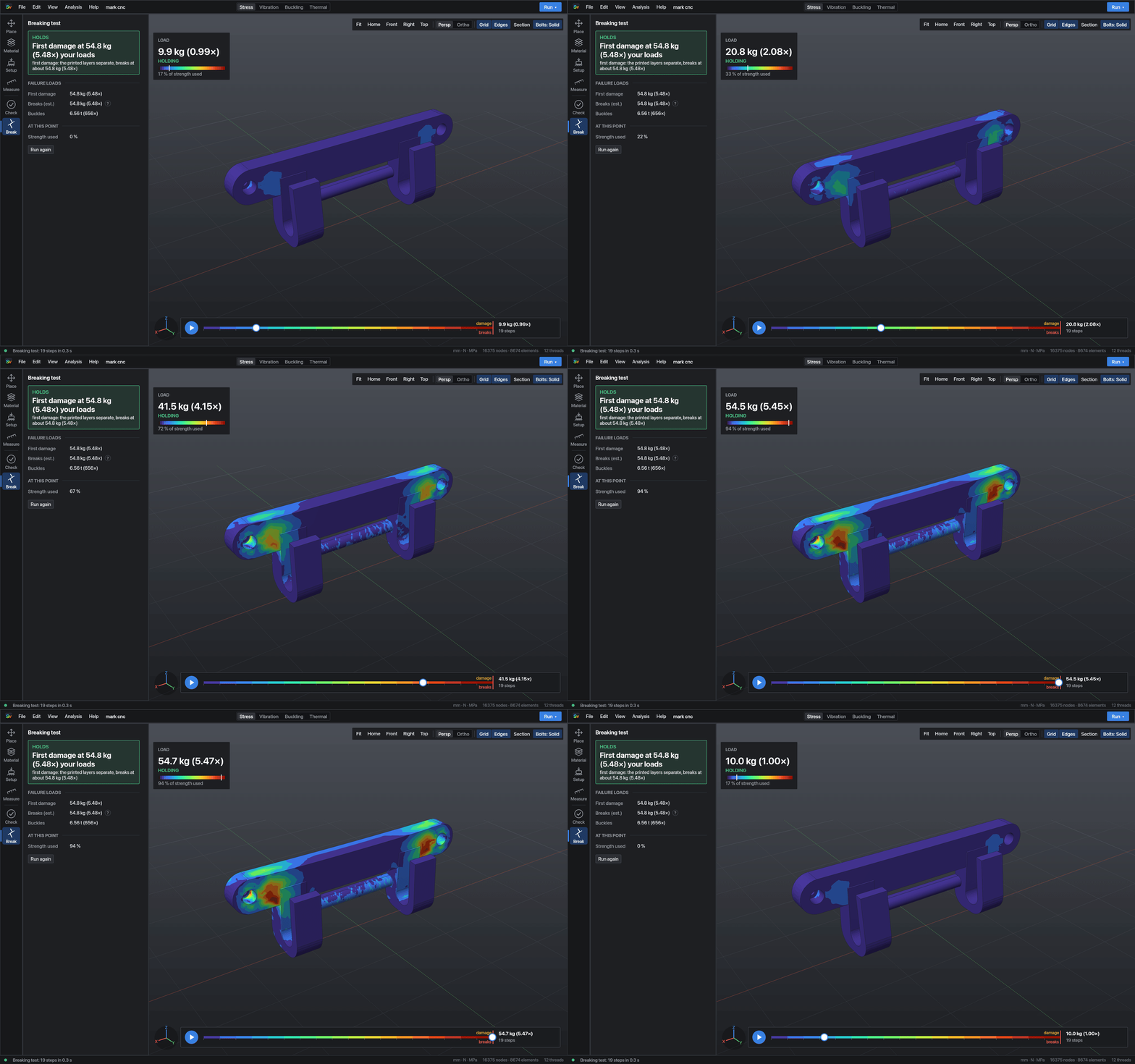
- Breaking test: all loads rise together, live, until it breaks; a timeline scrubs through it.
- Measure like in CAD: holes, faces, edges and corners.
- Stress, vibration, buckling and steady thermal analyses; FDM prints with walls, infill and layer strength.
- TET10 elements, AMG-preconditioned conjugate gradients, error estimate and equilibrium check on every solve; verified against analytical and NAFEMS cases.
See the README for the limitations before trusting a number.
SHA-256
6c2b5d445019eaca74e50286ebea29ef5c6fd7d8ada0a8235cf7635fefedd57f  StrainVue-0.0.1-macOS.dmg
045acdd2dfbec11cfeddead621727b3685235f4a270ec9ad9f4c5979cf9a24c4  StrainVue-0.0.1-macOS.zip
12dc6b7b141e401b71cba2f523f0a815e088ae692684689818b7913aa386f34a  StrainVue-0.0.1-Setup.exe
c4f232ca757b9032fd17935e31fc9c6fde41b17c48010e3e2b65ab4cb517b713  StrainVue-0.0.1-portable.exe