Repository navigation
Home
Welcome to the Background Timer wiki!
After installing using the provided msi or zip files, you are able to open the program.
The UI for the program will change depending on whether the mouse is hovering over it or not.
The full UI will appear while the mouse is hovering above it. This form of the UI will show as following:
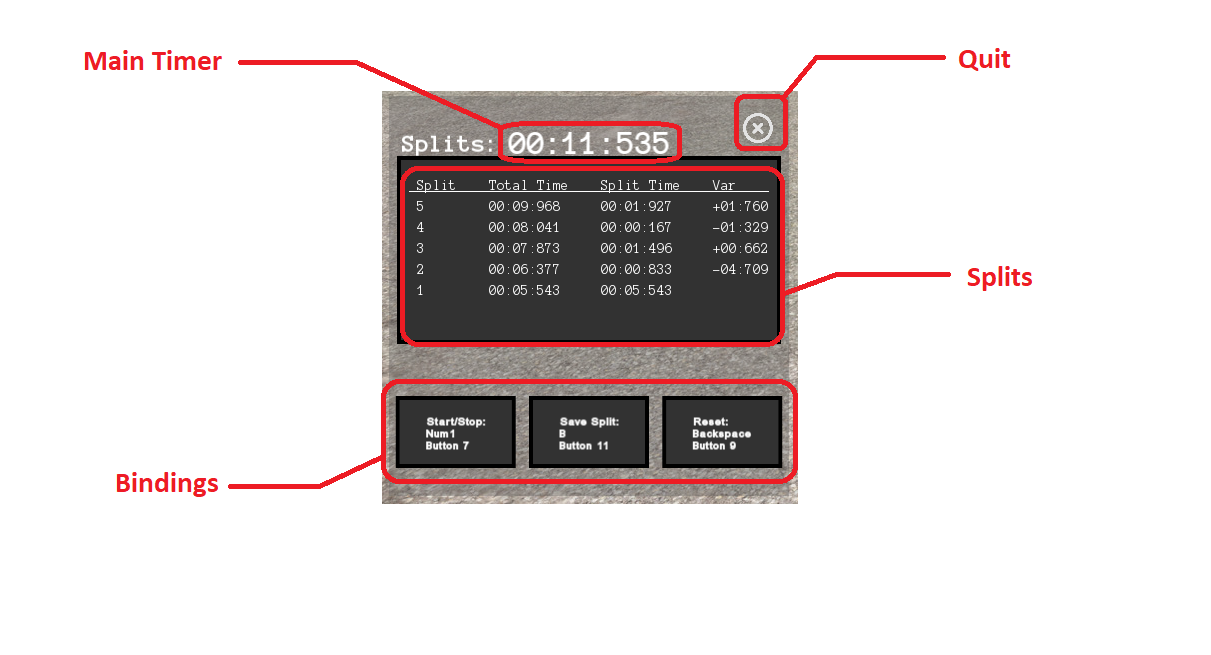
- Main Timer: This simply is the main section of the timer which shows the total time elapsed since the timer has been started.
- Quit: Safely exists the program.
- Splits: Shows the latest six splits, showing the split number (Split), the total time since the beginning of the timer to when the split was taken (Total Time), the time elapsed since the previous split (Split Time), and the difference in split time compared to the previous, measured in seconds (Var).
- Bindings: Buttons used to rebind buttons and keys to the three different actions. The first line shows the action, the second shows the keyboard key and the last line shows the joystick (or controller/steering wheel) button. Simply press a button and press a desired key/button to rebind it. NOTE: rebinding a keyboard key will not affect the joystick button bound and vice versa.
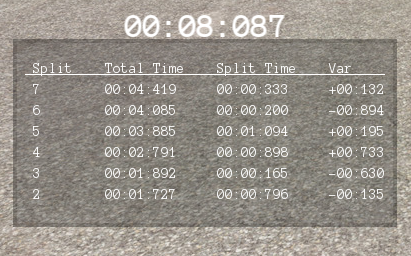
The minimal UI will show when the mouse is not hovering above the window. This mode will increase the transparency of the window and it will remove most UI elements to make the timer the least obtrusive as possible.