Repository navigation
Releases: Tlamir/MinimalistControlCenter
Release list
v0.8.0 — lower CPU use and startup recovery

Lower CPU use and recovery from slow Windows startup.
- Cooling CPU averaged 0.465% → 0.054% on the same laptop: 88% less than v0.7.2, including its read-only helper.
- No new helper processes during the open benchmark. Tray test recorded no CPU time or helper launches. RAM: 25.4 MiB open / 14.1 MiB tray.
- Startup allows longer firmware requests and retries twice if connection is delayed. Fresh light-bar readback prevents a late acknowledgement from causing another toggle.
Download mcc-windows-x64-installer.zip, extract it, exit the old app, then double-click Install.cmd. Accept the installation prompt once. Startup and the desktop shortcut use the protected installed task.
Benchmark chart and method. Battery / Balanced, two 30-second open runs and one tray run per version. Shared Windows hosts are excluded; zero is below counter resolution. A real reboot of this release still needs owner confirmation.
v0.7.2 — Windows installer
A small native Windows control center for Tongfang GK5CN6Z laptops.
Download the Windows x64 installer
- Exit the original control center and any older Minimalist app.
- Download the ZIP, right-click → Extract All, and open the extracted folder.
- Double-click Install.cmd, accept the administrator prompt, and use the desktop shortcut.
Starts with Windows in the tray and switches the light bar off after sign-in. Later launches need no repeated administrator prompt. Uninstall through Windows Settings → Apps → Installed apps.
Included
- Automatic / Boost fans and Office / Balanced / Performance power presets.
- Keyboard lighting, light-bar control and saved fan/power combinations.
- CPU clock/usage, RAM, battery and manual NVIDIA sensor readings.
- An app icon, direct Exit button, shorter interface and no polling in the tray.
Performance
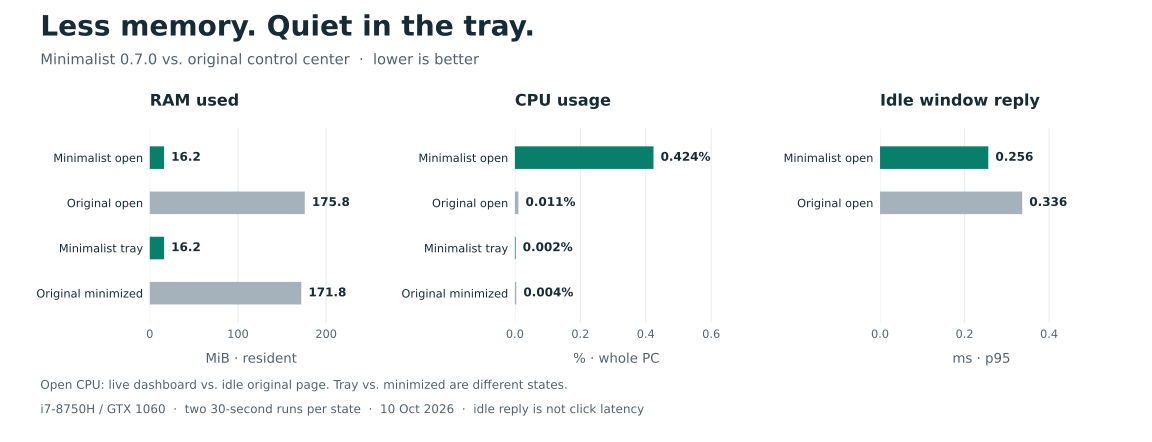
About 91% lower visible RAM use in the measured v0.7.0 comparison. The live dashboard uses more CPU than the original's idle page. Results and method.
Compatibility
Windows 11 x64. Hardware controls tested on Monster Tulpar T5 V17.1 / BIOS N.1.06. The platform is also used by XMG NEO 15 M18, but other firmware variants remain read-only pending validation. Custom fan curves and OEM minimum-speed mode are unavailable. Keep the original installed for recovery; uninstalling it has not been verified.
v0.7.2 packages the shorter documentation and charts; app behavior matches v0.7.1. Release checks: 104 Rust tests, strict Clippy, 15 startup scenarios and both executable import audits.
v0.4.2 — working administrator handoff
Fixes Enable controls failing with Windows error 3 after installation from a packaged terminal. The app now resolves the actual executable path before elevation and startup; the installer uses the normal per-user Applications folder. Administrator-launch failures show their actual Windows error rather than always saying permission was canceled.
The owner verified Enable controls works on the TULPAR T5 V17.1 and the fan-mode display follows the physical turbo button.
Validation: 95 local release tests, strict Clippy, formatting, both binary-import audits, and a real elevated self-test confirming the path diagnosis without hardware writes.
Extract the archive and run Install.ps1. Keep both executables together. This is an unsigned development prerelease. Minimum-noise/custom fan speeds remain unavailable pending sensor and thermal-fallback validation. Automatic light-bar-off after restart is not implemented yet. A real reboot/startup check remains outstanding.
Known development-host limitation: launching from a packaged terminal may redirect startup-registry writes. Same-process readback is insufficient; use a normal Windows launch and verify Windows Startup Apps. The target laptop now has an independently verified system-visible entry; automatic handling of this package-host toggle case remains unfinished.
v0.4.0 — synchronized cooling state and tray startup
Clear workload presets, physical turbo-state synchronization, and per-user tray startup.
- Office: adaptive firmware cooling + Windows Power Saver. Balanced: adaptive + Balanced. High: adaptive + High Performance. Turbo: cooling boost, preserving the power plan. These are workload presets, not calibrated fixed fan speeds or the OEM Office table.
- Read-only observation follows the physical button, backs off after failed reads, and never overrides the button with periodic fan writes.
- Install.ps1 installs into a versioned LocalAppData folder and enables current-user sign-in startup. It starts in the tray; Enable controls still needs administrator approval after login. No automatic privileged takeover is installed.
- Single-instance handling, tray recovery after Explorer restarts, and helper-file replacement protection.
93 local release tests, strict linting and both PE audits passed. Actual read-only observer latency averaged about 0.51 seconds versus 1.16 seconds for full status in small samples. UI resource measurements and their limitations are in docs/BENCHMARKS.md. Startup registration and installed tray/duplicate-instance smoke tests passed; an actual reboot and physical display synchronization remain owner checks.
Minimum-noise, fixed-speed and custom fan curves remain unavailable: CPU/RPM calibration and autonomous firmware thermal override are unverified. This is an unsigned development prerelease for the reviewed MONSTER TULPAR T5 V17.1 / BIOS N.1.06 / i7-8750H / GTX1060, not a completed OEM replacement. Keep the original controller installed for recovery. Exit older Minimalist instances before opening this version.
Windows and Linux CI passed for source commit be42e77: https://github.com/Tlamir/MinimalistControlCenter/actions/runs/38001368114
v0.3 — simpler native controls and reliable toggle recovery
v0.3 makes everyday controls clearer and recovers from delayed light-bar acknowledgements without forcing a reconnect.
- Cooling, Lighting and Settings pages; prominent Automatic / Cooling boost choices; one Enable controls action.
- One stateful switch per setting, native color swatches and clear selected power plans. Quiet also exits cooling boost.
- Pending toggle requests are consumed before another request; fresh state is read before writing and after failures. Failed writes are never blindly replayed.
- Missing OEM service is supported; proprietary DLLs are not loaded for direct controls.
Validation: 79 local tests passed, strict Clippy and both PE import audits passed. Windows and Linux CI passed for source 3522f23. Actual UI simulation reproduced a failed light-bar request followed by successful OFF without reconnecting.
Measured release UI over roughly 30 seconds: visible 15 MiB / 218.75 ms process CPU; hidden 11.91 MiB / 46.875 ms process CPU, including startup. No firmware access during UI tests or benchmarks. See bundled docs/BENCHMARKS.md for methodology and limitations.
Extract the zip, keep mcc-ui.exe and mcc.exe together, exit the old version and Monster Kontrol Merkezi (including tray icons), then open mcc-ui.exe and choose Enable controls. Nothing is applied on normal startup.
Unsigned preview for the exact reviewed laptop/BIOS only. Real light-bar timing needs physical retesting. CPU temperature/RPM calibration, custom fan curves and full OEM parity remain unfinished. Keep the original installed/paused as a recovery option; actual uninstall has not been validated. No FPS improvement or guarantee against hardware failure is claimed.
v0.2.0 — Native automatic/boost fan controls (preview)
Native Rust + Win32 preview for MONSTER TULPAR T5 V17.1 / BIOS N.1.06 / i7-8750H / GTX 1060.
Real AUTO → BOOST → AUTO passed on the target laptop, including five-second persistence, readback, automatic restoration and owner-observed fan response. The OEM launcher was temporarily stopped and restored. No curve, power-limit or voltage changes occurred.
Includes native dashboard/tray, guarded fan controls, reversible OEM handover, Windows power plans, profiles, finite keyboard effects and convenience controls. 59 library + 6 executable integration tests passed in release; strict Clippy and PE audits passed.
Extract the ZIP and run mcc-ui.exe with mcc.exe beside it. Exit the OEM GUI, Connect as admin, Take control if its launcher runs, then choose automatic/boost. Keep the OEM app installed for recovery. Profiles never apply on startup.
This is an unsigned development preview. Full parity, CPU/RPM calibration, custom curves, physical turbo-button routing with OEM paused, lighting/switch physical tests and extended thermal/power-transition tests remain unfinished. Read README.md, CONTINUATION.md and docs/SAFETY.md in the repository. No zero-risk or FPS/speedup guarantee is claimed.