Repository navigation
v0.7.2 — Windows installer

A small native Windows control center for Tongfang GK5CN6Z laptops.
Download the Windows x64 installer
- Exit the original control center and any older Minimalist app.
- Download the ZIP, right-click → Extract All, and open the extracted folder.
- Double-click Install.cmd, accept the administrator prompt, and use the desktop shortcut.
Starts with Windows in the tray and switches the light bar off after sign-in. Later launches need no repeated administrator prompt. Uninstall through Windows Settings → Apps → Installed apps.
Included
- Automatic / Boost fans and Office / Balanced / Performance power presets.
- Keyboard lighting, light-bar control and saved fan/power combinations.
- CPU clock/usage, RAM, battery and manual NVIDIA sensor readings.
- An app icon, direct Exit button, shorter interface and no polling in the tray.
Performance
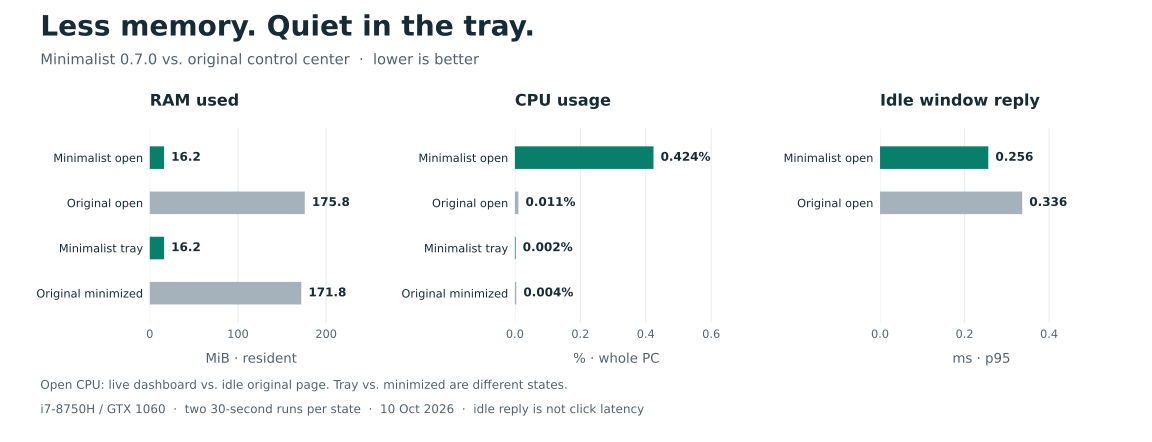
About 91% lower visible RAM use in the measured v0.7.0 comparison. The live dashboard uses more CPU than the original's idle page. Results and method.
Compatibility
Windows 11 x64. Hardware controls tested on Monster Tulpar T5 V17.1 / BIOS N.1.06. The platform is also used by XMG NEO 15 M18, but other firmware variants remain read-only pending validation. Custom fan curves and OEM minimum-speed mode are unavailable. Keep the original installed for recovery; uninstalling it has not been verified.
v0.7.2 packages the shorter documentation and charts; app behavior matches v0.7.1. Release checks: 104 Rust tests, strict Clippy, 15 startup scenarios and both executable import audits.